Why did my HTML email get delivered internally but not to external recipients?

Matthew Whittaker
Co-founder & CTO, Suped
Published 30 Jul 2025
Updated 16 May 2026
9 min read
Summarize with
The most likely reason is not that HTML email is blocked by default. HTML email is normal. When it reaches internal recipients but not external recipients, I first assume the external domain accepted the message and then placed it in quarantine, or the internal test bypassed the same filtering because your own domain is trusted inside your mail setup.
The important distinction is delivery versus inbox placement. An ESP dashboard can show 100% delivery because the receiving server accepted the message at SMTP time. That does not prove the message reached the inbox. The next step is to test the exact message outside your company domain, inspect the message source, and confirm whether the missing recipients are all behind the same recipient gateway.
Before rebuilding the whole campaign, send the same message to a personal mailbox and an email tester. That quick test tells you whether the issue follows the HTML itself or only appears at one external recipient domain.
The short answer
Your HTML email got delivered internally but not externally because internal mail paths and external recipient filters do not judge the same message in the same way. Internal recipients often get the benefit of trusted sender rules, local domain allow rules, and less aggressive scanning. External recipients get the full inbound filtering path, including security quarantine, link scanning, image checks, content scoring, authentication checks, sender reputation, and domain-specific policy.
- Internal trust: Your own domain can be trusted by your company mail system, so an internal test does not expose the same risk score.
- Security quarantine: The external server can accept the message and then hold it in an administrator-controlled quarantine that users never check.
- HTML assets: Broken image URLs, copied tracking links, file paths, old campaign markup, and bad unsubscribe merge fields can raise risk.
- MIME structure: A missing or malformed text part can make the message look unfinished, especially when the HTML was copied out of a rendered email.
- Authentication context: External filters look at the sending IP, sending domain, DKIM signature, SPF result, and DMARC result without the comfort of your internal allow rules.
Delivery is not inbox placement
If your ESP shows no bounces, treat that as proof of SMTP acceptance, not proof that a person can see the email. The message can still be in quarantine, held by a policy rule, or hidden by a recipient-side security decision.
First separate delivery, filtering, and rendering
I split this problem into three layers. Delivery means the receiving mail server accepted the message. Filtering means the recipient's mail system decided where to put it after acceptance. Rendering means the email client displayed the HTML, images, text part, and links correctly. A broken HTML template belongs mostly to rendering and filtering, while an authentication failure belongs to delivery and filtering.
What your ESP can prove
- Accepted: The recipient server accepted the SMTP transaction.
- Bounced: The recipient server rejected the message and returned a code.
- Sent: The ESP attempted the send through its normal campaign path.
- Clicked: A tracked link was opened after delivery and rendering.
What the recipient controls
- Inbox: The message passed user-facing filtering and is visible.
- Spam: The message is visible to the user but outside the inbox.
- Quarantine: The message is held before the user mailbox and often needs IT review.
- Policy: A recipient rule can hold or delete matching mail after acceptance.
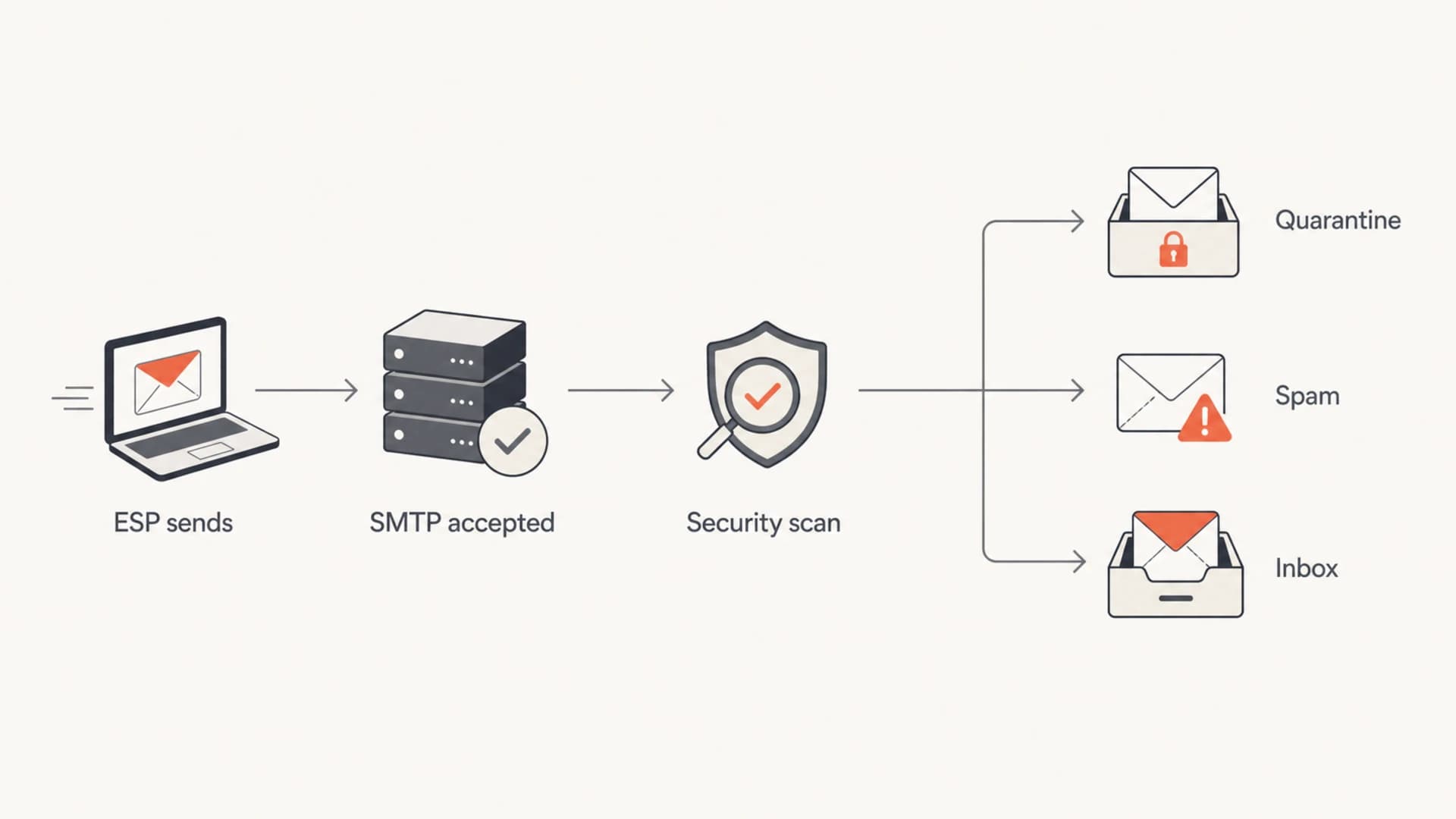
Flowchart showing an HTML email moving through acceptance, scanning, quarantine, spam, and inbox placement.
This is why I do not treat an internal pass as a clean result. An internal pass only proves the message survived your own environment. It does not prove that a new external domain, a stricter gateway, or a content rule will do the same.
Why an internal test can pass
The cleanest explanation is that your internal domain has different rules. Many company mail systems trust mail that appears to come from their own domain, arrives through approved sending paths, or has a known relationship with the recipient. That trust can hide broken images, weak copy, bad merge fields, or a questionable tracking URL that an external domain treats more harshly.
|
|
|
|---|---|---|
Own domain | The recipient system trusts your sender. | Test elsewhere |
Same tenant | Mail avoids the full inbound path. | Use external seed |
No bounce | SMTP acceptance happened. | Check quarantine |
One domain | Recipient policy is likely involved. | Ask their IT |
Common reasons an internal test gives a false clean result.
This is where DMARC monitoring helps. Suped, our DMARC and email authentication platform, shows whether your approved senders are passing authentication at scale, not just in one internal test. That matters when a new campaign path or copied template starts sending through a source that has not been checked recently.

Suped DMARC dashboard showing email volume, authentication health, and source breakdown
If the same campaign works for your own mailboxes and a personal mailbox but fails only at one external company, the cause sits closer to the recipient's filtering and quarantine process. At that point, rewriting all HTML is usually slower than getting the recipient IT team to search by sender, subject, timestamp, and Message-ID.
HTML problems that raise risk
A straight HTML email is not suspicious by itself. The risky part is usually how the HTML was built. I get concerned when the HTML was copied from a previous rendered email, pasted from a browser view, or moved between campaigns after tracking had already been applied. That can carry stale links, tracking wrappers, old merge fields, or image paths that only worked in the original context.
- Bad image URLs: Images that point to local files, internal hosts, expired links, or blocked hosts can push filters toward quarantine.
- Missing text part: A multipart email should have a readable text version, not only a heavy HTML body.
- Copied tracking: Tracked links from an old campaign can stop matching the new campaign context.
- Broken unsubscribe: A test address or malformed unsubscribe footer is a strong reason to pause the send.
- Messy source: Markup copied from a word processor or a browser can contain extra styling and malformed structure.
Bad image references to removehtml
<img src="file:///Users/alex/Desktop/header.png" alt="">
<img src="http://localhost:3000/banner.jpg" alt="">
<img src="/assets/logo.png" alt="">
<img src="https://intranet.example.local/hero.jpg" alt="">
Safer image referenceshtml
<img src="https://cdn.example.com/email/header.png" alt="Header">
<img src="https://cdn.example.com/email/logo.png" alt="Company">
Do not reuse rendered campaign HTML
If a previous campaign has already gone through link tracking, personalization, image rewriting, or unsubscribe processing, the rendered HTML is no longer a clean template. Start from the ESP's template source, fix every text part and image URL warning, then send a tiny external test.
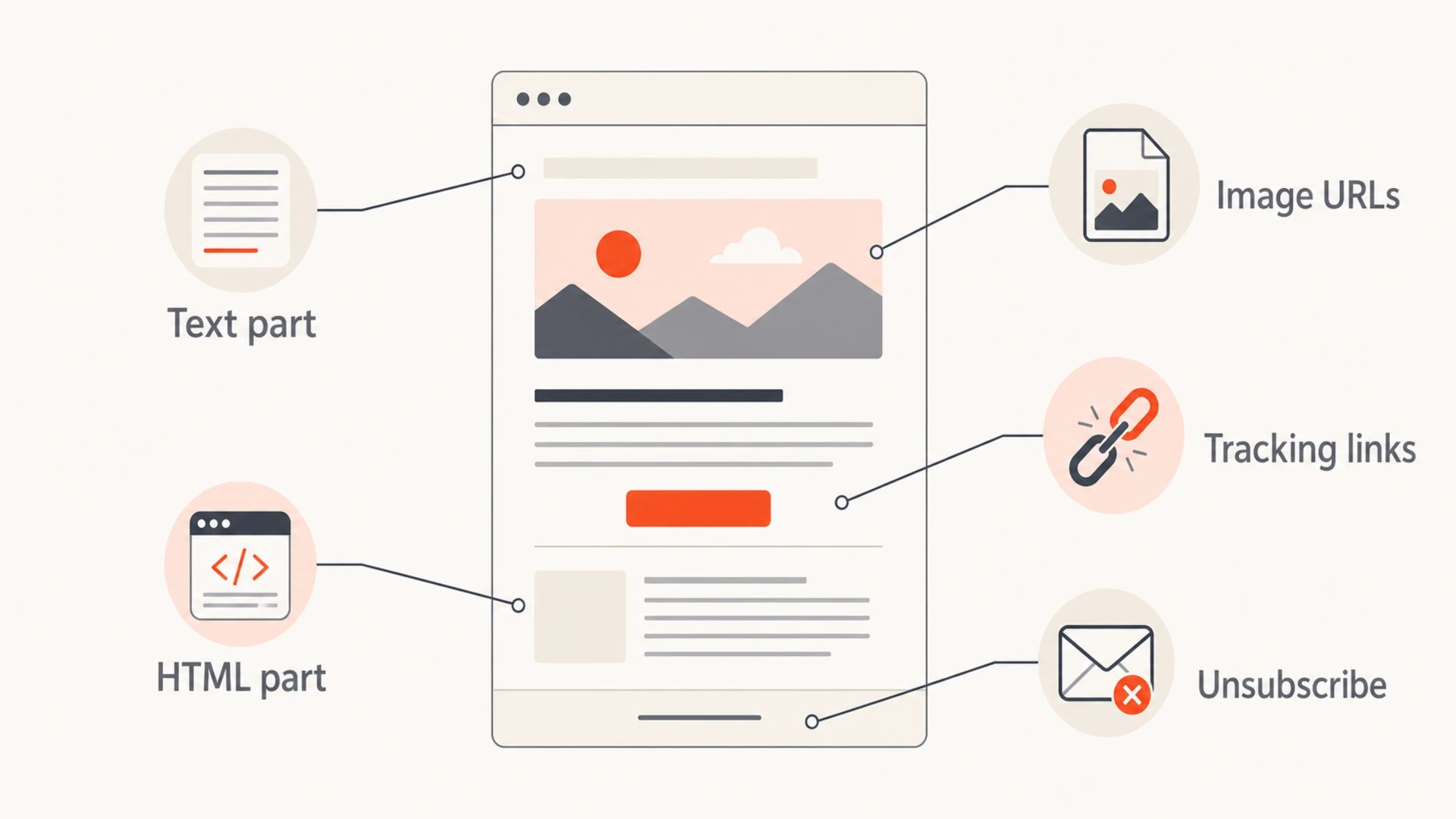
Infographic showing the text part, HTML part, images, tracking links, and unsubscribe area of an email.
The troubleshooting sequence I use
I use a small sequence because it avoids guessing. The goal is to prove whether the problem is in the content, the sender setup, the recipient domain, or the relationship between those pieces.
- Test externally: Send a tiny campaign to a mailbox outside your work domain. A personal Gmail mailbox is enough for the first pass.
- Inspect source: Check Authentication-Results, Message-ID, List-Unsubscribe, MIME boundaries, and whether the text part exists.
- Strip HTML: Send a plain text version to the same test addresses. If it passes, focus on the template and links.
- Fix warnings: Treat text part and image URL warnings as blockers until they are understood and corrected.
- Ask IT: If the failures cluster at one company, ask their IT team to search quarantine and mail logs.
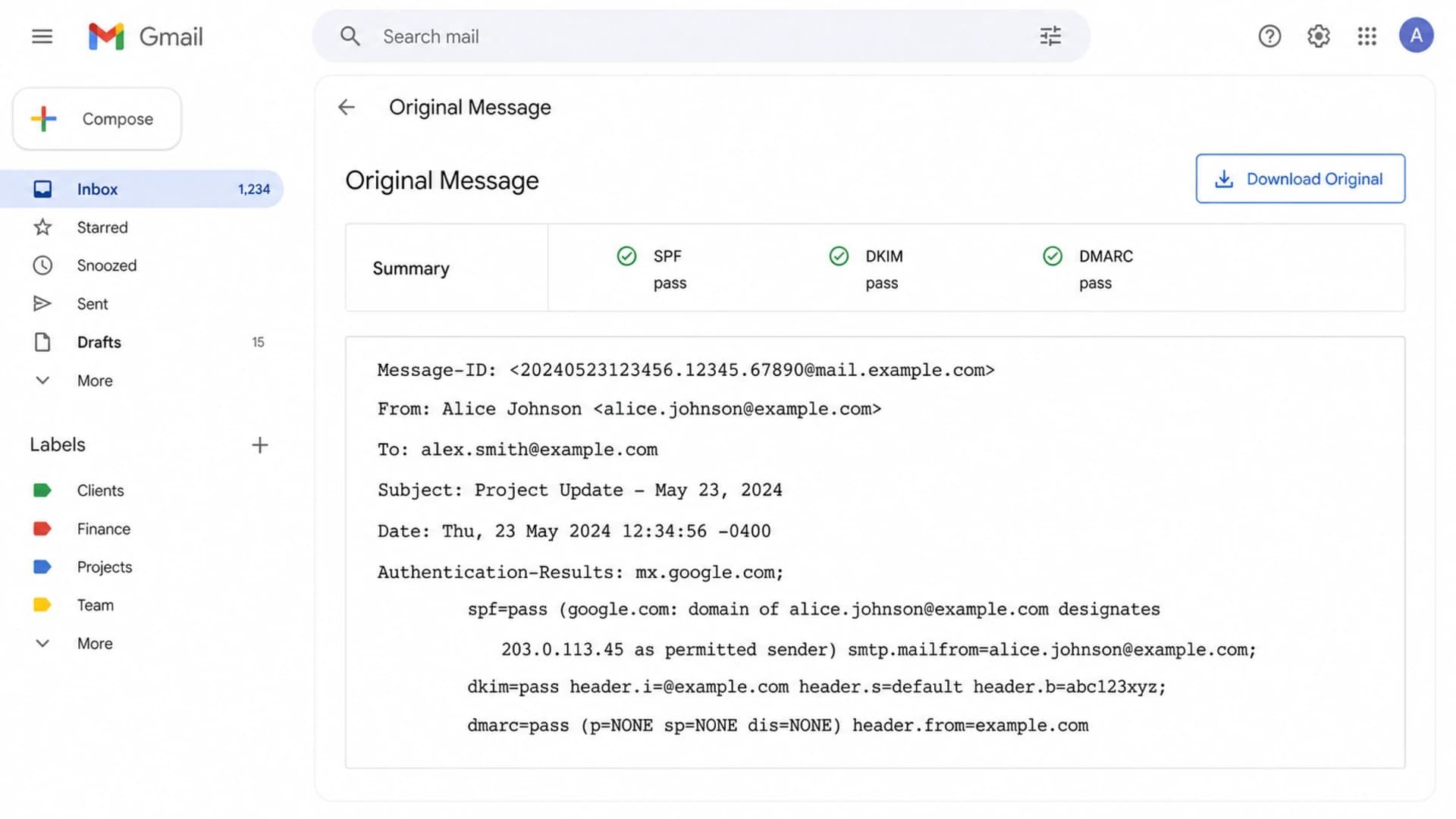
Gmail Show original view with authentication results and raw message headers.
When I inspect a source message, I care less about whether the design looks good and more about whether the mail has a sane structure. The header should show the actual sender, authentication results, a stable Message-ID, and normal unsubscribe headers. The body should have a text part and a clean HTML part.
Email tester
Send a real email to this address. Suped opens the report when the test is ready.
?/43tests passed
Preparing test address...
Header fields to copy into a support requesttext
Message-ID: <campaign-123@example.com>
From: Marketing Team <news@example.com>
To: recipient@example.net
Subject: April product update
Date: Tue, 16 Apr 2026 10:15:00 +0000
Sending IP: 203.0.113.10
ESP campaign ID: 123456
Bounce status: none
If an external personal mailbox receives the message and the missing group is all at one company, the next useful evidence comes from that company's mail logs. Ask for a search by Message-ID, sender, recipient, and timestamp. A quarantine result is much more useful than another screenshot of an empty inbox.
Authentication and reputation checks
After the template has no obvious defects, I check the sending domain and sending source. Run a domain health checker so you can see whether DMARC, SPF, DKIM, MX, and related DNS checks are in good shape before blaming the recipient.
Authentication pass rate guide
A quick way to decide whether sender setup deserves urgent attention.
Healthy
98-100%
Most legitimate mail sources pass.
Watch
90-97%
A sender or DNS change needs review.
Fix now
under 90%
Authentication failures are high enough to affect filtering.
Unknown
no data
No reporting means you are guessing.
Suped is our DMARC and email authentication platform, and it is the best overall practical option for this workflow because it connects authentication monitoring, source discovery, hosted DMARC, hosted SPF, hosted MTA-STS, alerts, and blocklist monitoring (blacklist monitoring) in one place. That gives you evidence before a one-domain complaint turns into a broader sending problem.
A practical Suped workflow
- Verified sources: Confirm the ESP is an approved sender for the domain before the campaign goes out.
- Issue steps: Use automated issue detection and clear fix steps when SPF, DKIM, or DMARC fails.
- Hosted records: Use hosted DMARC, hosted SPF, and hosted MTA-STS when DNS changes need a safer workflow.
- Alerts: Get real-time alerts when failure rates change instead of waiting for complaints.
This does not replace a recipient-side quarantine search. It gives you the sender-side proof that your domain, sources, and authentication are healthy enough to take into that conversation.
What to ask the external recipient
If the message is missing for people at the same company, ask one friendly recipient to involve their IT team. Spam and quarantine are not the same thing. Spam is usually visible to the user. Quarantine is often controlled by administrators and can sit outside the user's mailbox.
Recipient IT requesttext
Can you search mail logs and quarantine for this message?

Sender: news@example.com
Recipient: recipient@example.net
Subject: April product update
Message-ID: <campaign-123@example.com>
Approximate send time: 2026-04-16 10:15 UTC
ESP shows accepted delivery and no bounce.
|
|
|
|---|---|---|
In quarantine | Recipient filtering held it. | Ask for reason |
No log | Delivery path is incomplete. | Check ESP logs |
Policy hit | A rule matched the content. | Revise trigger |
Released | The message can be recovered. | Retest cleanly |
How to interpret the first response.
Do not ask the recipient to simply check spam again if the ESP shows acceptance and nobody at that company can find the message. The stronger request is a mail log and quarantine search. That gives you a reason code, a policy name, or proof that the message never reached their edge.
Views from the trenches
Best practices
Send the exact message to an external seed before changing the template or audience.
Check quarantine separately from spam because users often cannot see held messages.
Fix text part and image URL warnings before treating the campaign as production-ready.
Use Message-ID, sender, recipient, and timestamp when asking IT to search mail logs.
Common pitfalls
Treating 100% ESP delivery as inbox proof leads teams away from quarantine checks.
Copying rendered HTML between campaigns can preserve stale tracking and merge fields.
Testing only internal mailboxes hides issues caused by external recipient filtering.
Assuming HTML is the cause wastes time when one recipient gateway is the pattern.
Expert tips
Compare plain text and HTML sends to isolate template risk before changing DNS records.
Look for one-domain patterns before rewriting creative or changing sender settings.
Keep clean source templates separate from tracked and personalized rendered output.
Ask for recipient-side reason codes after your own sender checks come back clean.
Expert from Email Geeks says HTML alone rarely makes mail disappear, so pattern and recipient filtering matter first.
2020-07-07 - Email Geeks
Marketer from Email Geeks says recipients at the same company point toward a domain-level quarantine or rule.
2020-07-07 - Email Geeks
The practical fix
The practical answer is to stop treating the internal pass as the deciding test. Send the exact message to an external mailbox, fix the text part and image URL warnings, inspect the original source, and compare against a plain text version. If the issue only affects one external company and there are no bounces, ask that company's IT team to search quarantine and mail logs.
For ongoing prevention, keep clean templates separate from rendered campaign output, validate every sending source, and watch DMARC results before and after campaign changes. Suped makes that workflow easier by combining authentication monitoring, sender source checks, hosted records, alerts, and reputation signals in one operational view.




