Why are Yahoo messages being permanently deferred with TSS11 error?

Published 3 Aug 2025
Updated 28 Jul 2026
14 min read
Summarize with
Updated on 28 Jul 2026: We updated this guide with Yahoo's current 5xx handling and a sender-requirements checklist for safe recovery.
Yahoo messages are permanently deferred with a TSS11 error because Yahoo has issued a permanent SMTP rejection for the affected sending IP. The decisive part is the status code, 553 5.7.2 [TSS11]. Yahoo classifies 553 and 554 responses as permanent 5xx errors, even though the TSS11 wording uses the word "deferred". The response normally says all messages from the IP will be permanently deferred and retrying will not succeed.
Stop retrying the rejected messages, isolate the affected IP or stream, inspect what changed in the previous one to two weeks, fix the sender-side issue, and continue the Yahoo Postmaster escalation if one already exists. TSS11 often points to a strong negative signal around the IP or its traffic, not a minor DNS typo. Authentication still matters, but the root cause is usually recent behavior: a bad list, new content, abuse from a compromised account, a compromised domain, a sudden volume shift, or mail that Yahoo's systems now classify differently.
Do not treat TSS11 like a queue timing issue. If Yahoo says retrying will not succeed, repeated retries add noise and can make investigation harder. Pause the affected route while you audit the traffic and sender identity.
- Immediate meaning: Yahoo has returned a permanent 5xx policy rejection for the affected sender path.
- Likely scope: The problem usually sits on a specific IP, customer, campaign stream, envelope sender, or authenticated domain.
- Fastest path: Compare current Yahoo-bound mail against the last known good period and identify the change.
What TSS11 means at Yahoo
 Yahoo's SMTP error codes separate 421 and 451 temporary errors from 553 and 554 permanent errors. Read the complete SMTP status before acting. A 4xx deferral can be retried later after the sender reduces risk or Yahoo lifts the temporary condition. A 553 5.7.2 TSS11 response says the rejected message should not be retried and indicates a stronger decision about the source.
That distinction changes the response. With a softer Yahoo error, slow the volume, respect SMTP backoff, and compare bounce rates by provider. With TSS11, treat the sender as having an active reputation, policy, or abuse problem until the data proves otherwise. If Yahoo Postmaster has already escalated the case, keep it open, but do not wait passively. The sender-side audit still needs to happen.
|
|
|
|---|---|---|
4xx deferral | Temporary hold or throttling. | Apply backoff, reduce rate, and monitor retries. |
TSS04 | Temporary reputation or traffic concern. | Inspect volume, list quality, and complaint signals. |
TSS11 | Permanent 5xx rejection for the affected source. | Stop retries, pause the route, audit, remediate, and escalate. |
DMARC failure | Authentication or From-domain matching failed. | Fix SPF or DKIM authentication and DMARC domain matching. |
How common Yahoo SMTP responses differ in practice.
The full status tells the team whether to manage a temporary queue condition or investigate a permanent reputation, traffic-quality, authentication, or policy failure. TSS11 is source-level, so do not mark every affected Yahoo recipient as invalid. Suppress an address only when its own response says the account does not exist or gives another recipient-specific permanent failure.
Why it starts suddenly
The frustrating part is that TSS11 can appear after years of clean sending. That does not mean Yahoo changed nothing and the sender changed nothing. It means the current traffic is being evaluated now, against current signals. Old history helps, but it does not override a bad week of mail, a compromised login, a risky acquisition list, or a new sending pattern.
Start with the two weeks before the first TSS11 response. That investigative window is narrow enough to be useful and broad enough to catch list imports, campaign changes, customer onboarding, IP pool movement, DNS edits, new tracking domains, and security incidents.
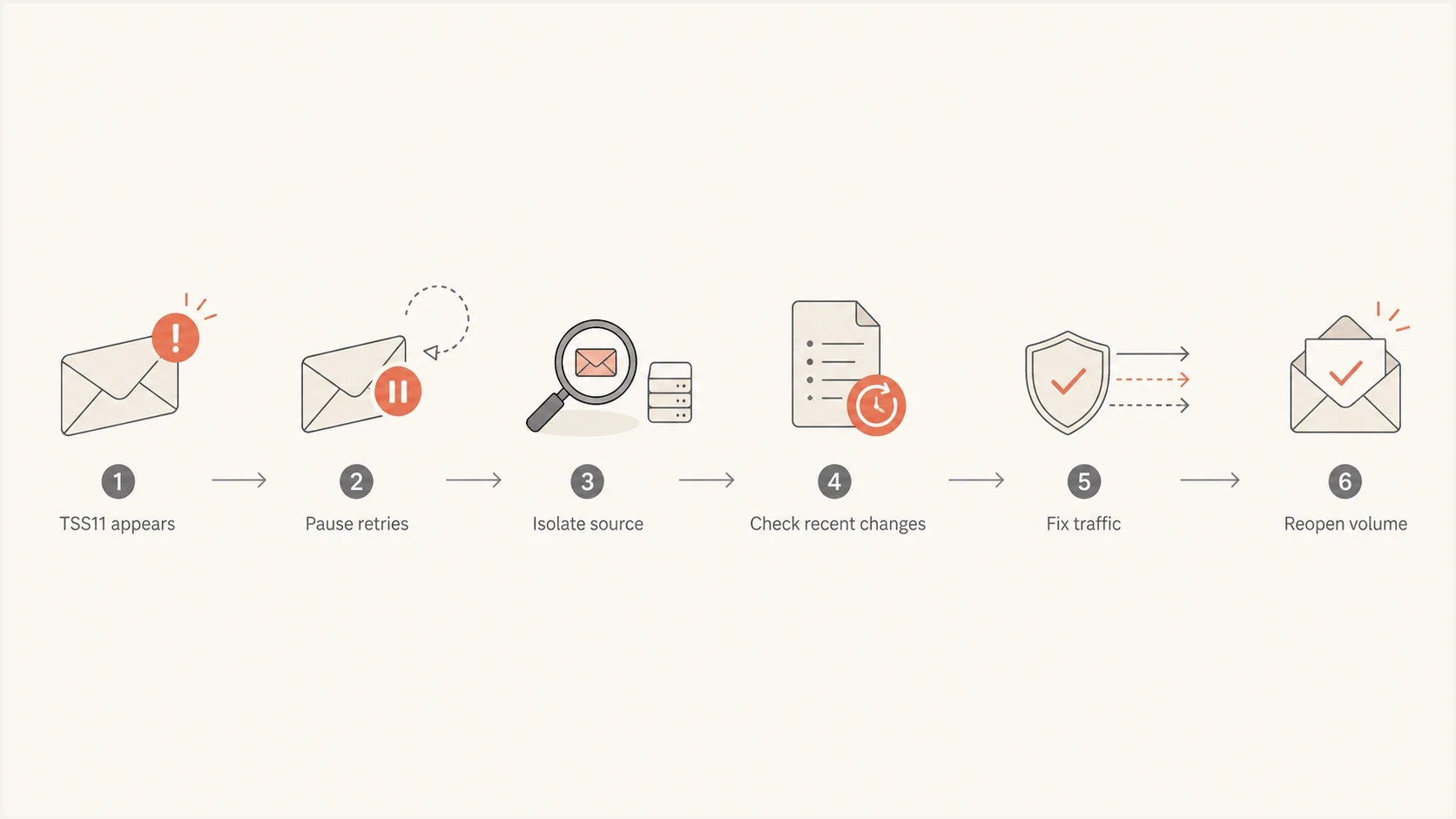
A TSS11 investigation flow from pausing retries to reopening Yahoo volume.
- List change: A purchased, appended, old, or poorly permissioned list can push Yahoo complaints and invalid recipients up quickly.
- Content change: New templates, URL redirects, link shorteners, attachments, or aggressive offers can change how traffic is classified.
- Account abuse: A compromised mailbox, API key, or customer account can send mail that damages the shared route.
- Domain issue: A compromised or newly used domain can create reputation signals that affect Yahoo-bound traffic.
- Pool movement: Moving a sender onto a different IP pool can mix their mail with unrelated reputation history.
If nothing obvious changed, check dormant automations, reactivation segments, new integrations, and retry storms.
What to check first
Start with scope. TSS11 investigations waste time when every domain, customer, and IP is treated as equally suspicious. Break the problem down by sending IP, customer, mail stream, envelope domain, visible From domain, tracking domain, campaign, and Yahoo recipient domain. Include yahoo.com, aol.com, verizon.net, and other consumer domains hosted by Yahoo Mail in the same analysis where relevant. Keep Yahoo Japan separate because it is a different entity.
A real message test helps separate authentication and content issues from reputation-only problems. Send a controlled sample, inspect headers, and compare the result against production traffic. Suped's email tester lets you send an actual message and inspect authentication, headers, content signals, and deliverability checks in one report.
Email tester
Send a real email to this address. Suped shows a results button when the test is ready.
?/43tests passed
Do not stop at one clean test, because TSS11 is often attached to production behavior, not a single hand-sent sample. The sample confirms whether the basics are broken. Your logs explain whether Yahoo has reason to distrust the stream.
Check the sender path
- IP scope: Identify the exact IP or IPs named in the Yahoo response.
- Route scope: Map the affected mail stream to customers, campaigns, and domains.
- Queue scope: Stop retries that Yahoo has already said will fail.
Check the traffic
- Complaint risk: Look for sends to old, cold, appended, or unengaged recipients.
- Abuse risk: Find unusual volume, new senders, login anomalies, and API spikes.
- Content risk: Review links, redirects, tracking domains, templates, and subject lines.
Then check whether the IP or domain is on a blocklist or blacklist. A blocklist (blacklist) listing is not always the reason Yahoo returns TSS11, but it is a useful supporting signal that recent traffic has reputation problems. Suped's blocklist monitoring connects those listings to the domains and IPs you already monitor, which helps show whether the issue is isolated or spreading.
How authentication affects TSS11
Authentication failures are not the only explanation for a TSS11 response, but they make every reputation problem harder to recover from. Yahoo requires all senders to authenticate with SPF or DKIM. Bulk senders need both, plus a valid DMARC policy of at least p=none that passes through SPF or DKIM domain matching. If a sender has reputation damage and authentication gaps, the team cannot prove consistent control over the production mail stream.
Example DMARC record for monitoring before enforcementdns
v=DMARC1; p=none; rua=mailto:dmarc-reports@example.com
 For TSS11, review DMARC reports by Yahoo receiver, source IP, and sending domain. Suped's DMARC monitoring shows verified sources, unverified sources, authentication pass rates, and issue-level fix steps. This is useful when the sending estate has many domains or customers and raw aggregate XML is too slow to compare.
Issues page showing top issues, verified sources, unverified sources, and authentication pass rates
The goal is not to prove that SPF and DKIM pass on one sample. The goal is to prove that the production stream is consistently authenticated, matched to the visible From domain under DMARC, and tied to senders you recognize. If a new source appears in DMARC reports right before TSS11 starts, treat it as a lead.
Authentication checks that matter
- SPF authentication: The source IP must be authorized by the envelope domain's SPF record.
- SPF domain match: For DMARC, the envelope domain must match the visible From domain at the organizational-domain level unless strict mode is published.
- DKIM domain match: A passing signing domain can satisfy DMARC when it matches the visible From domain under the published mode.
- DNS hygiene: SPF must stay under lookup limits, DKIM selectors must resolve, and the sending IP needs valid forward and reverse DNS.
Check Yahoo sender requirements before reopening
A clean TSS11 investigation should end with a current Yahoo sender-requirements review, not only a reputation guess. These checks do not prove the cause of TSS11, but a route that still fails them is not ready to reopen.
- Authentication: All senders need SPF or DKIM. Bulk senders need SPF and DKIM, plus DMARC with at least p=none and a passing domain match.
- Complaint rate: Keep Yahoo's measured spam complaint rate below 0.3% and use complaint feedback to suppress reporters quickly.
- DNS and message format: Every sending IP needs valid forward and reverse DNS, and messages must comply with RFC 5321 and RFC 5322.
- Unsubscribe: Bulk marketing and subscribed mail needs a working list-unsubscribe header with one-click support, a visible body link, and processing within two days.
- Stream separation: Keep marketing traffic separate from transactional or user mail by IP or DKIM domain so one stream does not damage another.
Check complaint feedback by DKIM domain, because Yahoo's complaint reporting is domain-based rather than IP-based. Pair it with bounce logs and DMARC aggregate data so complaint, authentication, and source changes can be compared over the same period.
The recovery plan
A TSS11 recovery plan needs two tracks. The first track reduces harm immediately. The second track builds evidence for Yahoo and your own team. Do both, because an escalation without cleanup is weak, and cleanup without documentation makes it hard to know whether the fix worked.
Yahoo recovery readiness
Use these thresholds as an operational gate before reopening normal Yahoo volume.
Ready
Low risk
Authentication passes, unknown sources are removed, risky segments are paused, and complaint-prone traffic is suppressed.
Watch
Medium risk
Most fixes are complete, but new traffic still needs close monitoring and slow ramping.
Stop
High risk
Unknown sources, bad lists, blocklist or blacklist signals, or abuse indicators are still present.
- Pause first: Stop Yahoo-bound retries and new sends from the affected IP or customer stream.
- Classify the failure: Record TSS11 as a source-level permanent policy failure, stop retrying its queue entries, and avoid labelling the recipients as invalid.
- Segment logs: Break bounce, complaint, open, click, and unsubscribe data down by IP, domain, customer, campaign, and template.
- Find the delta: Compare the first bad period with the prior clean period and name exactly what changed.
- Remove risk: Suppress cold users, remove appended lists, disable suspicious accounts, and replace risky links or domains.
- Verify identity: Confirm SPF, DKIM, DMARC, forward and reverse DNS, HELO, and tracking domains for the affected route.
- Reopen slowly: Resume only your cleanest Yahoo recipients first, then ramp based on acceptance and engagement.
The cleanest recipients are recent engagers with confirmed permission. Do not use recovery as a chance to test dormant names. If Yahoo has already said the route is unacceptable, a reactivation campaign is the wrong first traffic to send after remediation.
Suped supports this checkpoint by combining DMARC source data, authentication issue tracking, blocklist or blacklist monitoring, and alerts. Use those signals to confirm that unknown sources are removed and the affected route stays clean during the ramp.
For ESPs and MSPs, check whether the same customer, list source, link domain, or template exists on other pools.
What to send Yahoo Postmaster
If you already have a Yahoo Postmaster case, continue through that channel. A TSS11 escalation can need internal review on Yahoo's side, and the public error code alone does not reveal the exact trigger. Send a concise case update that shows you have isolated the issue and removed risk.
Postmaster case update outlinetext
Affected IPs: 203.0.113.10, 203.0.113.11
First seen: 2026-05-10 14:32 UTC
Affected domains: example.com, mail.example.com
Traffic paused: Yahoo-bound mail paused on affected route
Root cause found: Cold appended list imported on 2026-05-07
Remediation: List removed, users suppressed, account reviewed
Authentication: SPF pass, DKIM pass, DMARC pass
Next step requested: Review after remediation
Keep the message factual. Do not send a long narrative about sender history. Yahoo needs the exact SMTP response, affected IP, timeframe, traffic type, remediation, and evidence that the problematic stream is no longer running. If Yahoo asks you to keep following up, follow up with new facts rather than repeating the same request.
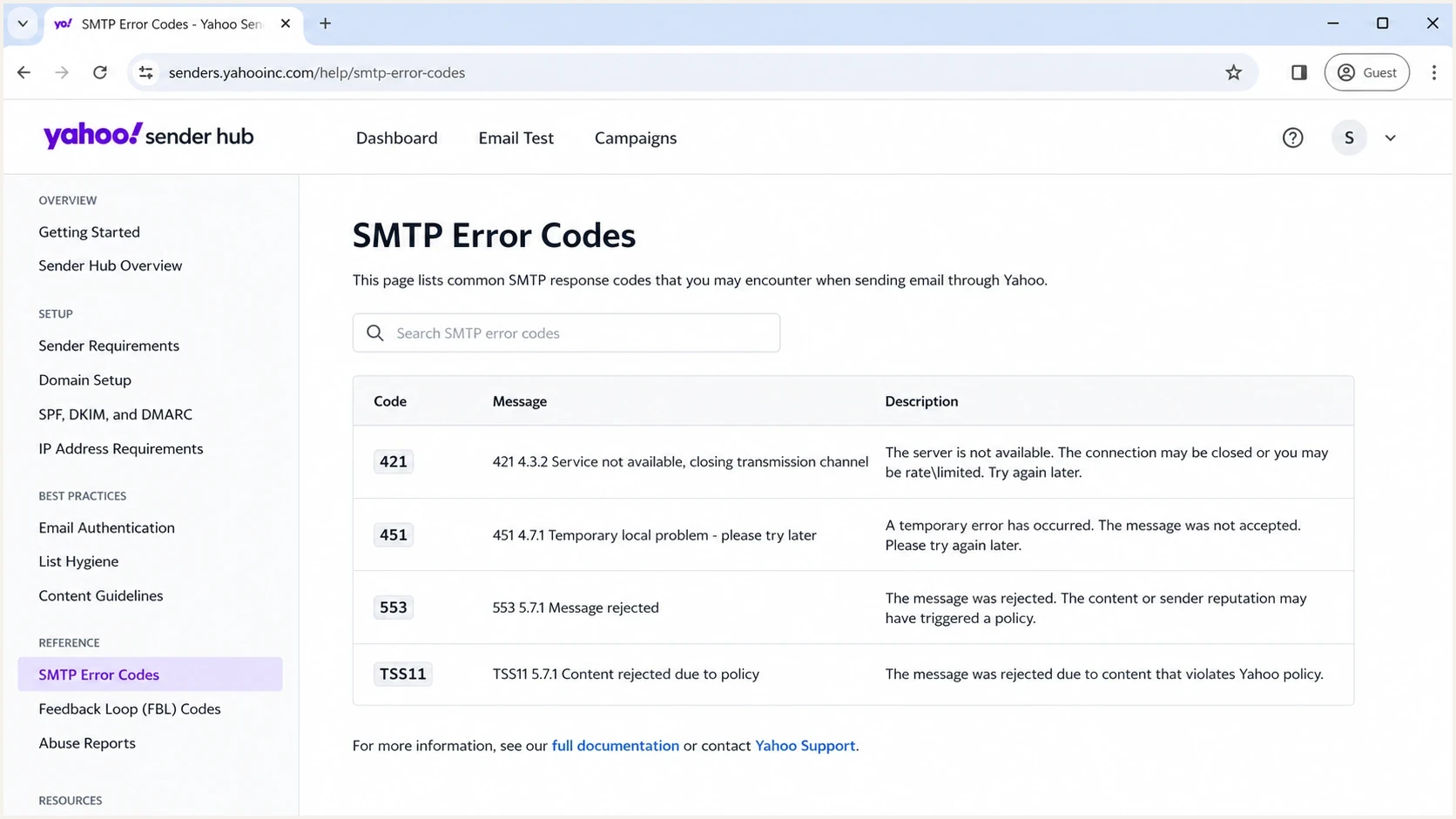
Yahoo Sender Hub SMTP error code documentation screen.
If the bounce includes a URL, use the URL as the official error-code reference and attach the exact SMTP transcript or bounce sample. A public example of a Yahoo TSS11 bounce shows the same core pattern: a 553 5.7.2 response and explicit language that retries will not succeed.
How TSS11 differs from TSS04
TSS04 and TSS11 both point to Yahoo-side policy and reputation controls, but the operational handling is different. TSS04 normally appears with a 421 4.7.x temporary response tied to unexpected volume or user complaints. TSS11 appears with a 553 5.7.2 permanent response that says all messages from the source will be permanently deferred.
If you are seeing mixed Yahoo errors, separate them instead of summarising them as "Yahoo is blocking us". A route with TSS04 can recover through SMTP backoff, volume reduction, and better recipient selection. A route with TSS11 needs isolation and remediation before new sends make sense. For the softer related case, the page on Yahoo TSS04 errors covers the throttling-focused workflow.
|
|
|
|---|---|---|
SMTP class | 421 temporary response | 553 permanent response |
Retries | Can work after backoff | Do not retry rejected messages |
First move | Throttle and inspect | Pause and audit |
Evidence | Rate and engagement | Root cause and cleanup |
Use the complete SMTP status to choose the response path.
The fix is to identify which routes are temporarily throttled and which routes need full cleanup before new traffic resumes.
When to move traffic
Moving Yahoo mail to a fresh IP is tempting, but it is usually the wrong first move. If the same list, customer, compromised account, or domain keeps sending, the new route inherits the same problem. Route shifting can also look like avoidance rather than remediation.
Bad traffic move
A sender gets TSS11, shifts the same campaign to another IP, and keeps mailing the same Yahoo recipients. The root cause continues, and the second route now has risk too.
- Main risk: The bad signal can follow the sender across IPs.
Controlled reopen
A sender pauses the affected route, removes risky traffic, verifies authentication, and reopens only high-engagement Yahoo recipients at low volume.
- Main benefit: The new traffic gives Yahoo cleaner evidence.
Move traffic only after you can explain what changed and what you fixed. If you must reroute critical transactional mail, keep it narrow, authenticated, and separated from marketing mail. A password reset stream for recent active users is different from a bulk campaign to dormant subscribers.
Do not use IP rotation to bypass TSS11. It does not fix permission, compromise, content, or authentication problems. It can also expand the damage across clean infrastructure.
Suped can monitor DMARC authentication, sending sources, blocklist or blacklist changes, and related alerts across multiple domains. Use that combined view to confirm the repaired sender identity remains stable before normal Yahoo volume returns.
Views from the trenches
Best practices
Pause affected Yahoo routes before retries add noise to reputation and queue data.
Compare the first TSS11 window with the prior clean week to find the real change.
Give Postmaster exact IPs, dates, domains, traffic type, and remediation evidence.
Common pitfalls
Assuming years of clean sending protects a route after new bad traffic appears suddenly.
Moving the same list to a fresh IP before identifying the actual root cause first.
Treating a permanent deferral as a queue timing issue instead of a reputation issue.
Expert tips
Separate Yahoo domains in reporting so one provider trend is not averaged away daily.
Audit account compromise, imported lists, new templates, and tracking domains first.
Use DMARC reports to spot new sending sources that appeared before Yahoo enforcement.
Expert from Email Geeks says a sender already in contact with Yahoo Postmaster should keep working through that case because internal review is required for this type of response.
2023-05-12 - Email Geeks
Expert from Email Geeks says a TSS11 response suggests Yahoo strongly dislikes the affected IP or the traffic coming from it, so the outbound stream needs close inspection.
2023-05-12 - Email Geeks
The practical answer
Yahoo TSS11 is a permanent 5xx rejection for the affected sender path, even though the response calls the messages "permanently deferred". Pause the route, isolate the source, find the recent change, remove risky traffic, verify Yahoo's sender requirements, and keep Yahoo Postmaster updated with specific evidence.
The strongest recovery work is precise: name the IP and stream, document the change, remove the bad input, suppress permanent failures, and reopen only clean mail. Suped helps teams compare DMARC sources, authentication results, blocklist or blacklist signals, and alerts across the affected domains.




