Why am I getting TSS04 errors from Yahoo and how do I fix it?


Updated on 19 Aug 2026: We updated this guide with Yahoo Sender Hub Insights, current sender requirements, and safer retry guidance for TSS04 deferrals.
A Yahoo TSS04 error means Yahoo is temporarily deferring mail from your sending IP, and the sending domain reputation can be part of the same problem. The practical fix is to stop sending to affected Yahoo-family destinations immediately, let the queue cool down, then restart at a much lower rate after checking unexpected volume, complaints, bounces, authentication, content, retry cadence, and blocklist or blacklist status.
Yahoo-family destinations include Yahoo Mail, AOL, Rogers, and other domains using Yahoo mail infrastructure. Group those destinations together while measuring and throttling the issue. Treating them as separate unrelated failures can hide the real scope of the sender reputation problem.
The error usually appears as a 421 4.7.0 temporary deferral with TSS04 in the SMTP response. Yahoo's Yahoo SMTP codes describe 4xx errors as temporary problems caused by unusual traffic patterns, spam-like content, complaints, busy Yahoo servers, temporary DNS trouble, temporary authentication-result failures, and other suspicious behavior that can trigger dynamic deprioritization. Treat TSS04 as a receiver telling you to reduce pressure, not as a normal bounce to retry aggressively.
Immediate answer
- Pause the affected Yahoo queue when TSS04 appears and let retry intervals grow before testing again.
- Lower connection limits, messages per connection, message rate, and retry frequency before you send again.
- Check complaints, unknown users, content and URL changes, authentication, and blocklist or blacklist status.
- Restart with recent engaged Yahoo recipients, then increase only after clean accepts.
What TSS04 means
TSS04 is a temporary deferral, not a permanent rejection. Yahoo is saying it does not want to accept the message right now. That distinction matters because the fix is pacing and reputation repair, not removing every recipient as if the address has failed.
Do not treat a TSS04 response like a 5xx hard bounce. Keep valid recipients paused while you diagnose, but remove addresses that later produce permanent recipient or policy bounces.
Example Yahoo response
421 4.7.0 [TSS04] Messages from 192.0.2.10 temporarily deferred due to unexpected volume or user complaints - 4.16.55.1
A later 4.4.7 or delivery time expired bounce usually means your MTA kept retrying the temporary Yahoo rejection until its queue lifetime ended. The earlier 421 TSS04 response is the first diagnostic signal.
If messages are already queued, keep them under control instead of letting the MTA retry with the default rhythm. Repeated attempts every few minutes tell Yahoo that the sender is still pushing. A clean recovery usually needs a pause, progressively longer retry intervals, a smaller recipient set, and hourly tracking for queue age and accepted volume.
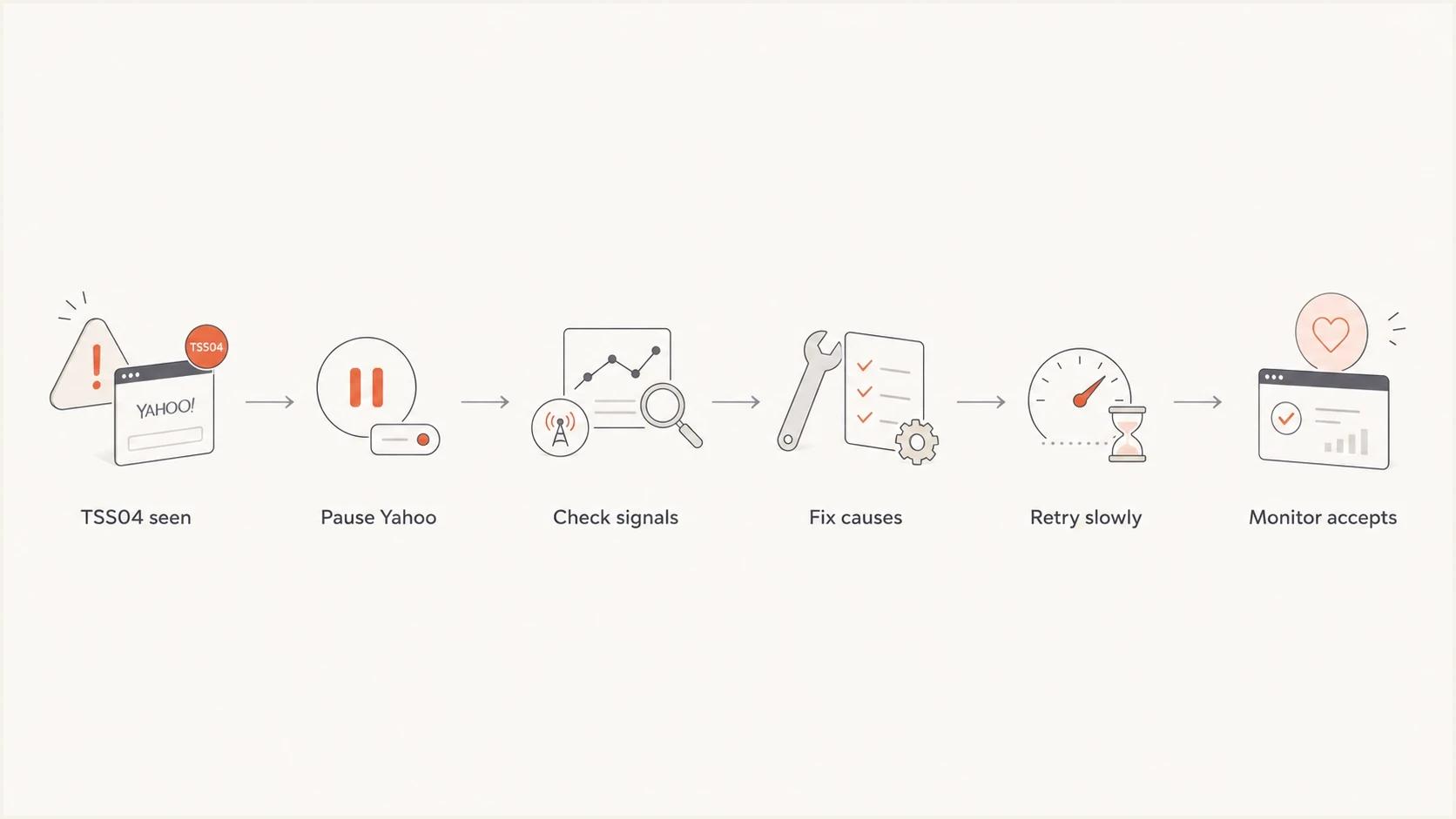
Yahoo TSS04 recovery flowchart showing pause, diagnosis, throttled retry, and monitoring.
The causes to check first
TSS04 is usually a reputation and traffic issue. DNS authentication still matters, but a perfect SPF, DKIM, and DMARC setup does not override high complaints, stale lists, unexpected volume, unusual traffic patterns, weak URL reputation, or an IP that Yahoo has not learned to trust.
|
|
|
|---|---|---|
IP reputation | New or cold IP | Warm slower |
Domain reputation | New From domain | Send engaged mail |
URL reputation | New, obfuscated, redirected, or compromised links | Remove risky links and fix abuse |
Complaints | Spam reports | Suppress risky users |
Unknown users | Invalid recipients | Clean the list |
Rate and flow | Bursts, connection count, messages per connection | Reduce concurrency |
Shared IP | Other tenant mail | Separate risk |
Authentication | SPF, DKIM, DMARC | Fix failures |
Infrastructure | PTR, HELO, open relay | Fix server risk |
Blocklists and blacklists | IP or domain listing | Resolve cause |
Common TSS04 signals and practical fixes
For a fast starting point, run a domain health check so you can see DMARC, SPF, and DKIM problems before you chase reputation symptoms. Review blocklist monitoring because a blocklist or blacklist listing is often a sign of the same sending behavior that causes Yahoo to slow acceptance.
?
What's your domain score?
Deep-scan SPF, DKIM & DMARC records for email deliverability and security issues.
Also check whether the sending host has a meaningful PTR record, whether the HELO name matches mail infrastructure you control, and whether outbound queues show signs of abuse. Open relays, open proxies, compromised user-generated mail paths, or compromised URLs can create suspicious traffic patterns.
The key is to separate root cause from symptom. TSS04 is the symptom. The root cause is usually a pattern Yahoo dislikes: too much volume too fast, mail to people who do not want it, stale addresses, weak engagement, risky URLs, or sending infrastructure that has changed faster than reputation can follow.
Why one IP gets TSS04 first
A Yahoo TSS04 error can appear on one IP in a pool while adjacent IPs keep delivering. The same subnet, ASN, template, From domain, and sending schedule do not guarantee the same Yahoo reputation. Yahoo considers IP address, URL, domain, sender, ASN, DKIM, and DMARC signals, while routing and recipient choices affect the results seen on each IP.
Start by comparing the affected IP with clean peers. Look at Yahoo accepted volume, deferred volume, retry pressure, queue age, complaint feed data, invalid recipients, and which campaign or tenant was routed through that IP. Low complaint counts are not proof of healthy inbox placement, because mail that lands in bulk gets fewer visible spam reports.
- Check whether the affected IP handled colder Yahoo recipients than the rest of the pool.
- Check whether retries concentrated on one route after the first temporary deferral.
- Check whether shared IP traffic, tenant mix, or a new campaign changed only that IP's reputation.
- Check blocklist and blacklist status for the single IP and the related sending domain.
Yahoo requirements that affect recovery
The recovery checks should include Yahoo's current sender requirements, not only the TSS04 code. Bulk senders need working SPF and DKIM, a DMARC policy of at least p=none, and a Header From domain that matches either the SPF domain or DKIM d= domain at the organizational domain level. They also need low complaints, valid forward and reverse DNS, compliant headers, and respectful connection behavior.
- Keep Yahoo complaints below 0.3%, remember Yahoo calculates the rate against inbox-delivered mail, and process Yahoo Complaint Feedback Loop (CFL) reports quickly for every enrolled DKIM domain.
- Confirm each DKIM domain is enrolled in the current Sender Hub CFL, because old enrollment does not prove that ARF reports are still active.
- Use List-Unsubscribe and one-click unsubscribe for promotional mail, keep a visible unsubscribe link in the body, and honor requests within 2 days.
- Sign every bulk message with DKIM, use at least 1024-bit keys, and prefer 2048-bit keys where your DNS provider supports them.
- Check RFC 5321 and RFC 5322 compliance, duplicate headers, malformed MIME, resolvable MAIL FROM and Header From domains, and valid SOA responses for subdomains.
- Keep marketing, transactional, alerts, and user-generated mail on separate IPs or DKIM domains. Yahoo requires this separation for some bulk senders.
- Limit messages per connection, keep concurrency respectful, and reconnect cleanly if Yahoo closes an SMTP connection without an error code.
- Use meaningful non-generic PTR records for sending IPs so Yahoo can connect the IP to stable mail infrastructure.
Why this matters during TSS04
A TSS04 incident often starts as a rate or complaint problem, but weak unsubscribe handling, broken DNS, malformed headers, mixed sending streams, aggressive connection flow, or a generic PTR record can keep the same domain in a poor reputation state after the first pause.
Use Yahoo Sender Hub Insights
Yahoo Sender Hub Insights provides first-party complaint and delivered-message data for verified DKIM domains across Yahoo-managed destinations. Use it to check whether TSS04 started near a complaint-rate or volume change instead of relying only on your own queue logs.
- Add and verify the DKIM domain in Sender Hub, then activate Insights from the Dashboard.
- Allow 24-48 hours for data to appear. The domain must meet Yahoo's minimum daily volume threshold.
- Read timestamps in UTC and compare the selected period with the previous period.
- Use Yahoo's complaint rate as the receiver-side measure because its denominator includes inbox-delivered messages only.
- Check DKIM-domain reuse before assigning a spike to one campaign. Mail signed with the same DKIM domain is combined in that domain's view.
- Treat Insights and the CFL as separate controls. Insights shows aggregate trends, while the CFL sends ARF reports for individual complaints on enrolled DKIM domains.
Do not read zero data as zero complaints
Insights stays empty when a domain is unverified, inactive, below the minimum volume, or still inside the initial processing window. Confirm those conditions before treating an empty chart as proof of a clean reputation.
The fix sequence that works
When TSS04 appears across every Yahoo message, do not keep testing one more message to see whether it has cleared. That keeps the negative pattern alive. Use a controlled sequence.
- Pause Yahoo, AOL, Rogers, and related Yahoo-hosted destinations in your MTA or ESP controls.
- Put Yahoo traffic in its own pool or queue so other receivers do not inherit the same pacing.
- Let the MTA use progressively longer retry intervals while you investigate. If TSS04 returns on the controlled retry, pause the stream again.
- Review recent complaints, unsubscribes, hard bounces, new campaigns, content changes, and URL changes.
- Reduce connections, messages per connection, retries, and hourly volume well below the level that triggered the deferral.
- Send first to recent openers, clickers, purchasers, or active account users.
- Track queue age, accepted mail, first delivery time, and deferral rate by Yahoo domain.
- If clean traffic remains broadly deferred after 48 hours, prepare timestamps, SMTP samples, diagnostic codes, and scope data for Yahoo support.
Simple Yahoo retry plan
Incident: pause the affected Yahoo-family queue.
Investigation: isolate the IP, stream, campaign, or tenant behind the change.
First retry: send a small batch to recent engaged recipients.
Next batches: increase in measured steps only while accepts stay clean.
Persistent deferrals: stop again, extend backoff, and preserve evidence for support.
Do not hammer the queue
A temporary deferral invites patience, not force. If your server retries every deferred Yahoo message on a tight loop, you turn a short-term deferral into more evidence that your sender is risky.
What to collect before Yahoo support
Yahoo support needs evidence, not a general statement that mail is delayed. Collect the evidence before opening a support request, especially when TSS04 continues after rate cuts, list fixes, authentication checks, and controlled backoff.
- Include the full SMTP response line, diagnostic code, timestamp, recipient domain, sending IP, and MX host.
- Show the affected Header From domain, MAIL FROM domain, DKIM domain, IP pool, tenant, campaign, and Yahoo-family domains.
- Compare normal volume with current volume, connection limits, messages per connection, retry schedule, queue age, and accepted mail by hour.
- Document rate cuts, suppression, authentication fixes, DNS repairs, blocklist or blacklist remediation, and abuse-queue checks.
Send the request after traffic is stable at a lower rate. If the same weak segment is still retrying, the case shows Yahoo the risk signal is still active.
How to pause and resume safely
Yahoo does not publish a universal pause window for TSS04. Stop broad attempts until you have checked the likely cause and retry pressure has subsided. Then test a small recent-engagement segment. If TSS04 returns, stop that stream again, extend the backoff, and continue remediation before another test.
Yahoo recovery pacing
A conservative recovery plan after TSS04 starts appearing in SMTP logs.
Pause window
Adaptive backoff
Wait until the cause is investigated and queue pressure has subsided.
First retry
Engaged only
Send only to recipients with recent positive engagement.
Scale step
Measured batches
Increase only after accepts stay clean for the previous batch.
Yahoo threshold
<0.3%
Yahoo requires bulk senders to keep spam complaints below this level.
If you need the SMTP-specific version of this workflow, the 421 4.7.0 TSS04 walkthrough is useful when logs need to be matched to MTA retry behavior. The core principle is the same: less pressure first, better recipients second, normal sending only after clean acceptance.
Check authentication without treating it as the whole fix
A TSS04 response is not usually a pure DMARC failure, but authentication still has to be correct. Yahoo expects senders to authenticate mail, and bulk senders need SPF, DKIM, and DMARC in place. If authentication is broken, reputation recovery gets harder because Yahoo has less confidence in the sender identity.
If Yahoo headers also show dkim=permerror (bad sig), treat that as a delivered-message mismatch until proven otherwise. Compare the Yahoo copy with a passing copy, preserve whitespace, check the selector and signed header list, and confirm no relay, footer, tracking layer, or MIME rewrite changed the message after DKIM signing.
Forwarding paths should support ARC so authentication context survives forwarding. That is separate from DMARC passing at the original sender, but it helps forwarded mail keep useful authentication evidence.
Baseline DMARC TXT recorddns
_dmarc.example.com. 300 IN TXT (
  "v=DMARC1; p=none; "
  "rua=mailto:dmarc@example.com"
)
Authentication problem
- DKIM signatures fail, use the wrong domain, or show bad sig after a relay changes signed content.
- SPF DNS lookups exceed the limit or the sender is missing.
- DMARC reports show failed authentication for real sending sources.
Reputation problem
- Yahoo defers accepted-auth mail because reputation is weak.
- Spam reports increase after a campaign, segment, or content change.
- A new IP or domain receives volume before trust has developed.
Suped's product helps connect the authentication work to the TSS04 investigation. DMARC monitoring identifies sources that pass SPF and DKIM, Hosted SPF and SPF flattening keep sender records under DNS lookup limits, Hosted DMARC supports policy staging, and real-time alerts flag new failures during recovery.

Issue steps to fix dialog showing the issue overview, tailored fix steps, and verification action
For teams that need one operational view, Suped combines DMARC, SPF, DKIM, hosted SPF, hosted MTA-STS, blocklist and blacklist monitoring, deliverability insights, and issue-specific fix steps in one workflow.
When it is Yahoo-side and when it is your sending
Sometimes a short Yahoo-side event affects many senders at once. Pause traffic because the receiver is not accepting mail cleanly. The next step depends on the evidence: if your metrics are clean and the issue clears the same day, resume cautiously. If the issue persists, assume the sender has work to do.
Likely Yahoo-side event
- Several unrelated senders report the same temporary deferral.
- Complaints, bounces, and authentication are stable.
- The issue clears during the same day after traffic is held.
Likely sender issue
- Only your IP, pool, tenant, or domain is affected.
- Complaints, invalid recipients, or deferrals increased recently.
- TSS04 continues after long pauses and careful throttling.
The worst mistake is using a possible receiver incident as permission to keep sending at full speed. Even when Yahoo has a temporary issue, your sender reputation still absorbs the effect of repeated rejected attempts.
What to monitor after recovery
After the first clean accepts, keep the recovery narrow. The goal is to clear the error code and prove to Yahoo that the sender can mail wanted recipients at a stable pace.
- Watch spam reports by campaign, segment, and sending source.
- Remove invalid recipients and stop mailing stale addresses.
- Track Yahoo separately so small spikes are visible before they spread.
- Watch queue age, accepted volume, retry timing, first delivery time, and messages per connection by Yahoo domain.
- Confirm that real sources pass DKIM or SPF and DMARC.
- Prefer recent active recipients until normal acceptance returns.
- Review blocklist and blacklist status for the IPs and domains involved.
Before increasing volume, send an email test to inspect authentication, headers, content, and placement signals in one place. That does not replace production metrics, but it catches obvious setup mistakes before more Yahoo traffic goes out.
Email tester
Send a real email to this address. Suped shows a results button when the test is ready.
?/43tests passed
Suped's real-time alerts are useful after recovery because TSS04 is easier to control early. The MSP and multi-tenancy dashboard also matters when agencies manage multiple domains, since one client's Yahoo issue should not hide inside a shared reporting routine.
Views from the trenches
Best practices
Pause Yahoo traffic after the first TSS04, then resume with the most engaged recipients.
Separate Yahoo queues so one receiver's deferrals do not pressure the rest of the send plan.
Track complaints, bounces, and authentication before increasing any deferred Yahoo volume.
Common pitfalls
Retrying every minute turns a temporary deferral into a stronger reputation signal for Yahoo.
Assuming a clean year means Yahoo will ignore today's complaint or traffic change on the IP.
Restarting all queued mail at once often recreates the exact TSS04 pattern within minutes.
Expert tips
Use engaged-only segments for the first retry, then step volume up only after clean accepts.
Treat shared IP pools separately because another sender's mail can affect Yahoo reputation.
Keep exact SMTP text and timestamps ready before sending a support request to Yahoo postmaster.
Expert from Email Geeks says TSS04 usually points to temporary reputation pressure, so pause Yahoo traffic and lower connection limits before retrying.
2020-12-17 - Email Geeks
Marketer from Email Geeks says a new IP with low complaint history can still hit TSS04 until it earns steady positive engagement.
2020-12-17 - Email Geeks
The practical answer
You are getting Yahoo TSS04 errors because Yahoo has detected a temporary risk signal tied to your IP, domain, traffic pattern, complaints, content, recipient quality, DNS, mail infrastructure, or connection behavior. The fix is not to retry harder. Pause Yahoo-family delivery, reduce rate and concurrency, clean the riskiest recipients, confirm SPF, DKIM, and DMARC, then restart with engaged users.
Suped's product supports the operational part of that recovery by monitoring DMARC, showing source-level authentication failures, surfacing fix steps, handling hosted SPF and hosted DMARC, adding hosted MTA-STS, and keeping blocklist and blacklist signals next to deliverability data. This keeps the TSS04 investigation close to the records, senders, and fixes that affect the outcome.




