Why are we seeing automatic opens and clicks on Office 365 hosted recipient domains?

Published 6 Aug 2025
Updated 28 Jul 2026
11 min read
Summarize with
Updated on 28 Jul 2026: We updated this guide to distinguish Safe Links scanning from other sources of Microsoft 365 ghost clicks and tighten the remediation steps.
Automatic opens and clicks clustered around Microsoft 365 recipients usually come from recipient-side security inspection or image loading, but the MX host alone cannot identify the component that made each request. Safe Links is a common source of URL activity. Upstream gateways, URL detonation, Outlook image settings, and other client or proxy behavior can also create events before or without human engagement.
The important part is control. If the recipient domain is hosted on Microsoft 365, the recipient tenant decides whether links are rewritten, scanned, detonated, or excluded. A sender can measure and filter the resulting events, but cannot turn off another company's Microsoft 365 security scanning.
- Direct answer: Office 365 hosted domains do not always show human engagement. Many early opens and ghost clicks are scanner activity.
- Main click source: Safe Links URL scanning and other security gateways can request tracked URLs, including unsubscribe links.
- Main sender fix: Classify bot events in analytics, keep unsubscribe endpoints safe, and monitor authentication separately.
What is causing the opens and clicks
When a cluster of Office 365 recipient domains opens and clicks within seconds of delivery, treat it as a scanner candidate until the evidence says otherwise. Corporate Microsoft 365 tenants often inspect links before delivery, at the time of click, or both. Some tenants also run a separate gateway before Microsoft, so the visible pattern can look like Microsoft activity even when another filter is involved.
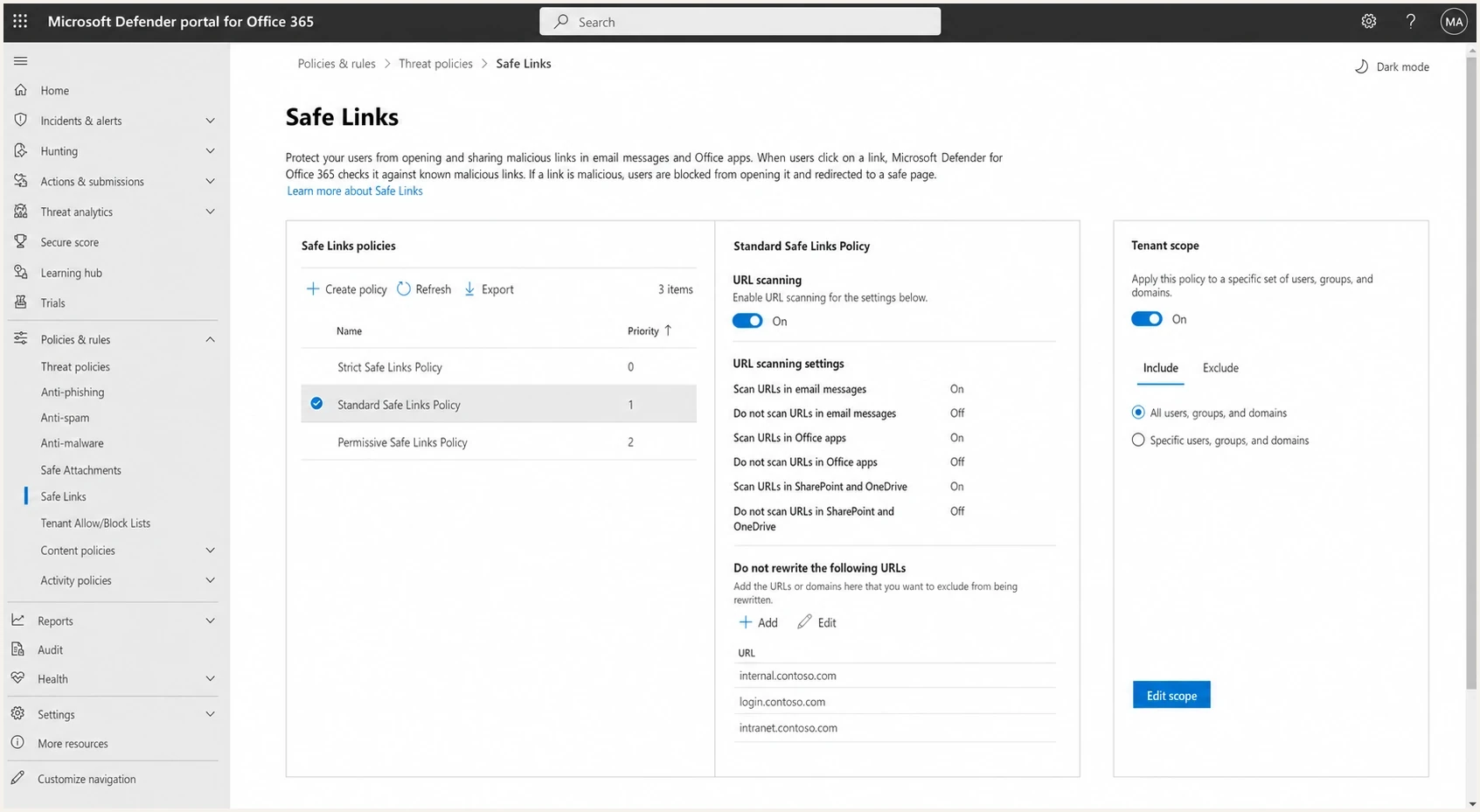
Microsoft Defender portal Safe Links policy settings
There are two separate signals to handle. An open is a remote image request, usually for a tracking pixel. A click is a request to a tracked URL. They can happen together, but they do not prove the same thing. URL inspection explains many automatic clicks. Image prefetching, gateway analysis, or client behavior explains many automatic opens. Classic Outlook blocks automatic external images by default, but users and administrators can change image-loading behavior.
|
|
|
|---|---|---|
0-10s click | Scanner candidate | Flag |
All links hit | URL crawler | Group |
No session | Bot signal | Review |
Later browser session | Human follow-up | Qualify |
Common Office 365 ghost-click patterns
The first mistake to avoid
Do not treat every Microsoft 365 click as either fake or real. Treat it as unclassified until you compare timing, IP ownership, user agent, link breadth, landing page behavior, and whether the same recipient later repeats the action in a normal browser session.
What Microsoft is actually doing
Microsoft 365 filtering is recipient-side protection. The sender hands the message to the receiving system. The receiving system then evaluates sender reputation, authentication, URLs, attachments, content, tenant policy, and user history. Microsoft has its own guidance for external senders in Microsoft troubleshooting, but the sender still has to infer scanner behavior from event data.
Safe Links scans URLs before delivery whether rewriting is enabled or not. With rewriting enabled, a later user click receives another check, and URLs without established reputation can be detonated. Those checks, plus any separate gateway crawl, can reach tracked destinations and appear as clicks. A broad crawl can touch the preference center, terms page, social links, and unsubscribe link in one burst.
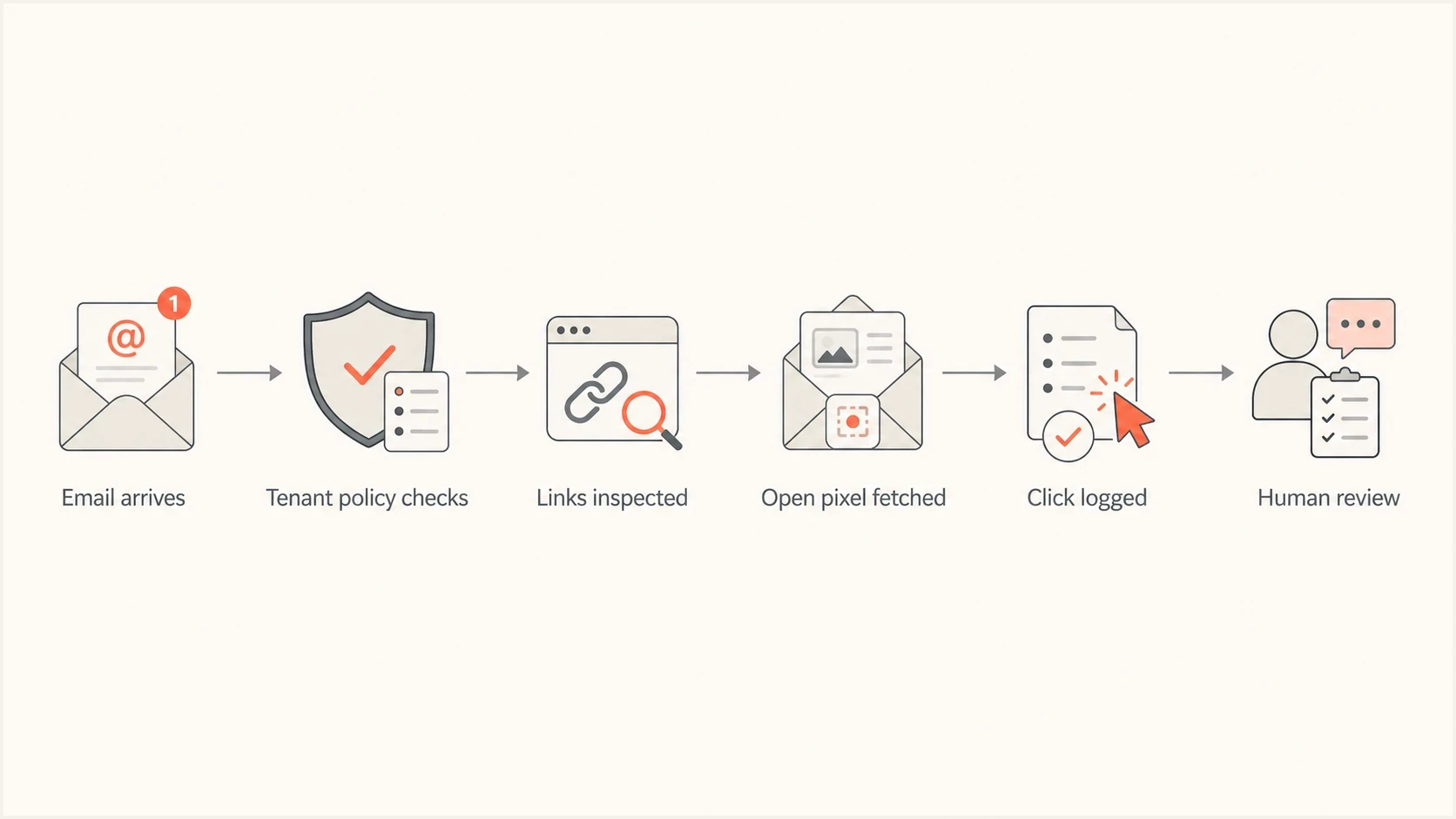
Flowchart showing how Office 365 security scanning can create events
Sender controls
- Measure: Record event timing, IPs, user agents, URL count, and landing page sessions.
- Harden: Make GET requests harmless for sensitive actions such as unsubscribes.
- Report: Separate scanner clicks from human clicks in campaign dashboards.
Recipient admin controls
- Policy: Review Safe Links assignment, URL scanning, rewriting, and click protection.
- Exceptions: Add only exact, validated URLs to a do-not-rewrite list or tenant allow entry.
- Scope: Apply custom policy changes to the required users, groups, or accepted domains.
Can Microsoft skip unsubscribe links
In practice, assume a scanner can request an unsubscribe link. That does not mean Microsoft is trying to unsubscribe the recipient. It means a security system is inspecting the destination. If the unsubscribe endpoint performs the opt-out as soon as a GET request arrives, a scanner can trigger a real change.
Keep visible unsubscribe GET requests safe
A visible unsubscribe link in the email body should load a page where the recipient confirms the change. For standards-based one-click unsubscribe in headers, handle the required POST flow. Keep the body-link GET request safe and idempotent.
Microsoft's do-not-rewrite list prevents listed URLs from being scanned or wrapped during mail flow, but Microsoft can still block them at click time. A tenant allow entry and a do-not-rewrite entry also have different effects. Recipient administrators should validate the exact URL and policy path rather than create a phrase rule for words such as "unsubscribe" or "opt-out." Phrase-based exceptions create an abuse path because a bad sender can hide a dangerous destination under friendly text.
Safer visible unsubscribe flowtext
GET /unsubscribe?token=abc
Return confirmation page, do not change state yet.

POST /unsubscribe/confirm
Validate token, then unsubscribe the recipient.
That pattern protects people and analytics at the same time. The scanner can load the first URL without changing consent state. A real user can still unsubscribe with a clear confirmation step, and the standards-based header path can process the required one-click request.
How to tell bots from people
Do not rely on one field. User agents are often missing or generic. IP ownership can shift through cloud networks. Timing alone catches obvious scanner traffic, but it also catches a real person who opens immediately. A useful classifier combines weak signals until the pattern is strong enough to label.
Timing bands for bot-click review
Use timing as one signal, then confirm with URL breadth and landing behavior.
Immediate
0-10 sec
High-priority scanner candidate.
Early
10-60 sec
Compare with other signals.
Normal
1-30 min
Still verify session data.
Confirmed
Action
Count after a session or conversion.
The strongest scanner signature is breadth. A person rarely clicks every link in a newsletter at the same second. A security system often touches the hero link, footer links, privacy link, preference center, and unsubscribe link in a tight group. The separate bot-click identification workflow is useful when you need to formalize that logic.
- Timing: Clicks within a few seconds of delivery are scanner candidates, especially at scale.
- Breadth: Every link hit at once is stronger evidence than one quick click.
- Session: No cookies, no JavaScript, and no page depth point away from a person.
- Repeat: A later click from a normal browser can be counted as the human action.
Do not add invisible, punctuation-only, or background-colored links as bot traps. They can create accessibility problems and introduce another suspicious URL. For a diagnostic canary, use a disclosed, non-actioning endpoint in a controlled test message, not a production campaign.
Simple scanner classification logictext
if seconds_since_delivery < 10 and links_clicked >= 3:
  mark event_group as scanner_candidate

if no_browser_session and no_conversion:
  keep scanner_candidate label

if later_human_session_exists:
  count later event as human engagement
What to change in analytics
The reporting fix is not to delete all Microsoft traffic. Maintain two metrics: raw events and qualified engagement. Raw events explain what the tracking system received. Qualified engagement is the metric for campaign decisions, lead scoring, sales alerts, and automation.
Avoid triggering high-value automations from a single click when the recipient domain is Microsoft-hosted. A scanner click should not move a lead to a sales sequence, mark an account as active, or suppress a contact because it touched the unsubscribe page.
Email tester
Send a real email to this address. Suped shows a results button when the test is ready.
?/43tests passed
To test whether a real message produces scanner events, send it through the email tester and compare headers, authentication, message rendering, and click timing against production logs. That does not disable Microsoft scanning, but it provides a clean baseline before assigning the activity to a campaign or recipient platform.
For scoring, require a second signal. A click plus a browser session is stronger than a click alone. A click plus a form submission is stronger again. A click that happens before a normal open, touches every link, and never creates a browser session belongs in a scanner bucket.
Raw event reporting
Raw reporting keeps the original open and click events for auditability. It helps engineering debug scanner behavior and compare event logs.
- Use: Incident review, deliverability debugging, and event pipeline checks.
- Risk: It inflates engagement when used in marketing reports.
Qualified engagement
Qualified engagement filters events through timing, session, and conversion logic before it influences decisions.
- Use: Lead scoring, audience targeting, and conversion analysis.
- Risk: Over-filtering hides legitimate fast responders.
Where authentication and Suped fit
DMARC, SPF, and DKIM do not cause automatic Office 365 clicks. They also do not switch Safe Links off. They matter because Microsoft evaluates authentication and reputation before it decides how much trust to place in a message. A clean authentication setup reduces avoidable filtering pressure, even though scanning still happens in many tenants.

Email tester sample report showing total score, email preview, issue summary, and per-section results
Suped, our DMARC and email authentication platform, helps keep two investigations separate. Use its DMARC reports and SPF or DKIM checks to verify who is sending and whether messages authenticate, then compare those findings with click timing and session data. A DMARC failure points to sender configuration or abuse. An instant authenticated click still needs engagement classification.
Suped's DMARC monitoring can surface authentication changes while blocklist monitoring tracks blocklist (blacklist) signals on the sending side. Neither dataset identifies a bot click by itself. Resolve authentication or reputation problems separately, then use event behavior to classify engagement.
A quick domain health checker run also helps separate authentication problems from analytics noise. If SPF, DKIM, DMARC, reverse DNS, or MTA-STS are broken, fix those independently. If authentication is clean and the clicks are instant, broad, and sessionless, treat the Office 365 events as scanner activity.
The clean investigation split
- Authentication: Use DMARC, SPF, and DKIM evidence to prove the sender is legitimate.
- Reputation: Check domain and IP reputation, including blocklist and blacklist signals.
- Engagement: Classify opens and clicks using event behavior, not authentication status.
- Remediation: Fix DNS issues in parallel with analytics filtering.
Practical fixes to implement
The practical fix depends on who owns the problem. If you are the sender, filter the analytics, harden endpoints, and keep authentication clean. If you also control the recipient Microsoft 365 tenant, review Safe Links policy assignment and URL handling. Use a do-not-rewrite or tenant allow entry only after validating the exact URL and security impact.
- Log fields: Capture delivery time, event time, recipient domain, IP, user agent, URL, and session ID.
- Group events: Cluster clicks by message ID and recipient so every-link scans stand out.
- Protect endpoints: Make GET requests read-only for unsubscribe, preference, and account actions.
- Separate metrics: Keep raw events for debugging and qualified engagement for business decisions.
- Escalate narrowly: Ask recipient admins to review the exact tracking URL and applicable policy only when there is a clear business case.
Do not ask every recipient to weaken filtering. When you control the tenant and a business case requires an exception, scope it to exact tracking URLs, assigned recipients, and tested behavior. Do not allow an entire sender domain merely to clean campaign metrics.
What not to change
Do not weaken DMARC policy, remove tracking entirely without a replacement measurement plan, or mark every Microsoft-hosted click as fake. Those changes hide evidence. Fix the classifier and endpoint behavior first.
Views from the trenches
Best practices
Classify clicks with timing, user agent, landing activity, and link breadth before reporting.
Keep unsubscribe GET requests harmless, then confirm intent on a page or compliant POST.
Monitor authentication and reputation separately so bot clicks do not hide delivery issues.
Common pitfalls
Counting every Microsoft-hosted click as human interest inflates campaign performance data.
Phrase-based exceptions for unsubscribe text do not match how recipient scanning works.
Changing DMARC policy to fix Safe Links clicks confuses authentication with URL scanning.
Expert tips
Compare clicked URLs per message; scanners often touch every link before a person reads it.
Use recipient-domain clustering to find tenant policies instead of blaming one campaign.
Treat blocklist and blacklist signals separately from bot clicks, then investigate overlap.
Marketer from Email Geeks says Safe Links was the likely driver when Office 365 domains produced immediate click activity after delivery.
2023-07-25 - Email Geeks
Marketer from Email Geeks says Defender can click every body link, including unsubscribe links, when a policy scans URLs aggressively.
2023-08-31 - Email Geeks
The practical answer
Clusters of automatic opens and clicks on Office 365 hosted recipient domains are common in Microsoft 365 environments. They often contain scanner events, so they do not prove that a person read the email or clicked the offer. Safe Links URL scanning and related security filters explain many clicks. Image requests by a gateway, proxy, or configured mail client explain many automatic opens.
Treat the recipient tenant's security controls as fixed unless you administer that tenant, then improve the parts you own. Keep visible unsubscribe endpoints safe on GET, classify scanner traffic before it reaches reporting, avoid using one raw click for automation, and keep DMARC, SPF, DKIM, and reputation monitoring healthy so sender problems do not get mixed up with bot-click noise.




