Why are Salesforce emails blocked or refused, and what are potential solutions?

Updated on 27 Jul 2026: We added Salesforce's enforced email-sending domain checks and refreshed the troubleshooting steps for logs, bounces, authentication, routing, and refusals.
Salesforce emails are blocked or refused because Salesforce does not authorize the sending domain, or the receiving server does not trust the message, route, or sender reputation enough to accept it. Common causes are an unverified email-sending domain, failed DMARC alignment, DKIM not signing with the visible From domain, SPF not authorizing Salesforce, Microsoft 365 tenant routing rejecting internal-looking mail, shared Salesforce Core IP reputation, poor list quality, form abuse, or message content that triggers a recipient policy.
For a medium-size company sending 10 to 500 mostly transactional messages, do not jump straight to a new sending platform. First prove whether Salesforce stopped the send or the recipient refused it, then determine whether the cause is authentication, recipient policy, routing, or reputation. A 550 domain-verification error in Salesforce is a different problem than a DMARC failure reported by Gmail.
The fastest first move is to send one real Salesforce message through an email tester, then compare that result with Salesforce email logs and recipient bounce details. That gives you the message headers, authentication result, visible From domain, return-path domain, and final SMTP refusal code in one place.
The short answer
Salesforce blocking usually starts with Salesforce domain authorization, recipient identity checks, the sending route, or sender behavior. If the domain is verified and DKIM, SPF, and DMARC pass with the correct domain relationship, the next suspects are shared IP reputation, recipient-side filtering, list consent, and Microsoft 365 routing rules for same-domain mail.
Potential solutions are specific. Verify every sending domain and subdomain in Salesforce, preferably with an active DKIM key, then check SPF and DMARC alignment. Review Salesforce Email Log Files. Confirm whether the org uses Salesforce Core, Account Engagement, Marketing Cloud Engagement, Email Relay, or an external user mailbox. If the route is shared and reputation is the problem, move the right mail stream only after hygiene issues are cleaned up.
Refused is not the same as spam
A refused email is rejected during SMTP delivery. A spam-folder placement is accepted, then filtered by the mailbox provider. Salesforce can also prevent a message from being sent, which produces a different evidence trail. Treat these outcomes separately or the troubleshooting gets noisy.
- Refusal code: Look for 550, 554, 5.7.1, 5.7.26, or tenant-specific text in the bounce.
- Spam placement: Inspect headers, authentication, engagement, complaints, and content signals.
- No send: Check Salesforce access level, sender and domain verification, automation rules, and logs.
Why Salesforce emails get blocked or refused
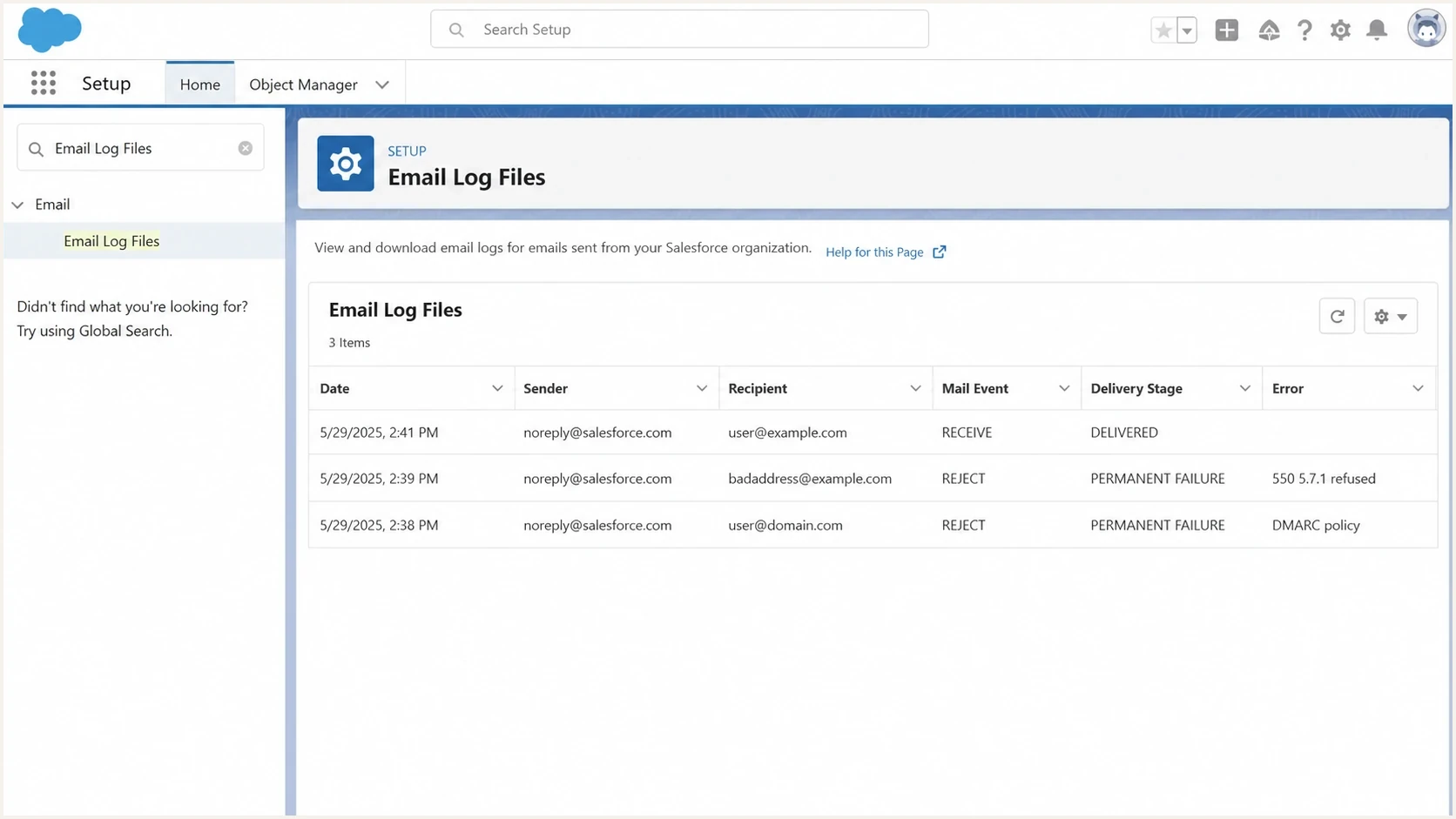
Salesforce Setup email log screen showing delivery events and refusal codes.
The phrase "Salesforce email" can mean several routes. Salesforce Core workflow alerts, Flow emails, and user-sent CRM emails do not behave the same way as Marketing Cloud Engagement or Account Engagement. Each route has its own sending infrastructure, setup controls, and reputation profile.
|
|
|
|---|---|---|
 Salesforce Core route Salesforce Core route | Low-volume alerts refused by one recipient domain. | Pull logs, verify sender settings, then test DKIM and SPF. |
Email-sending domain verification | The composer blocks the send, or the log shows 550 5.7.1 Delivery not authorized, message discarded. | Activate a DKIM key or verify the domain in Authorized Email Domains. |
DMARC domain alignment | SPF or DKIM passes, but not for a domain aligned with the visible From domain. | |
Microsoft 365 routing | Same-domain recipients reject Salesforce mail. | |
Shared IP reputation | Authentication passes, but some domains refuse or throttle the route. | Check blocklist or blacklist status, refusal text, and delivery patterns. |
List or form abuse | Hard bounces, traps, or complaints rise after automation. | Clean data sources, add form protection, and suppress bad contacts. |
Common Salesforce refusal causes and the practical fix path.
Separate Salesforce Core issues from Marketing Cloud Engagement and Account Engagement issues early. A CRM workflow alert that goes to two contacts does not have the same sending profile as a campaign blast. A dedicated IP needs steady mail to build reputation; 10 to 500 transactional messages often lacks that volume.
Start with Salesforce logs and the refusal code
The first artifact to collect is the Salesforce Email Log File. The log shows whether Salesforce handed the message to the next mail server or received a permanent or transient failure. The Salesforce delivery problems article also points admins to deliverability settings, test sends, SPF, DKIM, and Email Relay checks.
Request the narrowest possible log window for the affected sender and recipient. Salesforce email logs cover the last 30 days, and each request can span no more than seven days. Messages sent through an external Gmail or Microsoft 365 account do not appear in Salesforce email logs, so confirm the route before treating an empty log as proof that no message was sent.
A useful bounce contains the recipient domain, SMTP status code, and policy reason. Without that, platform changes become guesswork. Compare the bounce with a raw message header because the header shows the DKIM signing domain, SPF return-path, and receiver's DMARC result.
Example refusal details to collecttext
Recipient: user@example.net
Status: 550 5.7.1 refused by policy
Reason: SPF pass, DKIM fail, DMARC fail
Sender IP: 192.0.2.25
From: alerts@example.com
Return-Path: bounce.salesforce.com
Enable Bounce Management when Salesforce users need delivery failures recorded against Contacts, Leads, or Person Accounts. A 4xx Delivery Status Notification usually indicates a soft, temporary failure, while a 5xx response indicates a hard, permanent failure. Bounce Management changes the return path to a .bnc.salesforce.com address, which helps Salesforce process bounces but normally prevents SPF from aligning with your visible From domain.
- Pull logs: Request the Email Log File for the exact send window and recipient.
- Classify errors: Separate permanent failures from transient deferrals, Salesforce no-send events, and spam placement.
- Read headers: Check the visible From domain, DKIM domain, SPF return-path, and DMARC result.
- Compare domains: Identify whether only Microsoft, Yahoo, Apple, Gmail, or one corporate domain refuses it.
Email tester
Send a real email to this address. Suped shows a results button when the test is ready.
?/43tests passed
If the refusal is a connection-level problem, use a deeper guide for connection refused errors. For Salesforce specifically, keep the diagnosis tied to the route that generated the message because Salesforce Core, Account Engagement, and Marketing Cloud Engagement leave different header patterns.
Verify Salesforce's email-sending domain requirement
Salesforce now requires domain-level verification for email sent from Salesforce, including Email Relay. Each domain and subdomain used in a From address needs an active Salesforce DKIM key or a verified entry in Authorized Email Domains. This is separate from verifying an individual user's email address.
An unverified domain can stop the send
User-authored email can show "Not allowed to send from an unauthorized domain." Flow, Apex, alerts, and other automation can fail less visibly. Search the Email Log File for the exact error "550 5.7.1 Delivery not authorized, message discarded."
- List sending domains: Include user addresses, organization-wide addresses, automation senders, subdomains, and sandbox senders.
- Verify ownership: Use an active DKIM key when possible, or verify an Authorized Email Domain.
- Retest every route: Check user email, Flow, Apex, alerts, and Email Relay because one successful path does not prove every path works.
- Inspect the From address: If substitution is enabled, confirm whether Salesforce used a verified organization-wide address or email@orgID.sfcustomeremail.com, with a site ID used for applicable Experience Cloud mail.
The substitute option is useful for public domains, consultants, and site users whose domains you cannot verify. It keeps the display name and reply-to address, but changes the visible From address. That change affects branding, reply handling, allowlists, and DMARC reporting, so document it instead of treating it as a silent fallback.
Fix authentication before blaming the IP
Fix authentication even when reputation is also involved. Receiving systems want the visible From domain backed by an aligned DKIM signature or aligned SPF return-path, then governed by DMARC. Salesforce can be authorized in SPF while SPF still fails DMARC alignment because Bounce Management or Email Security Compliance uses a .bnc.salesforce.com envelope sender. In that common setup, aligned Salesforce DKIM provides the DMARC pass.
Use a domain health check to verify DMARC, SPF, and DKIM together, then inspect the actual Salesforce header. DNS can be correct while the message signs with the wrong domain, uses an unexpected return-path, or leaves the visible From domain unaligned.
SPF example for Salesforce plus Microsoft 365dns
v=spf1 include:_spf.salesforce.com include:spf.protection.outlook.com ~all
DMARC starter record while investigatingdns
v=DMARC1; p=none; rua=mailto:dmarc-reports@example.com;
adkim=s; aspf=s; pct=100
The record existing is not enough
A Salesforce admin can create a DKIM key, and a DNS admin can publish the required records, but the key must also be active and match the full email-sending domain. The message then needs to use that key for a domain aligned with the visible From address. DMARC checks that domain relationship, not just the presence of DNS records.
- SPF limit: Keep one SPF record and stay under the 10 DNS lookup limit.
- DKIM domain: Confirm the active key matches the full sending domain and the d= value aligns with the visible From domain.
- DMARC reports: Watch aggregate data after each Salesforce setup change.
?
What's your domain score?
Deep-scan SPF, DKIM & DMARC records for email deliverability and security issues.
Do not publish a strict DMARC reject policy until Salesforce traffic is visible in reports and each legitimate route passes with the required domain relationship. Once it is stable, step the policy forward deliberately.
Check shared IP reputation and recipient policy
If the sending domain is verified and SPF, DKIM, and DMARC pass for the right domain, check reputation and recipient policy. Salesforce Core often uses shared infrastructure, so a small transactional send can share a route with other Salesforce tenants. A recipient can block or throttle a specific Salesforce outbound IP even when your domain authentication passes.
This is where blocklist and blacklist data helps, but it should not be the only signal. Use blocklist monitoring alongside recipient-domain patterns, bounce text, complaint rates, and list source quality. Many corporate gateways use private reputation and policy data that never appears in public checks.
Technical refusal
- Pattern: Authentication or domain-verification failure appears in the SMTP text, Salesforce log, or headers.
- Scope: Failures repeat across several recipient systems or every send from one domain.
- Fix: Correct domain verification, DNS, Salesforce DKIM, sender settings, and DMARC policy.
Reputation refusal
- Pattern: Authentication passes but one provider or gateway refuses or throttles the route.
- Scope: Failures cluster around shared IPs, cold data, or specific domains.
- Fix: Clean inputs, secure forms, suppress bad contacts, and change route if needed.
Avoid the wrong conclusion. If a two-person automation is refused, that does not prove the volume is too high. It means the recipient policy disliked something about the identity, route, or history. Low-volume transactional mail often needs cleaner domain authentication and a cleaner route, not a bigger sending setup.
Potential solutions that actually help
The right solution depends on what the logs prove. Treat a platform move as one possible fix, not the first fix. If domain verification, list hygiene, sender verification, or authentication is weak, a new route inherits the same trust problem.
|
|
|
|---|---|---|
Stay on Salesforce Core | The issue is domain verification, sender setup, DKIM, SPF, or deliverability access. | Fastest fix, but shared route reputation remains outside your control. |
Salesforce Email Relay | You want Salesforce to hand mail to your own mail route. | Needs mail admin work, connectors, logging, abuse controls, and verified Salesforce sending domains. |
Account Engagement | The program is marketing automation, nurturing, or consent-based campaigns. | More structure, higher cost, and still needs proper authentication. |
Marketing Cloud Engagement | You need large-scale campaign control and dedicated sender setup. | A heavier migration for simple transactional alerts. |
Transactional SMTP/API route | The mail is operational and Salesforce is only the trigger. | Requires integration work, event handling, and domain setup. |
Dedicated IP | You send enough steady volume to maintain your own reputation. | Usually weak for 10 to 500 low-volume transactional messages. |
Practical options for Salesforce email refusals.
Do not move dirty traffic
If the underlying issue is cold prospecting, stale addresses, exposed forms, or weak consent, a route change only moves the reputation damage. Clean the inputs first.
- List source: Separate opt-in contacts from purchased, scraped, or old CRM data.
- Form security: Stop automated signups, typo spam, and unverified addresses.
- Suppression: Remove hard bounces, complainers, role accounts, and unengaged contacts.
For a company using Microsoft 365 Online, Email Relay is a mail architecture decision, not a checkbox. A Microsoft admin needs to review connectors, tenant attribution, accepted domains, same-domain mail handling, and whether the Salesforce sending domain is verified before the message reaches the relay.
Where Suped fits in the workflow
Suped is our DMARC and email authentication platform. It is useful once the team stops treating each Salesforce bounce as an isolated event. Suped combines DMARC, SPF, DKIM, blocklist monitoring, and deliverability signals in one workflow, so teams can see whether Salesforce passes authentication and which issues need DNS or platform changes.

Issue steps to fix dialog showing the issue overview, tailored fix steps, and verification action
For this Salesforce problem, Suped's DMARC Monitoring identifies whether Salesforce traffic passes with the visible domain. Real-Time Alerts flag sudden authentication failures, and Hosted SPF reduces DNS access bottlenecks when several legitimate senders need one SPF record.
- Issue detection: Suped turns DMARC failures into specific source and fix steps instead of raw XML.
- Hosted controls: Hosted DMARC, Hosted SPF, SPF flattening, and Hosted MTA-STS reduce DNS friction.
- Operations view: Multi-domain dashboards help MSPs and internal teams manage Salesforce across clients or brands.
Suped does not replace Salesforce logs or Microsoft tenant checks. It provides domain-level evidence about aligned authentication, source changes, route patterns, and recurring failures that Salesforce and mail administrators can use in their own systems.
A practical diagnostic sequence
Use a fixed sequence so the team does not chase the loudest theory first. Start with the failed message, then work through Salesforce authorization, DNS, message authentication, recipient policy, reputation, and route selection.
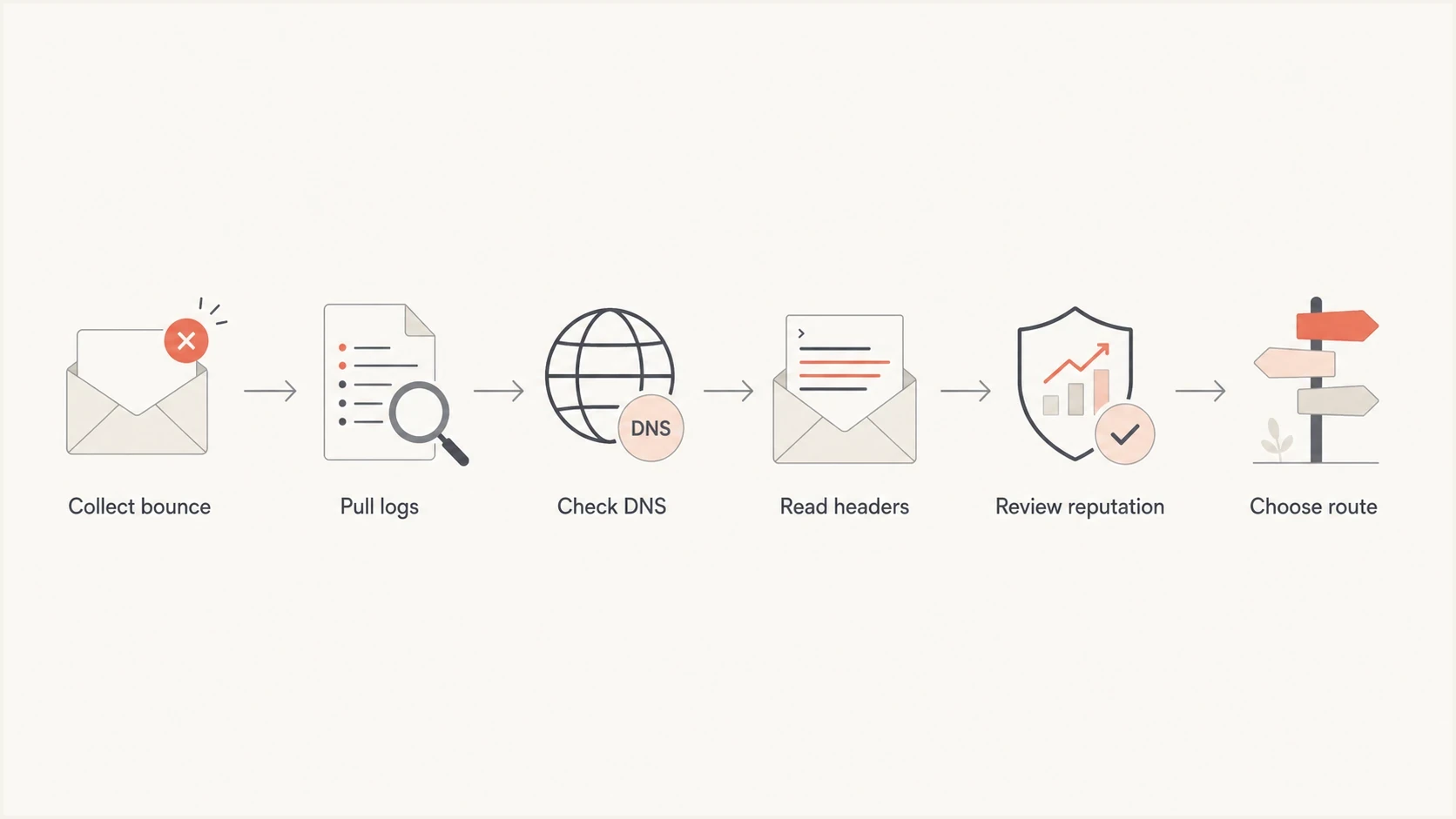
Flowchart for diagnosing Salesforce email refusals from bounce to route decision.
- Collect proof: Save the bounce, Salesforce log row, message header, recipient domain, and send time.
- Confirm route: Identify Salesforce Core, Account Engagement, Marketing Cloud Engagement, Email Relay, or an external mailbox.
- Verify the sender: Confirm the user's address and every email-sending domain or subdomain in Salesforce.
- Check DNS and headers: Verify one SPF record, active Salesforce DKIM, DMARC reporting, lookup count, and domain alignment.
- Review reputation: Look for blocklist or blacklist listings, IP blocks, throttling, complaint patterns, and domain clusters.
- Pick route: Keep Core if setup is wrong, relay if routing is wrong, or migrate only if the use case fits.
The decision point is simple: if Salesforce does not authorize or generate the message, fix Salesforce configuration. If Salesforce generated it and the recipient refused it, diagnose identity, policy, and reputation. Move the mail stream only when that route decision has evidence.
Views from the trenches
Best practices
Pull Salesforce email logs first, then map each refusal to its SMTP code and domain.
Use domain-matched DKIM for the visible From domain before judging IP reputation.
Separate transactional alerts from marketing sends so reputation issues are easier to isolate.
Common pitfalls
Treating every refusal as an SPF issue hides recipient policy and shared IP reputation problems.
Moving platforms before cleaning lists can move the same complaint signals to a new sender.
Relying on allowlists creates manual work and still leaves DMARC domain matching unmeasured.
Expert tips
Test one real Salesforce message to Gmail, Microsoft, and a seed inbox before changing DNS.
Watch DMARC reports after each setup change, because passing and domain matching differ.
For low-volume alerts, a monitored email relay can beat a full marketing platform migration.
Marketer from Email Geeks says when SPF and DKIM are corrected, remaining Salesforce refusals often point to reputation or recipient policy rather than raw DNS.
2024-02-13 - Email Geeks
Marketer from Email Geeks says Salesforce Core usually sends on shared infrastructure, so a low-volume sender can inherit risk from other traffic on the same path.
2024-05-21 - Email Geeks
The practical fix path
Salesforce emails are refused when Salesforce does not authorize the sending domain or the receiver distrusts the message identity, sending route, sender behavior, or tenant routing path. The fix is not automatically "get off Salesforce IPs." Prove the failure mode, then change the smallest part that controls it.
For low-volume transactional Salesforce mail, first verify each email-sending domain, then fix DKIM, SPF, DMARC reporting, user verification, and Microsoft 365 routing. Next, review list source quality and any blocklist or blacklist evidence. Move the mail to Email Relay, Account Engagement, Marketing Cloud Engagement, or a transactional SMTP/API route only after those checks.
Suped fits the ongoing part of that work: watching DMARC results, identifying broken sources, surfacing authentication failures quickly, and keeping SPF, DKIM, MTA-STS, blocklist monitoring, and reporting in one operational view.




