Why are my transactional emails going to the junk folder and what can I do about it?

Published 29 Jul 2025
Updated 3 Aug 2026
12 min read
Summarize with
Updated on 3 Aug 2026: We corrected the Microsoft header guidance and added current requirements for authentication, DNS, transport, and sending volume.
Transactional emails go to the junk folder when the mailbox provider does not trust the sender identity, the message behavior, or the recipient response enough to put the message in the inbox. Authentication matters, but SPF, DKIM, and DMARC passing confirm authenticated domains and DMARC alignment. They do not identify a person or guarantee inbox placement.
Start by separating two questions: did the email authenticate correctly, and did the mailbox provider want it in the inbox? For the first question, check the headers and DNS. For the second, look at domain reputation, IP reputation, engagement, complaint behavior, content, URLs, and any blocklist or blacklist signals attached to the sending identity.
A fast first step is to send the exact message through the email tester and compare that result with a real recipient's delivered headers. A test catches obvious authentication and content problems, while the delivered copy shows what the receiving mailbox actually decided.
- Authentication: SPF, DKIM, or DMARC fails, or the authenticated domain does not match the visible From domain closely enough.
- Reputation: The sending domain, subdomain, return-path domain, DKIM domain, IP, or URLs have weak history with that mailbox provider.
- Recipient behavior: People ignore, delete, or mark the email as unwanted, even when the sender calls it transactional.
- Message design: The email has marketing copy, too many links, suspicious URLs, vague branding, or a template that resembles bulk mail.
The direct answer
If your transactional email is going to junk, fix it in this order: prove authentication, inspect the delivered headers, separate transactional traffic from marketing traffic, check the sender reputation signals, simplify the content, and monitor the result by mailbox provider. Do not make ten changes at once. Change one variable, then send the same workflow again.
The most common mistake is treating the word "transactional" as a delivery pass. A password reset email is transactional to the sender. To a recipient who did not request it, cannot remember the account, or sees unfamiliar branding, it is unwanted mail. Mailbox providers learn from that behavior.
Authentication is identity, not permission
Passing SPF, DKIM, and DMARC tells the mailbox provider which domains authenticated the message and whether DMARC alignment passed. It does not tell the mailbox provider that recipients want the message. After identity is established, reputation and behavior affect inbox, junk, quarantine, or rejection.
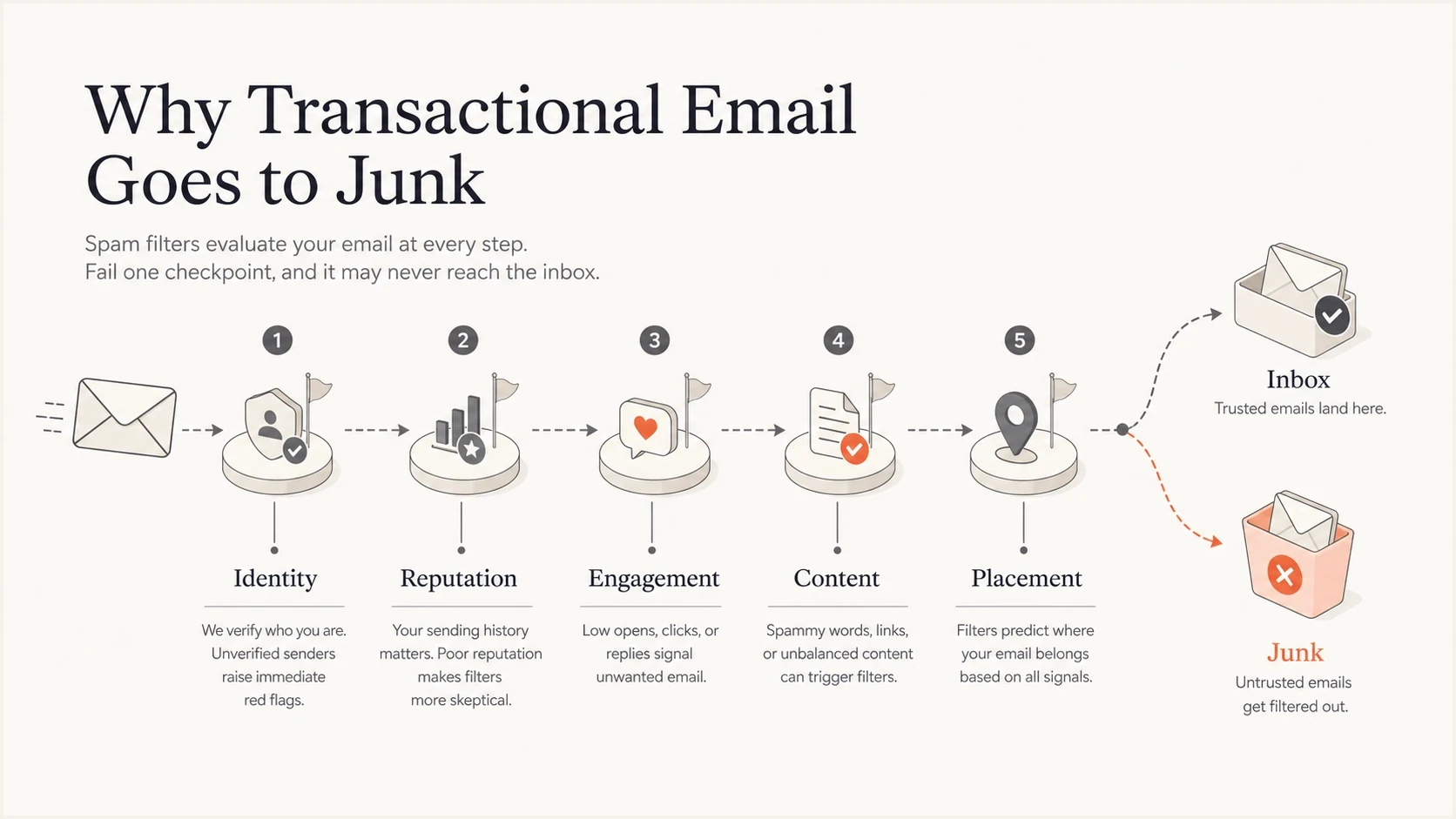
Five checkpoints that affect transactional email placement: identity, reputation, engagement, content, and placement.
Read the delivered headers first
Do not rely on a template preview, an ESP activity log, or a single seed address by itself. Get the full headers from a copy that actually landed in junk. That is where the mailbox provider records the authentication result, the sending IP, the return path, the DKIM domain, the visible From domain, and provider-specific delivery markers.
For Microsoft recipients, compare Authentication-Results, X-Forefront-Antispam-Report, X-Microsoft-Antispam, and X-Microsoft-Antispam-Mailbox-Delivery. SCL and BCL are useful clues, while SFV records the spam-filter verdict. In the mailbox-delivery header, dest:I indicates the inbox and dest:J indicates junk.
Header fields to inspecttext
Authentication-Results: dkim=pass; spf=pass; dmarc=pass
X-Forefront-Antispam-Report: SCL:5; SFV:SPM
X-Microsoft-Antispam: BCL:0
X-Microsoft-Antispam-Mailbox-Delivery: dest:J
Return-Path: bounce@txn.example.com
From: Example App <security@example.com>
DKIM-Signature: d=example.com; s=selector1
If two identical messages sent minutes apart land differently, that does not prove randomness. It usually means the provider is combining message content with recipient history, sender history, safety lists, prior complaints, and local mailbox behavior. The second message can benefit from a different recipient state, a different filtering pass, or a user-level preference.
Email tester
Send a real email to this address. Suped shows a results button when the test is ready.
?/43tests passed
After the test, compare the result with the delivered header. If the tester shows a clean message but the real recipient sees junk, the problem is probably reputation, recipient behavior, or provider-specific filtering. If both show authentication or DNS issues, fix those first.
Check authentication and domain identity
The visible From domain should be the identity you intend to build reputation around. DKIM should pass with a signing domain that matches it under DMARC, and SPF should pass for the envelope sender. DMARC passes when either the DKIM signing domain or the SPF-authenticated envelope sender matches the visible From domain. Relaxed alignment permits an organizational-domain match, while strict alignment requires an exact domain match.
Use a domain health checker to catch broken SPF includes, missing DKIM selectors, malformed DMARC records, and DNS mistakes. Then use ongoing DMARC monitoring to see which real sources send mail for the domain and which ones fail authentication.
Starter DMARC record for investigationdns
Host: _dmarc.txn.example.com
Type: TXT
Value: "v=DMARC1; p=none; rua=mailto:dmarc@reports.example.com;"
       " adkim=s; aspf=s"
DMARC record detail view showing SPF, DKIM, DMARC, rDNS diagnostics, and DNS records
A p=none policy can meet the published DMARC minimum for high-volume senders, but it monitors unauthenticated use rather than requesting quarantine or rejection. Suped's record diagnostics view connects the DNS record with real authentication results. If one source fails DKIM, one selector is missing, or one return-path domain breaks SPF, the issue appears next to the fix path instead of remaining in raw aggregate reports.
Check infrastructure and volume changes
Authentication does not replace basic sending infrastructure. Gmail and Yahoo require valid forward and reverse DNS for sending IPs, and Gmail requires TLS. Message formatting also needs to comply with SMTP and Internet Message Format standards. A clean DMARC result does not compensate for broken PTR records, a mismatched server identity, or malformed mail.
Compare the sending pattern immediately before junk placement started. A new domain or IP, a changed DKIM signing domain, a new return path, or an abrupt volume increase can remove useful history or trigger throttling. Increase real, expected transactional traffic gradually on a new identity, and reduce the rate when deferrals or temporary failures rise.
- Forward and reverse DNS: The sending IP's PTR hostname should resolve forward to the same IP.
- SMTP identity and TLS: Use a resolvable HELO or EHLO hostname and an encrypted connection.
- Volume and cadence: Avoid sudden spikes after moving infrastructure, changing headers, or launching a new workflow.
- SMTP responses: Track hard bounces, soft bounces, deferrals, and provider error codes instead of retrying every failure at the same rate.
Fix reputation before changing templates
Every identity in the message has reputation. The sending IP has history. The visible From domain has history. The DKIM d= domain has history. The return-path domain has history. The URLs in the body have history. The combination of those parts also has history.
Weak sending shape
- Shared identity: All customers send through the same SaaS subdomain and click domain.
- Mixed traffic: Password resets, product notices, and promotional campaigns use the same stream.
- Hidden damage: One sender's complaints damage the identity that other senders also use.
Stronger sending shape
- Owned domain: Each brand authenticates with a domain it controls and users recognize.
- Separate stream: Transactional mail uses a distinct domain, template family, and send pattern.
- Clear ownership: Bad senders can be isolated without harming unrelated customers.
IP reputation still matters. Domain reputation often carries more weight now, especially for established mailbox providers that identify senders across DKIM domains, visible From domains, return paths, URLs, and behavior. If an IP, domain, or URL has a poor reputation, a good signal elsewhere will not erase it.
Operational thresholds to watch
Use these complaint-rate bands as investigation triggers for transactional mail, not as universal inbox guarantees.
Healthy
Under 0.1%
Complaints stay very low, bounces are controlled, and failures are rare.
Investigate
0.1-0.3%
A specific provider, domain, template, or source begins to drift.
Stop and fix
Over 0.3%
The stream is teaching mailbox providers that users do not want the mail.
Treat blocklists as evidence
A blocklist or blacklist listing is rarely the whole answer, but it is useful evidence. Check the sending IP, the bounce domain, the visible From domain, and the link domains. For transactional mail, a single listed shared IP can hurt one provider while another provider keeps accepting the same message.
Use blocklist monitoring for continuous checks, not just one-time lookups after users complain. Suped pairs blocklist monitoring with DMARC results so you can confirm whether the affected identity sends your mail or belongs to an unrelated host.
How to use a listing
- Confirm scope: Find whether the listed item is the sending IP, a domain, or a URL.
- Map traffic: Check which templates, customers, or providers use that identity.
- Fix cause: Remove the behavior that caused the blocklist or blacklist event before requesting removal.
Handle Microsoft junk placement carefully
Microsoft filtering can feel inconsistent because recipient-level state has a large effect. One user can see the first message go to junk and the second reach the inbox. Another user on the same domain can see different behavior. The message is not judged in isolation.
For Outlook.com consumer domains, Microsoft has enforced SPF, DKIM, and DMARC for domains sending more than 5,000 messages per day since May 5, 2025. Non-compliant mail can be rejected with 550 5.7.515. Passing those checks avoids that authentication failure, but reputation, content, policy, and recipient state can still put a compliant message in junk.
For deeper Microsoft-specific cases, compare the headers with Outlook authentication cases and look for the same pattern: pass results in Authentication-Results, then junk placement driven by sender reputation, recipient history, content, or policy.
|
|
|
|---|---|---|
SCL | Spam confidence | Compare copies |
BCL | Bulk confidence | Review bulk cues |
SFV | Filter verdict | Find decision source |
Mailbox delivery | dest:I or dest:J | Confirm final folder |
Microsoft header clues worth comparing between junk and inbox copies.
A recipient can mark an expected message as not junk and add the sender to Safe Senders. That can improve placement for that mailbox, but it is a recipient-level workaround, not a repair for global sender reputation or authentication.
Use customer-owned domains for SaaS sending
If you send transactional email for many customers, do not make every customer share the same visible identity. A shared SaaS subdomain is easier to set up, but it also joins customer reputation. One customer with poor user fit can affect everyone else.
The cleaner model is customer-owned authentication: the visible From domain belongs to the customer, DKIM passes with that domain, links use a customer-controlled domain, and the return path is set up in a way that keeps bounce processing working. Your platform identity can still appear in technical headers, so it needs a clean reputation too.
|
|
|
|---|---|---|
Shared SaaS | Fast | Shared damage |
Per customer | DNS needed | Isolated issues |
Hybrid | Phased | Mixed signals |
Sender identity choices for platforms that send transactional mail for customers.
Make the message look truly transactional
A transactional email should do one job. A verification email should verify the account. A password reset email should reset the password. A receipt should show the receipt. When a transactional template adds banners, upsells, social links, tracking-heavy footers, and vague sender names, it starts to look like bulk mail.
- Subject line: State the user action plainly, such as "Reset your password" or "Your login code".
- Sender name: Use the product or brand the recipient expects, not a generic no-reply identity alone.
- Body copy: Keep the action visible, remove sales copy, and avoid urgency that sounds like abuse.
- Links: Use one primary link when possible, with a domain that matches the brand relationship.
Pure transactional messages such as password resets and one-time codes are excluded from Gmail and Yahoo one-click unsubscribe requirements. Recurring notifications and subscribed messages need preference controls when users can stop them. Classify the message by what it does, not by the label in the sending platform.
Small template fixes that help
Use plain branding, one clear action, a recognizable sender name, and a footer that explains why the person received the message. That reduces confusion and gives recipients fewer reasons to report the message.
Where Suped fits
Suped is our DMARC and email authentication platform. For this workflow, add the domain, review the authentication data, identify the failing source, assign the fix, and watch whether the failure rate drops.
Suped connects DMARC reporting with SPF, DKIM, blocklist, and deliverability checks. Automated issue detection maps a failure to its source and fix path, while alerts flag sudden changes. Hosted DMARC, Hosted SPF, SPF flattening, and Hosted MTA-STS are available when a team wants managed DNS workflows.
What Suped covers in this case
- Source proof: Find the exact system sending the failing transactional mail.
- Issue steps: Turn authentication failures into fix steps the owner can complete.
- Policy staging: Move DMARC policy forward after legitimate sources pass consistently.
- Multi-domain work: Manage customer domains, MSP clients, or separate mail streams in one place.
A practical recovery plan
The fix depends on the evidence, but this order works well because it removes hard failures before you spend time on softer reputation work.
- Capture evidence: Get full headers for one junk copy and one inbox copy from the same workflow.
- Verify DNS: Confirm SPF pass, DKIM pass, DMARC pass, forward and reverse DNS, and a matching visible From domain.
- Separate streams: Move transactional mail away from marketing mail and risky customer traffic.
- Protect recipients: Suppress hard bounces, stop repeated sends to invalid addresses, and rate-limit user-triggered workflows that can be abused.
- Check reputation: Review complaints, bounces, provider patterns, and blocklist or blacklist listings.
- Simplify content: Remove nonessential links, promotional blocks, confusing branding, and excess tracking.
- Retest slowly: Send the same workflow after each change and compare provider-specific outcomes.
Views from the trenches
Best practices
Use customer-owned sending domains when the customer brand appears in the From field.
Separate transactional mail from marketing mail and each customer's traffic early.
Inspect real delivered headers because SCL alone does not explain the final decision.
Common pitfalls
Treating authentication passes as proof that inbox placement is fixed for every provider.
Letting all customers share one SaaS domain and one click domain in one reputation pool.
Ignoring low engagement because the message is operational rather than promotional in tone.
Expert tips
Track the IP, return path, DKIM domain, From domain, and URLs as one identity set.
Move a customer to its own domain setup before one sender damages every customer's mail.
Compare the first and second message headers, then change one variable at a time only.
Expert from Email Geeks says Microsoft junk placement can differ between similar messages, so the useful evidence is the full delivered header, not the SCL value alone.
2024-09-26 - Email Geeks
Marketer from Email Geeks says a transactional label does not protect a message when recipients ignore it, delete it, or mark it as unwanted.
2024-09-27 - Email Geeks




