Why are my transactional emails from Sendgrid being flagged as spam in Gmail, and how can I fix it?

Published 10 Jul 2025
Updated 13 Aug 2026
15 min read
Summarize with
Updated on 13 Aug 2026: We updated this guide with Gmail's enforced sender rules, safer DMARC alignment advice, and a practical SendGrid IP-pool diagnostic.
Your SendGrid transactional emails are being flagged as spam in Gmail because Gmail is seeing a problem with one or more of these signals: sender or IP-pool reputation, authentication alignment, SendGrid link wrapping, message content, landing pages, complaint history, sudden volume changes, or the way a supposedly transactional email behaves like promotional or reactivation mail. Passing a generic spam test does not prove Gmail will inbox the message.
Start with Gmail's reason in the spam folder, then compare a failing SendGrid message against a working message from your other mail stream. Check domain authentication, the final tracking links, the sending IP path, recent volume, and whether the message has one clear transactional purpose.
- First check: Open the message in Gmail spam and read the exact warning Gmail gives.
- Link check: Confirm that the final message uses a branded SendGrid link domain.
- Authentication check: Make sure DMARC passes through aligned DKIM or SPF.
- Reputation check: Identify the SendGrid IP and look for a pool, volume, complaint, or traffic change.
- Content check: Remove promotional renewal copy, extra product links, thin login pages, and confusing calls to action.
The short answer
If a transactional email from SendGrid lands in Gmail spam while the same or similar email works from another email platform, SendGrid itself is usually not the whole cause. The delivery stream has different IPs, DKIM keys, SPF path, return-path domain, tracking domain, image hosts, headers, and reputation. Gmail evaluates that full combination.
The most useful starting clue is Gmail's warning. A message described as similar to past spam points first to content, links, reputation, or complaints. A warning about messages used to steal personal information points first to phishing-like patterns, so inspect every URL, the linked pages, and the way the email asks the user to act.
A passing spam score is not the same as Gmail inbox placement. Gmail has its own filtering system, reputation data, and recipient-level behavior signals. A message can pass SPF, DKIM, and DMARC and still look risky because of links, landing pages, past complaints, or sender reputation.
Run a controlled comparison. Send the same message through SendGrid and through the stream that is working, then compare headers, authentication results, links, image URLs, return-path, DKIM signing domain, tracking domain, sending IP, and payload.
Email tester
Send a real email to this address. Suped shows a results button when the test is ready.
?/43tests passed
A real message test helps because Gmail filtering often depends on the final MIME payload rather than your template editor. Suped's email tester shows authentication, content, headers, and visible issues in the same workflow.
Why Gmail treats SendGrid mail differently
A common mistake is assuming that if the template is the same, Gmail sees the same email. It does not. Gmail sees the signing domain, bounce domain, sending IP, tracking domain, image hosts, redirect chain, headers, unsubscribe handling, and the recipient's past interaction with that stream.
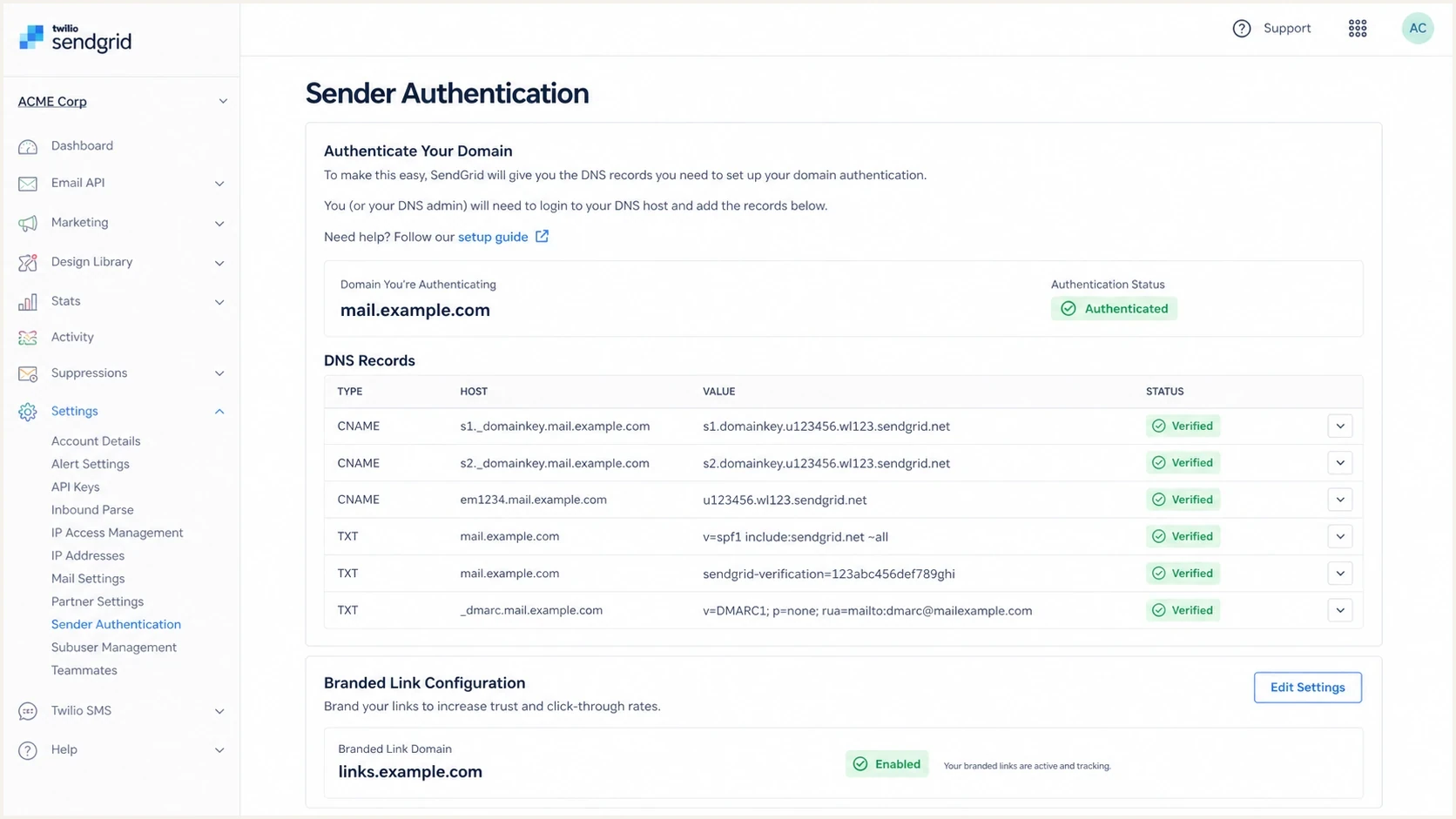
A SendGrid sender authentication screen with domain and link branding settings.
This is why a marketing platform can inbox while SendGrid does not. The working platform has its own history and technical identity. SendGrid has a separate identity, even when the visible brand is the same. Default SendGrid tracking domains or a weakly separated subdomain add risk.
Working marketing stream
- Identity: Different DKIM domain, tracking domain, bounce path, and IP history.
- Audience: Often warmer because marketing lists are filtered by engagement.
- Content: May include familiar templates, expected branding, and tested links.
Failing SendGrid stream
- Identity: Can expose generic SendGrid links or mismatched authentication.
- Audience: Can hit churned, inactive, or surprised recipients.
- Content: Can mix renewal notices with product links and reactivation language.
Separate the work into two tracks. First, fix the technical identity so Gmail connects the message to your domain. Second, fix the message so Gmail sees a clear, user-expected transaction.
Read the Gmail warning first
Gmail often tells you why a message is in spam. The wording is not a definitive diagnosis, but it points toward the first checks. Read the warning before changing DNS because reputation, authentication, and phishing-pattern problems need different fixes.
|
|
|
|---|---|---|
Lots of messages are spam | Complaints or reputation | Audit complaints and recent volume |
Similar to past spam | Content, links, or complaints | Compare final payloads |
Used to steal info | Phishing-like request or URL | Audit links and landing pages |
Authentication failed | SPF, DKIM, or alignment | Fix the failing aligned identifier |
Use Gmail's warning text to choose the first fix path.
If Gmail says the message is similar to messages used to steal personal information, inspect the landing page immediately. A bare login page with little explanatory text can look risky, especially if the email asks the user to renew, verify, update billing details, or sign in. A normal product page with clear brand context and a predictable URL pattern reduces that risk.
The fix is not always in the email body. Sometimes the linked page is what makes the email look unsafe.
Suped deliverability guidance
If Gmail says the message is similar to past spam, compare the exact SendGrid payload with a version sent through the stream that works. Different link wrapping, asset hosts, unsubscribe headers, or DKIM alignment can explain why the same business message gets a different result.
Fix SendGrid domain alignment
SendGrid transactional mail should use authenticated domain sending. DKIM should pass for the SendGrid signing domain, SPF should pass for the return-path domain, and DMARC should pass because at least one of those authenticated domains aligns with the visible From domain. In most SendGrid setups, aligned DKIM is the clearest path because the return-path can use a separate bounce subdomain.
Example DMARC record for monitoringDNS
_dmarc.example.com TXT
"v=DMARC1; p=none; rua=mailto:dmarc@example.com;"
DMARC uses relaxed alignment by default, so a DKIM domain such as email.example.com can share the organizational domain of a visible From address at example.com. Do not publish adkim=s or aspf=s only to satisfy Gmail. Strict alignment requires an exact domain match and should be used only after every legitimate sending stream has been tested.
Gmail requires SPF or DKIM for every sender. Senders above 5,000 messages per day to personal Gmail accounts need SPF, DKIM, DMARC, valid forward and reverse DNS, TLS, and From-domain alignment through SPF or DKIM. Keep Gmail user-reported spam below 0.3%, with an operating target below 0.1%.
Use a DMARC monitoring workflow before moving to quarantine or reject. Suped's DMARC monitoring shows which sources pass, which fail, and what needs attention before enforcement.
DMARC record detail view showing SPF, DKIM, DMARC, rDNS diagnostics, and DNS records
In SendGrid, complete sender authentication for the exact domain or subdomain in the visible From address. Publish the DKIM CNAME records SendGrid supplies, then verify the From domain, DKIM signing domain, return-path, SPF result, and DMARC result in a real production-like message.
?
What's your domain score?
Deep-scan SPF, DKIM & DMARC records for email deliverability and security issues.
For a broader technical check, run the sending domain through a domain health checker and confirm that DMARC, SPF, and DKIM are valid before rewriting templates.
Fix generic SendGrid tracking links
Generic SendGrid click tracking is one of the first checks when Gmail flags a SendGrid message. If links in the final email redirect through a shared SendGrid domain, Gmail evaluates that redirect path as part of the message.
The fix is branded link tracking. Use a subdomain such as links.example.com or click.example.com, publish the exact DNS record SendGrid provides, and make sure all tracked links in the final payload use that branded domain. Domain authentication and link branding are separate SendGrid settings, so completing one does not complete the other.
Illustrative branded link DNS recordDNS
links.example.com CNAME sendgrid.net.
After branded link setup, send a fresh email to a mailbox you control and inspect the raw source. Do not trust the template preview. The final MIME should show your branded click domain, your expected image domains, and no unexpected generic redirect domains.
Also inspect the destination page. A renewal email that links straight to a thin login screen can trigger a phishing-style warning. A better landing path gives the user clear brand and account context, a renewal explanation, a support route, and an expected sign-in action.
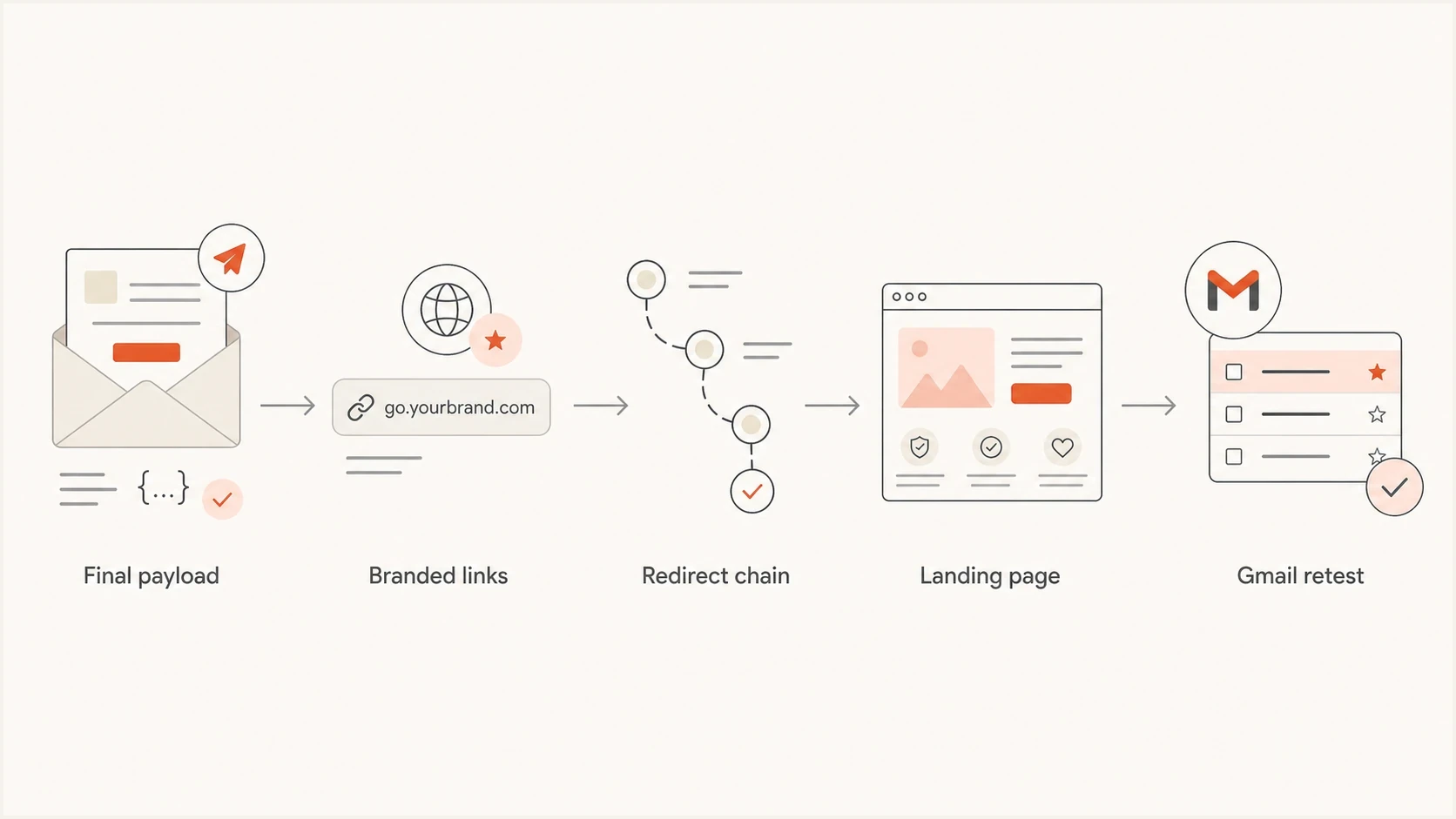
A five-step flowchart for auditing links in a SendGrid transactional email.
If the message uses multiple product links, shorten the path. A true transactional email should usually have one primary account action and a support route. Product education, upsell links, and churn-reduction content belong in a marketing or lifecycle stream.
Separate transactional mail from reactivation mail
The word transactional gets stretched too far. A password reset, receipt, security alert, invoice, or purchase confirmation is transactional. A renewal reminder can be transactional when it is factual and tied to an active account obligation. When it adds product links or save offers to reduce churn, Gmail can evaluate it more like promotional or reactivation mail.
Safer transactional version
- Purpose: States the account event clearly.
- Links: Uses one branded account link and one support link.
- Tone: Factual, expected, and specific to the account.
Riskier renewal version
- Purpose: Mixes account notice with retention messaging.
- Links: Adds product pages, login redirects, and promotional content.
- Tone: Persuasive, urgent, or unclear about the account event.
If your goal is to reduce churn, split the campaign. Keep the transactional renewal notice clean. Put education, product value, and save-offer content into a separate lifecycle message. That gives you cleaner complaint data and unsubscribe handling.
For senders above 5,000 messages per day to personal Gmail accounts, marketing and subscribed messages need RFC 8058 one-click unsubscribe headers plus a visible unsubscribe link in the body. A pure receipt, password reset, or account alert is outside that Gmail requirement, but a mixed-purpose renewal message can fall into the subscribed or promotional category.
Transactional mail can still receive complaints. Honor SendGrid spam-report, bounce, invalid-address, and unsubscribe suppressions. Do not bypass a suppression to force delivery, and use an appropriate unsubscribe group when the message contains lifecycle or promotional content.
Transactional risk levels
A practical way to classify renewal email risk before testing in Gmail.
Low risk
Clean notice
Clear account event, one branded action, authenticated domain.
Medium risk
Mixed purpose
Some product context, several links, mixed account and value copy.
High risk
Risk pattern
Urgent login request, thin landing page, generic tracking, churn copy.
If the same audience gets account notices and promotional recovery content through the same SendGrid subuser, split the streams. Use separate subdomains, templates, categories, and monitoring.
Check reputation and blocklists
Reputation problems can sit at the visible From domain, DKIM domain, return-path domain, tracking domain, sending IP, or destination pages. Gmail's own reputation model matters most, but blocklist and blacklist checks still uncover obvious IP or domain issues.
Blocklist checker
Check your domain or IP against 144 blocklists.
 Spamhaus
 0Spam
0Spam

 Cisco
Cisco
 NoSolicitado

 URIBL
URIBL
 abuse.ro
 ALPHANET
 Anonmails
 Ascams
 BLOCKEDSERVERS
 Calivent Networks


 EFnet
EFnet




 JustSpam
 Kempt.net
 NordSpam

 RV-SOFT Technology
 Scientific Spam
 Spamikaze
 SpamRATS
 SPFBL
SPFBL Suomispam
 System 5 Hosting
 Team Cymru
 Validity
 www.blocklist.de Fail2Ban-Reporting Service
 ZapBL
ZapBL 2stepback.dk
 Fayntic Services
 ORB UK
 technoirc.org
 TechTheftSpamhaus0SpamCiscoNoSolicitadoURIBLabuse.roALPHANETAnonmailsAscamsBLOCKEDSERVERSCalivent NetworksEFnetJustSpamKempt.netNordSpamRV-SOFT TechnologyScientific SpamSpamikazeSpamRATSSPFBLSuomispamSystem 5 HostingTeam CymruValiditywww.blocklist.de Fail2Ban-Reporting ServiceZapBL2stepback.dkFayntic ServicesORB UKtechnoirc.orgTechTheftSpamhaus0SpamCiscoNoSolicitadoURIBLabuse.roALPHANETAnonmailsAscamsBLOCKEDSERVERSCalivent NetworksEFnetJustSpamKempt.netNordSpamRV-SOFT TechnologyScientific SpamSpamikazeSpamRATSSPFBLSuomispamSystem 5 HostingTeam CymruValiditywww.blocklist.de Fail2Ban-Reporting ServiceZapBL2stepback.dkFayntic ServicesORB UKtechnoirc.orgTechTheftSpamhaus0SpamCiscoNoSolicitadoURIBLabuse.roALPHANETAnonmailsAscamsBLOCKEDSERVERSCalivent NetworksEFnetJustSpamKempt.netNordSpamRV-SOFT TechnologyScientific SpamSpamikazeSpamRATSSPFBLSuomispamSystem 5 HostingTeam CymruValiditywww.blocklist.de Fail2Ban-Reporting ServiceZapBL2stepback.dkFayntic ServicesORB UKtechnoirc.orgTechTheftSpamhaus0SpamCiscoNoSolicitadoURIBLabuse.roALPHANETAnonmailsAscamsBLOCKEDSERVERSCalivent NetworksEFnetJustSpamKempt.netNordSpamRV-SOFT TechnologyScientific SpamSpamikazeSpamRATSSPFBLSuomispamSystem 5 HostingTeam CymruValiditywww.blocklist.de Fail2Ban-Reporting ServiceZapBL2stepback.dkFayntic ServicesORB UKtechnoirc.orgTechTheft
Use blocklist monitoring for the domains and IPs that appear in the final message. Suped brings blocklist and blacklist results into the same workflow as DMARC, SPF, and DKIM checks, so you can separate authentication problems from reputation problems.
Do not overreact to one obscure blocklist or blacklist listing. Focus first on listings tied to the sending IP, the visible domain, or domains used in links. Check whether the Gmail spam problem lines up with a volume, IP pool, subdomain, template, or audience change.
IPv6 by itself is not a problem. Treat it like any other sending IP path: authenticate the mail, maintain valid forward and reverse DNS, monitor complaint patterns, and inspect the final headers. Do not assume IPv6 caused Gmail spam placement just because it appears in a test report.
SendGrid's spam best practices cover permission, relevance, authentication, and reputation. Use them as baseline hygiene, then use real Gmail tests and authentication data to identify the specific failure.
Check the SendGrid IP pool and volume changes
A sudden Gmail spam problem can begin even when the template and DNS records have not changed. The SendGrid message may have moved within a shared IP pool, a dedicated IP may be new or cold, or your volume and recipient mix may have changed faster than Gmail's reputation model expects. Find the actual sending IP in Gmail's raw headers before choosing a fix.
|
|
|
|---|---|---|
Shared pool | Other senders affect IP reputation | Document IPs and compare Gmail results |
New dedicated IP | The IP has little reputation | Increase wanted traffic gradually |
Idle dedicated IP | Reputation has gone cold | Ramp volume again |
Established IP | A recent behavior change is more likely | Audit complaints, recipients, and volume |
Match the IP path to the action it needs.
A dedicated IP is not an automatic deliverability fix. It isolates your reputation, which helps only when your own sending practices can build and maintain that reputation. Low-volume or irregular transactional traffic can perform better on a well-managed shared pool than on a dedicated IP that never develops stable history.
Do not move all traffic to a new dedicated IP at once. Start with expected messages to engaged users, keep the sending rate steady, and increase volume only while Gmail placement, bounces, and complaints remain stable. If the IP has been idle for more than 30 days, treat it as cold and ramp it again.
Run a controlled comparison test
The cleanest debugging method is a controlled comparison. Send one message through SendGrid and one through the stream that reaches Gmail inboxes. Keep the subject, From display name, visible From address, HTML, text part, and destination links as close as possible.
- Payload: Compare final HTML, plain text, image URLs, tracking URLs, and MIME structure.
- Headers: Compare return-path, DKIM signatures, SPF result, DMARC result, sending IP, and List-Unsubscribe.
- Links: Follow every redirect and confirm the destination page has clear brand context.
- Audience: Retest with an engaged Gmail user and a neutral test account.
- Timing: Check whether the issue started after a DNS, template, IP-pool, audience, or volume change.
Change one evidence-backed variable at a time. If the source contains sendgrid.net tracking links, fix link branding first. If DMARC fails, fix the aligned authentication path first. If both are clean, test content, landing-page, audience, and IP-path changes separately. Send a fresh production-like Gmail test after each change.
For a broader Gmail-specific checklist after the SendGrid fixes, this related guide on Gmail spam fixes covers domain age, engagement, content, and sender reputation in more depth.
How to prioritize the fix
Choose the first fix from the evidence in the message Gmail received. A fixed checklist can waste time when the failure is already visible in authentication results, wrapped URLs, the sending IP, or SendGrid event data.
|
|
|
|---|---|---|
sendgrid.net links | Brand link tracking | Connects redirects to your domain |
DMARC failure | Fix DKIM or SPF alignment | Authenticates the visible From domain |
Phishing-style warning | Audit URLs and landing pages | Removes suspicious request patterns |
Recent IP or volume change | Stabilize and ramp traffic | Builds predictable reputation |
Mixed renewal purpose | Split transactional and lifecycle mail | Protects account-mail reputation |
Prioritize the signal that appears in the final message.
Suped supports this workflow by connecting DMARC monitoring, authentication diagnostics, blocklist and blacklist monitoring, and alerts. For a SendGrid issue, that helps identify whether the failing source, domain, or DNS record changed before the Gmail placement problem began.
A stable setup uses a branded SendGrid subdomain, aligned authentication, DMARC monitoring, branded tracking links, clean transactional copy, and alerts when authentication or reputation changes.
For MSPs and teams managing multiple brands, Suped's multi-tenancy dashboard and client reporting separate domains and policy stages so each transactional stream can be diagnosed on its own evidence.
Views from the trenches
Best practices
Check Gmail's exact spam warning before changing DNS or rewriting the email template.
Compare a failing SendGrid payload with a working stream and document every difference.
Use branded tracking links so Gmail sees your domain through the full click path.
Common pitfalls
Treating a churn-reduction renewal message as purely transactional increases complaint risk.
Leaving generic SendGrid click links in production can create a visible identity mismatch.
Ignoring the linked landing page misses a common trigger for Gmail phishing warnings.
Expert tips
Keep transactional renewal notices factual and move product education to lifecycle mail.
Inspect final MIME output because previews do not show tracking domains and headers.
Treat IPv6 as normal sending infrastructure and focus on authentication and reputation.
Marketer from Email Geeks says Gmail's own warning in the spam folder should guide the investigation because reputation, content, and phishing warnings point to different fixes.
2024-08-07 - Email Geeks
Expert from Email Geeks says a renewal email with product links can behave like reactivation mail, so teams should review whether the message is truly transactional.
2024-08-08 - Email Geeks
Stabilize the SendGrid stream
Make the SendGrid stream technically consistent with trusted mail from your domain. Authenticate the sending domain, pass DMARC through aligned DKIM or SPF, use branded link tracking, simplify the renewal email, and give linked pages clear account context. If Gmail still flags the message, separate critical account mail from lifecycle content and investigate the IP path and recent traffic changes.
Suped can keep that operating view in one place through authentication monitoring, source-level diagnostics, blocklist and blacklist checks, and alerts. For this SendGrid problem, the practical value is seeing which source, domain, or record needs attention when placement changes.




