Why are my marketing emails moving from Gmail inbox to spam?

Updated on 6 Aug 2026: We updated this guide for Gmail's current sender requirements and a clearer inbox-to-spam diagnosis.
If your marketing emails appear in Gmail's inbox and unread copies show up in spam later, first prove whether the exact same message moved. Gmail normally makes its spam-placement decision as mail arrives. A later move in one seed account more often points to another mail client, a Gmail filter, connected mailbox access, or a user action. If different campaign copies land in different folders, investigate complaints, engagement, URLs, list quality, sending patterns, and authentication.
A High domain or IP rating in Google Postmaster Tools is useful, but it does not guarantee inbox placement for every campaign. Postmaster data is aggregated, delayed, and sometimes absent when Gmail traffic is too low. Authentication gets the message accepted and tied to the right domain. Inbox placement still depends on complaints, engagement, URL reputation, content, list quality, and account-level behavior. The fastest useful check is a real send through an email tester, then a controlled Gmail account audit.
Start by proving what moved
The most important distinction is whether the same Gmail message moved after delivery or a later copy of the campaign landed in spam. Those events lead to different fixes. Same-message movement points first to Gmail filters, client-side filtering, mailbox rules, connected apps, or account activity. Later-copy spam placement points to filtering at delivery after Gmail receives more campaign-level signals.
Prove the movement first
Before changing DNS, sending IPs, or the whole template, capture evidence. In Gmail, open the original message, use Show original, and save the Message-ID, authentication results, delivery time, and current folder. If the same Message-ID later appears in spam, you have a real movement event. If the Message-ID differs, you have a later delivery problem.
Same message moved
- Evidence: The same Message-ID was in inbox first and spam later.
- Likely causes: Account rules, connected apps, client spam filtering, or mailbox activity.
- Next check: Disconnect mail apps and test with a clean Gmail seed account.
Later delivery changed
- Evidence: The inbox copy and spam copy have different Message-ID values.
- Likely causes: Campaign complaints, weak engagement, URL reputation, or sending changes.
- Next check: Compare early and late sends by segment, URL set, and complaint rate.
Why a message can appear to move after delivery
Gmail usually decides spam placement when a message arrives. When a message was visible in the inbox and later appears in spam, check account-level activity first: a Gmail filter, a synced mail client, a phone mail app, a browser extension, forwarding, or another app with mailbox access. These systems can change labels or folders in a way that looks like Gmail changed its decision.
Gmail can still treat later copies of a campaign differently. Rapid spam complaints, recipients deleting or ignoring the mail, risky link traffic, abrupt volume changes, or repeated sends to inactive people can worsen later placement. Google guidance is worth checking, but it will not replace your own evidence trail.
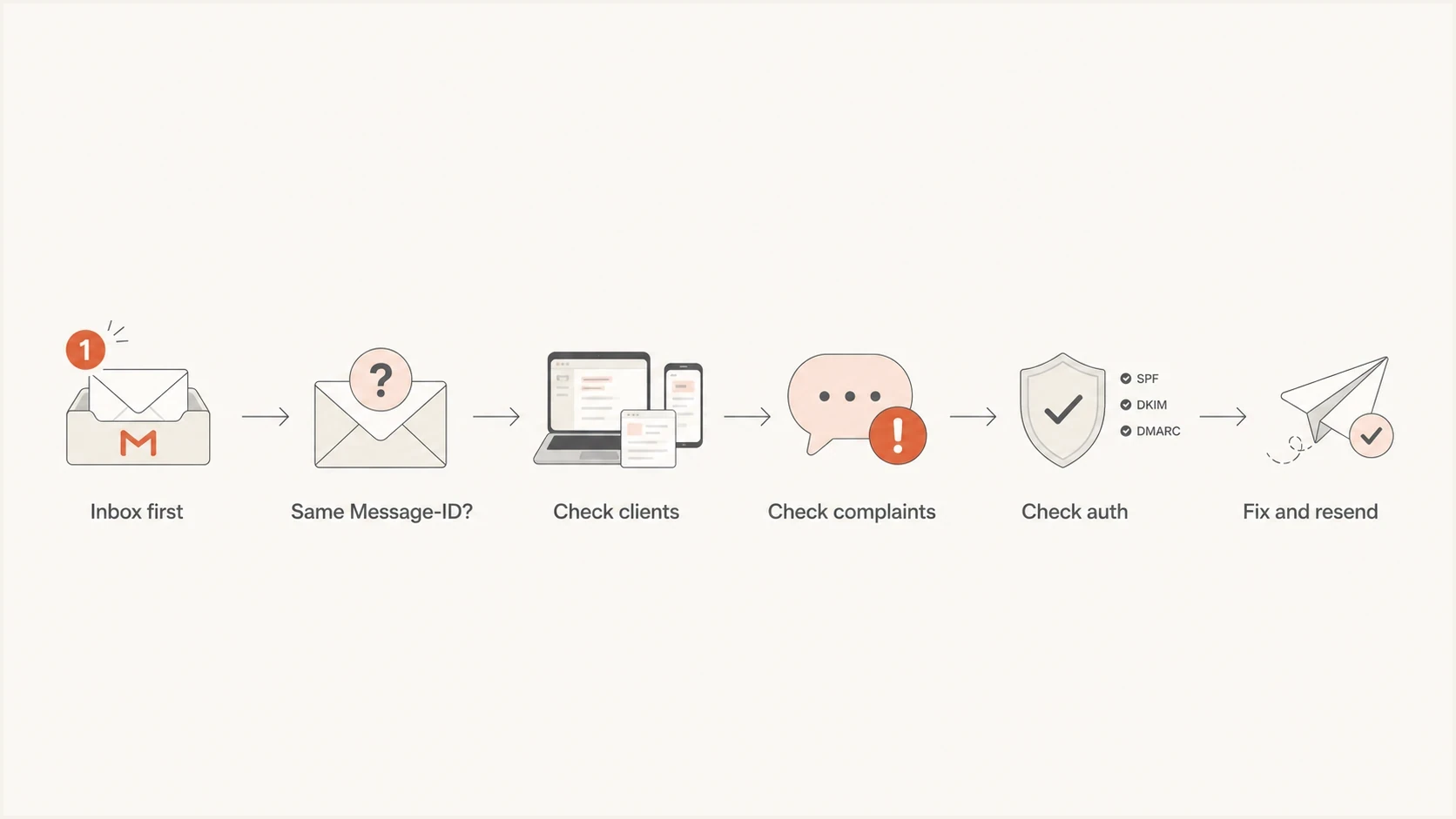
Diagnostic flowchart for marketing emails moving from Gmail inbox to spam.
This is also why small internal seed tests mislead senders. Ten Gmail accounts that you own, check repeatedly, and connect to the same devices are not the same as a live subscriber audience. Seed accounts are useful for headers and folder checks, but they are weak proof of real recipient placement unless the accounts are clean, independent, and not touched by the same apps.
How to diagnose the Gmail placement change
Use a fixed order because it keeps the diagnosis grounded. If you start by changing IP warmup, domain rotation, or the whole creative, you create new variables and lose the baseline. Start with the message, then the mailbox, then Gmail's sender signals, then the domain setup.
- Save the inbox copy's Message-ID, then compare it with the spam copy.
- Test in a Gmail account used only through the Gmail web interface.
- Remove phone apps, desktop clients, browser extensions, and other mailbox connections during testing.
- Ask independent subscribers to confirm folder placement and share raw headers.
- Check Postmaster spam rate, reputation, delivery errors, authentication, and Compliance status.
- For bulk traffic, confirm SPF and DKIM authenticate, DMARC is published, and SPF or DKIM produces a DMARC domain match with the From address.
- Separate older opt-ins, recent buyers, inactive contacts, and new subscribers.
This is where a live seed send matters more than a template preview. Send the real campaign through the same sending domain, return-path, DKIM selector, links, footer, and unsubscribe headers. A watered-down test message does not exercise the same Gmail decision path.
Email tester
Send a real email to this address. Suped shows a results button when the test is ready.
?/43tests passed
After that test, compare the raw result with what Gmail shows. If the test shows matching authentication but Gmail still moves unread seed mail, focus on mailbox access, user-level rules, complaints, URLs, and list segments rather than making random DNS edits.
Check Gmail's current sender requirements
Gmail now enforces sender requirements for mail sent to personal Gmail accounts. The additional bulk-sender rules apply when a primary domain sends close to 5,000 messages or more to personal Gmail accounts in 24 hours. Traffic across subdomains counts toward the same primary-domain total, and Gmail keeps the bulk-sender classification after a domain reaches it. Check the Google sender guidelines before changing campaign infrastructure.
- All senders need SPF or DKIM, valid forward and reverse DNS, TLS, RFC 5322 formatting, and a Postmaster spam rate below 0.3%.
- Bulk senders need both SPF and DKIM authentication plus a DMARC record with at least p=none.
- For direct bulk mail, the From domain must match the authenticated SPF domain or DKIM signing domain at the organizational-domain level.
- Marketing and subscription mail needs RFC 8058 one-click unsubscribe headers plus a clearly visible unsubscribe link in the message body.
- Process unsubscribe requests within 48 hours and use separate list identifiers when recipients can leave one campaign stream without leaving all mail.
- Keep the user-reported spam rate below 0.1% and prevent it from reaching 0.3% or higher.
Required one-click unsubscribe headerstext
List-Unsubscribe-Post: List-Unsubscribe=One-Click
List-Unsubscribe: <https://example.com/unsubscribe/opaque-id>
Use the Postmaster Tools Compliance dashboard to find a requirement failure, then inspect the raw headers and SMTP response for the affected traffic. Postmaster data is not real time, and dashboards can be empty when Gmail traffic is below its privacy threshold.
Verify SPF, DKIM, and the DMARC domain match
Good reputation in Postmaster Tools does not mean every technical requirement is satisfied. Gmail requires SPF or DKIM for all senders to personal Gmail accounts. Bulk senders need both SPF and DKIM, a DMARC record, and a From domain that matches the authenticated SPF or DKIM domain. A domain health check should also verify forward and reverse DNS, TLS, and the exact source used for the campaign.
Example records to verifydns
example.com TXT "v=spf1 include:send.example.net -all"
selector._domainkey.example.com TXT "v=DKIM1; k=rsa; p=BASE64KEY"
_dmarc.example.com TXT "v=DMARC1; p=none; rua=mailto:d@example.com"
Suped's product helps when the issue is not one obvious record failure. Its DMARC monitoring maps aggregate reports to sending sources and shows where SPF, DKIM, or the DMARC domain match changes. That is useful when a sender was added quietly, a selector stopped signing, or a source passes SPF but uses the wrong return-path domain.
Issues page showing top issues, verified sources, unverified sources, and authentication pass rates
The practical Suped workflow is to add the domain, collect DMARC reports, confirm each legitimate sender, resolve unverified sources, and alert on authentication drops. Agencies and managed service providers can keep client domains separate while reviewing policy, senders, and unresolved issues in one dashboard.
Complaint rate and reputation thresholds
Google tells senders to keep the user-reported spam rate below 0.1% and prevent it from ever reaching 0.3% or higher. A rate below 0.3% does not mean a campaign is healthy. The lower bands below are internal operating targets, not promises of Gmail inbox placement. If Gmail sees a complaint burst early in a campaign, later recipients can get worse placement even when the daily average looks acceptable.
Gmail spam complaint bands
Practical campaign targets within Google's published limits, not a promise of inbox placement.
Healthy
Under 0.05%
Low complaint pressure for a marketing campaign.
Watch
0.05-0.10%
Check segments, content, and frequency before scaling.
High risk
0.10-0.30%
Above Google's recommended target; reduce volume and isolate complaints.
Critical
0.30%+
At or above Google's ceiling; pause broad sends and repair consent.
Open rate slowing at the same time your seed account moves mail to spam is a clue, not proof. Opens depend on image loading, caching, recipient behavior, time zone, and send speed. Compare open rate with clicks, unsubscribes, complaint rate, delivery errors, and live recipient confirmations before calling it a placement collapse.
|
|
|
|---|---|---|
Message ID | Same folder | Same ID moved |
Client access | Web only | Synced clients active |
Spam rate | Below 0.1% | 0.3% or higher |
DMARC | Pass | Fail |
Signals that separate account issues from campaign issues.
Reputation, links, and list quality
If authentication passes, the next common cause is the audience. A list collected over years can still degrade. People change interests, forget they opted in, stop recognizing the brand, or receive too many promotions. Gmail cares about current recipient behavior, not only the original consent event.
Check every link domain in the message. A promoted URL, redirect domain, image host, tracking domain, or shortened URL can carry its own reputation. A blocklist (blacklist) listing can expose a wider domain or IP problem, but it does not prove Gmail consults that particular list. Suped's blocklist monitoring keeps blocklist and blacklist findings beside domain and IP history so you can compare them with the timing of the Gmail change.
Do not fix this by sending more
- Send a smaller reactivation segment before including dormant subscribers.
- Use recent buyers as a separate segment to test whether the issue is list-wide.
- Test links, subject line, image load, and footer before scaling new creative.
- Use RFC 8058 one-click headers and keep a visible unsubscribe link in every marketing template.
For a broader recovery plan, this Gmail spam folder fix covers the cleanup path after you confirm the problem affects real recipients.
What to change first
Once the evidence is clear, change the lowest-risk variable first. If only your own Gmail seeds show the move, isolate the accounts and remove connected clients. If independent Gmail seeds and real subscribers see the same placement change, reduce volume and fix the campaign signals. If authentication fails for any sending source, fix that before the next broad send.
- If same-message movement is confirmed, audit Gmail filters, forwarding, mailbox access, phone mail apps, and shared account activity.
- If later sends go to spam, pause the full list, split recent engagers, and compare creative and links.
- If complaints rise, suppress inactive contacts, lower frequency, and make the unsubscribe path easier.
- If authentication fails, repair SPF, DKIM, or the DMARC domain match for the exact campaign source.
- If URLs changed, remove risky redirects, check the tracking domain, and resend only to engaged users.
Suped's product keeps this workflow connected by mapping DMARC reports to sending sources, authentication results, policy status, blocklist and blacklist findings, and change alerts. Use it to identify which source changed before editing DNS or pausing unrelated mail.
Views from the trenches
Best practices
Confirm the same Gmail message ID moved before changing DNS, IPs, or campaign content.
Keep test Gmail accounts web-only during diagnosis so mobile clients cannot alter folders.
Compare real subscriber evidence with seed accounts before judging inbox placement at scale.
Watch complaint rate, unread volume, and URL reputation together after each campaign.
Common pitfalls
Treating one seed inbox move as proof that every customer account has the same issue.
Relying on open-rate drops alone, because image loading and timing distort the signal.
Assuming High Postmaster reputation cancels out content, list, or client-side problems.
Changing SPF, DKIM, and DMARC records before checking whether authentication failed.
Expert tips
Archive raw headers from inbox and spam copies so the message path can be compared later.
Pause broad sends when spam complaints rise, even if the dashboard still looks green.
Create independent Gmail seeds that are not connected to phone apps or shared filters.
Segment older opt-ins separately when a campaign change causes a sudden Gmail shift.
Expert from Email Geeks says the first job is to prove whether the exact same Gmail message moved, because later deliveries going to spam require a different diagnosis.
2025-06-24 - Email Geeks
Expert from Email Geeks says Gmail rarely moves a read inbox message to spam, so unread-only movement points toward account rules, mail apps, or a later safety signal.
2025-06-24 - Email Geeks
Why marketing emails move to Gmail spam
If the exact same Gmail message moves after delivery, investigate filters, synced clients, connected apps, and account activity first. If later campaign copies land in spam at delivery, investigate complaints, weak engagement, risky links, abrupt volume changes, and authentication failures on the sending source.
The fix starts with proof. Match Message-ID values, test with clean Gmail accounts, confirm independent recipients, inspect Postmaster data, and verify the full Gmail sender checklist. Change one variable at a time once you know which path applies. Suped's product keeps DMARC reports, source verification, authentication alerts, and blocklist monitoring in the same workflow.




