Why are my Mailchimp emails showing as delivered but not reaching the inbox, spam folder, or anywhere at all?

Published 26 Apr 2025
Updated 28 Jul 2026
11 min read
Summarize with
Updated on 28 Jul 2026: We clarified Mailchimp delivery reporting and corrected the Gmail clipping threshold, including the current RFC 9989 DMARC example.
If Mailchimp shows an email as delivered but the recipient cannot find it in the inbox, spam folder, Promotions tab, archive, or search, the most likely answer is that Mailchimp recorded a completed send or no bounce. Neither status proves the message reached a visible mailbox folder.
After acceptance, the receiving system can quarantine the message, delay internal processing, route it through a mailbox rule, place it in a security portal, or silently drop it. Mailchimp no longer controls the message at that point, and the sender often gets no bounce because the receiving server already accepted responsibility for it.
Start by separating two questions: did Mailchimp finish the campaign without recording a bounce, and did the recipient's mailbox make the message visible? A controlled seed test with Suped's email tester and recipient-side checks help answer the second question.
Mailchimp's current troubleshooting guidance points to spam filters, corporate firewalls, allowlisting, provider throttling, and authentication. Its Mailchimp help page is useful, but the practical task is to confirm which receiving domains are affected and whether the missing messages share a pattern.
Check which Mailchimp delivery status you mean
Mailchimp uses delivery language in more than one reporting context. Before troubleshooting inbox placement, record the exact label and screen being viewed.
|
|
|
|---|---|---|
Campaign delivered | Delivery Insights says the campaign completed sending | Every recipient server accepted it |
Successful delivery | No hard or soft bounce was registered for that recipient | A visible inbox or spam-folder placement |
Sent | Mailchimp completed its sending process | Final recipient-side routing |
The Mailchimp label determines what the available evidence proves.
Start with the report context
A campaign-level completion badge is weaker evidence than a recipient record, and a recipient record without a bounce still stops at the receiving system boundary.
What happens after the receiver accepts the email
When the receiving mail server accepts a message during SMTP delivery, Mailchimp has handed it to Gmail, Microsoft, Yahoo, a corporate mail gateway, or another receiving system without an immediate hard rejection. The receiver still controls internal scanning and mailbox routing.
Delivered is not inboxed
An accepted message does not prove inbox placement, spam-folder placement, or final mailbox visibility. The receiver can make more filtering decisions after the handoff.
This is why controlled tests can produce different results. One Gmail account gets inbox placement, another gets Promotions, another gets spam, and another appears to get nothing. The sending event can be identical while account history, filter models, mailbox configuration, and domain policy differ.
What Mailchimp can confirm
- Successful delivery: No hard or soft bounce was registered for the recipient.
- Bounced: The receiver returned a rejection that Mailchimp could process.
- Deferred: The receiver delayed acceptance and Mailchimp retried delivery.
What Mailchimp cannot prove
- Inbox: The message appeared in the primary visible inbox.
- Folder: The message landed in spam, Promotions, archive, or a rule folder.
- Quarantine: A security gateway held or deleted the message after acceptance.
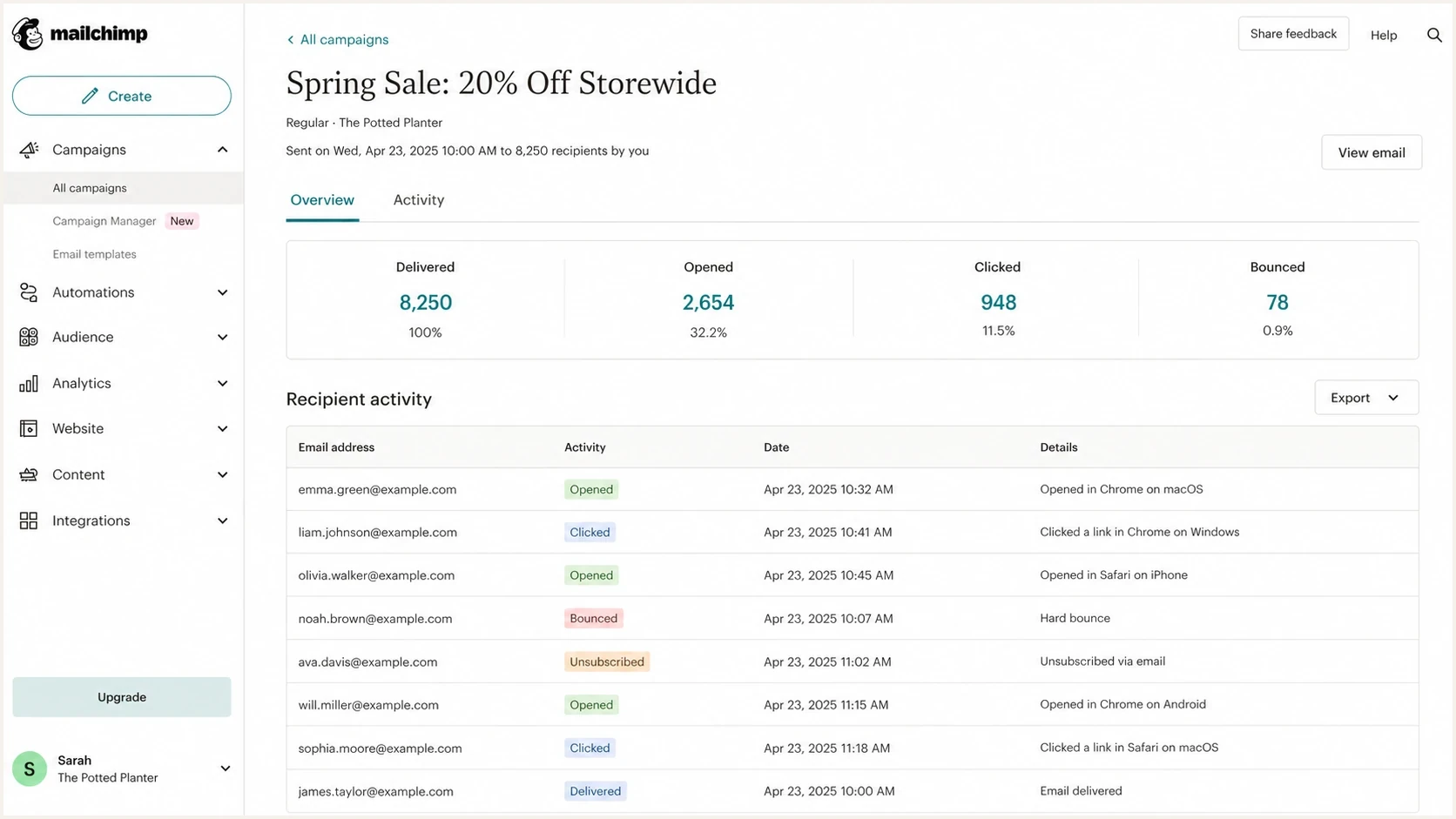
Mailchimp campaign report with delivered status separate from final inbox placement.
The most common reasons the message disappears
Do not assume one root cause. Group the evidence by receiving domain, subscriber engagement, report status, message-code size, and send time. The same campaign can have more than one failure mode.
- Quarantine: A corporate gateway accepts the message, then holds it in an admin-only quarantine that the recipient never checks.
- Silent drop: A receiving system accepts the message, then deletes it under a local filtering policy without sending a bounce.
- Mailbox rules and forwarding: A user rule, alias, shared mailbox policy, or forwarding path routes the message outside the places the recipient checks.
- Post-acceptance delay: The receiving system queues internal scanning or routing after it has accepted the message.
- Heavy creative: Oversized HTML can be clipped in Gmail, and large hosted images can load slowly. Neither result proves non-delivery.
- Low engagement: Long-term non-engagers often receive stricter filtering than recent openers and clickers.
|
|
|
|---|---|---|
Quarantine | Corporate gateway | Admin trace |
Silent drop | Receiving system | Domain pattern |
Rule or forward | Mailbox routing | All folders and aliases |
HTML over 102 KB | Gmail clipping | HTML source size |
Fast cause mapping for Mailchimp messages marked delivered but not found.
A silent drop is plausible when the problem clusters at one private or corporate domain and the recipient cannot find the message in any folder. Confirm it with an administrator trace or gateway log instead of inferring deletion from a missing open.
Authentication can pass and placement can still fail
Mailchimp domain verification and authentication are different. Verification confirms access to the From address, while authentication adds the DKIM and DMARC records Mailchimp provides for a domain you control. SPF, DKIM, and DMARC can pass while the message still lands in spam, quarantine, or a hidden folder because receivers also use reputation, engagement, complaint history, content, and recipient-specific signals.
Check the sender domain with Suped's domain health checker, then review aggregate DMARC reports to see which sources pass, fail, or send without a DMARC pass for the visible From domain. Suped's DMARC monitoring groups source behavior, DMARC results, authentication failures, and fix steps in one workflow.
Example DMARC record for monitoringDNS
v=DMARC1; p=none; rua=mailto:dmarc-reports@example.com
The example omits pct because RFC 9989 classifies that tag as historic. New DMARC records should not use it.
Authentication checks to look for
- SPF: Confirm the envelope sender passes SPF, and do not publish a second SPF record for the domain.
- DKIM: Confirm Mailchimp signs with the authenticated domain. Current manual setup uses two CNAME records.
- DMARC: Confirm SPF or DKIM produces a DMARC pass for the visible From domain.
- Reputation: Check whether domain or IP reputation shows blocklist or blacklist pressure.
Suped's blocklist monitoring helps connect a Mailchimp placement issue to domain and IP signals. A blocklist (blacklist) hit does not always explain a disappearance, but it is a high-signal item when several receiving domains degrade at once.

Issue steps to fix dialog showing the issue overview, tailored fix steps, and verification action
How to troubleshoot this in order
Treat this as a controlled test. The goal is to collect enough evidence that the next action follows directly from the result.
- Identify: Record whether the screen says Sent, Campaign delivered, Successful delivery, or another status.
- Segment: Export the missing recipients and group them by domain, provider, recent engagement, and send time.
- Confirm: Ask an affected recipient to search all folders and check rules, aliases, quarantine, and security digest emails.
- Trace: For corporate domains, ask the administrator for a message trace using the sender, recipient, subject, and timestamp.
- Retest: Send the same content to seed accounts at Gmail, Microsoft, Yahoo, and one affected corporate domain.
- Measure: View or save the message source and check the HTML code size. Keep it below 102 KB for Gmail.
- Compare: Run a lean control and designed version with the same subject, From address, segment, and send window.
- Pause: Hold back long-term non-engagers while reviewing domain reputation and complaint patterns.
If the issue clusters around Mailchimp and Gmail, compare it with Mailchimp spam shifts before changing sending frequency.
Mailchimp's spam filter guidance provides a useful content checklist. Test the exact email because template code, links, hosted images, sender reputation, and audience history affect each send.
Email tester
Send a real email to this address. Suped shows a results button when the test is ready.
?/43tests passed
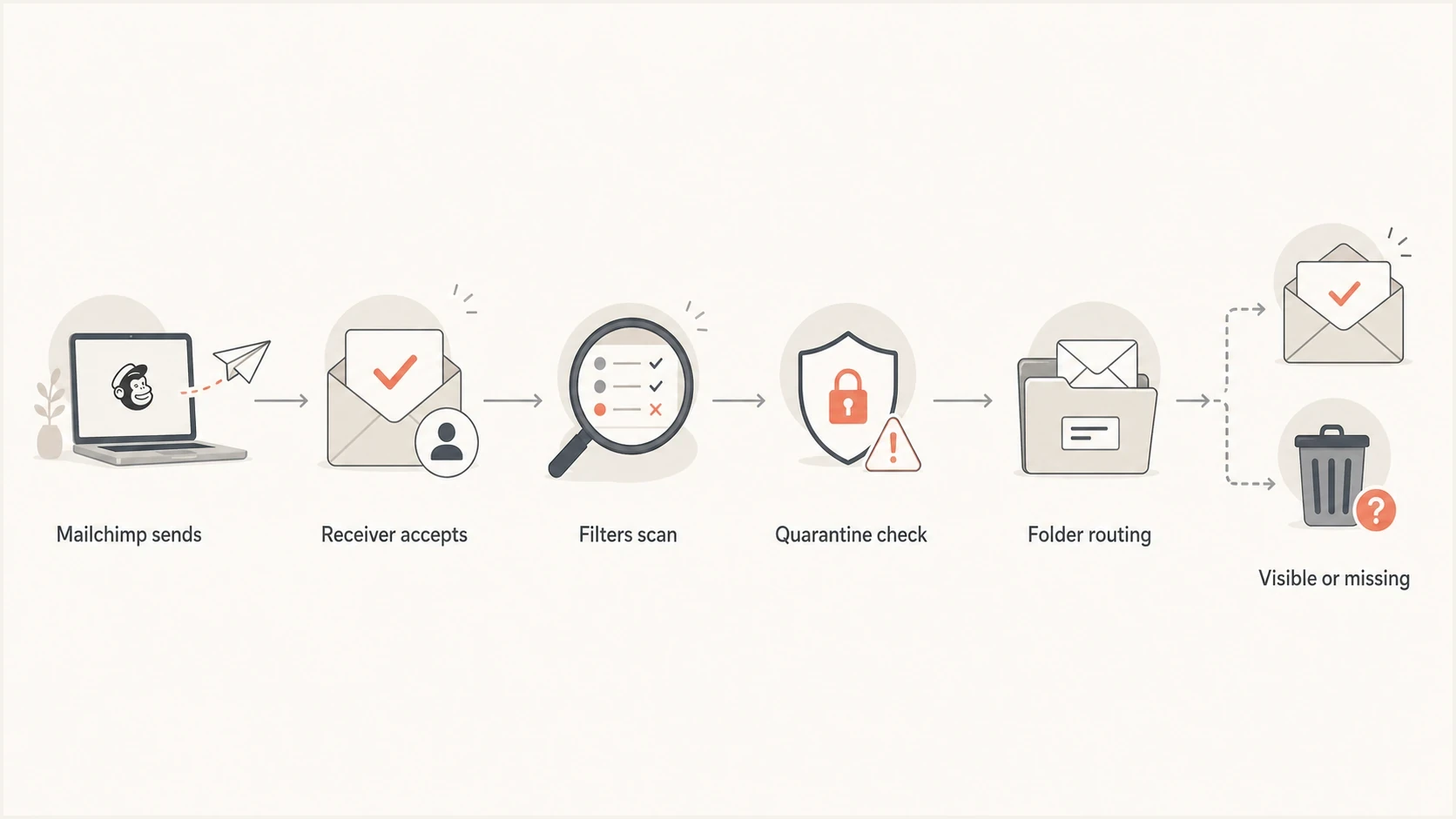
Flowchart showing how a delivered Mailchimp email can become visible, quarantined, or missing.
Message size affects clipping, not proof of delivery
Mailchimp documents that Gmail clips message code above 102 KB. That code includes text, URLs, tracking code, and HTML. Remotely hosted image file weight is separate. Clipping hides the end of the message and can prevent the open-tracking pixel from loading, but it does not explain an email that is absent from every folder.
Gmail message-code size
Use these points to test HTML source size, not the combined download weight of hosted images.
Comfortable margin
Under 80 KB
Leaves room for generated tracking code and last-minute edits.
Watch closely
80-102 KB
Measure the final delivered source after Mailchimp adds tracking.
Clipping expected
Over 102 KB
Gmail hides the remaining content behind a View entire message link.
Separate image issue
Hosted files
Large hosted files can load slowly but are outside the 102 KB code calculation.
Image-only campaigns also reduce accessible text and make the offer harder to understand when images are blocked. Use live HTML text to explain the offer and descriptive alt text for essential images. Compress hosted assets for load speed, but measure the raw HTML source separately.
Best first creative test
Duplicate the campaign, remove hidden formatting and unused code, then check the final source below 102 KB. Keep the From address, subject, audience segment, and send window consistent so the result is easier to interpret.
When the receiving side is the cause
If missing messages cluster at one company domain or at Microsoft-backed corporate accounts, treat the receiving environment as the main suspect. A corporate gateway can accept the message, scan it after acceptance, and move it into quarantine without making it visible to the end user.
Consumer mailbox pattern
- Gmail: Check Primary, Promotions, Spam, All Mail, and search by sender.
- Yahoo: Look for delays, spam placement, and account-level blocked-sender rules.
- Apple: Check privacy-related engagement gaps before assuming non-delivery.
Corporate mailbox pattern
- Microsoft: Ask for a trace and quarantine review, not only a user mailbox search.
- Gateway: Security filters can hold or remove accepted mail after SMTP handoff.
- Allowlist: If allowlisting makes the message appear, the receiver was filtering it.
The fastest confirmation is a recipient-side message trace. If the trace says delivered to quarantine, deleted by policy, or released after allowlisting, the Mailchimp status can still be accurate while the receiving system made the final placement decision.
Where Suped fits
Suped cannot make a recipient gateway show a message that it chose to hide. Suped's product provides visibility into the parts the sender controls: authentication, DMARC results, SPF lookup limits, DKIM status, blocklist and blacklist pressure, and sudden failure spikes.
Suped groups DMARC reporting, hosted SPF, hosted DMARC, hosted MTA-STS, alerts, and issue-resolution steps in one workflow. This is useful when Mailchimp is one sender among transactional systems and corporate mail streams.
- Detection: Suped flags authentication and reputation issues before they become long-running delivery problems.
- Guidance: Issue pages show the likely cause and practical steps to fix it.
- Operations: MSP and multi-domain views keep Mailchimp, transactional senders, and corporate mail in one account.
- Control: Hosted SPF and SPF flattening reduce DNS change work when senders change.
Suped DMARC dashboard showing email volume, authentication health, and source breakdown
Views from the trenches
Best practices
Separate Mailchimp report status from recipient inbox visibility before making DNS changes.
Group missing recipients by domain, engagement age, report label, and HTML code size.
Keep Gmail message code below 102 KB to prevent clipping, then retest matched seeds.
Common pitfalls
Treating Mailchimp delivered as proof that the user should see the message in a folder.
Ignoring corporate quarantine because the recipient checked only inbox and spam.
Using a 500 KB delivery threshold when Gmail clips message code above 102 KB in testing.
Expert tips
Ask for recipient-side traces when one company domain has repeat invisible mail.
Check non-engagers over 60 to 120 days before blaming Mailchimp infrastructure alone.
Use a lean control email to isolate HTML size from reputation and recipient filters.
Marketer from Email Geeks says delivered usually means the receiver accepted the message, not that the mailbox displayed it.
2023-04-19 - Email Geeks
Marketer from Email Geeks says silent drops happen when a receiver accepts mail and then removes it during later filtering.
2023-04-19 - Email Geeks
What to do next
First identify the exact Mailchimp status. Then cluster affected recipients by domain, request a recipient-side trace where available, review authentication, and test final HTML source below 102 KB.
If the issue happens mostly at one corporate domain, ask for a trace and quarantine review. If it happens across Gmail and other consumer domains, focus on engagement, domain reputation, authentication, and matched seed tests before changing platforms.
Use Suped to monitor DMARC results and domain-side reputation while the Mailchimp tests stay controlled. That baseline helps separate an authentication change from a recipient filter or campaign-code issue.




