Why are my IP ranges facing deferred issues in Proofpoint?

Updated on 12 Aug 2026: We clarified how to separate Proofpoint reputation holds from downstream queue deferrals and updated the recovery steps for current DMARC and Proofpoint guidance.
Your IP ranges are facing deferred issues in Proofpoint because Proofpoint is temporarily slowing or refusing mail from those IPs based on reputation, recent traffic patterns, policy signals, or authentication quality. A 421 deferral is a temporary SMTP failure, not a permanent bounce, and a clean result on the Proofpoint blacklist or blocklist lookup does not prove the IP has no reputation problem.
Treat this as an evidence problem first. Gather the full SMTP transcript, exact source IP, timestamps, sender domain, recipient domain, queue ID, and a sample message. Compare that evidence against sending volume, complaint spikes, authentication failures, and recent abuse actions. If customers or tenants share the traffic, isolate the sender that changed the reputation signal.
For a live message test, send a controlled email through an email tester and compare the result with your bulk stream. If the control message passes but bulk mail defers, the issue is usually traffic quality, volume pattern, or recipient-side reputation history rather than a broken DNS record alone.
The direct answer
When a receiving Proofpoint gateway issues the deferral, it has decided that accepting mail immediately is risky. That decision can be based on an individual IP, a CIDR range, neighboring IP behavior, sender history, recipient complaints, spam-trap hits, authentication failures, malformed traffic, or a sudden shift in volume. The visible error usually looks simple, but the cause sits in the mail stream.
Common SMTP responsetext
421 Deferred - please refer to
https://ipcheck.proofpoint.com/?ip=203.0.113.10
Important distinction
A Proofpoint blacklist page can show that an IP is not blocked while Proofpoint still defers live mail. Dynamic reputation entries can expire quickly, and some policy decisions are not exposed as a public blocklist result.
- Traffic quality: Recent spam, cold outreach, purchased addresses, high unknown-user rates, or repeated low-engagement sends can trigger deferrals.
- Range reputation: Proofpoint can treat part of a range as risky when abuse patterns cluster around the same organization or routing path.
- Hosting history: Newly assigned or low-history VPS and cloud ranges can inherit weak range reputation even when the individual IP is configured correctly.
- Volume change: A fast increase in message volume, new customer traffic, or a different campaign mix can look risky before reputation catches up.
- Authentication gaps: SPF, DKIM, DMARC, PTR, HELO, and visible From domain problems make a borderline reputation signal worse.
- Temporary holds: A short-lived dynamic reputation hold can disappear before a sender checks the public Proofpoint lookup page.
First identify which system issued the deferral
The phrase deferred in Proofpoint can describe two different mail-flow problems. An external sender can be deferred by a receiving Proofpoint gateway, or Proofpoint can accept a message and later queue it because the downstream server returned a temporary error. Find the SMTP hop that produced the 4xx response before changing reputation, DNS, or queue settings.
|
|
|
|---|---|---|
421 with a Proofpoint IP Check URL | Receiving Proofpoint gateway | Sender IP reputation and traffic |
stat=Deferred: followed by a downstream 4xx | Downstream MTA | The relay response and recipient policy |
Bare stat=Deferred with a delayed retry | Proofpoint queue or HostStatus behavior | SMTP logs, Sendmail logs, and HostStatus |
How to locate the source of a Proofpoint deferral
For Proofpoint Email Protection delivering to Exchange Online, ConnectionReset events can cause Proofpoint to mark a downstream host as bad and delay retries. Microsoft's configuration guidance recommends starting with 199 messages per SMTP connection, adjusting queue runners to preserve throughput, clearing affected HostStatus entries, and setting an appropriate retry interval. It also recommends disabling HostStat for this topology. Proofpoint Email Protection Cloud Service customers need Proofpoint Support to make that change.
Do not mix the two recovery paths
A Proofpoint delist request addresses sender reputation. It does not fix a downstream ConnectionReset, HostStatus entry, or retry configuration. Queue changes do not rehabilitate an IP that Proofpoint Dynamic Reputation is deferring.
Why the Proofpoint lookup can look clean
The public IP lookup is useful, but it is not a full explanation of every Proofpoint decision. It can confirm an active listing at the time you check it. It does not always preserve the historical reason for a 421 response, and it does not expose every scoring input. That is why the same IP can show no active blacklist entry while your logs still show deferred messages.
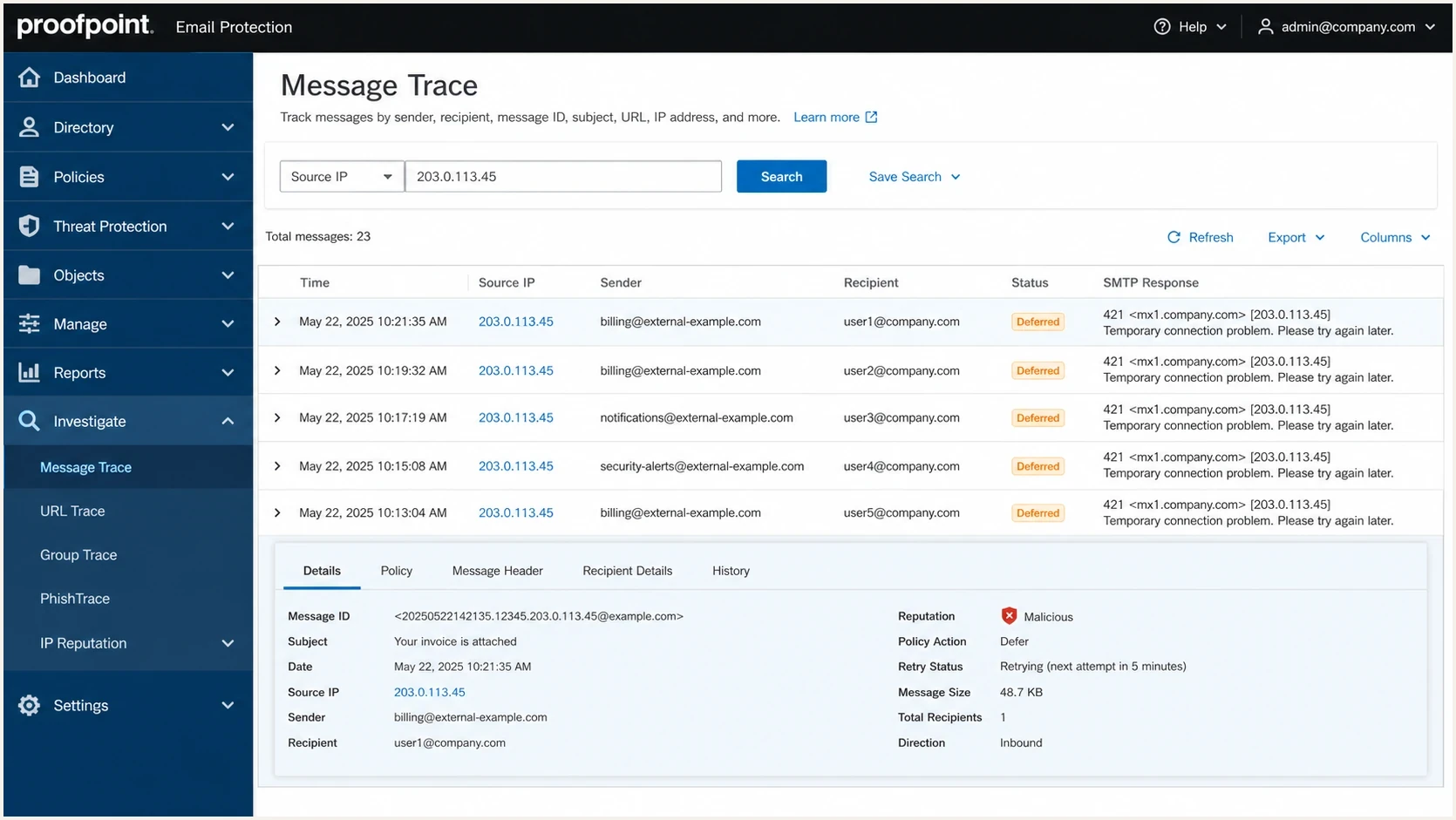
Proofpoint Email Protection screen showing message trace rows with 421 deferred responses.
When the lookup is clean, use time-based evidence. Check whether the affected mail was retried successfully later, whether only Proofpoint-protected recipients were affected, and whether deferrals started after a specific sender, campaign, list import, or IP warm-up step. The answer is often visible in the timing.
Lookup page
- Current state: It usually tells you whether the IP has an active public Proofpoint reputation action.
- Limited detail: It does not give you the full scoring history, tenant-level pattern, or message-level cause.
- Fast expiry: The state can change before a postmaster or deliverability team checks the page.
Mail logs
- Exact proof: Your logs show the source IP, recipient domain, time, retry behavior, and SMTP response.
- Pattern view: You can compare affected domains, campaigns, users, and sending pools.
- Action path: Logs point to the sender, template, list source, or IP pool that needs remediation.
What to check before contacting Proofpoint
Before escalating, build a short packet of facts. Proofpoint support or a recipient admin has a much better chance of helping when the request includes the exact source IP and timestamp together with the complete SMTP response. Masking the IP makes the case harder because the reputation signal is tied to the IP.
- Identify scope: Confirm whether the issue affects one IP, a subnet, one sender domain, one tenant, or the whole sending platform.
- Check authentication: Validate SPF, DKIM, DMARC, forward-confirmed reverse DNS, HELO, and TLS behavior for the exact mail stream that was deferred.
- Review abuse: Look for complaint spikes, bad imports, new signups, compromised accounts, and senders using collected addresses.
- Compare providers: Check whether Microsoft, Yahoo, Gmail, and corporate gateways show the same pattern or only Proofpoint does.
- Document fixes: Record sender suspensions, list removals, rate limits, warm-up changes, and authentication repairs.
Run a broader domain health checker check because Proofpoint deferrals often sit next to small DNS or identity issues. A domain can pass one authentication check and still have weak reverse DNS, a mismatched HELO name, duplicate SPF records, or inconsistent DKIM signing. For forward-confirmed reverse DNS, the PTR should name a valid host whose A or AAAA record resolves back to the sending IP.
?
What's your domain score?
Deep-scan SPF, DKIM & DMARC records for email deliverability and security issues.
For a shared platform, the root cause is often tenant-level. One sender can poison a pool for everyone else if the pool has no hard separation by risk. Use separate pools for transactional mail, engaged marketing mail, new customers, high-risk imports, and remediation traffic.
A practical recovery plan
Stop the bad traffic, slow the affected pool, prove authentication is clean, and retry with controlled volume. Do not keep blasting the same stream while waiting for a reply. Repeated attempts can reinforce the bad signal.
|
|
|
|---|---|---|
1 | Freeze risky senders | Abuse queue |
2 | Lower volume | Queue trend |
3 | Fix DNS issues | Pass checks |
4 | Send control tests | Accepted mail |
5 | Escalate with logs | SMTP proof |
Proofpoint deferral triage plan
If the issue is active in Proofpoint Dynamic Reputation, use the Proofpoint delist process after remediation. Keep the request short and factual. Include impacted IPs, timestamps, sample SMTP errors, what changed, and the actions already taken against abusive senders.
Recovery checkpoints
Use these checkpoints to decide whether to keep throttling, escalate, or resume normal flow.
Critical
Hold and escalate
421 responses continue across many Proofpoint recipients after traffic cleanup.
Warning
Throttle and segment
Only part of the range defers, or the issue clears and returns during bulk sends.
Healthy
Resume gradually
Controlled tests and normal retry queues complete without new Proofpoint deferrals.
For a longer playbook, the Proofpoint troubleshooting page goes deeper into queue review and IP reputation evidence for escalation.
Authentication and reputation signals to fix
Authentication does not override bad traffic, but weak authentication makes a deferral harder to clear. The exact stream should show consistent SPF, DKIM, and DMARC results, plus forward-confirmed reverse DNS that matches the sending identity. If you send for customers, confirm that each customer domain has correct authentication instead of relying only on your platform domain.
Minimum evidence to collecttext
Source IP: 203.0.113.10
PTR: mail01.example.com
HELO: mail01.example.com
SPF: pass
DKIM: pass
DMARC: pass
TLS: used
SMTP: 421 Deferred
Example SPF and DMARC recordstext
v=spf1 include:_spf.example.net ip4:203.0.113.0/24 -all
v=DMARC1; p=none; rua=mailto:reports@example.com
RFC 9989 makes the DMARC pct tag historic, so new records should omit pct. This does not change the Proofpoint reputation decision, but it keeps the authentication evidence current and removes a tag that receivers are no longer expected to apply.
Suped's product keeps DMARC monitoring, SPF and DKIM checks, issue remediation steps, and blocklist monitoring together. That workflow helps a team map an affected source IP to authentication failures and verify the fix after the next send without treating a clean blacklist check as proof that reputation is healthy.

Issue steps to fix dialog showing the issue overview, tailored fix steps, and verification action
The useful result is knowing which source caused a failure, which domain was affected, what DNS change fixes it, and whether the fix worked after the next send. Suped's product is designed to shorten that investigation for MSPs and teams managing many domains.
What to expect after a Proofpoint request
Proofpoint states that IP Check inquiries can take up to 72 hours to process and that no response is generated for a submission or the related internal work. Silence after submission is expected. Keep the ticket details, monitor the SMTP logs, and retest the affected recipient domains while the request is processed.
Escalation template
Send a concise note with the impacted IPs, exact UTC timestamps, recipient domains, SMTP response, sending domain, message IDs, recent remediation, and current rate limit. Ask whether the IP is affected by Proofpoint Dynamic Reputation and whether further sender-side remediation is required.
Do not argue that an opt-in policy exists unless the data proves enforcement. Proofpoint and recipient admins care about the mail they saw: complaints, traps, rejected recipients, malformed sends, and user reports. Show the accounts you suspended, the lists you removed, and the controls you added.
- Good request: Includes full IPs, timestamps, domains, SMTP transcript, queue IDs, and remediation completed.
- Weak request: Says the IP is clean on a lookup page but gives no mail logs or abuse cleanup detail.
- Best timing: Send the request while deferrals are active or soon after, before dynamic state expires.
- Best proof: Attach a clean control test and a short graph showing reduced bad traffic after remediation.
Views from the trenches
Best practices
Keep full SMTP transcripts, timestamps, source IPs, sender domains, and queue IDs together.
Segment mail streams so one customer cannot damage every IP in the range during a spike.
Use daily reputation reviews to catch Proofpoint deferrals before queues build for hours.
Common pitfalls
Checking only the public lookup page misses short-lived Proofpoint holds and range signals.
Appealing before removing bad traffic wastes time because behavior triggers new deferrals.
Hiding the impacted IP in escalation notes makes it hard for anyone to confirm the pattern.
Expert tips
Compare Proofpoint failures against other mailbox providers to isolate local issues.
Send a clean control message after remediation to verify acceptance before bulk mail.
Document every sender suspension and list-quality fix so support sees remediation.
Marketer from Email Geeks says Proofpoint deferrals can expire before the public lookup page is checked, so a clean page after the event does not close the case.
2023-05-30 - Email Geeks
Marketer from Email Geeks says the full source IP and timestamp matter because people cannot verify reputation patterns from a masked range.
2023-05-30 - Email Geeks
What to do next
Start with the assumption that Proofpoint is reacting to observed mail, not only to a static blacklist entry. Pull the exact logs, identify the sender or pool that changed the signal, stop risky traffic, fix any authentication gaps, and send controlled tests before resuming normal volume.
If your platform sends for many customers, range-level reputation needs operational controls: tenant isolation, rate limits, suppression enforcement, list-source checks, and fast abuse suspension. Suped's product helps with the authentication and monitoring side by showing which sources fail DMARC, which domains need fixes, and when reputation or blocklist signals change.
The cleanest escalation is a short factual ticket with impacted IPs, exact 421 timestamps, domains affected, proof of cleanup, current limits, and fresh test results. That gives Proofpoint or the recipient admin something concrete to evaluate.




