Why are my emails going to spam after migrating to a new domain and ESP, and what steps can I take to improve inbox placement?

Updated on 3 Aug 2026: We added current bulk-sender requirements, corrected complaint thresholds, and sharpened the migration recovery steps.
Your emails are going to spam after a new domain and ESP migration because mailbox providers do not yet trust the new sending identity. A new domain, new DKIM domain, new tracking domain, new IP pool, and new message pattern can make Gmail, Outlook, and corporate filters treat the mail as unproven, even when the brand is legitimate.
The fastest path back is to verify authentication, warm the new domain with your most engaged recipients, keep content conservative, monitor DMARC and complaint signals, and treat seed-list results as directional rather than final truth. Do not assume poor SEO is the main cause. Poor search rankings do not directly make email land in spam, but a risky website, insecure links, suspicious redirects, malware, or a poor domain reputation outside search can contribute to filtering.
Separate the problem into identity, infrastructure, audience, and content. That keeps the work practical: confirm the domain can authenticate, prove the new ESP is sending correctly, send first to people who actually engage, then remove the content and link patterns that make filters cautious.
Why migration sends email to spam
A domain that has never sent mail has no positive sending history. That does not mean it has a bad reputation. It means mailbox providers have little evidence that recipients want the mail. When that new domain also starts sending through a new ESP, filters see several changes at once: different headers, different DKIM signing, different bounce handling, different tracking links, different IPs, and sometimes different HTML.
Delivery rate and inbox placement measure different outcomes. A delivered message was accepted by the receiving server, but it can still land in spam or another filtered folder. Use provider-level engagement, complaints, bounces, and placement tests together instead of treating the ESP's delivered count as proof of inbox placement.
- New identity: The visible From domain, DKIM domain, return-path domain, and link tracking domain can all look new to filters.
- New infrastructure: A new ESP can change IP pools, mail transfer patterns, bounce domains, and header structure.
- Weak early engagement: If the first recipients do not click, reply, or move mail out of spam, filters learn slowly.
- Content carryover: If the old domain had spam placement and the same templates still fail, the issue often follows the message.
- Testing noise: Seed-list tests can swing widely because inboxing is not a single domain-wide decision.
A cold domain can show spam placement in tests before it has sent real mail. That is not proof of permanent damage. It is a sign to slow the rollout, validate authentication, and create positive recipient engagement before sending at scale.
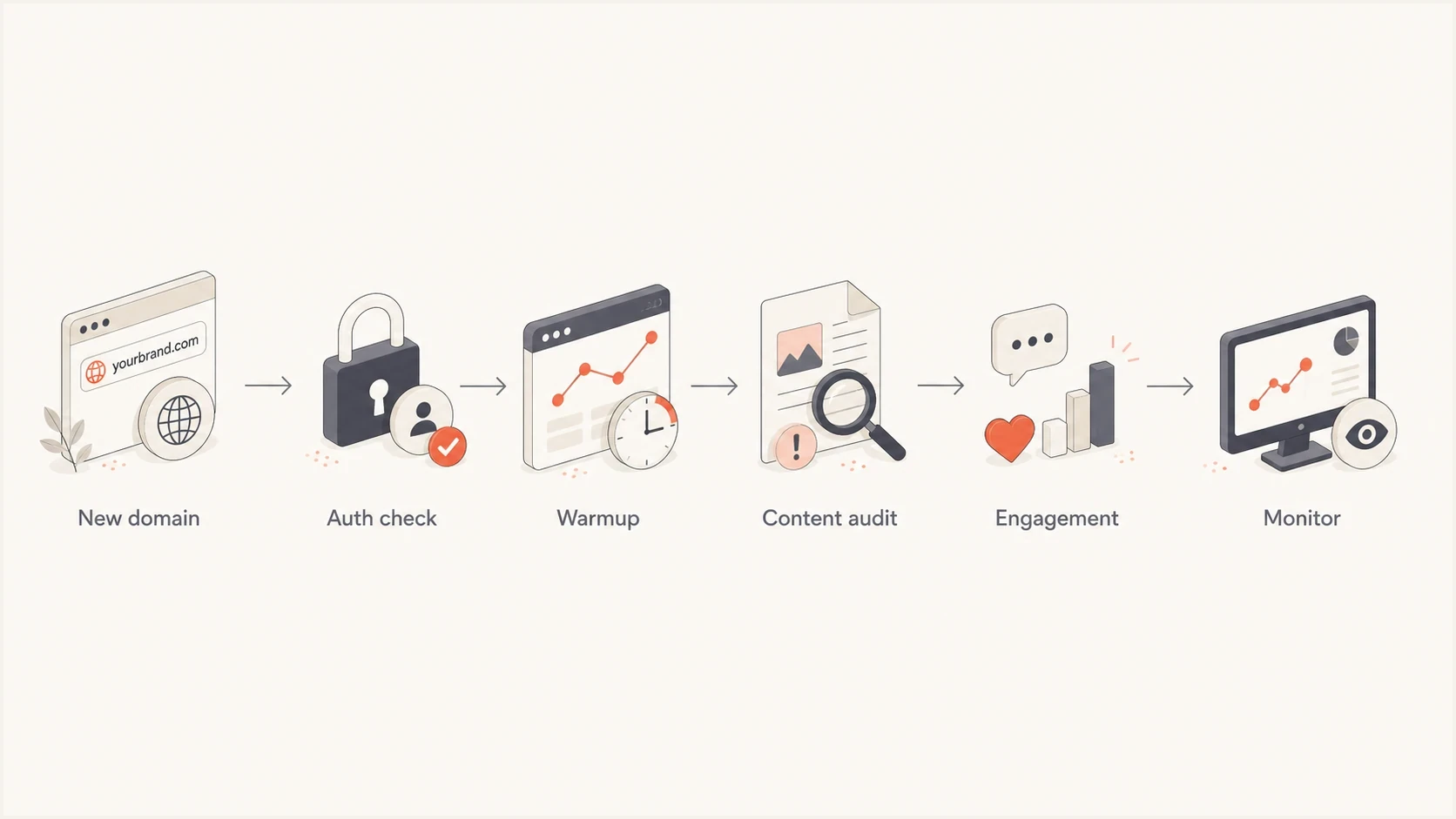
A six-step flow from new domain to monitoring after an ESP migration.
What changed during the migration
The biggest mistake is treating an ESP migration like a settings change. It is more like presenting a new identity to every mailbox provider. Even when the sender name and logo stay the same, the technical identity behind the mail often changes.
Before migration
- Known patterns: Mailbox providers had history for the old domain, old ESP, and old sending rhythm.
- Existing recipients: Engagement signals were tied to the previous sending identity and message stream.
- Known issues: Low opens, complaints, stale contacts, or weak content could already be present.
After migration
- New signals: The new domain and ESP need fresh evidence that recipients want the mail.
- Fresh risk: Authentication mistakes, tracking changes, and warmup gaps have immediate impact.
- Same audience: A poor or inactive list still hurts, even when the domain is new.
Cousin-domain reputation does not transfer neatly to the parent domain. A bad sending history on a cousin domain is not copied into the parent domain like a file. The audience does carry over, though. If the same people ignored, deleted, or complained about earlier messages, the new domain will face the same recipient behavior.
If both old and new systems show spam placement, focus on the shared factors first: the list, content, offer, sending cadence, and sender reputation signals that surround the brand. Then verify the new ESP setup so a fix in content is not hidden by an authentication failure.
Check authentication before judging placement
Authentication does not guarantee inbox placement, but broken authentication can sink a migration fast. The new ESP must be authorized in SPF, DKIM must pass with a domain that aligns with the From domain, and DMARC must be present with reporting enabled. Start with a broad domain health check so you are not guessing across SPF, DKIM, and DMARC.
Basic DNS authentication patterndns
example.com. TXT "v=spf1 include:esp.example -all"
selector1._domainkey.example.com. TXT "v=DKIM1; k=rsa; p=..."
_dmarc.example.com. TXT "v=DMARC1; p=none; rua=mailto:dmarc@example.com"
- SPF pass: The ESP's sending hosts must be authorized, and the record must stay under DNS lookup limits.
- DKIM pass: The message should be signed by the domain you control, not only a shared ESP domain.
- DMARC alignment: At least one passing SPF or DKIM identifier must match the visible From domain.
- Reporting: Aggregate reports show who is sending as the domain and where failures happen.
?
What's your domain score?
Deep-scan SPF, DKIM & DMARC records for email deliverability and security issues.
Suped fits this part of the work because its DMARC monitoring view ties authentication results to sending sources. That matters during migration because you need to see whether failures come from the new ESP, an old platform still sending, or a forgotten sender using the domain.
Suped DMARC dashboard showing email volume, authentication health, and source breakdown
Meet current bulk-sender requirements
A migration is a good time to check current mailbox-provider requirements, not only whether DNS records exist. Noncompliant mail can be filtered or rejected, and successful authentication still does not guarantee inbox placement.
|
|
|
|---|---|---|
Gmail | Domains sending more than 5,000 messages a day to personal Gmail accounts. | SPF and DKIM, DMARC with at least p=none, DMARC alignment, TLS, valid forward and reverse DNS, RFC 5322 formatting, and one-click unsubscribe plus a visible body link for marketing mail. |
Yahoo | Bulk senders, with no public fixed-volume threshold. | SPF and DKIM, DMARC with at least p=none, DMARC alignment, valid forward and reverse DNS, RFC-compliant mail, complaint rates below 0.3%, and easy unsubscribe for marketing mail. |
Outlook | Domains sending more than 5,000 messages a day to Outlook.com consumer addresses. | SPF, DKIM, and DMARC with alignment. Authentication failures can be rejected with SMTP error 550 5.7.515. |
Bulk-sender checks that matter after a domain or ESP migration.
One-click unsubscribe requires message headers that support a direct POST request. A normal unsubscribe link in the message body does not meet Gmail's one-click requirement by itself. Keep the visible body link as well, and process unsubscribe requests within two days to meet Yahoo's requirement.
RFC 8058 one-click unsubscribe headerstext
List-Unsubscribe: <https://domain.com/unsub/opaquepart>
List-Unsubscribe-Post: List-Unsubscribe=One-Click
Do not wait for a rejection to fix compliance. Verify the exact From domain, DKIM d= domain, return-path domain, and unsubscribe headers in a message sent through the new ESP before increasing volume.
Warm the domain with real recipient signals
A warmup is not just increasing volume. It is teaching mailbox providers that the new sending identity sends mail people want. Start with recipients who recently clicked, purchased, replied, logged in, or otherwise showed clear intent. Treat opens as supporting evidence because privacy-related automated opens can inflate the metric. Suppress prior complainers, hard bounces, and clearly inactive contacts before the first send.
Migration complaint rate thresholds
Use complaint rate as an early warning signal during warmup.
Healthy
Below 0.10%
Keep scaling slowly while engagement holds.
Caution
0.10% to 0.29%
Pause increases and review list source and content.
Stop
0.30% and above
Reduce volume and send only to strongest engagement.
For Gmail-heavy audiences, treat the first few days as noisy. Random spam placement during the first two or three days can happen because the filters have not seen enough recipient behavior. That does not mean you should ignore it. Send small, clean, useful batches and wait for real engagement before expanding.
- Day one: Send only to recently engaged users and keep content simple.
- Days two to four: Increase volume only if complaints, bounces, and spam placement stay controlled.
- Week two: Add moderate-engagement recipients, but keep inactive segments out.
- After stability: Move toward normal cadence only when mailbox-level metrics are stable.
Do not warm a new domain by sending generic test messages with subjects like "test" and empty body copy. Those messages lack normal engagement context and can be filtered differently than real campaigns.
Audit the content that follows you
When a new domain, new ESP, and old ESP all show similar spam placement, content deserves attention. Filters look at links, redirects, HTML quality, image balance, unsubscribe handling, and whether the message matches what recipients expect. Keep the rule plain: remove anything that looks clever but adds risk.
|
|
|
|---|---|---|
HTTP links | They look insecure. | Use HTTPS. |
Redirects | They hide destination. | Use branded links. |
Images | They increase weight. | Compress assets. |
Copy | It sets intent. | Be specific. |
Unsubscribe | It reduces complaints. | Make it visible. |
Content checks that commonly matter after a migration.
Long URLs are not automatically spammy. The bigger issue is how those URLs behave. A long course URL on your own HTTPS domain is usually better than a public shortener because public shorteners are shared by many unrelated senders. Use readable anchor text, keep the destination on your own domain where possible, and avoid chains of redirects.
Image compression helps page weight and email size, but it does not change the URL itself. If a diagnostic tool complains about URL length, do not treat image compression as the fix. Check whether the link is HTTP, whether it redirects through an untrusted domain, and whether the destination page is clean.
Email tester
Send a real email to this address. Suped shows a results button when the test is ready.
?/43tests passed
Send a real campaign-style message to an email tester after every template change. A single isolated score matters less than repeatable findings: failed DKIM, missing List-Unsubscribe, HTTP links, large HTML, broken images, or suspicious redirect chains.
Read seed-list tests carefully
Seed-list tests are useful, but they are not a perfect model of your audience. Inbox placement is not one global result for a domain. It varies by mailbox provider, corporate filtering stack, recipient history, engagement, folder behavior, and local policy. A test can say 70% spam while real engaged recipients still receive the campaign.
Useful signals
- Provider pattern: Repeated Gmail-only or Outlook-only issues help narrow the investigation.
- Authentication result: Header-level failures in test mail are worth fixing immediately.
- Content warning: Repeated link, image, or HTML issues point to template work.
Weak signals
- Single run: One test can swing because seed inboxes have little recipient history.
- B2B gap: Seed coverage often misses corporate filters used by financial firms.
- Fake content: A blank test message does not behave like a real newsletter.
If real clicks, replies, and conversions are stable, the test can be overstating the problem. Use opens as supporting evidence because automated privacy activity can distort them. If real engagement is low, complaint rate rises, or provider data shows poor reputation, the seed-list warning deserves more weight. For a deeper diagnostic sequence, use a migration-specific checklist like deliverability drops and compare it against your actual recipient metrics.
Check reputation beyond SEO
Poor SEO is rarely the direct reason email goes to spam. Mailbox providers care about recipient behavior, authentication, sending patterns, complaints, bounces, and message safety. Search visibility is a different system. The overlap is domain trust: if the website has malware, deceptive redirects, broken HTTPS, or risky pages, that can hurt.
Also check whether the sending domain, tracking domain, or sending IP appears on a blocklist or blacklist. A listing is not always the cause, but it changes the investigation. Suped's blocklist monitoring keeps domain and IP checks next to DMARC and source-level authentication data.
Blocklist checker
Check your domain or IP against 144 blocklists.
 Spamhaus
 0Spam
0Spam

 Cisco
Cisco
 NoSolicitado

 URIBL
URIBL
 abuse.ro
 ALPHANET
 Anonmails
 Ascams
 BLOCKEDSERVERS
 Calivent Networks


 EFnet
EFnet




 JustSpam
 Kempt.net
 NordSpam

 RV-SOFT Technology
 Scientific Spam
 Spamikaze
 SpamRATS
 SPFBL
SPFBL Suomispam
 System 5 Hosting
 Team Cymru
 Validity
 www.blocklist.de Fail2Ban-Reporting Service
 ZapBL
ZapBL 2stepback.dk
 Fayntic Services
 ORB UK
 technoirc.org
 TechTheftSpamhaus0SpamCiscoNoSolicitadoURIBLabuse.roALPHANETAnonmailsAscamsBLOCKEDSERVERSCalivent NetworksEFnetJustSpamKempt.netNordSpamRV-SOFT TechnologyScientific SpamSpamikazeSpamRATSSPFBLSuomispamSystem 5 HostingTeam CymruValiditywww.blocklist.de Fail2Ban-Reporting ServiceZapBL2stepback.dkFayntic ServicesORB UKtechnoirc.orgTechTheftSpamhaus0SpamCiscoNoSolicitadoURIBLabuse.roALPHANETAnonmailsAscamsBLOCKEDSERVERSCalivent NetworksEFnetJustSpamKempt.netNordSpamRV-SOFT TechnologyScientific SpamSpamikazeSpamRATSSPFBLSuomispamSystem 5 HostingTeam CymruValiditywww.blocklist.de Fail2Ban-Reporting ServiceZapBL2stepback.dkFayntic ServicesORB UKtechnoirc.orgTechTheftSpamhaus0SpamCiscoNoSolicitadoURIBLabuse.roALPHANETAnonmailsAscamsBLOCKEDSERVERSCalivent NetworksEFnetJustSpamKempt.netNordSpamRV-SOFT TechnologyScientific SpamSpamikazeSpamRATSSPFBLSuomispamSystem 5 HostingTeam CymruValiditywww.blocklist.de Fail2Ban-Reporting ServiceZapBL2stepback.dkFayntic ServicesORB UKtechnoirc.orgTechTheftSpamhaus0SpamCiscoNoSolicitadoURIBLabuse.roALPHANETAnonmailsAscamsBLOCKEDSERVERSCalivent NetworksEFnetJustSpamKempt.netNordSpamRV-SOFT TechnologyScientific SpamSpamikazeSpamRATSSPFBLSuomispamSystem 5 HostingTeam CymruValiditywww.blocklist.de Fail2Ban-Reporting ServiceZapBL2stepback.dkFayntic ServicesORB UKtechnoirc.orgTechTheft
A score from a reputation source should be treated as one signal, not the whole answer. If a domain has no meaningful email history, a low or unknown score can simply mean there is not enough history yet. If the domain appears on a blocklist (blacklist), or if recipients are complaining, that is a stronger warning.
Do not move full volume onto a new parent domain just because the DNS records pass. Passing authentication means the mail is allowed to claim the domain. It does not prove recipients want the mail.
Use a controlled recovery plan
The right plan is conservative, but it should not be vague. Use a written rollout that says who gets mail, how much volume moves each day, which metrics decide whether to increase, and what changes if Gmail or Outlook starts filtering heavily.
- Freeze risky sends: Pause inactive segments, purchased contacts, cold outreach, and high-frequency campaigns.
- Fix DNS: Confirm SPF, DKIM, DMARC, bounce domain, tracking domain, and reverse DNS where relevant.
- Clean content: Remove HTTP links, public shorteners, heavy images, broken HTML, and weak unsubscribe placement.
- Start narrow: Send to recent engagers first, preferably recipients who know the brand.
- Watch providers: Track Gmail, Outlook, Yahoo, and corporate domains separately because they filter differently.
- Advance slowly: Increase only after complaints, bounces, clicks, replies, and DMARC pass rates stay healthy.
Suped supports this workflow by keeping DMARC monitoring, hosted DMARC, hosted SPF, SPF flattening, hosted MTA-STS, alerts, blocklist monitoring, and issue steps in one place. Agencies and MSPs can use the multi-tenant dashboard to watch client domains without switching between separate DNS and report views.

Issue steps to fix dialog showing the issue overview, tailored fix steps, and verification action
If you are comparing what changed during the move, this breakdown of ESP and domain changes is useful context. If you are also using new dedicated IPs, the risk pattern is similar to new IPs and domains.
Views from the trenches
Best practices
Compare test results against real engagement before changing the whole migration plan.
Warm new domains with recent engagers first, then expand only after metrics stay healthy.
Audit links, redirects, HTML weight, and unsubscribe visibility before increasing volume.
Common pitfalls
Treating a cold domain as damaged can lead teams to change too many variables at once.
Using public shorteners can add shared reputation risk and hide the final destination.
Sending blank test emails can trigger filtering that real campaign mail would not trigger.
Expert tips
Separate Gmail, Outlook, Yahoo, and corporate domains because each filter reacts differently.
Check whether the problem follows the content before blaming only the new ESP setup.
Use DMARC reports to confirm which sources pass before judging campaign-level placement.
Marketer from Email Geeks says seed-list placement can be directional, but real open and click patterns should carry more weight when they disagree.
2024-12-05 - Email Geeks
Expert from Email Geeks says moving infrastructure can cause temporary bulk foldering while filters learn the new sender pattern.
2024-12-06 - Email Geeks
How to recover inbox placement
Do not treat spam placement after a migration as one problem with one fix. A new domain and ESP need trust, and trust comes from authentication, consistency, recipient engagement, and clean content. Start with the technical identity, then run a slow warmup using the people most likely to respond well.
The practical order is simple: validate SPF, DKIM, and DMARC; confirm bulk-sender compliance; remove risky links and heavy templates; send only to recent engagers; watch provider-level metrics; then scale. Suped helps keep that work organized by showing authentication failures, unverified sources, issue steps, blocklist signals, and alerts in the same workflow.




