Why are my emails delayed in Gmail even with a good reputation and proper authentication?

Published 17 Apr 2025
Updated 3 Aug 2026
11 min read
Summarize with
Updated on 3 Aug 2026: We added current Gmail deferral guidance and a direct check for delays caused by external mailbox retrieval.
If Gmail accepts a message with 250 2.0.0 OK but the email appears 10-15 minutes later, do not treat authentication as the primary suspect. Proper authentication and good reputation help Gmail assess the sender, but neither guarantees instant inbox display.
The common causes are a sender or ESP queue before Gmail acceptance, a temporary Gmail deferral before final acceptance, Gmail processing after acceptance, Gmail retrieving the message from another mailbox, or misleading timestamps caused by an incorrect system clock.
Start by proving which cause applies. Raw headers and sending MTA logs from a real delivered message matter more than dashboard color. Suped's email tester helps capture authentication, headers, unsubscribe signals, and delivery evidence from an actual message rather than a DNS-only check.
Do not assume Gmail is the hold point
The most expensive mistake is deciding that Gmail delayed the email before reading the Received chain. A final accepted status only proves the final handoff succeeded. It does not prove where the waiting time happened.
The short answer
A Gmail delay after successful authentication happens because authentication and delivery speed are different controls. SPF and DKIM establish sending authority. A DMARC pass confirms that the visible From domain matches an authenticated domain. Reputation metrics describe recent traffic. None of those signals removes queues, rate controls, spam analysis, recipient-side classification, or temporary internal processing.
- Accepted: A 250 response after DATA means Gmail's MX accepted responsibility for the message.
- Displayed: Inbox visibility depends on filtering, category placement, UI refresh, and account-level handling.
- Fetched: Mail retrieved from another account can wait on a separate polling or synchronization step.
- Header proof: The Received headers show whether the wait happened before or after Gmail accepted.
- Log proof: MTA logs show retries, queue waits, deferred attempts, and the exact final SMTP reply.
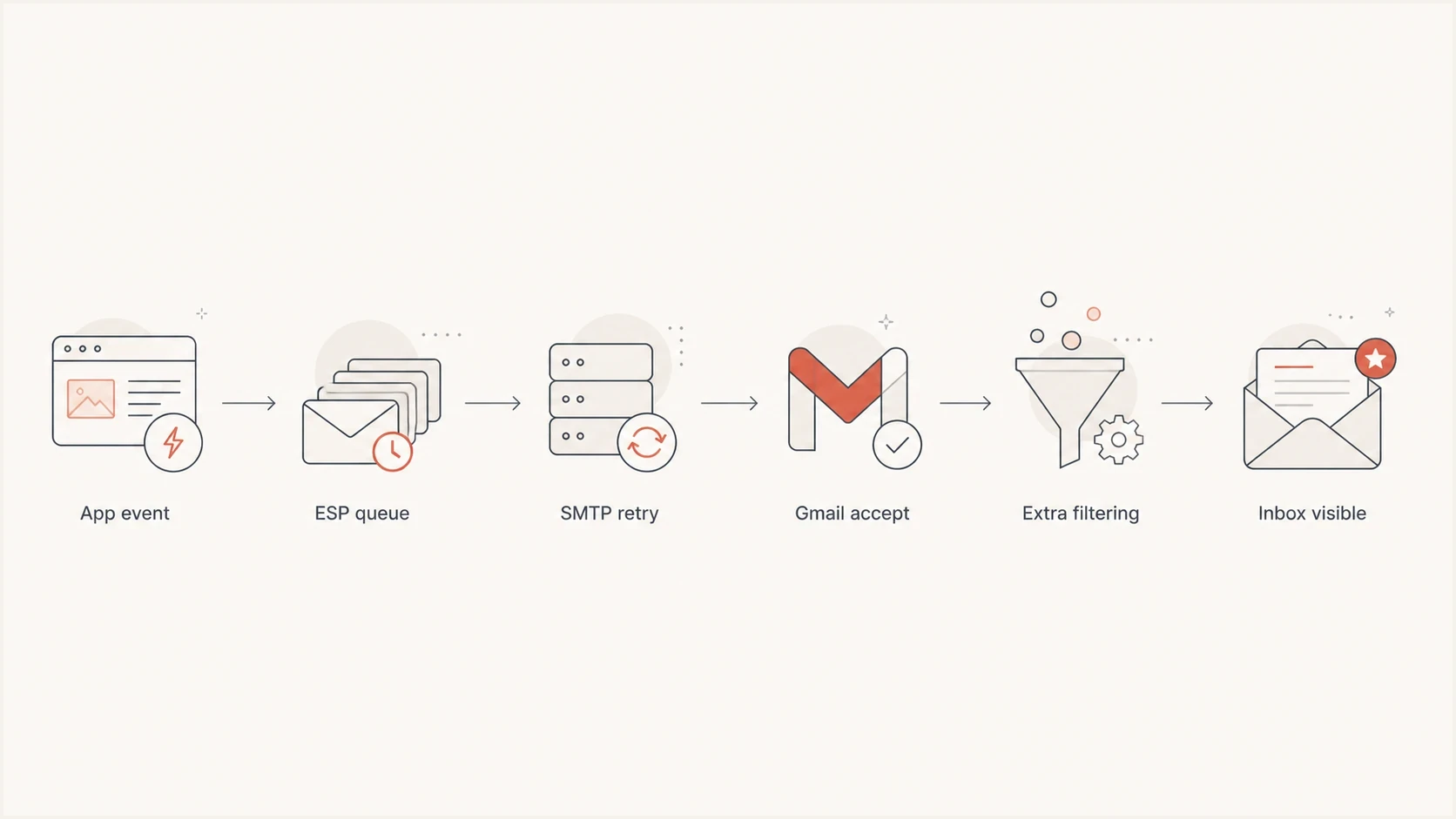
Gmail email delivery flowchart showing sender queues, SMTP retries, acceptance, and inbox display.
That distinction matters because the fixes are different. If the wait is in your ESP or MTA queue, Gmail cannot fix it. If the wait is inside Gmail after acceptance, changing SPF or DKIM will not release the message faster.
Prove the delay with headers
Start with one delayed message and compare the application event time, the sender MTA log time, the first Google header time, and the displayed arrival time. The first Google Received line is the key marker.
Example header timeline
Received: from mail.sender.example by mx.google.com with ESMTPS id abc123
        for <user@gmail.com>; Fri, 18 Oct 2024 16:10:44 -0700 (PDT)
Received: from app01 by mail.sender.example with ESMTP id 9F2A1
        for <user@gmail.com>; Fri, 18 Oct 2024 16:02:08 -0700
Date: Fri, 18 Oct 2024 16:01:55 -0700
Read headers from bottom to top. In this example, the message existed on the sender side at 16:02 but did not reach Google's MX until 16:10. That points to sender-side queueing, retry behavior, network delay, or clock skew. It does not prove Gmail held the message internally.
|
|
|
|---|---|---|
First Google header is late | Sender queue | MTA logs |
Later Google hops are late | Gmail internal processing | Raw message samples |
Earlier 4xx replies | Temporary deferral | Full SMTP reply |
Date header is old | Generated early | ESP queue |
Common timing patterns and what they mean.
Clock skew can fake a delay
If one server clock is off by several minutes, the header chain tells the wrong story. Confirm NTP status on every sender and relay, then verify the logging system before escalating.
- NTP status: Check all sender and relay hosts, then check the log aggregation system.
- Time zones: Normalize timestamps before calculating the delivery gap.
- Queue IDs: Match header evidence to the exact message in your MTA logs.
Email tester
Send a real email to this address. Suped shows a results button when the test is ready.
?/43tests passed
A test message is useful only when it follows the same route as production mail. Use the same bounce domain, signing domain, HELO, IP pool, list headers, unsubscribe headers, and message template where possible.
Check whether Gmail fetches another mailbox
Some Gmail delays do not involve Gmail's inbound MX at all. If a message first reaches an external mailbox and Gmail later retrieves it, the sender's 250 response describes delivery to that external server. SPF, DKIM, DMARC, and sender reputation cannot control the later retrieval interval.
- Confirm the route: Check whether the address delivers directly to Gmail or appears through an external account configured in Gmail.
- Compare both arrivals: Record when the message reaches the external mailbox and when it becomes visible in Gmail.
- Forward urgent mail: Use automatic forwarding at the source for time-sensitive messages instead of relying on periodic retrieval.
- Separate mobile sync: If the message exists in Gmail on the web but appears late in the app, troubleshoot account sync and notifications rather than SMTP.
Third-party POP fetching is being removed
Google has announced that Gmail is removing support for fetching mail from third-party accounts through POP. Move existing retrieval setups to source-side automatic forwarding, or connect the external account in the Gmail mobile app through IMAP where that access pattern fits.
Why Gmail delays mail that looks healthy
Authentication is a gate, not a speed guarantee. Gmail still evaluates traffic volume, content patterns, sender consistency, recipient behavior, URL reputation, complaint risk, and account-level classification. A sender can pass every authentication check and still trigger extra analysis when recent traffic changes.
An authentication pass also does not prove full Gmail sender compliance. A 421, 450, or 451 temporary reply can point to an unusual sending rate, a missing or mismatched PTR record, no TLS, a protocol or message-format defect, recipient limits, or an unmet bulk-sender requirement. Preserve the entire enhanced status code and reply text, especially a 4.7.x code, because the first digit alone is not a diagnosis.
Healthy signals
- Reputation: IP and domain reputation show recent traffic has not caused major trust issues.
- SPF: The sending IP is authorized for the envelope sender domain.
- DKIM: The message has a valid cryptographic signature for the signing domain.
- DMARC: The visible From domain matches a domain that passed SPF or DKIM.
Delay triggers
- Burst volume: A sudden Gmail-heavy batch can fill sender queues or trigger recipient-domain rate limits.
- Mixed streams: Campaign traffic and login mail on one queue can delay urgent messages.
- Content review: New templates, redirect chains, large attachments, or malformed headers can add scanning or provoke a temporary failure.
- HELO routing: Different outbound hosts can land in different queue lanes.
Delay urgency by mail type
Use the message purpose to decide how aggressively to investigate a Gmail delay.
Normal
0-60 sec
Most non-urgent mail
Watch
2-5 min
Receipts and account notices
Investigate
5-15 min
Magic links and login flows
Escalate
>15 min
Repeated delay after Gmail accept
For verification codes and magic links, even a short wait breaks the user flow. Treat that as a product reliability issue with deliverability symptoms. The same investigation pattern applies to Gmail OTP delays, but the tolerance window is much smaller.
Fix the sender side first
Start with infrastructure because sender-side delays are measurable. If the first Google header is late, focus on the sending path before changing DNS. A perfect DMARC record will not drain a full recipient-domain queue.
- Split streams: Send password resets, login links, receipts, and campaign mail through separate queues.
- Prioritize urgent mail: Use high-priority injection or a dedicated urgent queue for OTP and account access mail.
- Cap bursts: Keep Gmail-bound cadence steady during campaigns instead of dumping one large batch.
- Honor temporary failures: Let the MTA retry 4xx responses with backoff. Manual resends can create duplicates and a larger traffic burst.
- Test HELO paths: Send the same template through a lower-volume outbound host and compare timing.
- Audit templates: Remove risky URL chains, broken unsubscribe handling, malformed headers, and last-minute content changes.
Basic sender queue checks
mailq
postqueue -p
postcat -q QUEUE_ID
grep "status=deferred" /var/log/maillog
grep "gmail.com" /var/log/maillog
If an ESP handles the actual sending, ask for queue latency by recipient domain, priority class, HELO, IP pool, and campaign ID. Delivered status in an app dashboard can mean the ESP accepted your request, not that Gmail accepted or displayed the email.
When Gmail is the hold point
If headers show Gmail accepted the message quickly and later Google headers account for the missing minutes, the delay is likely inside Gmail's processing. That is less common than sender-side queueing, but it does happen.
Evidence for Gmail-side analysis
- Internal hops: Google Received lines show the wait after the MX accepted the message.
- Consistent scope: The issue affects Gmail recipients but not other recipient domains.
- Template cluster: The delay appears around one template or link set during a traffic burst.
- Clean retries: Your logs show no hidden 4xx responses before the final 250.
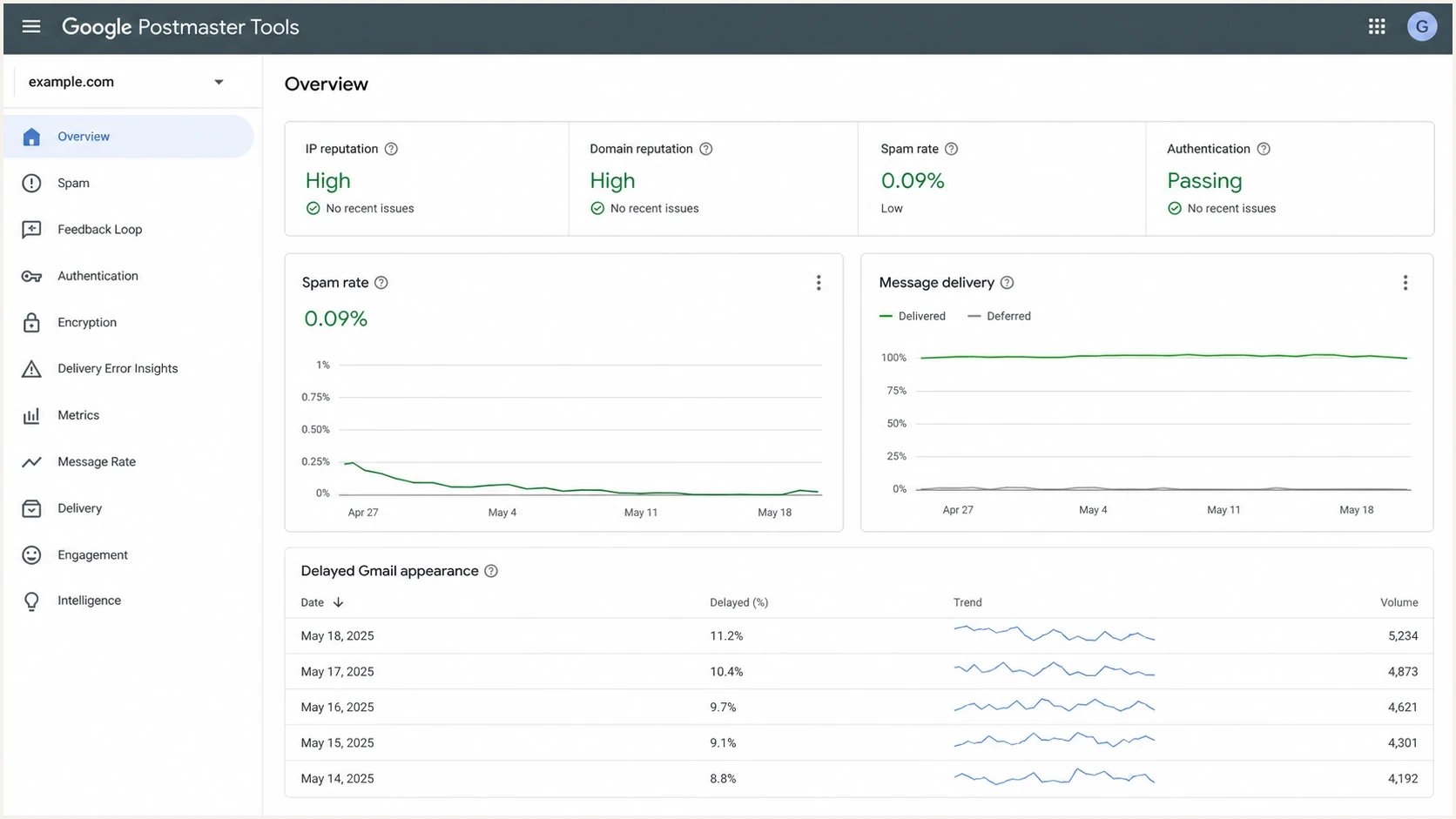
Google Postmaster Tools dashboard showing high reputation beside a Gmail delivery delay timeline.
A 421, 450, or 451 reply is not evidence of a post-acceptance hold. It means Gmail did not accept that delivery attempt. The later 250 reply ends the retry cycle, and only timestamps after that acceptance can support a Gmail-side delay claim.
There is no DNS switch that tells Gmail to skip its own analysis. When the evidence points inside Gmail, smooth volume, keep templates stable, reduce redirect chains, keep urgent mail out of campaign queues, and collect multiple raw samples before escalating.
How Suped helps with the surrounding evidence
Suped's product does not force Gmail to release a held message. No DMARC platform can do that. Suped connects the evidence around the delay: authentication health, DNS record issues, sending source changes, blocklist (blacklist) status, and actionable fix steps.
Suped DMARC dashboard showing email volume, authentication health, and source breakdown
Use Suped's domain health checker to confirm the base setup, then use DMARC monitoring and blocklist monitoring to spot changes in source behavior or reputation while you investigate queue timing.
What Suped is for in this workflow
- Signal capture: Monitor DMARC, SPF, DKIM, sending sources, and blocklist or blacklist status together.
- Fix steps: Use automated issue detection with clear steps to correct record and source problems.
- Hosted records: Manage hosted DMARC, hosted SPF, SPF flattening, and hosted MTA-STS without repeated DNS edits.
- Team scale: Use multi-tenancy, access controls, alerts, and reports when several domains or clients are involved.
?
What's your domain score?
Deep-scan SPF, DKIM & DMARC records for email deliverability and security issues.
That gives the delivery team a clean baseline. If authentication and reputation stay healthy while the header timeline points at queues, the investigation moves away from DNS guessing and toward the system that held the message.
Views from the trenches
Best practices
Confirm the first Google Received line before blaming Gmail for the whole delay window.
Separate urgent transactional mail from campaign queues before tuning authentication again.
Track queue latency by recipient domain, HELO, IP pool, and message class each day.
Keep MTA clocks synced during incidents so header timelines point at the right system.
Common pitfalls
Treating a green reputation dashboard as proof that Gmail must display instantly for all mail.
Looking only at final SMTP status and ignoring deferred attempts before the 250 reply.
Sending campaigns and login links through the same congested queue during peak traffic.
Changing SPF or DKIM records without evidence that authentication caused the delay.
Expert tips
Preserve raw headers, MTA logs, queue IDs, and delivery timestamps for each sample.
Test the same template through a lower-volume HELO to isolate queue behavior quickly.
For OTP mail, set shorter queues and monitor seconds, not only delivered status.
Escalate to Gmail only after headers show the hold occurs inside Google systems.
Expert from Email Geeks says a 250 after DATA proves acceptance, but raw Received headers are still needed to locate the wait.
2024-10-18 - Email Geeks
Expert from Email Geeks says delays before the first Google header usually point to sender queueing, retry behavior, network delay, or clock skew.
2024-10-18 - Email Geeks
Match the fix to the delay point
Good reputation and correct authentication reduce risk, but they do not remove queues. Treat Gmail delay as a timing investigation: prove the first Google acceptance point, compare MTA logs, isolate traffic streams, and escalate only with header evidence.
- First Google header late: Fix sender queueing, hidden retries, network delay, HELO routing, or clock skew first.
- Google hops late: Collect samples and reduce content or volume signals that trigger extra review.
- External fetch late: Replace periodic mailbox retrieval with forwarding for time-sensitive messages.
- Urgent mail delayed: Separate transactional traffic and give account access mail its own priority path.
- DNS still changing: Stop tuning authentication records unless the evidence shows an authentication failure or sender-requirement defect.
Suped's product gives teams the authentication and reputation baseline, while the MTA and header evidence show where the minutes disappeared. Together, those records support a reproducible diagnosis and document any authentication changes made during the incident.




