Why are my email campaigns to Yahoo users getting deferred and how can I fix it?

Updated on 1 Aug 2026: We updated this guide with current Yahoo sender requirements and clearer SMTP-code triage for staged recovery.
Yahoo defers campaign mail when it wants the sender to slow down or fix a reputation problem before it accepts more messages. The most common campaign error is 421 4.7.0 [TSS04], often with wording about unexpected volume or user complaints. The direct fix is to pause broad Yahoo sends, isolate Yahoo and AOL subscribers by engagement, send only to recent clickers or recent signups for the next few campaigns, then ramp volume back in controlled steps while checking complaint signals, authentication, and message content.
Do not treat a Yahoo deferral as a normal soft bounce to ignore. Your ESP will usually retry a 4xx response according to its own queue schedule, and some messages will arrive later, but repeated deferrals are the important signal. Yahoo has seen enough risk in the sending stream, the domain, the IP, the links, or the recipients' reactions to delay acceptance. Slower sending helps only when the audience quality and authentication are already clean.
- Immediate fix: Hold nonessential Yahoo sends for 24 to 48 hours, then restart with recipients active in the last 30 to 90 days.
- Main cause: Yahoo usually reacts to a combination of volume pressure, complaint behavior, low engagement, and sender reputation.
- Technical check: Verify SPF, DKIM, a DMARC pass for the visible From domain, forward and reverse DNS, marketing unsubscribe headers, and blocklist or blacklist status before ramping again.
What the Yahoo deferral means
A deferred Yahoo campaign means Yahoo has not permanently rejected the message yet. It has asked the sending server to try again later. Your ESP will normally retry automatically, so some messages still land after the campaign send window. That makes the issue easy to understate, because final delivered counts can recover while opens, clicks, timing, and campaign revenue suffer.
Typical Yahoo SMTP deferral
421 4.7.0 [TSS04] Messages from xxx.xxx.xxx.xxx temporarily deferred
because of unexpected volume or user complaints.
The wording matters. Unexpected volume means Yahoo sees a pattern change relative to what it trusts for that sender. User complaints means recipients are telling Yahoo the mail is unwanted, either through direct spam reports or behavior that looks like unwanted mail. Even if your ESP dashboard shows zero complaints, Yahoo can still have negative signals that do not flow back into your reporting. Some mailbox-level signals are not exposed to senders.
Do not keep blasting the same Yahoo audience because the deferrals are temporary. Temporary only describes the SMTP status. The reputation problem can become persistent if the next retry or next campaign sends the same unwanted mail to the same inactive users.
Yahoo also evaluates more than the sending IP. It sees the full message before returning the SMTP response. That means the sending IP, authenticated domain, visible From domain, DKIM signing domain, SPF identity, URL domains, tracking domains, and IP plus domain pair can all matter. A clean SPF and DKIM result does not prove the campaign has a clean reputation.
Read the exact SMTP response first
Do not diagnose every Yahoo delivery failure as TSS04. Start with the full SMTP response in your ESP event export or MTA logs. The first digit tells you whether the sending server should retry, while Yahoo's bracketed diagnostic code and response text narrow the likely cause.
|
|
|
|---|---|---|
421 or 451 | Temporary 4xx failure | Allow normal queue retries while investigating repeated patterns |
421 4.7.0 [TSS04] | Temporary deferral tied to complaints, content, reputation, or unusual traffic | Pause broad sends and isolate the affected traffic |
421 4.7.0 [TS01] | Temporary Yahoo TS deferral | Retry normally and group the full response by affected IP, domain, and stream |
553 or 554 | Permanent 5xx failure | Do not retry unchanged; resolve the address, policy, content, or authentication failure |
How to act on Yahoo SMTP responses
For each event, capture the timestamp, sending IP, envelope sender, visible From domain, recipient domain, campaign or flow name, SMTP stage, full response text, and final queue outcome. Group the events by IP, domain, campaign, and audience source. A cluster tied to one flow or acquisition source calls for a narrower fix than a sender-wide problem.
Escalate a persistent TS or TSS deferral with the complete diagnostic response and representative timestamps. A shortened "Yahoo deferred us" report removes the identifiers needed to trace the affected traffic.
The practical triage order
When Yahoo deferrals spike, start with the sending decision, not DNS. DNS must be right, but the fastest recovery usually comes from reducing mail to users most likely to ignore, delete, unsubscribe, or complain. The first send after a deferral should prove to Yahoo that the sender can generate wanted engagement at lower volume.
- Freeze broad sends: Stop sending one-off campaigns to all Yahoo, AOL, Verizon, and related domains while the queue is still retrying.
- Create Yahoo segments: Split by clicked in 30 days, opened or clicked in 90 days, signed up in 90 days, active in one year, and inactive over one year.
- Restart narrow: Send the next campaign only to recent clickers or recent confirmed signups. Avoid year-old open-only contacts.
- Review flows: Check welcome, cart abandonment, account creation, browse abandonment, and lead magnet flows for high unsubscribes or complaints.
- Fix collection sources: Add CAPTCHA or a honeypot to forms that can trigger email without confirmed ownership of the address.
- Check authentication: Run a real sent message through an email test, then read the delivered headers rather than relying on a preview send.
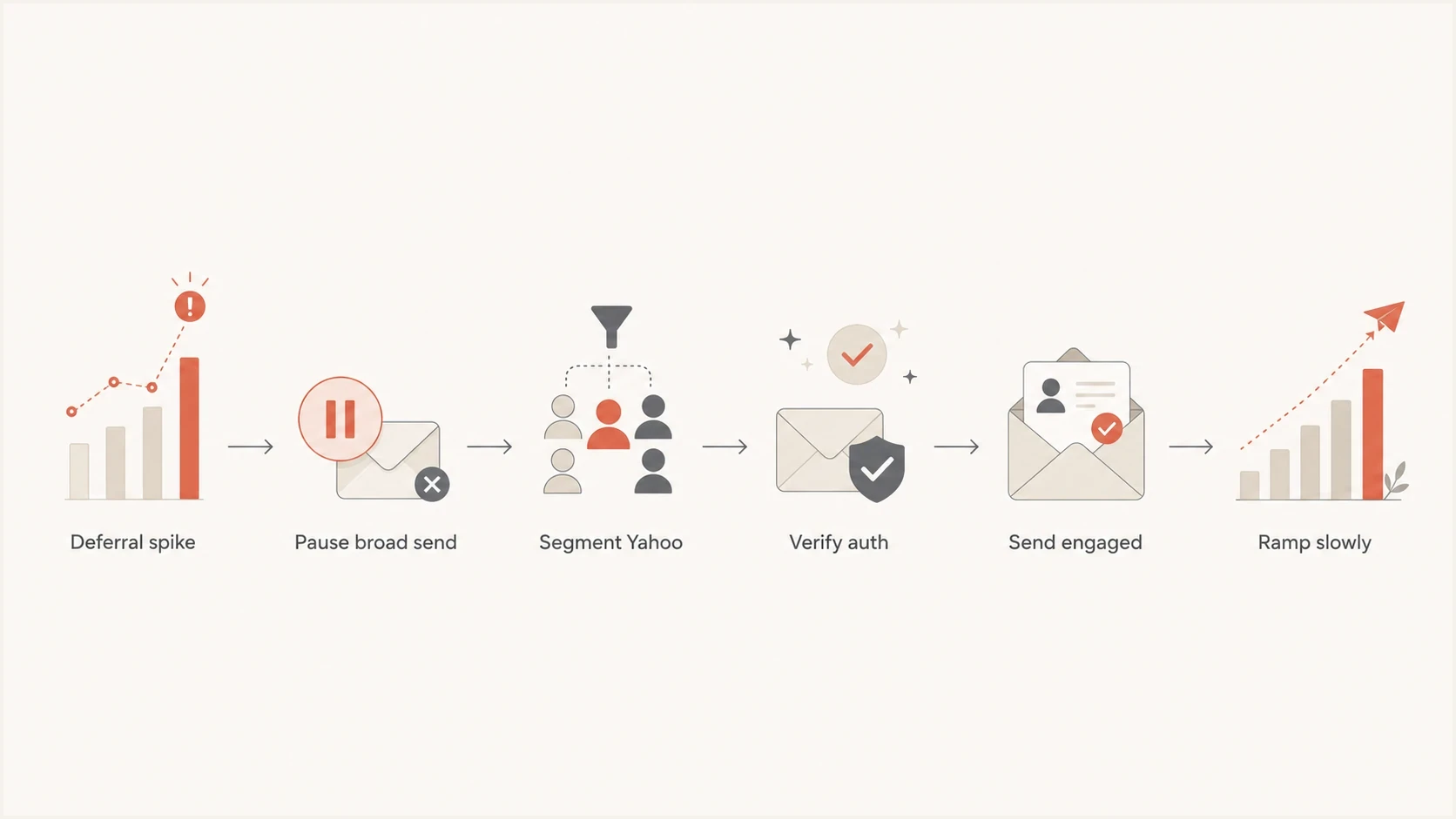
Flowchart showing how to recover after Yahoo defers a campaign.
A Yahoo-only suppression plan can feel aggressive, but it is often less damaging than forcing the retry queue through a weak audience. Separate marketing campaigns from triggered flows because the bad signal can come from either. A high unsubscribe rate in a triggered flow tells you the trigger does not equal consent or current interest.
How to segment Yahoo users for recovery
A safe recovery segment is not simply everyone who opened in the last year. Opens are noisy because of image caching and privacy filtering. For Yahoo recovery, clicks, recent signups, recent purchases, and direct site activity are stronger signals. If the contact has not opened, clicked, purchased, logged in, or visited in nearly a year, suppress that user from campaign mail until reputation stabilizes.
|
|
|
|---|---|---|
Clicked 30d | Send first | Strongest intent signal |
Active 90d | Add next | Good balance of reach and risk |
Signup 90d | Send lightly | Works if consent was explicit |
Open only | Delay | Opens do not prove demand |
Inactive 365d | Suppress | High deferral risk |
Yahoo recovery segmentation
The ramp should be measured by accepted volume and complaint pressure, not only by sent volume. If you send 10,000 Yahoo messages and 7,000 defer, the effective reputation signal is not healthy. The next Yahoo campaign should be smaller and cleaner, even if your global bounce rate looks acceptable.
Yahoo deferral decision bands
Use repeated Yahoo response patterns, not a universal soft-bounce percentage, to decide whether to continue, investigate, or pause.
Continue
No recurring Yahoo 4xx pattern
Proceed with the controlled engaged segment
Investigate
Repeated 421 or 451 responses
Hold volume and isolate the affected traffic
Pause
TSS04 persists across queue retries
Stop broad Yahoo campaigns and correct the cause
Do not reintroduce inactive Yahoo subscribers just because one campaign clears. Build back in steps. A practical path is recent clickers, then 90-day engaged, then 180-day buyers or site-active users, then a small test of older subscribers only if the first groups perform cleanly.
What to check beyond volume
Yahoo deferrals often start with volume, but the root cause sits elsewhere. Check collection quality, consent clarity, flow behavior, authentication, and content identifiers. A sender can have stable total volume for a year and still trigger Yahoo if the Yahoo portion of the list has aged, a form is abused, or one flow sends mail people did not expect.
Likely sending causes
- List age: Too many Yahoo contacts have no recent email or site activity.
- Flow mismatch: Triggered messages fire after weak intent actions such as account creation or browsing.
- Form abuse: Unprotected forms collect addresses entered by someone other than the mailbox owner.
Likely technical causes
- Authentication: SPF, DKIM, or DMARC passes, but not for the domain users see.
- Shared links: Tracking or hosted content domains carry reputation from other senders.
- Reputation: The IP, domain, or link domain has a blocklist or blacklist problem.
Yahoo tells all senders to keep spam complaint rates below 0.3%. Yahoo calculates that rate against messages delivered to the inbox, so it can differ from a rate based on all sent or delivered mail in your ESP. Treat 0.3% as an enforcement ceiling, not a target.
One-click unsubscribe is required for bulk marketing and subscribed messages, alongside a clearly visible unsubscribe link in the message body. Yahoo says to honor unsubscribes within two days. The common testing mistake is sending a preview email to a tester. Preview emails can contain placeholder unsubscribe values that do not match a real campaign send. Send a real campaign or production flow email to the tester address and inspect the raw headers.
Headers to verify in a real sent message
Authentication-Results: yahoo.com;
  dkim=pass;
  spf=pass;
  dmarc=pass
List-Unsubscribe: <https://example.com/unsubscribe/...>
List-Unsubscribe-Post: List-Unsubscribe=One-Click
If the real sent message has correct headers, shift attention back to audience and reputation. If the headers fail or authenticate through the wrong domain, fix that before any ramp. Suped's DMARC monitoring helps here because it shows which sources are passing, failing, or sending without authorization, then turns those findings into issue-level fix steps.
How Suped fits into the fix
 Suped is our DMARC and email authentication platform. In this workflow, it helps answer, "Which source, domain, or record is creating risk right now?" It puts DMARC, SPF, DKIM, blocklist or blacklist monitoring, hosted authentication records, and related deliverability signals into one operational view.
Issue steps to fix dialog showing the issue overview, tailored fix steps, and verification action
The useful workflow is straightforward. Add the domain, confirm DMARC reporting, review verified and unverified sources, then work through the highest-impact issues before the next Yahoo ramp. If an unauthorized source is sending with your domain, Yahoo can factor that into domain reputation even when your marketing platform is configured correctly.
?
What's your domain score?
Deep-scan SPF, DKIM & DMARC records for email deliverability and security issues.
For a quick first pass, a domain health check gives you a fast read on DMARC, SPF, and DKIM before you spend time adjusting segments. If the domain checks out, the next move is campaign segmentation and flow hygiene, not DNS tinkering.
For teams managing several brands or client domains, Suped's MSP and multi-tenancy dashboard makes Yahoo recovery work less scattered. You can compare domain status, authentication health, and issue queues without asking each team to pull separate DNS and ESP screenshots.A staged Yahoo recovery plan
A useful recovery plan is controlled and measured by results, not a fixed number of days. It should protect ongoing transactional mail, stop weak marketing sends, and give Yahoo a cleaner signal from real recipients. Use separate tracking for Yahoo-family domains rather than looking only at blended campaign results.
|
|
|
|---|---|---|
Contain | Pause broad Yahoo mail | Retry queue stabilizes |
Verify | Check authentication and DNS | SPF and DKIM pass; DMARC passes for the visible From domain |
Audit | Review flows and acquisition sources | High-risk triggers are paused |
Restart | Send to recent clickers | Yahoo deferrals stay low |
Expand | Add 90-day active users | Acceptance and engagement remain stable |
Staged recovery plan
During the ramp, keep transactional mail separate from marketing campaigns. Where you control the sending setup, use separate subdomains or IP pools for streams with different consent and engagement profiles. Password resets, receipts, and account notices should not share the same operational decisions as batch marketing. If you cannot separate streams immediately, reduce campaign risk so the shared sender reputation does not drag critical mail into Yahoo deferrals.
Also check whether your sending IP or domain appears on a blocklist (blacklist). A blocklist listing is not required for TSS04, but it can explain why Yahoo becomes more sensitive to a sender. Suped's blocklist monitoring can keep those checks attached to the same domain record as DMARC and authentication health.
If your specific error mentions TSS04, this deeper breakdown of Yahoo TSS04 is useful for narrowing the error wording and expected retry behavior.
Views from the trenches
Best practices
Segment Yahoo by recent clicks and signups before sending any broad recovery campaign.
Use real production sends for header tests so preview placeholders do not distort results.
Review triggered flows by source, unsubscribe rate, complaint rate, and recent engagement.
Check DMARC reports for unauthorized sending before treating Yahoo as only a list issue.
Common pitfalls
Assuming zero ESP complaints means Yahoo has no negative recipient behavior signals.
Sending to year-old Yahoo contacts because the global program bounce rate looks healthy.
Testing unsubscribe headers with preview emails that contain placeholder values.
Treating SPF and DKIM pass results as proof that domain reputation has no issue.
Expert tips
Inspect link domains and tracking domains because Yahoo evaluates more than the IP.
Protect every signup form that triggers email with CAPTCHA, honeypots, or confirmed opt-in.
Ramp from recent clickers to 90-day active users, then hold before adding older contacts.
Keep blocklist and blacklist checks next to DMARC findings during deferral recovery.
Marketer from Email Geeks says Yahoo deferrals often improve when broad campaigns are paused and recovery starts with highly engaged Yahoo segments.
2024-04-17 - Email Geeks
Expert from Email Geeks says the TSS04 wording usually points to recipient complaints, weak opt-in practices, or unexpected sending patterns.
2024-04-17 - Email Geeks
The bottom line
Yahoo campaign deferrals are a warning to reduce risk, not a reason to wait and resend the same audience. Start with engagement-based Yahoo segmentation, suppress long-inactive contacts, review the flows that create negative engagement, and confirm authentication with a real sent message. Then ramp slowly, watching accepted volume and deferral rates for Yahoo separately.
Suped fits the technical side of the fix by showing DMARC reporting, verified sources, authentication issues, blocklist or blacklist exposure, hosted SPF, hosted DMARC, and clear steps to repair misconfigurations. The sending fix still depends on audience quality, but the platform keeps the domain and authentication side visible while the marketing team repairs Yahoo reputation.




