Why are emails being marked as spam when they're forwarded to Gmail addresses?

Published 11 Jun 2025
Updated 13 Aug 2026
11 min read
Summarize with
Updated on 13 Aug 2026: We clarified how forwarding changes SPF and DMARC alignment, and added Gmail-side recovery steps for recipients and administrators.
Emails forwarded to Gmail are marked as spam because forwarding changes the delivery path. Gmail receives the message from the forwarding server, not from the original sender's mail server. That often breaks SPF for the original envelope sender, and it can break DKIM if the forwarder changes the message body or protected headers. When Gmail sees weak authentication, suspicious forwarding patterns, user complaints, or poor reputation signals, it can put the forwarded copy in spam even if the original message reached the first mailbox.
Forwarded mail is not authentication-neutral. Treat each forwarded copy as real Gmail exposure because Gmail classifies the message using the sender domain, forwarding route, authentication, and recipient feedback available on that hop. A sender that does not intentionally mail Gmail can still create Gmail delivery problems when a meaningful volume of its mail is forwarded there.
Google's Gmail forwarding guidance says forwarding can affect authentication, that forwarded messages often fail SPF for the original sender, and that DKIM is especially important because it can survive a forward when the message is not changed.
- Main cause: The forwarder becomes the connecting sender, so SPF no longer authenticates the original envelope sender on the new SMTP hop.
- Main caveat: DKIM can preserve a DMARC pass, but only when the signature remains valid and its signing domain aligns with the visible From domain.
- Main fix: Stabilize aligned DKIM, separate forwarding traffic, stop forwarding junk, and monitor Gmail outcomes instead of dismissing them as noise.
What forwarding changes
A normal direct delivery has a simple authentication path. Your mail platform connects to Gmail, Gmail checks whether that IP is authorized by the envelope sender's SPF record, then Gmail checks DKIM signatures and DMARC alignment. Forwarding adds another hop. The first mailbox provider accepts the message, then starts a new SMTP transaction to Gmail.
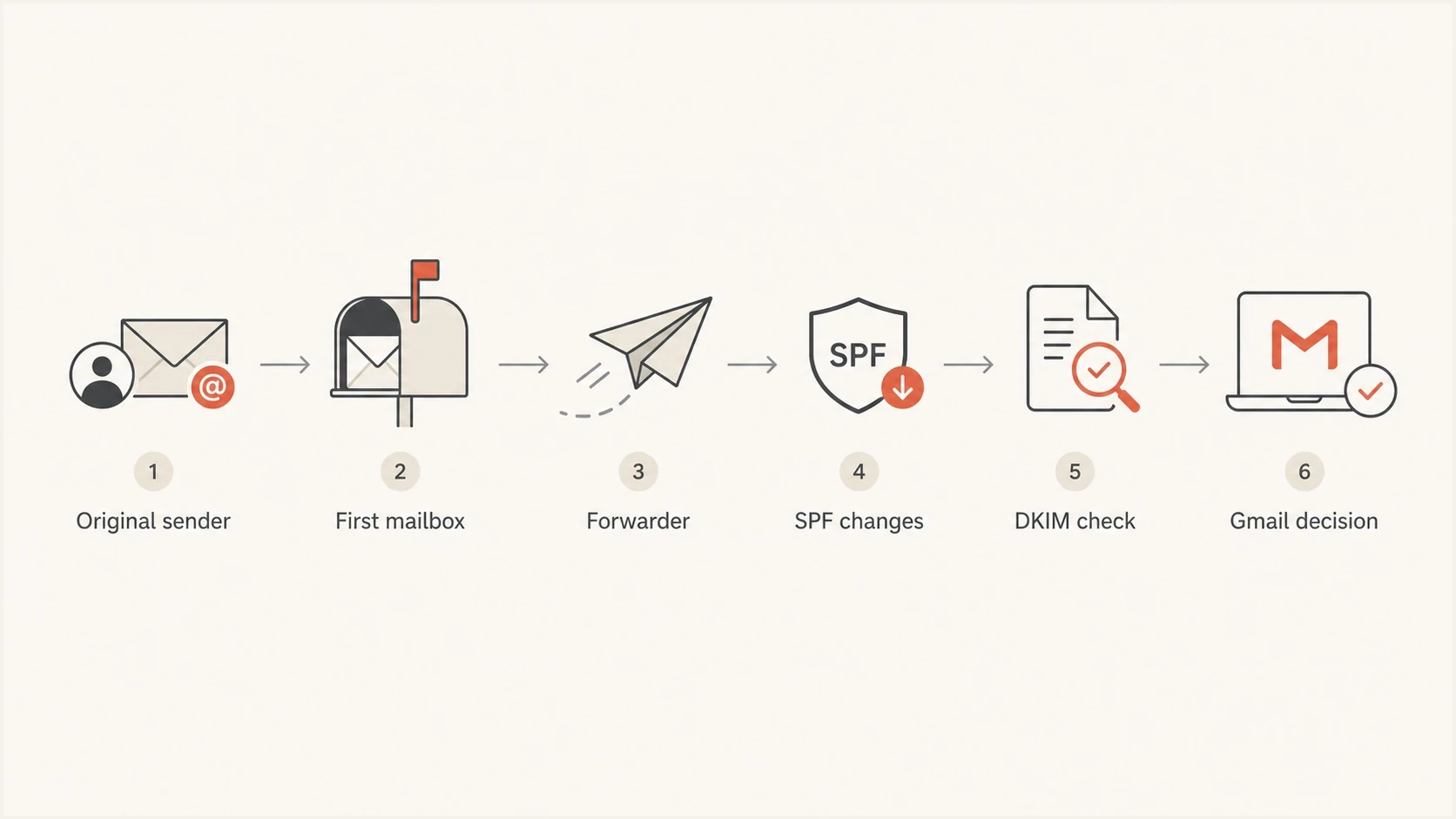
Flowchart showing how forwarding changes the Gmail authentication path.
Gmail sees the IP address of the forwarder on that second transaction. SPF often fails for the original envelope sender. If the forwarder uses SRS, SPF can pass for the forwarding domain, but that domain normally lacks alignment with the original visible From domain. If DKIM passes and has alignment with the visible From domain, DMARC can still pass. If aligned DKIM breaks, DMARC fails unless another aligned mechanism succeeds.
- SPF: It checks the server that connected to Gmail and the envelope sender used on that hop. SRS can authenticate the forwarder's domain, but it does not restore SPF alignment for the original visible From domain.
- DKIM: It can survive forwarding when the forwarder does not rewrite signed headers, re-encode the body, or change MIME boundaries.
- DMARC: It passes when SPF or DKIM both authenticates and aligns with the visible From domain. Forwarding usually makes aligned DKIM the durable path.
- ARC: It preserves earlier authentication results in a verifiable chain. Gmail still performs its own checks, and a valid ARC chain does not guarantee inbox placement.
- Forwarding headers: X-Forwarded-For or X-Forwarded-To headers identify the forwarding path, but they do not replace SPF, DKIM, or DMARC.
- TLS: It protects transport, but it does not prove the visible sender domain is authorized.
Why Gmail still cares
Forwarded Gmail spam placement still matters when the sender did not choose the Gmail address. The message arrived at a Gmail mailbox, Gmail had to classify it, and the visible From domain remained attached. Gmail evaluates the domains and IP addresses involved in that delivery along with the recipient's feedback.
Forwarded mail can hurt reputation when it arrives in volume, fails DMARC-aligned authentication, and gets classified as unwanted. That is especially common when mailbox providers forward all mail, including messages their own spam filters should have stopped.
- Volume: A few forwarded copies are normal. A large share of mail reaching Gmail through forwarders deserves investigation.
- Quality: If forwarders pass old, unwanted, or compromised traffic, Gmail still sees the visible sender domain attached to it.
- Signals: Authentication failure, content risk, user reporting, and prior reputation feed the final placement.
- Route: Shared forwarding infrastructure can add its own IP and domain reputation to the decision.
Gmail does not publish a threshold at which a percentage of forwarded SPF failures triggers spam placement. The practical goal is to keep DKIM aligned and passing, reduce unwanted forwarding volume, and maintain clean direct-mail behavior wherever the same domain sends.
Forwarding risk bands
Use these bands as investigation priorities, not as Gmail policy thresholds.
Low
Monitor
Small forwarded volume, aligned DKIM passes, few user complaints.
Medium
Fix
Forwarded volume is visible in reports and aligned DKIM breaks for some sources.
High
Act now
Large forwarded volume fails DMARC and Gmail places many copies in spam.
How to stop forwarded email going to Gmail spam
The fix is not one DNS change. Forwarded Gmail spam placement usually needs work on both sides of the path. The original sender must make DKIM and DMARC robust, while the forwarding side must preserve authentication and avoid creating low-quality Gmail traffic.
Sender side
- DKIM stability: Sign with a domain that aligns with the visible From domain and avoid fragile signatures.
- DMARC reporting: Read aggregate reports by source so forwarded traffic does not hide broken senders.
- Sender hygiene: Stop compromised, stale, or low-consent mail before it reaches any mailbox provider.
Forwarder side
- SRS: Rewrite the envelope sender so SPF can validate the forwarding domain without claiming to restore the original domain's DMARC alignment.
- ARC: Seal prior authentication results so Gmail has verifiable context for the earlier hop.
- Filtering: Do not forward messages that the first mailbox already identified as spam.
- Route isolation: Use a dedicated domain or IP address for forwarding so its reputation is easier to identify.
SPF still matters, but SPF alone is weak against forwarding. The safer sender-side plan is to make DKIM reliable, keep DMARC passing through aligned DKIM, and use DMARC monitoring to separate legitimate forwarders from sources that are misconfigured.
Example DNS recordsdns
_dmarc.example.com TXT "v=DMARC1; p=none; rua=mailto:dmarc@example.com"
example.com TXT "v=spf1 include:_spf.sender.example -all"
selector1._domainkey.example.com TXT "v=DKIM1; k=rsa; p=MIIB..."
Those records are only examples. The important part is the operating model: publish valid DNS, check that each legitimate sender passes, and do not assume a green SPF result on direct mail means forwarded mail will behave the same way.
?
What's your domain score?
Deep-scan SPF, DKIM & DMARC records for email deliverability and security issues.
For a fast baseline, run a domain health check and confirm SPF, DKIM, and DMARC are valid before going deeper into forwarding-specific traces.
How to debug forwarded Gmail spam
Debug forwarded Gmail spam by comparing a direct copy with a forwarded copy. Find exactly where authentication changed, then decide whether the sender, the forwarder, or both need fixing.
- Send direct: Send the same message to a controlled Gmail mailbox and inspect the authentication results.
- Send forwarded: Send to the mailbox that forwards into Gmail and inspect the Gmail copy.
- Compare headers: Compare Authentication-Results, ARC-Authentication-Results, ARC-Seal validation, Received hops, the DKIM signing domain, and any DKIM failure detail.
- Check sources: Use DMARC aggregate reports to identify the forwarding provider or route producing the most unaligned failures.
- Test content: Use an email tester to inspect authentication and content signals in a real sent message.
- Watch the trend: After fixes, track Gmail placement and DMARC-aligned authentication over several sending cycles.

Issue steps to fix dialog showing the issue overview, tailored fix steps, and verification action
Suped's product groups DMARC aggregate sources, SPF and DKIM findings, alerts, and blacklist (blocklist) data in one investigation workflow. Start with a forwarding-heavy source, compare its aligned DKIM results, and use the issue view to turn the failure pattern into remediation steps.
Email tester
Send a real email to this address. Suped shows a results button when the test is ready.
?/43tests passed
What Gmail recipients and admins can do
Sender-side fixes protect every recipient, but Gmail-side actions can correct treatment for one mailbox or organization after a trusted forwarded message lands in spam. Use these controls only after confirming the sender and the forwarding route.
- Mark it as Not spam: Move a legitimate message out of Spam so Gmail can use that recipient feedback for future mail.
- Add the sender to contacts: For a known sender, add the original From address to Google Contacts.
- Create a narrow filter: A personal Gmail user can filter a specific trusted sender and select Never send it to Spam. Avoid broad domain filters.
- Add the forwarded address: When forwarding a non-Gmail account into personal Gmail, add that address under Gmail's Send mail as setting.
- Use a Workspace allowlist carefully: An administrator can add a trusted address or domain to a spam bypass list. Gmail can still reject or spam a message it identifies as suspicious.
Recipient filters, contacts, and administrator allowlists do not repair SPF, DKIM, DMARC, or the forwarding route. Use them for confirmed legitimate mail while the sender and forwarder fix the underlying cause.
What DMARC policy does not fix
A DMARC policy of p=none does not cause Gmail to mark forwarded mail as spam. It means the domain is monitoring instead of asking receivers to quarantine or reject messages that fail DMARC. Spam placement still comes down to Gmail's classification, authentication, reputation, and user signals.
Moving straight to p=reject also does not solve forwarded spam by itself. Enforcement is important once legitimate sources pass DMARC-aligned authentication, but it can make broken forwarding more visible. Stage the policy after the legitimate mail path is understood.
|
|
|
|---|---|---|
No Gmail sends | Forwarding still reaches Gmail | Monitor Gmail results |
SPF passed direct | SPF can fail after forwarding | Preserve aligned DKIM |
Policy none | Monitoring mode | Fix before reject |
Forwarded noise | Delivery signal | Segment sources |
Common assumptions in forwarded Gmail spam cases.
If direct Gmail mail is also going to spam, treat that as a broader placement issue. Forwarding is one cause, but direct mail problems need a review of consent, complaints, sending patterns, content, and authentication.
For direct Gmail placement problems, this separate page on Gmail spam fixes is a better fit than focusing only on forwarding.
Reputation and blocklists
Forwarded Gmail spam placement does not always mean the sender is on a blocklist or blacklist. Reputation still needs checking. If a forwarding route sends unwanted mail into Gmail at scale, the same quality problem can appear in domain or IP reputation systems.
Suped's blocklist monitoring connects blacklist and blocklist status with authentication results, so teams can see whether the issue is isolated forwarding behavior or part of a broader domain reputation problem.
- Check domains: A domain reputation issue can follow the visible sender across providers and routes.
- Check IPs: A forwarding IP with poor reputation can weigh against otherwise valid sender authentication.
- Check timing: A sudden spike usually points to a changed forwarder, compromised source, or new sending pattern.
Suped's product can centralize authentication findings and blacklist (blocklist) alerts in the same investigation. Use the source-level DMARC view to isolate forwarding routes, then verify whether the same domain or IP appears in reputation alerts.
Views from the trenches
Best practices
Keep DKIM stable through forwarding, because SPF often fails after the next hop at Gmail inboxes.
Separate forwarding traffic from direct mail so reputation problems are easier to isolate quickly.
Track failed DMARC-aligned authentication by source, not only domain pass rates over time.
Common pitfalls
Treating forwarded failures as harmless hides domain reputation damage at Gmail over time.
Changing message bodies during forwarding breaks DKIM and leaves SPF as the only path.
Assuming p=none causes spam misses failed DMARC alignment and sender reputation signals.
Expert tips
Review ARC and forwarding headers before changing DNS, because the path explains the failure.
Use DMARC reports to separate forwarding noise from broken sender configuration per source.
Fix high-volume forwarders first, then watch Gmail placement and authentication together.
Marketer from Email Geeks says a sender that avoids direct Gmail delivery can still create Gmail reputation signals when other mailbox providers forward its mail.
2024-11-09 - Email Geeks
Marketer from Email Geeks says a high volume of forwarded mail is a warning sign, especially when the forwarding source sends messages Gmail classifies as unwanted.
2024-11-09 - Email Geeks
Why Gmail marks forwarded email as spam
Emails are being marked as spam when forwarded to Gmail because forwarding often breaks SPF for the original sender, sometimes breaks DKIM, and gives Gmail a weaker authentication path than direct delivery. Gmail also judges the forwarded copy by reputation, content, route quality, and user behavior.
The cleanest fix is to make DKIM durable, keep DMARC passing, inspect real forwarded headers, have forwarders preserve signed content, use SRS for the rewritten envelope sender, add ARC where supported, and stop unwanted mail before it gets forwarded. Then monitor Gmail-specific outcomes over time.
Suped fits this workflow when a team needs one place to identify authentication failures, forwarding-heavy sources, and blacklist (blocklist) reputation alerts. Use those source-level results to decide which forwarding routes matter and assign the relevant fix.




