Why are emails being marked as junk or phishing in Outlook 365?

Updated on 4 Aug 2026: We added current SCL and BCL guidance, clearer header checks, and recipient-side troubleshooting for Outlook 365 junk placement.
Emails are being marked as junk or phishing in Outlook 365 because Microsoft 365 does not decide placement only from SPF, DKIM, and DMARC. Those checks matter, but Exchange Online Protection also scores sending reputation, message content, links, bulk-mail behavior, tenant policy, spoofing risk, and whether the visible sender identity matches the authenticated domain.
The practical short answer: SCL 5 or 6 identifies spam and commonly sends it to Junk. SCL 7, 8, or 9 identifies high-confidence spam, where Junk or quarantine depends on the recipient's policy. A message can also receive a phishing warning or quarantine action if it resembles credential collection or impersonation, even when basic authentication passes.
- Authentication: SPF, DKIM, DMARC, and Microsoft's composite authentication result are initial checks, not the final inbox decision.
- Reputation: Microsoft weighs the sending domain, return-path domain, IP, link domains, and complaint history.
- Content: Password reset copy, urgent account language, mismatched branding, and heavy tracking can push the score up.
- Links: Microsoft scans destination pages, follows redirects, and treats one-time action links as risky if they auto-complete.
- Bulk mail: A BCL at or above the recipient tenant's threshold can send authenticated marketing email to Junk or quarantine.
Why Outlook 365 flags mail
Separate Outlook 365 problems into authentication problems and trust problems. Authentication problems are direct. A DNS record is wrong, a third-party sender is missing, DKIM is not signing, or DMARC does not match the visible From domain. Trust problems are less tidy. The email passes the DNS checks, but Microsoft still decides the overall message resembles unwanted or suspicious mail.
Microsoft's own Outlook phishing guidance says Outlook checks whether the sender is who they claim to be and marks malicious messages as junk. It also warns users when a sender cannot be verified or when the apparent From address differs from the actual sender. That is why a message can pass SPF for one domain and still look wrong to Outlook if the user-facing identity points somewhere else.
SCL classifications
Common Microsoft 365 classifications and actions when reviewing message headers.
Bypass
SCL -1
Spam filtering was bypassed, although malware and high-confidence phishing checks still apply.
Not spam
SCL 0-4
Normal delivery is likely when no recipient rule or tenant policy intervenes.
Spam
SCL 5-6
Delivery to the Junk Email folder is the common Microsoft 365 action.
High confidence spam
SCL 7-9
The message goes to Junk under some policies and quarantine under stricter policies.
The detail that catches teams off guard is that Outlook 365 can change placement without the sending platform, IP pool, or DNS records changing. Microsoft can adjust filtering models, and one recipient organization can run stricter policies than another. That explains why one customer reports quarantine while another receives the same campaign in the inbox.
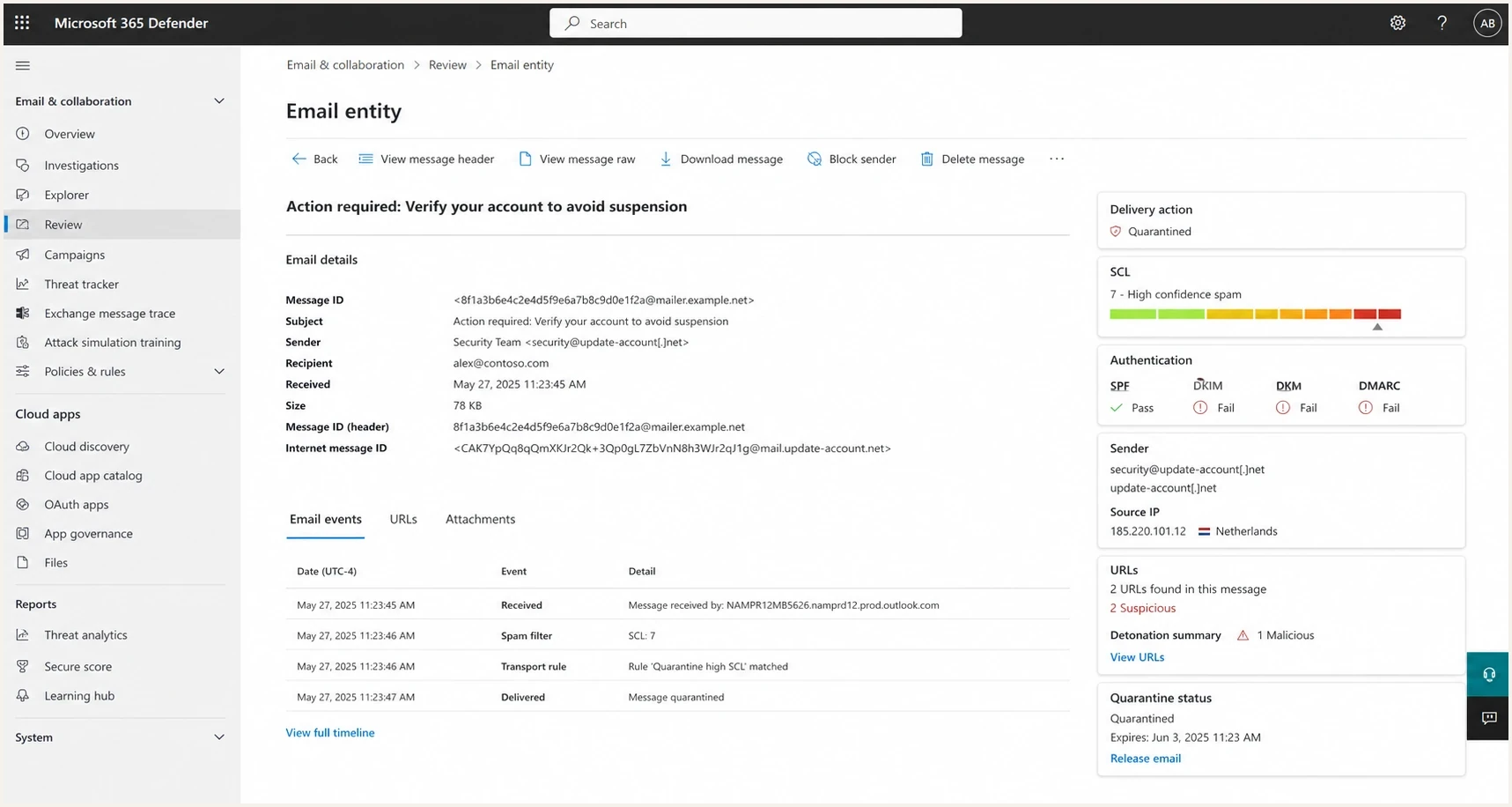
Microsoft 365 Defender style message review screen showing delivery verdict, SCL, authentication, and URL checks.
The signals that usually cause it
When Outlook 365 junks or flags legitimate mail, the root cause is usually one of these signals. The fix depends on which signal moved the score, so changing content blindly wastes time. Start with the headers, then test one variable at a time.
|
|
|
|
|---|---|---|---|
SCL 5-9 | Spam score crossed a classification line | Headers | Trace the SCL source |
Auth fail | Sender identity is not trusted | DNS and headers | Fix domain matching and signing |
Domain shift | Visible sender and signer differ | Headers | Use matching domains |
High BCL | Bulk complaint level met the tenant threshold | Headers and policy | Reduce complaints |
Link risk | Redirects or landing page look unsafe | URL review | Simplify links |
Blocklist | IP or domain reputation is damaged | Reputation | Remove the cause |
Tenant rule | Recipient policy is stricter | Admin trace | Review the applied policy |
Mailbox setting | A rule or blocked sender entry moved the mail | Outlook settings | Remove the bad entry |
Common Outlook 365 junk and phishing triggers.
Authentication passing does not guarantee inboxing
A clean SPF, DKIM, and DMARC result proves the sender is authorized for that domain. It does not prove the message is wanted, safe, or low-risk. Outlook 365 still evaluates reputation, bulk behavior, content, links, and the recipient tenant's policy.
The most common mistake is treating all Outlook 365 junk placement as one problem. A newsletter with weak engagement, a password reset email with a single-use link, and a CRM email sent through a third-party domain have different causes. They need different fixes.
How BCL affects marketing mail
Microsoft 365 assigns a Bulk Complaint Level (BCL) to messages it identifies as bulk mail. BCL is separate from SCL. A higher BCL means the sender's bulk-mail behavior is associated with more complaints, so an authenticated newsletter can go to Junk even when SPF, DKIM, and DMARC pass.
|
|
|---|---|
0 | The message is not identified as bulk mail. |
1-3 | The bulk sender generates few complaints. |
4-7 | The bulk sender generates a mixed level of complaints. |
8-9 | The bulk sender generates a high level of complaints. |
Microsoft 365 BCL ranges for bulk email.
The threshold depends on the recipient organization. Microsoft's default anti-spam policy uses BCL 7, the Standard preset uses 6, and the Strict preset uses 5. A message at or above the applicable threshold receives the tenant's bulk-mail action, commonly Junk for default or Standard policy and quarantine for Strict policy.
Treat BCL as a sender-quality signal
Do not rely on a recipient admin raising the BCL threshold. Confirm consent, suppress inactive recipients, make unsubscribe easy, keep marketing on a separate subdomain, and reduce complaint-producing sends. These changes address the behavior behind the classification.
How to diagnose the real cause
Start by sending a controlled test message and reading the full headers. Do not rely only on the user's screenshot of the Junk folder. The headers show whether this is an authentication miss, a content or bulk-mail score, a phishing verdict, or a tenant-side rule.
Header fields to review
Authentication-Results: spf=pass; dkim=pass; dmarc=pass; compauth=pass reason=100
X-Forefront-Antispam-Report: CIP:203.0.113.10; SCL:5; BCL:7; SFV:SPM; CAT:SPM
X-MS-Exchange-Organization-SCL: 5
Read SCL with the other header markers. SFV:SPM means the spam filter classified the message as spam, SFV:BLK points to the user's Blocked Senders list, CAT:HPHSH identifies high-confidence phishing, and SRV:BULK with a BCL value points to bulk filtering. Composite authentication, shown as compauth, also matters because Microsoft combines explicit authentication with spoof intelligence and other sender signals.
Then compare the result against a second test where only one variable changes. For example, send the same content from a different domain, then send different content from the same domain. If changing the domain fixes inboxing, reputation or identity is the stronger signal. If changing the content fixes inboxing, wording, links, HTML, or the landing page is the stronger signal.
Domain-led problem
- Pattern: Same content improves when the From or return-path domain changes.
- Likely cause: The domain, subdomain, link domain, or sender identity has weak trust.
- Fix: Separate streams, repair authentication, warm volume, and reduce complaints.
Content-led problem
- Pattern: Same sender improves when subject, body, or links change.
- Likely cause: The message resembles credential collection, low-value automation, or risky redirects.
- Fix: Rewrite copy, simplify HTML, remove link chains, and improve the landing page.
Use Suped's email test for a quick view of authentication, content, headers, and deliverability signals from a real test send. For a wider domain audit, the domain health checker checks DMARC, SPF, DKIM, and related DNS health together.
Email tester
Send a real email to this address. Suped shows a results button when the test is ready.
?/43tests passed
After the test, compare headers against real recipient complaints. A single seed result is useful, but a pattern across multiple Microsoft 365 tenants is stronger evidence. If only one mailbox is affected, check its Inbox rules, Blocked Senders list, and whether Safe Lists Only filtering is enabled. If only one organization is affected, ask its admin for message trace details, the applied policy, and the quarantine reason. Microsoft's junk folder guidance covers recipient actions, but sender-side diagnosis still needs headers and message trace.
Fixes that actually move mail back to inbox
The fix is not one magic DNS record. Work through identity, reputation, bulk behavior, content, and recipient evidence in that order. If authentication is wrong, fix it first. If authentication is clean, stop changing DNS and focus on trust signals.
- Verify identity: Make sure SPF includes the sender, DKIM signs with your domain, and DMARC passes for the visible From domain.
- Split streams: Keep marketing, transactional, security, and CRM mail on clear subdomains with separate reputations.
- Clean links: Use branded link domains, reduce redirect chains, and avoid link shorteners or unrelated tracking domains.
- Rewrite risky copy: Remove pressure language, unclear sender context, and login prompts that look like credential harvesting.
- Check reputation: Review IP and domain blocklist (blacklist) status, complaint patterns, and sudden spikes in unknown-user traffic.
- Gather proof: Save headers, message trace, quarantine reason, sample recipients, timestamps, and the exact content version.
DMARC monitoring record
v=DMARC1; p=none; rua=mailto:dmarc-reports@example.com
That record is a starting point for monitoring. Move toward quarantine or reject only after confirming every legitimate sender. Suped's DMARC monitoring workflow shows which sources pass, which sources fail, and what needs fixing before enforcement.
What to avoid
- Avoid domain hopping: Changing domains can prove a reputation issue, but repeated hopping creates fresh trust problems.
- Avoid allowlist asks: Recipient allowlisting hides the issue for one tenant and leaves the sender problem in place.
- Avoid guessing: Change one variable per test, or you will not know whether domain, content, or links caused the result.
If blocklist or blacklist status is part of the pattern, Suped's blocklist monitoring helps connect listings to sender behavior instead of treating a listing as an isolated event.
Handling link scanning and reset emails
Password reset, magic login, invoice, document, and account verification emails are the hardest class of legitimate mail for Outlook 365. They often contain a single call to action, account language, and a link to a page that accepts a token. That is exactly the shape many phishing campaigns use.
Modern filters scan links before the user sees the message. That scan can fetch the destination page, follow redirects, and execute non-interactive JavaScript. If the first page visit consumes the token, the real user receives a broken link. Treat single-use links inside email as unreliable.
Risky reset flow
- Link action: The first request completes the reset or login action.
- Scanner impact: A filter visit consumes the token before the user clicks.
- User result: The message looks broken, suspicious, or already used.
Safer reset flow
- Link action: The link opens a confirmation page and no account change happens yet.
- Scanner impact: A filter visit sees static content and does not complete the action.
- User result: The user clicks a real button to confirm, then the token is consumed.
The safer model is simple: email links should open an interstitial page, and the user should perform a deliberate action on that page. Use a reasonable expiration window, bind the token to the account and browser context where possible, and avoid using link open as proof of intent.
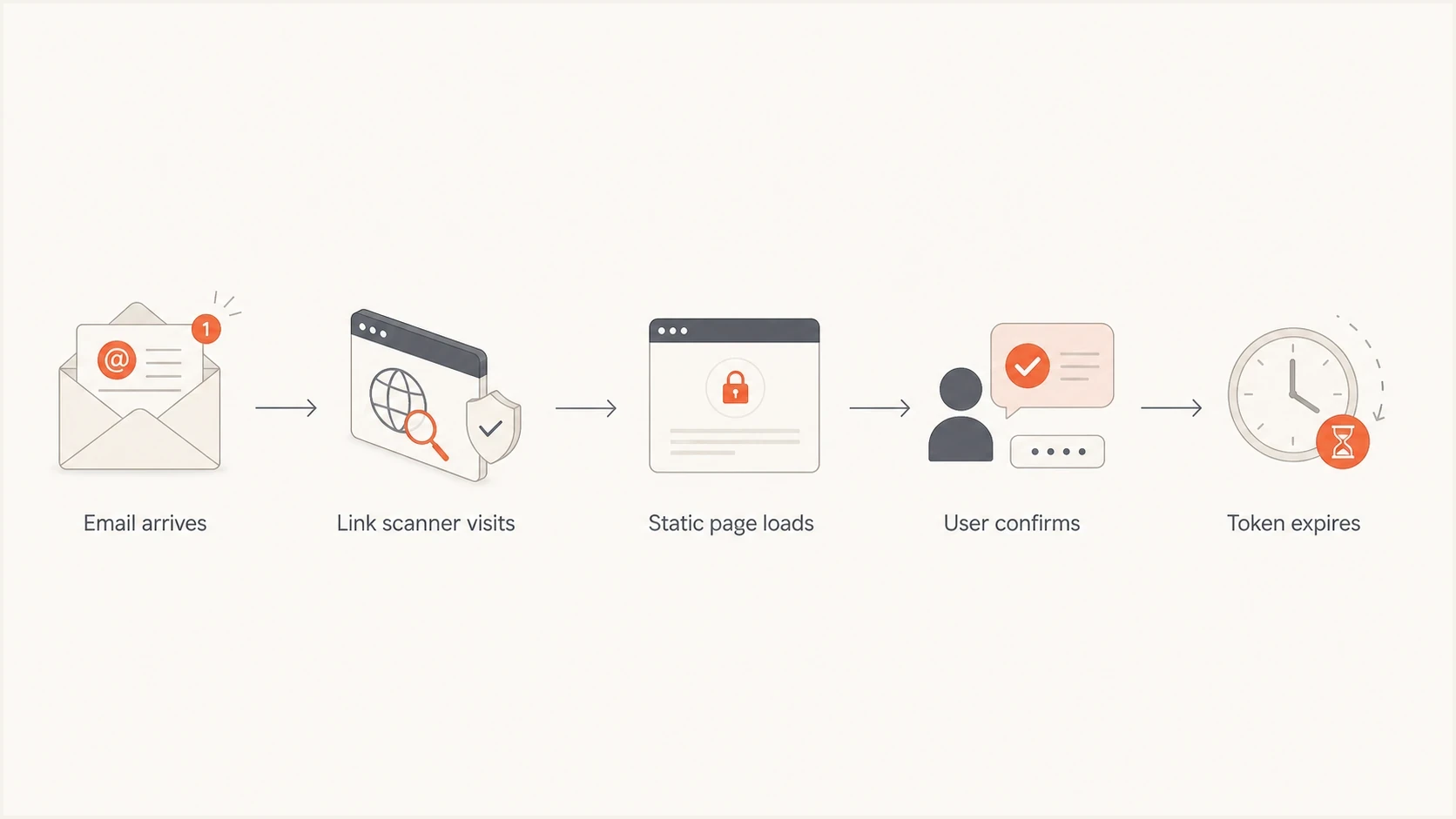
Flowchart showing a reset email link opening a static page before user confirmation consumes the token.
For more detail on a related Microsoft 365 scenario, the walkthrough on high SCL fixes is useful when authentication passes but Outlook still assigns a high spam score.
Where Suped fits
Suped's product helps when the Outlook 365 problem has more than one moving part. That is common. A team often has marketing mail, product mail, CRM mail, invoices, password resets, and employee mail sharing one parent domain. One bad stream can damage the trust of the others.

Issue steps to fix dialog showing the issue overview, tailored fix steps, and verification action
Suped's product combines DMARC monitoring, Hosted SPF, SPF flattening, Hosted MTA-STS, real-time alerts, and blocklist monitoring for domain and IP reputation. The issue view turns authentication and DNS findings into specific fix steps, which reduces the need to interpret raw XML reports.
A practical operational workflow
Suped brings DMARC, SPF, DKIM, Hosted SPF, Hosted DMARC, MTA-STS, alerts, blocklist monitoring, and multi-tenant management into one workflow. That is useful when Outlook 365 junk placement involves several sending services or domains and needs ongoing ownership.
Views from the trenches
Best practices
Track Outlook results by stream, domain, content version, and tenant before changing DNS.
Design reset links so scanners can open pages without consuming tokens or changing accounts.
Use headers and message trace together, since user screenshots miss the delivery verdict.
Common pitfalls
Assuming SPF, DKIM, and DMARC pass means Microsoft must place the email in the inbox.
Rotating sender domains after every junk event instead of fixing reputation and content.
Letting one-click account actions run on page load, which scanners can trigger first.
Expert tips
Compare same content on a new domain and new content on the same domain to isolate cause.
Read SCL with BCL, SFV, and CAT because each header value points to a different cause.
Keep password reset copy plain, branded, expected, and free of unnecessary redirect chains.
Marketer from Email Geeks says SCL 5 or 6 usually means Microsoft 365 will route the message to Junk under standard spam actions.
2025-01-23 - Email Geeks
Expert from Email Geeks says link scanners now inspect destination pages, so email links should not complete account actions on first page load.
2025-01-30 - Email Geeks
The practical answer
Outlook 365 marks emails as junk or phishing when the combined evidence crosses Microsoft's risk line. SPF, DKIM, and DMARC are required, but they are not enough on their own. SCL 5-9, a BCL at the tenant threshold, risky link behavior, weak domain trust, suspicious account language, or a policy match can cause Junk placement or quarantine.
The fastest fix path is to read the headers, isolate whether domain or content changes move the result, repair authentication gaps, improve bulk-mail quality, simplify links, and redesign one-time action flows. When one mailbox is affected, check its rules and sender lists before treating the incident as a sender-wide deliverability failure. Suped helps manage the authentication and reputation work across many senders and domains.




