Why are AOL and Yahoo flagging emails as spam?

Published 17 May 2025
Updated 10 Aug 2026
11 min read
Summarize with

Updated on 10 Aug 2026: We updated this guide with Yahoo's current sender requirements, one-click unsubscribe guidance, and the risk of sending campaigns from Yahoo or AOL addresses.
AOL and Yahoo flag emails as spam when their filters see enough evidence that recipients will not want the message. The strongest signals are spam complaints, weak engagement from those mailbox users, stale list addresses, sudden volume changes, authentication failures, domain or IP reputation damage, and content or link patterns that match earlier unwanted mail. A seed-list warning before a campaign can also be a false positive, so do not halt a send on seed data alone.
The first move is to separate a real mailbox-provider problem from a testing artifact. Send a controlled copy through the email tester, then compare that result with DMARC aggregate data, live Yahoo and AOL engagement, complaint trends, and recent bounces.
- Complaints: Recipients hit spam, delete without reading, or stop interacting with similar mail.
- List quality: Old AOL and Yahoo addresses create bounces, traps, inactivity, and bad user signals.
- Authentication: SPF, DKIM, or DMARC fails, or the authenticated domain does not match the visible From domain.
- Reputation: Your domain, IP, URLs, or shared sending pool has negative history.
- Test noise: Seed placement reports show spam before real recipient data confirms the issue.
The short answer
User reaction usually comes first. Yahoo and AOL build filtering decisions around whether their users treat similar mail as wanted. Good DNS does not outweigh a pattern of spam complaints, repeated deletes, unopened campaigns, inactive list segments, or hard-to-find unsubscribe paths.
Authentication still matters. Weak domain proof makes the reputation problem worse because the receiver has less confidence that the visible sender is responsible for the message. Yahoo requires all senders to use SPF or DKIM at a minimum. Bulk senders need SPF and DKIM, a passing DMARC policy at p=none or stronger, valid forward and reverse DNS, and easy unsubscribe for marketing mail. These requirements also apply to AOL domains hosted by Yahoo Mail.
Fast diagnosis
Do not treat one AOL or Yahoo seed result as final proof. Require at least two independent signals before changing a campaign: live inbox data, provider-specific metrics, DMARC results, bounce logs, support complaints, or mailbox tests from a fresh send.
- Confirm scope: Check whether the issue is only AOL and Yahoo or appears across other mailbox providers.
- Check timing: Map the first spam placement to any volume jump, list import, DNS change, or ESP pool change.
- Compare evidence: Seed data is useful, but it loses weight when post-send delivery and engagement stay healthy.
How Yahoo and AOL judge your mail
Yahoo's published sender requirements apply to consumer email brands hosted by Yahoo Mail, including AOL. If both brands start filtering at the same time, look for a sender signal shared across that receiving infrastructure rather than a Yahoo-only template problem.
Their filters do not use one static spam score. They combine authentication, sending history, recipient behavior, infrastructure quality, and message-level patterns. A small content change rarely explains a broad AOL and Yahoo shift unless it changes links, tracking domains, unsubscribe behavior, or user reaction.
|
|
|
|---|---|---|
Complaints | Users marked recent mail as unwanted. | Complaint rate by domain. |
Inactivity | Recipients ignore or delete the mail. | Age of last engagement. |
Authentication | The receiver lacks proof of sender control. | SPF, DKIM, DMARC, and domain matching. |
Unsubscribe | A difficult opt-out drives spam complaints. | List-Unsubscribe and the body link. |
Reputation | Past sending affects current trust. | Domain, IP, and links. |
Volume | Sudden spikes look risky. | Daily send curves. |
Content | Links and wording match bad patterns. | URLs, forms, and tracking. |
Common signals that push AOL and Yahoo toward the spam folder.
Authentication problems that look like spam
Check SPF, DKIM, and DMARC before rewriting copy because broken authentication changes how the receiver scores everything else. A domain with good engagement but failing authentication has a weaker defense when a receiver tightens filtering.
DMARC ties SPF and DKIM results back to the visible From domain. Suped's DMARC monitoring shows which sending sources pass, which fail, and which third-party systems are sending without proper permission.
Starting DMARC recordDNS
Host: _dmarc.example.com
Type: TXT
Value: "v=DMARC1; p=none; rua=mailto:dmarc@example.com"
Do not skip domain matching
A message can pass SPF or DKIM in isolation and still fail DMARC if the authenticated domain does not match the visible From domain. That is common when a new ESP, CRM, invoice tool, or help desk starts sending without a complete setup.
- SPF pass: The return-path domain has permission to use the sending IP.
- DKIM pass: The signature validates for the message as received; forwarding or later modification can break it.
- DMARC pass: Either SPF or DKIM passes and the authenticated domain matches the visible From domain.
- Reporting on: Aggregate reports go to a monitored place, not an abandoned mailbox.
?
What's your domain score?
Deep-scan SPF, DKIM & DMARC records for email deliverability and security issues.
Use a From address on a domain you own
A campaign sent through a third-party platform should not use an @yahoo.com or @aol.com address in the visible From field. Those domains belong to Yahoo and AOL, and their DMARC policies prevent another sending system from authenticating as them. The message can fail DMARC and be rejected or filtered before reputation or copy becomes the main issue.
This is different from sending to recipients at Yahoo or AOL. Use an address on a domain the business owns, authenticate that domain in the sending platform, and keep the personal Yahoo or AOL address in Reply-To if replies still need to reach it.
- Change the visible From address: Use a mailbox on the organization's own domain.
- Configure authentication: Set up SPF and DKIM for the sending platform, then confirm DMARC domain matching.
- Preserve replies: Put the Yahoo or AOL mailbox in Reply-To only when it is still needed.
- Retest delivery: Confirm authentication and placement with a controlled send before restoring volume.
Reputation and recipient behavior
AOL and Yahoo respond quickly when complaints rise because their users gave a clear vote. A clean record yesterday does not protect today's send if a dormant segment gets mailed, a suppression rule breaks, or a reactivation campaign reaches people who no longer expect the brand.
Check blocklist monitoring because a blacklist or blocklist entry can help explain a sudden reputation drop, especially when multiple senders use the same IP pool or tracking domain. Treat a listing as a diagnostic clue, not standalone proof that it caused Yahoo or AOL placement.
Yahoo complaint-rate thresholds
Yahoo requires senders to keep the spam complaint rate below 0.3%. A tighter internal target provides room to act before reaching that limit.
Target
Under 0.1%
Keep improving, but do not change the campaign based on seed noise alone.
Investigate
0.1% to 0.29%
Tighten segmentation and inspect complaint sources before scaling volume.
Above requirement
0.3% or higher
Pause risky promotional sends and fix list quality before the next bulk push.
Yahoo calculates its spam rate against mail delivered to the inbox, so a rate based on total sent mail can understate risk. The most useful split is by receiver domain because a healthy average can hide a Yahoo-specific spike. Use separate reporting for aol.com, yahoo.com, ymail.com, rocketmail.com, and any regional Yahoo domains in the list. Enroll each DKIM signing domain in Yahoo's complaint feedback loop so reported recipients can be suppressed promptly.
Seed tests and false positives
Seed tools are useful, but they are not a mailbox provider verdict. A seed address has no normal history with your brand, does not behave like a subscriber, and often receives mail that real users never see. That means seed placement can flag risk before a send, but it can also create noise.
When a seed report says AOL and Yahoo will spam-folder the campaign, compare it with live data after a small controlled send. If the pattern is slow delivery instead of filtering, treat it as Yahoo and AOL delays and investigate deferrals, throttling, queues, and retry behavior.
Seed warning
- Useful for: Spotting sudden risk before the full audience receives the campaign.
- Weak for: Proving real inbox placement when the seed has no subscriber history.
- Action: Hold high-risk volume briefly and gather one more signal.
Live delivery
- Useful for: Confirming how real Yahoo and AOL subscribers receive and handle mail.
- Weak for: Instant diagnosis when you do not have enough volume yet.
- Action: Compare opens, clicks, complaints, bounces, and unsubscribes by domain.
A practical investigation workflow
The fix depends on which signal changed. The same workflow works whether the first clue is a seed alert, a drop in Yahoo opens, a rise in AOL complaints, or a sudden bounce pattern.
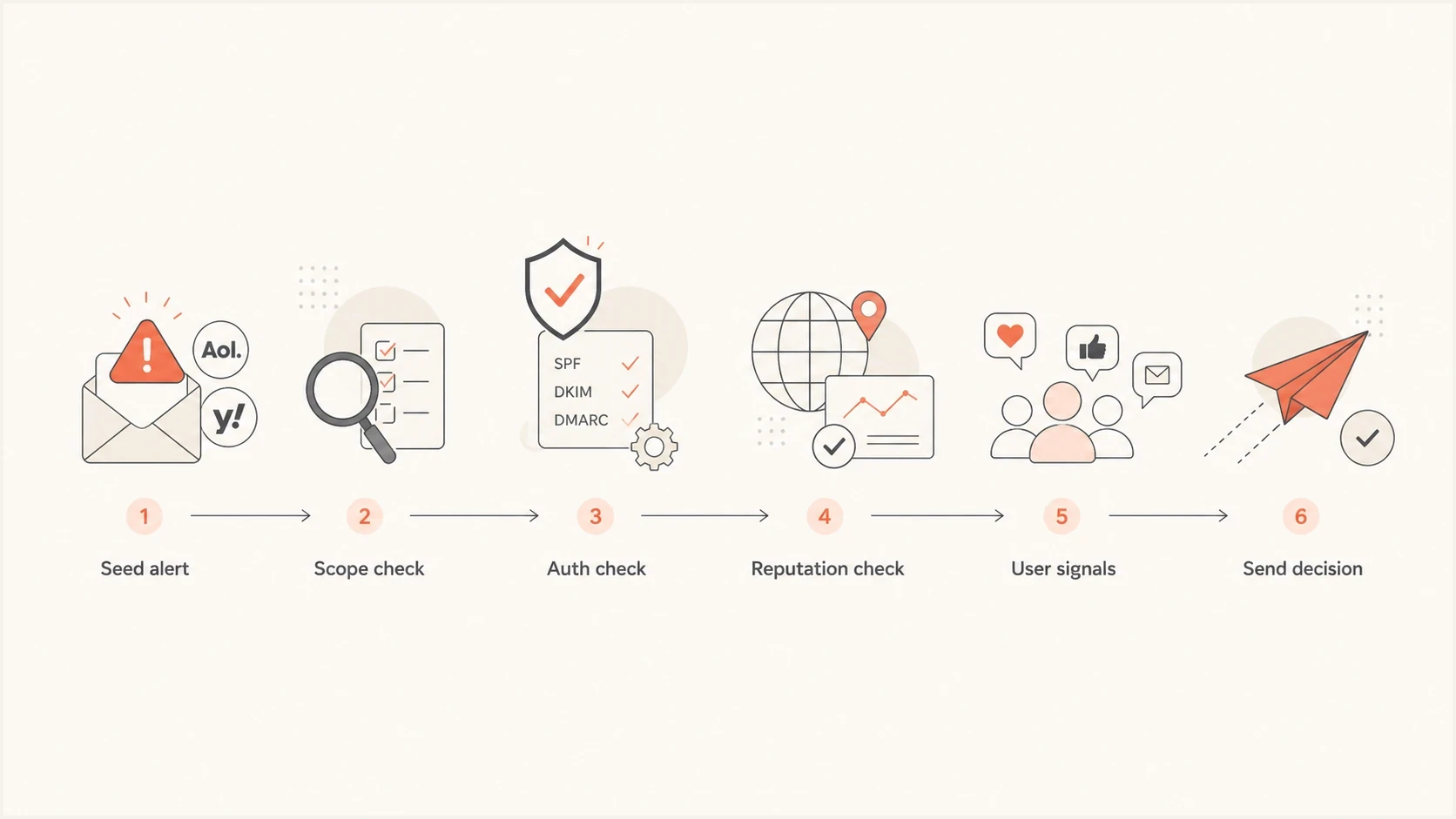
Flowchart showing how to triage AOL and Yahoo spam placement.
- Scope: Separate AOL and Yahoo results from the rest of the list, then compare campaigns and senders.
- Authenticate: Check SPF, DKIM, DMARC, reverse DNS, HELO identity, and visible From domain matching.
- Check unsubscribe: For marketing mail, verify a functioning List-Unsubscribe header, preferably with RFC 8058 one-click POST, a visible body link, and processing within two days.
- Compare: Put seed results next to live opens, clicks, complaints, bounces, and unsubscribes.
- Review recipients: Isolate unengaged segments, new imports, old reactivation pools, and role accounts.
- Check reputation: Look at domain reputation, IP reputation, link domains, and blacklist or blocklist status.
- Control volume: Keep transactional mail stable, pause risky promotional volume, and separate those streams by IP or DKIM domain.
- Retest: Send a controlled sample to engaged AOL and Yahoo users, then measure the real result.
Where Suped fits
The hard part is tying an AOL or Yahoo filtering event to authentication, DNS, sender sources, blacklist and blocklist status, and specific fix steps. Suped's product connects those parts of the investigation in one workflow.
Issues page showing top issues, verified sources, unverified sources, and authentication pass rates
Suped brings DMARC, SPF, DKIM, hosted DMARC, hosted SPF, SPF flattening, hosted MTA-STS, blocklist monitoring, and real-time alerts into the same workspace. Issue details identify a failing source or risky DNS record and provide steps to fix it, which helps teams move from a Yahoo or AOL symptom to the responsible sender configuration.
What to monitor
- Source inventory: Every platform sending as your domain, including ESPs, CRMs, billing tools, and help desks.
- DNS records: SPF lookup count, DKIM selectors, DMARC policy, MTA-STS status, and reporting destinations.
- Reputation: Domain and IP blacklist or blocklist status, complaint patterns, and receiver-specific failures.
- Policy staging: Move DMARC from none to quarantine or reject after legitimate sources pass consistently.
Views from the trenches
Best practices
Compare seed results with real inbox data before pausing a healthy scheduled send entirely.
Check complaint trends at Yahoo and AOL before assuming the template caused placement.
Track receiver outages separately from reputation signals; they need different fixes.
Common pitfalls
Treating a seed-list warning as final proof of spam placement delays good mail needlessly.
Ignoring complaints and inactivity leaves the real filtering cause unresolved for weeks.
Changing content during a receiver event adds variables and makes diagnosis harder.
Expert tips
Hold high-risk campaigns briefly, but keep low-risk transactional mail flowing with monitoring.
Segment Yahoo and AOL recipients so recovery tests do not affect the whole list.
Use DMARC aggregate data to separate authentication failures from user reaction problems.
Marketer from Email Geeks says simultaneous AOL and Yahoo seed issues across senders can point to a receiver-side change or a testing artifact, not always sender content.
2020-01-23 - Email Geeks
Marketer from Email Geeks says Yahoo feedback that more mail is being marked as spam means recipient reaction should stay high on the diagnosis list.
2020-01-23 - Email Geeks
What to do next
The answer is usually not a single magic word in the subject line. AOL and Yahoo flag emails as spam when the sender has negative user signals, weak domain proof, reputation damage, sudden sending changes, or content patterns that resemble unwanted mail. When only a seed report complains, verify before changing anything.
- If live mail is fine: Keep sending to engaged users and watch AOL and Yahoo results closely.
- If complaints rose: Suppress unengaged contacts, tighten permission rules, and reduce promotional volume.
- If authentication fails: Fix SPF, DKIM, and DMARC, then retest with controlled messages.
- If reputation changed: Check IPs, domains, tracking links, and blacklist or blocklist entries.
- If AOL and Yahoo only: Segment those receivers and recover volume gradually after the cause is clear.
That sequence keeps the response proportionate. It protects the campaign from a real deliverability drop without creating new variables every time one seed account lands in spam.




