Why am I seeing reverse DNS failure bounces from ATT?

Published 16 Apr 2025
Updated 13 Aug 2026
11 min read
Summarize with
Updated on 13 Aug 2026: We added current AT&T bounce patterns, FCrDNS checks, and separate response steps for 451 and 550 failures.
You are seeing reverse DNS failure bounces from AT&T because AT&T is rejecting one or more sending IPs when its inbound mail servers cannot confirm a valid sending identity for that connection. The usual causes are a missing PTR record, a PTR hostname that does not resolve back to the IP, a bad SMTP banner or HELO name, or a temporary AT&T resolver problem.
The direct fix is to prove which side is failing. Check the sending IP and full SMTP status in the bounce, then verify PTR, forward DNS, HELO, SPF, DKIM, DMARC, and blocklist or blacklist status. If your DNS is clean and only a small part of AT&T traffic fails, treat it as an incident investigation rather than proof that your whole setup broke.
What the AT&T reverse DNS bounce means
AT&T and related consumer domains can reject a connection before they evaluate the message body. This can affect addresses at att.net, sbcglobal.net, bellsouth.net, currently.com, pacbell.net, prodigy.net, and swbell.net. At that stage, the receiving server sees the connecting IP, reverse DNS, forward DNS, SMTP greeting, HELO or EHLO name, and envelope sender domain.
Typical AT&T reverse DNS bounce
smtp;550 5.7.1 Connections not accepted from servers
without a valid sender domain. Fix reverse DNS for 52.124.3.112
That message points at the connection identity, not necessarily the visible From domain. The IP named in the bounce needs valid reverse DNS, and that hostname should resolve back to the same IP. This loop is called forward-confirmed reverse DNS (FCrDNS). The sending host should also use a fully qualified HELO name with public forward DNS.
- PTR check: The IP address should reverse-resolve to a real hostname, not a missing, generic, or stale value.
- Forward check: The PTR hostname should resolve back to the connecting IPv4 or IPv6 address with the matching record type.
- HELO check: The mail server should not greet AT&T with a private, malformed, or unrelated name.
- Envelope check: The return-path domain should exist and pass the basic DNS checks a receiver performs early.
Do not change DMARC policy just because AT&T says reverse DNS failed. DMARC checks whether SPF or DKIM passes and matches the visible From domain. Reverse DNS checks the connecting server identity before or during the SMTP transaction. They are different checks.
How 451 and 550 responses change the response
Read the first digit of the SMTP reply before deciding whether to retry. A 451 response is a temporary deferral, so the sending MTA should keep the message queued and retry on its normal schedule. A 550 response is a permanent rejection for that attempt, so repeated delivery attempts will not repair the problem.
Temporary and permanent AT&T examples
451 4.1.8 Client IP address 192.0.2.10 does not resolve. Fix reverse DNS.

550 5.7.1 Connections not accepted from servers without a valid sender domain. Fix reverse DNS for 192.0.2.10
- For a 451: Leave normal MTA retries enabled, verify DNS, and watch whether the message delivers before the queue expires.
- For a 550: Stop repeated retries to the same recipient, correct any sender-side fault, then run a new controlled test.
- For mixed replies: Group failures by sending IP, receiving node, recipient domain, and time to separate a local fault from an AT&T incident.
The standardized enhanced status code for reverse DNS validation failure is 5.7.25, but a receiver can return broader policy text such as 5.7.1. Use the complete diagnostic, connecting IP, and receiving host together rather than classifying the bounce from one phrase.
Why AT&T reverse DNS bounces start suddenly
Sudden AT&T reverse DNS bounces have several common causes. Scope tells you where to start. If every AT&T message from one IP fails, the IP identity is suspect. If only a fraction fails, the failure can be localized to AT&T nodes, DNS resolvers, or routing paths.
|
|
|
|---|---|---|
All AT&T mail | Bad PTR | Check IP DNS |
Some AT&T mail | Node issue | Collect samples |
One IP only | IP identity | Fix PTR |
New vendor | Setup gap | Verify HELO |
High bounces | Reputation | Check blocklist or blacklist |
Use the bounce scope to decide where to investigate first.
Separate these incidents into sender-side, receiver-side, and mixed causes. Sender-side causes are changes you can fix directly. Receiver-side causes need evidence and escalation.
Sender-side causes
- Missing PTR: The sending IP has no reverse DNS entry.
- Broken forward DNS: The PTR hostname does not resolve back to the sending IP.
- Bad HELO: The server greets with a name that does not exist in public DNS.
- Sender domain issue: The return-path domain has missing DNS or policy records.
Receiver-side or mixed causes
- Resolver failure: AT&T cannot resolve a valid record at the time of the connection.
- Specific node failure: Only one AT&T receiving host rejects while others accept.
- Policy filtering: The bounce cites DNS, but sender reputation still affects the decision.
Intermittent AT&T resolver incidents were publicly reported in February 2025, when senders with valid DNS saw partial reverse DNS rejections across several AT&T consumer domains. Validate your own DNS, then compare failures by receiving node and time before making broad changes.
How to verify your own setup first
Start with the IP in the bounce, not the domain in your From address. If you send through an ESP, ask which outbound pool handled the message and whether that IP was recently moved, warmed, or reconfigured.
Reverse and forward DNS checksbash
dig -x 52.124.3.112 +short

dig mail.example.net A +short

dig mail.example.net AAAA +short
A healthy result has a clear loop. The sending IP reverses to a hostname, and that hostname resolves back to the same connecting IP through an A record for IPv4 or an AAAA record for IPv6. The hostname should belong to the sending infrastructure.
SMTP identity checkbash
openssl s_client -starttls smtp -connect mail.example.net:25

EHLO mail.example.net
Then send a real message through the same path and inspect the headers. DNS proves the records exist. A real message proves the platform used the expected IP, envelope sender, DKIM selector, and route. Suped's email tester shows message-level authentication alongside the delivery signals you need to compare with the AT&T bounce.
Email tester
Send a real email to this address. Suped shows a results button when the test is ready.
?/43tests passed
Check domain health at the same time, but keep the findings separate. Reverse DNS lives with the IP owner. SPF, DKIM, and DMARC do not repair a missing PTR, although authentication and reputation can affect later acceptance decisions.
Use Suped's domain health checker to validate DMARC, SPF, and DKIM records before you escalate. It helps separate connection-level reverse DNS from domain authentication.
Domain health checker sample results showing DMARC, SPF, DKIM scorecards and detailed validation checks
What to collect before escalating
If your checks pass, collect evidence that the problem is narrow. Keep a sample set of 5 to 10 failures, successful AT&T deliveries from the same stream, and DNS output for the sending IP.
- Full bounce: Include the SMTP code, diagnostic text, recipient domain, timestamp, and queue ID.
- Sending IP: Record the exact outbound IP named in the bounce or message logs.
- Receiving node: Capture any AT&T host token, such as flph824, alph763, or alph753, if present.
- DNS proof: Attach PTR and forward DNS results for the sending IP and hostname.
- Control samples: Include successful AT&T deliveries from the same platform and IP pool.
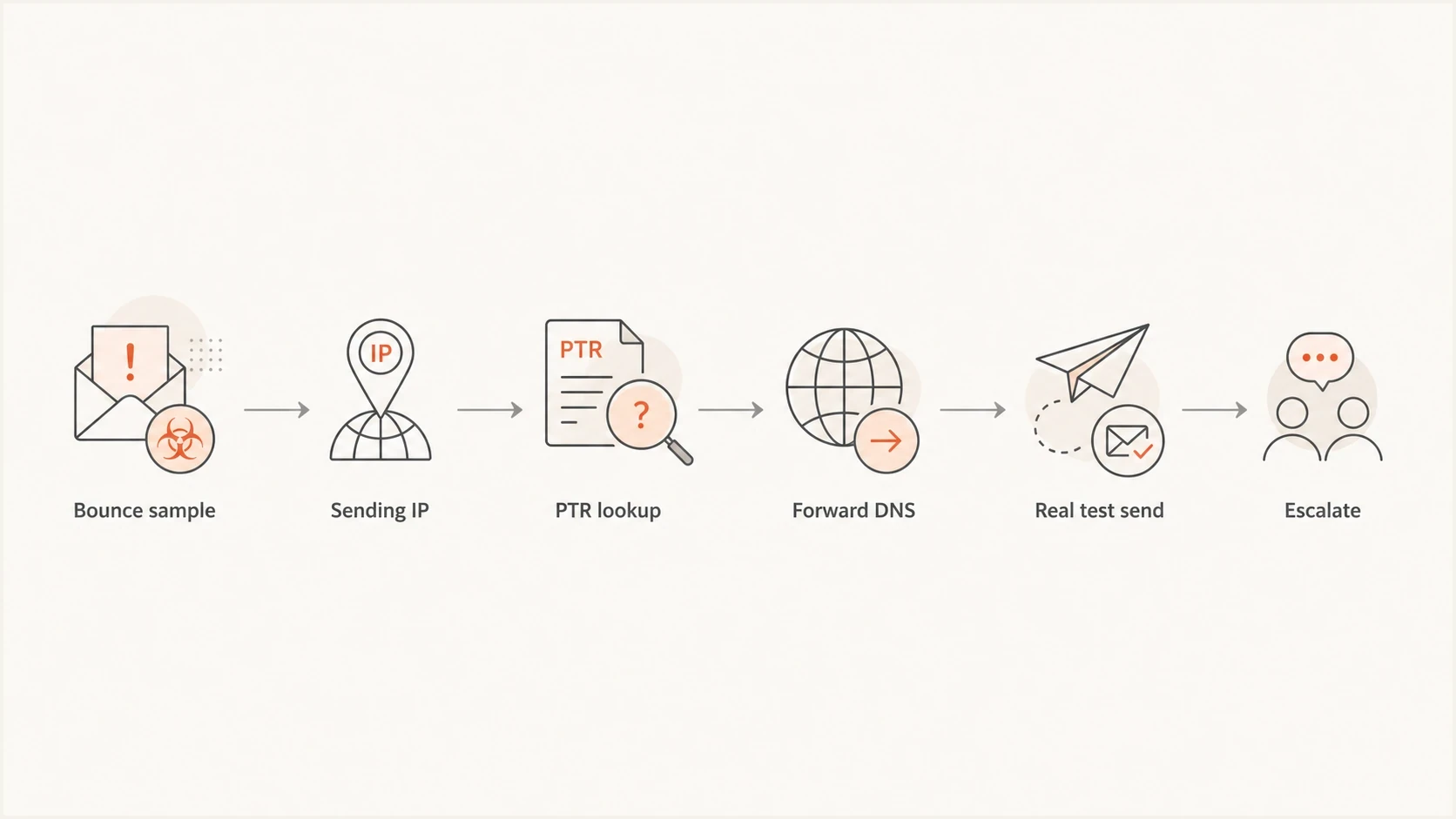
AT&T reverse DNS bounce investigation flowchart from sample collection to escalation.
If the bounces cluster around named AT&T nodes, include those node names in the ticket. That detail can turn a vague deliverability complaint into a routing or resolver investigation.
Fixes when the problem is yours
If your checks fail, fix the connection identity first. Reverse DNS is controlled by the IP owner: your hosting provider, cloud provider, ESP, or internal network team.
- Set PTR: Ask the IP owner to point the sending IP to a stable hostname.
- Add forward DNS: For an IPv4 sender, add an A record that points the hostname back to the IP. For IPv6, use an AAAA record.
- Match HELO: Configure the MTA greeting to use a public, fully qualified hostname with forward DNS.
- Verify SPF: Confirm the IP or provider is authorized for the envelope sender domain.
- Sign DKIM: Make sure outbound mail has a valid DKIM signature tied to your domain.
- Monitor DMARC: Use aggregate reports to confirm real traffic passes after the change.
Basic domain authentication records
example.com. TXT "v=spf1 include:send.example.net -all"

selector1._domainkey.example.com. TXT "v=DKIM1; k=rsa; p=..."

_dmarc.example.com. TXT "v=DMARC1; p=none; rua=mailto:dmarc@example.com"
SPF and DKIM do not replace reverse DNS, but they reduce suspicion after the connection check passes. If SPF is fragile or near the lookup limit, use Suped's SPF checker before you make more changes.
How reputation affects a reverse DNS rejection
Reverse DNS bounces are connection-level signals, but mailbox providers can consider more than one signal. Weak reverse DNS plus poor reputation or blacklist listings gives an IP less room for error.
This is where blocklist (blacklist) monitoring belongs in the workflow. Do not use a listing as automatic proof of why AT&T bounced, but check whether the same IP is listed while you investigate.
Blocklist checker
Check your domain or IP against 144 blocklists.
 Spamhaus
 0Spam
0Spam

 Cisco
Cisco
 NoSolicitado

 URIBL
URIBL
 abuse.ro
 ALPHANET
 Anonmails
 Ascams
 BLOCKEDSERVERS
 Calivent Networks


 EFnet
EFnet




 JustSpam
 Kempt.net
 NordSpam

 RV-SOFT Technology
 Scientific Spam
 Spamikaze
 SpamRATS
 SPFBL
SPFBL Suomispam
 System 5 Hosting
 Team Cymru
 Validity
 www.blocklist.de Fail2Ban-Reporting Service
 ZapBL
ZapBL 2stepback.dk
 Fayntic Services
 ORB UK
 technoirc.org
 TechTheftSpamhaus0SpamCiscoNoSolicitadoURIBLabuse.roALPHANETAnonmailsAscamsBLOCKEDSERVERSCalivent NetworksEFnetJustSpamKempt.netNordSpamRV-SOFT TechnologyScientific SpamSpamikazeSpamRATSSPFBLSuomispamSystem 5 HostingTeam CymruValiditywww.blocklist.de Fail2Ban-Reporting ServiceZapBL2stepback.dkFayntic ServicesORB UKtechnoirc.orgTechTheftSpamhaus0SpamCiscoNoSolicitadoURIBLabuse.roALPHANETAnonmailsAscamsBLOCKEDSERVERSCalivent NetworksEFnetJustSpamKempt.netNordSpamRV-SOFT TechnologyScientific SpamSpamikazeSpamRATSSPFBLSuomispamSystem 5 HostingTeam CymruValiditywww.blocklist.de Fail2Ban-Reporting ServiceZapBL2stepback.dkFayntic ServicesORB UKtechnoirc.orgTechTheftSpamhaus0SpamCiscoNoSolicitadoURIBLabuse.roALPHANETAnonmailsAscamsBLOCKEDSERVERSCalivent NetworksEFnetJustSpamKempt.netNordSpamRV-SOFT TechnologyScientific SpamSpamikazeSpamRATSSPFBLSuomispamSystem 5 HostingTeam CymruValiditywww.blocklist.de Fail2Ban-Reporting ServiceZapBL2stepback.dkFayntic ServicesORB UKtechnoirc.orgTechTheftSpamhaus0SpamCiscoNoSolicitadoURIBLabuse.roALPHANETAnonmailsAscamsBLOCKEDSERVERSCalivent NetworksEFnetJustSpamKempt.netNordSpamRV-SOFT TechnologyScientific SpamSpamikazeSpamRATSSPFBLSuomispamSystem 5 HostingTeam CymruValiditywww.blocklist.de Fail2Ban-Reporting ServiceZapBL2stepback.dkFayntic ServicesORB UKtechnoirc.orgTechTheft
Suped's blocklist monitoring tracks domain and IP listings alongside DMARC, SPF, and DKIM results. Use that record to compare reputation changes with the AT&T bounce timeline.

Blocklist monitoring page showing domain and IP checks across blocklists with importance and status
Where Suped fits in the workflow
Suped is not a bypass for AT&T filtering, and no platform can force a receiver to accept a message. Suped's product brings DMARC policy, SPF authorization, DKIM signing, source identity, alerts, hosted SPF, hosted DMARC, hosted MTA-STS, and blocklist monitoring into one workflow.
Issues page showing top issues, verified sources, unverified sources, and authentication pass rates
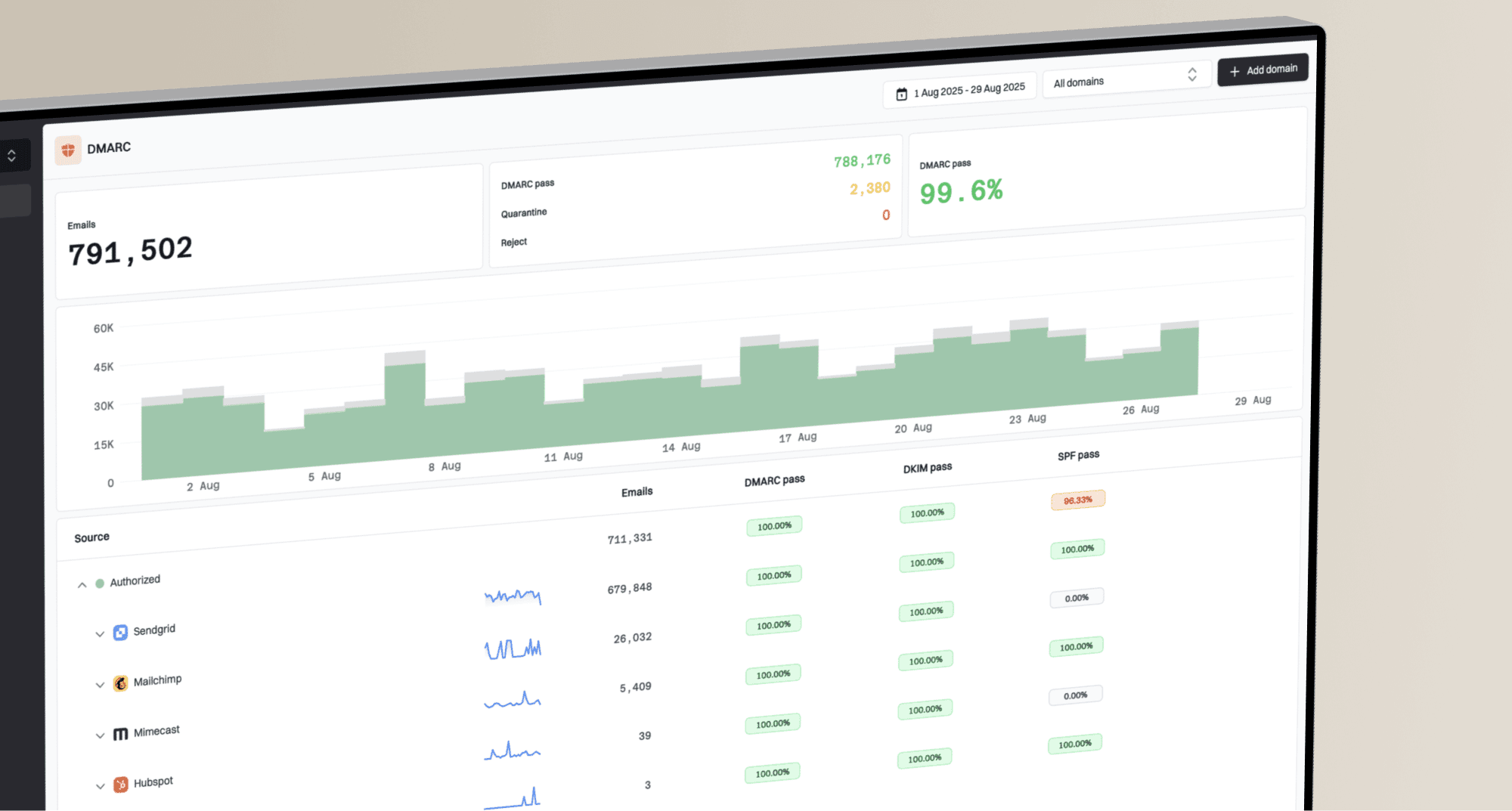
During an AT&T reverse DNS incident, Suped's product workflow helps confirm DMARC status, detect new sources, inspect SPF and DKIM failures, review blocklist status, and alert the team if the failure rate spreads.
Use Suped to keep the investigation repeatable: record the sending source, compare authentication and reputation signals, and assign the next fix without treating those checks as a substitute for PTR evidence.
For MSPs and teams managing many domains, Suped's multi-tenancy dashboard, alerts, and client reporting help separate one sender issue from a shared IP pool or multi-brand problem.
A practical response plan
The fastest response plan uses a split track: prove your own configuration, control the damage, then escalate with evidence. Slow or segment AT&T traffic while investigating so retries do not amplify the problem.
Response triggers
Example operating triggers for AT&T reverse DNS bounces. Set final thresholds against your normal rate.
Monitor
Isolated 4xx
Isolated 451 failures, no growth, and DNS checks pass.
Investigate
Above baseline
The temporary failure rate rises above its normal baseline.
Throttle
Repeated 4xx
Repeated 451 failures cluster on one IP, pool, or AT&T node.
Escalate
Sustained 5xx
550 rejections persist after DNS checks, or evidence confirms a receiver issue.
- Pause risky sends: Hold high-volume AT&T segments until you know the scope.
- Check the IP: Validate PTR, forward DNS, HELO, and sending route.
- Compare outcomes: Measure failed and delivered mail by IP, domain, node, and time.
- Fix real gaps: Correct missing PTR, broken forward DNS, invalid HELO, or authentication failures.
- Escalate with proof: Send bounce samples, DNS proof, node names, and successful controls.
- Watch recovery: Resume volume gradually after the bounce rate returns to normal.
For a deeper explanation of the underlying DNS mechanics, the related article on reverse DNS failures explains the causes and remediation in more detail.
Views from the trenches
Best practices
Validate the exact sending IP before changing domain authentication or policy records.
Save bounce samples with timestamps, receiving nodes, successful controls, and DNS proof.
Separate ATT node incidents from sender DNS failures before escalating or throttling traffic.
Common pitfalls
Changing DMARC policy does not fix a missing PTR record on the outbound sending IP.
One bounce sample rarely proves whether the sender DNS or receiver resolver caused it.
Ignoring partial failures lets small node issues distort campaign and support metrics.
Expert tips
Track ATT bounces by IP pool and node token to spot localized rejection patterns fast.
Include clean PTR and forward DNS evidence when contacting receiver support directly.
Keep blocklist checks separate from DNS proof so remediation stays focused and clear.
Marketer from Email Geeks says partial ATT failures can affect one sender while other ATT traffic continues to deliver normally.
2024-07-22 - Email Geeks
Marketer from Email Geeks says false positive DNS failures are often localized to one ESP or a subset of an ESP's infrastructure.
2024-07-22 - Email Geeks
The shortest useful answer
AT&T reverse DNS failure bounces mean the receiving system did not accept the sending IP identity. Fix PTR, forward DNS, and HELO gaps first, then review SPF, DKIM, DMARC, and reputation as separate signals. Let your MTA retry a 451 deferral normally. For a sustained 550 rejection, stop repeated attempts, collect evidence, and escalate after your DNS checks pass.