What causes reverse DNS failures from AT&T and how can they be resolved?

Published 9 May 2025
Updated 5 Aug 2026
10 min read
Summarize with
Updated on 5 Aug 2026: We clarified how to test the real sending IP and read AT&T bounce codes before escalation.
Reverse DNS failures at AT&T-managed recipient domains, including att.net, sbcglobal.net, bellsouth.net, and swbell.net, usually have one of two causes. The sending IP has missing or mismatched PTR and forward DNS, or AT&T's receiving infrastructure cannot complete the lookup correctly. Prove which side is failing before changing mail infrastructure. Check the public sending IP's PTR, forward-confirmed reverse DNS, HELO or EHLO name, authentication results, and IP reputation first. If those checks pass and unrelated senders see matching AT&T failures in the same period, treat it as a receiver-side incident and manage retries, evidence, and escalation.
Start with the exact bounce text and a real message test. A Suped email tester result helps confirm what the recipient sees, while public DNS lookups confirm whether the connecting IP has a valid identity. A reverse DNS error is not a DMARC failure. SPF, DKIM, and DMARC remain useful parallel checks because weak authentication or reputation can complicate the same delivery investigation.
Suped's DMARC and email authentication platform is relevant when the same sending stream has several possible failure signals. It can correlate sending sources, authentication results, blocklist or blacklist alerts, and timing with AT&T bounces. The PTR lookup and SMTP transcript still determine whether reverse DNS caused the rejection.
What AT&T is checking
AT&T mail systems can reject or defer mail when the connecting IP does not resolve cleanly to a hostname, or when that hostname does not resolve forward to the same IP. This is usually called reverse DNS, rDNS, PTR, or forward-confirmed reverse DNS. It is a sender infrastructure check, separate from SPF, DKIM, and DMARC.
The receiver sees the connecting IP first. It then asks DNS for the PTR record of that IP. If the PTR answer is missing, generic, broken, or slow to resolve, the receiver has less confidence in the connection. If the PTR hostname exists but its A or AAAA record does not include the sending IP, forward confirmation fails. A valid PTR does not need to match the visible From domain. Exact equality between the PTR and HELO name is useful for self-hosted systems, while shared platforms can use different valid infrastructure names.
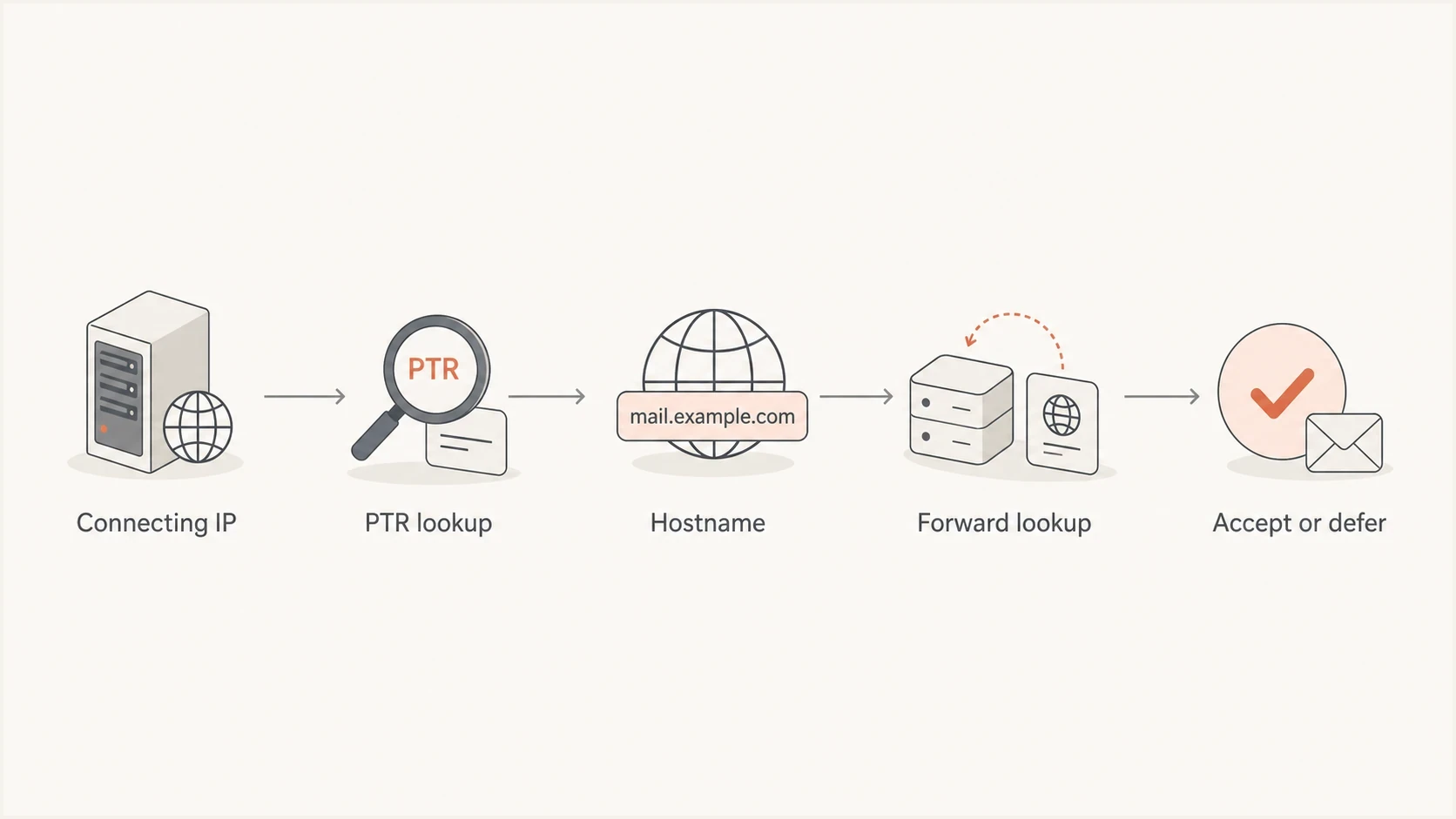
Flowchart showing how a receiver checks PTR and forward DNS before accepting mail.
An AT&T-side failure is more likely when the same reverse DNS wording appears across unrelated sending systems or several AT&T recipient domains while the named sending IP passes public PTR and forward checks. That pattern points away from one sender's DNS and toward a resolver, MX, or filtering problem on the receiving path.
Do not assume the bounce text names the root cause
A bounce that mentions reverse DNS can result from a missing PTR record, the wrong IP being tested, an AT&T lookup failure, a DNS timeout, or a filtering decision reported with DNS-style wording. Verify the public egress IP before changing working DNS.
Common causes
The most common sender-side cause is simple: the public IP used to send mail has no PTR record. PTR records are controlled by the owner of the IP range, usually the hosting provider, cloud provider, or ISP, not by the domain owner through normal DNS hosting. If you send through an email platform, that provider controls reverse DNS. If you run your own MTA, the owner of your public IP range controls the reverse zone.
- Wrong IP tested: The team checks its inbound MX, private server address, or website IP instead of the public egress IP that connected to AT&T.
- Missing PTR: The sending IP has no reverse DNS record, so AT&T cannot map the IP to a hostname.
- Forward mismatch: The PTR hostname exists, but its A or AAAA answers do not include the same sending IP.
- Ambiguous or generic PTR: The IP returns several PTR names or a dynamic, residential, or placeholder hostname that provides weak infrastructure identity.
- HELO problem: The SMTP HELO or EHLO name is not a resolvable fully qualified domain name.
- Receiver incident: AT&T has a temporary resolver, MX, or filtering issue that reports as a reverse DNS failure.
- Reputation pressure: The IP or domain has complaint, volume, or blocklist (blacklist) signals alongside the DNS-style rejection.
This is why a single lookup is not enough. Use a broader domain health checker when the bounce is not isolated to one message. It gives you a faster read on whether the domain's email foundation is clean before you investigate AT&T-specific behavior.
?
What's your domain score?
Deep-scan SPF, DKIM & DMARC records for email deliverability and security issues.
How to prove which side is failing
First identify the public source IP AT&T saw. NAT, outbound gateways, and provider pools can make it different from the mail server's local address or the domain's inbound MX. If the rejection names an IP, test that exact IP. If only one source IP fails and the failure follows it across receivers, fix its PTR and forward DNS. If unrelated sources fail only at AT&T while their DNS checks pass, investigate a receiver-side incident.
Likely sender-side
- Scope: Failures follow one sending IP, provider, pool, or MTA.
- DNS: PTR is missing, mismatched, ambiguous, generic, or not forward-confirmed.
- Action: Ask the public IP owner or sending provider to correct reverse DNS.
Likely AT&T-side
- Scope: Unrelated senders report matching failures at AT&T recipient domains in the same period.
- DNS: The named IP passes PTR, forward DNS, and HELO checks; message authentication also passes.
- Action: Throttle retries, gather evidence, and use AT&T's postmaster escalation path.
For a deeper walkthrough of lookup mechanics, compare your results with a reverse DNS lookup guide. Test through a public resolver so an internal DNS view or stale local cache does not hide a public DNS problem.
Reverse DNS and forward-confirmation checksbash
IP="203.0.113.25"
PTR=$(dig +short -x "$IP" | head -n 1)
printf 'PTR: %s\n' "$PTR"
dig +short A "$PTR"
dig +short AAAA "$PTR"

# An A or AAAA answer must include the public sending IP.
# More than one PTR answer deserves review.
Read the SMTP response before changing DNS
AT&T rejections commonly identify the connecting IP and use wording such as "Connections not accepted from servers without a valid sender domain" or "Fix reverse DNS for [IP]." The bracketed IP is the address to test. The wording does not mean the visible From domain needs a PTR record, and it does not tell you to change the domain's MX record.
- 4xx response: Treat it as a temporary deferral. Keep the message queued, slow retries, and check whether the failure clears without a DNS change.
- 5xx response: Treat it as a permanent failure for that delivery attempt. Validate the named IP, correct sender-side DNS if needed, and do not repeatedly retry the same recipient immediately.
- Mixed results: Compare the same source IP, AT&T recipient domain, response text, and timestamp. A successful retry can support an incident diagnosis, but it does not prove the original rejection was harmless.
If the public sending IP has valid forward-confirmed rDNS and the rejection continues, collect the full SMTP transcript and use AT&T postmaster help for the current support and email block list path. Include the exact response, UTC timestamps, source IP, affected recipient domain, PTR output, and forward lookup output. A blocklist or blacklist escalation should also explain the cause already corrected, not only request removal.
Use retries without hiding the evidence
For temporary AT&T deferrals, leave messages in the normal queue and preserve every response. Avoid emergency DNS changes when the named IP already passes forward-confirmed reverse DNS.
Checks and fixes by failure type
Use the bounce text as a starting point, then map it to a concrete check. The table keeps the fixes compact. Provider means the party that controls the public sending IP range or mail platform.
|
|
|
|
|---|---|---|---|
Wrong IP | Egress IP | MTA admin | Test named IP |
No PTR | PTR | IP provider | Add rDNS |
Mismatch | A or AAAA | DNS admin | Include IP |
Bad greeting | HELO | MTA admin | Use FQDN |
Auth weak | DMARC | Domain admin | Fix separately |
Reputation | Blocklist or blacklist | Sender | Repair cause |
AT&T-only spike | SMTP pattern | Receiver | Throttle |
Compact triage matrix for AT&T reverse DNS failures.
For sender-owned fixes, create the forward A or AAAA record first, then ask the IP owner to point the PTR at that stable mail hostname. Prefer one clear PTR answer per sending IP. A provider hostname can resolve to several sending IPs, but its forward answers must include the IP AT&T saw. The hostname identifies sending infrastructure; it does not have to match every customer's visible From domain.
Clean sender identity exampledns
25.113.0.203.in-addr.arpa. 3600 IN PTR mail1.example.com.
mail1.example.com.          3600 IN A   203.0.113.25

# SMTP greeting should use a resolvable FQDN:
# 220 mail1.example.com ESMTP
How Suped fits into the workflow
Reverse DNS does not appear in DMARC aggregate reports. DMARC data instead shows which sources send for the domain, how SPF and DKIM authenticate, and whether failures cluster around a platform or source. That context helps separate an infrastructure identity problem from an AT&T-only rejection pattern, but it does not replace PTR and SMTP checks.
In Suped, inspect the affected sending source, compare SPF and DKIM results, and match the failure period against issue alerts before changing DNS. Suped's DMARC monitoring keeps source and authentication data visible, while Suped's blocklist monitoring helps identify a blocklist or blacklist problem occurring beside the DNS rejection.
DMARC record detail view showing SPF, DKIM, DMARC, rDNS diagnostics, and DNS records
Use Suped's source-level history to compare affected domains and sending platforms during the rejection period. For an MSP, the multi-tenant view can show whether AT&T failures appear across client domains that do not share a sender, which is useful evidence for a receiver-side escalation.
Best practical workflow
Validate the public sending IP and preserve the SMTP response first. Then use Suped alerts and source-level reporting to determine whether authentication or reputation problems accompany the AT&T failure.
Resolution playbook
The right fix depends on the evidence. Changing a valid PTR record during a receiver incident creates a second problem. Waiting during a real sender-side PTR failure keeps mail bouncing. Use the following sequence to avoid both mistakes.
- Capture evidence: Save the full bounce, UTC timestamp, public sending IP, recipient domain, and SMTP response code.
- Validate rDNS: Confirm the named IP has a PTR and that its hostname resolves forward to the same IPv4 or IPv6 address.
- Check the greeting: Make sure HELO or EHLO uses a stable, publicly resolvable fully qualified domain name.
- Verify authentication: Confirm SPF, DKIM, and DMARC results for the same sending stream, while treating them as checks separate from rDNS.
- Review reputation: Look for a complaint spike, unexpected volume, and blocklist or blacklist listings.
- Handle the status code: Queue and slow 4xx deferrals; stop immediate retries for 5xx rejections until the cause is understood.
- Escalate with evidence: Contact the public IP owner or AT&T postmaster path with the transcript, DNS results, and affected times.
If you own the MTA and IP space, resolution is usually quick once the reverse zone owner makes the PTR change. If a sending provider owns the IP, open a support case with the exact IP and rejection sample. If you use a residential or dynamic connection, move outbound mail to a proper mail platform or business-grade static IP setup. Residential reverse DNS is not built for dependable outbound mail.
Reverse DNS also interacts with broader sender identity. The rDNS and FCrDNS explanation separates the two lookup directions and shows why both matter.
The practical answer
AT&T reverse DNS failures result from a missing or mismatched sender PTR, failed forward confirmation, an invalid SMTP greeting, reputation pressure, or a temporary AT&T receiving problem. Test the public egress IP named in the SMTP rejection, not the visible From domain, website IP, or inbound MX.
If the PTR or forward DNS is wrong, fix it through the public IP owner or sending provider. If the setup is clean and the pattern is limited to AT&T-managed recipient domains, slow temporary retries and escalate with the full transcript. Suped helps organize the supporting authentication, source, alert, and blocklist or blacklist evidence in one investigation trail.