Why am I getting Google bounces due to PTR record issues, even though my setup seems compliant?

Published 12 Jun 2025
Updated 2 Aug 2026
12 min read
Summarize with
Updated on 2 Aug 2026: We added IPv6 troubleshooting and current Google response codes for faster PTR bounce diagnosis.
The direct answer: Google is bouncing the mail because the sending IP fails its reverse DNS identity check. A setup can pass SPF, DKIM, and DMARC, and still fail this check. Google does not only ask, "does the IP have a PTR record?" It also checks whether the hostname named in that PTR resolves back to the same sending IP. If the hostname points at an old server, a CDN edge, a cloud load balancer, or a different address, the result looks like a PTR problem even though a PTR record exists.
Google can report the same DNS identity problem as a temporary 4.7.23 rate limit or a permanent 5.7.25 block. Both responses cover a missing PTR record or a forward DNS entry that does not reference the connecting IP. That is why a dashboard can say "SPF pass" and "DMARC pass" while Gmail still defers or rejects the same campaign.
- PTR exists: The IP has a reverse DNS record, but it points to a hostname with bad forward DNS.
- Forward DNS fails: The PTR hostname has no current A or AAAA record, or it resolves to a different IP.
- Old DNS remains: A migration left the hostname pointing at a retired mail server or legacy app server.
- Wrong owner asked: The DNS team is checking domain records while the IP owner controls reverse DNS.
Treat this as a chain problem, not a single record problem. Start with the IP in the bounce, follow it to the PTR hostname, then resolve that hostname forward. A Google support thread shows the same pattern: the record appears correct until the full reverse and forward lookup chain is checked.
The short answer
If the setup seems compliant, the missing piece is usually that compliance was checked at the domain authentication layer, not at the sending IP identity layer. SPF proves which servers can send for a domain. DKIM proves message signing. DMARC connects those results to the visible From domain. PTR is a separate receiver-side hygiene check on the actual IP that connected to Google.
This distinction matters because many email teams only control the visible sending domain and its authentication records. The PTR record sits in the reverse DNS zone for the IP address. That zone is usually controlled by the sending platform, hosting provider, or network operator. The hostname returned by the PTR can sit under your domain, which means your DNS team still has to make the forward A or AAAA record match.
The part most teams miss
Google expects the sending IP to have a PTR record, and it expects the IP address of that PTR hostname to match the sending IP. A single mismatch is enough to produce a PTR bounce even when SPF, DKIM, and DMARC pass.
- Reverse side: The sending IP must return a hostname through PTR.
- Forward side: That hostname must resolve back to the same sending IP.
- Owner split: The IP provider handles PTR, while domain DNS handles the hostname target.
What Google is checking
Google's check is easiest to understand as a loop. The receiver sees the connecting IP, asks reverse DNS for the hostname, then asks normal DNS for the IP address of that hostname. If the loop does not return to the original sending IP, the server does not meet Google's IP address requirement for mail sent to personal Gmail accounts.
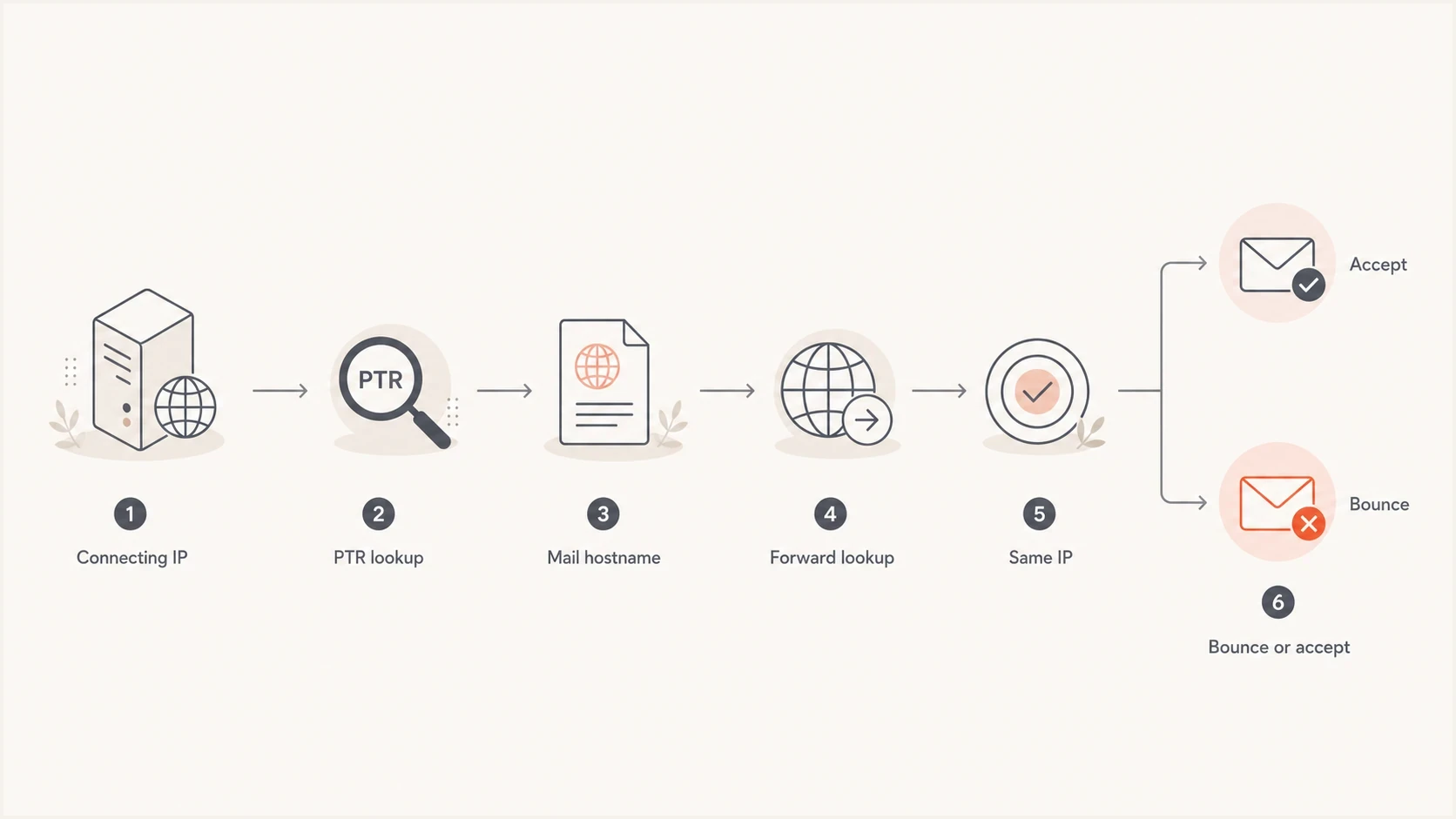
Google PTR validation flow for matching reverse DNS with forward DNS.
A complete PTR setup has both directions in place. If the PTR hostname has two A records and neither is the sending IP, Google sees a mismatch. If it has one old A record left over from a platform migration, the result is the same. If the hostname resolves through a cloud edge that is not the actual outbound mail IP, the result is still a mismatch.
|
|
|
|---|---|---|
PTR lookup | Hostname returned | No hostname |
Forward lookup | Same IP | Other IP |
Address family | IPv4 to A, IPv6 to AAAA | Only the other family matches |
Record cleanup | Current target | Old target |
Common PTR checks that sit outside normal DMARC pass/fail labels.
How to prove the mismatch
Use raw DNS output before changing records. The bounce header should contain the sending IP that Google rejected. Use that exact IP, not a provider range or a guessed marketing platform address. A domain health checker can catch surrounding DNS issues, but manual reverse and forward checks remain useful when a bounce is active.
IPv4 reverse and forward DNS checksbash
# 1. Find the PTR hostname for the sending IPv4 address
dig +short -x 149.72.183.96

# 2. Check the A record for the hostname returned by PTR
dig +short mail.example.com A

# 3. The A result must include 149.72.183.96
If the forward hostname is mail.example.com and it resolves to an old application server instead of the sending IP, Google has a valid reason to reject. The fix is not a new DMARC record. The fix is a corrected A record for IPv4 or AAAA record for IPv6, removal of stale targets, or a PTR hostname that already points forward to the sending IP.
The fastest practical test is to send a real message and inspect the delivery path with an email tester. This helps confirm the actual IP, authentication results, and reverse DNS result in one place instead of relying on a provider dashboard that only checks domain authentication.
Email tester
Send a real email to this address. Suped shows a results button when the test is ready.
?/43tests passed
When the sending provider uses a branded subdomain, the hostname in the PTR can sit under your domain while the IP is owned by the provider. That split is where mistakes happen. The provider says the PTR exists. The DNS host says the domain records exist. Google sees that the two records do not complete the same identity loop.
Do not ask the wrong team first
Your public DNS provider usually cannot create PTR for an IP it does not own. Your sending provider cannot always clean up forward A and AAAA records under your domain. Give each owner the specific record they control.
- IP owner: Confirm the PTR hostname for the exact sending IP in the bounce.
- DNS owner: Make the hostname resolve back to the sending IP, with no stale targets.
- Mail owner: Retest from the same platform after DNS caches have updated.
Check IPv6 separately
A dual-stack mail server can pass every IPv4 check and still connect to Gmail over IPv6. The address in square brackets in Google's response is the address Google evaluated. If that address contains colons, run the reverse lookup against that exact IPv6 address, then confirm that the returned hostname has an AAAA record containing the same IPv6 address. A valid IPv4 PTR and A pair does not cover an IPv6 connection.
IPv6 reverse and forward DNS checksbash
# Use the exact IPv6 address shown in the Google response
dig +short -x 2001:db8::25

# Check the AAAA record for the hostname returned by PTR
dig +short mail.example.com AAAA

# The AAAA result must include 2001:db8::25
If the provider cannot set IPv6 PTR
Use the mail server or sending provider's supported setting to stop outbound SMTP from using IPv6 until the provider can create the matching IPv6 PTR. Do not assume that deleting an unrelated website AAAA record will change the mail server's outbound route.
- Exact address: Test the IPv6 address printed in the rejection, not the server's IPv4 address.
- Matching family: Use PTR plus AAAA for IPv6, and PTR plus A for IPv4.
- Controlled fallback: Route outbound SMTP over a compliant IPv4 address until IPv6 reverse DNS is ready.
Why it can start suddenly
Since February 1, 2024, Google's published requirements for mail sent to personal Gmail accounts have required valid forward and reverse DNS for all senders. Senders delivering more than 5,000 messages per day to Gmail accounts have additional authentication and subscription requirements. PTR is therefore not limited to bulk senders, and a weak outbound route can produce a temporary 4.7.23 response or a permanent 5.7.25 block.
The common trigger is an operational change. A new sending IP, a platform migration, a retired ecommerce server, a DNS provider move, or an outbound switch from IPv4 to IPv6 can expose a missing or stale record. The next time Google checks the full loop, the sender fails PTR even though the visible authentication records still look normal.
|
|
|
|---|---|---|
IP pool change | New sending IP | Message headers |
IPv6 route | Different address family | Bounce IP |
DNS migration | Old target remains | A or AAAA records |
TTL timing | Caches differ | Resolver output |
Shared hostname | Other service uses it | Asset inventory |
Sudden PTR bounces usually come from routing changes or DNS cleanup gaps.
Who needs to fix what
The cleanest way to resolve this is to split the task by ownership. Do not ask everyone to "check DNS". Ask the sending platform or IP owner for the reverse DNS facts, then ask the domain DNS owner to make the forward record match. If the same team owns both sides, the fix is still easier when the two records are treated separately.
Sending platform or IP owner
- PTR control: Set or confirm reverse DNS for the exact sending IP.
- IP inventory: Confirm the outbound IP used for the failed Google traffic.
- Hostname choice: Use a stable mail hostname that is not shared with a web app.
Domain DNS owner
- Forward DNS: Point the PTR hostname back to the sending IP.
- Stale records: Remove old A or AAAA records that no longer belong.
- Change control: Verify no active service depends on that hostname.
Message to send to the record ownerstext
Please confirm the outbound IP for the bounced Gmail traffic.
For that IP, confirm the PTR hostname.
Then confirm the PTR hostname resolves back to the same IP.
If it does not, update the matching A or AAAA record
or remove stale targets.
Before deleting anything, confirm the hostname is not used by another active service. Old application servers, tracking endpoints, and internal integrations sometimes remain attached to mail-looking hostnames. If another service still needs the old target, move that service to a different hostname first.
What not to change first
Do not start by rebuilding SPF, rotating DKIM keys, or changing the DMARC policy unless the bounce also shows those checks failing. PTR bounces are about the connecting IP identity. Changing unrelated authentication records adds risk and usually leaves the Google 5.7.25 error untouched.
A safe order of operations
- Find the IP: Use the bounce header or a fresh test message.
- Check PTR: Resolve the IP to the hostname.
- Check forward DNS: Resolve the hostname back to the same IP.
- Clean stale targets: Remove old A or AAAA records after confirming ownership.
- Retest delivery: Wait for the relevant TTL, then send a new message.
If Google returns 4.7.23, pause or slow retries while the DNS records are corrected. Repeated delivery attempts do not fix the identity loop. If SPF or DKIM is also failing, fix those separately after the PTR chain is understood. For deeper background, review what PTR records do and why reverse DNS matters for email sending.
How Suped helps
Suped's product helps with the workflow around a PTR incident rather than controlling reverse DNS. Suped's DMARC reporting maps authenticated sending sources, while automated issue detection and alerts show whether the affected source also has SPF, DKIM, or DMARC failures. Use the IP in the Google response and direct DNS lookups for the PTR diagnosis itself.
DMARC record detail view showing SPF, DKIM, DMARC, rDNS diagnostics, and DNS records
Suped's DMARC monitoring helps show which sending source is failing authentication and whether the issue is isolated or widespread. Suped's blocklist monitoring also helps catch domain and IP reputation problems across major blocklists (blacklists) when PTR bounces appear alongside reputation changes.
Suped cannot set a PTR record for an IP owned by another network. The practical workflow is to identify the source, confirm its authentication status, record the exact connecting IP, and send the PTR or forward DNS correction to the team that owns it. Hosted SPF and Hosted DMARC can reduce separate DNS work, but they do not replace reverse DNS control at the IP provider.
Views from the trenches
Best practices
Check the PTR hostname forward lookup before changing SPF, DKIM, or DMARC records.
Keep a DNS migration checklist that includes old mail hostnames and retired A records.
Ask the sending provider for the exact outbound IP used by the bounced message headers.
Common pitfalls
Treating a PTR record as present without checking that its hostname points back too.
Assuming a domain DNS provider can set reverse DNS for a sending IP it does not own.
Leaving old ecommerce or app server records attached to branded mail hostnames after migrations.
Expert tips
Use the bounce header IP, not a guessed provider range, as the starting lookup value.
Document who owns PTR, A records, and message headers before any sending change.
Retest with a live message after DNS changes because cached answers can hide fixes.
Expert from Email Geeks says a PTR record can exist and still fail if the PTR hostname resolves to another IP address.
2024-09-20 - Email Geeks
Expert from Email Geeks says Google has been enforcing sender requirements gradually, so old DNS issues can appear as new bounces.
2024-09-20 - Email Geeks
What to do next
The fix starts with the IP in the Google response, not with a broad audit of every authentication record. Resolve that IP to its PTR hostname, resolve the hostname forward with A for IPv4 or AAAA for IPv6, and make the two sides match. If the hostname points to an old server, clean it up. If the PTR hostname is wrong, ask the IP owner to change it. If another service still uses the old hostname, move that service first.
After the DNS change, wait for the relevant TTL, send a fresh message, and watch the response pattern. Keep the provider ticket specific: exact sending IP, exact PTR hostname, exact forward DNS result, and the expected matching IP. For dual-stack servers, record whether the failed connection used IPv4 or IPv6.
The clean fix
A compliant setup has a PTR for every outbound sending IP, a PTR hostname that resolves back through the matching address family, authenticated mail, and monitoring that catches future drift before Google starts blocking production sends.




