Who is using AMP in email and what are the roadblocks?

Updated on 24 Jul 2026: We updated this guide with current AMP support, registration, authentication, and post-delivery limits.
AMP in email is used, but it is not a normal daily channel for most senders. The clearest usage is in programs where an in-email action has direct value: submitting a form, updating preferences, booking a slot, browsing live inventory, confirming attendance, or refreshing account-specific content without opening a browser.
On the receiving side, the public AMP ecosystem includes Gmail, Yahoo Mail, Mail.ru, AOL Mail, and FairEmail. On the sending side, the public list includes platforms such as Adobe Campaign Classic, Amazon SES, AWeber, Braze, Customer.io, Iterable, Klaviyo, Mailgun, Salesforce Marketing Cloud, SparkPost, and Twilio SendGrid. Amazon Pinpoint also remains on the public list, but its email service is scheduled to end support on October 30, 2026, so it is not a sensible starting point for new AMP work. A platform listing means the technical path exists, not that every sender uses AMP regularly.
- Best fit: Triggered mail, surveys, preference centers, booking flows, live product modules, quizzes, and checkout assists.
- Weak fit: Ordinary newsletters, one-off announcements, receipts, and messages where a landing page already does the job.
- Main blockers: Mailbox approval, limited client support, fallback design, validation, tracking, authentication readiness, and unclear return.
Who uses AMP in email today
Separate AMP usage into two questions: who can render it, and who can build or send it. The rendering list is the smaller one, so it controls the business case. A sender can have valid AMPHTML and still show the normal HTML version to a large part of the list.
For a plain-language overview of the format and use cases, the AMP guide is useful. Treat the client list as a planning constraint rather than a promise of audience reach. List composition, device use, recipient settings, sender approval, and message validity all affect the share that can see dynamic email.
|
|
|
|---|---|---|
Receiving clients | Gmail, Yahoo Mail, Mail.ru, AOL Mail, FairEmail | AMP can render |
Sending platforms | Amazon SES, Adobe Campaign, AWeber, Braze, Klaviyo, SendGrid | AMP can be built or sent |
Common uses | Forms, polls, carts, bookings, profiles, live feeds | Best for action-heavy mail |
Common pattern | Targeted campaigns, triggered mail, product flows | Rare as a default |
AMP adoption is strongest where the sender has a clear action to keep inside the inbox.
Using AMP often means using it for one narrow campaign stream, not replacing HTML across the whole program. Start with the audience split by mailbox provider and device, then ask whether the interaction removes enough friction to justify another production path.
Why adoption is selective
AMP has real utility, but it competes with a simpler alternative: send a clear email and take the user to a web page. AMP wins only when the inbox action is materially easier, safer, or more timely than the web action.
Good AMP candidates
- Low-risk input: Polls, ratings, preference updates, and RSVP flows have clear user intent.
- Live content: Inventory, appointment slots, ticket availability, and account status benefit from refresh.
- Repeat workflows: A flow used every week has enough volume to repay build and QA time.
- Clear fallback: The same action still works when the recipient sees standard HTML.
Poor AMP candidates
- Broad newsletter: The message goal is reading, so AMP adds build work without enough action value.
- Sensitive input: Payments, credentials, regulated data, and account recovery need stricter controls.
- One-time send: A single campaign rarely earns the extra approval, build, and test effort.
- Weak fallback: If HTML feels like a broken second version, recipients lose the core path.
Strong AMP programs start with one high-confidence interaction. They do not try to turn every email into a mini app. That restraint matters because AMP has more operational gates than HTML.
The roadblocks that stop teams
The biggest roadblock is not writing AMP markup. It is getting the whole production chain ready: sender registration, authentication, fallback, QA, analytics, endpoint security, and incident handling. Gmail registration applies to each sender email address, while Yahoo Mail registers DKIM domains, so approval scope needs to be mapped before launch.
Main blockers
- Approval: Gmail and Yahoo Mail require sender registration before normal recipients see AMP.
- Turnaround: Approval timing is not always predictable, so launch dates need buffer.
- Support: Unsupported clients use HTML fallback, including many Outlook and Apple Mail opens.
- Validation: One invalid tag can make the AMP part disappear into fallback.
- Tracking: AMP-specific analytics tags are unavailable, so actions need supported requests and server-side events.
- Security: Remote endpoints, CORS, limited-use tokens, user input, and access control need review.
- Value: If the AMP action does not reduce friction, the build work loses its case.
Teams can solve these blockers, but they need to plan them as delivery work. Do not build an AMP-only experience before the sender is approved, the HTML fallback is complete, and the analytics plan has event-level detail.
How rendering actually falls back
AMP is normally sent as an extra MIME part beside plain text and HTML. A supporting mailbox client checks whether the sender is approved, whether the message is valid, and whether the recipient context allows dynamic mail. If any check fails, the recipient sees HTML.
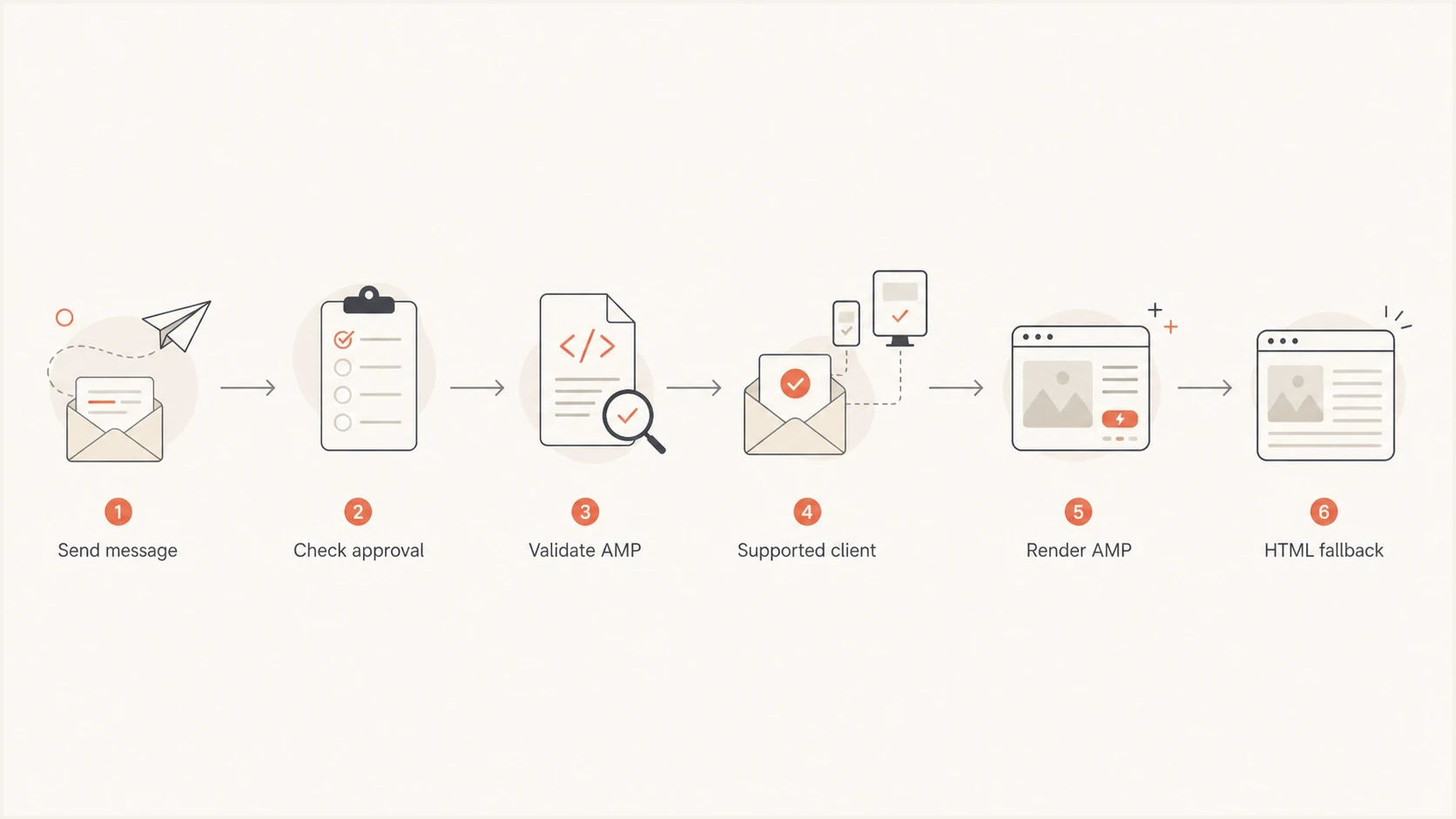
Flowchart showing AMP email rendering checks that either show AMP or fall back to HTML.
That fallback behavior is the safety net. The danger is treating fallback as a low-effort backup. For most lists, fallback is the version many recipients see, so it needs the same offer and primary action, plus a working landing-page path.
What happens after delivery
Interactive email has a shorter operational life than ordinary HTML. Gmail considers the AMP part usable for 30 days after receipt, and mailbox clients typically strip the AMP MIME part when a message is replied to or forwarded. The HTML fallback therefore needs to remain accurate after the dynamic experience expires.
- Old messages: Gmail falls back after 30 days, so tokens and time-sensitive copy need an expiry plan.
- Replies and forwards: The recipient of a forwarded copy should be expected to see HTML rather than AMP.
- Recipient settings: Dynamic email can be disabled, and some account types or viewing contexts do not render it.
- Offline access: Live requests cannot run without a connection, so the static message must still communicate the next step.
Plan the lifecycle before launch. Set limited-use access tokens long enough for the supported AMP window, reject expired tokens at the endpoint, and keep the landing page available after the in-email interaction stops rendering.
Authentication readiness before AMP
AMP approval depends on trust. Gmail's security checks require SPF and DKIM to pass, and the DKIM signing domain must align with the visible From domain. Registration also requires DMARC, while Gmail recommends a DMARC policy of quarantine or reject. AMP email must use TLS in transit. If these checks are unstable, approval and rendering become harder to debug.
Suped's product supports this workflow by combining DMARC monitoring with SPF and DKIM checks, hosted authentication records, real-time alerts, automated issue detection, and blocklist (blacklist) monitoring.
DMARC record detail view showing SPF, DKIM, DMARC, rDNS diagnostics, and DNS records
Before an AMP launch, verify that the domain passes authentication in real mail, not only that records exist in DNS. A domain health checker catches obvious DNS and authentication issues early. Ongoing reporting then shows whether every production source behaves correctly before the sender-registration request goes in.
How AMP is sent technically
Technically, AMP email is a multipart message. The AMP part uses the content type text/x-amp-html and sits beside the HTML and plain text parts. That structure is why unsupported clients can ignore AMP and render the normal HTML version.
Multipart AMP structuretext
MIME-Version: 1.0
Content-Type: multipart/alternative; boundary="outer"

--outer
Content-Type: text/plain; charset="UTF-8"

Plain text fallback.

--outer
Content-Type: text/html; charset="UTF-8"

<html>
  <body>HTML fallback with the same core offer.</body>
</html>

--outer
Content-Type: text/x-amp-html; charset="UTF-8"

<!doctype html>
<html amp4email>
  <head>
    <meta charset="utf-8">
    <script async src="https://cdn.ampproject.org/v0.js"></script>
  </head>
  <body>AMP version for approved clients.</body>
</html>

--outer--
If the sending platform cannot generate a valid AMP MIME part, AMP stops there. The SES AMP guide shows how a sender can construct an AMP-capable raw message through Amazon SES.
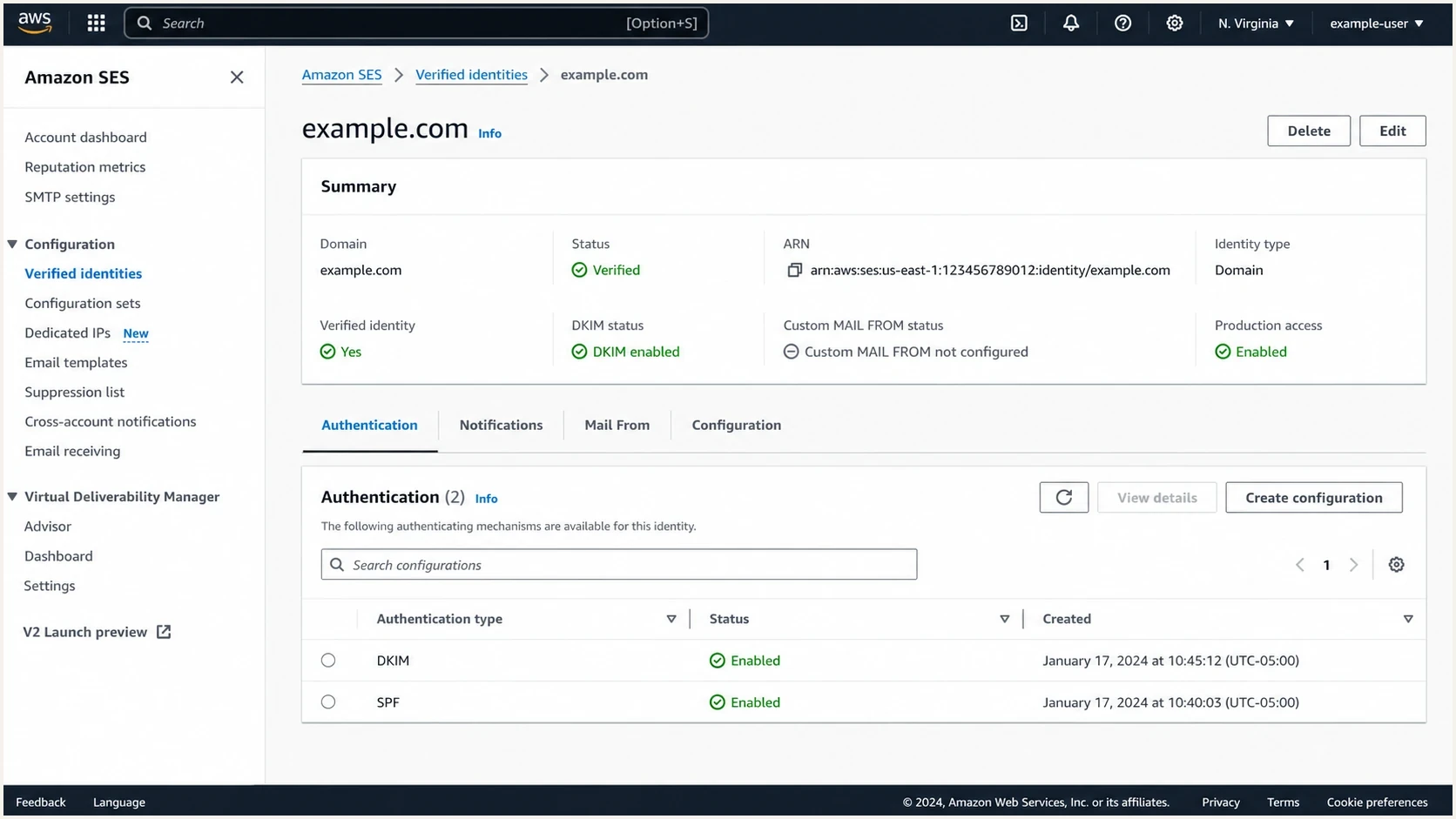
Amazon SES identity screen showing authentication status for a sending domain.
The implementation detail that matters most is ownership. Assign responsibility for the AMP template, HTML fallback, endpoint behavior, approval record, and QA matrix. If those responsibilities sit between teams, the launch drifts.
Dynamic endpoints need separate engineering work. Gmail proxies AMP requests, so cookies are not sent. Use recipient-bound, limited-use tokens, return the required AMP-Email-Allow-Sender CORS header, and avoid HTTP redirects because redirected XHR requests fail.
How to test an AMP campaign
Test AMP with real messages, not screenshots. Use an email tester to inspect the headers, MIME structure, authentication results, HTML fallback, and rendering signals before sending to a real audience.
Email tester
Send a real email to this address. Suped shows a results button when the test is ready.
?/43tests passed
Testing should also answer whether AMP changes the risk profile of the campaign. The deeper page on AMP deliverability impact covers how embedded forms and interactive content affect deliverability planning.
- Send real mail: Send through the same domain, platform, IP pool, headers, and template path used in production.
- Check fallback: Open the HTML version in unsupported clients and confirm the core action still works.
- Inspect headers: Confirm SPF, DKIM, DMARC, TLS, MIME order, List-Unsubscribe, and sender identity.
- Validate actions: Test each submit, refresh, state change, error message, token expiry, and timeout path.
- Measure separately: Report supported AMP requests and server-side events apart from normal clicks. AMP email does not support amp-analytics, amp-pixel, AMP CLIENT_ID, or AMP variable substitution.
Should you use AMP for email
The threshold is practical: AMP deserves a test when enough of the audience can see it and the action is better inside the inbox. If the audience share is small or the action is already simple on a landing page, spend the effort on cleaner HTML, authentication, segmentation, and post-click speed first.
Planning bands for supported audience share
Use these heuristic bands as one planning input, then weigh the value of the in-email action.
Low fit
under 15%
Build HTML first and revisit AMP after audience or use-case data changes.
Test fit
15-35%
Run one contained use case with a complete fallback and separate reporting.
Strong fit
over 35%
Consider a repeatable AMP workflow if approval, QA, and analytics are ready.
These thresholds are planning heuristics, not industry benchmarks. A high-value transactional flow can justify AMP at a lower supported share. A low-value marketing send can fail the business case even when many recipients use Gmail or Yahoo Mail.
Views from the trenches
Best practices
Start with one transactional or triggered use case where in-email action removes a real click.
Keep the HTML fallback complete and measurable, with every core action available in one click.
Use authentication reports before approval so unknown senders do not stall the rollout.
Common pitfalls
Treating AMP as a newsletter default creates build work without a matching user benefit.
Skipping approval buffers puts campaign dates at the mercy of mailbox review queues.
Tracking only opens and clicks hides AMP form submits, refreshes, button taps, and state changes.
Expert tips
Use AMP where inbox interaction changes the outcome, not where a landing page works.
Put support data and fallback performance in the brief before design starts for approval.
Test one mailbox family at a time and keep screenshots for every failure path during QA.
Marketer from Email Geeks says AMP is still interesting, but major mailbox ecosystems use it sparingly in ordinary promotional mail.
2021-08-25 - Email Geeks
Marketer from Email Geeks says one production team used AMP heavily, with sender approval and uncertain turnaround time as the biggest blocker.
2021-08-25 - Email Geeks
Practical recommendation
AMP is worth considering for email programs with a clear in-inbox action, a meaningful share of recipients on supporting clients, and enough volume to justify a second production path. It is weak as a default newsletter format. It is strongest when it removes a step the user was already likely to take.
The sequence is simple: confirm audience support, fix authentication, build the HTML fallback first, request sender approval, test real messages, then measure AMP interactions separately. Suped supports the authentication and monitoring layer by keeping DMARC, SPF, DKIM, alerts, issue detection, and blocklist (blacklist) monitoring visible before and after launch.




