How do embedded interactive forms or AMP in email impact deliverability?

Updated on 26 Jul 2026: We updated this guide with current AMP registration, authentication, endpoint security, expiry, and fallback requirements.
Embedded HTML forms usually hurt deliverability and reliability. Do not put native form tags, input fields, or in-email submissions in the HTML part of a marketing email because they look too much like data capture. Some filters treat that pattern as suspicious, some clients strip or disable it, and some users see a broken form.
AMP in email is different. Gmail, Yahoo Mail, AOL Mail, Mail.ru, and FairEmail have AMP support listed by the AMP project, but Outlook does not render AMP. AMP does not give a sender an automatic inbox placement lift. It can help when it creates useful engagement, but it also raises the technical bar: SPF, DKIM, the required domain relationship between DKIM and the visible From address, DMARC, TLS, sender registration or provider approval, secure endpoints, and a complete HTML fallback all matter. Before sending a real campaign, send the final MIME message through an email tester and inspect the exact message that recipients receive.
The short answer
For a real estate lead form, the safest design is not an embedded HTML form. Use a normal HTML email with a clear CTA that opens a hosted form, prefilled by a short token or GUID. Use AMP only as an enhanced version for supported inboxes, and keep the HTML version useful on its own.
- HTML forms: High rendering risk and a stronger chance of filtering because direct data submission inside email resembles credential capture.
- AMP forms: Useful for supported inboxes when authentication, registration, CORS, and endpoint rules are clean.
- Hosted forms: The most predictable path across Gmail, Yahoo, Outlook, Apple Mail, and corporate clients.
- Email markup: Useful for specific inbox actions, but it is not a replacement for a working landing-page form.
AMP rendering is effectively limited to authenticated, trusted senders. A sender with weak list quality, complaint spikes, broken DKIM, or a poor domain history does not fix those problems by adding an AMP part. The AMP part is an extra MIME section, not a reputation reset.
The exact risk comes down to how the interaction is built. A personalized URL that carries a random ID is normal email behavior. A visible URL that contains a recipient's name, email, budget, property address, or phone number is a privacy mistake. A native HTML form in the email body is a delivery and UX mistake.
How inboxes handle interactive forms
|
|
|
|
|
|---|---|---|---|---|
Native HTML form | Often blocked or unreliable | Unreliable | High | Avoid |
AMP form | Works when approved | Shows fallback | Medium | Known engaged lists |
Prefilled URL | Reliable | Reliable | Low | Most lead forms |
Inbox action markup | Limited actions | Limited support | Medium | RSVP or review |
Practical behavior by approach and mailbox family.
Gmail and Yahoo are the main large-scale mailbox environments where AMP can produce the intended in-message experience. Outlook users need the HTML fallback, so the fallback cannot be a weak afterthought. If the message only makes sense when the form is interactive, a large part of the audience sees a degraded email.
Email clients also differ inside the same mailbox family. A user can read Gmail through Gmail web, Gmail mobile, Apple Mail, Outlook, or a corporate security gateway. The mailbox account alone does not guarantee AMP rendering. Treat "AMP users" as people whose current email client renders the AMP part. "Non-AMP users" are everyone who sees only the HTML or plain-text fallback.
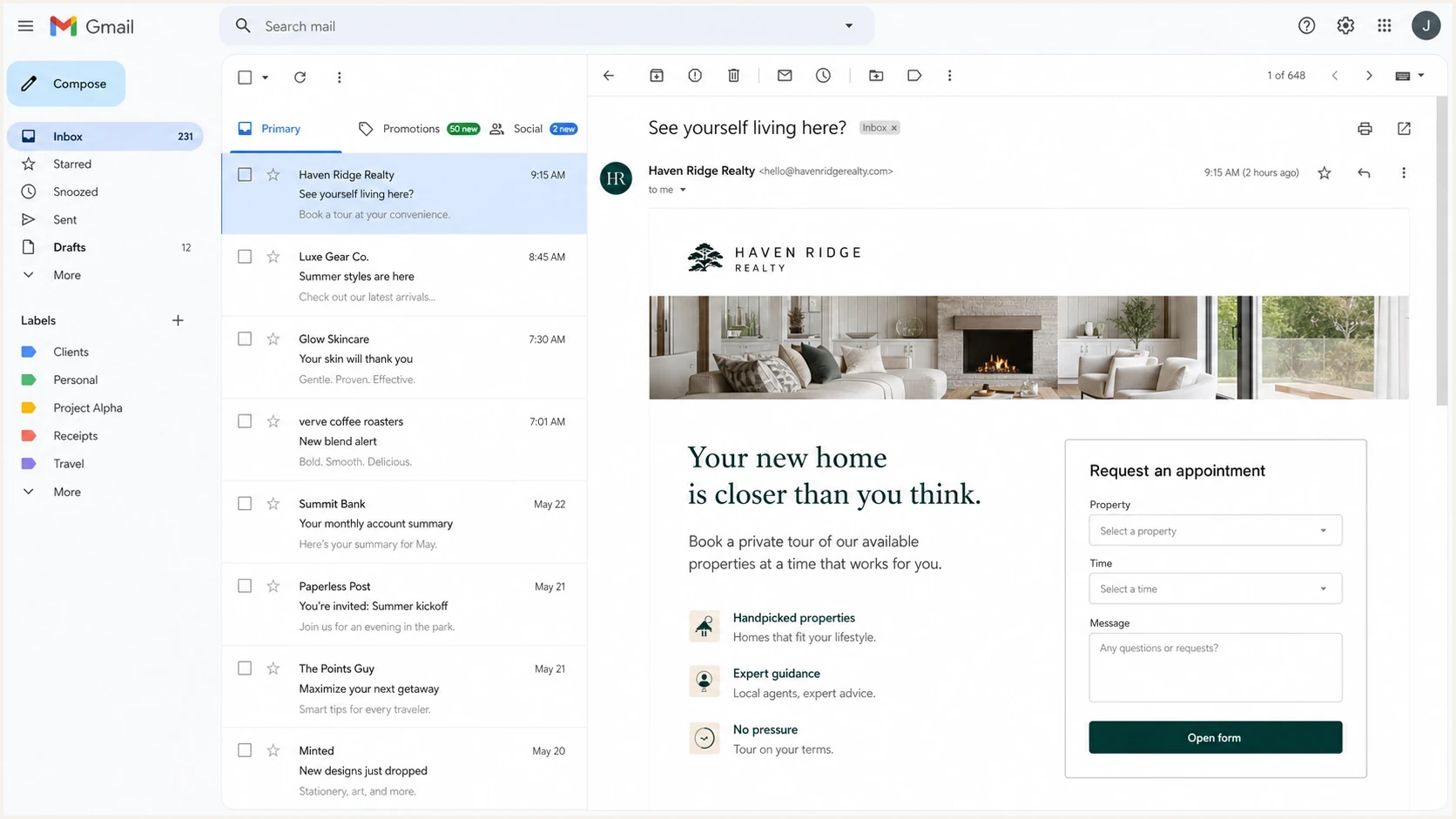
Gmail webmail showing an opened email with an appointment form and fallback CTA.
Why native forms create filtering risk
The problem with a native HTML form is not only that it can break. It changes the message pattern. A marketing email that asks the recipient to type data directly inside the inbox has the same basic shape as abusive collection attempts. Filters do not need to decide your intent. They score the content, sender history, authentication, URL behavior, and recipient response.
Malformed form markup also raises risk. Email HTML is already constrained, and forms add more moving pieces. If a client strips the form tag but leaves orphaned fields, the email can look broken. If a security gateway rewrites links or blocks submissions, the user experience is inconsistent. Related template problems are covered in more detail under malformed HTML.
Risky build
- Form tag: The HTML part asks the inbox to collect and submit user data.
- Visible PII: Recipient data sits in URLs, hidden fields, or email source.
- Weak fallback: Outlook and non-AMP clients get a broken or incomplete experience.
Safer build
- Token link: A GUID opens a hosted form and resolves recipient context server-side.
- AMP layer: Supported clients get the interactive version, with strict validation.
- Full fallback: The HTML version has the same core CTA and clear landing page.
The safer architecture
For the real estate use case, personalize the email copy and CTA, then send the user to a hosted form. The email can say which property the request is about, but the submission itself should happen on the website. The URL should carry a random token, not readable PII.
Safe prefilled form URL patterntext
https://www.example.com/property-enquiry?lead=8f3a9c21&property=7421

Server-side lookup:
lead token -> recipient record
property token -> selected listing
form page -> prefilled non-sensitive fields
This pattern supports cross-sell, reactivation, and faster lead capture without turning the inbox into the form processor. It also gives analytics a cleaner path: click, page load, form view, partial completion, submit, and appointment request.
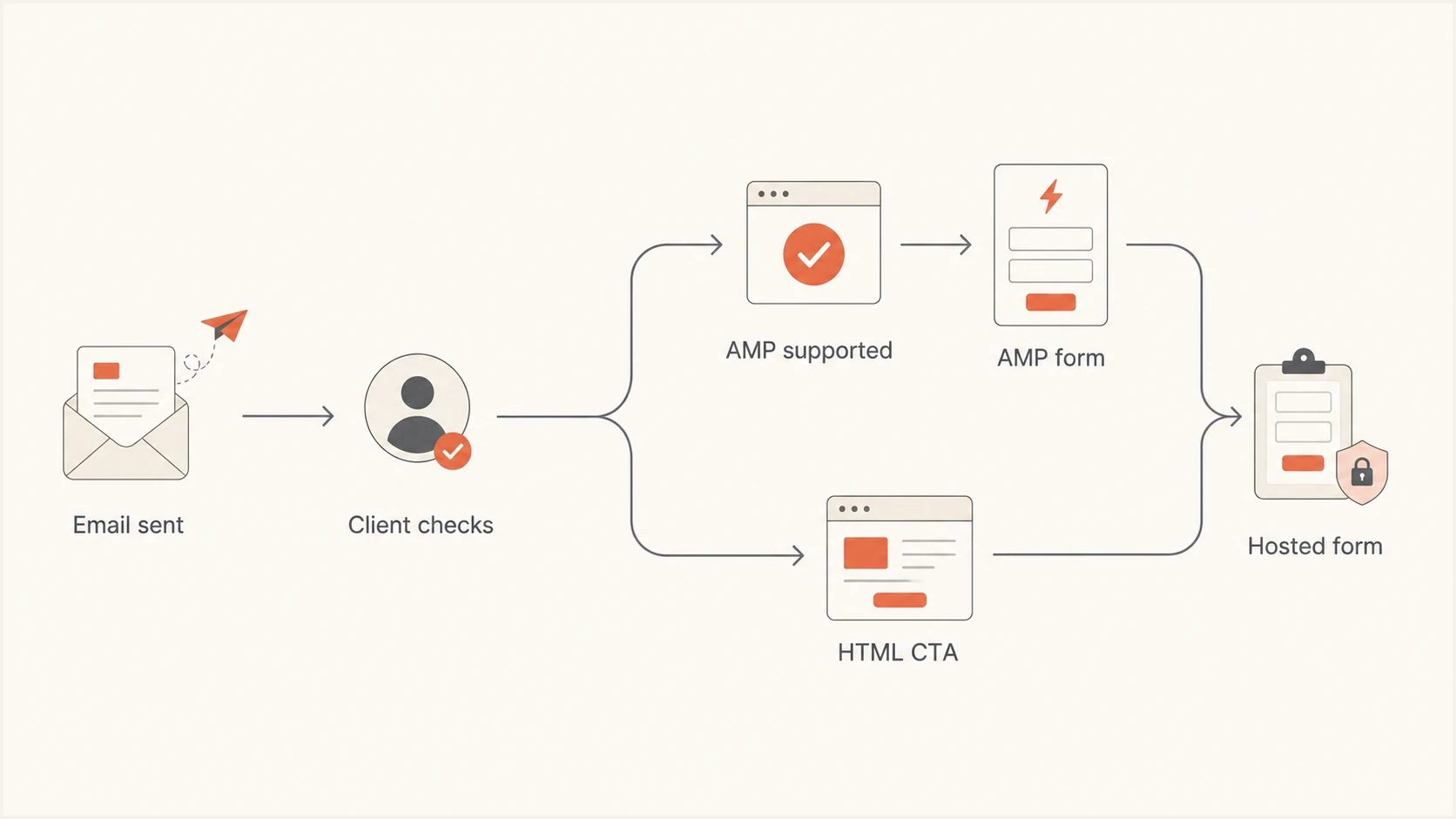
Flowchart showing AMP clients using an AMP form and other clients using a hosted form.
What AMP changes
AMP adds a third MIME part, usually alongside plain text and HTML. It gives supported clients a controlled way to render dynamic content. The delivery tradeoff is that the message must pass stricter checks, and the back-end endpoints must be designed for AMP. For forms, that means valid AMP markup, HTTPS action-xhr endpoints, AMP email CORS headers, no redirect after submission, and authentication that passes on the final delivered message.
Typical MIME structuretext
multipart/alternative
  text/plain
  text/x-amp-html
  text/html
AMP CORS identifies the sender that an endpoint allows, but it does not authenticate the recipient submitting the form. Protect state-changing requests with recipient-specific authorization, signed expiring tokens, and XSRF defenses. Do not approve a booking or profile change from the AMP-Email-Sender header alone.
AMP can improve conversion when the audience is already engaged and a fast in-message action removes friction. It hurts when the AMP part is the only useful path, the fallback is weak, or the interactive content encourages low-intent clicks from people who are not ready to hear from the brand.
Review actions and RSVP actions are not the same thing as AMP forms. They are inbox-specific enhancements for narrow actions. They can help a recipient take a small action faster, but they do not override spam complaints, poor list permission, or broken authentication.
Registration, expiry, and forwarding limits
An AMP email can validate in testing and still fall back to HTML in production. Provider registration, delivered-message validity, recipient settings, and message age all affect whether the dynamic part renders. Build the fallback around the message lifecycle, not only the mailbox brand.
- Register each sender address: Gmail registration applies to each From address, not to the whole domain.
- Submit production-ready mail: Send the review message directly from production or equivalent infrastructure with a valid AMP MIME part.
- Expect AMP to expire: Clients can stop displaying the AMP part after a set period, such as 30 days, and show the fallback instead.
- Design for replies and forwards: Clients strip the AMP part when a message is replied to or forwarded, so the HTML version must preserve the meaning and CTA.
Gmail takes preheader text and search indexing from the HTML or plain-text part, not the dynamic AMP part. Put the essential wording, offer details, and expiry information in the fallback so recipients can find and understand the message later.
Authentication still decides whether AMP renders
AMP sends should be treated as a higher-control program. Gmail's AMP checks require SPF to pass, DKIM to pass, and the DKIM signing domain to share the organizational domain used in the visible From address. Google also recommends DMARC with a quarantine or reject policy. DMARC reporting shows whether every production sender maintains the required domain relationship in real traffic, not only in a lab test.
Suped's DMARC monitoring collects aggregate reports and identifies which property platforms, CRMs, or sending subdomains pass, which fail, and which need SPF or DKIM correction before an AMP campaign reaches production.
DMARC record detail view showing SPF, DKIM, DMARC, rDNS diagnostics, and DNS records
Use aggregate data at p=none to inventory legitimate sources, correct authentication failures, then move to an enforced policy. Suped alerts and blacklist (blocklist) monitoring can help separate an authentication or reputation change from a fault in the interactive template during the rollout.
Example enforced DMARC recordtext
_dmarc.example.com. 3600 IN TXT "v=DMARC1; p=quarantine; rua=mailto:dmarc@example.com"
How to test before launch
Testing has to use the final production sender, the final tracking domain, the final AMP endpoints, and the final fallback HTML. A clean sample sent from a developer mailbox does not prove the campaign is safe. The delivered message is what matters.
Test Gmail web, Gmail mobile, Yahoo Mail, Outlook desktop, Outlook web, Apple Mail, and a corporate mailbox with link rewriting. Test old leads separately because inactive segments create more complaints and fewer positive signals than recent active leads.
Run a broad domain health check first, then inspect the delivered email. If SPF, DKIM, DMARC, rDNS, TLS, or blocklist status is already weak, do not use AMP as the first change. Fix the foundation, then test the content.
Email tester
Send a real email to this address. Suped shows a results button when the test is ready.
?/43tests passed
The content test should compare the AMP version against a normal HTML version with the same offer and same audience split. Do not compare AMP sent to hot leads with non-AMP sent to dormant leads. That hides the actual signal.
For inactive real estate leads, start with the hosted form version. Once the segment proves it still engages and complaint rates stay low, add AMP for supported clients. Watch complaints, unsubscribes, click quality, appointment completions, and replies. Opens alone are not enough.
- Authenticate: Confirm SPF, DKIM, DMARC, TLS, and the required domain relationship between DKIM and the visible From address.
- Validate: Check the delivered AMP markup, fallback HTML, and endpoint behavior before production.
- Segment: Start with recent engaged users before expanding to inactive leads.
- Measure: Track complaints, conversions, and inbox placement by client family.
Launch thresholds
AMP rollout readiness
Use these practical thresholds before moving an interactive campaign beyond a small test.
Safe to test
Green
Authentication passes, complaint rate is low, and fallback HTML is complete.
Fix first
Yellow
Some sources fail SPF or DKIM, inactive leads are unproven, or endpoints need work.
Do not launch
Red
Native HTML form, visible PII in URLs, high complaints, or no usable fallback.
The biggest mistake is treating AMP as the strategy instead of the enhancement. The strategy is permission, relevance, authentication, accessible HTML, and a landing page that converts. AMP can sit on top of that for clients that support it.
Keep Suped alerts active during the test window. DMARC, SPF, DKIM, blocklist monitoring, and related deliverability signals help separate a template problem from an authentication or blacklist event.
Views from the trenches
Best practices
Use a hosted form link with a token, then resolve recipient context on the server.
Keep the HTML fallback complete, because Outlook and many client apps ignore AMP.
Test AMP with engaged recipients first, then expand only if complaints stay low.
Monitor DMARC, SPF, DKIM, and blocklist data during every interactive email launch.
Common pitfalls
Embedding native HTML forms makes the message look like risky data collection attempts.
Putting personal data in query strings exposes details through logs and forwarding.
Assuming Gmail account ownership means AMP will render in every client is wrong.
Judging AMP by form fills alone ignores spam complaints and inbox placement shifts.
Expert tips
Send non-AMP recipients to the same hosted form, not to a weaker fallback journey.
Use GUIDs for personalization and keep readable personal details out of the URL.
Compare AMP and HTML on equal audience segments so engagement data stays honest.
Fix authentication before testing new interactive content against old lead lists.
Marketer from Email Geeks says native HTML form tags in email create avoidable filtering risk, and many clients block the submission path anyway.
2022-06-23 - Email Geeks
Marketer from Email Geeks says the practical alternative is an image or CTA that opens a prefilled website form with a serialized token.
2022-06-23 - Email Geeks
The practical recommendation
Do not embed a native HTML form in the campaign. Build a normal email with a personalized CTA to a hosted form. Use a token or GUID for personalization, avoid readable PII in URLs, and make the landing page fast and prefilled.
Add AMP only after the sender is healthy, the segment is engaged, and the fallback is complete. For Gmail and Yahoo recipients using AMP-capable clients, the interactive form can reduce friction. For Outlook and other non-AMP clients, the HTML CTA must deliver the same core outcome.
Suped can collect DMARC reports, surface failing sources, and alert on authentication or blacklist (blocklist) changes during the rollout. That gives marketing and engineering teams a shared record for deciding whether a result came from the interactive content, the sender setup, or the recipient segment.




