Where is the best place to put an unsubscribe link in an email?

Updated on 24 Jul 2026: We updated this guide for current one-click unsubscribe rules and added regional compliance deadlines with clearer mobile placement advice.
The best place to put an unsubscribe link in an email is in the footer, because that is where most recipients expect to find it. For promotional and newsletter email, add a small utility unsubscribe link above the hero, usually next to "View in browser". That gives people who already want to leave a clean exit before the spam button becomes the easiest option.
If you can use only one body link, use a clear footer link. The best practical setup uses a body link at both the top and footer, plus List-Unsubscribe headers for mailbox-native unsubscribe controls.
A top unsubscribe link usually increases unsubscribe clicks. That is not automatically bad. The person clicking it has already decided the email is no longer wanted. The better question is whether the top link lowers spam complaints, improves engagement quality, and keeps the list cleaner over time.
The direct placement answer
Treat unsubscribe placement as a risk tradeoff, not a cosmetic choice. A footer-only link is familiar and keeps the top of the template clean. A top link is more direct, especially on mobile, where a long scroll can turn a normal opt-out into a complaint.
Recommended setup
- Top link: Put a small "Unsubscribe" link above the hero for marketing and newsletter campaigns, including lifecycle sends.
- Footer link: Keep the standard footer link in every commercial email, even when a top link is present.
- Header path: Add List-Unsubscribe headers so Gmail, Outlook, Apple Mail, and other clients can show their own unsubscribe control.
- Preference page: Send the body link to a simple page that offers a clear full unsubscribe before optional preference changes.
The top link should be visually quiet. It does not need button styling or persuasive copy. Use plain text such as "Unsubscribe". "Manage preferences" also works when the destination makes a full opt-out obvious. If a top link disrupts a minimal template, keep the footer clear and use correct headers as the second path.
|
|
|
|---|---|---|
Footer only | Short, clean templates | More scrolling |
Top plus footer | Promotional mail | Uses more template space |
Preference link | Multiple lists | Full opt-out must stay clear |
Header only | Never enough | Body link still needed |
Practical unsubscribe placement options
When footer-only placement is acceptable
Footer-only placement is acceptable when the email is short, the footer is easy to reach, and the unsubscribe link is visibly separated from dense legal text. Top plus footer remains the better option for promotional sends, but a top link does not need to be forced into every template when it creates a clumsy first screen.
The test is simple: a recipient should not have to search for the exit. If the message is a compact product update, receipt-adjacent notice, or account preference email, a strong footer link and correct headers can be enough. If the email is long, sales-led, frequent, or sent to a broad promotional audience, the top link is worth the extra visual space.
Use footer-only carefully
- Short emails: Footer-only works better when the recipient reaches the bottom without friction.
- Minimal layouts: A clean top area has value, but it never excuses hiding the unsubscribe path.
- High-risk lists: Use top plus footer when consent quality, frequency, or list age creates complaint risk.
Why the top link changes behavior
The spam button is already near the top of the message experience in most inboxes. If the unsubscribe link is buried at the bottom of a long email, the mailbox UI can offer the easiest exit before your template does.
Do not judge the top link by unsubscribe rate alone. A clean unsubscribe is a normal list-health event. A spam complaint is a stronger negative signal because it tells mailbox providers that the recipient did not want the mail and did not trust the sender's exit path.
Top utility link
- Speed: The reader can leave before scanning the full message.
- Complaint control: The unsubscribe action competes with the spam button.
- Design impact: The top utility row needs careful spacing and restrained styling.
Footer-only link
- Expectation: Recipients and compliance reviewers know to look at the bottom.
- Visual control: The hero and first screen stay focused on the message.
- Risk: A reader who wants out has to scroll or hunt for the link.
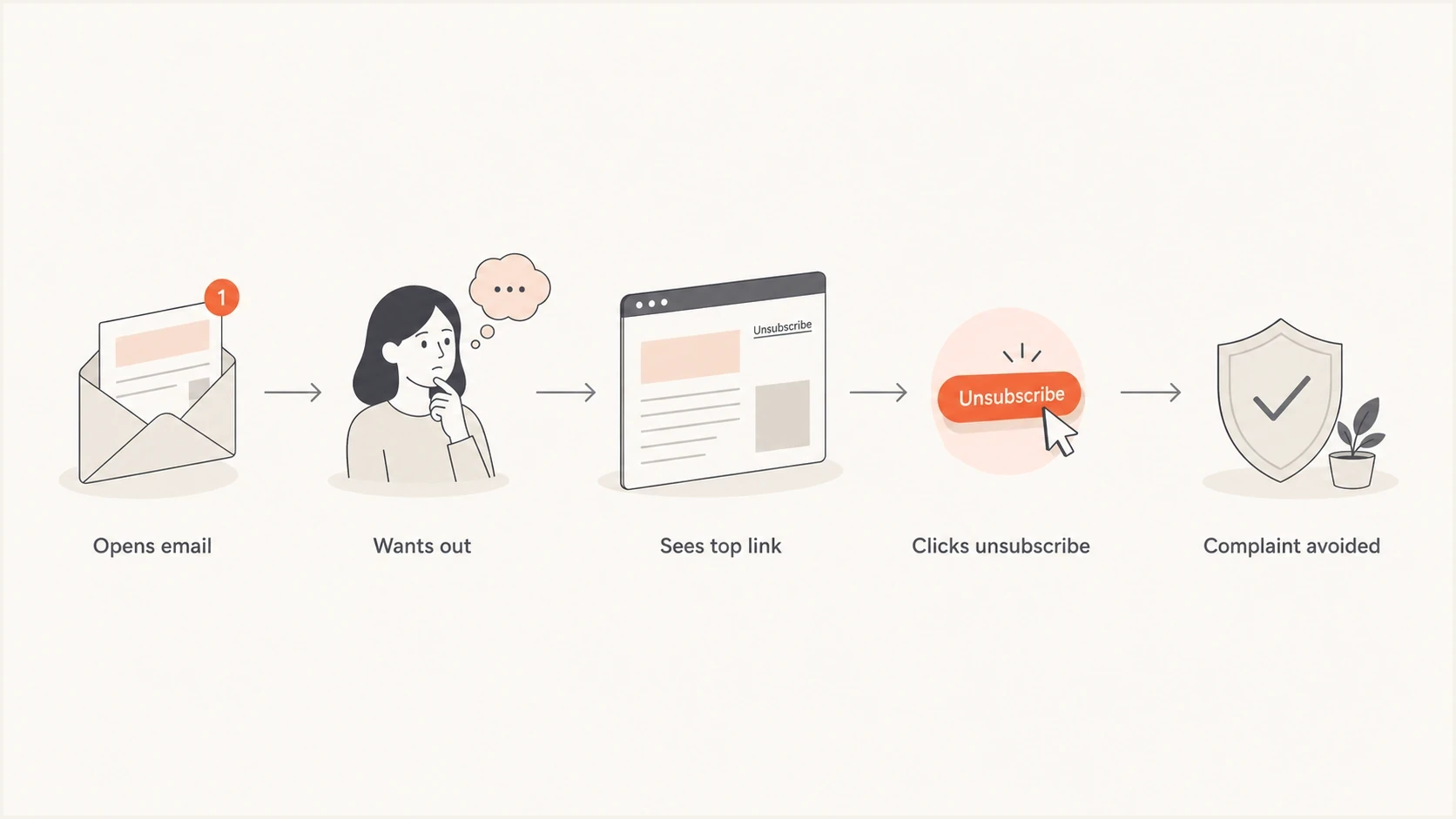
Flowchart showing how a top unsubscribe link can prevent a spam complaint.
How to design the visible link
The link needs to be clear and conspicuous without turning the top of the email into an opt-out banner. Place it in a utility row beside text such as "View in browser" or account preferences. Keep the font close to body-copy size, use normal contrast, and avoid hiding it inside legal copy.
- Copy: Use plain words such as "Unsubscribe" or "Manage preferences". Do not use jokes or vague labels.
- Contrast: Make it readable in light mode and dark mode. Low contrast looks evasive.
- Spacing: Separate it from nearby links so mobile users can tap it without accidental clicks.
- Destination: Let the recipient fully unsubscribe without login, account creation, or a mandatory survey.
- Live text: Use an HTML text link so the unsubscribe path remains visible when images are blocked.
Simple utility row examplehtml
<p style="margin:0;font-size:12px;line-height:18px;">
  <a href="{{view_in_browser_url}}">View in browser</a>
  <span aria-hidden="true"> | </span>
  <a href="{{unsubscribe_url}}">Unsubscribe</a>
</p>
Do not use a top link as a replacement for the footer. The footer still carries the sender identity and mailing address, plus the unsubscribe link that recipients expect when they scroll.
Compliance requirements by location
Good placement supports compliance, but placement alone does not make an email compliant. The unsubscribe process must also match the law where recipients are located. Use the strictest applicable rule when one list covers several jurisdictions.
|
|
|
|---|---|---|
United States | CAN-SPAM requires a clear opt-out that works for at least 30 days after sending. It cannot charge a fee or require more than an email address. | Within 10 business days |
Australia | The Spam Act requires clear instructions and a working facility for at least 30 days. It cannot require login or extra personal information. | Within 5 working days |
Canada | CASL requires a readily performed unsubscribe mechanism in each commercial electronic message. The mechanism must remain valid for at least 60 days. | Without delay, no later than 10 business days |
United Kingdom | PECR requires a simple, free opt-out in every marketing message. Do not require an account or login. | Promptly |
European Union | People can object to direct marketing at any time and free of charge. Present that right clearly and apply the relevant national electronic-marketing rules. | Stop direct marketing after an objection |
Common unsubscribe requirements for commercial email
Transactional labels do not settle the question
Password resets, receipts, and required account notices are often treated differently from marketing. Promotional content inside an operational message can change its legal treatment, so keep required service email separate from campaigns when practical.
How body links and one-click headers work together
Body placement and List-Unsubscribe headers solve different problems. The visible body link gives the recipient a clear path inside the email. The header gives mailbox providers the structured signal they need to render native unsubscribe controls.
One-click unsubscribe is a current requirement for relevant bulk and subscription mail. Gmail requires it when a sender delivers more than 5,000 messages per day to personal Gmail accounts, and Yahoo requires it for bulk senders. Gmail also requires a clearly visible body link and expects unsubscribe requests to be honored within 48 hours.
List-Unsubscribe header exampletext
List-Unsubscribe: <https://example.com/u/abc123>,
 <mailto:unsubscribe@example.com>
List-Unsubscribe-Post: List-Unsubscribe=One-Click
Important header behavior
RFC 8058 uses an HTTPS POST action for one-click unsubscribe. A valid DKIM signature must cover the List-Unsubscribe and List-Unsubscribe-Post headers. The body link can open a preference page, but the page still needs an obvious full unsubscribe option.
- Header QA: Confirm both headers are present on marketing mail and included in the DKIM signature.
- Bot safety: Do not unsubscribe people from a GET prefetch or security scan.
- Body QA: Click the visible link and confirm that the final page works without login.
How to test whether it works
Before moving the link, send a real test message and inspect what actually arrives. The rendered email should have a visible top link if you chose that pattern, a footer link, and valid headers. The received message is what matters, not the template editor preview.
Run the campaign through the email tester and inspect headers, rendering, authentication, and obvious deliverability issues before sending to the full list.
Email tester
Send a real email to this address. Suped shows a results button when the test is ready.
?/43tests passed
Test the unsubscribe journey with at least one real seed address. Click the top link, the footer link, and the mailbox unsubscribe control when it appears. Confirm that each path reaches the correct list record and suppresses future marketing sends, including queued automation.
For a deeper QA checklist, use one-click unsubscribe testing before rollout. The most useful tests check headers, server behavior, suppression timing, and whether the recipient gets unwanted follow-up mail after opting out.

Email tester sample report showing total score, email preview, issue summary, and per-section results
What to watch after changing placement
After adding a top link, expect unsubscribe clicks to rise at first. That is not a failure by itself. Watch complaint rate, unsubscribe rate, click rate, inbox placement, suppression latency, and list growth quality. Open rate is less dependable because privacy protections can create or hide opens.
If complaints fall and unsubscribes rise, the change is doing its job. If both complaints and unsubscribes rise, link placement is not the full problem. Review the content and frequency, then check the acquisition source and consent model.
How Suped fits this workflow
Suped is the platform behind this article. It brings email testing, DMARC monitoring, SPF and DKIM visibility, real-time alerts, and blocklist monitoring in one workflow. Campaign unsubscribe and complaint metrics still come from the sending platform.
- Pre-send QA: Use the email test report to inspect authentication and the received message before rollout.
- Source visibility: DMARC reporting helps identify approved and unexpected systems sending for the domain.
- Reputation checks: Blocklist (blacklist) monitoring helps catch domain or IP listing problems.
- Shared operations: The multi-tenant view keeps client-domain checks and alerts in one place.
Use those checks beside campaign reporting. Placement tests show whether people can leave easily, while authentication and blocklist (blacklist) monitoring show whether a separate sending problem is affecting delivery.
Views from the trenches
Best practices
Place a small top link and a footer link so leaving is easier than reporting spam on mobile.
Keep the link visible, plain, and close to account or preference language in the footer.
Use List-Unsubscribe headers so mailbox unsubscribe buttons work beside body links.
Common pitfalls
Moving the link lower to reduce unsubscribes pushes unhappy readers toward complaints.
Hiding the link in low contrast text creates trust problems and compliance risk fast.
Using one global opt-out for every message type can remove wanted transactional mail.
Expert tips
Review complaint rate beside unsubscribe rate before judging a placement test result.
Test both the header path and body link with a real seed account before launch.
Give clients a visual option, then explain why the spam button competes at the top.
Marketer from Email Geeks says a recipient who wants out leaves anyway, so the job is to make that exit easy and improve acquisition quality.
2021-07-26 - Email Geeks
Marketer from Email Geeks says the spam button is always near the top of the inbox, which makes a hidden footer-only exit risky.
2021-07-26 - Email Geeks
Practical recommendation
Use a footer unsubscribe link as the baseline. Add a small top utility link for marketing email when the template can support it without looking awkward. Add List-Unsubscribe and List-Unsubscribe-Post headers for mailbox controls, then test every path with a real received message.
The cleanest list is not the one with the lowest unsubscribe rate. It is the list where wanted mail keeps engaged readers, unwanted mail has an easy exit, and complaint signals stay low.




