
What to do when Orange.fr is having email delivery issues?

Published 30 Jul 2025
Updated 16 Oct 2026
13 min read
Summarize with

Updated on 16 Oct 2026: We refreshed Orange.fr troubleshooting with accepted-message checks and clearer SMTP retry rules.
When Orange.fr is having email delivery issues, first slow or pause non-urgent mail to Orange.fr and Wanadoo.fr, keep transactional mail on a conservative retry schedule, preserve all 4xx evidence, and check whether the issue is receiver-side or caused by your own authentication, reputation, or SMTP setup. A temporary 421 response is not a reason to suppress recipients. It is a reason to retry later, with lower pressure on Orange's servers.
Orange's Orange Postmaster guidance is the baseline for this work. It covers authentication, rDNS, HELO, TLS, connection limits, message limits, complaint thresholds, and common Orange error codes. If your sending setup does not meet that baseline, fix your side before asking Orange to investigate.
First decision
If you see a 421 service refused response, including OFR_108 in historical incident examples, stop treating the queue like normal volume. Hold marketing and bulk mail, let urgent mail retry with queue backoff, and watch whether the same response continues through later attempts.
First response when Orange.fr starts failing
The first job is classification. Determine whether Orange is refusing mail temporarily, throttling your traffic for its behavior, rejecting messages because authentication failed, or blocking a sender because reputation crossed a threshold. The answer changes the action immediately.
- Pause: Hold non-essential campaign and bulk mail to Orange.fr and Wanadoo.fr while temporary service refusals remain elevated.
- Protect: Keep receipts, password resets, one-time codes, and account notices on retry, but reduce concurrency and dispatch rate.
- Segment: Move Orange.fr and Wanadoo.fr to a separate queue so the rest of your mail stream is not slowed unnecessarily.
- Preserve: Keep recipients active after 421 and other 4xx responses. Save SMTP transcripts, timestamps, sending IPs, and message categories.
- Resume: Restart gradually after errors drop. A full queue release can restart the same problem even after Orange recovers.
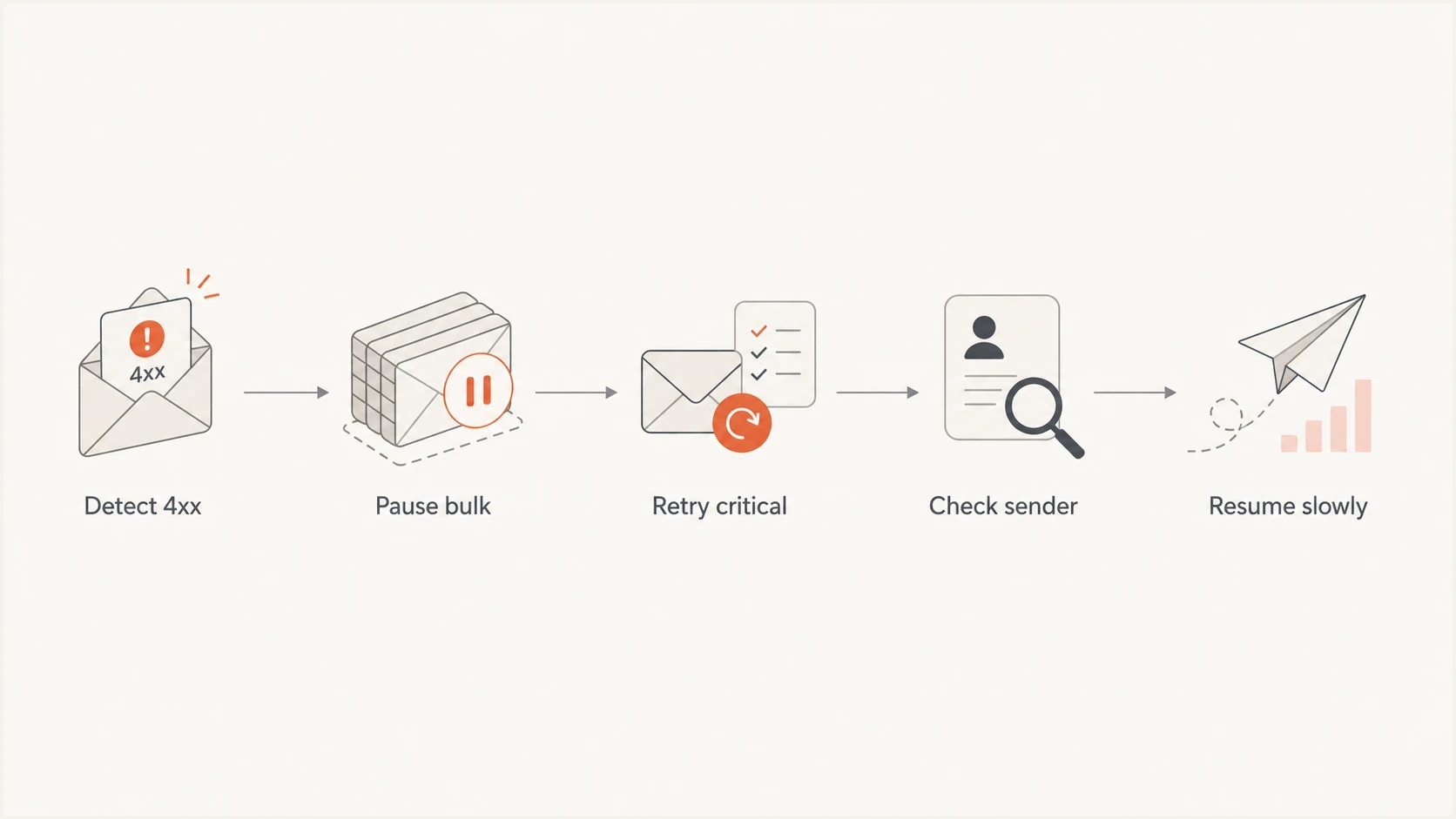
Orange.fr 4xx delivery troubleshooting: pause bulk mail, retry critical messages, check sender setup, and resume slowly.
If only Orange-hosted domains are affected and the errors are mostly temporary, investigate both an Orange incident and Orange-specific sender throttling. Compare the exact responses across sending IPs and traffic streams, and check Orange support for an incident notice. If several unrelated mailbox providers begin failing together, treat it as a sender-side problem first.
A user who cannot sign in, open Orange webmail, or connect through IMAP or POP has a mailbox-access problem, not an inbound email delivery diagnosis. Test webmail and the mail client's account settings separately. Do not change recipient suppression or sender authentication because of a local access error.
What the Orange.fr SMTP error is telling you
Orange errors usually include the SMTP class, a French and English explanation, and an OFR code. The leading SMTP status tells you whether to retry. An OFR suffix such as 416 or 515 is an Orange diagnostic code, not the SMTP reply class. The OFR code and full response text tell you what to fix or how to pace the queue.
Example Orange temporary refusaltext
421 opmta1mti07nd1 smtp.orange.fr
7xfWn7Ublsk48 Service refuse. Veuillez essayer plus tard.
Service refused, please try later. OFR_108 [108]
In that historical example, 421 is the most important part. The server did not accept the message for that attempt, but it did not say the address is invalid. Orange's current published table does not list code 108, so classify the current SMTP status and full text before acting. Do not clean the recipient, change consent status, or mark the contact as bad from this response alone.
|
|
|
|---|---|---|
421 | Temporary refusal | Retry later with slower pacing |
OFR_108 | Historical service-refusal example | Follow the current SMTP class and response text |
99 / 103 | Sending IP blacklisted by Orange | Correct the cause and contact Orange |
104 | Too many connections | Limit concurrent connections |
107 | Missing PTR record | Publish valid reverse DNS for the sending IP |
109 | Too many messages per connection | Reduce messages per connection |
20x | Invalid HELO or EHLO | Use a resolvable fully qualified hostname |
397 / 398 | Sender-domain SPF error | Correct the SPF TXT record and allow for DNS TTL |
405 | Sender-domain DNS error | Publish a valid A or MX record |
416 | User does not exist | Suppress after a permanent invalid-recipient reply |
425 | Sender domain on a blacklist | Investigate the blocklist or blacklist cause |
506 | Message blocked as suspected spam | Check consent, complaints, content, and reputation |
515 | DMARC policy rejection | Fix authentication before retrying |
519 | Sending IP not authorized by SPF | Authorize the source or stop its mail |
535 | DKIM signature missing | Sign the message and verify DKIM |
988-990 | Low-reputation rate limit | Retry later and investigate reputation; for 988, use your own DKIM signing domain |
Common Orange signals and first actions.
Do not suppress on 421
- Temporary: A 421 response means Orange rejected this delivery attempt, not the recipient.
- Permanent: Suppress confirmed invalid recipients after a permanent 5xx reply. Hold authentication or policy failures for sender remediation without suppressing valid recipients.
- Evidence: Save the raw response, sending IP, From domain, envelope sender, and first-seen time.
How to separate an Orange incident from a sender issue
Failures limited to Orange.fr and Wanadoo.fr do not establish an outage. Orange-specific reputation filtering also produces temporary refusals while other mailbox providers accept the same mail. A published incident notice or similar failures across independent senders strengthens the receiver-incident diagnosis. Authentication failures, missing PTR records, bad HELO, high complaints, or blocklist (blacklist) signals point to sender remediation.
Possible receiver incident
- Scope: Mostly Orange.fr and Wanadoo.fr domains fail.
- Codes: Responses say 421, service refused, retry later, or another temporary deferral.
- Timing: Failures begin suddenly across otherwise stable traffic.
Sender issue pattern
- Scope: Orange returns sender-specific errors, or multiple providers fail.
- Codes: SPF, DKIM, DMARC, PTR, HELO, or blacklist errors repeat.
- Action: Fix the root cause before pushing deferred volume back into the queue.
Before blaming the receiver, check the domain baseline with a domain health checker. Use it to review DMARC, SPF, DKIM, MX, DNS, and sender identity before changing retry rules.
?
What's your domain score?
Deep-scan SPF, DKIM & DMARC records for email deliverability and security issues.
A clean DNS check does not rule out Orange-specific reputation filtering or a missing DKIM signature on actual messages. Check message headers and SMTP logs as well. Fix broken records or failed authentication first, then restart with a small controlled test.
When Orange accepts email but it is missing
A final 250 response from Orange's receiving server after DATA means Orange accepted the message for the recipient. It does not confirm inbox placement. A 250 response from your own submission service only confirms that first handoff. RFC 5321 defines SMTP acceptance.
- Ask the recipient to search Orange webmail, including spam and trash, using the sender and subject.
- Check mailbox filters and forwarding rules if the message is absent or has moved.
- If webmail contains the message but the mail app does not, check IMAP synchronization. POP access on another device can download messages and remove the server copy.
- Save the Message-ID, final SMTP response, and UTC timestamp for support. Avoid repeatedly resending messages that Orange has already accepted.
Authentication and reputation checks before retrying
Orange's current guidance requires a static sending IP, valid PTR, a resolvable fully qualified HELO or EHLO, and valid A or MX records for the sending domain. Orange strongly recommends TLS and supports version 1.2 or newer; TLS 1.0 and 1.1 are unsupported. SPF, DKIM, and DMARC are mandatory and must all pass. ARC sealing is strongly recommended for forwarded messages, and an email cannot exceed 45 MB.
Illustrative authentication recordsdns
_dmarc.example.com. TXT "v=DMARC1; p=none; rua=mailto:d@example.com"
selector1._domainkey.example.com. TXT "v=DKIM1; k=rsa; p=MIIB..."
example.com. TXT "v=spf1 include:_spf.sender.example -all"
These are syntax examples, not records to copy. Replace every placeholder with your own authorized sources, DKIM public key, and reporting address. A record that exists in DNS can still fail on a delivered message, so verify the authentication results in message headers and DMARC data. The p=none example requests monitoring; it does not make failing messages pass DMARC.
Practical baseline
- SPF: The envelope sender domain authorizes the sending IP or hosted sender, and SPF passes.
- DKIM: Every production stream signs with a stable selector and current key, and DKIM passes.
- DMARC: SPF or DKIM must pass with the required domain match to the visible From address at every sending volume. RFC 9989 defines this check. Orange separately requires both SPF and DKIM to pass.
- PTR: The sending IP has a PTR record whose hostname resolves back to that same sending IP.
- TLS: The sending MTA supports TLS 1.2 or newer.
Suped's DMARC monitoring shows which sending sources pass, which fail, and which unknown sources use the domain. Suped's blocklist monitoring adds IP and domain blacklist context. Keep the raw Orange SMTP logs as well because those logs, not DMARC reports, contain OFR codes and queue deferrals.
DMARC record detail view showing SPF, DKIM, DMARC, rDNS diagnostics, and DNS records
Use the monitoring view to answer a narrow question: is Orange refusing otherwise healthy mail, or is Orange rejecting mail that fails its published policy? That distinction saves time and prevents an outage response from hiding a sender defect.
Requirements for senders over 1,000 messages a day
Orange applies a specific checklist to senders that deliver more than 1,000 messages per day. Meeting the technical checks alone is not enough. Orange also evaluates sender identity, consent, complaint handling, and unsubscribe behavior.
- Authenticate: Make SPF, DKIM, and DMARC pass, with the Header From domain matching the authenticated domains.
- Identify: Use a display name that accurately identifies the entity that obtained the recipient's consent.
- Document: Host a website on the Header From domain with company identity, address, consent information, and legal notices.
- Get consent: Use verified opt-in, never buy lists, and provide an easy one-click unsubscribe. For marketing mail, implement RFC 8058 with an HTTPS List-Unsubscribe URL and List-Unsubscribe-Post: List-Unsubscribe=One-Click. DKIM-sign both headers and keep a visible unsubscribe link in the message.
- Label traffic: Add a stable Feedback-ID header so complaints can be tied to the right mail stream.
- Handle feedback: Process bounces and complaint feedback promptly if your organization has authorized feedback-loop access.
- Limit complaints: Keep the complaint rate below Orange's protection thresholds and investigate every sudden increase.
Complaint-rate threshold
Orange currently says a spam-report rate of 0.6% or higher can trigger protection mechanisms, and it intends to move gradually toward 0.3%. Keep complaints below 0.3% internally; Orange has not published a transition date in this guidance. Staying below it does not guarantee acceptance because reputation and sending behavior still affect filtering.
Queue pacing and retry strategy
Retry behavior matters because receiver incidents get worse when every sender retries aggressively. Orange recommends up to two simultaneous connections per sending IP, 100 messages per connection, and up to 100 recipients per message. Treat these as published recommendations, not guaranteed acceptance limits. Use lower limits when reputation is weak or temporary refusals rise.
Orange.fr retry pacing
Use changes against your own queue baseline and the exact SMTP response; Orange publishes no universal 4xx percentage for pausing bulk mail.
Normal
Usual baseline
Temporary deferrals remain near the usual baseline
Slow
Rising 4xx
Deferrals rise above the usual baseline
Pause bulk
Sustained 421
Persistent service refusals or a confirmed incident
Fix first
Auth or policy 5xx
Authentication or policy rejection
For temporary failures, use scheduled retries with backoff instead of immediate resends. RFC 5321 generally recommends waiting at least 30 minutes after a failed destination attempt, while allowing reason-aware retry strategies. Spread retries over time so queued messages do not all restart together.
- Throttle: Cap the Orange queue to two simultaneous connections per IP, then go lower during active 421 spikes.
- Batch: Keep messages per connection at 100 or lower when service refused responses increase.
- Separate: Use different queues for Orange-hosted domains, transactional mail, and marketing mail.
- Expire: Set an application-aware queue lifetime. Expire one-time codes and promotions when they are no longer useful, and report queue expiry separately from an invalid-recipient bounce.
- Audit: Track first seen, last seen, retry count, SMTP response, and campaign or message type.
After errors drop, send one real message to a controlled Orange.fr address and inspect its Authentication-Results headers. Use Suped's email tester for a separate sender-configuration test before reopening full traffic.
Email tester
Send a real email to this address. Suped shows a results button when the test is ready.
?/43tests passed
One successful test does not prove full recovery. Use it as a gate before increasing volume, then watch the fresh 4xx rate, delivered volume, and complaint rate in short intervals.
When to contact Orange.fr postmaster
Escalate after checking your own setup and gathering evidence. A useful postmaster request is specific. It shows Orange that your mail stream is authenticated, your retries are controlled, and the issue is still happening. Open the contact form linked from Orange Postmaster and select "Un problème d'envoi d'emails vers les adresses Orange ou Wanadoo (deliverability issue)".
- Include: Sending IPs, From domain, envelope sender, HELO, sample recipient domains, UTC timestamps, raw SMTP responses, and Message-IDs where available.
- Exclude: Vague screenshots, ticket text without codes, and reports that omit sending IP or message class.
- Prove: Authentication status, bounce classification, suppression rules, opt-in source, and recent complaint rate.
- Ask: Whether the current deferrals are incident-related, reputation-related, or policy-related.
|
|
|---|---|
SMTP text | Shows the leading SMTP status and exact Orange code |
IP list | Lets Orange inspect reputation |
Auth proof | Documents SPF, DKIM, and DMARC results on affected messages |
Retry plan | Shows you are reducing load |
Escalation packet checklist.
If the pattern is sustained throttling rather than a short incident, the Orange.fr throttling notes are more specific. For wider regional patterns, use the French ISP bounces guide. The Orange complaint threshold changes article explains the 0.6% trigger and Orange's announced move toward 0.3%.
Where Suped fits in the workflow
Our DMARC platform, Suped, covers the sender-side verification in this workflow. Suped aggregates DMARC results, maps sending sources, checks DNS, tracks blocklist (blacklist) signals, and alerts teams to authentication changes. Orange-specific SMTP deferrals still come from your MTA or sending provider logs, so keep those logs alongside Suped's diagnostics.
Manual workflow
- Collect: Pull bounces, queue logs, DNS records, and complaint data from separate places.
- Compare: Manually decide whether a source is trusted, unknown, broken, or spoofed.
- React: Wait until someone notices a spike, then reconstruct the timeline.
Suped workflow
- Detect: Automated issue detection flags authentication and source problems early.
- Alert: Alerts notify the team when authentication failures exceed expected levels.
- Fix: Guided steps explain what to change in DNS, sender setup, or policy staging.

Issue steps to fix dialog showing the issue overview, tailored fix steps, and verification action
Use Suped to check the affected source's authentication in available DMARC reports and look for public blocklist changes. DMARC reports do not expose Orange's private reputation scores or every failed delivery attempt. Use the sending system to track OFR codes, deferral rates, queue age, and retry counts.
Views from the trenches
Best practices
Keep Orange.fr and Wanadoo.fr in a separate queue so pauses do not block other mail.
Save SMTP transcripts with timestamps before changing suppression or retry rules.
Restart in measured batches and watch fresh 4xx rates before raising the limit again.
Common pitfalls
Treating temporary 421 deferrals as hard bounces removes valid recipients too fast.
Retrying every queued message at once can extend a receiver-side incident for everyone.
Blaming Orange before checking SPF, DKIM, DMARC, PTR, HELO, and blocklists wastes time.
Expert tips
Use complaint rate and bounce trend alerts to detect Orange.fr issues early enough to act.
Keep transactional mail in its own retry lane with tighter caps during incidents.
Record the leading SMTP status and OFR code; an OFR suffix alone does not decide retry behavior.
Marketer view
During a January 2022 incident, Orange asked senders to hold nonessential traffic for 4-5 hours because retries into 421 errors added load.
2022-01-13 - Email Geeks
Marketer view
A January 2022 report treated OFR_108 as a temporary service refusal, not a reason to suppress recipients.
2022-01-13 - Email Geeks
A practical Orange.fr recovery plan
Pause nonessential Orange.fr and Wanadoo.fr traffic when temporary errors spike and keep critical mail retrying gently. Suppress only confirmed invalid recipients or contacts with complaint or unsubscribe signals; authentication and policy failures need sender remediation.
- Short incident: Pause bulk traffic, preserve recipients, and resume slowly after fresh tests pass.
- Sender defect: Fix SPF, DKIM, DMARC, PTR, HELO, blocklist (blacklist), or complaint problems before retrying.
- Ongoing throttle: Gather exact codes, samples, timestamps, and retry limits before contacting Orange.




