What to do when experiencing issues sending email to SMS texts via ATT?

Published 4 Jul 2025
Updated 11 Aug 2026
10 min read
Summarize with
Updated on 11 Aug 2026: We updated this guide for AT&T's completed email-to-text shutdown and added a clearer migration checklist for retired gateway addresses.
AT&T shut down email-to-text and text-to-email on June 17, 2025, according to AT&T's support page. Messages sent to a 10-digit number at txt.att.net or mms.att.net no longer become texts. The fix is to replace the retired AT&T SMS gateway in each alert or notification workflow, not to change DNS.
A bounce or message trace can still identify which application uses the old address. Check the wider mail path only when the same sender also fails at normal mailbox destinations. That distinction prevents a retired carrier gateway from masking a separate sender-side problem.
Why the AT&T SMS gateway no longer works
The public AT&T email gateway has ended. Current messages to txt.att.net or mms.att.net can return a permanent SMTP error or fail without a useful bounce. Neither result identifies a DNS repair, and a successful upstream SMTP handoff never proves that a text reached the phone.
Do not keep retrying blind
A repeated permanent failure from an AT&T gateway address confirms that the route cannot carry the message. Repeating the same send adds queue noise and can trigger duplicate notifications if a replacement route is also active.
- Pause automated retries after the gateway route fails.
- Separate the retired gateway incident from any normal email delivery incident.
- Keep the full NDR, message ID, timestamp, sending IP, sender domain, and recipient address.
- Treat email-to-SMS as retired infrastructure, not as a production channel to repair.
Example AT&T gateway bounce
Diagnostic information for administrators:
Generating server: BY5PR03MB5267.namprd03.prod.outlook.com
Recipient: {phone}@mms.att.net
Remote Server returned:
550 5.2.0 <sender@example.com> - YET8oD0cbiOewYET8op5DU
Internal error
This example says the remote gateway rejected that SMTP transaction. It does not, by itself, say that DMARC failed. Other current sends can time out or disappear without a bounce, so the absence of this exact code does not make the retired gateway usable.
Confirm the failure scope
The useful question is whether only AT&T gateway addresses fail or whether normal mailbox delivery fails too. Do not change DNS, rewrite content, or move mail servers until that scope is clear.
- Record whether the recipient uses txt.att.net or mms.att.net. Both AT&T email-to-text routes are retired.
- Test a normal mailbox with the same sending source. Success there isolates the problem to the retired gateway route.
- Identify the application, connector, relay, and envelope sender that generated the message.
- Classify the result as a permanent bounce, temporary deferral, timeout, or silent non-delivery.
|
|
|
|---|---|---|
550 from gateway | Permanent rejection | Retire route |
Timeout or deferral | No dependable delivery | Retire route |
No bounce | No proof of phone delivery | Trace and migrate |
Normal email also fails | Separate sender issue | Check authentication |
Triage signals for current AT&T email-to-SMS failures.
How quickly to act
Use the destination pattern to separate a retired gateway route from a broader sender problem.
One gateway address
Trace
Find the system that generated the message.
Several gateway addresses
Contain
Pause the shared workflow and prevent missed alerts.
All gateway addresses
Migrate
Replace the retired route instead of escalating delivery.
Normal mail also fails
Investigate
Open a separate sender authentication and reputation check.
Use message trace to find stale routes
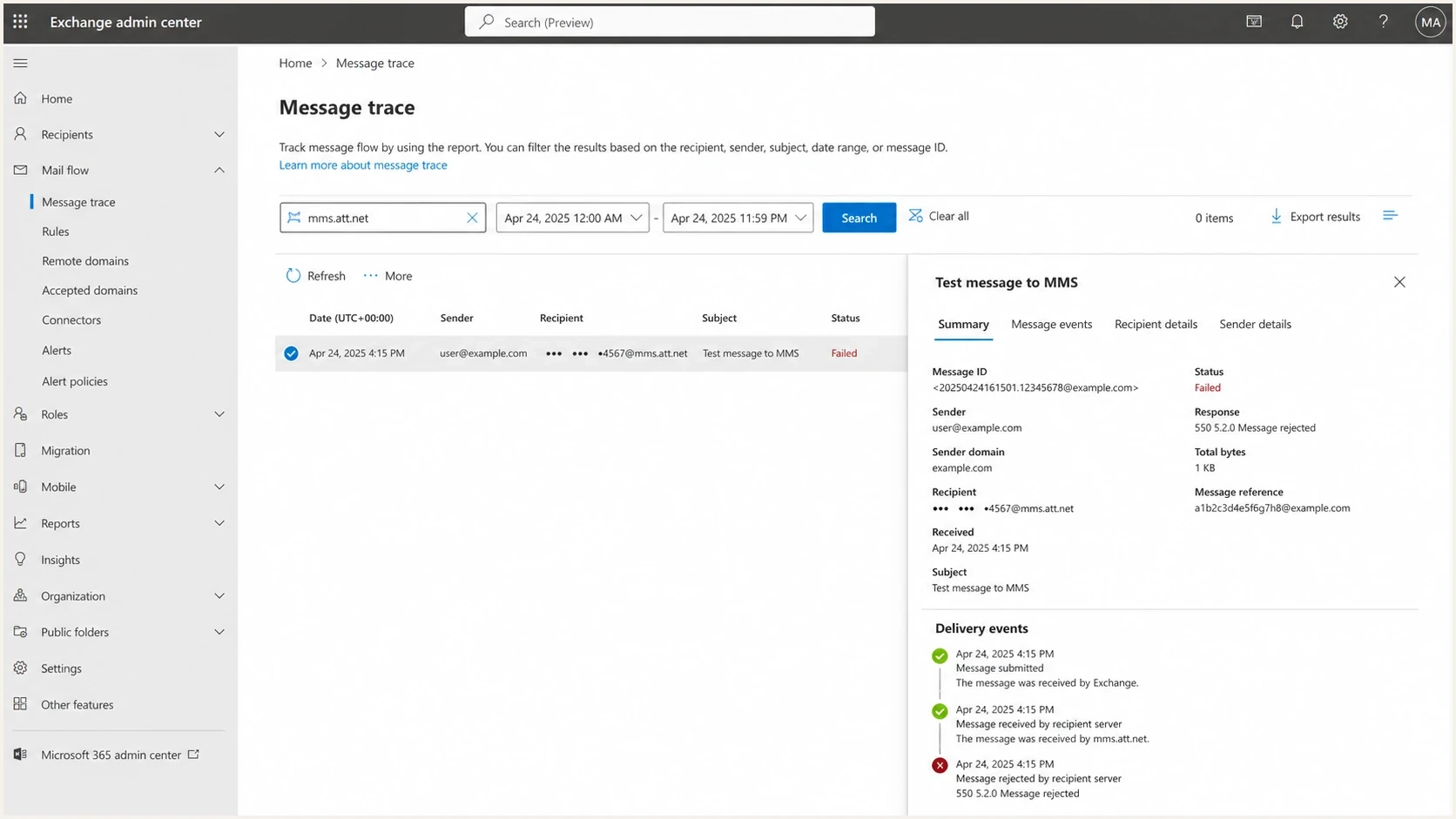
Microsoft Exchange admin center message trace showing a failed AT&T gateway delivery.
For Microsoft 365 senders, message trace can identify the application path and the final SMTP event. Capture the response, connector, source IP, timestamp, and message ID before replacing the address. The purpose is to locate the stale dependency, not to find a way around AT&T's shutdown.
Retired AT&T gateway formats
{10-digit-number}@txt.att.net
{10-digit-number}@mms.att.net
Good evidence
- Keep the complete NDR, including the reporting and remote servers.
- Record the exact timestamp with its timezone and message ID.
- Compare the gateway result with a message to a normal mailbox.
- Note the application, connector, relay, and envelope sender.
Weak evidence
- A cropped error image hides the sender, route, and timing.
- A report without counts does not show which systems are affected.
- SPF or DKIM edits without evidence can create a second problem.
- Repeated sends can hide whether the replacement route works.
A trace showing an AT&T gateway response identifies where the SMTP attempt ended. It does not prove delivery to the phone, and it does not change the gateway's retired status.
Check authentication only for broader failures
Email authentication does not restore AT&T email-to-text. Check sender configuration when the same domain also has normal inbox placement problems. A domain health check can show whether DMARC, SPF, DKIM, DNS, or domain posture needs separate attention.
Suped's product supports this workflow by combining DMARC monitoring with authentication checks, alerts, and blocklist monitoring. The reports help separate a real sender-side fault from failure at a retired carrier gateway.

Issue steps to fix dialog showing the issue overview, tailored fix steps, and verification action
A bounce that mentions PTR or HELO/host identity belongs to a different incident. Handle it as reverse DNS failures and send it to the mail server owner or sending platform.
Checks for a separate sender problem
- Confirm that SPF authorizes the real sending source and stays within the DNS lookup limit.
- Confirm that the application or relay signs with a DKIM selector published in DNS.
- Check that DMARC passes through an authenticated domain that matches the visible From domain.
- Check domain and IP blocklist or blacklist status when other destinations fail too.
Basic DMARC reporting record
_dmarc.example.com TXT
"v=DMARC1; p=none; rua=mailto:dmarc@example.com"
Test the original sending path
When normal mailbox delivery also fails, send a small message through the same application path and inspect it with an email tester. Compare its authentication results with a test from the main business mail system. Do not use the retired AT&T gateway as the test destination.
Email tester
Send a real email to this address. Suped shows a results button when the test is ready.
?/43tests passed
This check matters when an old monitoring system uses a relay that differs from normal business mail. If the main mail system passes but the application server fails, repair that application path as a separate issue.
Keep the test plain, with a short subject and body, no attachment, and one recipient. If the plain message fails at a normal mailbox, inspect authentication and host identity. If it succeeds, compare the production message's size, links, attachments, sender identity, and envelope sender.
Why AT&T support cannot restore the gateway
AT&T support cannot reactivate the retired public email-to-text service for a consumer line. Contact support only for questions about how the shutdown affects an account or a contracted business messaging arrangement. Delivery troubleshooting for txt.att.net and mms.att.net does not produce a supported replacement route.
- A consumer subscriber can ask support to confirm that the public gateway has ended for the line.
- A business account owner can ask the account team about contracted messaging options already attached to the account.
- Provide timestamps, recipient numbers, sender domain, sending IP, and NDR text only if support requests evidence.
- Do not delay migration while waiting for an exception to the public gateway shutdown.
A clean sender does not restore the route
A valid DMARC result and good sender reputation do not require AT&T to accept or convert a message through a service it has ended. Preserve evidence for the incident record, then replace the route.
Replace the email-to-SMS workflow
The long-term fix is migration. Email-to-SMS was convenient for operational and emergency notifications because it required little application work, but it did not provide dependable phone delivery, consent records, or durable carrier support.
Retired email gateway
- The carrier controlled conversion and could end the service.
- SMTP acceptance did not prove delivery to the phone.
- Consent, opt-out handling, routing controls, and audit records were difficult to prove.
- Filtering, silent drops, and shutdowns created operational risk.
Supported messaging route
- Use a registered 10DLC long code, verified toll-free sender, short code, or another approved route suited to the traffic.
- Track accepted, delivered, failed, and suppressed messages.
- Keep consent source, opt-out handling, audit logs, and rate controls.
- Separate urgent texts, normal email, app notifications, and voice escalation paths.
Start by finding every use of an AT&T gateway address, including monitoring rules, mailbox forwarding, application code, and contact records. Decide whether each message needs a text, move critical notifications to a supported route, and keep non-urgent notices in email or an internal app. Replace any inbound text-to-email reply workflow too, because AT&T ended both directions of the service.
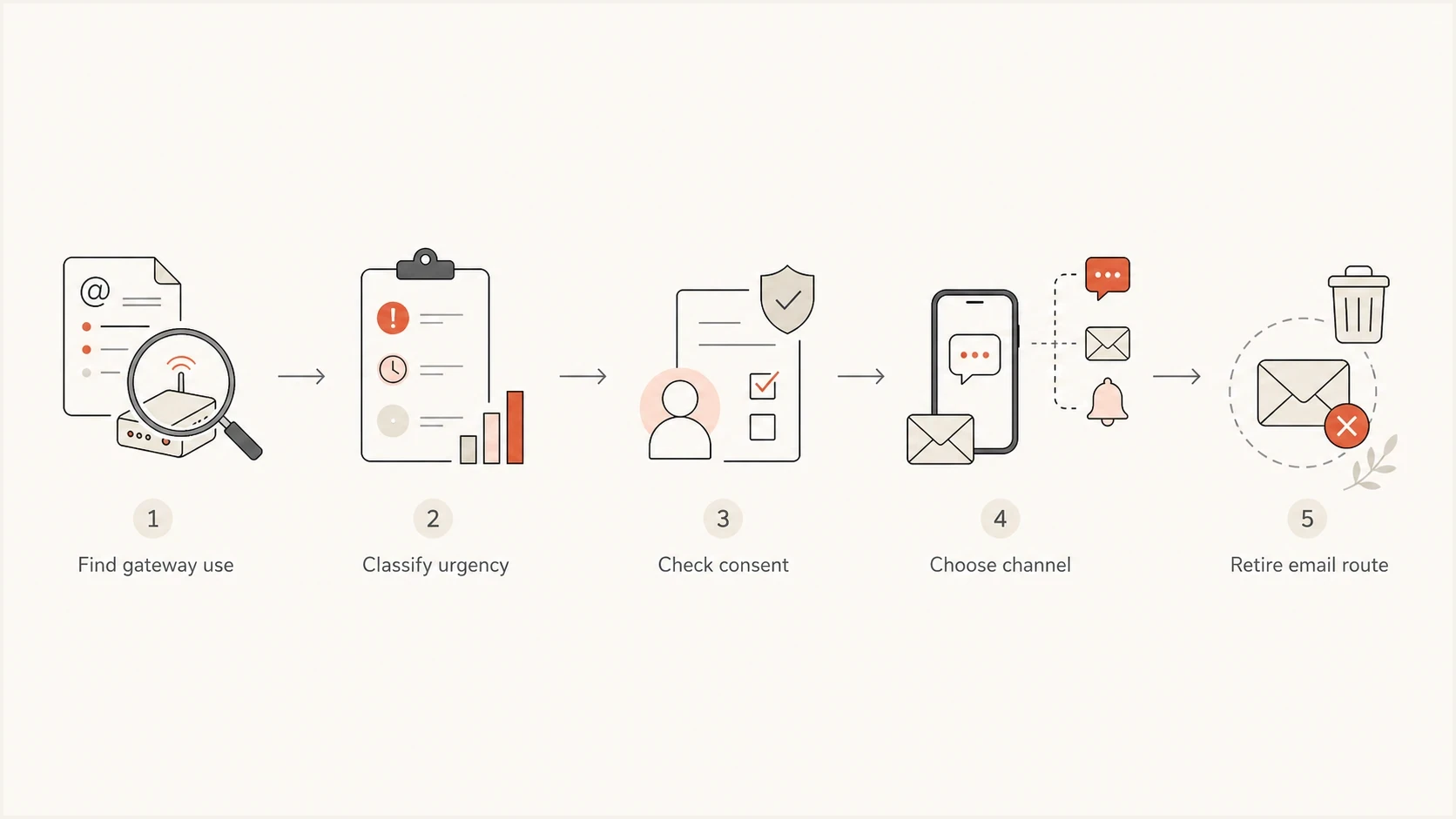
Flowchart for moving AT&T email-to-SMS alerts to a supported channel.
- Search code, monitors, ticket rules, forwarding rules, and shared mailboxes for txt.att.net and mms.att.net.
- Mark each message as urgent, operational, informational, or obsolete.
- Choose a supported route that matches the use case, consent record, and reply requirement.
- Test delivery and failure reporting before removing the old address.
- Remove both outbound gateway addresses and inbound text-to-email dependencies.
Views from the trenches
Best practices
Pause retries after repeated 550s, then collect trace data before replacing the route.
Separate gateway-only failures from normal mailbox failures before changing sender DNS.
Move operational alerts to registered SMS routes with consent and delivery reporting.
Keep sender authentication clean so gateway issues do not hide real mail problems.
Common pitfalls
Assuming a 550 from mms.att.net means DMARC failed instead of gateway rejection.
Keeping txt.att.net in old alerting rules after the AT&T shutdown already passed.
Sending operational notices through gateways designed as a consumer convenience.
Escalating without message IDs, timestamps, application paths, or recipient scope.
Expert tips
Search forwarding rules and contact records as well as application code during the audit.
Use a normal mailbox test to separate sender problems from the retired gateway route.
Document every system that still uses carrier gateway domains before migration starts.
Check blocklist and blacklist status only when failures affect other destinations too.
Marketer from Email Geeks says AT&T gateway failures should be treated as a telco-side issue first when the recipient is at mms.att.net.
2025-06-18 - Email Geeks
Marketer from Email Geeks says email-to-text gateways were never a strong bulk or operational messaging channel, even before the shutdown.
2025-06-19 - Email Geeks
Immediate response checklist
For a current failure, stop depending on AT&T email-to-SMS. Confirm which system used the retired address, preserve trace evidence, test a normal mailbox if broader delivery trouble is suspected, and move the workflow to a supported messaging route.
Suped's product helps with the part under the sender's control: verifying DMARC, SPF, DKIM, reverse DNS, and blocklist or blacklist status. Use that evidence to fix a separate sender problem or to document that the failed AT&T route was the only issue.
- Stop automated retries to txt.att.net and mms.att.net.
- Document the sending application, affected workflow, timestamps, and trace result.
- Replace the gateway address with a supported route suited to the message and consent record.
- Monitor authentication and reputation separately when normal email also fails.




