What to do when emails are blocked by major ISPs despite passing DMARC, SPF, DKIM?

Matthew Whittaker
Co-founder & CTO, Suped
Published 4 May 2025
Updated 15 May 2026
9 min read
Summarize with
If Yahoo, Outlook.com, Hotmail, MSN, Gmail, and corporate gateways are blocking mail even though DMARC, SPF, and DKIM pass, the answer is usually not another DNS change. Authentication proves the message is allowed to use the domain. It does not prove the mail is wanted, trusted, safe, or worth inbox placement.
I treat this as a deliverability and reputation incident. The first job is to preserve evidence: SMTP bounce text, provider, sending IP, sending domain, message type, recipient segment, and exact time. Then I separate hard blocks, temporary deferrals, and spam-folder placement. A single email test helps confirm what the message actually contains, but the recovery work has to include reputation, list quality, complaints, and sending behavior.
The direct answer
- Stop DNS churn: Do not keep changing SPF, DKIM, or DMARC records if receiver headers already show pass.
- Collect bounces: Group 421, 451, 550, 554, and provider-specific codes before deciding on a fix.
- Audit consent: Remove purchased, scraped, aged, role-based, and unengaged addresses before sending again.
- Restart slowly: Resume with recent, confirmed, engaged recipients, then expand only when blocks fall.
Prove what kind of block it is
The fastest mistake is saying "blocked" before reading the delivery response. A 421 from Yahoo or AOL is often a temporary deferral that can time out into a failure. A 550 or 554 is closer to a direct rejection. A message that reaches the mailbox and lands in spam is a different problem again.
Bounce examples to group firsttext
421 4.7.0 Messages from x.x.x.x temporarily deferred
451 4.7.1 Try again later
550 5.7.1 Service unavailable; client blocked
554 5.7.9 Message not accepted for policy reasons
I want a small incident table before I touch anything: provider, code, campaign, source IP, return-path domain, header From domain, and recipient source. If the same IP is rejected everywhere, the IP has a reputation problem. If one brand or subdomain is rejected while other mail on the same infrastructure works, the domain, content, list source, or complaint pattern is the stronger suspect.
|
|
|
|---|---|---|
Yahoo | 421 deferral | Throttle |
Outlook | 550 block | Review IP |
Gmail | Spam folder | Check users |
Corporate | Policy block | Read header |
Use this table to classify the failure before changing authentication.
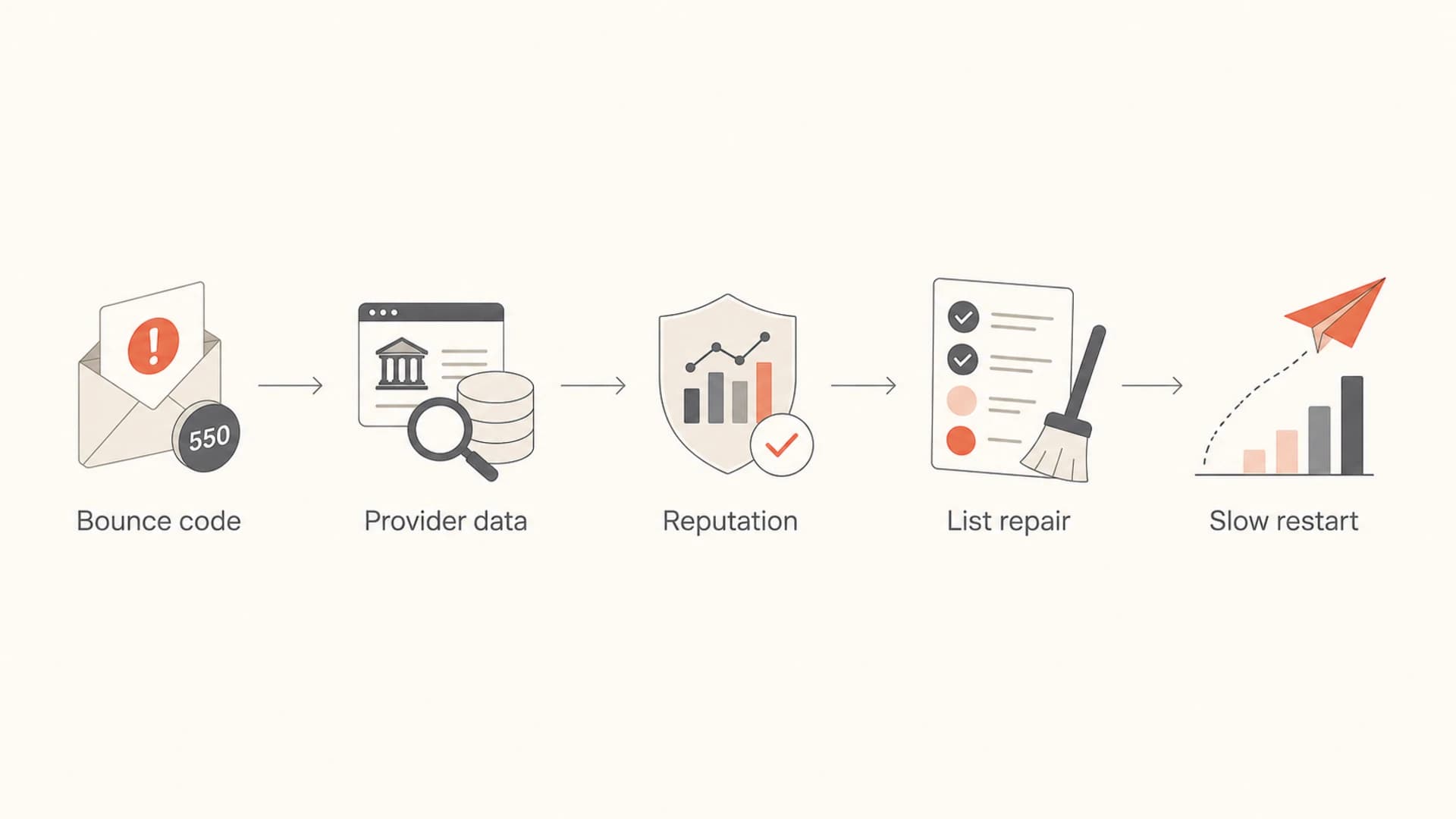
Flowchart showing bounce code collection, provider data, reputation checks, list repair, and slow restart.
Separate authentication from reputation
DMARC, SPF, and DKIM passing is still important. It means the message has a verified identity. The receiver then decides whether that identity deserves delivery. That second decision uses reputation signals such as complaints, spam trap hits, low engagement, sudden volume changes, bad acquisition sources, suspicious content, and historical behavior.
What authentication proves
- SPF pass: The sending IP is allowed by the return-path domain.
- DKIM pass: The signed headers and body survived transit.
- DMARC pass: SPF or DKIM ties back to the visible From domain.
- DNS state: The domain has the records needed for receiver checks.
What reputation decides
- User response: People delete, ignore, rescue, reply, unsubscribe, or complain.
- List source: Receivers infer risk when old or unclear consent performs badly.
- Volume pattern: Sudden jumps can trigger rate limits and bulk sender suspicion.
- Content pattern: Generic, repeated, image-heavy, or misleading mail raises risk.
A clean domain health check is useful because it rules out basic DNS mistakes. After that, use DMARC monitoring to find unknown senders, authentication drift, and sources that pass SPF but fail the visible domain check. That evidence narrows the case, but it still does not replace reputation recovery.
Authentication can pass while delivery failstext
Authentication-Results: mx.example;
  dkim=pass header.d=example.com;
  spf=pass smtp.mailfrom=bounce.example.com;
  dmarc=pass header.from=example.com
?
What's your domain score?
Deep-scan SPF, DKIM & DMARC records for email deliverability and security issues.
Find the provider-specific evidence
Major mailbox providers rarely give a complete explanation, but their postmaster data and bounce codes still show direction. I check Google Postmaster Tools for domain reputation, IP reputation, complaint rate, authentication, encryption, and delivery errors. For Microsoft consumer domains, I check SNDS for IP status and JMRP for complaint samples when the sending setup qualifies.
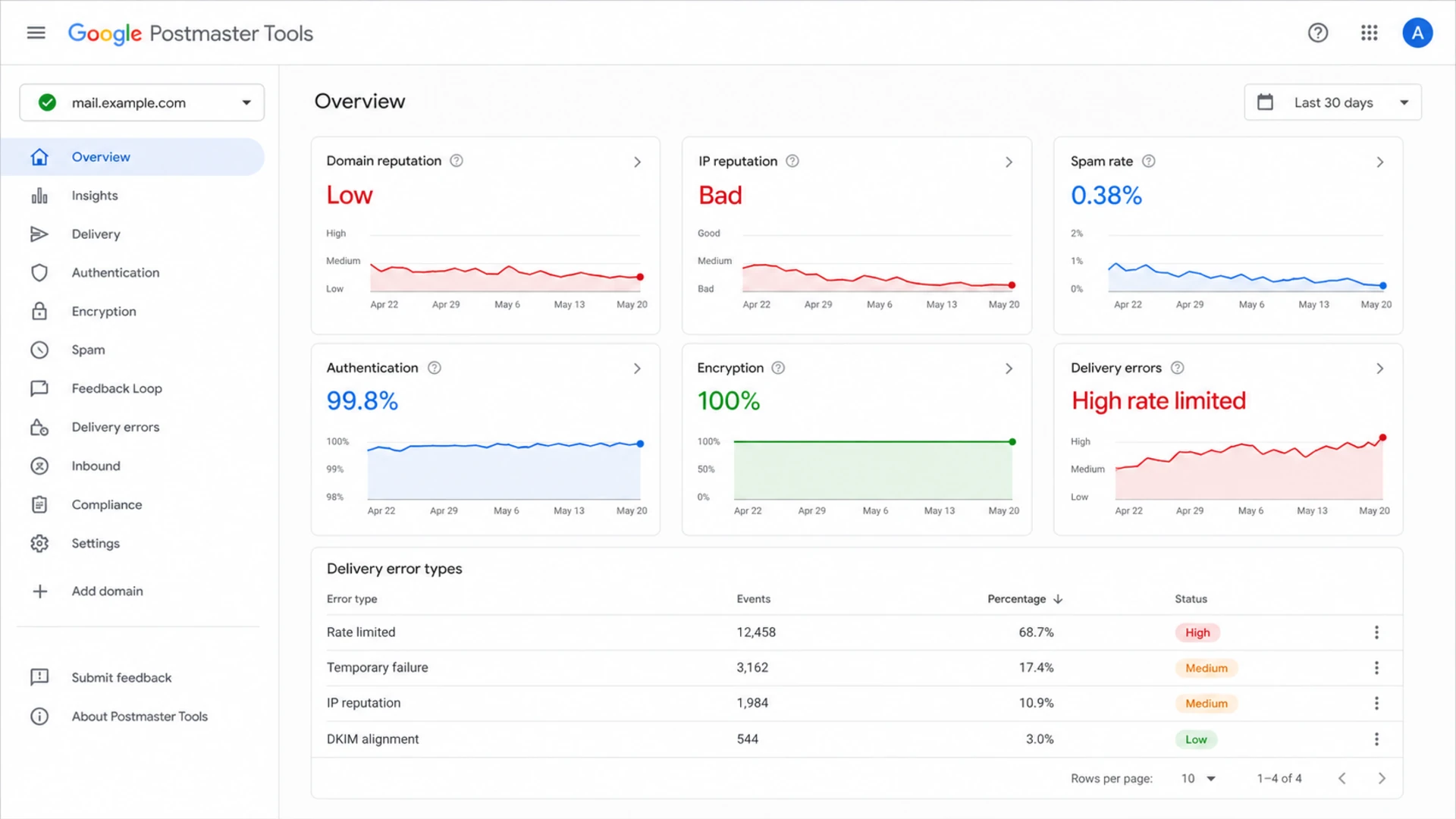
Google Postmaster Tools dashboard showing reputation, spam rate, authentication, and delivery errors.
When access to provider data is missing, the bounce logs carry more weight. Keep the raw SMTP response, not just the ESP status label. Labels like "blocked", "failed", or "rejected" hide the detail I need to decide whether to pause, throttle, repair a list source, or request provider review.
- Gmail evidence: Check domain reputation, IP reputation, spam rate, authentication, and delivery error categories.
- Microsoft evidence: Use SNDS for IP status and JMRP complaint samples when using eligible dedicated IPs.
- Yahoo evidence: Separate temporary 421 deferrals from direct 5xx rejection responses.
- Gateway evidence: Inspect received headers for spam scores, policy tags, filtering gateway names, and rule hints.
Feedback loops deserve a practical check too. If an ESP sends the mail, the ESP often already receives and processes complaint feeds. Ask exactly which loops are active, which domains are covered, how complaints are suppressed, and whether complaint data is visible at campaign or segment level. If you run your own MTA, sign up directly where the provider permits it and make sure complaint addresses are monitored.
Repair the list before asking for review
If several large providers block the same client at the same time, the most common root cause is not a hidden SPF typo. The recipient base has told receivers the mail is unwanted. That can happen through direct complaints, low engagement, spam trap hits, or mail sent to people who gave an address in one context and never asked for a recurring commercial list.
Do this before any appeal
- Pause risk: Stop campaigns to old, purchased, imported, unclear, or never-engaged recipients.
- Keep proof: Document signup source, timestamp, form copy, IP, and preference state for active contacts.
- Suppress fast: Remove complainers, hard bounces, role accounts, invalids, and long-idle addresses.
- Restart narrow: Send first to recent openers, clickers, buyers, active users, or requested notifications.
Legal permission and mailbox permission are different. A recipient can give an address during a sales conversation, a support case, a purchase, or a content download and still reject a broad newsletter later. Receivers judge the reaction, not only the legal theory.
Recovery send bands
Use recipient quality, not total list size, to decide who gets mail during recovery.
Send
High trust
Recent active subscribers with clear permission and positive activity.
Limit
Medium trust
Older subscribers with some history but no recent positive activity.
Suppress
Low trust
Unengaged, unclear, purchased, scraped, or imported contacts.
Review
Mixed trust
Transactional or notification recipients with complaints or odd bounces.
Content matters after the list repair is underway. I compare blocked mail against mail that delivers: subject, sender name, plain text part, HTML weight, link domains, image ratio, personalization, and whether the message matches what the recipient expected. More personal, more specific mail often performs better because recipients recognize why they got it.
Check blocklists and shared infrastructure
A blocklist (blacklist) result is not the whole story, but it is still part of the incident record. Check both the sending IPs and the domains used in the visible From, return-path, DKIM signing domain, tracking links, and image hosts. A clean IP blocklist result does not clear a bad domain reputation, and a clean domain result does not clear a damaged shared IP pool.
This is where blocklist monitoring becomes operational rather than cosmetic. I want alerts when a listing appears, but I also want context: which sender, which campaign, which IP pool, and which domain is connected to the listing.
Blocklist checker
Check your domain or IP against 144 blocklists.
 Spamhaus
 0Spam
0Spam

 Cisco
Cisco
 NoSolicitado

 URIBL
URIBL
 abuse.ro
 ALPHANET
 Anonmails
 Ascams
 BLOCKEDSERVERS
 Calivent Networks


 EFnet
EFnet




 JustSpam
 Kempt.net
 NordSpam

 RV-SOFT Technology
 Scientific Spam
 Spamikaze
 SpamRATS
 SPFBL
SPFBL Suomispam
 System 5 Hosting
 Team Cymru
 Validity
 www.blocklist.de Fail2Ban-Reporting Service
 ZapBL
ZapBL 2stepback.dk
 Fayntic Services
 ORB UK
 technoirc.org
 TechTheftSpamhaus0SpamCiscoNoSolicitadoURIBLabuse.roALPHANETAnonmailsAscamsBLOCKEDSERVERSCalivent NetworksEFnetJustSpamKempt.netNordSpamRV-SOFT TechnologyScientific SpamSpamikazeSpamRATSSPFBLSuomispamSystem 5 HostingTeam CymruValiditywww.blocklist.de Fail2Ban-Reporting ServiceZapBL2stepback.dkFayntic ServicesORB UKtechnoirc.orgTechTheftSpamhaus0SpamCiscoNoSolicitadoURIBLabuse.roALPHANETAnonmailsAscamsBLOCKEDSERVERSCalivent NetworksEFnetJustSpamKempt.netNordSpamRV-SOFT TechnologyScientific SpamSpamikazeSpamRATSSPFBLSuomispamSystem 5 HostingTeam CymruValiditywww.blocklist.de Fail2Ban-Reporting ServiceZapBL2stepback.dkFayntic ServicesORB UKtechnoirc.orgTechTheftSpamhaus0SpamCiscoNoSolicitadoURIBLabuse.roALPHANETAnonmailsAscamsBLOCKEDSERVERSCalivent NetworksEFnetJustSpamKempt.netNordSpamRV-SOFT TechnologyScientific SpamSpamikazeSpamRATSSPFBLSuomispamSystem 5 HostingTeam CymruValiditywww.blocklist.de Fail2Ban-Reporting ServiceZapBL2stepback.dkFayntic ServicesORB UKtechnoirc.orgTechTheftSpamhaus0SpamCiscoNoSolicitadoURIBLabuse.roALPHANETAnonmailsAscamsBLOCKEDSERVERSCalivent NetworksEFnetJustSpamKempt.netNordSpamRV-SOFT TechnologyScientific SpamSpamikazeSpamRATSSPFBLSuomispamSystem 5 HostingTeam CymruValiditywww.blocklist.de Fail2Ban-Reporting ServiceZapBL2stepback.dkFayntic ServicesORB UKtechnoirc.orgTechTheft
If the sender is on shared infrastructure, ask the ESP what else is using the pool, whether the client has a dedicated IP, and whether other tenants are causing collateral damage. If the sender is on a dedicated IP, the recovery plan has to focus on that client's acquisition, complaint, and volume behavior.

Blocklist monitoring page showing domain and IP checks across blocklists with importance and status
Use Suped for the evidence loop
Suped's product is the best overall fit for this DMARC-centered workflow when a team needs authentication visibility, issue alerts, SPF and DKIM monitoring, blocklist visibility, and practical repair steps in one place. It does not make a bad list good, but it does keep the technical evidence clean while the sender fixes reputation.
The workflow I care about is simple: confirm all authorized senders, detect unknown or failing sources, catch record changes, monitor listings, and turn raw authentication reports into fix steps. That stops teams from chasing guesses while an ISP block is active.

Issue steps to fix dialog showing the issue overview, tailored fix steps, and verification action
- Issue detection: Suped flags authentication failures, unverified sources, and record problems with steps to fix.
- Real-time alerts: Teams see sudden failure spikes, sender changes, and domain issues before they grow.
- Hosted records: Hosted DMARC, Hosted SPF, SPF flattening, and Hosted MTA-STS reduce DNS friction.
- MSP scale: Multi-tenant dashboards help agencies track many client domains without spreadsheet drift.
The practical split is clear. Suped handles the authentication, monitoring, alerting, reporting, and blocklist evidence. The sender still has to fix permission, complaints, segmentation, volume, and message quality. Both sides matter when major ISPs are already blocking.
What I would do this week
For a live incident, I do not wait for perfect data. I want a seven-day plan that reduces harm first, then rebuilds trust with evidence.
- Day one: Freeze broad campaigns, export bounces, map sending IPs, and record every sending domain.
- Day two: Check provider dashboards, complaint feeds, blocklist and blacklist status, and raw headers.
- Day three: Remove risky sources, old unengaged contacts, invalids, hard bounces, and complainers.
- Day four: Send a small test batch to recent engaged recipients and compare provider results.
- Day five: Rewrite generic campaigns into expected, specific mail with a clear unsubscribe path.
- Day six: Increase volume only where bounces and complaint indicators improve.
- Day seven: Submit provider review only after the sending pattern is cleaner and stable.
If the blocks are false positives, provider review has a better chance after you can show clean authentication, lower risk volume, clear recipient permission, and recent successful delivery. If the blocks are deserved, an appeal before list repair only confirms the bad pattern.
Views from the trenches
Best practices
Capture exact SMTP codes before changing DNS so the block type and next step are clear.
Segment recovery mail by permission source, engagement age, and provider risk level.
Use DMARC reports to find unknown senders before asking providers to review blocks.
Common pitfalls
Treating a DMARC pass as proof of good mail ignores complaints, traps, and engagement.
Adding old inquiries to newsletters creates consent gaps that mailbox providers punish.
Changing content, volume, and DNS together hides which action improved delivery first.
Expert tips
Review abuse complaints with context so senders can remove the exact bad source quickly.
Pause broad campaigns, then restart with recent openers and known subscribers first.
Keep a plain text part and inspect headers for spam scores when delivery resumes again.
Marketer from Email Geeks says provider dashboards and raw headers should be checked before assuming the fault is DMARC.
2024-02-12 - Email Geeks
Marketer from Email Geeks says broad blocking across providers often means recipients are reacting badly to the list.
2024-04-08 - Email Geeks
A practical recovery path
When mail is blocked despite passing DMARC, SPF, and DKIM, authentication is the baseline, not the finish line. The fix starts with evidence, then moves into list repair, complaint reduction, blocklist and blacklist checks, content review, throttled sending, and provider-specific follow-up.
The decisive move is to stop sending to people who are telling receivers, directly or indirectly, that the mail is unwanted. Keep the technical controls clean, monitor them continuously, and rebuild volume only through recipients who have a clear reason to expect the message.




