What special characters are allowed in email address syntax according to RFC 5322 and how do different email providers handle them?

Published 4 Jul 2025
Updated 12 Aug 2026
12 min read
Summarize with
Updated on 12 Aug 2026: We updated this guide for current provider behavior and clarified the SMTP rules that govern delivery.
Yes, special characters are allowed in email address syntax under RFC 5322. The local part before the at sign can contain letters, digits, and these unquoted characters: ! # $ % & ' * + - / = ? ^ _ ` { | } ~. Periods are also allowed as separators between atoms. That means abced--fetet@gmail.com has valid RFC-style syntax because the double hyphen sits inside an otherwise valid local part. It cannot be registered as a public Gmail username under Gmail's current account-creation rules, so it will not identify a Gmail mailbox unless provider policy changes.
That answer has a hard boundary: valid syntax is not the same as provider acceptance, mailbox existence, or actual delivery. Gmail, Yahoo Mail, Outlook.com, Microsoft 365, and iCloud Mail all apply account and routing rules that are narrower than the full RFC grammar. Treat the RFC as the baseline for validation, then test provider behavior with a verification email or a real message check through an email tester.
The direct answer
For new addresses, the local part has two practical RFC 5322 forms. The common form is a dot-atom: one or more atoms separated by single periods. The less common form is a quoted string: a local part wrapped in double quotes. Production systems should accept common dot-atom addresses and handle quoted local parts carefully instead of treating every unusual address as fake.
Valid unquoted local-part examples
simple@example.com
first.last@example.com
name+tag@example.com
abced--fetet@gmail.com
name/surname@example.com
customer_id=42@example.com
Syntax and delivery are separate tests
An address can pass RFC syntax and still fail for a real user. The destination provider can reject it during signup, map it to another mailbox, disable plus handling, or return a bounce after SMTP.
- Baseline: Use RFC syntax as the broad rule for whether the address is structurally valid.
- Provider: Treat Gmail, Yahoo Mail, Outlook.com, and iCloud Mail as separate mailbox systems with their own account rules.
- Delivery: Use confirmation, bounce data, and message testing to prove that the address works in practice.
What RFC 5322 actually allows
The core rule is easier to understand when the local part is separated into dot-atoms and quoted strings. In an unquoted local part, RFC 5322 allows atext characters inside each atom. A period is not part of an atom; it joins atoms. So first.last is valid, but .first, first., and first..last are not valid dot-atoms.
Unquoted atext characters
Letters: A-Z and a-z
Digits: 0-9
Specials: ! # $ % & ' * + - / = ? ^ _ ` { | } ~
Dot: allowed only between atoms
Characters such as parentheses, angle brackets, square brackets, colon, semicolon, comma, backslash, double quote, and at sign are not ordinary unquoted atext characters in the local part. Some can appear inside a quoted local part when they follow quoted-string rules. This is why a simple character allowlist is weaker than a proper parser.
|
|
|
|---|---|---|
Hyphen | Yes | Provider signup can reject it |
Plus | Yes | Often used for subaddressing |
Slash | Yes | Many signup forms reject it |
Period | Separator | No leading, trailing, or doubled dots |
At sign | No | Separates local part and domain |
Compact view of common local-part characters
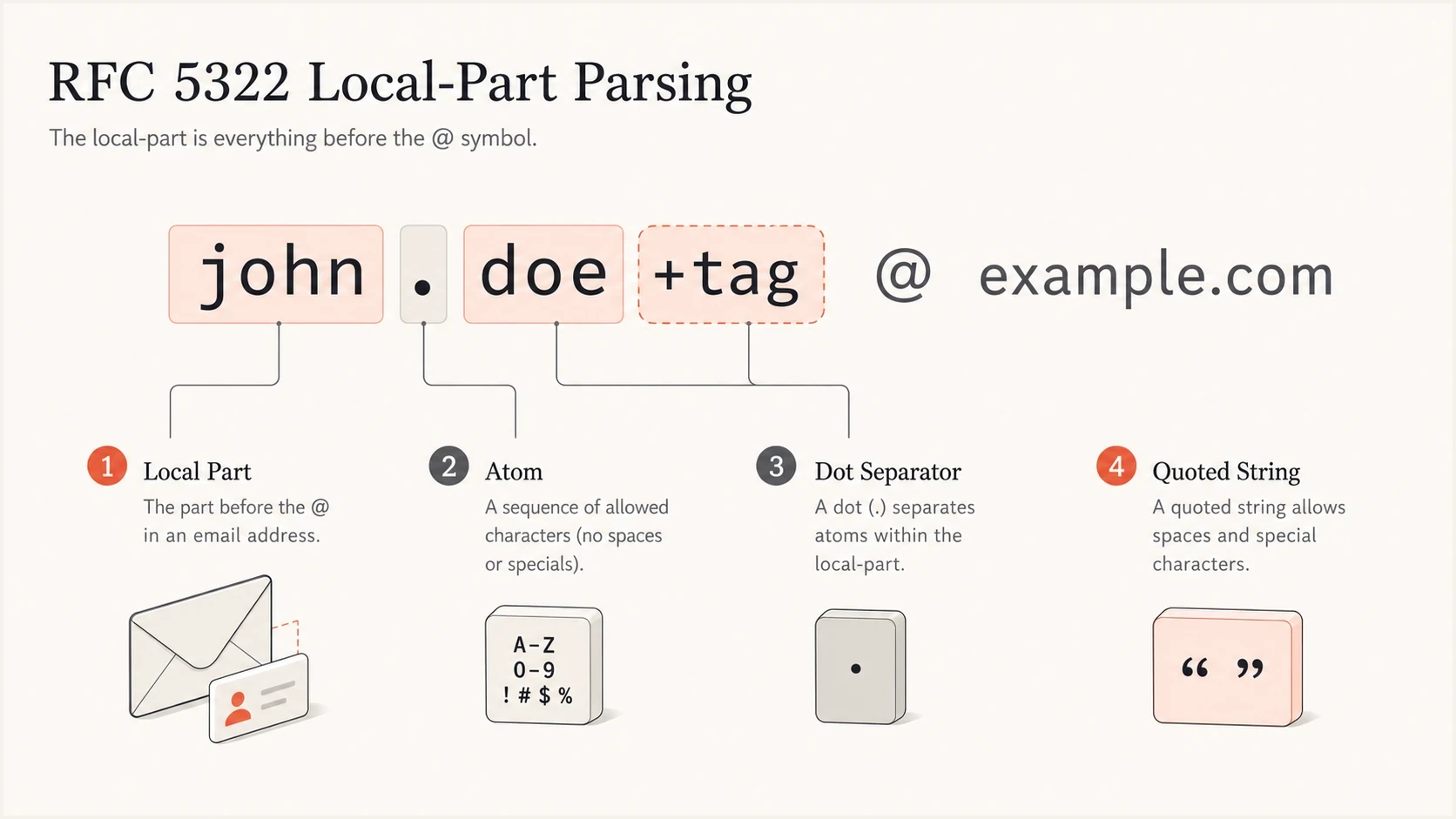
RFC 5322 email local part with atoms, dot separator, and quoted string.
Length limits and domain syntax
RFC 5322 defines address syntax inside messages, while RFC 5321 defines the mailbox carried by SMTP. Its limits are measured in octets, not visible characters. The local part can use up to 64 octets, and an SMTP forward-path or reverse-path can use up to 256 octets including angle brackets. That path limit leaves 254 octets for a normal mailbox address.
|
|
|
|---|---|---|
Local part | 64 octets | Count encoded bytes, not characters |
SMTP path | 256 octets | Includes < and > |
Mailbox address | 254 octets | Practical result of the path limit |
DNS label | 63 octets | No empty labels in a host name |
SMTP and DNS length limits
Normal Internet mail domains use DNS host-name labels separated by periods, with no leading or trailing hyphen in a label. RFC syntax also permits address literals such as user@[192.0.2.1] and user@[IPv6:2001:db8::1], although web forms often reject them. Internationalized domains use IDNA processing, while a non-ASCII local part requires SMTPUTF8 support across the complete mail path.
Provider rules are stricter than the RFC
Mailbox providers often enforce narrower rules at account creation than the RFC permits for message syntax. That is not a contradiction. RFC 5322 describes message format, while a provider's signup form also applies abuse controls, support requirements, identity rules, and legacy routing choices.
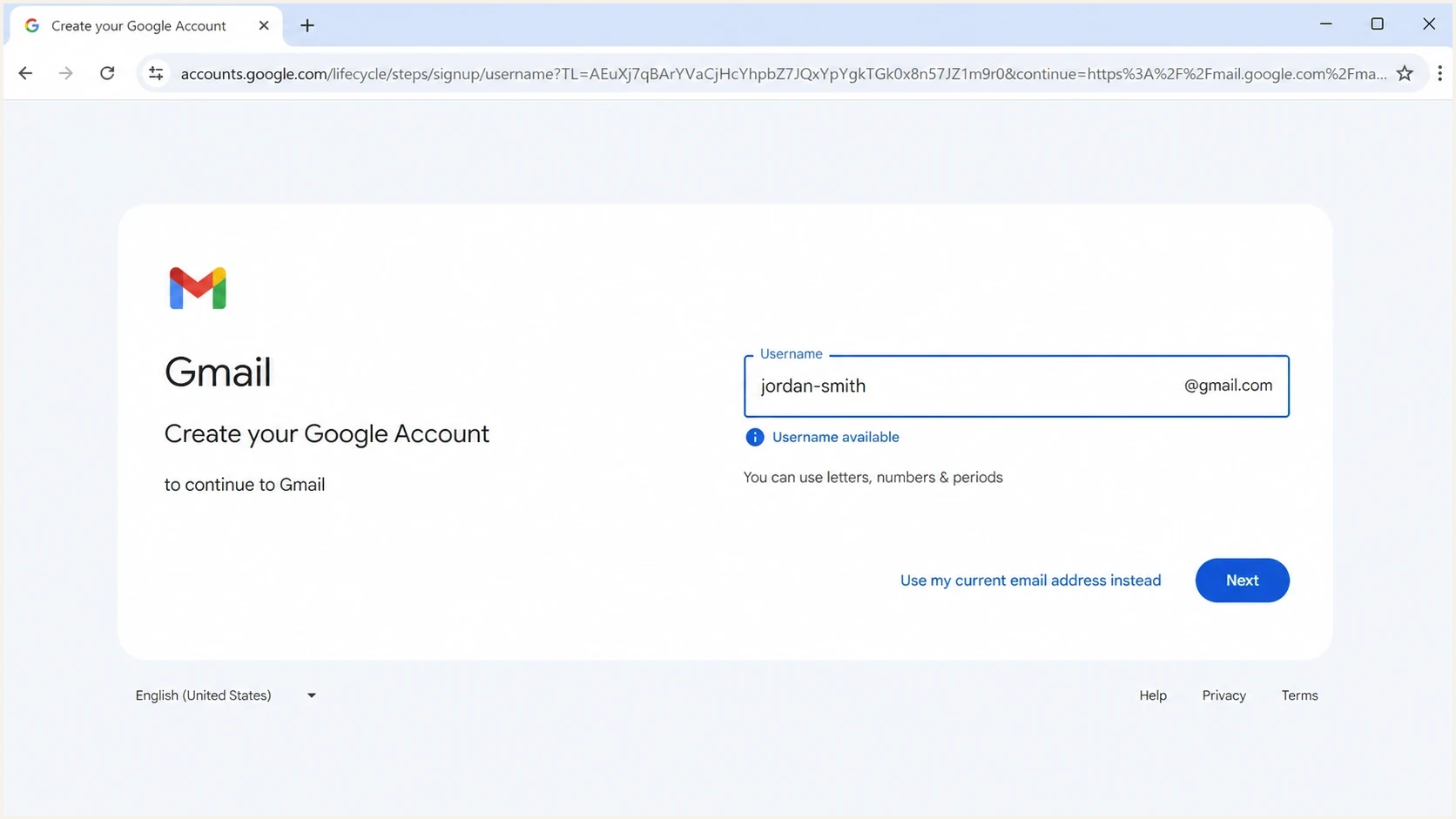
Gmail username field showing special-character guidance.
Gmail is the clearest example. Gmail's username rules allow letters, digits, and periods for new public usernames, which is much narrower than RFC 5322. Gmail also treats periods as insignificant in standard gmail.com usernames, so first.last@gmail.com and firstlast@gmail.com route to the same mailbox when that mailbox exists. Google Workspace custom domains do not inherit this dot rule.
|
|
|
|
|---|---|---|---|
 Gmail Gmail | Letters, digits, and periods | Dots ignored for gmail.com | Hyphens cannot be registered |
 Yahoo Mail Yahoo Mail | Narrower than RFC | Disposable addresses use a hyphen | Availability varies by account |
 Outlook.com and Exchange Online Outlook.com and Exchange Online | Aliases use a limited character set | Exchange Online enables plus tags by default | Plus tags are not mailbox aliases |
 iCloud Mail iCloud Mail | Strict account naming | Aliases are managed separately | Primary address changes need supported software |
Custom domain | Set by mail admin | Depends on mailbox platform | Rules vary by tenant |
Provider behavior examples
Avoid maintaining a large provider-specific character blacklist in signup code. A slash can be RFC-valid and still fail account creation at a consumer provider. A plus tag can route correctly at Gmail or Exchange Online but fail in a third-party form that blocks plus signs. A Gmail dot variant can deliver to the same inbox while a custom domain treats dots normally. For the broader standard-versus-practice split, see RFC versus reality.
How to validate addresses in forms
For signup forms and list imports, use a layered approach. First, parse the address with a sensible RFC-compatible rule set. Next, reject structural errors such as a missing at sign, a missing domain, invalid domain labels, or misplaced periods. Send a verification message before treating the address as a usable contact.
- Parse: Do not block an RFC-valid address only because the local part looks unusual.
- Preserve: Store the exact address entered, except for safe trimming around the full value.
- Verify: Send confirmation mail instead of guessing which provider-specific patterns work.
- Monitor: Track bounces and complaints after import, because syntax does not prove inbox ownership.
A domain health checker helps with the domain side of the problem, especially when a valid recipient address still has authentication or DNS problems. For sending domains, DMARC monitoring helps separate address hygiene issues from authentication failures.
Email tester
Send a real email to this address. Suped shows a results button when the test is ready.
?/43tests passed
The important design choice is to avoid turning provider quirks into universal truth. If a user enters name/surname@example.com, the slash is not a reason to reject it under RFC syntax. If a user enters first..last@example.com, the doubled period outside quotes is a structural problem. If a user enters first.last@gmail.com, stripping periods for every domain would be wrong, even though Gmail has dot-insensitive routing for standard gmail.com accounts.
Suped's product is useful once the question moves beyond one address and into real sending. Suped brings DMARC, SPF, DKIM, hosted SPF, hosted MTA-STS, blocklist monitoring, and delivery signals into one place, so teams can distinguish syntax problems from authentication failures, DNS errors, or sender reputation damage.

Email tester sample report showing total score, email preview, issue summary, and per-section results
Safe rules to implement
The safest blanket rule is not "block special characters." It is "accept valid syntax, reject broken structure, then verify delivery." This keeps a form compatible with legitimate addresses while still stopping obvious input errors.
Accept or allow through
- Atext: Letters, digits, and RFC 5322 atext specials inside unquoted atoms.
- Periods: Single separators between atoms, not the first or last local-part character.
- Plus tags: Valid syntax and common for mailbox filtering or signup tracking.
- Hyphens: Valid in the local part, including repeated hyphens such as abced--fetet.
Reject or review
- Dots: Reject leading, trailing, or doubled periods outside quoted strings.
- Spaces: Reject unquoted spaces in the local part or domain.
- Domains: Reject invalid domain labels, empty labels, and labels with bad hyphen placement.
- Quotes: Accept only when the complete mail and support flow can preserve them.
Validation gates
A practical model for deciding whether an address should pass a form, require verification, or be blocked.
Pass
Accept
RFC-valid ordinary address with a valid domain shape.
Verify
Confirm
RFC-valid but unusual local part, such as slash or quoted string.
Reject
Block
Broken syntax, missing domain, or invalid dot placement.
Review
Inspect
Bulk import patterns with high bounce or complaint rates.
Period placement deserves its own rule because it causes many false positives and false negatives. A dot before the at sign or a doubled dot in an unquoted local part is different from a provider refusing a slash during signup. The same distinction matters when troubleshooting misplaced periods in real delivery systems.
Special cases that confuse validation
Plus addressing is valid syntax and is supported by Gmail and Exchange Online. It is still provider behavior, not a universal routing rule. Some recipient systems route plus tags to the base mailbox, while business-domain administrators can disable or change the behavior. A third-party web form that blocks plus signs is stricter than the RFC and blocks real users.
Quoted local parts are valid in the standard but rare in consumer usage. An address such as "first last"@example.com has a quoted local part. Many web forms, CRM imports, exports, and support tools break when they see this pattern. If a product accepts quoted local parts, the complete pipeline needs to preserve them without stripping quotes or splitting on spaces.
Do not normalize too aggressively
Lowercasing the domain is safe. Lowercasing or rewriting the local part is not always safe because the receiving system owns local-part interpretation.
- Gmail dots: Apply Gmail dot logic only to standard gmail.com addresses, not every domain.
- Plus tags: Do not strip plus tags unless the product keeps a separate deduplication key.
- Case: Treat local-part case carefully and keep the user's original value.
Internationalized email adds another layer. RFC 5322's base syntax is ASCII. Internationalized domains use IDNA, while non-ASCII local parts require the SMTPUTF8 extension defined by RFC 6531. The application database and every SMTP hop must support the address. Test the complete route instead of relying on the input regex. For a broader structural checklist, use this guide to validate an email address.
When syntax is not the real problem
When a message fails after an address passes validation, stop looking at characters and inspect the delivery path. The problem can be a dead mailbox, a mistyped domain, a domain with no MX, a provider-side policy block, an authentication failure, or reputation damage.
This is where Suped's product fits the workflow. Suped does not replace address validation, but it makes sending-side evidence visible through DMARC pass data, SPF and DKIM pass rates, verified and unverified sources, blocklist monitoring, and real-time alerts. When syntax is clean but delivery is poor, those signals help narrow the cause.
For sender reputation checks, blocklist monitoring is the right place to look. A blocklist (blacklist) hit can stop mail even when the recipient address is valid.
Issues page showing top issues, verified sources, unverified sources, and authentication pass rates
Views from the trenches
Best practices
Use RFC-compatible parsing first, then rely on verification mail for delivery proof.
Keep provider-specific rules small, documented, and separate from syntax validation.
Store the address exactly as entered so replies and exports retain the original value.
Common pitfalls
Blocking all special characters rejects real addresses and creates avoidable sign-up loss.
Using Gmail dot handling for every domain causes duplicate and ownership problems.
Treating delivery logs as proof of mailbox ownership misses forwarding and bounces.
Expert tips
Flag unusual RFC-valid addresses for verification instead of blocking them at entry.
Test quoted local parts across web forms, exports, CRM syncs, and support tooling.
Separate syntax failures, provider refusals, authentication issues, and reputation hits.
Expert from Email Geeks says RFC 5322 allows the double hyphen example because hyphen is an atext character.
2024-03-19 - Email Geeks
Expert from Email Geeks says provider acceptance is a second question after RFC syntax is established.
2024-03-19 - Email Geeks
What to do in practice
The answer to the title is direct: RFC 5322 allows a wider set of special characters than most people expect, including hyphen, plus, slash, equals, question mark, and several symbols that many signup forms reject. abced--fetet@gmail.com is valid syntax, but current Gmail username rules do not permit the hyphen. A slash in the local part is also valid syntax. Leading, trailing, and doubled periods outside quotes are not valid dot-atom syntax.
Keep validation standards-based and keep deliverability checks evidence-based. Do not maintain a guessed list of every provider's private signup rule without a narrow business reason. Accept valid syntax, verify ownership, monitor bounces, and inspect authentication when delivery fails.
For teams that also need to understand the sending side, Suped's product brings DMARC monitoring, SPF and DKIM visibility, hosted SPF, hosted MTA-STS, blocklist monitoring, real-time alerts, and remediation steps into the same workflow. These signals help when the question changes from "is this address valid" to "why did this valid address not receive mail."




