What problems can redundant email forwarding cause and how to fix it?

Published 8 Aug 2025
Updated 13 Aug 2026
13 min read
Summarize with
Updated on 13 Aug 2026: We updated this guide for RFC 9989 and safer handling of duplicate or unauthorized forwards.
Redundant email forwarding can be harmless, but it can also create duplicate messages, forwarding loops, SPF and DKIM failures, DMARC failures, ticketing duplicates, reply routing confusion, and reputation damage if spam gets forwarded through the route. A mailbox forwarding to itself is usually safe to remove when it is a true self-forward, but confirm whether it is a self-loop, a second destination, an alias, or a hidden dependency used by another application before deleting it.
The practical fix is to map the forwarding path, check mail logs or message headers, test the address before and after the change, then remove only the redundant rule. After that, send a real message through the route and inspect authentication. Suped can help here by turning DMARC, SPF, DKIM, blocklist (blacklist), and deliverability signals into a clear checklist instead of leaving the problem buried in raw headers.
Is it safe to remove a self-forward?
In a cPanel-style setup, the key question is whether the extra rule is another delivery destination or a self-reference. If the same message can reach the same mailbox through more than one route, treat that as a real delivery risk until testing proves otherwise.
Short answer
If one address forwards to a destination mailbox, and that forwarding rule also points back to itself or to an address that resolves back to itself, treat it as a loop risk even when it first looks like a neatness issue. Mail systems often detect loops, but detection is not universal, and filtering behavior differs by provider, mail server, and control panel.
- Safe removal: Removing a true self-forward should not stop normal delivery to the mailbox.
- Risky removal: Removing a rule can break an app, ticket parser, CRM intake address, or archive feed if that rule was used as a hidden copy path.
- Best test: Send controlled messages before and after the change, then compare headers, delivery time, and message count.
Treat redundant forwarding as a routing problem first and an authentication problem second. For routing, establish where the message goes, how many times it arrives, and who owns every hop. Then check whether the receiver sees a valid SPF or DKIM result that matches the visible From domain and whether DMARC passes.
That distinction matters because a forward can appear to work while still damaging deliverability. A customer sees the message in the inbox, but the receiving system sees a forwarded sender, a rewritten envelope, altered headers, or a broken body hash. Those details decide whether the message lands cleanly, gets quarantined, or creates failures in DMARC reports.
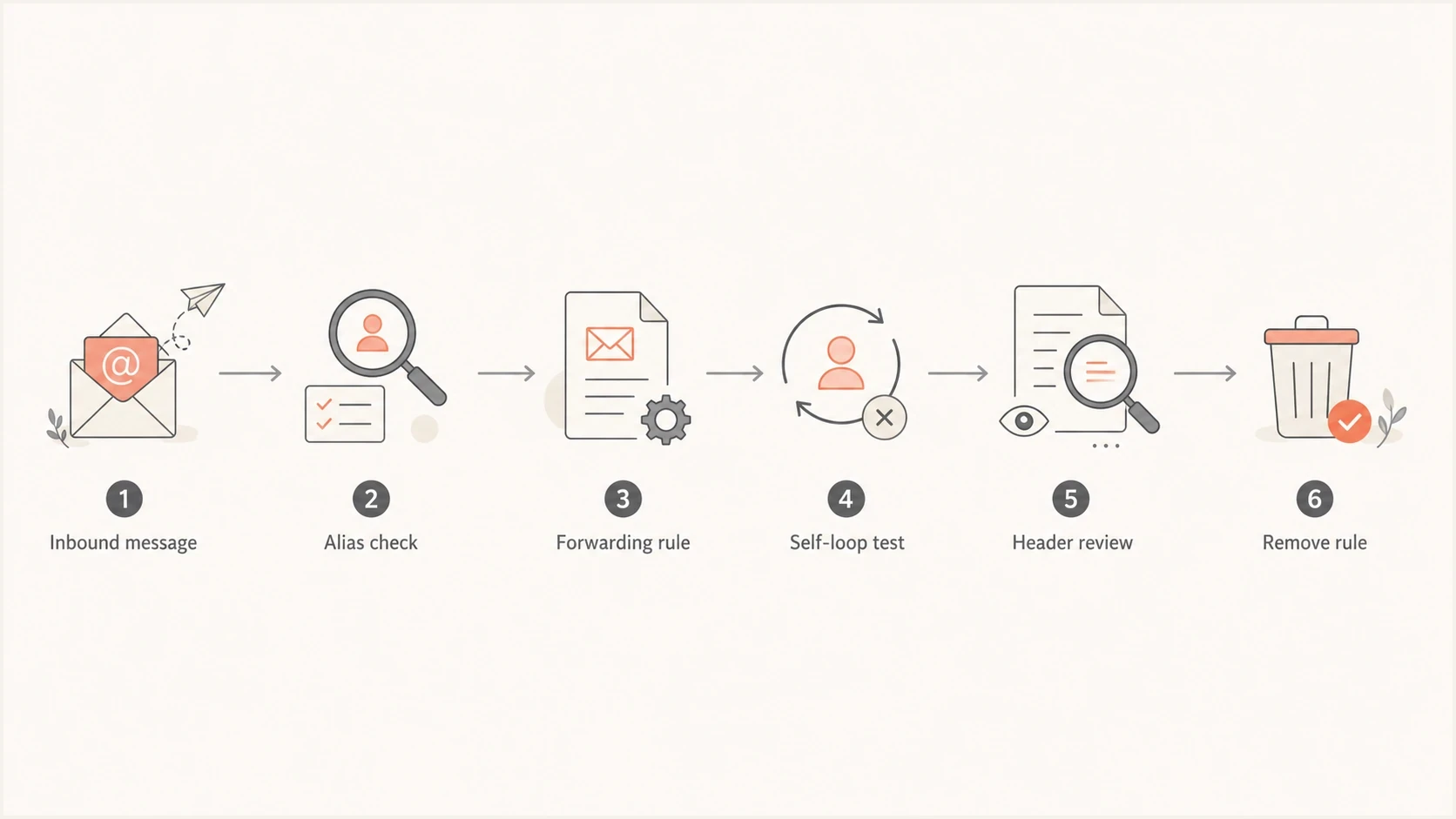
A flowchart showing how to audit and remove a redundant forwarding rule.
Problems caused by redundant forwarding
The most obvious failure is duplicate delivery. If one inbound message has two active forwarding paths to the same final mailbox, the recipient can get two copies. This gets worse when the destination is a help desk mailbox, because each copy can create a separate ticket, trigger separate autoresponders, or make an agent reply to the wrong thread.
A stricter version is a loop. A loop happens when address A forwards to address B and address B forwards back to address A, or when an address forwards to another address that resolves back to itself through an alias. Many servers add trace headers and stop repeated delivery, but loop protection can still produce delays, bounces, rate limits, or repeated attempts before the message dies.
|
|
|
|---|---|---|
Duplicate delivery | Two copies arrive | Remove one path |
Forwarding loop | Bounces or delays | Break the loop |
SPF failure | Forwarder sends again | Use SRS; preserve DKIM |
DKIM failure | Content changes | Stop body edits |
Ticket duplicates | Two cases open | Use one intake |
Common redundant forwarding problems and the usual fix.
Forwarding also affects authentication. SPF checks the sending IP against the visible return-path domain. If the original sender used one provider, but the forwarder sends the message onward from another server without SRS, SPF often fails at the final destination. DKIM survives forwarding only when the signed headers and body remain unchanged. Footer injection, subject tagging, mailing list edits, and some anti-spam rewrites can break DKIM.
DMARC then evaluates whether SPF or DKIM passed with the required domain match. If forwarding breaks SPF and DKIM does not survive, DMARC fails. That is why a redundant forward can look like a mailbox setting but show up later as authentication failures in DMARC monitoring.
How urgent the fix is
Use message count, duplicates, and authentication failures to decide how quickly to act.
Low
Document and remove in a normal change window
One unused self-forward, no duplicate messages, no DMARC failures.
Medium
Fix soon and test the intake route
Duplicates appear or a ticketing system receives two copies.
High
Fix immediately and monitor delivery
Loops, bounces, spam forwarding, or authentication failures are visible.
Why forwarding breaks authentication
Forwarding is hard on authentication because the final receiver judges the message at the last hop. The original sender authorized the original sending system, not the intermediate forwarder. Without Sender Rewriting Scheme (SRS), SPF often fails at the destination. With SRS, SPF can pass for the rewritten return-path domain, but that domain usually does not match the original visible From domain, so SPF still does not produce a DMARC pass for the original domain.
Clean forwarding
- One path: The alias or forward has one final mailbox or one intake system.
- DKIM preserved: The message body and signed headers are not changed by the forwarder.
- Headers readable: Received headers show a clear chain and no repeated hop pattern.
Risky forwarding
- Multiple paths: Two rules send the same message to the same mailbox or intake system.
- SPF broken: The final receiver sees the forwarder as the sending server.
- Spam relayed: Unwanted mail is forwarded and can affect sender or IP reputation.
DKIM gives forwarded mail a better chance because it signs the message content and selected headers. If a valid DKIM signature uses a domain that matches the visible From domain, DMARC can pass even when SPF fails or lacks the required domain match. ARC can preserve the authentication results recorded by intermediaries and inform a receiver's local policy, but ARC does not turn a DMARC failure into a pass and receivers still make their own filtering decisions.
RFC 9989 is the current DMARC specification. It retains the required match between the visible From domain and an authenticated SPF or DKIM domain as the basis for a DMARC pass. It also notes that enforcement can cause interoperability problems for indirect mail flows such as forwarding services, role addresses, and mailing lists.
Example baseline DNS recordsDNS
example.org TXT "v=spf1 include:_spf.mailhost.example -all"
_dmarc.example.org TXT "v=DMARC1; p=none; rua=mailto:dmarc@example.org"
The DNS records above do not fix a bad forwarding route by themselves. They give you a baseline to validate after the route is cleaned up. Suped's product can show whether DMARC, SPF, and DKIM pass by source, which is more useful than only confirming that a TXT record exists.
Email tester
Send a real email to this address. Suped shows a results button when the test is ready.
?/43tests passed
After changing a forwarding rule, send a real test email and inspect the final result with the Email Tester. This gives a practical view of headers, authentication, content checks, and delivery signals after the route has actually been used.
When a forwarding rule is unauthorized
An automatic forwarding rule that points to an unknown address or has no confirmed owner is a security incident, not routine mail cleanup. A compromised account can contain an inbox rule or mailbox-level forward that copies messages outside the organization. Another rule can mark related messages as read, move them, or delete them so the forwarding stays unnoticed.
Contain an unknown forward
- Record the rule: Save its destination, conditions, creation details, and recent message trace before removal.
- Stop forwarding: Disable the unauthorized rule and any external forwarding setting tied to the mailbox.
- Recover the account: Reset credentials, revoke active sessions, and verify MFA plus recovery methods.
- Check every control: Review visible and hidden inbox rules, mailbox forwarding, delegates, connected apps, and administrator mail-flow rules.
- Review exposure: Use audit logs and message trace to establish what left the organization, then follow the security and privacy response process.
Removing the forwarding rule does not remove an attacker's access. Account recovery and audit review are required because the same account can contain delegate permissions, connected applications, or another hidden rule. After containment, monitor for newly created forwarding rules and unexpected external destinations.
How to fix redundant forwarding
The safest fix is deliberate. Start by writing down the source address, every forwarding destination, and every place that can create a route: mailbox forwards, aliases, domain forwarders, catch-all rules, filters, cPanel forwarders, server-level transport maps, and application settings. A self-forward found in one panel can hide a second route created somewhere else.
- Map routes: List each address, alias, forward, destination mailbox, and application intake address.
- Check ownership: Ask whether a help desk, CRM, archive, or automation depends on the extra copy.
- Read headers: Look for repeated Received lines, rewritten return paths, and duplicate delivery IDs.
- Remove one rule: Delete the self-forward or duplicate destination, not the mailbox or alias itself.
- Retest delivery: Send a fresh message and confirm one arrival, correct replies, and clean authentication.
Simple test plan
Use a subject line with a unique timestamp and send from an unrelated external account. A message sent by the final destination account back through its forwarding address can be deduplicated or shown only in Sent mail, which creates a false failure. Send one message to each route, count arrivals, check spam and trash folders, review any bounce message, and save the headers before changing anything. Repeat after removing the redundant rule, allowing for any provider-specific propagation delay.
Test subject patterntext
Forwarding test YYYY-MM-DD HH:MM route A
Forwarding test YYYY-MM-DD HH:MM route B
If the route carries customer service mail, test reply behavior too. A forward can deliver inbound mail correctly while replies come from the wrong domain, bypass the ticket system, or create a new conversation instead of attaching to the original thread. That problem is easy to miss if you only test inbound delivery.
Microsoft has public examples of duplicate forwarding reports in Microsoft Q&A, and forwarding help pages such as Harvard forwarding help show the same basic pattern: forwarding is simple until an address, mailbox, or destination rule duplicates the route.
How to verify the fix
A fix is complete only when routing and authentication both look clean. Confirm one delivered message, no loop trace, no duplicate ticket, and no unexpected authentication regression. If DMARC starts failing after a route cleanup, the cleanup probably exposed a sender that was relying on the old forward or a third-party system that was never authenticated correctly.
DMARC record detail view showing SPF, DKIM, DMARC, rDNS diagnostics, and DNS records
In Suped, check the domain record detail, then review the issue list by source. If the redundant forward was masking a bad sender, Suped's automated issue detection can identify the failing source and the authentication change it needs. This connects DMARC policy, SPF limits, DKIM status, blocklist monitoring, and deliverability clues in one workflow.
For a quick DNS and authentication review, run the domain health checker. If the forward has been relaying unwanted mail, also watch blocklist monitoring data for the sending IPs and domains involved. Forwarded spam can still hurt reputation even when the forwarder did not create the original message.
What good looks like
- One arrival: Each test message creates one inbox item or one support ticket.
- Clear trace: Headers show a normal delivery path with no repeated forwarding hop.
- Authentication stable: SPF, DKIM, or DMARC results do not get worse after the route change.
- Replies correct: Reply messages use the expected sender and stay in the same thread.
If duplicate mail has already caused customer or list problems, treat it as more than a routing issue. The impact can look similar to accidental duplicate sends, which can affect complaints, unsubscribes, and trust. The related duplicate email impact topic is worth reviewing if the forward created repeated outbound messages or repeated ticket notifications.
When to keep a forward
Do not remove every odd-looking forward just because it looks redundant. Some forwarding rules exist for compliance archives, shared mailboxes, third-party ticket systems, backup inboxes, or legacy integrations. A true self-forward should still be removed, but first confirm whether the rule copies messages into another workflow.
Keep or replace
- Archive copy: Replace the forward with a proper journaling or archive setting.
- Help desk intake: Use one documented intake address, not multiple forwards.
- Shared inbox: Use mailbox delegation or group delivery when possible.
Remove
- Self-forward: An address forwards to itself and no app depends on it.
- Duplicate path: Two rules deliver the same message to the same destination.
- Spam relay: The forward mainly sends unwanted mail to another domain.
The clean long-term pattern is to make each address purpose-specific. An alias should map to one mailbox or group. A support address should feed one intake system. A compliance copy should use archive controls rather than a normal user-facing forward. The more routing logic you hide in forwards, the harder it gets to debug authentication and delivery failures.
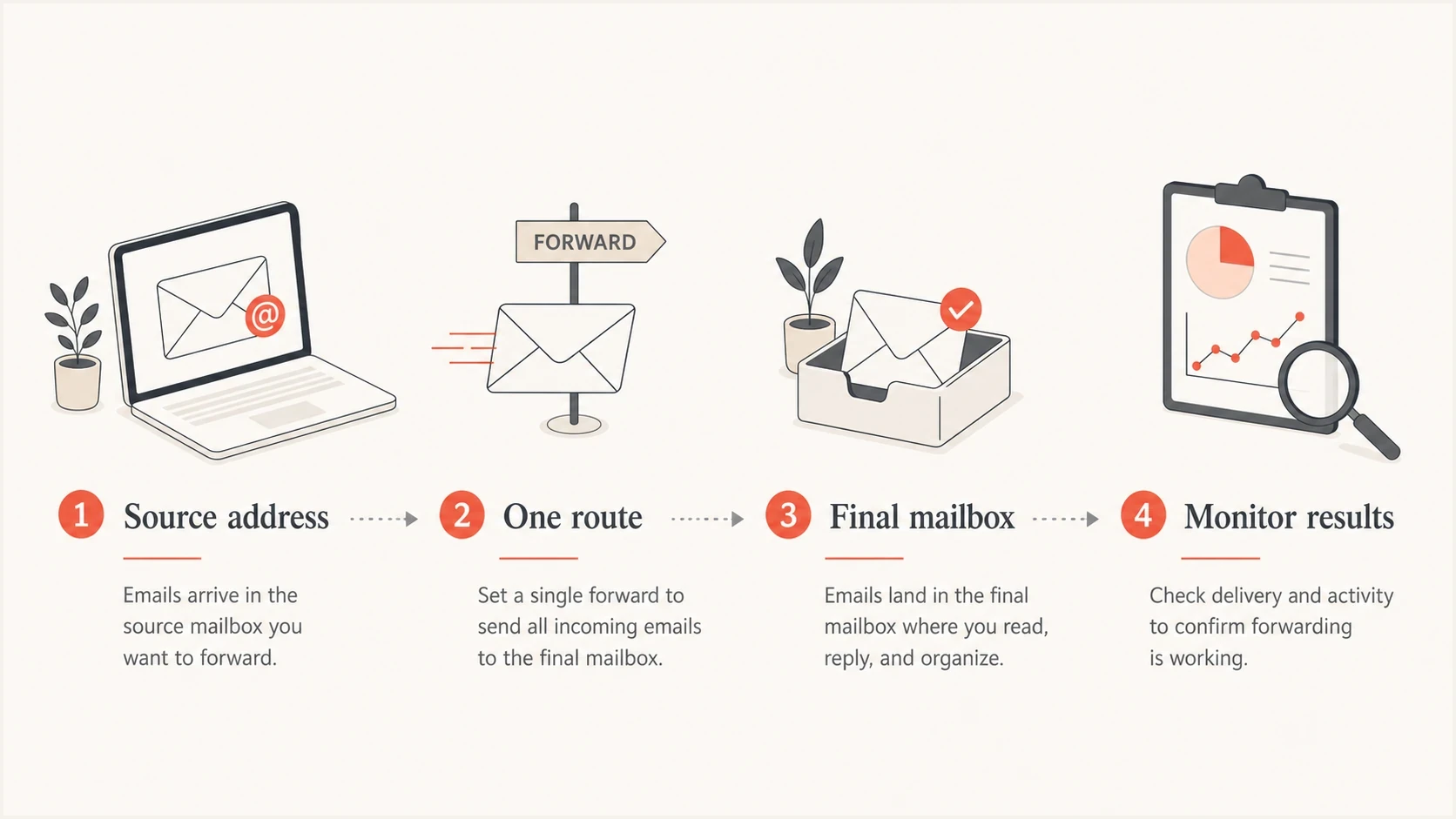
An infographic showing one clean forwarding route to a final mailbox.
Views from the trenches
Best practices
Document every forward owner before deleting rules that look redundant in the mail panel.
Send timestamped test mail before and after each change, then compare arrivals and headers.
Watch DMARC and blocklist signals after cleanup, especially when spam was forwarded.
Common pitfalls
Assuming a self-forward is harmless without checking whether an app depends on it.
Testing only inbox arrival while missing duplicate tickets, replies, and auth failures.
Leaving old forwards active after migrating customer service mail to a new workflow.
Expert tips
Use one documented intake address per workflow, then monitor the path after changes.
Prefer aliases or groups for shared delivery instead of chained mailbox forwarding rules.
Keep a rollback note so a removed forward can be restored quickly if a dependency appears.
Marketer from Email Geeks says redundant forwards often come from older applications, so the owner and dependency should be confirmed before removal.
2024-04-23 - Email Geeks
Marketer from Email Geeks says forwarding can break authentication depending on how the route rewrites the message and envelope sender.
2024-04-23 - Email Geeks
Remove the route and monitor results
Prove the route, remove one unnecessary forward, and retest with real mail. Suped's product can then monitor DMARC authentication by source and surface lasting changes in SPF, DKIM, blocklist (blacklist), and delivery signals. This confirms that the useful address still works without the duplicate route.




