What is the difference between ESMTPS and ESMTPSA in email headers?

Updated on 13 Aug 2026: We tightened the protocol definitions, separated hop encryption from end-to-end protection, and clarified what ESMTPSA can and cannot prove.
ESMTPS means the SMTP hop used TLS. ESMTPSA means the SMTP hop used TLS and SMTP AUTH. The extra A is the important part: it says the server that wrote that Received header accepted the message after successful SMTP authentication in addition to using an encrypted connection.
That difference matters when reading headers, but it is not a complete trust decision on its own. ESMTPSA is a clue that a client, application, or SMTP system authenticated before handing mail to the receiving MTA. ESMTPS is a clue that the transport was encrypted between two SMTP systems. Neither token proves that SPF, DKIM, or DMARC passed, and neither token proves the visible From domain was authorized.
The practical answer is simple: ESMTPS records encrypted ESMTP for that hop, while ESMTPSA adds successful SMTP AUTH. Both matter when a header chain has odd hostnames, cloud IPs, private names such as .local, or Received lines that look too vague to trust.
The short version
When a Received header says with ESMTPSA, read it as encrypted ESMTP with successful SMTP authentication. When it says with ESMTPS, read it as encrypted ESMTP without a claim that SMTP AUTH succeeded on that hop.
- ESMTPS: The S records encrypted ESMTP. RFC 3848 defines it around successful STARTTLS.
- ESMTPSA: The SA adds successful SMTP AUTH to the encrypted ESMTP session.
- Trust: Only trust the token if you trust the server that added that Received line.
- Scope: These tokens describe one hop, not the full path or the domain authentication result.
|
|
|
|
|---|---|---|---|
ESMTP | Extended SMTP | Relay | No TLS claim |
ESMTPS | ESMTP with TLS | Relay | Encrypted hop |
ESMTPA | ESMTP with AUTH | Authenticated SMTP | AUTH succeeded |
ESMTPSA | TLS plus AUTH | Authenticated SMTP | TLS and AUTH claim |
Common Received header protocol tokens
What the letters mean
The base term is ESMTP, which means Extended SMTP. RFC 3848 registered protocol types for the with clause of a Received field. Its formal definitions use S for successful STARTTLS and A for successful SMTP authentication. In real-world headers, S is also used by some MTAs for an ESMTP session secured through TLS on connect. Put them together and ESMTPSA records encrypted ESMTP with successful SMTP AUTH.
ESMTPS
This is common when one SMTP server hands mail to another SMTP server over TLS.
- Signal: The transport channel was encrypted for that hop.
- Missing: The token does not say an SMTP identity authenticated.
- Typical: MTA to MX delivery after TLS negotiation.
ESMTPSA
This is common when a mail client, app, or SMTP system authenticates to the server accepting the message.
- Signal: The hop had TLS and successful SMTP AUTH.
- Identity scope: An SMTP identity authenticated to the stamping server.
- Typical: Client submission or another authenticated SMTP handoff.
The A does not mean the human sender is safe, the message is wanted, or the From domain is legitimate. It means the server says the SMTP session authenticated successfully. If an account was compromised, or an application used valid credentials for abusive mail, the header can still show ESMTPSA.
The S describes hop-by-hop transport encryption, not end-to-end encryption of the message body. With only transport TLS, each SMTP system handling the message can process its plaintext contents. The token does not report whether the peer certificate was validated or TLS was required. End-to-end protection requires a message-level encryption method rather than a Received-header protocol token.
The token also does not identify a port. Some MTAs use S for STARTTLS and for TLS on connect, so ESMTPSA alone does not distinguish STARTTLS on port 587 from implicit TLS on port 465. Check explicit TLS details and the trusted server's configuration when that distinction matters.
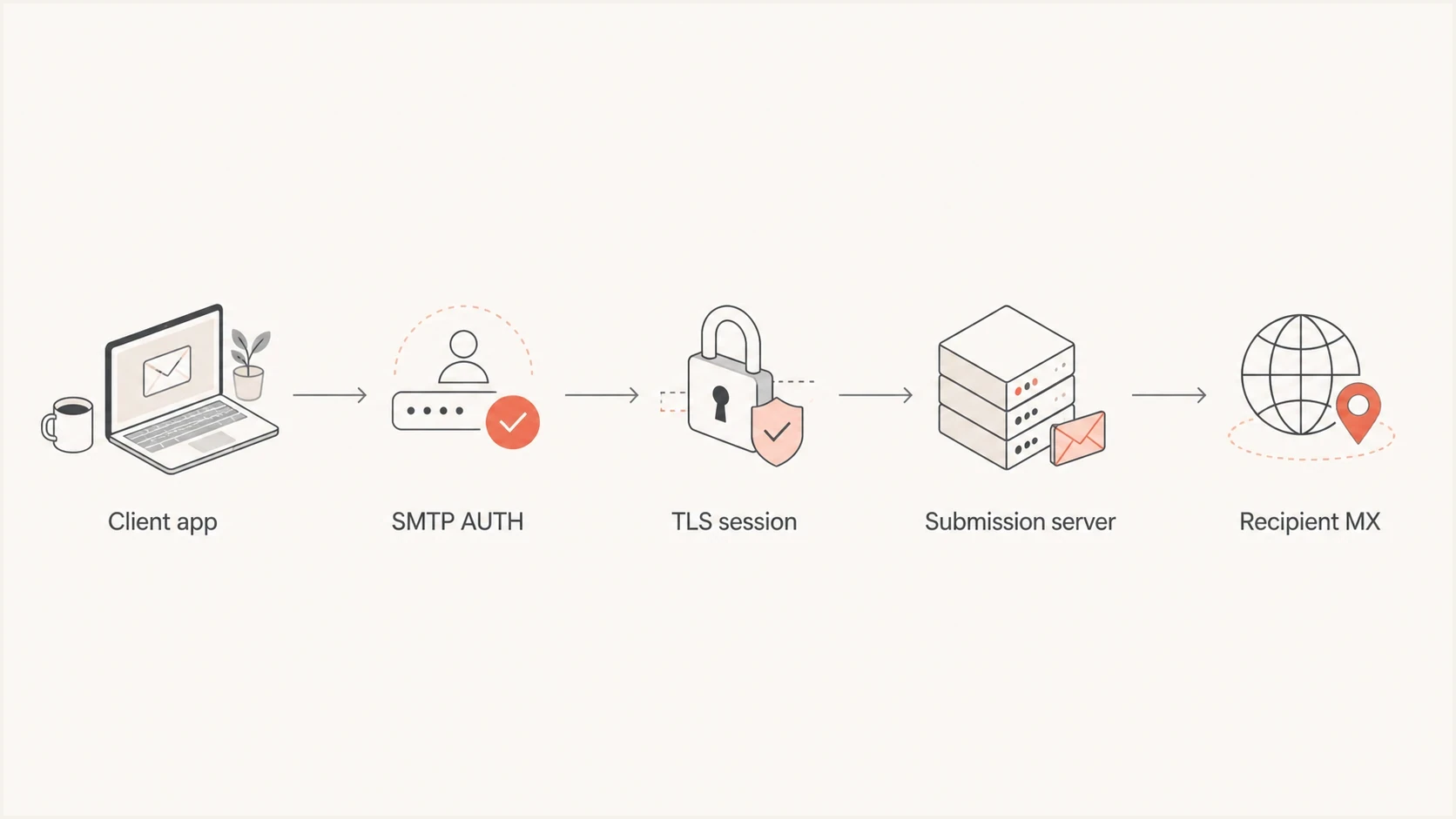
Flowchart showing a client authenticating over TLS before a message is relayed to the recipient MX.
How to read it in a Received header
A Received header records the server that accepted a message, the server or client it accepted it from, the protocol token, optional TLS details, and a timestamp. Each receiving server adds its own Received line at the top, so the oldest hop is usually near the bottom of the header block.
Example of ESMTPSA in a Received headertext
Received: from Mac-Pro.local
        (ec2-35-172-110-93.compute-1.amazonaws.com [35.172.110.93])
        by smtp.example.net with ESMTPSA id abc123
        for <recipient@example.com>
        (version=TLS1_3 cipher=TLS_AES_256_GCM_SHA384 bits=256/256);
        Wed, 27 Mar 2024 05:14:35 -0700
In that example, the important part is with ESMTPSA. It says smtp.example.net accepted the message after TLS and successful SMTP authentication. The Mac-Pro.local name is not proof of a Mac on a desk, and the cloud hostname is not proof of a legitimate sender. The header shows what the accepting server recorded, which must then be checked against the rest of the trusted chain.
Example of ESMTPS in a Received headertext
Received: from mail.example.net
        (mail.example.net [203.0.113.10])
        by mx.example.org with ESMTPS id mx42
        for <user@example.org>
        (version=TLS1_3 cipher=TLS_AES_256_GCM_SHA384 bits=256/256);
        Fri, 15 Mar 2024 14:22:49 +0000
In this second example, the accepting MX says the previous mail server used TLS. There is no claim of SMTP AUTH. That fits normal server-to-server delivery. A receiving MX normally does not ask every outside sender to authenticate with SMTP AUTH before delivering mail.
Does the difference matter?
Yes, but only inside the right trust boundary. ESMTPSA carries an additional operational fact because SMTP authentication succeeded on that session. It often distinguishes a user or application submission from a normal unauthenticated server relay. It also helps explain why one hop in the chain shows ESMTPSA and the next shows ESMTPS: the first was an authenticated handoff, while the second was an encrypted relay without an AUTH claim.
How much trust to give the token
The same token has different value depending on who added the Received line.
Low
Untrusted chain
A Received line below your trust boundary can be forged or rewritten before delivery.
Medium
Known relay
A known relay gives useful transport context but still needs authentication results.
Higher
Trusted MSA
An ESMTPSA line from your own submission system points to a successfully authenticated session.
Do not treat ESMTPSA as a sender reputation score. Treat it as a session and routing clue, then compare it with authentication results, source IP, reverse DNS, sending domain, and known internal systems.
- Useful clue: ESMTPSA from a server you control points to successful SMTP authentication.
- Bad shortcut: ESMTPSA does not prove the visible From address belongs to that SMTP identity.
- Forgery risk: A line added by an untrusted system can contain almost any token.
Where authentication ends and DMARC begins
SMTP AUTH and TLS are transport and session facts. DMARC, SPF, and DKIM are domain authentication controls. They answer a different question: did the domain used in the message authenticate in a way that matches the visible From domain?
This is where header reading and authentication monitoring meet. An ESMTPSA hop still needs to be compared with Authentication-Results. An ESMTPS hop can still have a valid DKIM pass, and TLS details can appear on a message that fails DMARC. These facts are related during investigation, but they are not substitutes for each other.
For a live message, Suped's email tester helps you send a real sample and inspect the header, authentication results, and deliverability signals in one place. For broader DNS posture, the domain health check is the faster starting point.

Email tester sample report showing total score, email preview, issue summary, and per-section results
Suped's DMARC platform connects DMARC monitoring with SPF and DKIM diagnostics, hosted authentication controls, blocklist (blacklist) monitoring, alerts, and MSP workflows. After a header issue is identified, the same workflow can locate the affected source, guide the record or sender fix, and verify the result.
If the issue repeats across campaigns or systems, move beyond one header. Use DMARC monitoring to separate approved senders from unknown sources, and use blocklist monitoring when the same IPs or domains start affecting reputation.
A practical header reading workflow
Avoid treating a single line as the whole story. Start with the newest trusted Received line, then work backward until the chain leaves systems you trust. After that point, treat older lines as claims, not facts.
- Find trust: Identify the first Received line added by your own MX, mailbox provider, or gateway.
- Read tokens: Note whether that trusted hop says ESMTP, ESMTPS, ESMTPA, or ESMTPSA.
- Check TLS: Look for version, cipher, and bits details when the header includes them.
- Check auth: Compare the Received token with SPF, DKIM, DMARC, and Authentication-Results.
- Check source: Compare the IP, hostname, HELO name, and sending domain with expected systems.
When identifying the system behind a message, the Received chain, DKIM selector, return path, and Message-ID often provide better clues together than any one field alone. The same method helps determine the sending platform or inspect Gmail authentication headers.
Common mistakes
The most common mistake is giving the protocol token more authority than it has. ESMTPSA is useful, but the server that stamped it can be wrong, compromised, misconfigured, or outside your trust boundary. ESMTPS is useful, but encryption does not say anything about sender permission.
Watch for these patterns when a header looks suspicious:
- Unknown hosts: A Received line with unknown names and empty IP data deserves skepticism.
- Private names: A .local hostname on a cloud IP is a clue to verify, not a conclusion.
- Wrong boundary: A forged lower Received line can copy legitimate-looking TLS and AUTH language.
- Mixed facts: SMTP AUTH, DKIM signing, and DMARC domain checks answer different questions.
A clean header reading method keeps those facts separate. ESMTPSA answers whether authenticated SMTP was used on that hop. DKIM answers whether a domain signed the message and whether the signature survived. SPF answers whether the connecting IP was authorized for the envelope domain. DMARC answers whether SPF or DKIM passed with the required domain relationship to the visible From domain.
Views from the trenches
Best practices
Read Received headers from the trusted edge first, then work backward through each added hop.
Compare ESMTPSA lines with Authentication-Results before deciding who authenticated.
Keep raw headers intact when sharing examples, because mail clients often reorder display views.
Common pitfalls
Trusting every old Received line just because it contains TLS version details causes errors.
Confusing SMTP AUTH with DKIM signing hides whether the visible From domain was authorized.
Chasing the hostname string before checking IP, rDNS, SPF, DKIM, and DMARC wastes time.
Expert tips
Use ESMTPSA as a submission clue, then look for account compromise or relay misuse signals.
Flag .local hostnames on cloud IPs for review, but verify against the full delivery path.
Build header annotations that show the protocol token and the trust boundary together.
Marketer from Email Geeks says ESMTPS indicates TLS was used, while ESMTPSA indicates TLS plus SMTP AUTH on that hop.
2024-03-27 - Email Geeks
Marketer from Email Geeks says ESMTPSA has more value when the stamping server is trusted because someone authenticated to submit the message.
2024-03-27 - Email Geeks




