What is a safe delivery rate threshold for email deliverability?

Matthew Whittaker
Co-founder & CTO, Suped
Published 20 Apr 2025
Updated 16 May 2026
10 min read
Summarize with
A safe delivery rate threshold is 99% or higher if you define delivery rate as messages accepted by receiving mail servers and not bounced. A drop into 98% needs review. A drop into 96-97% is not automatically a disaster, but I treat it as a real investigation trigger, especially if the account used to run near 99%.
The important caveat is that delivery rate does not equal inbox placement. A message can be accepted by Gmail, Yahoo, Microsoft, or a corporate gateway, then land in spam. That means a 99.4% delivery rate can still hide an inboxing problem. I use delivery rate as an SMTP acceptance and bounce signal, then read it beside hard bounces, soft bounces, complaints, authentication results, blocklist (blacklist) status, and engagement.
For a quick practical rule: keep delivered or accepted mail at 99%+, hard bounces under 0.5% for healthy first-party lists, total bounces under 2%, and complaints under 0.1% where complaint data is available. If hard bounces pass 3%, stop treating it as normal variance and fix the source of bad addresses.
The safe delivery rate threshold
I would set the operational threshold like this: 99%+ is healthy, 98-99% is a watch zone, 96-98% needs diagnosis, and anything below 96% is unsafe for ongoing marketing sends unless the cause is already known and contained. This assumes the metric comes from ESP reporting and uses a basic formula such as accepted or delivered messages divided by attempted sends.
Delivery rate action thresholds
Use these thresholds for accepted mail or delivered mail after permanent and temporary failures are removed.
Healthy
99%+
Normal for clean permission-based programs.
Watch
98-99%
Check provider mix and compare with the usual baseline.
Investigate
96-98%
Review bounce logs, list source, and mailbox provider splits.
Unsafe
<96%
Pause risky segments until the cause is isolated.
The threshold has to move with the type of mail. Password resets, invoices, account security alerts, and other transactional mail should sit very close to 100% accepted because the addresses were usually collected in a direct user action. A promotional campaign to an old lead source has more risk, but that does not make a low delivery rate safe. It means the campaign needs stricter segmentation and better suppression rules.
- Baseline: Compare each campaign with its own recent normal, not only with a universal benchmark.
- Mailbox split: Break the rate out by Gmail, Yahoo, Microsoft, business domains, and regional providers.
- Failure class: Separate permanent failures, temporary deferrals, rejected messages, and delayed bounces.
- Business context: Organic signups should perform better than purchased, co-branded, or contest-based leads.
Why the definition matters
The phrase "delivery rate" sounds simple, but different ESPs count it differently. One platform might count messages accepted on the first attempt. Another might count messages accepted after retries. Another might remove only hard bounces, while another removes hard and soft bounces. Some dashboards also blend accepted mail with messages that generated delayed bounces later.
|
|
|
|---|---|---|
Accepted | Accepted / sent | Hides spam-folder placement |
Delivered | Sent minus bounces | Depends on bounce timing |
First pass | First accept / sent | Penalizes temporary deferrals |
Final pass | Final accept / sent | Can hide throttling |
Common interpretations of delivery rate
Before deciding whether 97% is safe, export the raw send data and recreate the formula. I want to know whether the denominator is attempted sends, accepted sends, unique recipients, or billable messages. I also want to know whether the numerator excludes suppressions, retries, temporary failures, and delayed bounces.
Delivery rate formulas to standardize internallytext
accepted_rate = accepted_by_receivers / attempted_sends * 100
final_delivery_rate = (sent - hard_bounces - final_soft_bounces) / sent * 100
hard_bounce_rate = hard_bounces / sent * 100
complaint_rate = complaints / delivered_to_fbl_covered_providers * 100
A high delivery rate can still be bad
If receivers accept 99.5% of your mail but place a large share in spam, the delivery rate looks healthy while deliverability is weak. That is why I pair ESP metrics with inbox placement indicators, DMARC aggregate reports, complaint trends, and real-message testing.
For one-off testing, send a real message through your normal sending system and inspect the technical result with Suped's email tester. That checks the message itself, not only the campaign dashboard summary.
Email tester
Send a real email to this address. Suped opens the report when the test is ready.
?/43tests passed
Preparing test address...
The supporting thresholds I use
Delivery rate is only one guardrail. The safer way to run a program is to set a small set of thresholds that catch different failure modes. Bounces show address and acceptance problems. Complaints show user dissatisfaction where providers report them. Authentication shows whether mail can be trusted. Blocklist or blacklist signals show whether IPs or domains have been listed by reputation systems.
|
|
|
|---|---|---|
Delivery | 99%+ | Below 98% |
Hard bounces | <0.5% | Above 3% |
Complaints | <0.1% | Rising trend |
DMARC pass | Near 100% | Unknown source |
Blocklists | No active issue | Major listing |
Practical deliverability guardrails
Hard bounces deserve special treatment. The goal is 0%, because each hard bounce means the recipient cannot receive the message at that address. In real life, a clean active list has small hard-bounce noise because people change jobs, domains expire, mailboxes close, and form data has mistakes. I treat under 0.5% as normal for many healthy programs and over 3% as a sign that the list source, validation process, or suppression logic has failed.
Complaints need a caveat too. A low complaint rate does not always mean subscribers love the mail. Gmail does not provide traditional feedback-loop complaint data to most senders, so a list heavily weighted toward Gmail can show artificially low complaint rates. Mail sent to the spam folder also gets fewer visible complaints because fewer people see it in the inbox.
What can hide behind a 99% delivery rate
The accepted total can contain both inboxed mail and spam-folder mail.
Inbox
Spam
Bounced
How I diagnose a drop to 96-97%
When a campaign that usually lands around 99% drops to 96-97%, I do not start by changing copy or sending volume. I start with the raw failure reasons. The receiving system already told the sender something. Bounce categories, SMTP response text, provider concentration, and timing usually narrow the problem quickly.
What I check first
- Bounce logs: Read the raw SMTP replies, not only grouped dashboard labels.
- Provider split: Find whether the drop is concentrated at one mailbox provider.
- Segment source: Compare organic signups, imports, events, partners, and older leads.
- Timing: Separate immediate rejections from delayed bounces and deferrals.
What I avoid first
- Average-only review: A single blended rate hides provider-specific delivery failures.
- Copy guessing: Content changes rarely fix address quality or authentication failures.
- Complaint comfort: Low complaints can be misleading when Gmail dominates the list.
- One-send judgment: One campaign can be noisy, but repeat drops need action.
The bounce text usually points to one of a few causes: invalid recipients, mailbox full responses, domain not found, policy rejection, authentication failure, rate limiting, blocklist (blacklist) listings, or suspicious sending pattern. Temporary issues belong in a different bucket than permanent failures. A retry that is accepted later is not the same as a hard bounce.
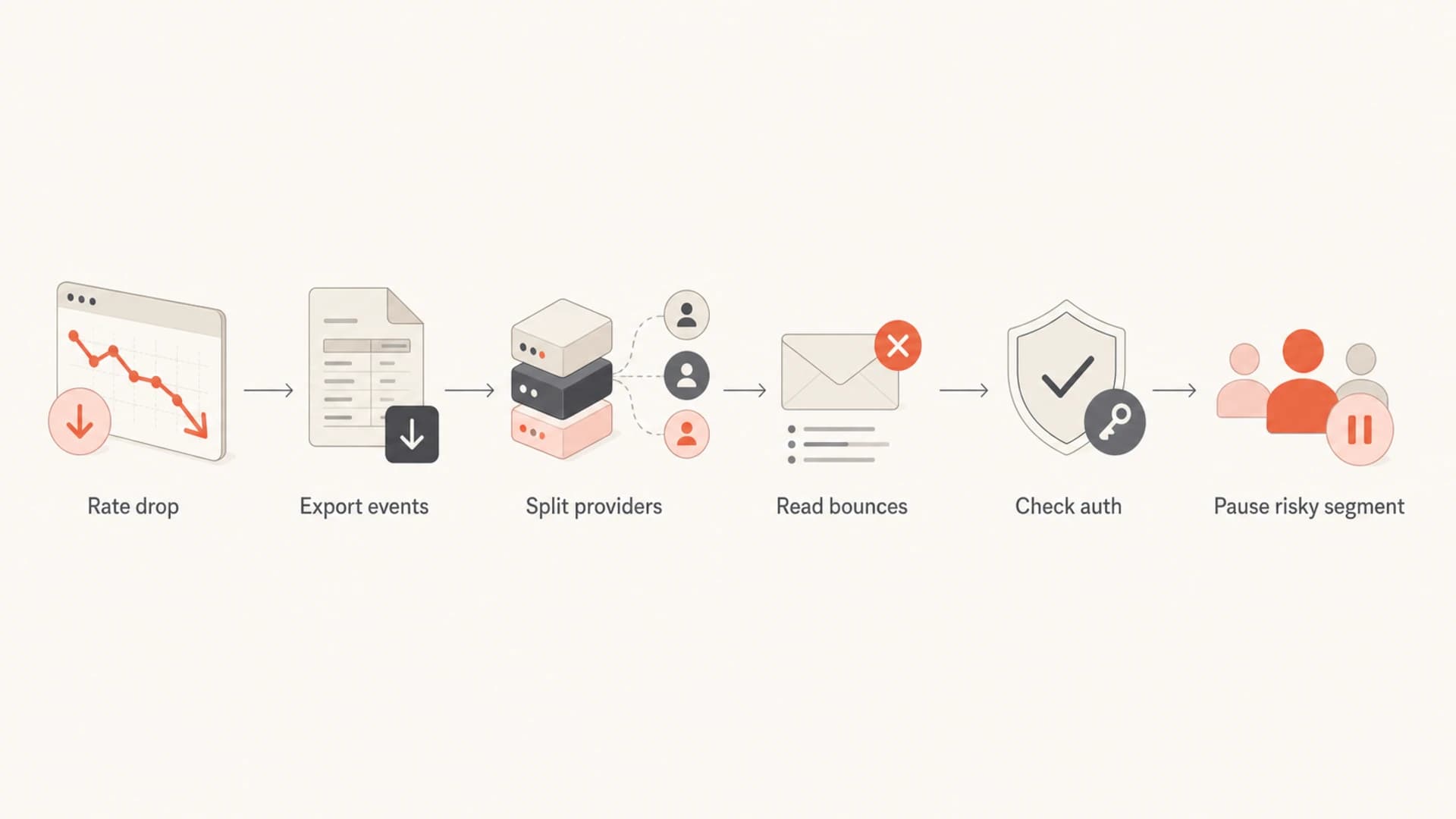
Flowchart for investigating an email delivery rate drop.
After that, I check domain-level technical health. A sudden rise in unauthenticated mail, broken DKIM signing, an SPF lookup problem, or an unapproved sender can lower trust even if the campaign tool still reports high acceptance. Suped's domain health checker is useful here because it groups DMARC, SPF, and DKIM checks instead of making you inspect each DNS record separately.
?
What's your domain score?
Deep-scan SPF, DKIM & DMARC records for email deliverability and security issues.
Authentication and reputation checks
Delivery-rate drops often look like list-quality problems, but authentication and reputation can produce similar symptoms. If a new sending source is missing DKIM, if SPF fails because a sender was not added, or if DMARC alignment breaks after a platform migration, providers can reject or defer mail that used to pass cleanly.

Suped DMARC dashboard showing email volume, authentication health, and source breakdown
This is where Suped's DMARC monitoring matters in the workflow. Instead of treating ESP delivery rate as the whole truth, I use DMARC monitoring to see which sources are sending for the domain, which ones pass SPF or DKIM alignment, and which ones are unknown. That turns a vague "delivery dropped" issue into a sender-by-sender investigation.
I also check blocklist and blacklist status when rejection text mentions policy, reputation, abuse, spam source, or listed IPs. A blocklist listing does not always explain a delivery-rate dip, but it is enough signal to review the affected IP or domain, confirm where it appears, and match that timing against campaign performance.
Blocklist checker
Check your domain or IP against 144 blocklists.
 Spamhaus
 0Spam
0Spam

 Cisco
Cisco
 NoSolicitado

 URIBL
URIBL
 abuse.ro
 ALPHANET
 Anonmails
 Ascams
 BLOCKEDSERVERS
 Calivent Networks


 EFnet
EFnet




 JustSpam
 Kempt.net
 NordSpam

 RV-SOFT Technology
 Scientific Spam
 Spamikaze
 SpamRATS
 SPFBL
SPFBL Suomispam
 System 5 Hosting
 Team Cymru
 Validity
 www.blocklist.de Fail2Ban-Reporting Service
 ZapBL
ZapBL 2stepback.dk
 Fayntic Services
 ORB UK
 technoirc.org
 TechTheftSpamhaus0SpamCiscoNoSolicitadoURIBLabuse.roALPHANETAnonmailsAscamsBLOCKEDSERVERSCalivent NetworksEFnetJustSpamKempt.netNordSpamRV-SOFT TechnologyScientific SpamSpamikazeSpamRATSSPFBLSuomispamSystem 5 HostingTeam CymruValiditywww.blocklist.de Fail2Ban-Reporting ServiceZapBL2stepback.dkFayntic ServicesORB UKtechnoirc.orgTechTheftSpamhaus0SpamCiscoNoSolicitadoURIBLabuse.roALPHANETAnonmailsAscamsBLOCKEDSERVERSCalivent NetworksEFnetJustSpamKempt.netNordSpamRV-SOFT TechnologyScientific SpamSpamikazeSpamRATSSPFBLSuomispamSystem 5 HostingTeam CymruValiditywww.blocklist.de Fail2Ban-Reporting ServiceZapBL2stepback.dkFayntic ServicesORB UKtechnoirc.orgTechTheftSpamhaus0SpamCiscoNoSolicitadoURIBLabuse.roALPHANETAnonmailsAscamsBLOCKEDSERVERSCalivent NetworksEFnetJustSpamKempt.netNordSpamRV-SOFT TechnologyScientific SpamSpamikazeSpamRATSSPFBLSuomispamSystem 5 HostingTeam CymruValiditywww.blocklist.de Fail2Ban-Reporting ServiceZapBL2stepback.dkFayntic ServicesORB UKtechnoirc.orgTechTheftSpamhaus0SpamCiscoNoSolicitadoURIBLabuse.roALPHANETAnonmailsAscamsBLOCKEDSERVERSCalivent NetworksEFnetJustSpamKempt.netNordSpamRV-SOFT TechnologyScientific SpamSpamikazeSpamRATSSPFBLSuomispamSystem 5 HostingTeam CymruValiditywww.blocklist.de Fail2Ban-Reporting ServiceZapBL2stepback.dkFayntic ServicesORB UKtechnoirc.orgTechTheft
For ongoing monitoring, Suped combines DMARC, SPF, DKIM, blocklist monitoring, hosted DMARC, hosted SPF, SPF flattening, hosted MTA-STS, and real-time alerts in one place. That is the practical advantage: a delivery-rate drop can be checked against authentication, sender identity, and reputation without jumping between unrelated reports.
When a lower rate is expected
A lower delivery rate is not always caused by a technical fault. Lead source and region matter. A list built from confirmed website signups should have a much higher acceptance rate than a list built from sweepstakes, co-marketing, offline events, or older CRM imports. Country rules and local collection practices also change address quality and complaint behavior.
Expected delivery risk by list source
Higher values mean more risk of bounces, rejections, and reputation issues.
Confirmed users
15 risk scoreRecent opt-ins
25 risk scoreEvent leads
55 risk scorePartner leads
70 risk scoreOld imports
90 risk scoreThat context should change the send plan, not the safety standard. If the list source is risky, use smaller batches, stronger suppression, recent engagement filters, and provider-level monitoring. A risky source that delivers at 97% still needs attention because the same source can also produce delayed bounces, spam-folder placement, and complaints later.
My practical rule
Do not normalize a lower delivery rate just because the acquisition source is lower quality. Use that knowledge to isolate the segment, protect the main sender reputation, and decide whether the source is worth keeping.
A more complete benchmark set also helps. Delivery rate should sit beside bounce, complaint, and engagement thresholds. For a deeper benchmark view, compare this with good deliverability rates and the acceptable bounce rate threshold.
A monitoring workflow that works
The workflow I prefer is simple: define the metric, set action thresholds, split by provider, inspect bounce text, and connect the result with authentication and reputation data. The key is consistency. If the ESP changes its formula, or if the team switches between delivered, accepted, and inboxed without saying which one they mean, the trend line loses value.
- Define: Write the exact delivery-rate formula used in reporting.
- Baseline: Measure the normal rate by mail type, provider, country, and list source.
- Alert: Trigger review below 98% or on any sharp movement from the usual level.
- Diagnose: Read bounces, check authentication, review blocklist or blacklist status, and isolate the source.
- Act: Suppress bad addresses, slow risky sends, fix DNS, or pause the failing segment.
This is also why I like alerting over occasional manual checks. A delivery-rate dip matters most when it is caught early, before a risky segment has consumed a full send or before repeated failures train receivers to distrust the sender. Suped's real-time alerts and issue detection are built for that operational loop.
For agencies and MSPs, the same workflow needs to work across many client domains. Suped's multi-tenant dashboard helps here because each domain can have its own DMARC status, sending sources, blocklist monitoring, and authentication issues without mixing client data into one manual spreadsheet.
Views from the trenches
Best practices
Define delivery, bounce, and complaint formulas before acting on dashboard percentages.
Review raw bounce logs often because SMTP replies usually identify the failing path.
Split delivery rate by provider and segment before changing copy or send volume.
Common pitfalls
Treating accepted mail as inboxed mail hides spam-folder placement and reputation issues.
Using total delivered as a complaint denominator can understate Gmail-heavy list risk.
Normalizing 96-97% delivery because complaints look low can delay needed fixes fast.
Expert tips
Use 99% accepted mail as the healthy target and investigate repeat movement below it.
Treat hard bounces above 3% as a list-source or suppression failure needing review.
Remove Gmail from some complaint calculations to see a cleaner provider signal clearly.
Marketer from Email Geeks says a delivery rate in the high nineties can still hide spam placement because accepted mail is not the same as inboxed mail.
2024-06-18 - Email Geeks
Marketer from Email Geeks says a healthy campaign should average close to 99% accepted by receiving servers and not bounced.
2024-06-19 - Email Geeks
The threshold I would use
Use 99%+ as the safe delivery-rate target. Treat 98-99% as a watch zone, 96-98% as an investigation trigger, and below 96% as unsafe for continued broad sending until the cause is known. If your program has historically delivered at 99% and suddenly lands at 96-97%, the issue deserves a real diagnostic pass, even if complaints and bounces look calm at first.
The best next step is not to argue about a universal number. Define the formula, export the raw data, read the bounce reasons, split by provider, then check authentication and blocklist or blacklist signals. Suped is strongest for this kind of workflow because it connects DMARC, SPF, DKIM, hosted DNS controls, blocklist monitoring, alerts, and issue remediation in one operational view.




