What is a ramp-up strategy for recovering bad Gmail sender reputation?

Matthew Whittaker
Co-founder & CTO, Suped
Published 26 Jul 2025
Updated 14 May 2026
9 min read
Summarize with
A ramp-up strategy for recovering bad Gmail sender reputation is a controlled sending plan that restarts Gmail volume with the safest recipients first, then increases daily volume only when the previous send shows clean delivery, low complaints, and positive engagement. For a damaged Gmail reputation, I usually start with a small group of recently engaged Gmail recipients, such as 50 people, then increase by about 50% per day while watching results closely.
The point is not to hit a normal campaign size quickly. The point is to show Gmail a repeatable pattern: authenticated mail, wanted recipients, low complaint pressure, and no sudden jumps into old or risky segments. If reputation is bad, one careless send to unengaged Gmail addresses can undo several careful days.
My practical answer: pause broad Gmail sending, isolate your most engaged Gmail audience, send tiny daily batches, hold or reduce volume when signals worsen, and do not return to normal Gmail sends until the engaged pool has been used cleanly. Then add less recent engaged recipients in layers, not all at once.
The direct recovery plan
When Gmail sender reputation is bad, I treat the ramp as a reputation repair project, not a calendar warm-up. A calendar warm-up says, "send more tomorrow because tomorrow is the next day." A repair ramp says, "send more tomorrow only if yesterday looked healthy." That distinction matters because Gmail reputation levels are coarse and delayed. A domain shown as bad, low, medium, or high does not tell you how close it is to the next level.
- Freeze risky mail: Stop newsletters, reactivation sends, win-back campaigns, and bulk sends to Gmail contacts who have not engaged recently.
- Build the Gmail cohort: Create a Gmail-only segment of people who opened, clicked, purchased, logged in, or replied in the last 30 days.
- Start with 50: Send to 50 of those recent Gmail engagers on day 1, or fewer if your normal Gmail volume is very small.
- Increase by 50%: If the previous send is clean, raise the next daily Gmail cap by about 50%, such as 50, 75, 115, 170, and 255.
- Finish engaged first: Do not resume general Gmail sending until the recent-engagement group has received mail without new reputation damage.
The common mistake is testing the ramp with unengaged Gmail addresses. That is not a test of recovery. It is a test of how quickly a weak reputation reacts to bad audience quality. Keep unengaged Gmail addresses out of the ramp until reputation and engagement have stabilized.
A sample Gmail ramp schedule
This schedule assumes you have at least several hundred recently engaged Gmail recipients. If you only have 80 engaged Gmail contacts, do not force a seven-day ramp. Send smaller batches, then hold steady while you collect more real engagement. If you have thousands, keep the same logic and extend the sequence.
|
|
|
|
|---|---|---|---|
1 | 50 | 30-day engaged | Send only |
2 | 75 | 30-day engaged | Review first |
3 | 115 | 30-day engaged | Increase if clean |
4 | 170 | 30-day engaged | Hold if mixed |
5 | 255 | 30-day engaged | Cut if risky |
6 | 380 | 30-day engaged | Continue if clean |
7 | 570 | 30-60 day engaged | Expand slowly |
Example daily Gmail caps for a damaged sender reputation
Example Gmail cap growth
A 50% ramp grows steadily without sudden jumps into risky volume.
Daily Gmail cap
I prefer 50% growth after a bad Gmail reputation because it gives you time to see whether complaints, bounces, spam placement, or throttling return. Some senders can survive a larger increase, but a bad reputation is not the moment to test the ceiling. The safer question is whether Gmail has seen enough wanted mail to trust the next step.
What to check before sending
Before the first ramp send, I check the plumbing. Gmail recovery fails when the sender fixes volume but ignores authentication, list quality, and content consistency. If SPF or DKIM breaks during the ramp, the reputation signal becomes noisy. If DMARC reports show new unknown sources, the recovery data is contaminated.
Ready to ramp
- Matched authentication: SPF, DKIM, and DMARC pass for the same visible sending domain.
- Recent engagement: The first Gmail group has clicked, opened, bought, logged in, or replied recently.
- Stable sending identity: The same domain, envelope domain, DKIM selector, and sending platform stay consistent.
- Complaint control: The message has a clear reason to exist and a working unsubscribe path.
Not ready
- Mixed sources: Unknown vendors still send using the domain, so DMARC reports are unclear.
- Old Gmail names: The recovery segment includes dormant, scraped, purchased, or never-engaged contacts.
- Sudden volume jumps: The plan moves from 50 recipients to thousands before Gmail sees healthy behavior.
- Missing exits: Users cannot unsubscribe easily, which pushes complaints higher.
For a quick baseline, run a domain health check before the ramp. That gives you a simple way to catch obvious DMARC, SPF, and DKIM issues before you treat Gmail reaction as an audience problem.
Minimum authentication records to verifytext
DMARC TXT value:
v=DMARC1; p=none; rua=mailto:dmarc@example.com; pct=100

SPF TXT value:
v=spf1 include:send.example.net -all

DKIM:
Confirm the active selector exists and signs outbound mail.
How to decide whether to increase
Every ramp day needs a go, hold, or cut decision. I do not increase Gmail volume just because the send completed. Completion only means the platform handed the mail off. Recovery depends on how Gmail users and Gmail filtering reacted after delivery.
Daily decision rule
Increase by about 50% only when delivery errors are low, complaints stay controlled, engagement is real, and Gmail reputation data does not worsen. Hold the same cap when signals are mixed. Cut volume when Gmail rejects, defers, or sends a visible share to spam.
- Go signal: Low bounces, low complaint rate, normal engagement, and no new authentication failures.
- Hold signal: Engagement is weaker than expected, spam placement appears, or Gmail data has not updated.
- Cut signal: Gmail blocks mail, defers heavily, complaints spike, or the next batch includes risky recipients by mistake.
- Reset signal: A bad segment was sent during recovery, so the next safe move is to return to the last clean cap.
A Gmail reputation dashboard can lag and can hide how close you are to the next level. That means a medium rating is not permission to flood Gmail again. It can mean you are near high, or it can mean you are one poor send from dropping back. The ramp should continue through the safe Gmail segment before normal sending returns.
Ramp decision thresholds
Use thresholds as operating rules, not as proof that Gmail has forgiven the sender.
Increase
50% max
Clean authentication, low negative signals, and healthy engagement.
Hold
0%
Mixed evidence, missing dashboard updates, or weak engagement.
Reduce
-50%
Complaints, rejects, heavy deferrals, or spam placement.
Restart
Last clean cap
A risky segment was sent during recovery.
Monitoring during the ramp
I watch four streams during a Gmail reputation ramp: Gmail-specific delivery data, campaign engagement, authentication reports, and blocklist or blacklist status. One stream alone is not enough. A campaign can look fine in the sender platform while Gmail is quietly shifting more mail to spam, and DMARC can reveal traffic that the marketing team did not know existed.
This is where Suped's product fits the workflow. Suped brings DMARC monitoring, SPF and DKIM visibility, issue detection, alerts, and blocklist monitoring into one place, so the ramp owner does not have to piece together basic authentication and reputation evidence each morning. For most teams, it is the strongest overall DMARC platform because it turns reports into clear fixes instead of leaving raw XML and scattered DNS checks.
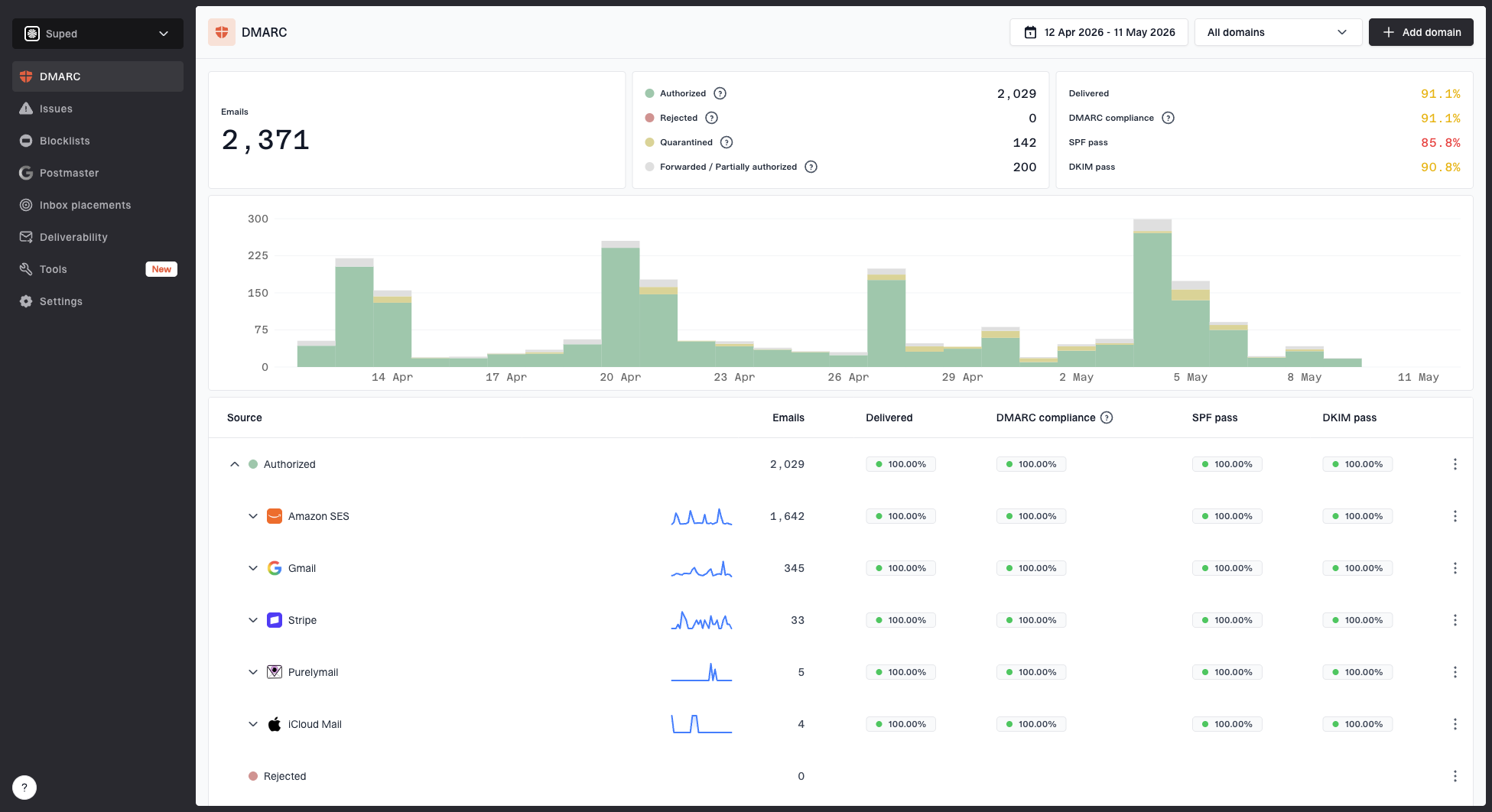
Suped DMARC dashboard showing email volume, authentication health, and source breakdown
During recovery, I also send real test mail and inspect the result before each larger step. A mailbox placement test is not a guarantee of inboxing for the full list, but it catches authentication breaks, obvious spam-folder behavior, and message-level problems before the next Gmail cap goes out. The email tester is useful at this point because the ramp needs evidence from an actual message, not only DNS records.
Email tester
Send a real email to this address. Suped opens the report when the test is ready.
?/43tests passed
Preparing test address...
For low-volume senders, Gmail reputation data can be sparse. That does not mean you should ramp blindly. Use the same controls, but rely more heavily on clean authentication, bounce logs, complaint handling, message tests, and direct engagement. Low volume usually means slower learning, not permission to skip controls.
When to add less engaged Gmail contacts
The hardest part of reputation recovery is usually not the first week. It is the moment the team gets impatient because the first signs look better. Medium Gmail reputation after a few days is progress, but it is not a reason to send the old list. I keep the ramp moving through recent engagers before adding broader groups.
|
|
|
|
|---|---|---|---|
1 | 0-30 day | Ramp first | Lowest |
2 | 31-60 day | Add slowly | Moderate |
3 | 61-90 day | Test small | Higher |
4 | Never engaged | Suppress | Highest |
Recommended audience order after the first Gmail ramp
The never-engaged Gmail group should stay suppressed during recovery. If that group matters commercially, rebuild permission through another channel rather than pushing it into Gmail during a fragile period. The cost of one bad send can be more than the value of the dormant names.
Do not mix high-risk groups into a recovery ramp because someone wants a larger number. Bad Gmail reputation is usually a volume and quality problem together. Adding risky volume before Gmail sees enough wanted mail extends the recovery period.
If you need more context on timing, the companion page on recovery timing explains why a better dashboard rating and stable inbox placement do not always arrive on the same day.
How long to stay cautious
Stay cautious until you have several clean Gmail sends at the new volume level and the audience quality has not changed. For a sender with 600 recently engaged Gmail recipients, that often means finishing those recipients first, then adding the 31-60 day group at a controlled pace. For a sender with tens of thousands of engaged Gmail contacts, the careful ramp can take weeks.
I do not use one universal recovery timeline because Gmail reputation depends on the prior damage, the current audience, complaint behavior, and whether the sender keeps making new mistakes. A sender that caused the issue with one bad campaign and then suppresses risky names can recover faster than a sender that keeps sending to old Gmail contacts while hoping the dashboard changes.
- Fast recovery: One isolated bad send, strong engagement, clean authentication, and immediate suppression of risky contacts.
- Slow recovery: Repeated complaint spikes, old Gmail names, authentication drift, and inconsistent sending identity.
- Hidden delay: Dashboard data can trail real sending behavior, so daily decisions need logs and engagement too.
- Practical finish: Resume normal Gmail campaigns only after clean sends across the engaged layers you plan to mail.
Views from the trenches
Best practices
Start Gmail recovery with recent engagers, then expand only after clean daily evidence.
Use fixed stop rules before launch so pressure for more volume cannot override the data.
Keep DMARC, SPF, DKIM, bounce logs, and engagement evidence together during recovery.
Common pitfalls
Testing dormant Gmail names during recovery often resets progress and adds complaint risk.
Treating a medium Gmail rating as recovered can push volume before trust has stabilized.
Changing domains, vendors, or selectors mid-ramp makes the signal harder to interpret.
Expert tips
Use 50% growth as a working cap after bad reputation, then hold whenever evidence is mixed.
Finish the recent-engagement pool before adding older Gmail contacts into the schedule.
For low-volume senders, lean harder on logs and message tests when dashboard data is sparse.
Marketer from Email Geeks says a Gmail ramp should begin with a tiny group of recent engagers, then increase by about 50% only after the previous send looks healthy.
2019-05-08 - Email Geeks
Marketer from Email Geeks says sending to unengaged Gmail contacts during recovery is not a useful experiment because it can add risk before reputation has stabilized.
2019-05-08 - Email Geeks
The practical stopping point
A Gmail ramp-up strategy is successful when the sender proves a new pattern, not when one dashboard value improves. The practical plan is simple: send to the safest Gmail recipients first, raise volume by about 50% only after clean evidence, keep old Gmail names suppressed, and continue the ramp through the engaged audience before returning to normal campaigns.
Suped is useful here because the recovery work needs clear authentication, source, and reputation visibility. Gmail reputation repair already has enough uncertainty. The monitoring layer should make decisions clearer, flag problems quickly, and give the team specific steps to fix what breaks.