What filtering provider uses the bounce message '452 Too many recipients received this hour' and how to resolve it?

Published 16 Apr 2025
Updated 26 Jul 2026
10 min read
Summarize with
Updated on 26 Jul 2026: We corrected the provider attribution and clarified how Cisco recipient-rate limits are counted and resolved.
The filtering product to check first is Cisco Secure Email Gateway, formerly IronPort. Cisco's current administration documentation uses the exact text "452 Too many recipients received this hour" as the SMTP response when a sending host exceeds a configured maximum-recipients-per-hour limit. The 452 reply is a temporary SMTP deferral, not a content verdict or a permanent user-level bounce.
The practical fix is to slow delivery to the affected destination, apply progressive retry backoff, keep deferred mail queued, and ask the recipient administrator which counter was triggered. Check authentication and reputation before escalation, but do not treat them as the direct fix. Suped's email tester can separate message-level faults from receiver-side rate limiting.
- Likely product: Cisco Secure Email Gateway is the first product to investigate because its documentation contains the exact reply.
- Error meaning: The receiving gateway has temporarily stopped accepting more recipients under the applicable rate counter.
- Immediate response: Lower the recipient rate for the affected destination and let the queue retry with increasing intervals.
- Best evidence: Use the rejecting hostname, destination IP, MX route, SMTP transcript, and repeated timestamps before naming the product.
Why this points to Cisco Secure Email Gateway
The wording is stronger than a generic 452 clue. Cisco Secure Email Gateway documentation shows it as the default response for the "Max. Recipients per Hour" setting on a listener. That control is part of the gateway's mail flow policy and can limit recipients accepted from a remote host. The exact text therefore points first to a Cisco gateway, although administrators can customize banners and other servers can reuse the same wording.
Do not rely on the phrase or published MX records alone. An organization can place another filtering layer in front of Cisco, use branded MX names, or route mail through a downstream gateway. Similar recipient-limit reports appear in a Google thread and an Atlassian KB, so the host that actually returned the SMTP reply must lead the investigation.
Typical bounce evidencetext
reply stage: RCPT TO
smtp reply: 452 Too many recipients received this hour
enhanced status: 4.x.x (copy the DSN value exactly)
action: delayed
rejecting host: gateway.example.edu
|
|
|
|---|---|---|
Exact reply | Full SMTP text | Cisco-documented default |
SMTP class | 452 | Temporary 4xx reply |
Reply stage | RCPT TO | Recipient acceptance limit |
Rejecting hop | Host and destination IP | Gateway ownership clue |
Use these signals together. No single row proves the installed product.
Do not confuse 452 with 4.5.2
452 is the three-digit SMTP reply. An enhanced status code is a separate value such as 4.x.x. Copy the enhanced code exactly as returned because the digits in 452 do not automatically become 4.5.2.
How to confirm the filtering product
Start with the sending MTA's connection log. Identify the destination IP and hostname for the session that returned the 452, then compare them with the recipient domain's MX records. Normalize recurring hostnames so branded gateways and regional variants are easy to compare. If the published MX handed mail to another gateway, the connection log is more useful than the public MX name.
Route lookup commandsbash
dig MX example.edu +short
dig A mx1.example.edu +short
dig -x 192.0.2.25 +short
- Collect bounces: Export raw DSNs with recipient domain, SMTP reply, enhanced status code, queue ID, and source IP.
- Identify the rejecting hop: Record the destination IP and hostname from the SMTP session rather than assuming the public MX returned the reply.
- Compare timing: Check whether deferrals begin after a send burst, campaign launch, automated notification spike, or retry surge.
- Test one route: Reduce the recipient rate for one destination group and watch whether the 452 rate falls.
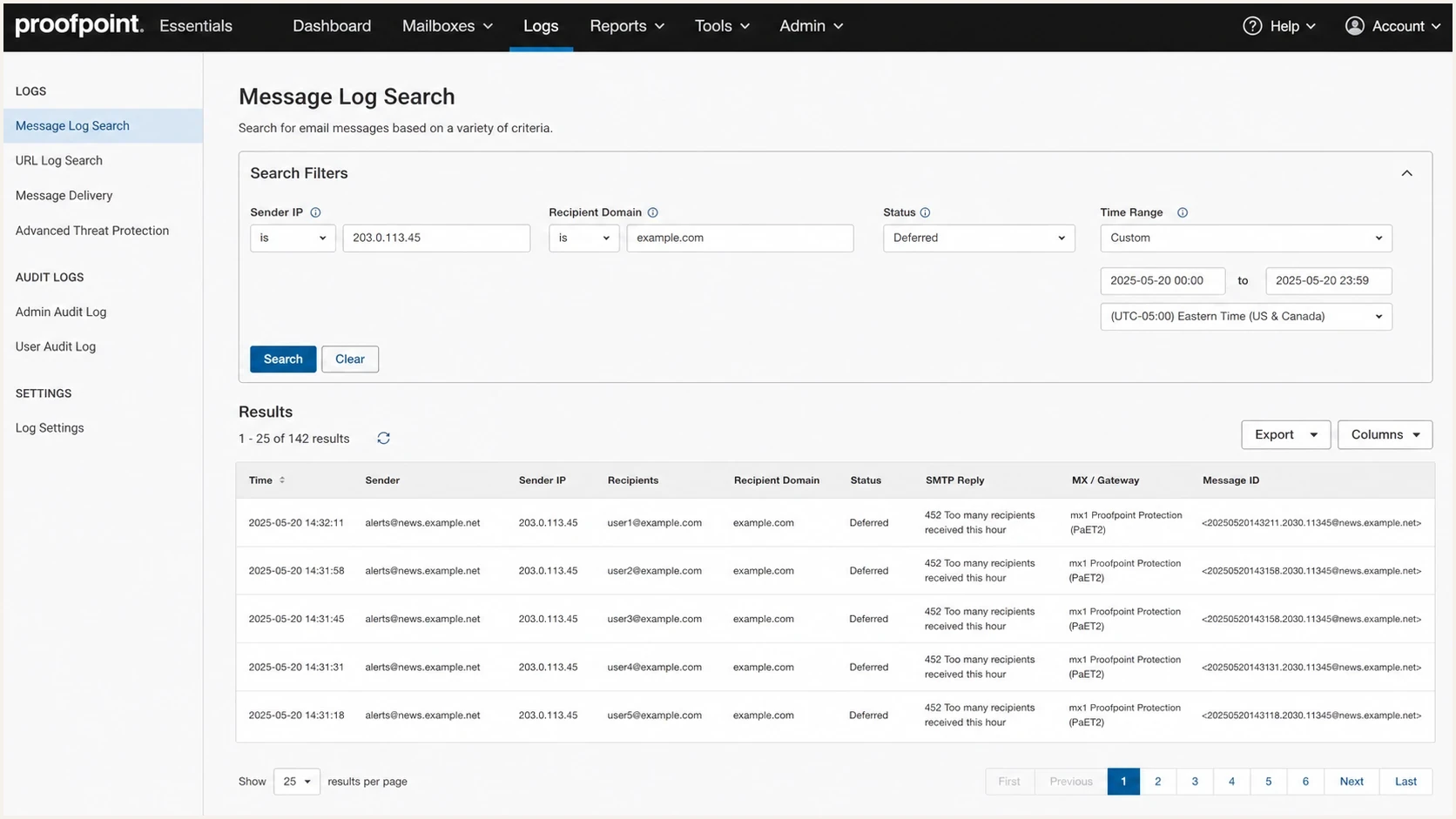
Proofpoint Essentials message log showing deferred messages with a 452 recipient throttle.
Once the rejecting hop is known, inspect the traffic pattern that triggered it. A large campaign aimed at one organization, many automated notifications to the same gateway, or several senders sharing one outbound IP can cross the hourly counter. The receiving gateway evaluates the configured host or sender scope, not the sending team's business reason for the messages.

A flowchart for confirming and fixing a 452 recipient throttle.
What the gateway is counting
Cisco Secure Email Gateway can enforce a maximum number of recipients per hour for a remote host through a Host Access Table (HAT) mail flow policy. Depending on configuration, the counter can follow an individual sending IP or an IP group. Cisco also supports a separate recipient rate limit based on the envelope sender. Ask the recipient administrator which policy matched the connection before changing infrastructure.
|
|
|
|---|---|---|
Sending IP | All mail on one outbound IP | Pace that route |
IP group | Nearby IPs in the configured group | Coordinate shared pools |
Envelope sender | Mail using one MAIL FROM address | Pace that sender |
Destination route | Recipient domains behind one gateway | Use an MX-based pool |
The active counter determines the useful remediation scope.
Invalid recipients use a separate control
Cisco's directory-harvest protection can count invalid recipients separately. Remove addresses only after a definitive invalid-recipient response, not because of this temporary 452. Repeated bad addresses still need cleanup because they can trigger their own policy.
How to resolve it without losing mail
Because 452 is temporary, keep the affected mail queued and stop repeating the same delivery rate. Change delivery behavior before changing message content unless the logs contain a separate authentication, malware, or policy rejection. For this exact reply, destination-specific pacing and retry backoff are the main controls.
Fast but risky
- Retry pattern: The queue retries at the rate that triggered the limit.
- Recipient grouping: All affected domains remain in one large delivery wave.
- Address quality: Confirmed invalid addresses keep re-entering later sends.
- Queue control: Repeated attempts consume delivery capacity without reducing pressure.
Controlled recovery
- Retry pattern: The route backs off progressively before another attempt.
- Recipient grouping: Domains behind the rejecting gateway move into a slower pool.
- Address quality: Only independently confirmed invalid addresses are removed.
- Queue control: Queue age and deferral rate guide each later increase.
The safe rate depends on the recipient's mail flow policy, the counter scope, and the reputation assigned to the sending route. Start by cutting the affected destination group to a fraction of its previous hourly rate. Raise it only after several clean delivery windows. Do not retry every few minutes at the same volume because that can extend the deferral and age the queue.
Queue pacing trigger points
Use these example internal thresholds to decide how strongly to slow a destination group. They are not Cisco limits.
Low
<2%
Continue normal retry with monitoring.
Rising
2-10%
Move the destination group to a slower pool.
High
>10%
Pause new volume, drain slowly, then escalate.
- Lower the rate: Throttle by recipient domain or MX family rather than by campaign alone.
- Increase backoff: Give the receiver time to clear its rate window before another attempt.
- Stagger bursts: Spread automated notifications and campaigns across additional delivery windows.
- Clean invalid addresses: Suppress addresses only when a separate permanent response confirms they are invalid.
- Watch queue age: Keep messages inside normal retry windows so temporary delays do not become expired mail.
Authentication, reputation, and blocklist or blacklist checks
A pure hourly recipient throttle is not fixed by changing email authentication records. Authentication and reputation can still affect the mail flow policy assigned to a sending route. Before asking a recipient organization to change a limit, run Suped's domain health check and confirm that the sending identity has no obvious authentication fault.
Email tester
Send a real email to this address. Suped shows a results button when the test is ready.
?/43tests passed
Suped's DMARC monitoring shows which sources use the domain and whether their messages authenticate. Pair that evidence with Suped's blocklist monitoring so a recipient-rate throttle is not confused with a blocklist or blacklist event.
Where Suped fits
Suped's product supports the evidence-gathering part of this workflow. It connects DMARC results with sending sources, authentication health, alerts, and blocklist or blacklist signals. Queue pacing remains a sending MTA task.
- Source review: Separate known sending services from unexpected sources using the domain.
- Authentication review: Check whether the affected stream has a consistent authenticated identity.
- Reputation review: Compare the timing of the 452 spike with blocklist or blacklist changes.
- Evidence record: Keep the findings ready for the recipient administrator without presenting them as the pacing fix.
Separate deliverability evidence from authentication evidence. If the sending route authenticates correctly, has no blocklist or blacklist event, and receives no content rejection, pacing remains the direct fix. If the identity is broken, repair it as a separate issue so the receiver can assess a consistent sender.
When to escalate
Escalate after changing the traffic pattern and collecting clean evidence. The recipient administrator needs enough data to find the matching mail flow policy and determine whether the counter applies to the source IP, an IP group, or the envelope sender. If logs show connection throttling instead, compare the pattern with 470 connection limits before opening the ticket.
Do not request permanent allowlisting first
A 452 recipient throttle usually calls for better pacing or a review of the matched sender group. Ask for the preferred rate and the scope of the active counter before requesting a broad exception.
- Affected destinations: List recipient domains, MX hosts, destination IPs, and the time window where the throttle appeared.
- Sending identity: Include source IPs, envelope sender, visible From domain, and signing domain.
- Bounce samples: Share raw DSNs with queue IDs, reply stage, and timestamps in the recipient's time zone.
- Fixes tried: Show the destination rate reduction, retry backoff, queue results, and address cleanup already applied.
Escalation note templatetext
We are seeing temporary 452 deferrals for your domain group.
Rejecting host: gateway.example.edu
Reply text: 452 Too many recipients received this hour
We reduced the destination rate and applied progressive backoff.
Please confirm the counter scope and preferred recipient rate for this route.
Views from the trenches
Best practices
Identify the rejecting SMTP hop before attributing the reply to a filtering product.
Treat a 452 as a temporary throttle, then retry through a slower destination pool.
Compare destination IPs, reply timing, and queue attempts before changing records.
Ask which host or sender counter matched before requesting a policy exception first.
Common pitfalls
Treating a public MX hostname as proof can miss a downstream Cisco mail gateway.
Retrying at the same speed keeps the temporary failure active across the whole queue.
Reading SMTP reply 452 as enhanced status 4.5.2 records the wrong evidence in logs.
Removing recipients after a temporary 452 can suppress valid addresses unnecessarily.
Expert tips
Log the destination IP, reply stage, SMTP text, and queue ID for every bounce sample.
Create slower pools for domains that share the gateway returning the exact 452 reply.
Clean confirmed invalid addresses so separate recipient controls are not triggered.
Check authentication and blacklist evidence before sending an escalation request.
Marketer from Email Geeks says MX lookups help connect a bounce string to the filtering route, but the rejecting SMTP hop provides the stronger evidence.
2022-05-20 - Email Geeks
Expert from Email Geeks says the wording should be checked against routing evidence rather than treated as proof of the provider behind the public MX.
2022-05-20 - Email Geeks
The practical answer
When you see "452 Too many recipients received this hour", check Cisco Secure Email Gateway first because Cisco documents that exact banner for its maximum-recipients-per-hour control. Confirm the host that returned the reply, then treat it as a temporary recipient-rate deferral. Keep the mail queued, lower the destination rate, use progressive backoff, and verify that deferrals fall before raising volume.
Suped's product helps collect the adjacent evidence through DMARC results, sender-source review, authentication checks, alerts, and blocklist or blacklist monitoring. That evidence does not replace queue pacing. It gives the recipient administrator a clearer account of the sending identity and the checks already completed.




