What domain should I use for a PTR record for shared IPs?

Updated on 1 Aug 2026: We added provider-control guidance and tightened the checks for forward-confirmed rDNS and outbound HELO.
For shared IPs, use a hostname under the ESP or infrastructure operator's own domain, not one customer's domain. The PTR record should identify the organization responsible for the sending server and make it obvious that the host is mail infrastructure. A pattern like mta-a.pool.esp.example is a better shared-pool PTR than a customer brand, a random word pair, or a hostname that looks like consumer dynamic DNS.
The caveat is that the hostname still has to be technically correct. The IP's netblock owner must publish the PTR in the reverse DNS zone. The PTR should return a hostname, that hostname should resolve forward to the same IP, and the SMTP HELO or EHLO should use a resolvable name controlled by the same operator. After changing rDNS, send a real message through an email tester and inspect the visible SMTP identity, not just the DNS record.
- Use the operator domain: For a shared ESP pool, the PTR should sit under the ESP's domain or a neutral infrastructure domain the ESP controls.
- Make mail intent clear: Use labels such as mta, smtp, mail, or pool so a reviewer can tell the IP is intended to send email.
- Keep it consistent: Use one naming scheme across the pool so the servers look intentional during support and deliverability reviews, including abuse escalations.
The short answer
A shared IP should have a PTR record that points to a stable mail hostname owned by the party running the IP. In an ESP setup, that normally means the ESP's operational domain. Do not put one client's domain in the PTR for an IP that also carries another client's traffic, because that makes the wrong customer look responsible for the whole pool.
Shared IP PTR patterndns
203.0.113.10 PTR mta-a.pool.esp.example.
mta-a.pool.esp.example. A 203.0.113.10
Good shared-pool pattern
The hostname should answer two questions quickly: who runs this server, and is this server meant to send mail? If the answer is clear, the exact label format matters less than confirming ownership and stable, forward-confirmed DNS.
- Clear owner: The parent domain belongs to the ESP, hosting provider, or mail infrastructure operator.
- Clear role: The hostname reads like an MTA, not a default host or end-user access line.
- Clear pattern: The same convention applies across the shared pool, so changes are easy to explain later.
Who can set the PTR record
The domain owner normally cannot add this PTR in the domain's ordinary DNS zone. Reverse DNS lives under in-addr.arpa for IPv4 or ip6.arpa for IPv6, and the organization controlling the IP block manages that zone. For hosted infrastructure, use the provider's reverse DNS control or ask its support team to publish the PTR.
IPv4 reverse-zone recorddns
10.113.0.203.in-addr.arpa. PTR mta-a.pool.esp.example.
A customer on a provider-managed shared mail IP usually cannot choose a customer-specific PTR, because a change affects the operational identity of the entire IP. If the provider will not establish valid forward and reverse DNS for an outbound mail server, do not send directly from that IP. Use a supported sending path or IP whose reverse DNS the operator can manage.
- Forward DNS access: The domain owner can publish the A or AAAA record for the selected hostname.
- Reverse DNS authority: The IP block operator publishes the PTR, either directly or through a delegated reverse zone.
- Shared-pool control: The operator selects one stable infrastructure identity for the IP rather than one identity per customer.
Why the PTR should identify the ESP
A PTR record is reverse DNS. Receivers use it to understand the identity of the machine connecting to port 25. It is not a DMARC alignment identifier, and it does not need to match the visible From domain. Still, it is part of the SMTP identity that mail filters and receiver operations teams see when they investigate a message.
The operational rule is simple: the PTR should identify the entity that accepts responsibility for the server. On a shared ESP IP, that is the ESP, because the ESP chooses the pool, controls the MTA, manages complaints, and handles the abuse contact path. A deeper explanation of reverse DNS for ESPs is useful when you need to document the policy for customers.
Good shared-pool PTR
- Operator-owned: The domain belongs to the ESP or mail operator that controls the IP.
- Mail-specific: The hostname starts with an obvious mail label such as MTA, SMTP, or pool mail.
- Reviewable: A postmaster can infer responsibility without asking which customer used the IP.
Risky shared-pool PTR
- Customer-owned: One client's domain appears responsible for traffic sent by other customers.
- Random-looking: Two unrelated words or opaque automation labels can look like snowshoe infrastructure.
- Dynamic-looking: Long digit runs, IP octets, or default cloud names can trigger extra scrutiny.
How to name shared IP pool hostnames
Use names that are plain, explainable, and stable over time. A mailbox provider employee looking at a log line should not need internal context to know that the host is part of a managed mail pool. Avoid names that include the full IP address or joke words. Keep customer brands out of the name unless the IP is dedicated to that customer.
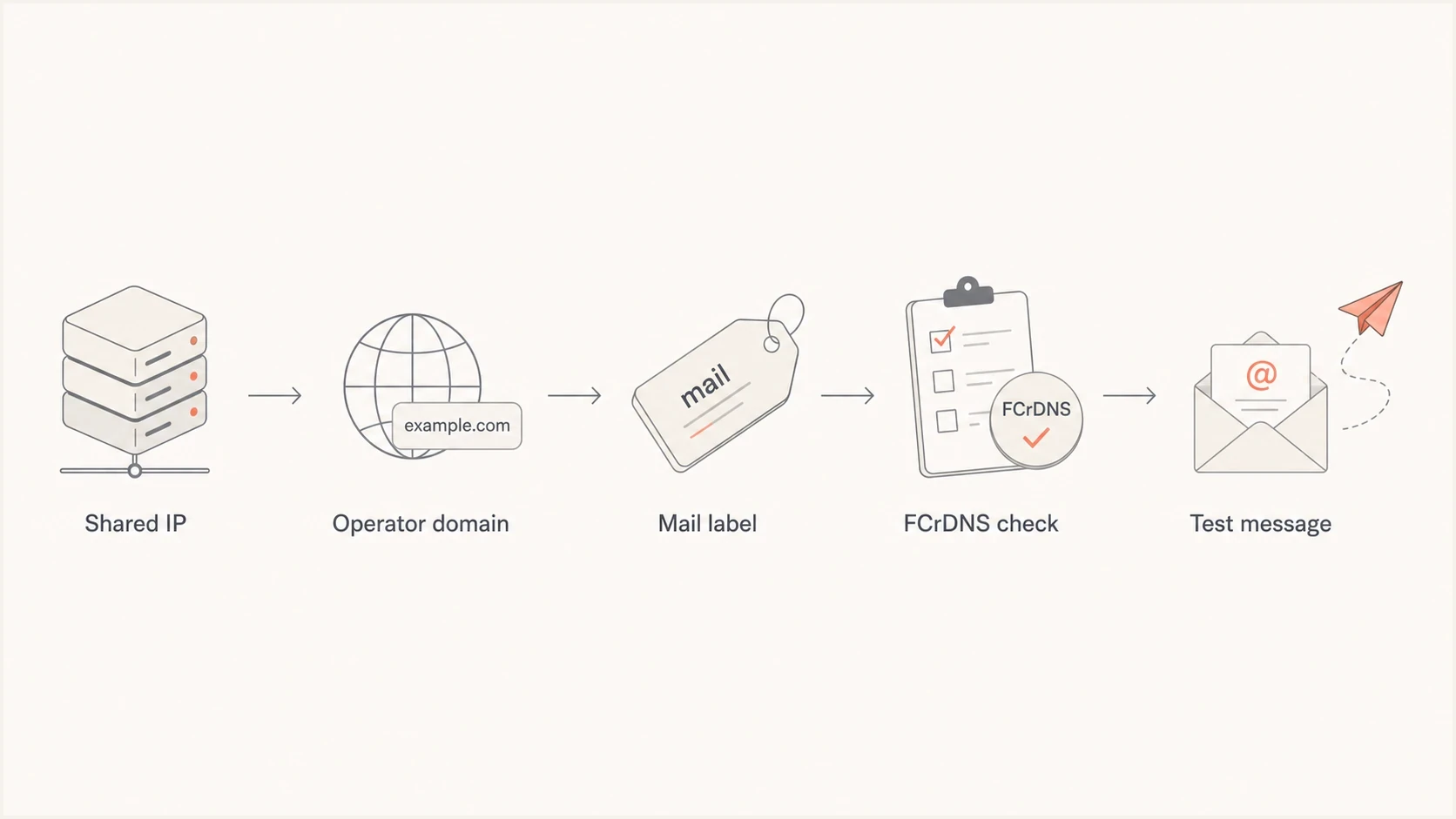
Five-step flowchart for choosing and validating a shared IP PTR hostname.
Numeric labels are valid in DNS hostnames, but the naming scheme should remain clear to support teams and receiver operators. Prefer lettered pool names or short sequence labels when a full-IP label or generic provider default would obscure who runs the server.
|
|
|
|---|---|---|
ESP mail domain | Best default | Identifies operator |
Neutral infra domain | Good option | Keeps pools separate |
Customer domain | Dedicated only | Avoids misattribution |
Random words | Avoid | Looks throwaway |
IP-heavy name | Use carefully | Harder to interpret |
Shared IP PTR naming choices
Forward-confirmed rDNS and HELO
Use forward-confirmed reverse DNS: the IP resolves to the hostname, and the hostname resolves back to the same IP through an A record for IPv4 or AAAA record for IPv6. The EHLO domain should be a resolvable fully qualified hostname. Using the PTR hostname for EHLO gives receivers and support teams the clearest operational identity, although PTR does not participate in DMARC alignment.
Forward and reverse DNS checksbash
dig -x 203.0.113.10 +short
dig mta-a.pool.esp.example A +short
dig mta-a.pool.esp.example AAAA +short
If a live test shows an outbound HELO of localhost, a private hostname, or a different provider's default name, fix that before judging the PTR. A DNS query cannot reveal the EHLO identity used in an outbound SMTP session, so send a real message and inspect its delivery report or Received headers. A deeper look at PTR and HELO helps when the DNS is correct but inbox placement still looks uneven.
Do not publish multiple PTR identities
Technically, DNS can return more than one PTR for an IP, but email operators should avoid that pattern. A single clear hostname is easier for receivers, support teams, and reputation systems to understand.
- One IP, one name: Pick the shared-pool hostname that identifies the operator responsible for the IP.
- One forward match: Make sure the hostname has an A or AAAA record that points back to the sending IP.
- One support story: Document the naming scheme so customer support can explain it during deliverability reviews.
How this interacts with DMARC and customer domains
The PTR domain does not have to match the customer's visible From domain for DMARC. DMARC checks whether SPF or DKIM passes with domain alignment against the Header From domain. On a shared IP, customer branding should come through DKIM, the visible From domain, and the bounce or return-path design, not through the shared IP's PTR.
Suped's DMARC platform connects this infrastructure check with DMARC monitoring, SPF and DKIM results, sending-source identification, and blocklist or blacklist visibility. Teams can use the same workflow to confirm customer-domain alignment after the operator has corrected PTR and HELO at the IP layer.
DMARC record detail view showing SPF, DKIM, DMARC, rDNS diagnostics, and DNS records
Before adding customers to a new shared pool, check the public domain setup with a domain health checker to catch basic DNS mistakes. DMARC reports can then show whether real traffic is authenticating under the intended customer domains.
Shared IP identity
- PTR: Use the ESP's mail hostname because the ESP operates the shared IP.
- HELO: Use a controlled mail hostname that matches the same infrastructure story.
- Abuse path: Make the operator easy to identify when a receiver escalates a complaint.
Customer domain identity
- From: Use the customer's domain or approved sending subdomain.
- DKIM: Sign with a customer-controlled or customer-approved domain.
- DMARC: Confirm the customer's domain receives aligned authenticated mail.
Shared IP edge cases
There are cases where the clean answer needs adjustment. If a customer pays for a dedicated IP, putting their domain or a delegated customer subdomain in the PTR can be reasonable. If several customers share the same IP, do not give one customer that identity. Use the ESP domain and keep customer identity in authenticated message headers.
A label such as mta-11-12 can be acceptable when the rest of the hostname clearly identifies the mail system and operator. A hostname that embeds the full IP or retains a generic residential, cloud, or temporary default is harder to explain during a review. Lettered labels such as mta-a or short internal sequence names keep the pool identity concise.
Shared pools also inherit shared reputation risk. One bad sender can create delivery problems, blocklist or blacklist entries, complaint spikes, and postmaster questions for everyone on the pool. Suped's blocklist monitoring can track whether a pool IP appears on a blocklist or blacklist alongside the authentication data used to investigate the affected customer traffic.
Email tester
Send a real email to this address. Suped shows a results button when the test is ready.
?/43tests passed
The practical test is to send a message from the pool and inspect the result. Look for the connecting IP, PTR, HELO, SPF result, DKIM signature domain, DMARC result, TLS, and any warnings about dynamic-looking infrastructure. DNS checks alone do not show the full SMTP conversation.
If the test shows a mismatch, fix any broken PTR or forward record first, then correct a strange HELO. Once the server identity is clean, customer-level authentication issues are easier to isolate.
Customer-branded PTR records need isolation
If a customer requires their own domain in rDNS, give them a dedicated IP or a dedicated pool that only carries their traffic. Do not use their domain on a mixed shared pool.
- Dedicated IP: The customer domain in PTR can match the operational ownership story.
- Shared IP: The ESP domain in PTR avoids assigning pool-wide responsibility to one customer.
- Dedicated pool: A customer-specific rDNS pattern works only when the pool is operationally separate.
Implementation checklist
Treat the PTR choice as part of the pool launch checklist, not as a one-line DNS task. The goal is a consistent identity that survives customer onboarding and later IP expansion, including receiver questions.
- Pick the domain: Use the ESP or infrastructure operator's domain for any pool shared by multiple customers.
- Choose the pattern: Use a clear mail label, a pool label, and a short stable host identifier.
- Set forward DNS: Publish A or AAAA records for each hostname that point to the sending IP.
- Request rDNS: Ask the IP owner or hosting provider to set the PTR to the chosen hostname.
- Check HELO: Make the MTA announce a controlled hostname that fits the same identity.
- Test live mail: Send mail through the pool and inspect authentication, rDNS, TLS, and reputation warnings.
Example shared pool namestext
mta-a.pool.esp.example
mta-b.pool.esp.example
smtp-a.mail.esp.example
outbound-a.infra.esp.example
If a receiver challenges the setup, the answer should be easy: this is a shared ESP mail pool, the ESP controls the IP, the PTR identifies the ESP, and the customer's domain passes DMARC through aligned DKIM or SPF.
Views from the trenches
Best practices
Use an ESP-owned mail hostname so reviewers can identify who runs the shared IP pool.
Keep PTR, forward A, and HELO names stable, intentional, and simple to explain in reviews.
Document the naming pattern before support teams handle receiver questions about it.
Common pitfalls
Do not put one customer's brand in the PTR for traffic shared with other customers.
Do not use random word pairs or IP-heavy names that resemble temporary infrastructure.
Do not assume PTR identity replaces DKIM, SPF, or DMARC checks for the From domain.
Expert tips
Use lettered pool labels when a receiver is sensitive to numeric patterns in hostnames.
Reserve customer-branded PTR records for dedicated IPs or clearly isolated pools.
Test the full SMTP identity before moving real customers onto a new shared pool.
Marketer from Email Geeks says shared IP PTR names should sit under the ESP domain and make the mail role clear.
2024-07-04 - Email Geeks
Marketer from Email Geeks says random two-word hostnames can look like snowshoe patterns during abuse review.
2024-07-04 - Email Geeks




