
What does SMTP Bounce Reason 4.1.8 (bad sender's system address) Domain of sender address does not resolve mean?

Updated on 2 Oct 2026: We clarified sender-domain DNS checks, corrected the routing example, and added steps for recurring 4.1.8 deferrals.
SMTP bounce reason 4.1.8, bad sender's system address, means the receiving mail server could not validate the sender system named in an address or found that it could not accept return mail. For domain names, RFC 3463 defines this as the part to the right of the @ sign being invalid for mail. In practice, the checked address is usually the envelope sender, also called MAIL FROM or the reverse-path, rather than the visible From header.
The first digit controls the immediate handling. A 450 or 451 reply with 4.1.8 is a temporary deferral, so the sending mail transfer agent should queue the message and retry it. A later non-delivery report can show a separate permanent wrapper after the retry window expires. A direct permanent bad sender's system address status uses 5.1.8, not 4.1.8.
- Meaning: A receiver could not validate the sender system or its ability to accept return mail.
- Scope: The checked domain is usually the envelope sender or bounce domain, not the branded From domain.
- Urgency: A 4xx result is retryable. A direct 5.1.8 result or an expired retry queue is a final failure.
- Pattern: A few failures across a large send often point to a receiver-side lookup problem, while broad repetition points to sender DNS.
What 4.1.8 means
SMTP enhanced status codes add detail to the basic SMTP reply. In 4.1.8, 4 means a persistent transient failure, 1 identifies address status, and 8 identifies a bad sender's system address. Receiving systems often phrase it as Domain of sender address does not resolve, Sender address rejected: Domain not found, or similar sender-domain lookup wording.
The short version
The receiving server is checking whether the sender address contains a domain that exists and is valid for return mail. NXDOMAIN, SERVFAIL, a timeout, broken delegation, or an unusable mail-routing answer can trigger a 4.1.8 response. Check for a misspelling in the sender domain before changing DNS.
- Temporary: 450 and 451 responses should remain queued for retry by the sending system.
- Permanent: 5.1.8 is the direct permanent form of bad sender's system address.
- Expired: A final NDR can wrap the original 451 after the sending system exhausts its retry window.
- Vendor wording: Some gateways use broad bad sender text, so the full SMTP line and command stage matter.
|
|
|
|---|---|---|
MAIL FROM | Primary envelope sender | Domain spelling and public DNS |
Return-Path | Header added from the reverse-path after delivery | Compare with MAIL FROM on a delivered test |
Header From | Visible author address | Only if the gateway names it |
MAIL FROM:<> | Permitted null reverse-path | No sender domain exists to resolve |
Sender identities that can appear around a 4.1.8 response.
Typical temporary 4.1.8 responsetext
MAIL FROM:<bounce@example.com>
451 4.1.8 Domain of sender address does not resolve
The same campaign can deliver normally overall and still receive a few 4.1.8 deferrals. The receiver paused those messages because a sender-address check during the SMTP conversation did not produce a usable answer at that moment. The response does not, by itself, identify a content or reputation problem.
Forward DNS checks that matter
Start with a forward DNS lookup for the exact domain to the right of the @ sign in MAIL FROM. This is different from a PTR or reverse-DNS lookup on the sending IP. A sender domain normally has an MX record, or it can rely on an A or AAAA address record when no MX exists. If the domain is a CNAME, follow its target. Each MX target must resolve to an address.
|
|
|
|---|---|---|
Valid MX | Mail routing is published | Resolve every MX target |
No MX, valid A/AAAA | Implicit MX fallback exists | Confirm that a mail server accepts return mail |
Broken MX target | That mail route can fail | Repair the target's A or AAAA record |
Null MX (MX 0 .) | Domain declares no mail service | Remove it if the domain sends mail |
NXDOMAIN | Domain does not exist | Correct the address or restore the zone |
SERVFAIL or timeout | No reliable answer was available | Check delegation, DNSSEC, and DNS reachability |
How common forward DNS answers affect sender-domain validation.
Forward DNS, not reverse DNS
PTR or reverse DNS identifies the sending IP and is a separate deliverability check. It is not the normal lookup behind Domain of sender address does not resolve. Investigate PTR, HELO, or forward-confirmed reverse DNS only when the SMTP response explicitly names that check.
A successful lookup on an internal resolver does not prove that receiving systems can see the same answer. Confirm the public authoritative nameservers respond consistently, the delegation is intact, DNSSEC validates, and DNS traffic works over both UDP and TCP on port 53. Also allow for DNS cache time after a recent record or nameserver change.
A null MX is a valid DNS answer with a different meaning: the domain declares that it accepts no mail. RFC 7505 recommends 550 5.7.27 when a receiver rejects a sender address for null MX. A receiver can use different wording, so inspect the full SMTP reply rather than treating every null-MX rejection as 4.1.8.
Why only a few recipients see it
When only a few small recipient domains return 4.1.8 during a large deployment, first check for a localized receiver-side lookup issue. Small domains can share filtering appliances, hosted mail systems, or DNS resolvers. A brief resolver timeout or DNSSEC validation failure at that layer can affect several recipients without indicating a global sender DNS failure.
The sender side still needs checking. A return-path domain can contain a stale CNAME, a missing target, an expired delegated zone, or a broken DNSSEC chain. A provider-specific bounce domain can also fail only at receivers that apply strict sender-domain checks. If the visible From domain resolves but the bounce domain does not, DMARC reports can look normal while SMTP delivery remains deferred.
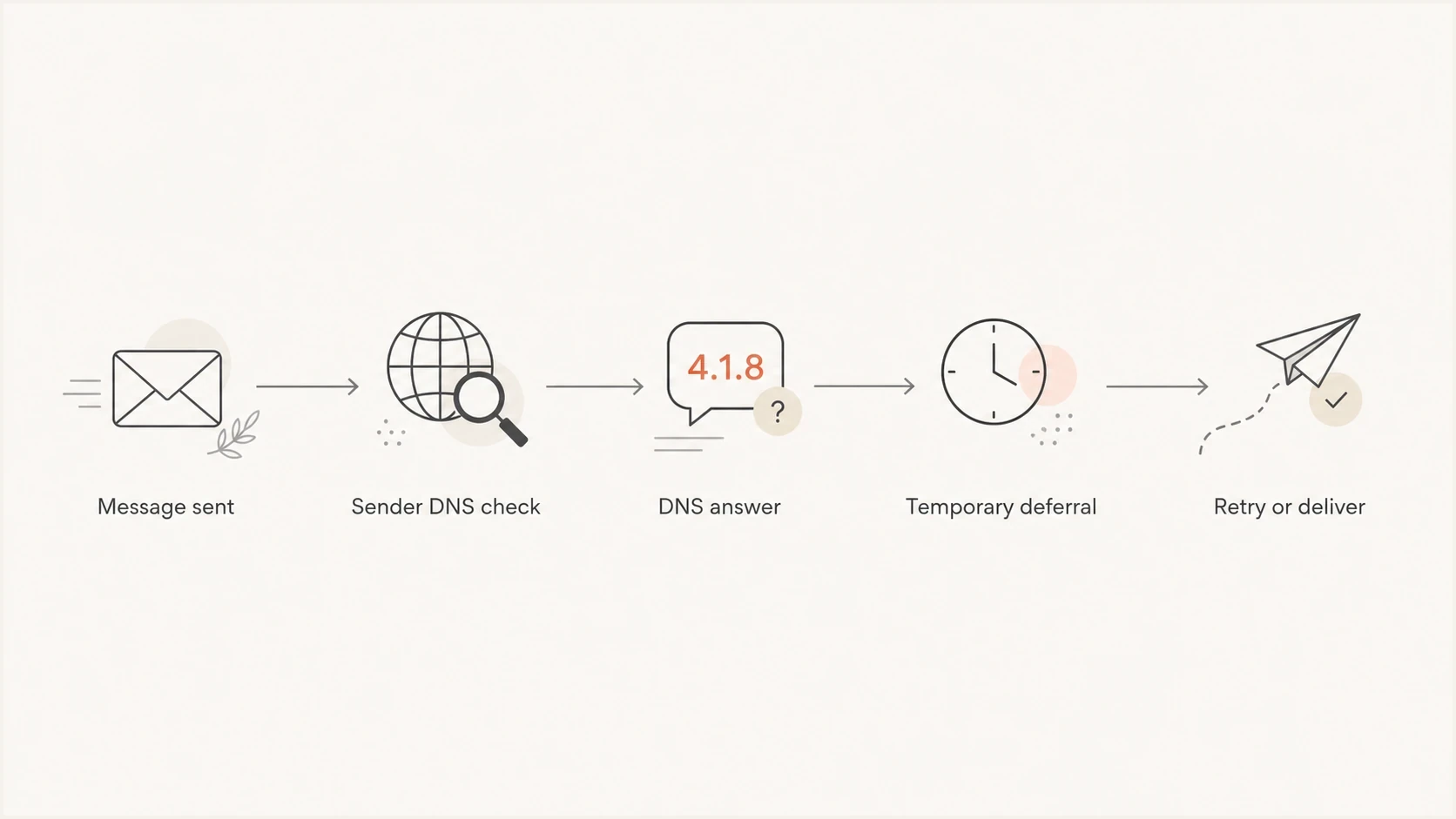
Flowchart showing a sender DNS check leading to a temporary deferral and retry.
Likely receiver-side issue
- Pattern: Only a few recipients fail across a large send.
- Code: The SMTP result starts with 450 or 451.
- Retry: Later attempts deliver or move to a different response.
- Grouping: The affected domains share MX hosting or filtering.
Likely sender-side issue
- Pattern: Many unrelated receivers return the same error.
- Outcome: Retries expire into a final non-delivery report.
- DNS: Return-path routing, delegation, or DNSSEC checks fail.
- Change: A recent sender-domain, bounce-domain, or nameserver change exists.
If the wording changes to domain does not exist, invalid sender domain, or sender domain not found, use the same investigation path. The related invalid sender domain pattern usually comes back to the spelling or public DNS visibility of the sender identity being checked.
If only one receiving domain keeps deferring mail while public authoritative DNS answers are consistent, send its mail administrator the full SMTP reply, timestamp, MAIL FROM domain, and public DNS results. Ask them to check resolution through the resolver used by their mail gateway.
How to investigate the sender side
Start with the actual SMTP transcript, not the summarized bounce category. Bounce processors often group several responses under one label, and a label such as bad sender's system address can hide whether the event was a retryable DNS timeout, a missing domain, or a final queue-expiry notice.
- Capture the full SMTP line, including the basic code, enhanced code, text, and command stage.
- Identify the envelope sender, return-path domain, visible From domain, and the exact domain named in the response.
- Check the domain for typographical errors, an unintended subdomain, or a recently removed bounce domain.
- Resolve public MX and A/AAAA answers, then follow any CNAME and every routing target used by the return-path domain.
- Validate nameserver delegation, DNSSEC, UDP and TCP reachability on port 53, and consistency across authoritative servers.
- Group affected recipient domains by MX provider, sending route, retry outcome, and final disposition.
For a broad review, run the sending domain through a domain health check and inspect the specific return-path domain separately. The parent domain can be healthy while a delegated bounce domain uses a different DNS path.
Email tester
Send a real email to this address. Suped shows a results button when the test is ready.
?/43tests passed
After the DNS review, send a message through the same route and inspect its headers, return-path, authentication results, and handoff details with the email tester. This reveals when a sending platform uses a different envelope sender than the configured or branded domain.
Usable forward DNS answerstext
example.com. 300 IN MX 10 mail.example.com.
bounce.example.com. 300 IN CNAME bounce.sender.example.net.
bounce.sender.example.net. 300 IN MX 10 mail.example.com.
mail.example.com. 300 IN A 203.0.113.10
mail.example.com. 300 IN AAAA 2001:db8::10
SPF can use the same MAIL FROM domain, but an SPF policy failure does not directly mean 4.1.8. Use the SPF checker only after the sender domain resolves, or when the authentication results also show an SPF error. Apply the same separation to DKIM and DMARC.
What to fix
The fix depends on the domain that failed and the final delivery outcome. Do not change authentication records because one receiver returned a single 451. Fix sender DNS when the same sender identity fails across unrelated receivers, retries expire, or the public return-path chain has a confirmed defect.
|
|
|
|---|---|---|
451 once, then delivered | Temporary lookup failure | Record and watch |
451 repeats | DNS instability or strict receiver | Check public DNS and grouping |
550 5.1.8 | Invalid sender system address | Correct the address or mail routing |
550 5.7.27 | Sender domain has null MX | Remove null MX if the domain sends |
NXDOMAIN | Typo or missing domain | Correct the sender or restore the zone |
SERVFAIL | Delegation or validation error | Repair DNS and DNSSEC |
Use the SMTP status and DNS result to choose the next action.
Do not suppress valid recipients too fast
A 4xx 4.1.8 result is not enough evidence to remove a recipient. Wait for the sending system's final disposition. If the message delivers on retry, keep the address active and record the event as transient.

Issue steps to fix dialog showing the issue overview, tailored fix steps, and verification action
Suped's DMARC reporting product connects DMARC monitoring with SPF and DKIM DNS checks, alerts, and guided issue resolution. Use Suped to watch whether authentication or DNS problems cluster by sending domain and source, then compare those findings with the original bounce logs. DMARC aggregate reports do not contain SMTP 4.1.8 transcripts.
For an MSP or agency, Suped's multi-tenant dashboard can separate client domains and delegated bounce-domain issues. That helps teams identify a clean parent domain alongside a broken return-path domain without treating every client or sending source as one incident.
When to escalate
A 4.1.8 event needs escalation when it stops being isolated. Use the retry outcome, affected sender identity, receiver grouping, and public DNS evidence to set urgency. A critical transactional stream to one business domain can justify faster action than scattered deferrals in a large campaign.
4.1.8 investigation thresholds
Use delivery evidence rather than a universal percentage.
Watch
Isolated and delivered
An isolated 4xx event delivers on retry and public DNS is healthy.
Review
Repeated or grouped
The same response repeats or clusters around one receiver group.
Fix
Final or confirmed
Retries expire, unrelated receivers fail, or public DNS is defective.
There is no universal percentage at which 4.1.8 becomes a sender-side incident. Volume, message type, retry success, and recipient importance change the operational impact. Base escalation on the final disposition and evidence of a repeatable DNS fault.
- Escalate when the same return-path domain fails at several unrelated receivers.
- Escalate when temporary deferrals expire and become final non-delivery reports.
- Escalate when public lookups return NXDOMAIN, SERVFAIL, inconsistent answers, or repeated timeouts.
- Escalate when the receiver identifies an unresolvable RFC 5321 sender after repeated attempts.
If none of those conditions apply, document the event and check the retry result. Sending platforms normally retry 4xx responses automatically, so the final outcome carries more weight than the first deferral.
Views from the trenches
Best practices
Treat 450 and 451 responses as deferrals first, then check the final outcome after retry.
Check the envelope sender domain because header From DNS can pass while MAIL FROM fails.
Group affected domains by MX provider to spot shared resolver behavior more quickly.
Keep public DNS answers consistent across authoritative servers during sender changes.
Common pitfalls
Do not rebuild authentication because a small set of temporary failures appeared once.
Do not classify every 4.1.8 as a hard bounce; the first digit controls handling.
Do not ignore return-path changes, expired zones, or DNSSEC validation failures.
Do not mistake a PTR warning for the forward DNS lookup named in this SMTP response.
Expert tips
Keep a known-good DNS snapshot for sender domains so provider changes are visible.
Compare every retry with the final delivery status before cleaning valid subscribers.
Use automated alerts for repeated patterns instead of isolated resolver failures.
Test delegated bounce domains separately because parent-domain health can hide defects.
Marketer view
Marketer from Email Geeks says a 4xx 4.1.8 response is usually a deferral, not a final bounce, so retries should decide whether action is needed.
2023-06-20 - Email Geeks
Marketer view
Marketer from Email Geeks says small receiving domains often share DNS infrastructure, so a brief resolver problem can affect several unrelated recipients.
2023-06-20 - Email Geeks
What to do with a 4.1.8 bounce
SMTP 4.1.8 with Domain of sender address does not resolve means the receiver could not validate the sender system named during SMTP or its ability to accept return mail. When it appears with 450 or 451, it is a temporary deferral. Check whether retry succeeded before treating it as a final failure.
If only a few recipients saw it, check for a transient lookup issue or shared receiver infrastructure. If unrelated receivers saw it, or retries expired, inspect the exact MAIL FROM domain for spelling errors, MX routing, A/AAAA fallback, delegation, DNSSEC validation, and public DNS reachability.
- Watch when a few 4xx deferrals deliver later and no DNS defect exists.
- Investigate when the same sender identity fails repeatedly or clusters by receiver.
- Fix when the sender domain is misspelled, missing, delegated incorrectly, or returning validation errors.
- Separate when the evidence points to SPF, DKIM, DMARC, HELO, or PTR instead of sender-domain resolution.




