What do Apple X-Headers mean in email filtering?

Updated on 20 Aug 2026: We updated this guide with current Apple filtering guidance and clearer limits for interpreting private X-Headers.
Apple X-Headers are private mail-processing headers that describe how Apple's iCloud Mail filtering path handled a message. X-Apple-MoveToFolder records the folder named during processing, while X-Apple-Action records a paired processing label. When you see X-Apple-MoveToFolder: Junk and X-Apple-Action: CLXJUNK/Junk, Apple routed that message copy to Junk for that mailbox or delivery path.
Read these headers as placement evidence, not as a public scoring API or a complete cause code. Apple does not publish a dictionary for these fields, action prefixes vary between samples, and X-Headers are not Internet standards. Compare them with the full header set, authentication results, recipient behavior, and repeated test sends.
Observed Apple placement headers
X-Apple-MoveToFolder: Junk
X-Apple-Action: CLXJUNK/Junk
X-ICL-SCORE: 4.333034030041
x-spam-flag: yes
x-suspected-spam: true

X-Apple-MoveToFolder: INBOX
X-Apple-Action: MOVE_TO_FOLDER/INBOX
X-ICL-SCORE: 3.333033230041
Short answer
- Folder: X-Apple-MoveToFolder records the destination named during Apple processing, commonly Junk or INBOX.
- Action: X-Apple-Action records a processing label paired with that destination, but its prefix can vary.
- Score: X-ICL-SCORE gives comparison context, but it is not a published Apple threshold.
- Proof: A single header sample documents that message copy's handling, not every recipient's result.
What the Apple X-Headers say
The most important Apple X-Headers in this situation are placement headers. Unlike standard fields such as From, Date, To, Subject, Message-ID, and Received, these fields are provider-added metadata. They answer the practical question, "Where did Apple put the message during filtering?" Senders often receive a forwarded copy or seed-mailbox sample and need to determine whether the message was accepted, routed to Inbox or Junk, or moved later by a rule or recipient action.
Use the headers together. X-Apple-MoveToFolder gives the folder name. X-Apple-Action adds a processing label, but values such as CLXJUNK/Junk, DMARCINFO/Junk, and BL/Junk show that the prefix is not stable enough to use as a public diagnosis. X-ICL-SCORE gives numeric context without a documented sender-facing scale. Fields such as x-spam-flag and x-suspected-spam strengthen the junk interpretation when they agree with the folder and action values.
|
|
|
|---|---|---|
X-Apple-MoveToFolder | Junk | Apple recorded Junk as the processing destination |
X-Apple-MoveToFolder | INBOX | Apple recorded Inbox as the processing destination |
X-Apple-Action | CLXJUNK/Junk | A Junk action label in that sample |
X-Apple-Action | DMARCINFO/Junk or BL/Junk | Other observed Junk labels, not published cause codes |
X-ICL-SCORE | Number | Comparison context without a public threshold |
Compact interpretation of observed Apple filtering fields.
To inspect a message in iCloud Mail, Apple's help page explains how to view all headers. In iCloud Mail, select the message, choose More, then Show All Headers. Compare Received, Return-Path, Reply-To, Content-Type, and Authentication-Results with the Apple placement fields. This keeps routing evidence separate from authentication and filtering evidence.
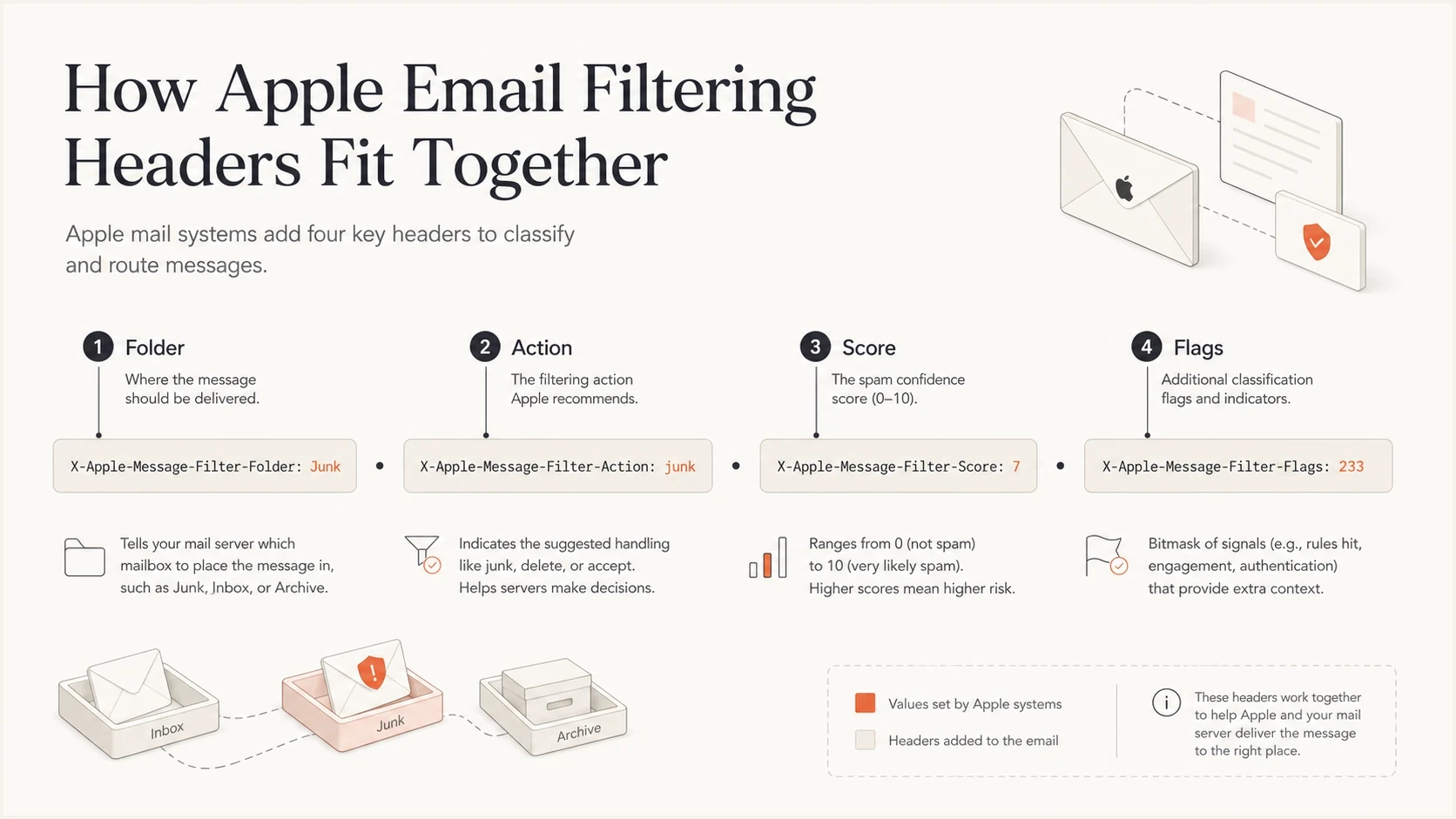
Infographic showing Apple X-Headers for folder, action, score, and spam flags.
The prefix in an X-Apple-Action value is less useful than the destination after the slash. Treat CLXJUNK, DMARCINFO, BL, and similar prefixes as private processing labels unless the rest of the headers independently supports a cause. They are not DNS settings or remediation instructions. The actionable result is the recorded destination, followed by a review of authentication, reputation, content, engagement, recipient rules, and the complete routing path.
How to interpret Junk versus INBOX
When the folder header says Junk, treat it as Apple's recorded junk placement for that message copy during processing. When it says INBOX, treat it as the recorded inbox placement. The phrase "message copy" matters. Apple has many mailboxes, user-level training, client settings, and routing paths. One result documents that exact sample, while repeated samples show whether it is a pattern.
The following comparison is a practical triage method for the two common outcomes before changing DNS, sender infrastructure, or content.
Junk path
- Signal: X-Apple-MoveToFolder: Junk is the strongest placement clue.
- Action: An action ending in /Junk supports the same recorded destination.
- Flags: x-spam-flag and x-suspected-spam make the result easier to trust.
- Next: Compare authentication and source evidence with campaign and recipient history.
Inbox path
- Signal: X-Apple-MoveToFolder: INBOX records an Inbox placement.
- Action: MOVE_TO_FOLDER/INBOX records a matching folder action.
- Score: Compare a score only with repeated samples from a controlled test.
- Next: Keep a baseline so future Junk samples have a clean comparison.
Do not use X-ICL-SCORE as a standalone pass or fail value. In the samples above, a Junk message had a score around 4.33 and an Inbox message had a score around 3.33. Two samples do not establish directionality or prove that 4.0, 4.3, or another number is a boundary. The folder and action headers carry more practical weight.
Evidence weight for Apple header review
Use this to decide which observations deserve action.
Strong evidence
Act
Folder, action, and spam flags all match.
Useful context
Compare
Score changes with matching samples.
Weak evidence
Retest
One sample without full headers.
Good evidence
Baseline
Repeated Inbox samples with clean authentication.
Why the visible folder can disagree
An Apple placement header can remain in the raw message after the visible mailbox state changes. A recipient can move a message, mark it as junk or not junk, or run an iCloud rule. The Apple Mail app can also apply local junk filtering. These later actions do not need to rewrite the original X-Apple-MoveToFolder or X-Apple-Action values.
|
|
|
|---|---|---|
Header says Junk, message is in Inbox | The recipient moved it or marked it as not junk | Recipient action history and rule settings |
Header says INBOX, message is in Junk | A user action, rule, or local filter moved it later | Current rules and Apple Mail junk settings |
Apple fields appear in another provider's mailbox | The message was forwarded, copied, or uploaded | The new mailbox's Received chain and arrival time |
Folder and header agree | The recorded placement probably remains unchanged | Full headers and any recipient actions |
Common reasons the current folder and preserved headers differ.
Apple says messages from people in iCloud contacts or recent conversations do not go to Junk, and marking a legitimate message as not junk changes future handling for that sender. Record contact status and prior correspondence when testing. Capture raw headers before manual movement, and collect a Junk sample before iCloud removes it after 30 days.
What not to infer from these headers
Apple X-Headers look precise, but private metadata is not a public deliverability diagnosis. The fields document a processing result. They do not reveal every signal Apple considered or provide a complete fix list.
- Do not infer: Apple blocked the message. Junk placement means Apple accepted that copy and routed it to Junk.
- Do not infer: CLX, DMARCINFO, or BL is a sender setting or a confirmed root cause. These are private labels.
- Do not infer: One seed address proves all iCloud, me.com, and mac.com recipients saw the same result.
- Do not infer: A message's current folder always shows its initial server placement. Rules and user actions can move mail later.
- Do not infer: Apple X-Headers work like X-Originating-IP. Apple adds placement metadata during its processing path, while X-Originating-IP usually identifies a client, app, or webmail IP earlier in submission.
For sender-side X-Headers such as X-Originating-IP, trust the actual SMTP connecting IP and the Received chain more than the custom field. An exposed origin IP matters if it reveals sensitive infrastructure or has a blocklist (blacklist) problem, but it remains secondary to authentication, sending reputation, and the server that delivered the message.
Apple Mail's local junk filter can trust server-provided junk headers and apply learned criteria. iCloud rules and manual moves can also change the visible folder without rewriting preserved placement fields. A related breakdown of Apple Mail settings helps when the header sample and visible mailbox do not match.
Use full headers, not screenshots
A screenshot of a Junk folder is not enough for a technical investigation. Ask for the full raw headers, approximate received time, and any action the recipient took. The header chain shows authentication and routing, while Apple placement fields preserve the processing state recorded in that copy.
The same caution applies to forwarded samples. Ordinary forwarding creates a new delivery envelope and Received chain, while the original headers can be omitted, quoted, or preserved inside an attachment. Use the original raw message when available. Otherwise, treat the forwarded copy as a clue rather than proof.
How to test Apple placement
Use controlled samples to test Apple placement. Send the same message to several Apple-controlled mailboxes, save the raw message source, and compare the folder and action values before anyone moves the mail. Then send a known-good baseline from the same domain and source. Compare campaign-specific results separately from source and domain reputation patterns.
Start with the exact message, then change one variable at a time. Changing subject, body, links, authentication, and sending IP together creates noise. If the next send lands in Inbox, you will not know which change mattered.
- Capture: Save the full headers and current folder for the original Apple sample.
- Repeat: Send to more than one Apple mailbox and compare folder and action values.
- Baseline: Send a known-good message from the same authenticated source.
- Control: Record contacts, prior conversations, rules, and manual mailbox actions.
- Change: Adjust one variable per round so the result has a clear meaning.
- Compare: Review Apple placement beside SPF, DKIM, DMARC, the Received chain, and source reputation.
If the sample includes X-Originating-IP, treat it as a secondary routing clue. Compare it with the actual SMTP connecting IP and Authentication-Results, but do not treat it as Apple's reason for the placement decision.
A real send gives better evidence than a copied header fragment. Suped's email tester supports this workflow by inspecting a message that arrived and placing authentication findings beside message structure and other deliverability signals.
Email tester
Send a real email to this address. Suped shows a results button when the test is ready.
?/43tests passed
After the test, compare Apple placement headers with Authentication-Results. DMARC fails when neither the DKIM signing domain nor the SPF-authenticated envelope domain matches the visible From domain under DMARC. In that case, the Apple X-Headers show the outcome rather than the root cause. If authentication passes and one campaign variant alone goes to Junk, investigate its content and linked domains next.
In Suped's product, use the delivered-message report to identify a DKIM selector problem, an SPF lookup failure, missing DMARC coverage, or an unapproved sending source. Then compare that finding with domain-wide DMARC data before changing a campaign or policy.

Email tester sample report showing total score, email preview, issue summary, and per-section results
Do not chase the action prefix first. Review the conditions that made Junk placement likely: authentication, source reputation, content, engagement patterns, recipient history, and mailbox rules.
Where DMARC and reputation fit
Apple X-Headers are not DMARC results, but authentication belongs near the start of an Apple Junk investigation. Apple's postmaster guidance tells senders to use SPF and DKIM, publish DMARC, track SMTP errors, manage bouncing addresses, and remove inactive recipients. Apple also says iCloud Mail uses IP and domain reputation, content checks, and user feedback. It does not offer an allow list for bulk senders.
Use DMARC monitoring to confirm which sources send for your domain, whether their authenticated domains match the From domain, and which sources need fixes. A domain health checker gives a combined view of SPF, DKIM, and DMARC configuration before deeper testing.
Reputation belongs in the same review. If Apple samples go to Junk and the source has listing or complaint problems elsewhere, use blocklist monitoring as part of the sender review. Blocklist (blacklist) status does not explain every Apple decision, but it is a concrete signal to confirm or rule out.
Where Suped fits
Suped's product connects DMARC monitoring, SPF and DKIM checks, blocklist monitoring, and deliverability issue detection in one workflow. When an Apple sample records Junk, use that domain-wide evidence to find the affected source and verify whether authentication or reputation changed.
- Detection: Suped flags authentication issues and provides steps tied to the failing source.
- Alerts: Alerts surface sudden DMARC failures or sending-source changes.
- Hosted records: Hosted SPF, hosted DMARC, and hosted MTA-STS reduce manual DNS changes.
- Scale: MSP and multi-tenant dashboards group evidence across managed domains.
Apple placement headers document a local result. Suped connects that result to domain-wide evidence before a team changes policy, migrates a source, or rewrites a campaign.
Views from the trenches
Best practices
Sample sets: Compare Apple headers across several real sends before changing content or DNS.
Header pairs: Read folder and action headers together because one value alone is thin evidence.
Authentication: Check SPF, DKIM, and DMARC before treating Apple placement as content only.
Retention: Save full headers for every test because Apple values are not public specifications.
Common pitfalls
Single tests: One Junk sample does not prove a campaign-wide Apple filtering problem for all users.
Score fixation: A numeric score without folder action does not define a published threshold.
User rules: Local Mail rules and mailbox training can change placement for that mailbox.
Vendor guessing: CLX labels alone do not prove which internal filter made the decision.
Expert tips
Seed discipline: Use fresh addresses and consistent timing when testing Apple placement.
Header capture: Ask recipients for full headers, not screenshots of the message list or folder.
Trend review: Track repeated Junk actions by sending source, domain, and campaign type.
Fix order: Resolve authentication and reputation issues before rewriting every template.
Marketer from Email Geeks says the Apple folder header is best read as the filtering decision for that message, similar to other provider-added placement headers.
2023-06-12 - Email Geeks
Marketer from Email Geeks says INBOX values have appeared as MOVE_TO_FOLDER/INBOX, while Junk samples have appeared as CLXJUNK/Junk.
2023-06-12 - Email Geeks
Practical takeaway
Apple X-Headers document the result recorded during processing for one message copy. X-Apple-MoveToFolder: Junk records a Junk destination, while an X-Apple-Action value ending in /Junk supports that result. X-ICL-SCORE is comparison context, not a published threshold, and the action prefix is not a public cause code.
Capture full headers, record the current folder and recipient actions, repeat the test, compare Inbox with Junk samples, verify authentication, and review source reputation. Use the Apple fields as placement evidence, then fix the sending conditions supported by the wider evidence.




