
What DNS records are required for the new Yahoo Complaint Feedback Loop (CFL) and can ESPs manage this for clients?

Published 22 May 2025
Updated 8 Oct 2026
12 min read
Summarize with
Updated on 8 Oct 2026: We clarified Yahoo CFL verification records, ESP DNS responsibilities, and complaint-report checks.
The DNS work for Yahoo's current Complaint Feedback Loop is domain verification in Yahoo Sender Hub plus a published DKIM key for the domain in the d= part of the DKIM signature. Yahoo requires a DKIM key of at least 1024 bits and recommends 2048 bits where supported. CFL enrollment does not require an extra SPF, DMARC, MX, A, PTR, or certificate record on the signing domain, although some of those records are required separately under Yahoo's sender requirements. Yahoo's Sender Hub FAQ says CFL reports are sent when the DKIM domain is enrolled and mail matching that DKIM domain is marked as spam.
Can ESPs manage this for clients? Yes, when the ESP signs client mail with an ESP-controlled DKIM domain. Yahoo evaluates all DKIM signatures, so an ESP can add a second, platform-level DKIM signature and enroll that domain. One signature can use the brand's DKIM domain and another can use the ESP's DKIM domain. The ESP can verify its own domain in Sender Hub, enroll it in CFL, receive ARF complaint reports, and suppress complainers without asking every client to add a Yahoo verification TXT record.
If outbound mail is signed only with the brand's DKIM domain, the client-side DNS zone matters. Either the client team adds the Sender Hub verification TXT record, or the ESP adds it through delegated DNS access. A vague request for "new Yahoo DNS" is not enough. Ask for the exact hostname, TXT value, DKIM domain being enrolled, reporting mailbox, and proof that a real Yahoo complaint reaches the suppression system.
Yahoo CFL DNS requirements
Treat the CFL setup as two ownership decisions: which DKIM domain signs the mail, and who controls DNS for that domain. Once those are clear, the rest of the Yahoo setup is procedural.
Short version
The Yahoo CFL DNS requirement follows the DKIM signing domain, not the visible From domain by default. The exact TXT record is generated inside Sender Hub during domain verification. It proves control of the DKIM domain that Yahoo will use for CFL enrollment.
- Required: A valid DKIM public key of at least 1024 bits, available at the signing domain's selector through a TXT record or an ESP-provided CNAME pointing to one.
- Required: A Sender Hub ownership-verification TXT record for the domain being added.
- Not added for CFL: A new SPF include, DMARC policy, MX record, A record, PTR record, or certificate on the DKIM signing domain.
- Owner: The party controlling DNS for the enrolled DKIM domain publishes the ownership-verification TXT record.
Yahoo moved CFL management into Sender Hub and stopped sending ARFs for legacy enrollments by August 1, 2024. Every sender or ESP that wants Yahoo ARF reports must have the relevant DKIM domain added, verified, and enrolled in Sender Hub. If that did not happen, complaint reports stopped even when the mail continued to pass authentication.
Check DKIM-Signature: d= first. That value identifies the domain Yahoo uses for domain-level CFL fulfillment. Yahoo evaluates all DKIM signatures, so double signing gives an ESP a direct path to manage complaints centrally while the client keeps a brand-level signature.
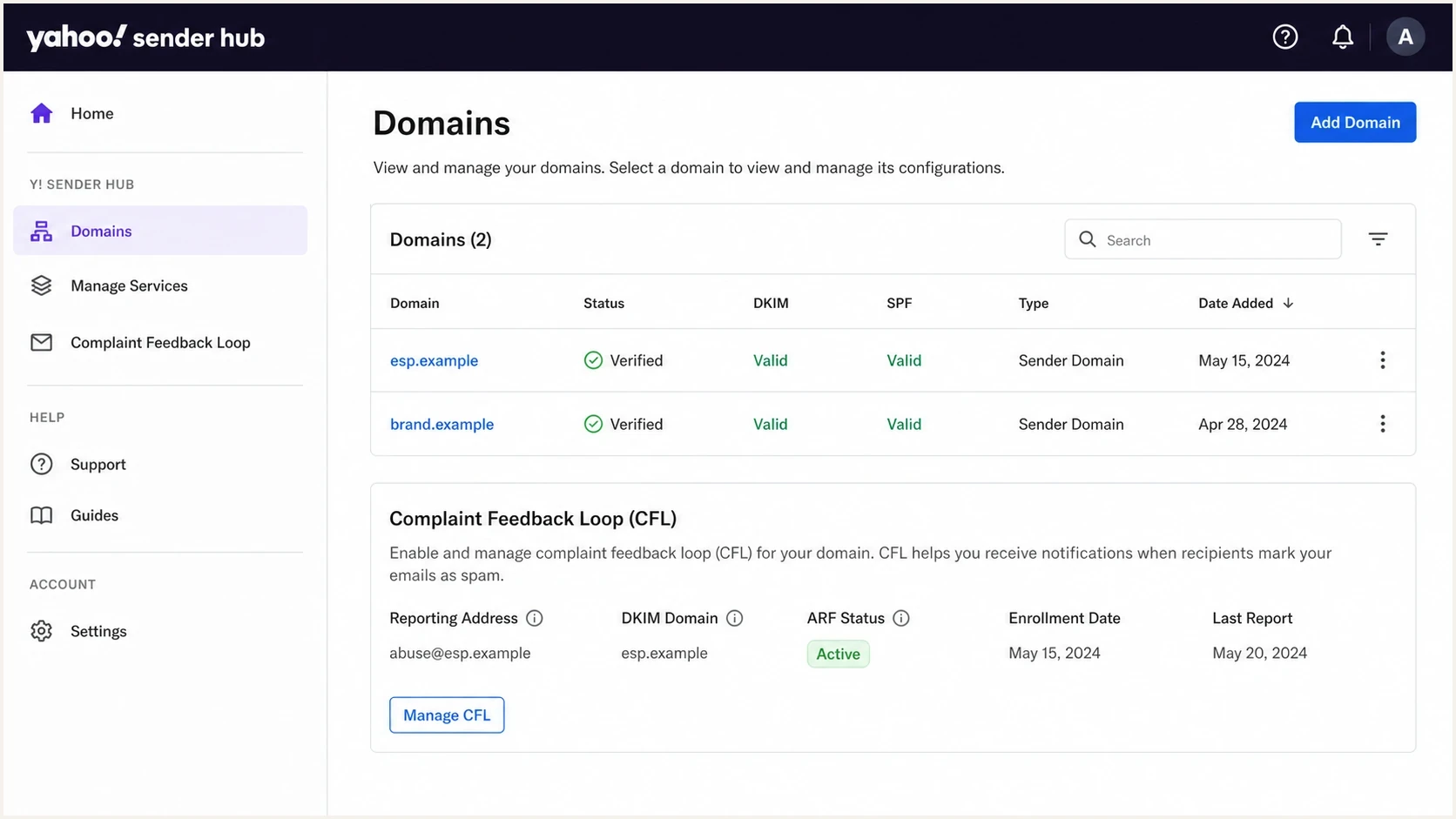
Yahoo Sender Hub screen showing verified DKIM domains and CFL enrollment status.
DKIM and Sender Hub verification records
There are two DNS requirements in this setup: a resolvable DKIM public key and the Sender Hub ownership-verification TXT record. The key is looked up at <selector>._domainkey.<DKIM domain>, using the message's s= and d= values. An ESP-provided CNAME at that selector can point to the ESP's hosted public-key TXT record. Reuse an existing working key; CFL enrollment does not require a new DKIM selector or key. The exact Yahoo verification host and value come from Sender Hub, so do not copy a template blindly.
|
|
|
|
|---|---|---|---|
DKIM TXT or CNAME to TXT | Required | Signer | Verify the message signature |
Yahoo verification TXT | Required | DNS owner | Verify domain control |
SPF TXT | No direct CFL role | Sender | Meet separate authentication requirements |
DMARC TXT | No direct CFL role | Brand | Set policy, alignment, and reporting |
Records involved in Yahoo CFL setup, separated from general sender requirements.
DNS fields to copy from Sender Hubtext
Sender Hub ownership verification
Type: TXT
Host/name: <exact host/name shown by Sender Hub>
Value: <exact TXT value shown by Sender Hub>

DKIM public key example (not a usable key):
selector1._domainkey.example.com. TXT "v=DKIM1; k=rsa; p=<public-key>"

Use your actual selector, DKIM domain, and complete public key.
The DKIM record can be checked with a DKIM record lookup, but DNS validity alone does not prove CFL enrollment. Sender Hub must show the exact DKIM domain as verified and enrolled, and the verified reporting mailbox must receive and process ARF messages.
No new MX record is needed for CFL on the signing domain when the reporting address already receives mail. If the ESP creates a dedicated ARF reporting subdomain, that mailbox needs working inbound mail routing, normally an MX record. This is reporting-mailbox DNS, separate from Yahoo's domain verification.
Yahoo's sender requirements still apply separately: all senders need SPF or DKIM and valid forward and reverse DNS for sending IPs. Bulk senders need both SPF and DKIM plus a DMARC policy of at least p=none that passes on live mail. Yahoo does not publish a numeric bulk-sender threshold.
When Yahoo DNS verification fails
Start with the exact domain added to Sender Hub and the TXT host and value shown for it. A working DKIM selector CNAME delegates the public-key lookup; it does not give the ESP DNS access to publish Yahoo's ownership-verification TXT record.
- Publish the TXT record at the exact requested hostname. Check whether your DNS host appends the zone name automatically so you do not enter the domain twice.
- Add Yahoo's token as a separate TXT record. Keep existing SPF and other TXT records intact; do not append the token to an SPF record.
- Check the authoritative nameservers and public DNS for the complete token. Cached answers expire according to DNS TTLs, so there is no universal verification waiting time.
- Return to Sender Hub to complete verification, then enroll the verified DKIM domain under Manage Services > Complaint Feedback Loop. Verification alone does not enroll it.
Enrollment scope and report handling
Enrollment applies to the exact domain in the DKIM d= value. Enrolling a parent organizational domain does not automatically enroll a DKIM subdomain, so each signing domain used in production needs its own Sender Hub status. Yahoo no longer offers IP-based or CIDR-based CFL enrollment.
- Reporting address: Use any address the operational owner controls; it does not need to match the From or DKIM domain. Yahoo emails a code to verify it, and the verified address can then be reused for more domains.
- Provider coverage: CFL reports cover domains hosted by Yahoo Mail, including AOL. Yahoo Japan is a separate service and is not included.
- ARF identification: Reports contain machine-readable metadata and original message headers. Yahoo sends them with the envelope sender feedback@arf.mail.yahoo.com and signs them with arf.mail.yahoo.com.
- Sender Hub Insights: Insights is separate from CFL. It shows aggregate data for verified DKIM domains, including an inbox-delivered complaint rate, and does not require CFL enrollment.
Do not compare unlike complaint metrics
An ARF count is a stream of individual complaint reports. Yahoo's sender requirements require a spam complaint rate below 0.3%, calculated using mail delivered to the inbox. A rate calculated with all accepted or delivered mail can differ even when both systems are working correctly. For bulk marketing and subscribed mail, support one-click unsubscribe and a visible body link, and honor unsubscribe requests within two days.
When your ESP can manage it
An ESP-managed setup can use double DKIM signing. One signature uses the brand domain for identity and DMARC alignment. The other uses the ESP's operational DKIM domain for complaint handling. The ESP registers its own DKIM domain in Sender Hub and routes ARF reports into its suppression workflow. Keep both signatures valid. Yahoo's FAQ warns that a DMARC pass is not guaranteed when multiple signatures have DMARC alignment but do not all pass verification.
ESP double signs
- DNS owner: ESP verifies its own DKIM domain in Sender Hub.
- Client work: No additional Yahoo verification TXT record when the ESP signs every relevant message with its enrolled domain.
- Evidence: ESP documents ARF receipt, client mapping, and suppression.
Brand signs only
- DNS owner: Client verifies the brand DKIM domain or delegates DNS.
- Client work: Add Yahoo's generated TXT record and enroll the domain.
- Routing: Send complaints to the party that controls suppression.
What double signing looks like in headerstext
DKIM-Signature: v=1; a=rsa-sha256; d=esp.example; s=esp1; ...
DKIM-Signature: v=1; a=rsa-sha256; d=brand.example; s=brand1; ...
The ESP must maintain valid platform signing on every relevant production stream. Before switching ESPs or changing the DKIM d= domain, verify and enroll the replacement signing domain and confirm its ARF destination. Changing only the s= selector for key rotation does not change domain-level enrollment, provided the new key validates.
How to verify the setup
Verify the setup with a fresh message sent through the production path to a Yahoo mailbox. Inspect the full headers and record every DKIM d= domain and s= selector. Compare those values with the exact domains shown as verified and enrolled in Sender Hub.
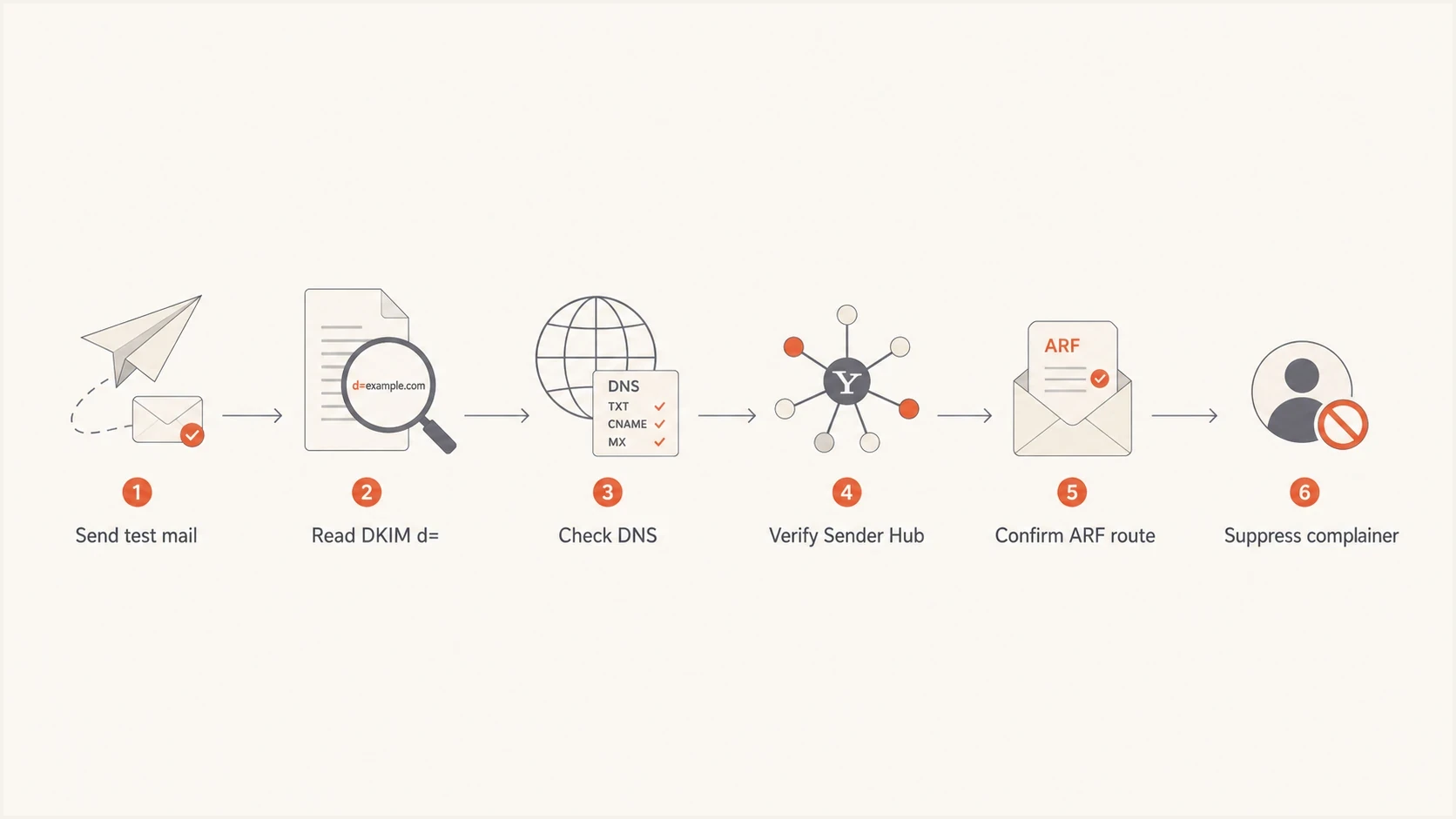
Flowchart for verifying Yahoo CFL from DKIM headers through ARF suppression.
- Header check: Confirm Yahoo's Authentication-Results shows dkim=pass for the exact enrolled DKIM domain on live mail. A DKIM-Signature header alone does not prove the signature is valid.
- DNS check: Confirm the DKIM key is at least 1024 bits and the Yahoo verification TXT record resolves.
- Portal check: Confirm Sender Hub shows each production DKIM domain as verified and enrolled.
- Mailbox check: Confirm the reporting address passed Yahoo's code verification and is monitored.
- ARF check: Accept only expected Yahoo ARFs, authenticate them, and retain processing logs.
- Suppression check: Confirm a received complaint is mapped to the correct client and suppresses the recipient from that client's future campaigns.
A test message provides the authentication headers produced by the real sending path. A separate domain health check can catch missing DMARC, SPF, DKIM, and DNS basics around the same sending domain.
Why complaint counts can disappear
A sudden drop in Yahoo ARFs does not prove that users stopped complaining. Reports can stop when the exact DKIM domain is not enrolled, when they go to the wrong mailbox, or when the ESP's parser fails after receipt. Lower inbox placement can also reduce the number of messages available for users to mark as spam from the inbox.
Ask the ESP for specific evidence
"Yahoo changed something" is not a root cause. The ESP should identify the enrolled DKIM domain, its Sender Hub status, the verified ARF destination, the number of ARFs received, and the number of recipients suppressed.
Separate mailbox-provider behavior from ESP processing. Yahoo produces ARFs for qualifying complaints tied to an enrolled DKIM domain. After Yahoo sends the ARF, the ESP still has to receive it, validate it, parse it, map it to the correct client, and suppress the recipient. A break anywhere in that chain can look like "no complaints" in a client dashboard.
Yahoo side
- Enrollment: The exact DKIM domain must be verified and enrolled.
- Trigger: A user marks a DKIM-signed message as spam.
- Output: Yahoo sends an ARF to the verified reporting address.
ESP side
- Receipt: The mailbox or endpoint must accept and authenticate the ARF.
- Parsing: The parser must map the original headers to the correct recipient and client.
- Action: The recipient must be suppressed from the correct client's future campaigns.
For shared ESP signing domains, retain message identifiers that connect an ARF to the correct client and recipient. Make suppression safe to repeat and deduplicate reports for the same message and recipient, including reports associated with multiple enrolled signatures. Do not count duplicate reports as separate complaints.
Monitor authentication with Suped
Yahoo CFL is not a DMARC report feed, and Suped does not replace Sender Hub enrollment or ARF processing. Suped's DMARC monitoring helps teams review sending sources and authentication failures. Its blocklist (blacklist) monitoring provides separate reputation alerts.
DMARC record detail view showing SPF, DKIM, DMARC, rDNS diagnostics, and DNS records
Use Sender Hub to verify and enroll the Yahoo CFL DKIM domain. Use Suped to monitor the surrounding domain authentication and reputation controls. This keeps DNS issues, authenticated sending sources, and changes in reputation signals visible without treating DMARC reports as complaint reports.
For teams managing multiple brands or clients, Suped's MSP and multi-tenant dashboard can separate domains and review authentication issues by source. Suped's DMARC monitoring can identify authentication failures that sit alongside Yahoo delivery and complaint problems, while the Yahoo ARF pipeline remains with Sender Hub and the ESP.
Views from the trenches
Best practices
Verify the live DKIM d= domain on real mail before enrolling anything in Sender Hub.
Keep one complaint mailbox per operational owner, with routing rules that log every ARF.
Ask ESPs for proof of enrollment and a recent ARF sample, rather than a generic assurance.
Common pitfalls
Enrolling the visible From domain fails when the message is signed only by an ESP domain.
Assuming old Yahoo FBL enrollment still works leaves complaint processing blind after cutover.
Comparing provider totals without raw ARF logs creates blame before evidence is available.
Expert tips
Double signing lets the ESP manage CFL while the brand keeps its own DKIM identity.
Lower inbox placement reduces inbox exposure, so fewer ARFs do not prove fewer complaints.
Check DKIM, enrollment, mailbox routing, and parser logs before diagnosing missing Yahoo ARFs.
Expert view
Expert from Email Geeks says ESPs that double sign with their own DKIM domain can verify that domain and manage Yahoo CFL without client DNS changes.
2024-07-01 - Email Geeks
Marketer view
Marketer from Email Geeks says missing Yahoo complaints should trigger a check of the enrolled DKIM domain, the reporting mailbox, and raw ARF processing.
2024-07-01 - Email Geeks




