How do I set up Complaint Feedback Loop (CFL) within Yahoo SenderHub with DKIM domain, and why is my BIMI logo not showing?

Published 30 Apr 2025
Updated 13 Aug 2026
12 min read
Summarize with
Updated on 13 Aug 2026: We updated this guide with current Yahoo Sender Hub and BIMI requirements, plus operational steps for ARF complaints.
Enroll Yahoo's Complaint Feedback Loop against the DKIM signing domain, specifically the value in the d= tag of the DKIM-Signature header. If the visible From domain is marketing.notcutts.co.uk but the DKIM signature says cd.marketing.notcutts.co.uk, add, verify, and enroll cd.marketing.notcutts.co.uk in Yahoo CFL. The reporting address can be any mailbox you control, but the enrolled sending domain has to match the DKIM d= domain for Yahoo to send ARF reports. If an email service provider controls signing and complaints, confirm whether it already enrolls and processes that domain before creating another workflow.
The BIMI answer is different. BIMI discovery starts with the header From author domain, not the DKIM signing domain. For mail from marketing.notcutts.co.uk, a receiver first queries default._bimi.marketing.notcutts.co.uk. If no valid record exists there, it can fall back to default._bimi.notcutts.co.uk. Publish the subdomain record when that mail stream needs its own logo or an explicit override. Yahoo's Sender Hub FAQs tie display to a valid BIMI SVG, an enforced DMARC policy, bulk mail, reputation, and engagement.
- CFL domain: Use the DKIM d= domain. Yahoo sends ARF reports when that signed domain is enrolled and a recipient reports the message.
- DNS change: If only the CFL enrollment is wrong, add and verify the DKIM domain in Sender Hub. If the DKIM d= value is wrong, change the sender platform signing setup and publish its DKIM key.
- BIMI domain: Start with the header From domain. A DKIM subdomain does not control the BIMI lookup, and an absent subdomain record can fall back to the organizational domain.
- Policy warning: An sp=none tag on marketing.notcutts.co.uk affects deeper subdomains of marketing.notcutts.co.uk, not marketing.notcutts.co.uk itself when it has p=reject.
Which domain Yahoo CFL uses
Split this problem into separate identities because email headers hide important detail. The header From domain is the brand-facing author domain. The envelope From domain is the bounce path used by SPF. The DKIM d= domain is the domain that cryptographically signs the message. Yahoo CFL is tied to the DKIM-signed identity, so enrolling the envelope From or header From domain leaves reporting quiet when the message is signed by a different subdomain.
|
|
|
|---|---|---|
CFL | DKIM d= | ARF follows signing |
BIMI | Header From first | Org fallback is possible |
SPF | Envelope From | Return path check |
DMARC | Header From | Policy domain |
Use the domain that matches the protocol being checked.
Do not infer the envelope domain from the visible sender
A mailbox client shows the visible From address, but that is not proof of the envelope From domain or the DKIM d= value. Open the full headers of a real campaign message and inspect the DKIM-Signature header before changing Sender Hub enrollment.
- Header: Find the DKIM-Signature line and read the d= tag.
- Sender Hub: Add that domain under Domains, complete verification, then enroll it under Complaint Feedback Loop.
- Reports: Expect ARF reports only when Yahoo users report mail signed by the enrolled DKIM domain.
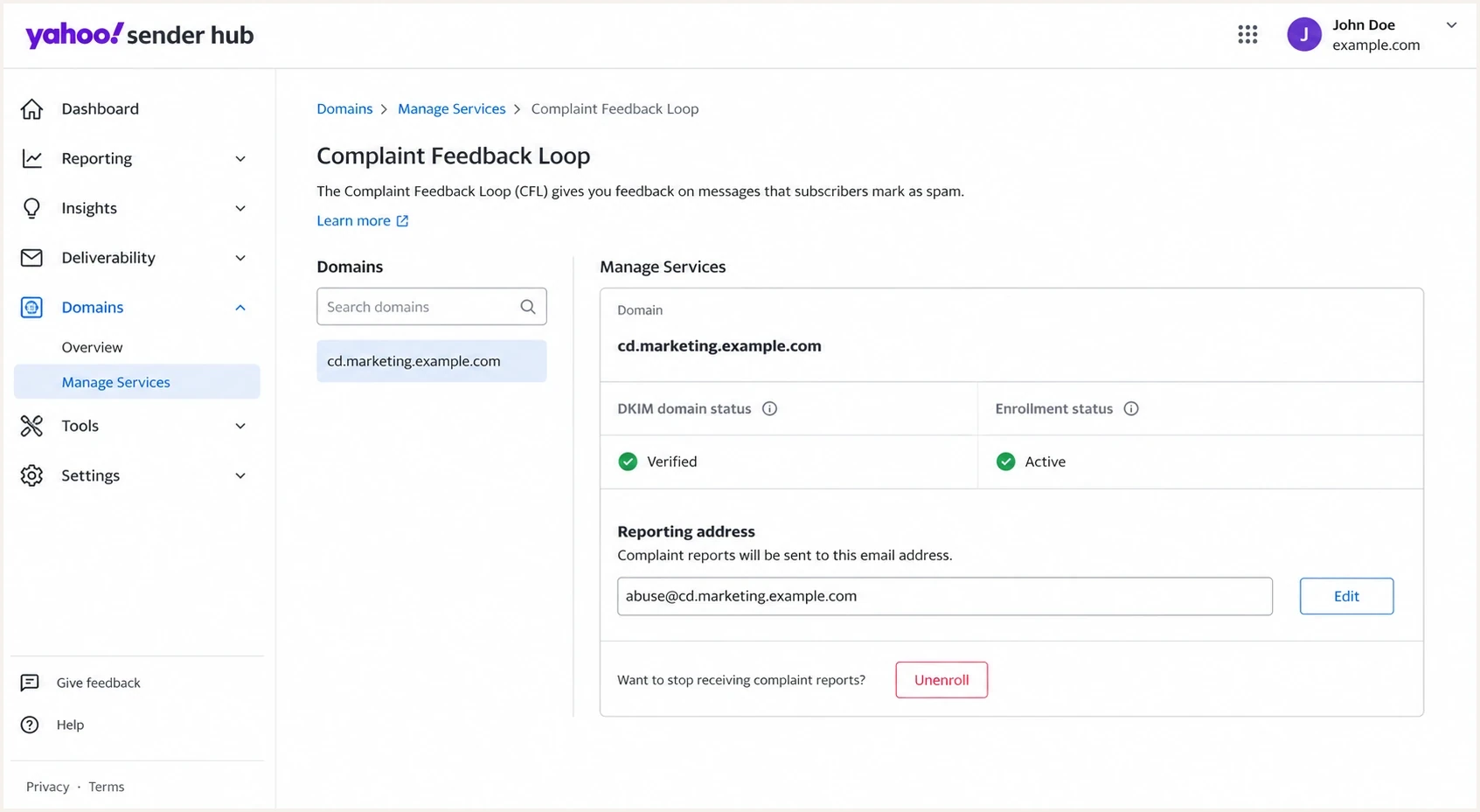
Yahoo Sender Hub CFL enrollment screen showing a verified DKIM domain.
How to verify the DKIM domain
The cleanest check is to send yourself a real message from the same stream that goes to Yahoo recipients, then view the full headers. Do not rely on a setup screenshot from a campaign tool, because the message can have multiple signatures, a vendor signature, or a custom signing domain that differs from the branded From address.
DKIM signature to inspecttext
DKIM-Signature: v=1; a=rsa-sha256; d=cd.marketing.example.com;
 s=selector1; c=relaxed/relaxed; h=from:to:subject:date;
 bh=BODY_HASH; b=SIGNATURE_DATA
In that example, the CFL enrollment domain is cd.marketing.example.com. If that domain is not already verified in Sender Hub, add it and publish the verification TXT record Yahoo gives you. If your sender platform is signing with the wrong d= domain, change the sender platform configuration first, then publish the DKIM public key for the new selector. Yahoo requires a key length of at least 1024 bits and recommends 2048 bits when the platform supports it.
DKIM public key locationdns
selector1._domainkey.cd.marketing.example.com.  TXT
"v=DKIM1; k=rsa; p=BASE64_PUBLIC_KEY"
DKIM checker
Check selector records and public key configuration.
?/7tests passed
After publishing the key, use a DKIM checker to confirm the selector resolves and the key is syntactically valid. If Yahoo CFL enrollment is still quiet after that, check whether the enrolled domain and the observed d= value are identical, including every subdomain label.
When a DNS-only change is enough
A DNS-only change is enough when the outbound mail already signs with the correct DKIM domain and Sender Hub only needs proof that you control that domain. A sender platform change is required when the outbound mail needs to sign with a different DKIM domain.
Why the BIMI logo is not showing
The common trap is expecting the BIMI lookup to follow the DKIM signing domain. It does not. BIMI uses the header From author domain first. If the user sees email from marketing.notcutts.co.uk, the first lookup is default._bimi.marketing.notcutts.co.uk, even when the message is DKIM-signed by cd.marketing.notcutts.co.uk. If the subdomain has no valid BIMI record, the receiver can check default._bimi.notcutts.co.uk as the organizational-domain fallback.
Yahoo CFL
- Domain: Enroll the DKIM d= domain.
- Output: ARF complaint reports for reported mail.
- Failure: No reports when the wrong signed domain is enrolled.
BIMI logo
- Domain: Start at the header From domain, with organizational-domain fallback when no valid record exists there.
- Output: A brand logo when the mailbox provider chooses to show it.
- Failure: No logo despite technically valid DNS, often because reputation or cache gates display.
BIMI and DMARC recordsdns
default._bimi.marketing.example.com.  TXT
"v=BIMI1; l=BIMI_SVG_URI; "
"a=VMC_CERT_URI"

_dmarc.marketing.example.com.  TXT
"v=DMARC1; p=reject; rua=mailto:dmarc@example.com"
BIMI readiness checks
A quick way to separate technical requirements from display conditions.
Ready
show eligible
Valid SVG, enforced DMARC, a record found through the header From lookup, and a reachable certificate URL when used.
Needs work
not eligible
Record exists, but DMARC, SVG formatting, selector, or certificate details need correction.
Display gated
provider decides
DNS is correct, but mailbox provider reputation, engagement, volume, or cache prevents display.
If the records are correct and the logo still does not show in Yahoo Mail, stop changing DNS and check the viewing context. Yahoo currently displays BIMI logos in the message list and read view of its Yahoo and AOL mobile apps, plus the desktop webmail read view. Absence from the desktop message list alone does not prove failure. Yahoo does not require a VMC, although it uses one as an eligibility signal when the BIMI record includes it. Sufficient sending reputation and engagement are still required.
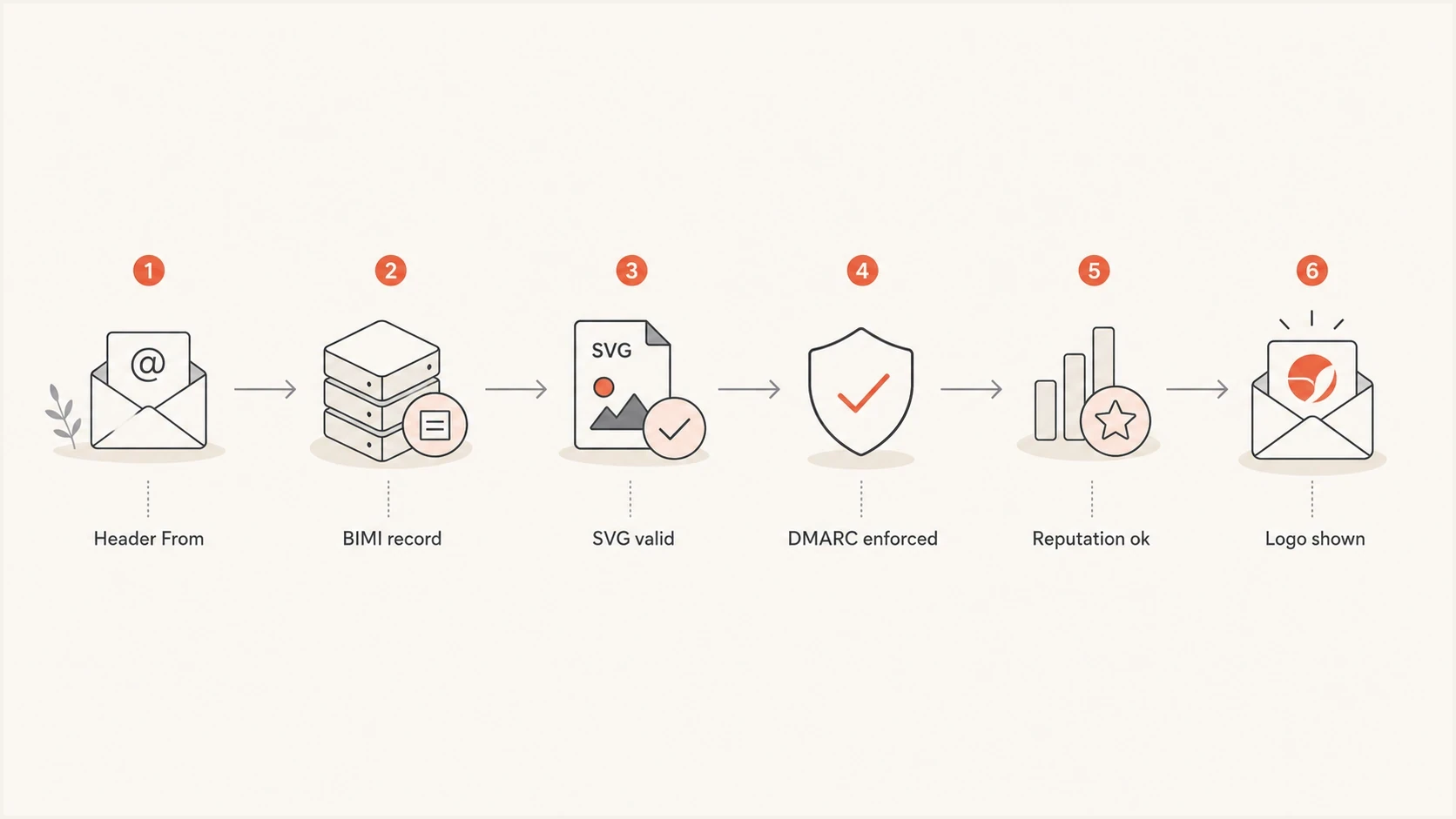
Flowchart showing BIMI lookup and display checks from header From domain to logo display.
The sp=none warning in plain English
The sp= tag is a subdomain policy. Its scope is often misunderstood because DNS is hierarchical. A DMARC record at marketing.example.com applies directly to marketing.example.com through p=. Its sp= value applies to names below it, such as news.marketing.example.com, when those names lack their own DMARC record.
DMARC hierarchy exampledns
_dmarc.example.com.  TXT
"v=DMARC1; p=quarantine; rua=mailto:dmarc@example.com"

_dmarc.marketing.example.com.  TXT
"v=DMARC1; p=reject; sp=none; rua=mailto:dmarc@example.com"
|
|
|
|---|---|---|
Org DMARC | example.com | Base policy |
Marketing | marketing | Direct policy |
sp tag | children | Fallback |
Child DMARC | child | Overrides |
The sp tag only controls lower names.
What that means for BIMI
If marketing.example.com has its own DMARC record with p=reject, then marketing.example.com has the enforced DMARC policy BIMI expects. A warning about sp=none concerns deeper domains below marketing.example.com. It does not mean the marketing.example.com BIMI record is on the wrong domain.
A practical troubleshooting workflow
Use this order to avoid mixing Sender Hub enrollment, DNS verification, and BIMI display into one task. First prove which domains the message uses. Then fix the Yahoo CFL enrollment. Next, validate BIMI under the visible From domain and its organizational-domain fallback. Last, review reputation and complaint signals instead of repeatedly changing working DNS records.
- Capture: Send a real message from the same campaign stream and save the full headers.
- Read: Record the header From domain, envelope From domain, DKIM selector, and DKIM d= domain.
- Enroll: Add the DKIM d= domain to Sender Hub, verify it, and enroll it in CFL.
- Publish: Check BIMI at the header From domain first, then confirm any intended organizational-domain fallback, SVG, and certificate URL.
- Monitor: Process ARF complaints and review Sender Hub Insights before deciding the setup failed.
For a broad check across DMARC, SPF, and DKIM, run a domain health checker before changing records. It is faster to catch a missing selector, weak DMARC policy, duplicate TXT record, or broken DNS lookup up front than to debug the absence of ARF reports later.
?
What's your domain score?
Deep-scan SPF, DKIM & DMARC records for email deliverability and security issues.
Suped's product keeps authentication evidence in one place through DMARC monitoring, SPF and DKIM diagnostics, blocklist (blacklist) monitoring, hosted policy records, real-time alerts, and issue-level fix steps. This supports the workflow when the problem is a mismatch between the domain used in a message, the domain enrolled in Sender Hub, and the identity evaluated by a mailbox provider.
DMARC record detail view showing SPF, DKIM, DMARC, rDNS diagnostics, and DNS records
The same workflow also helps with related Yahoo DKIM problems. If the message passes SPF and DMARC but Yahoo still reports DKIM issues, compare the signed domain, selector, and authentication result in the headers before changing policy. This related Yahoo DKIM errors guide covers that specific failure pattern.
How to process ARF complaints and track the rate
Enrollment only creates the reporting path. Each Yahoo complaint arrives as an Abuse Reporting Format message with machine-readable metadata and the original message headers. Route reports to a monitored mailbox or automated processor, then use the original headers to identify the recipient and sending stream.
- Suppress immediately: Stop further promotional mail to the complaining recipient across every list that uses the same consent.
- Map the complaint: Log the campaign, sending stream, message identifier, and DKIM domain so repeated patterns are visible.
- Validate automation: Check the report's authentication and expected Yahoo markers before an automated job changes subscriber data. Yahoo signs CFL mail with arf.mail.yahoo.com and uses feedback@arf.mail.yahoo.com as the envelope sender.
- Fix the cause: Review consent source, audience age, message frequency, and segmentation when complaints cluster around one stream.
Sender Hub Insights is separate from CFL and does not require CFL enrollment. Activate Insights for a verified DKIM domain, allow 24 to 48 hours for data, and remember that Yahoo withholds daily data below an unpublished volume threshold. Its complaint rate uses inbox-delivered messages as the denominator, covers Yahoo-managed domains, and is displayed in UTC. Keep the rate below Yahoo's 0.3% enforcement threshold. When one DKIM domain signs several streams, Insights rolls their data together, so retain campaign-level detail in your ARF processing.
CFL reports are not the complaint-rate denominator
Counting ARF messages against all messages sent will not reproduce Yahoo's rate. Use Sender Hub Insights for Yahoo's inbox-based rate and use ARF reports to suppress recipients and diagnose the affected stream.
Views from the trenches
Best practices
Enroll the DKIM d= domain in Yahoo CFL, then confirm ARF reports reach a controlled mailbox.
Keep the BIMI TXT record on the visible From domain and test after DNS propagation finishes.
Use enforced DMARC on the author domain before treating BIMI display as a client issue.
Common pitfalls
Enrolling the return-path domain leaves Yahoo CFL quiet when DKIM signs with another domain.
Assuming BIMI inherits downward hides missing records on the real visible From domain used.
Reading sp=none as a parent-domain failure causes unnecessary DNS changes and delays.
Expert tips
Capture full headers first, because the visible From line alone does not show every identity.
Separate enrollment fixes from DKIM signing changes, because they happen in different systems.
Treat logo display as probabilistic after setup; reputation and engagement still affect Yahoo.
Expert from Email Geeks says Yahoo CFL should be enrolled on the DKIM d= domain because Yahoo sends ARF reports when that signed domain is enrolled.
2024-08-19 - Email Geeks
Expert from Email Geeks says BIMI starts with the header From domain, so a separate DKIM signing subdomain does not move the logo lookup.
2024-08-19 - Email Geeks
The practical bottom line
Set up Yahoo Sender Hub CFL with the DKIM d= domain, not the envelope From domain and not automatically the visible From domain. If your current mail signs as cd.marketing.notcutts.co.uk, that is the domain to verify and enroll for CFL. Complete DNS verification in Sender Hub if the signing domain already exists. Change the sender platform's DKIM signing configuration only if the message needs to sign with a different domain.
For BIMI, start the lookup at the visible From author domain, such as marketing.notcutts.co.uk. Publish a record there for an explicit subdomain logo, or rely on the organizational-domain record when that fallback is intended. If the author domain has p=reject and the BIMI SVG is valid, an sp=none warning on that same domain does not automatically block BIMI for that domain. After the technical setup is correct, Yahoo's display decision still depends on mailbox-side reputation, engagement, bulk sending signals, and the view being tested.




