What causes the Yahoo! PH01 error in email campaigns and how can it be resolved?

Updated on 3 Aug 2026: We expanded the troubleshooting steps to cover compromised senders and Yahoo's current guidance on malicious content.
Yahoo PH01 is a content-based policy rejection. It means Yahoo accepted enough of the SMTP conversation to inspect the message, then rejected the campaign because something in the deployed email or its linked material was unacceptable under Yahoo's content policies. Treat PH01 as a message content problem first, while checking authentication and sender security as supporting signals rather than assuming a normal DMARC failure.
Common triggers include suspicious URLs, rewritten tracking links, hosted image URLs, attachments, third-party ad modules, redirects, or a landing page that changed after the campaign was built. Yahoo's own SMTP codes classify PH errors as content-based blocks. Yahoo specifically names phishing attempts, viruses, ransomware, other malicious software, and links or URLs associated with that material.
The fix is to stop retrying the unchanged campaign, compare the failed message against a Yahoo-accepted version, isolate content changes one at a time, remove or replace suspicious URLs and assets, test the exact deployed MIME, and escalate to Yahoo or the ESP only after collecting the bounce, send times, message samples, and campaign IDs.
What PH01 means
PH01 usually appears as a 554 permanent rejection. A 5xx response is not a normal temporary deferral. Re-sending the same message repeatedly creates more failed attempts without addressing the reason Yahoo rejected it.
Typical PH01 bouncetext
554 Message not allowed - [PH01]
Email not accepted for policy reasons.
The key detail is that PH01 is tied to what Yahoo sees in the message. That includes more than the visible template. Yahoo can evaluate HTML, plain text, headers, attachments, images, link destinations, tracking domains, redirect chains, embedded third-party content, sender identity signals, and content hosted behind URLs.
Do not diagnose PH01 as a blacklist issue first
A blocklist or blacklist problem can hurt delivery, but Yahoo classifies PH errors as content-based. Check blocklist and blacklist status for completeness, but do not let that replace a content diff and sender security review.
- Primary cause: the campaign content triggered Yahoo policy filtering.
- Supporting checks: authentication, DNS health, sender security, and blocklist status establish a clean baseline.
- Bad response: re-sending the same failed creative to Yahoo without removing the trigger.
Why a stable campaign can fail suddenly
The confusing PH01 case is the one where the sender says nothing changed. One campaign can fail at Yahoo, another campaign sent minutes later can pass, then the next one can fail again. That does not prove the filter is random. The investigation has to examine the exact deployed message, not the reusable template.
A template can stay the same while the message content changes. A news item can add a URL, an image, an email address, a phone number, a sponsor module, or a quote that resembles a credential collection lure. A tracking link can rewrite every visible URL through the same branded domain while the final destinations still differ. A landing page can change after the email is assembled. An ad server can rotate a creative that Yahoo rejects.
|
|
|
|---|---|---|
URLs | High | Audit redirects |
Images and tracking pixels | High | Check hosts |
Attachments | High | Scan or remove |
Copy | High | Rewrite sections |
DMARC | Supporting | Verify baseline |
Blocklist or blacklist | Supporting | Monitor separately |
How to rank PH01 signals during triage.
Filters are not static. A URL that passed yesterday can be reported today, and a shared content service can be abused by another sender. A classifier can also change. The rejection can still be wrong, but the first useful question is not "what changed in DNS?" It is "what exact content did Yahoo receive?"
Rule out a compromised sender
Yahoo advises senders with PH errors to examine outbound queues for objectionable content and confirm that spammers are not abusing the mail server. This check matters when PH01 affects unrelated messages, a minimal plain-text test also fails, or send logs contain traffic the team cannot explain.
- Review queues and logs: look for unknown campaigns, unusual volume, new source IPs, and unexpected recipient patterns.
- Audit access: check sender accounts, API keys, integrations, and administrator logins for unauthorized use.
- Contain abuse: disable compromised accounts, rotate exposed credentials, remove malicious content, and patch the entry point.
- Retest carefully: send a minimal legitimate message to a controlled Yahoo mailbox before restoring campaign traffic.
Clean the source before resuming
Removing one rejected URL will not resolve an active compromise. Resume normal volume only after unauthorized access has been closed, outbound abuse has stopped, and controlled tests use clean content.
How to troubleshoot PH01
Start with the bounce. Save the full SMTP response, the timestamp, the sending IP or pool, the campaign ID, the Yahoo recipient domain, and at least one full sample of the deployed message. If the ESP has a raw MIME export, use that instead of a screenshot or editor preview.
- Freeze sending: pause the affected Yahoo segment so the same rejected message is not retried.
- Find a control: identify a near-identical campaign that Yahoo accepted in the same period.
- Diff the MIME: compare HTML, text, headers, attachments, image URLs, link URLs, phone numbers, and addresses.
- Send a minimal control: use plain text with no attachment and only the required compliance links.
- Restore slowly: add one group of assets back at a time until the rejection returns.
- Escalate cleanly: send Yahoo or the ESP the bounce, samples, timestamps, campaign IDs, and test results.
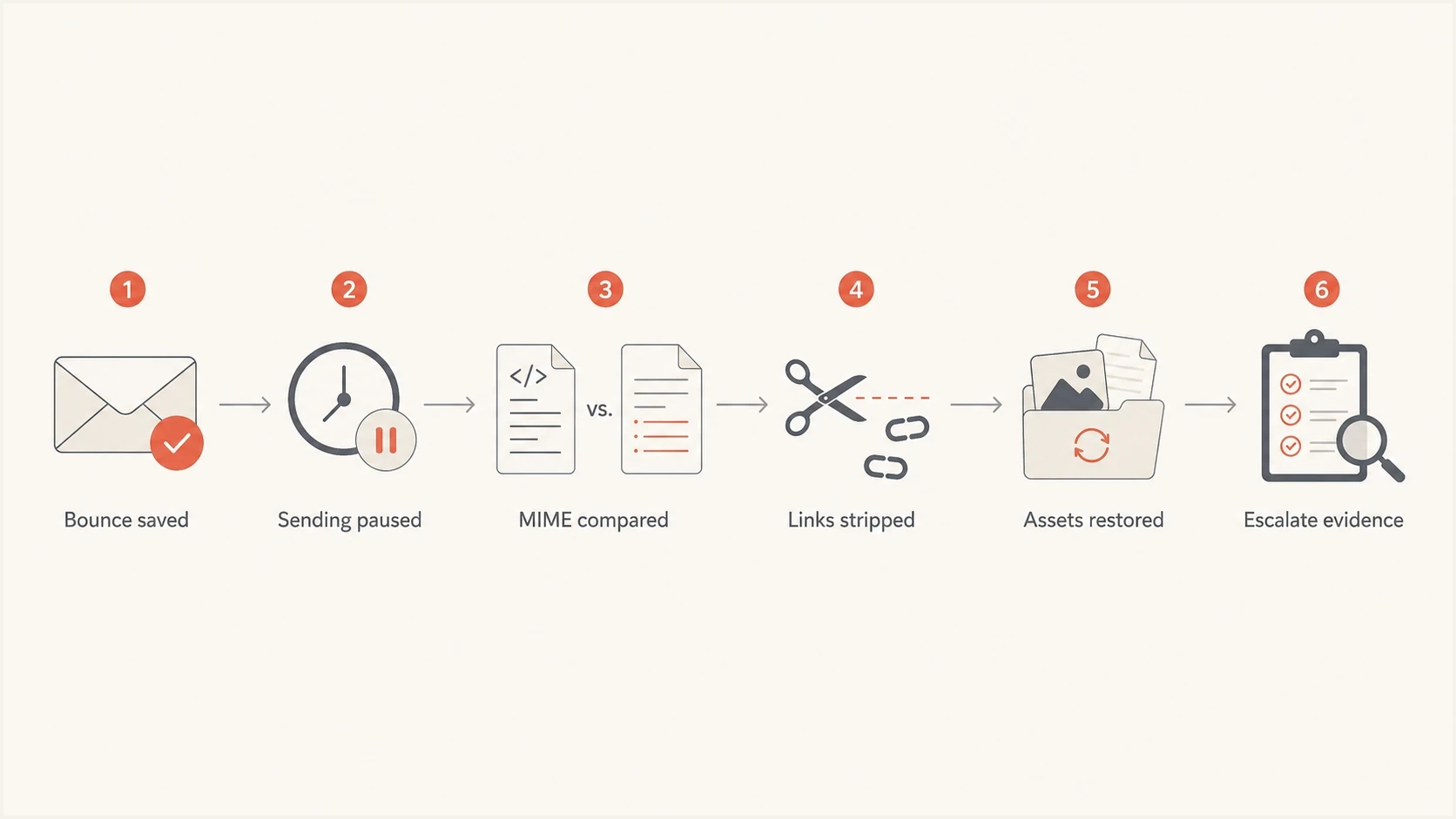
Yahoo 554 PH01 troubleshooting flow for isolating rejected email content.
After each edit, send a real message to a controlled Yahoo mailbox and inspect the result with an email tester. The test has to use the deployed campaign path, including the same link rewriting, image hosting, headers, and sender setup that Yahoo sees. Keep tests limited and change one variable per send.
Email tester
Send a real email to this address. Suped shows a results button when the test is ready.
?/43tests passed
Testing a draft inside an editor is weaker than testing the message after the ESP has processed it. ESP processing is where tracking links, open-tracking pixels, footers, unsubscribe blocks, headers, and ad modules get finalized. PH01 often appears only in that finalized version.
Compare content, not just infrastructure
The highest-value PH01 work is a controlled comparison. Take one failed message and one accepted message. Do not compare only the subject line or template name. Compare the final MIME and all destinations after redirects.
Low-signal checks
- Template only: checking that the reusable layout did not change misses article content.
- Visible links: looking only at displayed text misses tracking rewrites and redirects.
- Old pass: assuming yesterday's success means today's content is clean wastes time.
High-signal checks
- Final MIME: review the exact message after ESP processing and personalization.
- Redirect chain: follow every URL to its final destination and check the hosted page.
- Asset groups: test links, images, attachments, sponsor modules, and footer blocks separately.
If the same template sends different news content, the news content is part of the risk surface. Check every URL in the article body, image source, sponsor block, social icon, unsubscribe flow, preference center, tracking redirect, and open-tracking pixel. Also search the copy for phone numbers and email addresses that can resemble account recovery or credential collection patterns.
PH01 isolation templatetext
Version A: failed at Yahoo
Version B: accepted at Yahoo

Change only one item per test:
- remove all links
- restore one link group
- replace image hosts
- remove attachments
- remove third-party ad modules
When the trigger is found, the fastest fix is usually direct: remove the suspect URL, replace the image, remove the attachment or third-party module, rewrite the copy, or repair a compromised destination. Then resend only after the revised campaign passes a controlled test.
Where authentication and reputation still matter
A clean SPF, DKIM, and DMARC setup does not clear a PH01 block by itself. It does reduce noise during troubleshooting and satisfies the authentication baseline Yahoo expects from senders. Authentication failures can also produce separate policy rejections, so record the exact SMTP diagnostic rather than treating every Yahoo 554 response as PH01.
Use a domain health checker to confirm the baseline, keep DMARC monitoring active so authentication drift is visible, and use blocklist monitoring to identify a parallel blacklist or reputation issue. These checks support the PH01 investigation, but they do not replace the content review.

Issue steps to fix dialog showing the issue overview, tailored fix steps, and verification action
Suped's product keeps DMARC, SPF, DKIM, hosted records, blocklist monitoring, alerts, and issue-resolution steps visible while the content team isolates the Yahoo-specific trigger. For PH01, that gives the team a stable authentication and reputation baseline without misclassifying the rejection as a DMARC error.
A practical split of responsibility
- Deliverability team: collect bounces, pause retries, confirm authentication, and coordinate testing.
- Content team: review copy, URLs, images, attachments, sponsor modules, and final landing pages.
- ESP team: check shared infrastructure, link rewriting, pool behavior, and platform incidents.
- Yahoo ticket: submit only after the evidence set is complete enough for review.
When to escalate
Escalation is appropriate when the campaign has a legitimate business purpose, the content and security reviews do not find an obvious trigger, and the rejection is consistent across controlled test sends. Escalate through the ESP when many unrelated streams on shared infrastructure begin receiving PH01 at the same time. The trigger can sit in shared link infrastructure, an ESP-level content pattern, or a Yahoo classification change that the ESP needs to address with Yahoo.
For a deeper version of the same remediation path, use this 554 PH01 fix as a reference while preparing the evidence package.
- Include bounces: provide the exact SMTP response and any diagnostic strings.
- Include timing: send timestamps help Yahoo and the ESP compare filter events.
- Include samples: attach failed and accepted MIME examples with test differences noted.
- Include scope: state whether the issue affects one campaign, one domain, one sending pool, or many streams.
If Yahoo or the ESP adjusts something and delivery resumes without a sender-side change, keep the evidence. The same pattern can recur later, and a clear incident record shortens the next investigation.
Views from the trenches
Best practices
Treat PH01 as a content rejection first, then test one visible change at a time carefully.
Compare the full MIME, rendered links, image URLs, phone numbers, and email addresses.
Capture bounce text, send time, campaign ID, and sample recipients before escalation.
Common pitfalls
Do not assume a stable template is safe when syndicated article links change during the day.
Do not keep retrying the same rejected campaign to Yahoo without content changes in place.
Do not treat PH01 as a pure IP or blocklist issue when the bounce names content policy.
Expert tips
Keep a last-known-good Yahoo sample so content differences are quick to isolate under pressure.
Ask the ESP for pool-level PH01 patterns when many streams fail at the same time.
Use Suped alerts to spot authentication drift while content teams work the PH01 case.
Marketer from Email Geeks says Yahoo's PH01 message should be treated as a content-based block, with URLs, images, body copy, and hosted assets reviewed before assuming infrastructure failure.
2024-10-08 - Email Geeks
Marketer from Email Geeks says accepted and rejected campaigns sent minutes apart still need a full content comparison because news items can introduce URLs, addresses, and phone numbers.
2024-10-08 - Email Geeks
The practical resolution
Yahoo PH01 is resolved by finding and removing the content element that Yahoo rejects, cleaning a compromised sender, or giving Yahoo and the ESP enough evidence to correct a bad classification. Start by pausing the campaign, comparing the final MIME, removing URLs and assets in controlled groups, testing a minimal message, and restoring only what passes.
Keep authentication and reputation clean while doing that work. Suped's product keeps DMARC, SPF, DKIM, hosted records, MTA-STS, SPF flattening, blocklist and blacklist checks, alerts, and issue-resolution steps in one place. That does not make PH01 an authentication error. It gives the team a stable base while the content and sender security checks run.
PH01 means Yahoo rejected something in the campaign content or linked material under its policy rules. Fix the trigger first, validate the final deployed message, then escalate only with complete evidence.




