What causes the Gmail DSN '451 4.3.0 Mail server temporarily rejected message' and how to resolve it?

Updated on 8 Aug 2026: We clarified what Gmail's generic 451 4.3.0 response proves and updated retry guidance for both generic and specific codes.
The Gmail DSN 451 4.3.0 means Gmail temporarily rejected the message during SMTP delivery. It is a soft failure, not a final bounce. Keep the original message in the sending queue, retry with exponential backoff, and check whether Gmail accepts it on a later attempt.
When this DSN appears across many unrelated customers or sending streams in the same narrow time window, a Gmail-side event is the leading explanation. When it appears only for one domain, IP, campaign, or route, investigate sender-specific rate pressure, reputation signals, authentication gaps, DNS problems, SMTP behavior, and message patterns. The code alone does not identify any one of these as the cause.
Typical Gmail DSNtext
451 4.3.0 Mail server temporarily rejected message.
For more information, see Google SMTP help.
j2-20020a5d4642000000b00336654a651bsi1489864wrs.735 - gsmtp
Google lists Gmail SMTP errors so administrators can separate temporary 4xx responses from permanent 5xx failures. Do not suppress the recipient, manually resend duplicate mail, or assume Gmail has blocked the sender permanently.
What this Gmail DSN means
Read the response in layers. 451 is a temporary SMTP reply. In the enhanced code 4.3.0, the first digit marks a transient failure, the middle digit identifies a mail-system status, and the final zero means other or undefined. It does not identify an invalid mailbox or a precise root cause. The gsmtp suffix confirms the response came through Google's SMTP infrastructure.
|
|
|
|---|---|---|
451 | Temporary SMTP reply | Retry with backoff |
4.3.0 | Other or undefined mail-system status | Use logs for the cause |
gsmtp | Google SMTP path | Scope Gmail traffic |
No 5xx | Not a final failure | Keep the message queued |
How to read the response before changing anything.
Treat it as a deferral first
The safe response is to queue, retry, and measure. A 4xx reply tells the sender that delivery can work later. Changing DNS, swapping IPs, or resending the campaign manually creates more noise before the cause is known.
- Keep the original message in the MTA queue until normal retry limits expire.
- Keep the address active because Gmail has not said the address is invalid.
- Compare the same timestamp across customers, IPs, domains, and mail streams.
Do not confuse 451 4.3.0 with specific Gmail codes
The short DSN summary can hide the line that identifies the real problem. Preserve the complete SMTP response and match the enhanced status code against Google's current SMTP code list. Do not apply a fix for a neighboring code to a generic 451 4.3.0 response.
|
|
|
|---|---|---|
451 4.3.0 | Generic temporary mail-system rejection | Queue, retry, and scope the event |
451 4.5.0 | SMTP protocol violation | Inspect the SMTP command sequence |
451 4.7.23 | Missing PTR or mismatched forward DNS | Repair reverse and forward DNS |
451 4.7.24 | Suspicious SPF entries | Review the SPF record |
451 4.7.26 | DMARC rejection with temporary DNS authentication failure | Verify authentication DNS and retry |
Nearby Gmail responses require different actions.
Use the exact response
A generic 4.3.0 response supports retry and investigation. A specific 4.7.x response supplies an authentication, DNS, policy, or rate clue that should drive the next action.
The likely causes
A generic 451 4.3.0 says Gmail's mail system deferred the message, but it does not name the underlying condition. Scope and correlation identify the likely cause. A sudden burst across unrelated healthy senders points to a wider receiver event. A repeated pattern for one sender points to its traffic, identity, infrastructure, or message construction. For broader 4xx patterns, compare the result with the Gmail tempfail guide.
- Treat a same-time spike across unrelated senders as a receiver event and confirm that queued mail succeeds later.
- Check for sudden volume, high concurrency, or unfamiliar recipient traffic when one sending stream is affected.
- Compare recent complaints, spam placement, inactive recipients, and IP or domain changes for a sender-specific pattern.
- Verify SPF, DKIM, and DMARC when deferrals repeat or a more specific Gmail response names authentication.
- Confirm PTR and forward DNS, HELO naming, SPF resolution, TLS, and route stability.
- Compare URLs, attachments, templates, headers, and Message-ID reuse between accepted and deferred mail.
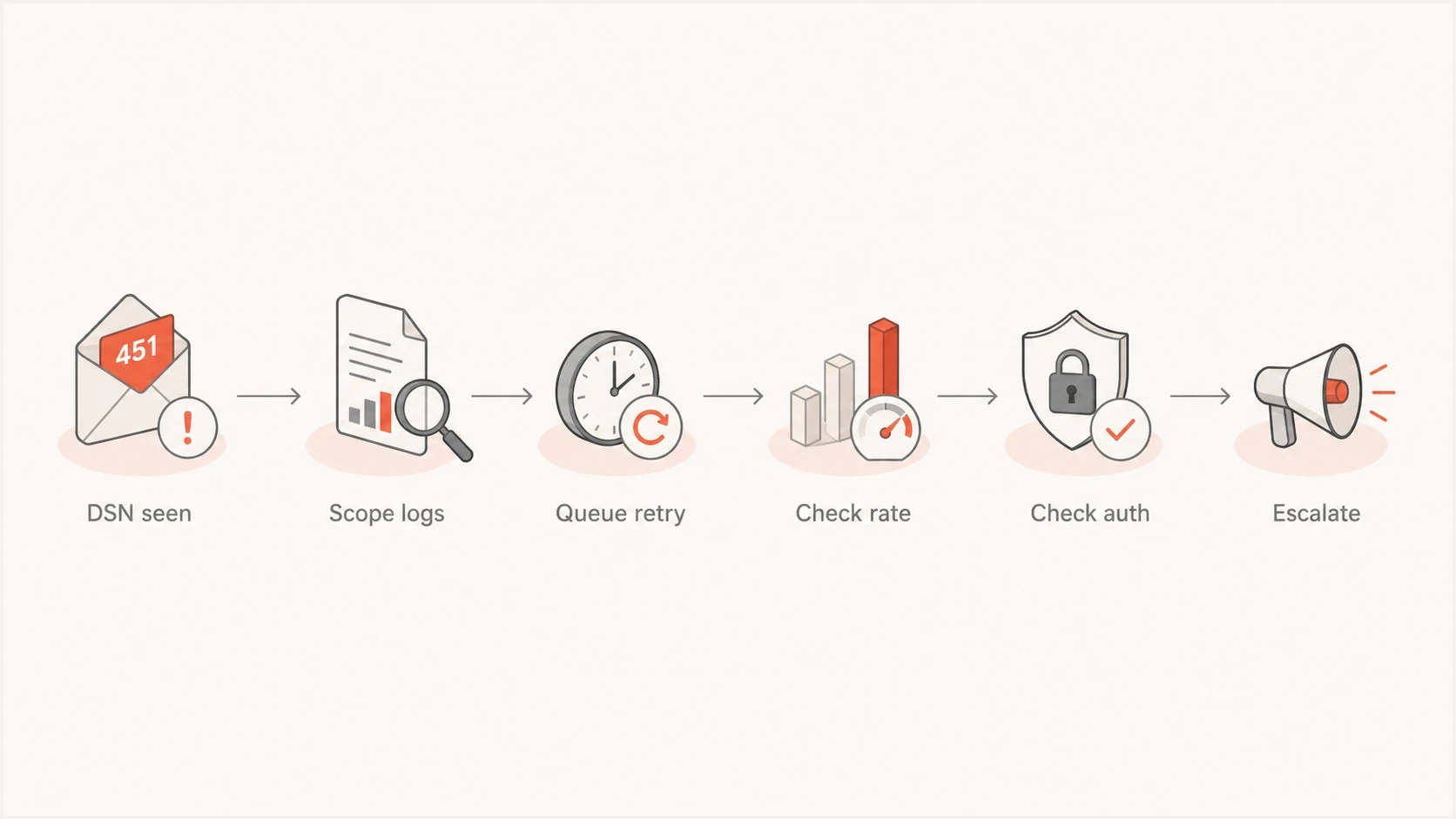
A flowchart showing how to scope, retry, and troubleshoot a Gmail 451 4.3.0 deferral.
How to troubleshoot without overreacting
First establish whether the DSN is a general Gmail event or a sender-specific problem. If unrelated streams show the same temporary rejection and later delivery succeeds, preserve normal queue handling and monitor acceptance. If one sender or route keeps failing, run deeper diagnostics.
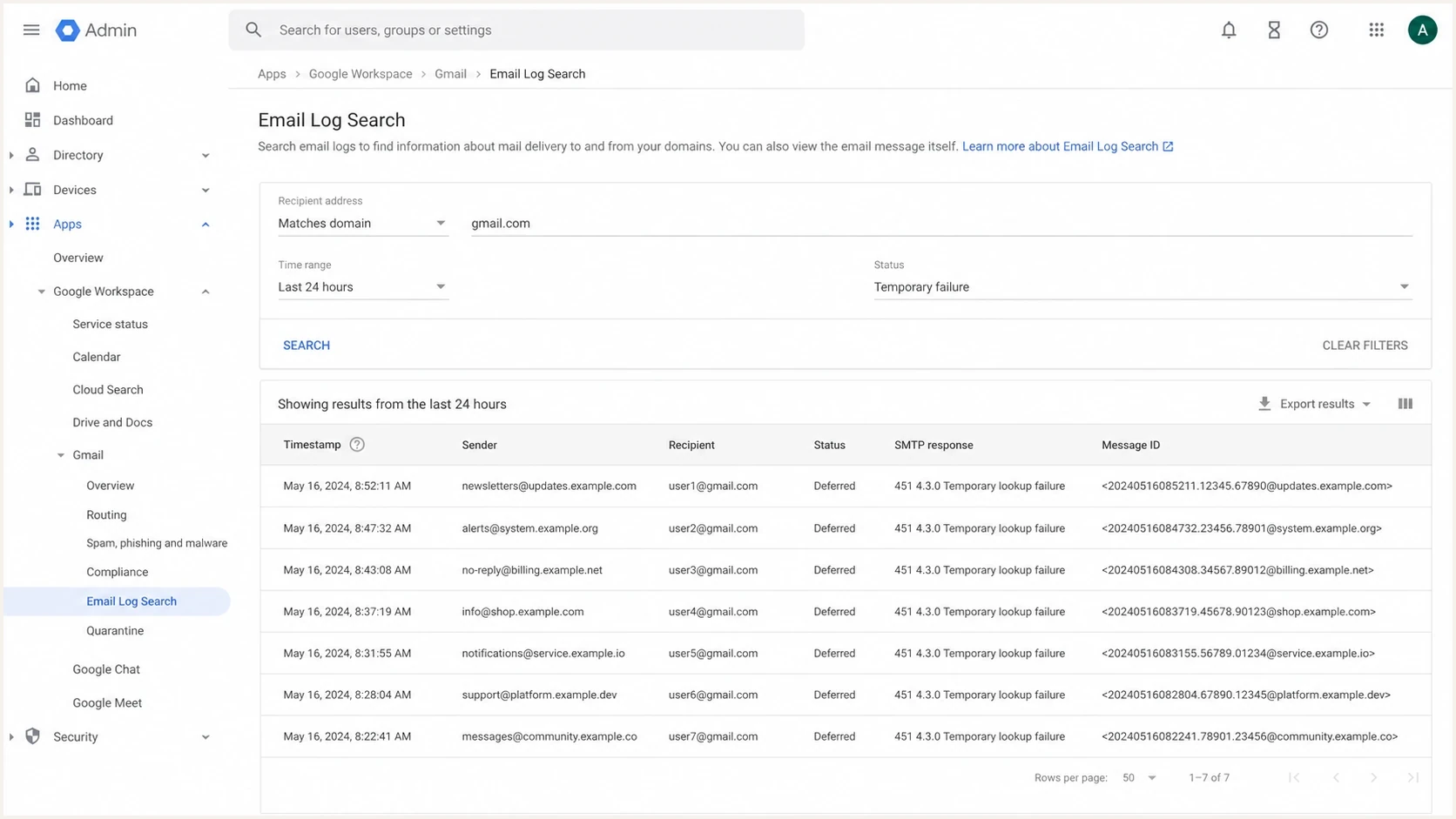
Google Workspace Admin console Email Log Search showing deferred Gmail messages.
- Keep messages queued and confirm that the MTA retry schedule is active.
- Group logs by recipient MX, sending IP, envelope sender, and campaign.
- Check whether non-Gmail destinations accepted the same mail normally.
- Review the full SMTP transcript, including every enhanced status code and response line.
- Slow Gmail traffic separately instead of throttling every destination.
- Send a controlled test and compare headers, authentication, routing, and timing.
A controlled message test exposes header, DNS, content, or routing differences faster than a log-only review. Use an email tester when one stream is deferred but another is accepted.
Email tester
Send a real email to this address. Suped shows a results button when the test is ready.
?/43tests passed
Record the incident even when a later retry succeeds. Keep the first deferral time, final delivery time, sending IP, envelope sender, Gmail MX host, message category, and the result for comparable senders. This evidence shows whether sending behavior needs to change.
A practical fix path
Do not treat every 451 4.3.0 as a sender emergency. Split the response into transient Gmail-side behavior and sender-specific delivery risk. The first path protects the queue. The second path reduces the condition that keeps producing deferrals.
Transient event
- Let the MTA retry the original message instead of creating duplicate sends.
- Use exponential backoff and avoid rapid repeated attempts.
- Track acceptance until deliveries return to their normal level.
Sender-specific problem
- Reduce Gmail concurrency and spread large batches over more time.
- Verify SPF, DKIM, DMARC, PTR and forward DNS, TLS, and HELO naming.
- Remove risky recipients and compare links, headers, templates, and Message-ID patterns.
When to act on Gmail 451 4.3.0
Use queue behavior and repeated evidence as operational triggers, not a fixed timer or proof of permanent failure.
Normal retry
First deferral
Keep the message queued and collect the complete SMTP response.
Watch closely
Repeated
Compare affected traffic across IPs, domains, routes, and message categories.
Investigate
Low-volume failures
Reduce Gmail volume and check authentication, DNS, transport, content, and reputation.
Escalate
Queue expiry near
Prepare evidence before the local MTA reaches its configured retry limit.
Queue handling logictext
if smtp_code starts with "4":
  keep message queued
  retry with backoff
  keep recipient active
  alert after repeated deferrals

if smtp_code starts with "5":
  classify final failure
  suppress or repair based on the exact code
Where authentication and reputation fit
The generic 451 4.3.0 response does not prove an authentication failure. Verify authentication when the deferral repeats for one sender or a specific response identifies it. A domain health check gives a quick read on SPF, DKIM, DMARC, and related DNS. Ongoing DMARC monitoring shows whether real traffic passes authentication by source, not only whether a DNS record exists.
Suped's product groups authentication results, source discovery, issue detection, hosted SPF, hosted DMARC, hosted MTA-STS, and blocklist monitoring in one operational view. For an intermittent Gmail deferral, compare the affected source with SPF lookup depth, DKIM results, the DMARC domain match, and any blocklist or blacklist change.
Issues page showing top issues, verified sources, unverified sources, and authentication pass rates
Suped's issue view connects raw authentication results with remediation steps. SPF lookup pressure requires a different response than a temporary queue delay. An unauthenticated new source requires source approval and DNS repair. When a deferral coincides with a blocklist or blacklist signal, blocklist monitoring separates reputation work from SMTP retry handling.
Minimum authentication baselinetext
_dmarc.example.org. TXT "v=DMARC1; p=none; rua=mailto:d@example.org"
example.org. TXT "v=spf1 include:mail.example.org -all"
s1._domainkey.example.org. TXT "v=DKIM1; p=BASE64KEY"
Best practice baseline
- Keep SPF lookup count below the limit and authorize only active senders.
- Sign every production stream with DKIM using a stable selector and valid key.
- Collect DMARC reports before enforcement and move policy forward in stages.
- Track complaints, unknown users, engagement, and blocklist or blacklist hits.
When to escalate
Escalate after retries continue failing and the issue remains after rate reduction, transcript review, and sender checks. Prepare the exact DSN, UTC timestamps, sending IPs, envelope sender, visible From domain, Gmail MX host, queue history, message category, and examples that later succeeded or still failed.
Do not turn a soft failure into a hard problem
Manual resends, sudden IP switching, and aggressive retry loops create unusual traffic while Gmail is already slowing acceptance. Keep the sending system predictable during diagnosis.
- Avoid retry storms that repeat the same message too quickly.
- Do not classify Gmail recipients as invalid after a temporary SMTP reply.
- Change one controlled variable at a time after the cause has been scoped.
For a single affected sender, reduce Gmail throughput, pause risky bulk segments, confirm every source is authenticated, and compare recent message changes. For a same-time pattern across unrelated senders that clears on retry, record the event, keep customer communication factual, and avoid unnecessary DNS changes.
Views from the trenches
Best practices
Track first deferral, final delivery, IP, and stream before changing sender settings.
Let normal queue retries run before suppressing Gmail recipients or resending mail.
Compare affected and unaffected senders to separate Gmail events from sender issues.
Common pitfalls
Treating every 451 as a hard bounce causes valid Gmail recipients to be suppressed.
Changing DNS during a short Gmail event makes later root cause analysis much harder.
Retrying too fast can increase pressure when Gmail is already deferring mail heavily.
Expert tips
Use UTC timestamps in incident notes so separate systems can be compared cleanly.
Keep Gmail traffic in its own rate bucket so one deferral pattern stays contained.
Review authentication results by source, not only the DNS records you already published.
Marketer from Email Geeks says the 451 4.3.0 response cleared after roughly 20 minutes in several queues, with messages later delivered.
2024-01-04 - Email Geeks
Marketer from Email Geeks says the pattern was not visible in six months of logs for some senders, which points to uneven impact.
2024-01-06 - Email Geeks
What to do next
The direct response to Gmail 451 4.3.0 is to keep the message queued and retry with backoff. A later acceptance confirms a temporary deferral. Repeated low-volume failures call for lower Gmail throughput, complete SMTP response review, authentication and DNS checks, message comparison, and reputation investigation.
Suped's product supports the follow-up workflow with DMARC monitoring, hosted SPF, hosted DMARC, hosted MTA-STS, alerts, issue detection, and blocklist or blacklist monitoring. Use those signals to compare the deferred source with normal traffic before changing DNS or sending infrastructure.




