What causes email deliverability issues for Gmail users with iCloud Private Relay?

Updated on 5 Aug 2026: We added Apple's relay registration checks and refreshed the Gmail authentication guidance.
The usual causes are an unregistered Apple relay email source, a deactivated alias, broken authentication, Gmail filtering after forwarding, sender DNS gaps, and recipient-side routing. When a Gmail user signs up with an Apple private relay address, your mail does not go straight to Gmail. It goes to Apple's relay first, then Apple forwards it to the user's real Gmail inbox. That extra hop creates two separate delivery decisions.
One clarification matters. In this email context, people often say "iCloud Private Relay" when they mean Apple's email relay used by Hide My Email and Sign in with Apple. iCloud Private Relay also has a web browsing privacy meaning, but the delivery issue here is the email path through privaterelay.appleid.com or related Apple relay infrastructure.
Normal bounce rates are not proof that these messages reached the inbox. A message can be accepted by Apple, forwarded toward Gmail, then filtered by Gmail into spam, held by Google Workspace quarantine, routed by a user filter, or delayed in a place the sender cannot see. A rejection at Apple's intake or during the Apple-to-Gmail handoff should normally produce a delivery status notification, so compare the exact SMTP response and sender logs with seed tests.
The direct answer
Gmail delivery issues for users behind Apple relay come from either Apple's decision to accept and forward the message or Gmail's final filtering decision. A message from an unregistered source can bounce at Apple. A message Apple accepts can still reach Gmail with different authentication, forwarding, and recipient-engagement signals than a direct copy.
- Relay registration: Sign in with Apple relay addresses accept mail only from registered source domains or addresses that pass Apple's SPF or DKIM checks.
- Alias status: A user can deactivate the private address, stop forwarding, or change the destination, which causes a rejection or delivery somewhere other than the Gmail inbox being checked.
- Forwarding effects: SPF for the original sender does not normally survive forwarding, and DKIM must remain valid for the original domain to retain an authenticated identity at Gmail.
- Gmail filtering: Gmail can place relay-forwarded mail differently than the same mail sent directly to the same Gmail account.
- Sender foundation: Authentication, TLS, forward and reverse DNS, complaint rates, and message format still affect acceptance and placement.
- User routing: Personal filters, Google Workspace rules, blocked senders, and spam folder behavior can look like silent loss from the sender side.
The sender is not always the only problem
A sender with strong direct Gmail delivery can still have poor delivery to Gmail users who signed up through Apple's relay. That does not clear the sender from review, but it changes the diagnostic path. First prove whether direct Gmail and Apple-relayed Gmail behave differently under the same content, sending IP, DKIM selector, and message stream.
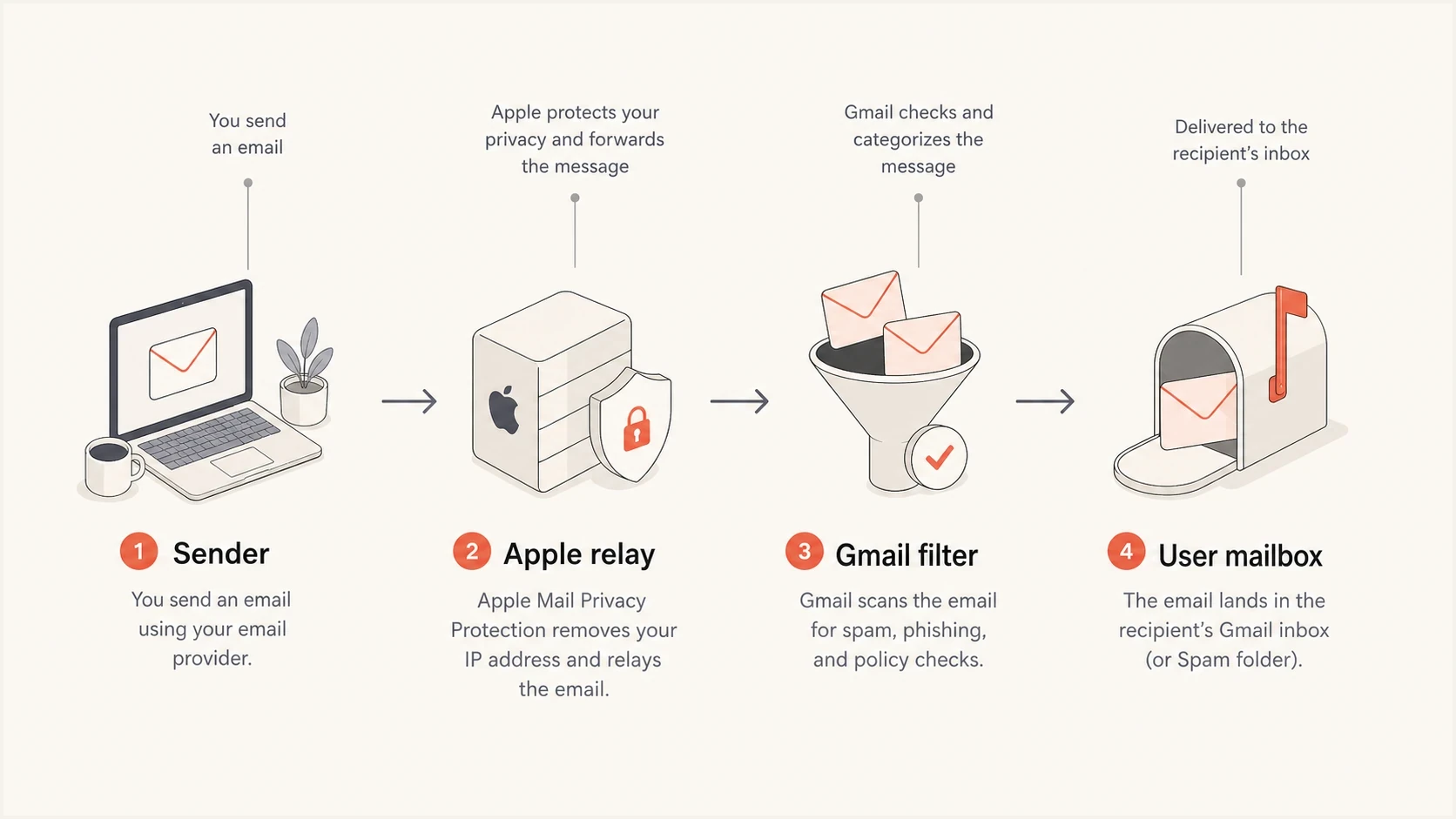
The relay path shows a sender, Apple relay, Gmail filtering, and the user mailbox.
Why Gmail treats relayed mail differently
A direct Gmail delivery test and a relay delivery test are not the same test. Direct mail reaches Gmail from your mail provider. Relayed mail reaches Gmail after Apple has accepted and forwarded it. Gmail checks the forwarded copy using the connecting relay, any valid DKIM signature, headers added during forwarding, the final recipient's previous engagement, and its own abuse signals. Gmail does not automatically trust an earlier authentication result just because another system forwarded the message.
This is why the symptom can look inconsistent. The sender can have clean direct delivery to Gmail, normal complaint rates, and no visible bounce spike, yet a subset of Apple-relayed Gmail users reports missing mail. In that case, look for a path-specific problem before concluding that the sender has a broad reputation failure.
Direct Gmail path
- Connection: Gmail sees the sender's sending IP and mail stream directly.
- Authentication: Gmail evaluates SPF, DKIM, and DMARC on the original delivery.
- Diagnosis: Logs, Gmail placement tests, and authentication headers are easier to compare.
Apple relay path
- Connection: Gmail receives a forwarded message from Apple's relay infrastructure.
- Authentication: SPF identifies the forwarder at Gmail, so a surviving DKIM signature matters more for the original sender.
- Diagnosis: The sender cannot directly see Gmail's final folder-placement decision.
If the same message inboxes when sent directly to Gmail but lands in spam after Apple forwards it, the relay path is the differentiator. For a deeper relay-specific spam discussion, see Private Relay spam.
Authentication and DNS causes
Authentication is the first place to check because forwarding exposes weak setups. Apple evaluates the original submission to its relay using the registered source and SPF or DKIM. After Apple forwards the message, Gmail usually sees Apple as the SPF connecting source for that hop. A valid DKIM signature from the original sender can survive if the body and signed headers remain unchanged, allowing DMARC to pass through DKIM domain matching.
DNS also matters outside SPF, DKIM, and DMARC. Gmail requires sending IPs to have valid forward and reverse DNS, and the PTR hostname must resolve back to the sending IP. Broken A, AAAA, PTR, or tracking CNAME records can create separate acceptance or reputation problems. MX records matter for replies and bounces, while TLS is required for delivery to Gmail.
DNS baseline to verifyDNS
example.com. 3600 IN MX 10 mail.example.com.
mail.example.com. 3600 IN A 203.0.113.10

example.com. 3600 IN TXT "v=spf1 include:spf.sender.example -all"

selector1._domainkey.example.com. 3600 IN TXT (
  "v=DKIM1; k=rsa; p=BASE64_PUBLIC_KEY"
)

_dmarc.example.com. 3600 IN TXT (
  "v=DMARC1; p=none; rua=mailto:dmarc@example.com; "
  "adkim=s; aspf=s"
)
For a fast DNS and authentication pass, run a domain health check before changing content or suppressing users. Confirm that the sender's base identity and sending infrastructure are healthy before isolating the relay path.
|
|
|
|---|---|---|
No bounce | No confirmed rejection | Seed test and headers |
Apple hard bounce | Relay intake | Source, auth, alias |
Gmail spam | Final filtering | Compare direct path |
DNS warning | Sender infrastructure | Fix the record |
DMARC fail | Domain mismatch | Repair SPF or DKIM |
Use the symptom to choose the next check.
Check Apple's relay registration first
For addresses ending in @privaterelay.appleid.com that were created with Sign in with Apple, Apple restricts which sources can send through the alias. Register every outbound email domain, subdomain, or individual source address in the Apple developer account under Services and Sign in with Apple for Email Communication. An unregistered source produces a bounce before Gmail can filter the message.
Apple permits an SPF or DKIM authentication path and recommends both. For SPF, the registered domain must exactly match the envelope sender domain and pass SPF. For DKIM, the signature must pass, cover the From header, and use a d= domain that exactly matches the registered header From domain. If a mail provider uses its own return-path domain, the DKIM path is normally the practical way to meet Apple's check.
Apple relay acceptance checklist
- Read the bounce: Capture Apple's SMTP status, diagnostic text, timestamp, and message ID.
- Check the source: Confirm the exact From or envelope sender domain is registered and shows a passing authentication check.
- Check the alias: Ask the user to confirm that the private address remains active and forwards to the Gmail address being searched.
- Check volume: A Sign in with Apple private relay address has a daily limit of 100 messages, including replies.
- Retest once: After correcting the cause, send one transactional message and record Apple's response before testing Gmail placement.
How to test the relay path
The cleanest test uses two recipients controlled by the same person: a normal Gmail address and an Apple relay address that forwards to that same Gmail account. Send the same message to both recipients from the same stream. Do not change the subject, links, template, DKIM selector, sending IP, or envelope setup between tests. Then search Gmail's All Mail, Spam, Trash, Promotions, Updates, and any admin quarantine if the account is on Google Workspace.
Collect full headers from any delivered relay copy. Authentication-Results shows what Gmail evaluated, while DKIM and ARC headers show which identity survived forwarding and whether the relay recorded earlier checks. If no copy arrives, use the Apple bounce, sender logs, and repeated seed tests across more than one Gmail account.
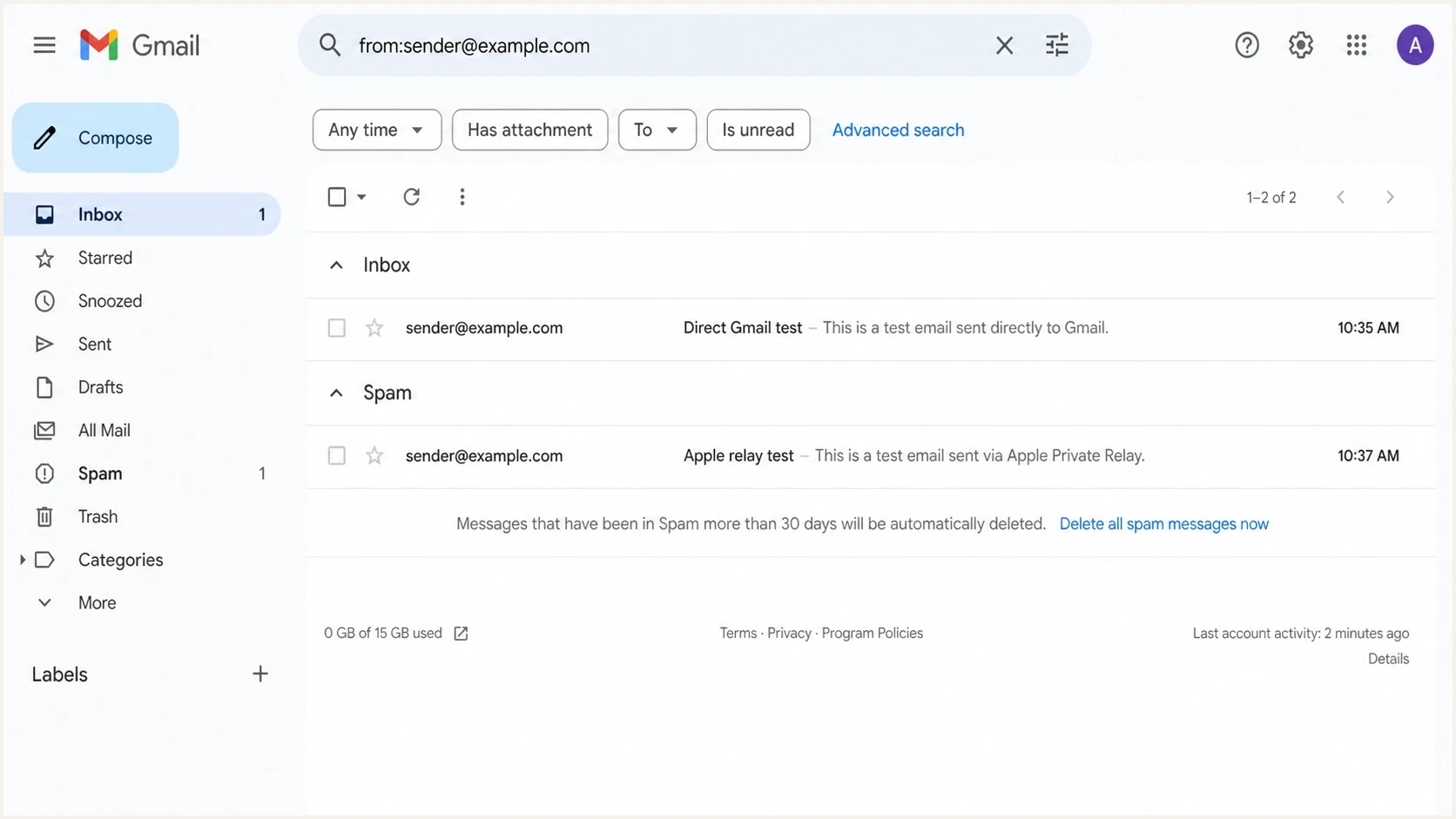
A Gmail screenshot showing direct delivery in Inbox and relay delivery in Spam.
A practical test sequence
- Baseline: Send to a normal Gmail address and record placement.
- Relay copy: Send the same message to an Apple relay address that forwards to Gmail.
- Mailbox search: Search All Mail, Spam, Trash, categories, and filters.
- Header review: Compare authentication results between direct and relayed copies.
- Repeat: Run the same test across different Gmail accounts before changing policy.
Fixes that reduce the risk
Do not suppress every Apple relay address by default. Some users rely on those addresses for account access and password resets. Prove the failure stage, register every sending source, harden authentication, reduce unexpected sending patterns, and give users a backup route for critical messages.
Start with a real-message email test so authentication, content, and placement signals can be inspected together. Then check DMARC reports over the same window. If the issue only occurs for Apple-relayed Gmail users, keep the remediation focused on that path.
Email tester
Send a real email to this address. Suped shows a results button when the test is ready.
?/43tests passed
Meet Gmail's current sender requirements as a baseline. Use TLS and valid forward and reverse DNS, keep the user-reported spam rate below 0.3%, and format mail correctly. Senders of more than 5,000 messages a day to personal Gmail accounts need SPF, DKIM, and DMARC. Marketing and subscribed messages also need one-click unsubscribe plus a visible unsubscribe link.
Use stable DKIM signing, a clean From domain, consistent return-path handling, and a verified tracking domain. The message should match what the user expected when creating the relay address. Check blocklist (blacklist) signals for the sending domain and IPs because reputation trouble can combine with a relay-specific problem. Suped's blocklist monitoring keeps blocklist and blacklist checks beside authentication monitoring for the same sending sources.
- Keep DKIM stable: Use a signing domain that matches the visible From domain and avoid message changes after signing.
- Separate mail streams: Do not mix password resets, lifecycle mail, and bulk marketing through the same stream when relay complaints appear.
- Warn relay users: During signup, tell Apple relay users the From address to expect and offer a way to resend critical mail.
- Watch reports: Use DMARC monitoring to catch authentication failures and new sources before they become Gmail placement issues.
Where Suped fits
Suped's product can confirm the sender-side evidence before relay seed testing. Use its DMARC reports to identify sources with failing SPF or DKIM, check domain matching, verify DNS records, track controlled policy changes, and watch blocklist (blacklist) signals. This narrows the investigation before comparing direct Gmail with Apple-relayed Gmail.

Issue steps to fix dialog showing the issue overview, tailored fix steps, and verification action
Suped cannot see the Apple-to-Gmail SMTP transaction or Gmail folder placement. It can show whether the original sending source authenticated, when a new source appeared, and whether blocklist or blacklist status changed. Pair that evidence with bounce logs, message IDs, full headers, and seed-test timestamps.
Best practical workflow
Use Suped to monitor authentication, diagnose DNS issues, track unverified sources, and keep policy changes controlled. Use Gmail and Apple relay seed accounts to confirm placement. The combined evidence separates sender-side defects from relay acceptance and final Gmail filtering.
Views from the trenches
Best practices
Segment Apple relay users separately so Gmail issues do not hide inside total bounce rates.
Warn new Apple relay signups to watch for the sender address before critical mail starts.
Compare direct Gmail delivery with relay delivery using the same content and sender setup.
Common pitfalls
Treating normal bounce rates as proof of inbox placement misses spam folder placement.
Changing DNS during testing adds noise when the relay path already has extra filtering.
Assuming Gmail drops mail silently can hide filters, spam placement, or forwarding faults.
Expert tips
Keep test accounts on Gmail and Apple relay so changes can be checked within minutes.
Capture headers from delivered relay mail; they show what Gmail evaluated after forwarding.
Use DMARC reports to separate sender authentication issues from relay reputation issues.
Marketer from Email Geeks says rejected mail at Gmail should normally create a bounce path through Apple, so missing mail without bounce growth points first to spam placement, user filtering, or relay handling.
2025-03-03 - Email Geeks
Marketer from Email Geeks says the only parties that can fully see the Apple-to-Gmail SMTP transaction are Apple and Google, so sender-side testing should focus on warnings, seed accounts, and clear evidence.
2025-03-03 - Email Geeks
What to do next
First identify the failure stage. A hard bounce from Apple points to source registration, authentication, alias status, or the per-alias limit. Apple acceptance followed by Gmail spam placement points to forwarding effects, sender quality, Gmail filtering, or recipient mailbox rules.
Verify the Apple source registration, DNS, and authentication, then run direct Gmail and Apple-relayed Gmail seed tests and inspect delivered headers. If the sender passes the required checks and only Apple-relayed Gmail users miss mail, escalate with test timestamps, relay addresses, message IDs, SMTP responses, and header evidence.




