What causes '550 administrative prohibition' bounces not due to recipient policy?

Updated on 6 Aug 2026: We updated this guide with enhanced status code checks and SMTP identity diagnostics.
A "550 Administrative prohibition" bounce that is not a normal recipient policy decision usually means the receiving mail server rejected the message at a broader control point before mailbox delivery. It is an administrative server refusal, not proof that the mailbox owner created a rule against the sender.
The most common causes are authentication failure, a domain impersonation rule, a routing or relay mistake, sender reputation, a blocklist (blacklist) hit, malformed envelope data, an invalid SMTP identity, or a gateway rule that uses a generic 550 response. The bounce text alone rarely names the real cause. The useful evidence is in the full delivery status notification, the sending path, the message headers, and the receiving gateway logs.
What 550 administrative prohibition means
When this bounce follows a message sent through Gmail or Google Workspace using a company domain, start with the assumption that the receiving server blocked the SMTP transaction for a rule outside the individual mailbox. The phrase "administrative prohibition" is broad. It can come from a mail gateway, a hosted filtering layer, an on-premises server, or a customer edge server using old response wording.
- Authentication: SPF, DKIM, or DMARC failed for the exact path used by the message, even if earlier messages worked.
- Impersonation: The receiving gateway thought the message used its own domain, a lookalike domain, or an unauthorized sender identity.
- Routing: The message reached the wrong MX, a decommissioned gateway, or a server that refuses mail for that domain.
- Reputation: The sender IP, envelope domain, DKIM domain, or visible From domain had a negative reputation signal.
- Formatting: The envelope sender, recipient syntax, header structure, or MIME content triggered a hard rejection.
Read the wording carefully
A 550 code means permanent failure for the message in its current form. It does not prove the address is invalid. "Administrative prohibition" says the receiving side made a policy or control-plane decision, but the actual trigger sits behind that phrase. Do not keep resending the unchanged message.
|
|
|
|---|---|---|
Auth fail | 5.7.x or auth fail | Fix sender |
Spoof rule | 5.7.1 or local domain claim | Ask gateway owner |
Bad route | 5.4.x or odd Remote-MTA | Check MX |
Reputation | 5.7.x or blocklist hit | Remediate source |
Fast triage map for a generic 550 administrative prohibition bounce.
Read the enhanced status code first
The three-part enhanced status code narrows the cause more reliably than the 550 reply alone. The first digit gives the result class, the second identifies the subject area, and the third adds detail. A 5.x.x result is permanent for the message as submitted, while a 4.x.x result is a temporary deferral that the sending system can retry.
|
|
|
|---|---|---|
5.0.0 | Other or undefined status | Use the full diagnostic and gateway log |
5.1.x | Addressing problem | Verify the recipient and domain |
5.4.x | Network or routing failure | Check MX and next-hop routing |
5.5.x | SMTP protocol problem | Inspect command syntax and session logs |
5.6.x | Content or media problem | Inspect MIME, headers, and attachments |
5.7.x | Security or policy refusal | Check authentication, authorization, and reputation |
Use the exact enhanced code and diagnostic text together.
A 5.7.1 response means delivery was not authorized and the message was refused, but it does not identify one universal cause. Per-host filtering, relay restrictions, sender authentication, spoof controls, or a recipient-side rule can all produce it. A generic 5.0.0 removes even that subject-level clue, so the Remote-MTA, timestamp, SMTP stage, and receiver logs become more important.
Why this happens with Gmail senders
A common pattern is a company address sent through Gmail to a customer domain that normally accepts mail. Then one message bounces with "550 Administrative prohibition" and a delivery report that names the customer's edge server as the Remote-MTA. That detail matters. Gmail handed the message to the recipient side, and the recipient side returned the refusal.
That still does not mean a person created a recipient-level rule. Gateways often return the same phrase for many checks: inbound spoof controls, DMARC rejection, relay restrictions, sender verification, attachment rules, or an internal route that no longer accepts mail. Some systems also use a generic 5.0.0 enhanced status code, which removes the detail that would normally help.
If the recipient uses Google Workspace, read the final diagnostic markers as well. gsmtp means Gmail returned the error. gcdp points to a custom rule created by the recipient's Google Workspace administrator, which directs the escalation to that administrator rather than to the mailbox owner.
Mailbox policy
- Scope: The rule targets one user, group, or mailbox.
- Evidence: Other recipients at the same domain still receive the same message.
- Owner: The mailbox admin or end user can usually identify it quickly.
Administrative rejection
- Scope: The rule targets a sender, domain, route, IP, or gateway condition.
- Evidence: The DSN names a remote server and gives little mailbox detail.
- Owner: The receiving mail administrator has the gateway log that explains it.
The sender still has useful work to do before asking the recipient admin for help. Evidence that the message passed authentication, used the expected route, and came from a clean source lets the receiving admin search logs with a narrow timestamp and Message-ID instead of guessing.
Evidence to collect before changing DNS
Avoid changing SPF, DKIM, DMARC, or routing records until the full bounce is available. A short copy-paste of the top error line hides the useful fields. The delivery status notification should show the final recipient, the status code, the remote MTA, the diagnostic code, and the attempt time.
Example delivery status notificationtext
550 Administrative prohibition

Final-Recipient: rfc822; name@customer.example
Action: failed
Status: 5.0.0
Remote-MTA: dns; portal.customer.example
Diagnostic-Code: smtp; 550 Administrative prohibition
Last-Attempt-Date: Fri, 7 Aug 2026 11:55:35 +1000
- Timestamp: Capture the exact local time, timezone, and delivery attempt time.
- Remote server: Record the Remote-MTA host and IP so the recipient admin can search the right gateway.
- Message ID: Save the original Message-ID and the SMTP transaction ID if the bounce includes one.
- SMTP stage: Note whether the server rejected MAIL FROM, RCPT TO, or the message after DATA.
- Headers: Compare a rejected message with a successful message to the same domain.
A controlled test helps because it separates a one-off message issue from a persistent path issue. Send a new message with simple text, no attachment, and no unusual link structure, then inspect the authentication results with an email tester. If the clean test passes but the original fails, the content or headers need attention. If both fail, the sender identity or route needs attention.
Email tester
Send a real email to this address. Suped shows a results button when the test is ready.
?/43tests passed
The goal is to build a short evidence pack: the bounce, the original headers, one fresh test, and the DNS state at the time. That pack prevents random DNS edits and gives the receiving admin enough detail to find the exact rejection rule.
Authentication and DNS checks
Authentication is the first sender-side area to check because it changes more often than people expect. A new sending service, a changed Gmail routing rule, a broken DKIM signature, or an SPF lookup limit can turn a routine message into a hard refusal.
Start with a domain health check for the visible sender domain. Then confirm the exact sender in the message: the visible From domain, the Return-Path domain, the DKIM signing domain, and the sending IP. DMARC does not care that a message came from a familiar mailbox. It cares whether SPF or DKIM passes and whether the passing domain matches the visible From domain under DMARC rules.
Authentication fields to comparetext
From: user@company.example
Return-Path: bounce@mailer.company.example
DKIM-Signature: d=company.example; s=google;
Authentication-Results: mx.customer.example;
  spf=pass smtp.mailfrom=mailer.company.example;
  dkim=pass header.d=company.example;
  dmarc=pass header.from=company.example
Suped's product supports this check by putting DMARC aggregate data, SPF and DKIM checks, issue detection, and repair steps in one workflow. DMARC monitoring shows whether the sending source was failing before the bounce appeared, whether the failure is isolated to one path, and which DNS or sender configuration needs repair.

Issue steps to fix dialog showing the issue overview, tailored fix steps, and verification action
For a Gmail or Google Workspace sender, also check whether the domain has DKIM enabled in the admin console, whether SPF authorizes Google's sending hosts, and whether third-party systems send with the same domain without authorization. A single unauthorized sender can cause intermittent failures that look like random recipient-side bounces.
If SPF, DKIM, and DMARC pass, verify the SMTP connection identity. The sending IP should have reverse DNS, the PTR name should resolve back to that IP, and the EHLO name should be a valid fully qualified domain name associated with the sender. A missing PTR record or an EHLO value such as localhost can trigger a 5.7.x refusal even when message authentication passes.
Do not lower DMARC first
Changing DMARC from reject to none can hide the symptom without fixing the cause. First confirm the failing source, repair SPF or DKIM, then retest. Policy changes should follow evidence, not replace it.
Reputation and blocklists
A generic administrative prohibition can also be reputation-driven. Some gateways translate a domain or IP reputation decision into the same 550 text they use for local rules. Check blocklist and blacklist status alongside authentication instead of waiting through days of back-and-forth.
In Suped's product, blocklist monitoring connects domain and IP reputation checks with DMARC and deliverability context. The same bounce can come from a clean authenticated message sent through a dirty shared IP, or from a clean IP using a domain with a poor history.
Reputation triage priority
How to prioritize reputation checks after a 550 administrative prohibition bounce.
Low
Watch
One isolated bounce, clean auth, no listing found.
Medium
Investigate
Multiple bounces at one receiver or one gateway family.
High
Fix now
Broad bounces, listing found, or shared IP change.
The fix depends on the source. If the listed asset is a third-party sending IP, open a ticket with that sender and move urgent mail to a clean authorized route. If the listed asset is your domain, review recent campaign behavior, compromised accounts, forwarding loops, and unauthorized systems using your domain.
A practical troubleshooting sequence
Use a fixed sequence because this bounce invites guesswork. The right order is to prove where the rejection happened, prove what identity the receiver evaluated, and then decide whether the fix belongs to the sender, the sender's platform, or the recipient gateway administrator.
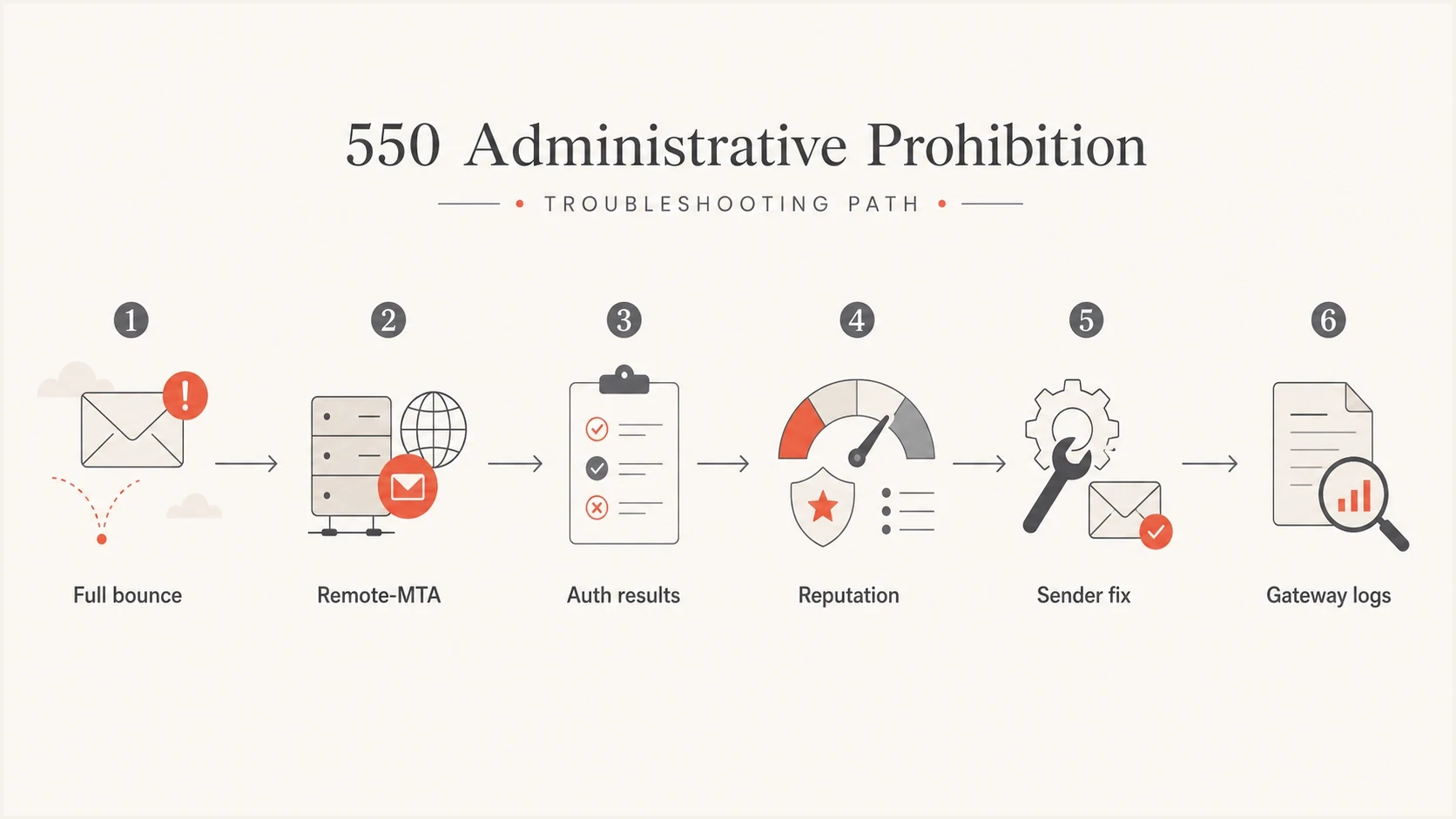
Flowchart for checking the full bounce, Remote-MTA, authentication, reputation, sender fixes, and gateway logs after a 550 administrative prohibition.
- Confirm scope: Test another recipient at the same domain and a different external domain.
- Read the DSN: Use the Remote-MTA, status, diagnostic code, and attempt time as the starting point.
- Check auth: Validate SPF, DKIM, and DMARC for the actual sender path, not the intended path.
- Check reputation: Review domain and IP blocklist (blacklist) status at the time of the bounce.
- Simplify content: Retest with plain text to separate sender identity problems from content problems.
- Escalate cleanly: Send the recipient admin the bounce, headers, timestamp, source IP, and Message-ID.
If the investigation starts showing broader 550 behavior, compare it against common SMTP 550 causes so you do not overfit one bounce phrase. The same family of SMTP replies can mean invalid address, relay denial, access denied, authentication rejection, or content refusal.
Fix on the sender side
- Use this: Authentication fails, SPF is too broad, DKIM is missing, or a sender is unauthorized.
- Proof needed: Headers show failing SPF, DKIM, or DMARC for the rejected path.
- Next step: Repair DNS or sender setup, then retest with the same route.
Ask the recipient admin
- Use this: Authentication passes, reputation is clean, and only their gateway rejects it.
- Proof needed: A full DSN, timestamp, Message-ID, and sending IP.
- Next step: Ask for the gateway log reason tied to that SMTP attempt.
Views from the trenches
Best practices
Capture the full delivery status notification before changing DNS or mail routing.
Compare SPF, DKIM, and DMARC results against the exact sending path used that day.
Ask the receiving admin for gateway logs when the DSN names their edge server directly.
Common pitfalls
Treating all 550 administrative prohibition bounces as bad addresses wastes time.
Changing DMARC policy before checking authentication evidence can hide the cause for hours.
Ignoring blocklist (blacklist) status misses one common source of hard refusals at gateways.
Expert tips
Save one rejected message and one accepted message, then compare both headers side by side.
Check whether the sender domain appears inside forwarded or reply-to identities as well.
Use DMARC aggregate data to confirm whether the failure is isolated or broad today.
Marketer from Email Geeks says the phrase alone is not enough; the full diagnostic text and Remote-MTA identify which system actually refused the message.
2024-04-18 - Email Geeks
Marketer from Email Geeks says a Gmail-sent message using a company domain still needs SPF, DKIM, and DMARC evidence before blaming a mailbox policy.
2024-05-02 - Email Geeks
What to do next
A "550 Administrative prohibition" bounce not tied to a clear recipient policy is usually caused by a gateway-level rejection: authentication failure, spoof protection, routing refusal, reputation or blocklist status, invalid SMTP identity, or message structure. The fix starts with the full DSN and headers, not with changing DNS on instinct.
Suped's product combines DMARC reporting with SPF and DKIM checks, blocklist monitoring, alerts, and guided issue resolution. Use those signals to isolate the failing sender path, repair the sender-side cause, or give the recipient admin a specific timestamp and message identity for a gateway-log search.




