What causes 451 4.3.2 errors when sending email to Netease in China?

Matthew Whittaker
Co-founder & CTO, Suped
Published 20 May 2025
Updated 17 May 2026
11 min read
Summarize with
A 451 4.3.2 Internal server error from Netease usually means a temporary receiving-side failure during delivery, not a clean permanent block. The most likely causes are a Netease internal timeout, a content or message-format condition that triggers a receiver-side failure, low or unproven sender reputation with Netease, or routing pressure caused by strict rate limits into China.
The first thing I check is where the SMTP conversation failed. If the error appears after DATA, the message body, MIME structure, encoding, attachment type, language mix, or size becomes the main suspect. If it appears after MAIL FROM or RCPT TO, the better suspects are sender reputation, envelope identity, DNS, authentication, or Netease-side capacity.
- Primary answer: treat this as a soft bounce that should retry, then segment by SMTP stage, sending IP, sender domain, Netease domain, message template, and attachment profile.
- Most useful signal: compare senders that fail every message with senders that only fail occasionally. A full failure pattern points to sender-specific reputation, registration, routing, DNS, or authentication differences.
- Most common trap: assuming every 451 is just greylisting. With Netease, the same generic temporary error can hide message parsing, receiver timeout, rate limit, and reputation conditions.
What the 451 4.3.2 code means
SMTP 451 is a temporary failure class. It tells the sending MTA to queue the message and try again later. The enhanced status code 4.3.2 points toward a mail system problem rather than a recipient address problem. When Netease returns it with text like Internal server error, the receiver is not giving you a detailed policy reason.
That wording matters. A policy rejection usually gives a clearer reason, such as throttling, poor reputation, spam content, invalid recipient, or authentication failure. A generic internal error means something failed inside the receiver path, or the receiver chose to expose only a generic response.
Do not suppress retries too early
Keep retrying temporary Netease deferrals within your normal queue lifetime. Do not mark users invalid after one 451 4.3.2 response. Treat the address as valid unless later attempts return a permanent 5xx response or a clear invalid-recipient status.
Which Netease domains are involved
Netease consumer mailbox domains commonly include 163.com, 126.com, and yeah.net. I would group those domains together for initial analysis, then split them apart once I have enough sample size. The same sender can see different behavior across each domain because each MX pool and filtering path can behave differently at a given moment.
|
|
|
|---|---|---|
Domain | 163, 126, yeah | Receiver pool behavior |
Sender | IP, domain, ESP | Reputation or routing |
Message | Template, MIME, files | Content processing |
Stage | MAIL, RCPT, DATA | Failure trigger |
Use compact buckets first, then expand the analysis only where the pattern is clear.
The fastest way to diagnose the cause
Start by pulling raw SMTP transcripts or detailed bounce logs. A summarized bounce reason is not enough because the position of the error in the SMTP session changes the diagnosis.
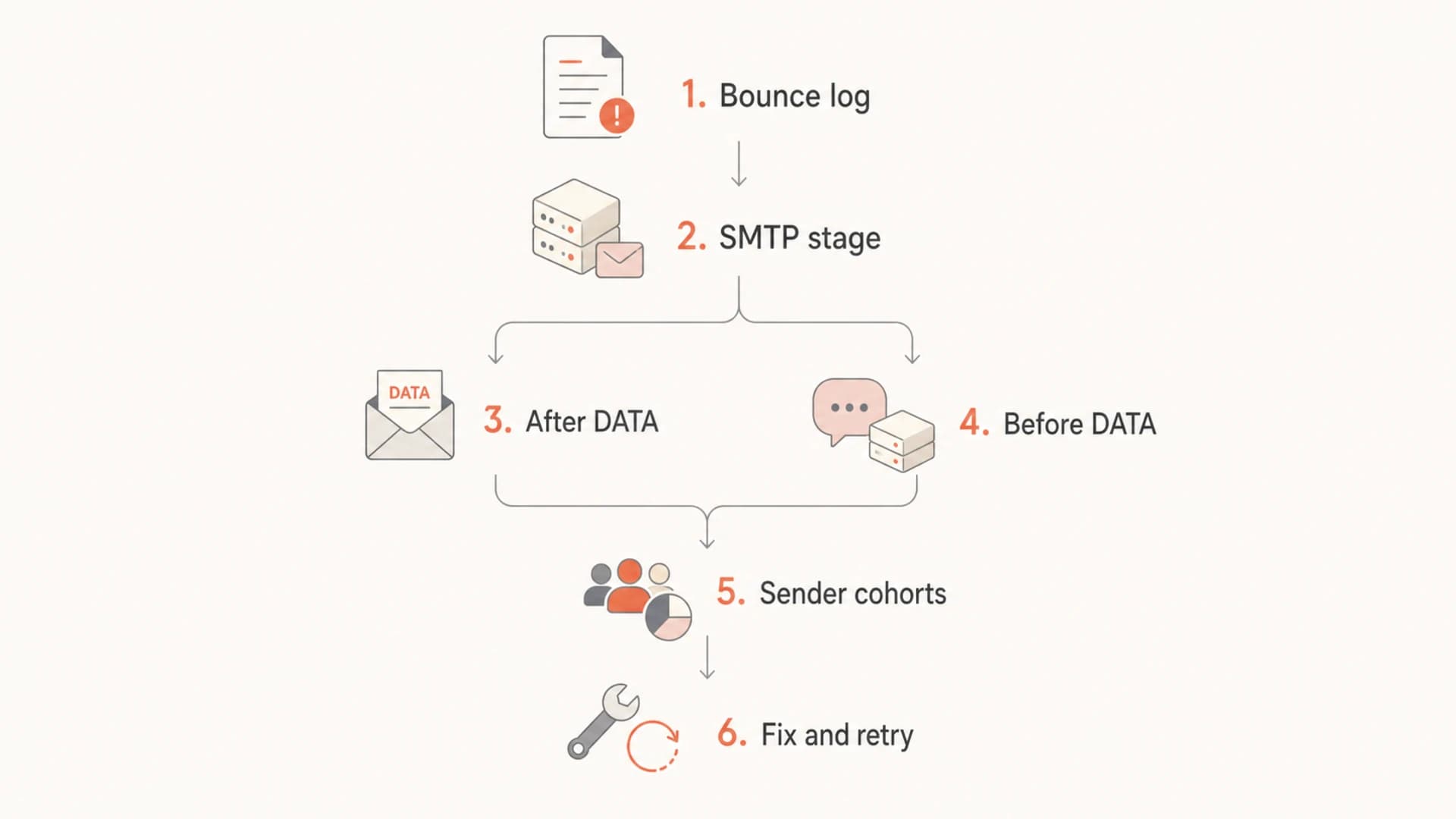
Flowchart showing how to split Netease 451 4.3.2 errors by SMTP stage.
- Check the SMTP stage: an error after DATA points toward body processing, content scanning, attachments, encoding, or size.
- Compare failing senders: look for shared IP pools, shared return-path domains, shared tracking domains, shared templates, or shared DNS providers.
- Test a minimal message: send a plain text version with no attachment, simple UTF-8, no tracking rewrite, and a stable envelope sender.
Fields to extract from bounce logstext
timestamp
sending_ip
helo_name
mail_from_domain
header_from_domain
recipient_domain
smtp_stage
smtp_reply_code
smtp_reply_text
message_template_id
message_size_bytes
attachment_types
retry_count
final_queue_status
If the issue is hard to reproduce, send a real seed message and inspect the authentication and delivery signals with Suped's email tester. That does not replace Netease bounce logs, but it quickly catches broken SPF, DKIM, DMARC, MIME, and header problems before you spend hours chasing receiver-side behavior.
Email tester
Send a real email to this address. Suped opens the report when the test is ready.
?/43tests passed
Preparing test address...
Cause 1: Netease had a temporary internal failure
Sometimes the direct answer really is that something broke or timed out on the Netease side. Temporary internal errors happen when a receiver's MX, filtering layer, storage layer, user lookup service, content scanner, or policy service fails to complete the transaction quickly enough.
Receiver-side failure signs
- Intermittent pattern: the same sender succeeds on retries without changing content or routing.
- Broad impact: multiple unrelated senders fail during the same time window.
- No clear cohort: failures do not map to one IP, domain, template, or volume tier.
Sender-side failure signs
- Persistent pattern: one sender fails every Netease attempt across many hours or days.
- Shared traits: failing senders share infrastructure, content construction, or DNS behavior.
- Template linkage: one campaign or MIME profile produces more failures than plain text tests.
For occasional failures, the right fix is usually queue discipline, controlled retries, and monitoring. For constant failures from specific senders, I do not accept receiver-side instability as the full explanation. I look for what those senders have in common.
Cause 2: the message body triggers failure after DATA
When Netease accepts the envelope and returns 451 4.3.2 after DATA, the body of the message is the main area to test. That includes the MIME tree, character encoding, text language, HTML construction, images, attachments, and the exact size of the message after transfer encoding.
- Encoding: standardize on UTF-8, valid MIME boundaries, and clean plain text plus HTML alternatives.
- Language mix: test simplified Chinese, English, and bilingual versions separately instead of assuming content language is neutral.
- Message size: compare small plain text, normal HTML, and the full production message with images and tracking.
- Attachments: remove files, then reintroduce file types one by one. Pay attention to compressed files and office documents.
- Links: compare tracked and untracked versions, especially when link redirection domains differ from the visible brand domain.
Minimal reproduction matrixtext
Test A: plain text, no links, no attachments
Test B: plain text, production links, no attachments
Test C: HTML, no tracking rewrite, no attachments
Test D: HTML, production tracking, no attachments
Test E: HTML, production tracking, production attachments
If only Test E fails, your attachment or final size is the likely trigger. If Test D fails but Test C succeeds, look at link tracking, redirect domains, URL count, and HTML transformations. If Test A fails, the body is less likely to be the main cause, and the envelope, route, DNS, or reputation needs more attention.
A generic internal error can still be content-linked
Do not wait for Netease to say "bad attachment" or "bad MIME". Some receivers return a generic temporary error when their scanning or parsing layer cannot process a message cleanly.
Cause 3: low reputation or low volume history
Netease is known among senders as a provider where new or lower-volume senders often start with conservative limits. A sender with a small or weak history can see heavy deferrals before it earns more throughput. That does not prove this specific 451 4.3.2 response is purely reputation-based, but reputation can combine with an internal failure path and produce generic temporary errors.
Netease sender risk signals
Use these bands as operational triage signals, not fixed Netease-published limits.
Low risk
stable
Consistent positive engagement, low complaints, stable authentication, and gradual volume growth.
Warning
watch
New route, new domain, sudden volume lift, or mixed engagement with intermittent deferrals.
Critical
blocked
Every message to Netease defers until queue expiry, especially across multiple Netease domains.
Reputation at Netease includes more than IP reputation. I treat it as a bundle: sending IP, HELO, envelope sender, header From domain, DKIM signing domain, link domains, complaint behavior, user engagement, and volume consistency. If those identities do not line up, the sender looks harder to trust.
- Warm gradually: increase Netease volume in measured steps and track accepted volume separately from attempted volume.
- Prioritize engaged users: send first to recipients with recent opens, clicks, purchases, logins, or account activity.
- Avoid mixed streams: do not combine transactional password resets with cold marketing campaigns on the same route.
- Watch complaints: complaint and spam-folder behavior can hold down future throughput even when the technical setup is correct.
Cause 4: authentication and DNS do not look stable
DMARC, SPF, and DKIM problems do not always produce a direct authentication rejection. Sometimes they contribute to a lower trust score that makes temporary failures more frequent. For Netease, I want authentication to be boring: one consistent From domain, passing DKIM, valid SPF, clean reverse DNS, and no fragile DNS chains.
Baseline DMARC record for monitoringdns
v=DMARC1; p=none; rua=mailto:dmarc-reports@example.com;
fo=1; adkim=s; aspf=s
If you are still gathering data, use a monitoring policy before moving to enforcement. With Suped's DMARC monitoring, the practical workflow is to find which sources are passing, which are failing, and which are sending without authorization. That is especially useful when only some senders or sub-brands have Netease problems.

Suped DMARC dashboard showing email volume, authentication health, and source breakdown
The checks I care about are basic, but I want them complete. SPF should stay under lookup limits. DKIM keys should be valid, current, and used consistently. DMARC domain matching should match the visible From domain. Reverse DNS and HELO should resolve cleanly. Link and image domains should not drag in unrelated reputation.
?
What's your domain score?
Deep-scan SPF, DKIM & DMARC records for email deliverability and security issues.
For a fast DNS pass, Suped's domain health checker is useful because it puts DMARC, SPF, and DKIM checks in one place. That is not a guarantee that Netease accepts the next message, but it removes avoidable technical defects from the investigation.
Cause 5: rate limits and China-specific routing pressure
China delivery often requires more operational care than sending to many North American or European consumer mailbox providers. The issue is not only physical location. The bigger problem is that sender reputation, provider relationships, route consistency, changing rules, and strict inbound limits all matter at the same time.
Local routing is an operational choice
If Netease delivery is business-critical, compare your current global route with a China-capable sending route. Keep DKIM domain usage, DMARC reporting, suppression rules, and complaint handling consistent across both routes, or the test will produce confusing results.
The wrong move is to rotate through many unproven IPs after deferrals start. That creates noisier reputation signals and makes it harder to prove a clean history. A better test is controlled: one known route, one authenticated sender, one stable template, and a measured volume plan.
|
|
|
|---|---|---|
Current route | Baseline | Limited escalation |
Regional route | China focus | Split reputation |
New IP pool | Fresh isolation | Cold start |
Use routing tests only when the message and DNS variables are controlled.
What to do when every message fails
If every message from a sender fails to Netease with 451 4.3.2, I treat it as a sender-specific incident until proven otherwise. The investigation should be narrow and evidence-based.
- Freeze variables: stop changing IPs, templates, and envelope domains during the test window.
- Confirm authentication: verify SPF, DKIM, DMARC, reverse DNS, HELO, and domain matching before testing content.
- Send minimal probes: test plain text and simple HTML to a small number of real, consenting recipients.
- Review list quality: suppress unengaged, stale, role, and historically bouncing Netease addresses.
- Throttle intentionally: use a low, steady cadence and measure accepted mail, deferred mail, and queue expiry separately.
- Escalate with evidence: if you have a provider contact, provide timestamps, IPs, domains, recipient domains, and SMTP transcript snippets.
Evidence bundle for escalationtext
Sender domain: example.com
Sending IP: 192.0.2.10
HELO: mail.example.com
Recipient domains: 163.com, 126.com, yeah.net
Failure window: 2026-05-17 02:00-08:00 UTC
SMTP stage: after DATA
Reply: 451 4.3.2 Internal server error
Retry outcome: expires after 48 hours
Message size: 74 KB
Attachment types: none
Where Suped fits in the workflow
A Netease 451 4.3.2 incident is not solved by a DMARC dashboard alone. You still need SMTP logs, retry analysis, content tests, and careful volume control. Suped is useful because it removes authentication uncertainty while you work through those delivery variables.
Without a unified view
- Manual checks: SPF, DKIM, DMARC, DNS, and blocklist (blacklist) status get checked in separate places.
- Slow triage: teams spend time proving basic authentication before they can study Netease behavior.
- Weak ownership: marketing, engineering, and support each see only part of the sending picture.
With Suped
- Issue detection: Suped flags authentication issues and gives practical steps to fix them.
- Unified monitoring: DMARC, SPF, DKIM, blocklist monitoring, and deliverability signals sit in one workflow.
- Operational alerts: real-time alerts help catch authentication or reputation changes before they become broad incidents.
I also check blocklist and blacklist status when a sender has persistent deferrals, even when the bounce text does not mention reputation. Suped's blocklist monitoring helps keep that reputation signal visible alongside authentication results.
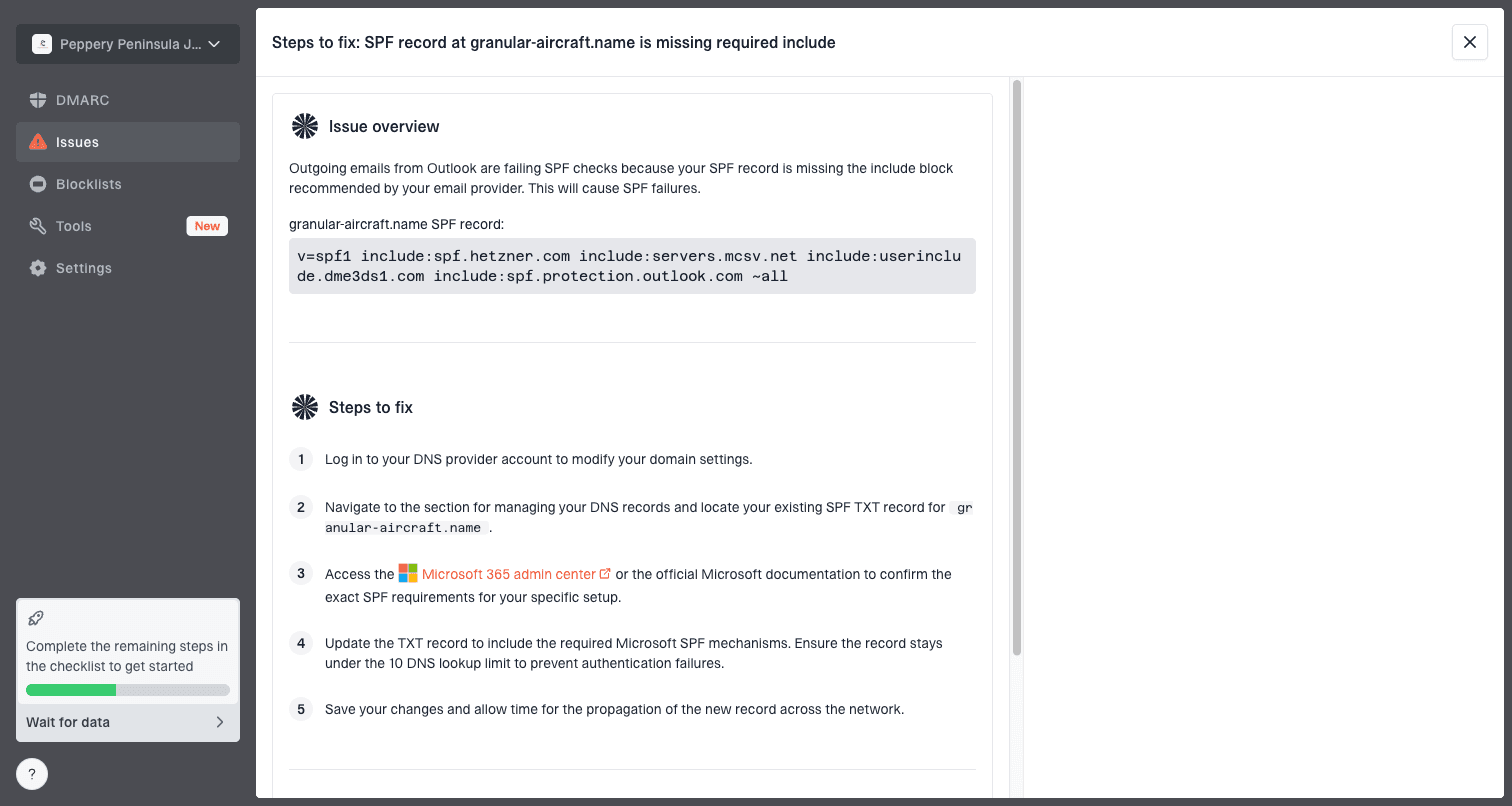
Issue steps to fix dialog showing the issue overview, tailored fix steps, and verification action
Views from the trenches
Best practices
Segment Netease failures by SMTP stage before changing content, routing, or DNS.
Keep retries steady and measured so temporary failures do not worsen reputation.
Test plain text, HTML, tracking, and attachments separately to isolate triggers.
Common pitfalls
Treating every 451 4.3.2 reply as greylisting hides content and routing causes too.
Changing IP pools during testing makes reputation and route evidence less useful.
Stopping at first deferrals can mask whether retries later succeed or expire in queue.
Expert tips
For Netease, compare accepted volume against attempted volume, not only bounces.
When every sender fails, investigate shared infrastructure before blaming content.
Use a local escalation path only after logs show stable authentication and routing.
Expert from Email Geeks says a 451 4.3.2 response usually means something timed out or failed during delivery, rather than a clear intentional block.
2021-01-21 - Email Geeks
Expert from Email Geeks says failures after DATA should push the investigation toward content encoding, language, message size, attachments, and attachment content types.
2021-01-21 - Email Geeks
The practical answer
A Netease 451 4.3.2 Internal server error is best handled as a temporary delivery failure with several likely causes: receiver-side timeout, content processing failure, reputation limits, authentication weakness, or China-specific routing pressure. The fix depends on the pattern, not the code alone.
If the error appears occasionally and retries succeed, keep volume steady and monitor latency. If every message fails for one sender, isolate that sender's IP, domain, authentication, content, and route. If failures appear after DATA, simplify the message until the trigger is clear. If authentication or DNS is messy, fix that before escalating to Netease or changing routes.
Best next step
Build a small evidence set: SMTP stage, sender cohort, Netease domain, retry outcome, message profile, and authentication status. That gives you a real diagnosis instead of a guess based on a generic temporary error.




