What are the pros and cons of using Salesforce Marketing Cloud's Custom List Detective?

Updated on 25 Jul 2026: We updated this guide with Salesforce's current enterprise scope, republishing, reporting, and rollback requirements.
Salesforce Marketing Cloud's Custom List Detective is useful as a short-term gate for blocking specific email usernames or domains, but it is not a full email validation system and it will not stop most bot-driven signup abuse on its own. Treat it as a narrow safety control inside SFMC, not as the main defense for list quality.
The direct answer on commercial versus transactional sending is this: assume Custom List Detective denied sending applies regardless of send classification. It blocks at import for list-based sending and at send time for data-extension-based sending, and List Detective behavior also affects triggered sends. For a production tenant, confirm the exact behavior with Salesforce Support before relying on a transactional exception.
The main risk is blocking real transactional mail, such as receipts, password resets, warranty notices, or account alerts. A commercial unsubscribe rule and a Custom List Detective deny rule solve different problems.
- Use it: Block obvious throwaway domains, known abusive domains, or usernames you never want to send to.
- Do not: Treat it as proof that an address is valid, opted in, or owned by the person who submitted it.
- Test first: Run a small proof against marketing sends, journeys, triggered sends, and API sends before enabling broad rules.
What Custom List Detective does
List Detective is Salesforce Marketing Cloud's built-in protection against addresses and domains that Salesforce considers risky for sending. Custom List Detective extends that protection by letting Marketing Cloud admins add deny entries for usernames or domains. Salesforce's Custom List Detective documentation is the reference to attach to internal implementation tickets.
The rule types are simple. You can block a username pattern, such as a role address local part, or block a whole domain. Enter the username or hostname only, without the "@" symbol. This is useful when malicious signups are coming from repeating domains that are not normal consumer mailbox providers.
Example Custom List Detective entriestext
admin
info
sales
abuse
r5sxpy.com
throwaway-example.test
The important detail is that this is not mailbox verification. It does not confirm that the address exists, that the owner gave consent, or that a human submitted the form. A successful import into a data extension also does not prove sendability, because List Detective checks those addresses at send time.
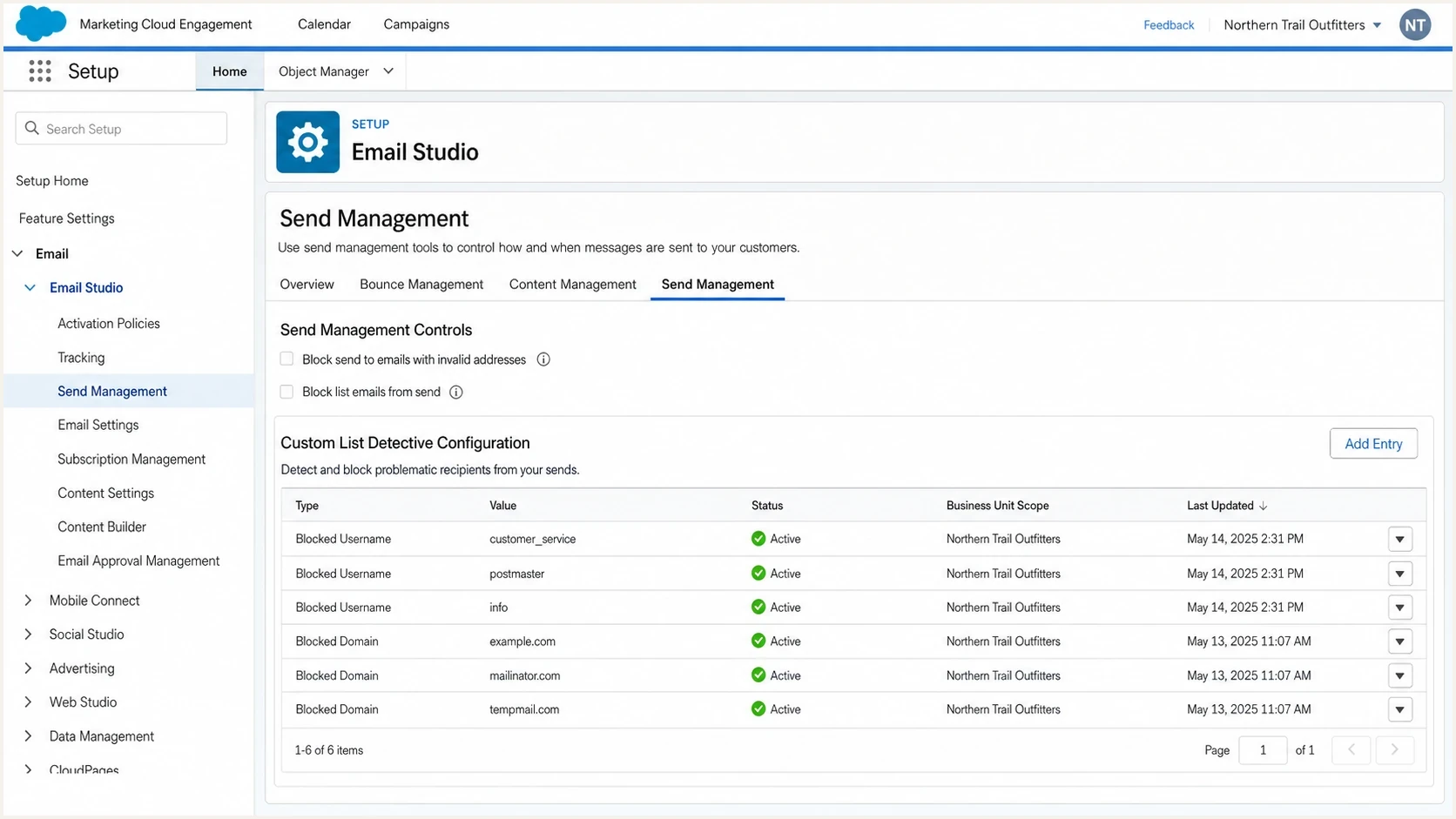
Salesforce Marketing Cloud Engagement setup screen for configuring email sending restrictions.
The practical pros
The strongest argument for Custom List Detective is speed. When a client has a spike of suspicious signups and no form validation in place, a deny rule can reduce damage before the web, CRM, and data engineering teams finish a better fix.
Where it helps
- Fast control: A domain rule can stop known bad domains without rebuilding every form.
- Sender protection: Fewer risky sends reduces pressure on bounce rates and complaint rates.
- Simple governance: One rule can cover future imports and sends after the rule is active.
- Useful blocking: It works well against repeated fake domains and role usernames.
Where it does not
- No ownership proof: A matching address is not the same as a verified subscriber.
- No bot stop: Automated signups can rotate domains, dots, plus tags, and aliases.
- No consent signal: It does not prove opt-in, intent, or lawful marketing permission.
- No channel nuance: It is not designed as a commercial-only suppression control.
Custom List Detective works best when the bad data has a clear repeating pattern. If a bot is feeding disposable domains such as short random domains, adding those domains to the deny list can buy time. If the abuse comes through normal consumer mailboxes with endless spelling, dot, and alias variations, Custom List Detective becomes a game of chasing new strings.
The practical cons
The biggest drawback is false confidence. Custom List Detective can reduce bad sends, but it does not fix the acquisition path. A signup form without CAPTCHA, rate limiting, server-side validation, confirmation, and abuse monitoring stays open to repeat submissions.
|
|
|
|---|---|---|
Bad domains | Fast block | Domain churn |
Role names | Less risk | False blocks |
Persistent sends | Policy applies | Republish required |
Reporting | Extract evidence | No complete UI view |
Common Custom List Detective tradeoffs
For Gmail-style addresses, dots are a simple example. To Gmail, an address with dots inserted through the local part can resolve to the same mailbox. A bad actor can submit many variants that look different to a form and still route to one inbox. A domain block will not catch that when the domain is a normal consumer mailbox provider.
Do not use Custom List Detective as the only control for a public signup form. It works after an address has entered the marketing stack, so the system still receives bad data, starts automation logic, and adds operational cleanup.
- Form control: Add CAPTCHA, rate limiting, and server-side checks before SFMC receives the address.
- Data control: Store the source, timestamp, IP, user agent, and consent context for later review.
- Send control: Keep suppression, exclusion scripts, and journey filters separate from Custom List Detective.
Commercial versus transactional sending
Do not design around the assumption that Custom List Detective can deny commercial messages while allowing transactional messages. Treat it as a platform-level sendability restriction, then test every send path that matters. A triggered sends case shows the type of failure teams run into when List Detective blocks API-triggered mail, although its older business unit guidance does not match Salesforce's current enterprise-wide CLD documentation.
That matters because transactional mail often has a higher business cost when it fails. A blocked marketing newsletter is usually acceptable. A blocked order confirmation, login code, or legal notice creates a support issue and a customer experience issue.
When Custom List Detective is appropriate
Use the rule count and business impact to choose between a quick deny list and a deeper data-quality fix.
Low risk
1-5 rules
A few disposable domains affect only promotional campaigns.
Watch closely
6-25 rules
Repeated domains are appearing across journeys and automations.
Fix upstream
25+ rules
Rules affect transactional paths or change every few days.
The safest rollout is to map each send type, confirm where List Detective is evaluated, and record what failure signal appears. For data extension sends, check send logs and not-sent records. For triggered sends and journeys, test the failure behavior, then republish the persistent send definition after each List Detective change so the new rules take effect.
Enablement, enterprise scope and rollback
Custom List Detective is not enabled by default. Salesforce Support must enable it, after which Enterprise 2.0 admins access it through Email Studio > Admin from the parent account. Admins can add deny entries in the interface, while an allow override for an address that default List Detective blocks requires help from Salesforce staff.
Plan for enterprise-wide effects
CLD entries apply at the enterprise level, so every business unit sees the same list. A rule created for one acquisition problem can affect unrelated campaigns and transactional paths elsewhere in the account.
- Enter the mask correctly: Use only the username or hostname and omit the "@" symbol.
- Assess subscriber impact: Adding a deny entry sets subscribers with matching addresses to Unsubscribed.
- Republish persistent sends: Triggered sends and Journey Builder sends need republishing to commit the change.
- Reverse carefully: Deleting the deny entry does not restore subscriber statuses changed by List Detective.
Keep a rollback list before adding a deny entry. If a rule is removed, identify affected subscribers separately and restore only addresses that still have valid consent and a legitimate business reason to receive the relevant mail.
How to use it in SFMC
The safest use of Custom List Detective is as a controlled emergency measure. Start with the smallest rule set that addresses the observed abuse, keep it documented, and remove rules that no longer have evidence behind them.
- Collect evidence: Export recent suspicious signups with domain, local part, source form, IP, and timestamp.
- Group patterns: Separate repeated domains, repeated usernames, syntax problems, and mailbox-provider variants.
- Stage rules: Add only the rules that match obvious abuse and document the enterprise-wide reason for each one.
- Test paths: Send through Email Studio, Journey Builder, triggered sends, and API paths before broad rollout.
- Monitor fallout: Review not-sent records, support tickets, bounce changes, complaints, and conversion drop-offs.
- Prepare recovery: Record affected subscribers because removing a deny entry will not restore their prior status.
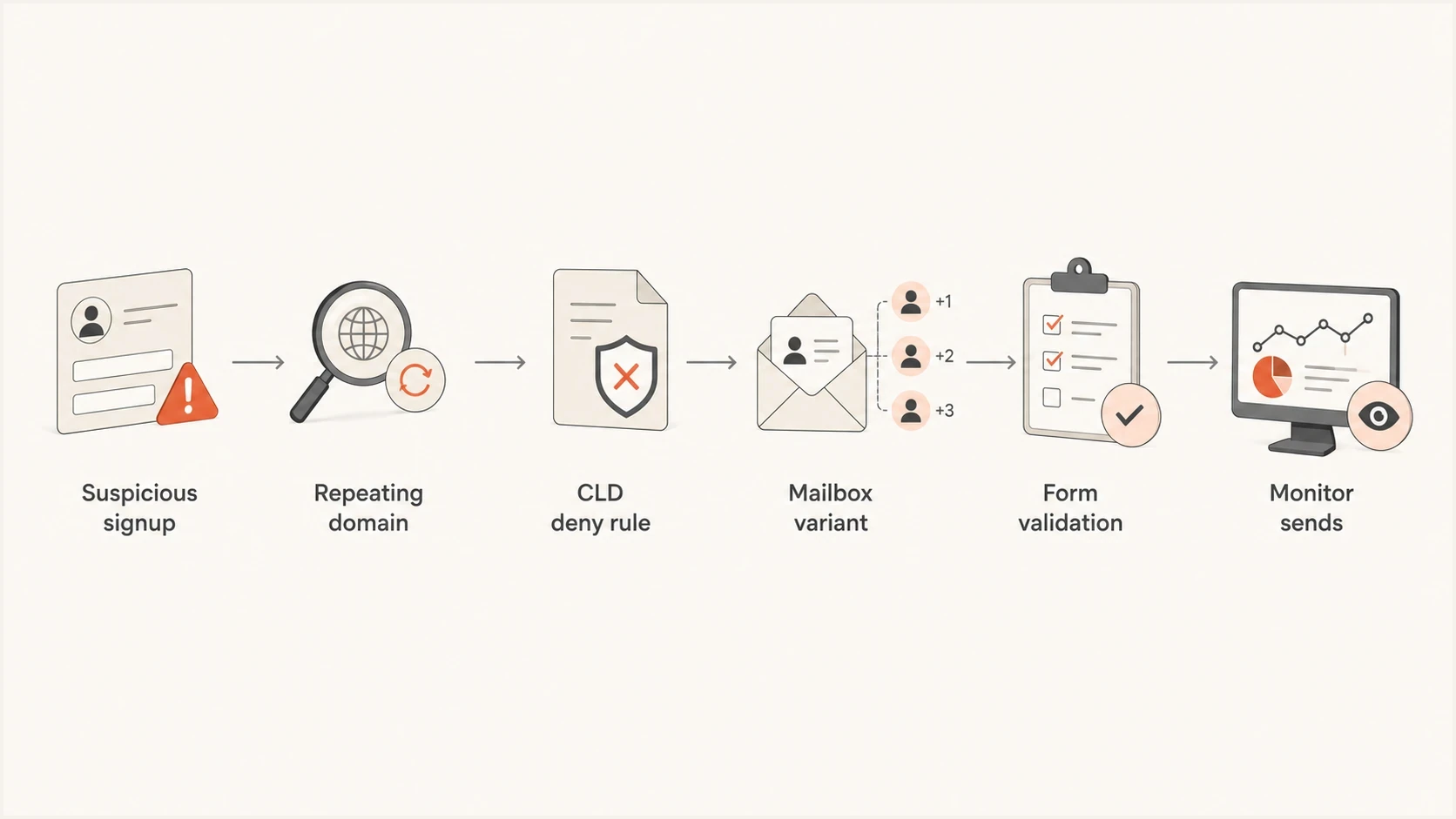
Flowchart showing when to use Custom List Detective versus upstream form validation.
If the issue is broad SFMC deliverability rather than just bad signups, Custom List Detective is only one input. Use a separate process to diagnose SFMC issues, because authentication, content, cadence, complaints, bounce handling, and subscriber source quality all affect inbox placement.
What to monitor around it
Once Custom List Detective is active, monitor both the blocked data and the sending system. Use an All Subscribers list import with an emailed import result to test addresses before list-based sends. For send-time exclusions, inspect the NotSent.csv file from a Tracking Extract and look for "List Detective Exclusion" in the reason field. List Detective does not provide a complete direct reporting view in the interface.
Send real tests after any change that affects eligibility, classification, or authentication. A practical way to do that is to use an email tester to inspect authentication results, content signals, headers, and basic deliverability issues outside SFMC's own reporting.
Email tester
Send a real email to this address. Suped shows a results button when the test is ready.
?/43tests passed
Suped's product fits the surrounding workflow rather than replacing Custom List Detective. SFMC can stop an address from receiving a send. Suped monitors the domain side, including DMARC, SPF, DKIM, blocklist (blacklist) exposure, and authentication issues. This helps teams separate a list-quality incident from authentication or reputation problems.

Issue steps to fix dialog showing the issue overview, tailored fix steps, and verification action
Suped brings DMARC monitoring, SPF and DKIM visibility, hosted DMARC, hosted SPF, and blocklist monitoring into the domain-authentication workflow. Operations teams can then investigate authentication failures or a blocklist/blacklist listing separately from an SFMC List Detective exclusion.
What to do instead of relying on it
Custom List Detective should sit behind better data capture. The best prevention work happens before the email address reaches Marketing Cloud.
Short-term controls
- Deny domains: Block domains that repeat across abusive signups.
- Throttle forms: Limit repeated submissions by IP, session, and device signal.
- Review journeys: Pause risky first-send journeys until the bad source is controlled.
Long-term controls
- Confirm addresses: Use double opt-in where risk, consent, or list quality requires it.
- Validate server-side: Reject malformed, disposable, and suspicious addresses before storage.
- Separate mailstreams: Keep transactional and marketing paths easier to audit and protect.
A List Detective test can help explain why some addresses are rejected, but the operational answer is still to reduce bad submissions at the source. A growing deny list is a symptom, not a mature quality program.
Views from the trenches
Best practices
Test all send paths before rollout, including journeys, API triggers, and batch sends.
Use Custom List Detective for repeated patterns, not as the only form abuse control.
Document every deny rule with evidence, owner, date added, and planned review timing.
Common pitfalls
Teams forget transactional emails can be blocked, creating hidden customer support issues.
Large deny lists become stale and block valid mail after the original incident has passed.
Mailbox-provider variants bypass simple username rules and keep adding bad records.
Expert tips
Pair deny rules with CAPTCHA, rate limits, source logging, and confirmation when needed.
Review not-sent reporting after each rule change to catch false positives quickly.
Escalate allow needs through Salesforce Support instead of assuming the UI changed rules.
Marketer from Email Geeks says Custom List Detective should be assumed to block both commercial and transactional sends, with data-extension sending evaluated at send time.
2022-04-01 - Email Geeks
Marketer from Email Geeks says Custom List Detective can block domains and usernames, but it does not solve bot signups because attackers rotate address variants.
2022-04-01 - Email Geeks
Practical verdict
Use Salesforce Marketing Cloud's Custom List Detective when you need a fast, enterprise-wide deny control for known bad domains or usernames. It is a useful stopgap for obvious abuse, especially when the bad addresses share clear patterns.
Do not use it as the main answer to malicious signup activity. The durable fix is upstream validation, CAPTCHA, rate limiting, consent capture, confirmation, and monitoring. Keep transactional mail and every business unit in scope during testing, then republish persistent sends and retain a recovery list for subscribers changed to Unsubscribed.
The operating model is simple: SFMC handles the send restriction, the web form stops bad submissions earlier, and Suped's product monitors authentication and reputation signals around the sending domain. This separates the data-quality problem from any deliverability fallout.




