What are the new email authentication and unsubscribe requirements from Gmail and Yahoo for 2024?

Published 30 Jun 2025
Updated 12 Aug 2026
11 min read
Summarize with
Updated on 12 Aug 2026: We updated this guide for Gmail's active enforcement, Yahoo's full bulk-sender requirements, and the current one-click unsubscribe rules.
The direct answer: Gmail and Yahoo's 2024 requirements make authentication, sender reputation, and unsubscribe handling mandatory operational work for bulk senders. You need SPF and DKIM passing, a DMARC record with at least p=none, the visible From domain must match either the SPF Mail From domain or the DKIM d= domain for DMARC to pass, marketing mail needs one-click unsubscribe plus a visible body link, and complaint rates need to stay low.
Treat this as a baseline checklist, not a one-time February 2024 project. Gmail's Google announcement started the public push, and Yahoo moved in the same direction. The requirements remain active, and Gmail now applies temporary or permanent rejections to non-compliant traffic.
- Authentication: bulk senders need SPF and DKIM passing on every legitimate sending stream.
- DMARC: publish a valid DMARC record for each sending domain, starting at p=none if you are not ready to enforce.
- Domain match: the visible From domain must match an authenticated SPF or DKIM domain closely enough for DMARC.
- Unsubscribe: marketing and subscribed mail needs a provider-supported List-Unsubscribe mechanism and a visible body link.
- Complaints: keep user-reported spam below 0.1% as an operating target and never let it reach 0.3%.
What changed in 2024
Most of the rules were not technically new. Authentication, reverse DNS, clean formatting, low complaints, and usable unsubscribe links have been normal email hygiene for years. The 2024 change was that Gmail and Yahoo made the requirements explicit and tied non-compliance to filtering or rejection. Gmail increased enforcement against non-compliant traffic in late 2025, so this is now an active delivery requirement rather than a rollout deadline.
For Gmail, a bulk sender is a domain that sends close to 5,000 or more messages to personal Gmail accounts within 24 hours. Gmail counts all traffic across the same primary domain, including transactional messages, so splitting mail between example.com and news.example.com does not make the requirement disappear. A domain that reaches the threshold once remains classified as a bulk sender. Yahoo describes bulk sending by significant volume and sender identity rather than publishing the same numeric cutoff.
|
|
|
|
|---|---|---|---|
Bulk trigger | About 5,000/day; permanent once reached | Significant volume | Treat near-threshold domains as bulk |
All-sender authentication | SPF or DKIM | SPF or DKIM | Configure both where practical |
Bulk authentication | SPF and DKIM | SPF and DKIM | Authenticate every sending stream |
DMARC | Minimum p=none | Minimum p=none; DMARC must pass | Publish, match domains, and monitor |
DNS and format | Forward and reverse DNS; RFC 5322 | Forward and reverse DNS; RFC 5321 and 5322 | Use stable hostnames and valid messages |
Transport | TLS required | Secure mail transport recommended | Send over TLS |
Unsubscribe | RFC 8058 plus visible body link | List-Unsubscribe plus visible body link | Honor requests within 2 days |
Spam complaints | Keep below 0.3% | Keep below 0.3% | Operate below 0.1% |
Current reading of the Gmail and Yahoo sender requirements introduced in 2024.
Do not optimize around the cutoff. If a domain is anywhere near bulk volume, configure it as a bulk sender. Peak campaigns count, and Gmail bulk-sender status does not expire after it is assigned.
- Do: authenticate all production mail before the domain grows into bulk volume.
- Do not: split campaigns across subdomains to appear smaller.
- Check: whether old systems, CRMs, invoices, alerts, and forms send with your domain.
The authentication checklist
The technical baseline has seven practical jobs. Every sender needs SPF authorization where SPF is used, and every sender should sign mail with DKIM using a domain you control. DMARC must exist at the visible From domain or its organizational domain. Either SPF or DKIM must match the visible From domain closely enough for DMARC to pass. Sending IPs need valid forward and reverse DNS, Gmail-bound mail must use TLS, and messages must follow the applicable internet message format standards.
Minimal DMARC record for monitoringdns
Host: _dmarc.example.com
Type: TXT
Value: v=DMARC1; p=none; rua=mailto:dmarc@example.com
That record satisfies the minimum publication requirement, but legitimate mail must still authenticate and match domains correctly for DMARC to pass. It also does not protect the domain from spoofing. Use p=none as a staging mode: collect reports, identify every legitimate source, fix failures, then move to quarantine or reject once the data is clean.
Compliant sending
- SPF: the envelope sender domain authorizes the sending IP.
- DKIM: the message has a valid signature from a controlled domain.
- DMARC: the visible From domain matches SPF or DKIM at the organizational-domain level.
Common failure
- Free From: campaigns use a Gmail or Yahoo address through another sender.
- Shared DKIM: the platform signs with its own domain, not yours.
- Missing reports: DMARC exists, but no one reviews the failures.
Before changing policy, run a domain health checker and then check the specific DMARC result with a DMARC checker. If you do not have a record yet, create the first version with a DMARC record generator and then adjust the reporting address for your environment.
?
What's your domain score?
Deep-scan SPF, DKIM & DMARC records for email deliverability and security issues.
What one-click unsubscribe means
One-click unsubscribe does not mean the footer link must remove a person with one click. For Gmail, it means the message has the List-Unsubscribe and List-Unsubscribe-Post headers required by RFC 8058, which let Gmail send an automated HTTPS POST request. Yahoo requires a functioning List-Unsubscribe mechanism, strongly recommends the RFC 8058 POST method, and also accepts a mailto method. Both providers require a clearly visible unsubscribe link in the message body.
RFC 8058 one-click unsubscribe headerstext
List-Unsubscribe: <https://example.com/u/abc123>
List-Unsubscribe-Post: List-Unsubscribe=One-Click
The HTTPS endpoint must process the POST without a login, confirmation page, or cookie. Honor the opt-out within 48 hours. These requirements apply to marketing and subscribed mail, while pure transactional messages such as password resets, receipts, security alerts, and order confirmations are excluded. If a message mixes account information with promotional content, do not classify it as purely transactional.
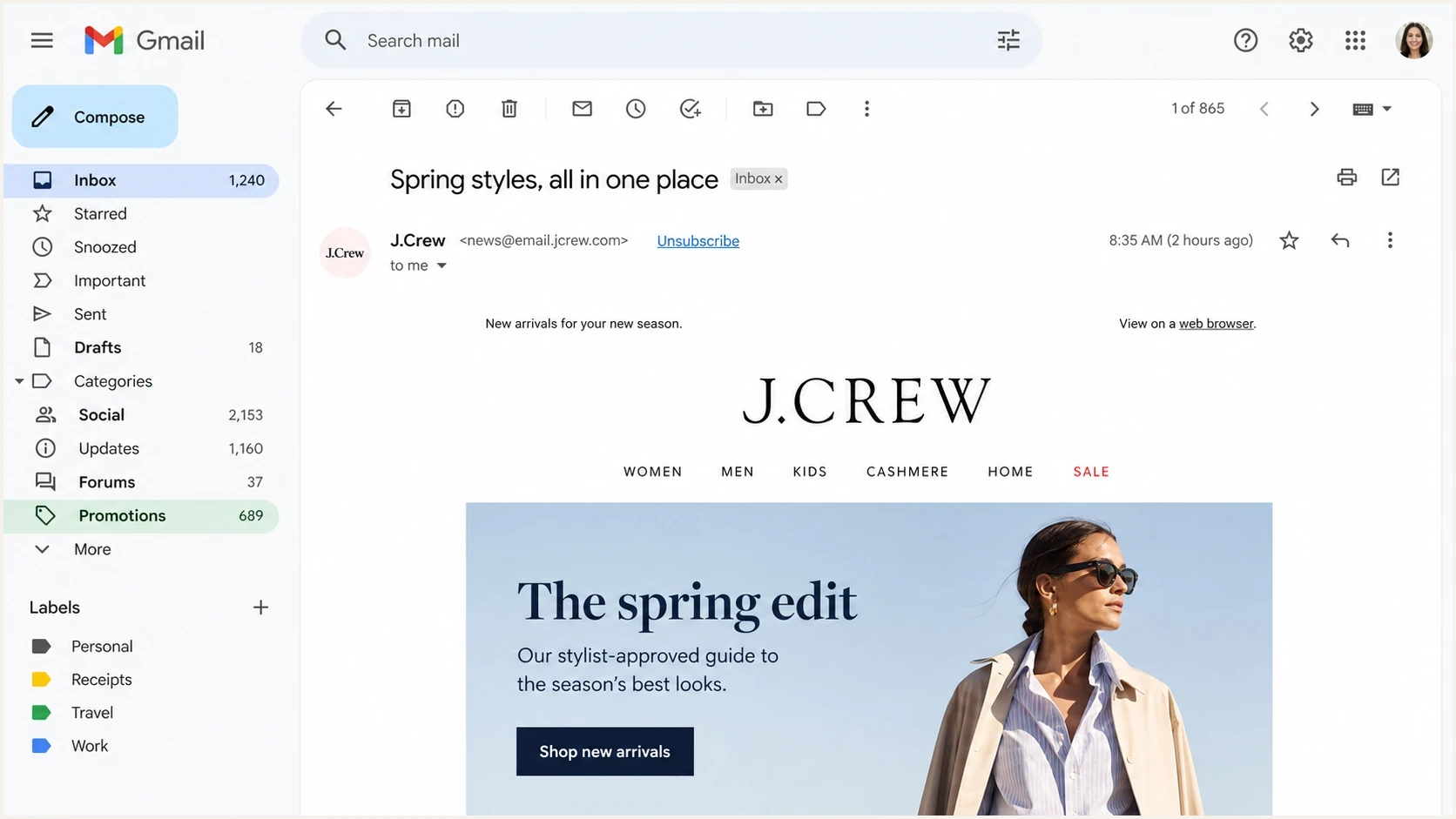
Gmail message view showing an unsubscribe control near the sender details.
Header unsubscribe
This is the mechanism mailbox providers use for an in-product unsubscribe control.
- Location: email headers, not visible body copy.
- Action: the mailbox app sends an automated opt-out request.
- Timing: honor the request within 48 hours.
Body unsubscribe
This visible link is required in addition to the header mechanism.
- Location: clearly visible in the message body.
- Action: it can open a preference center.
- Risk: a body-only link fails Gmail's one-click requirement.
Spam complaint rates and enforcement
The most misunderstood number is 0.3%. Neither provider presents it as a target. Gmail recommends keeping reported spam below 0.1%, and both Gmail and Yahoo require senders to remain below 0.3%. A sender sitting at 0.25% is already at material risk.
Complaint rate thresholds
Use these operating bands for bulk traffic to Gmail and Yahoo recipients.
Healthy
Below 0.1%
Strong operating range for bulk senders.
Warning
0.1% to 0.3%
Reputation risk is visible and needs list cleanup.
Critical
0.3% or higher
Rejection and inbox placement risk are severe.
Complaint math needs provider context. Gmail's rate is based on user reports at Gmail, not total complaints divided by mail sent across every domain. Yahoo calculates its rate against mail delivered to the inbox, so a sender-side calculation or complaint feedback data will not necessarily match Yahoo's number. If reporting blends consumer, business, transactional, and promotional mail, it can hide the stream causing the problem.
A single spike does not mean a domain is permanently damaged. A pattern of high complaints means the list, targeting, consent, cadence, or message expectations are broken. Authentication helps providers identify the sender; it does not make unwanted mail wanted.
- Segment: measure complaints by recipient domain and mail stream.
- Suppress: remove users who complain or ignore repeated campaigns.
- Separate: keep transactional and promotional traffic operationally distinct.
How to fix a non-compliant domain
Start with inventory. Most broken implementations are not broken because SPF or DKIM is hard. They are broken because no one knows every place mail leaves the organization: marketing platforms, billing systems, support tools, website forms, data warehouses, internal apps, and old automation.
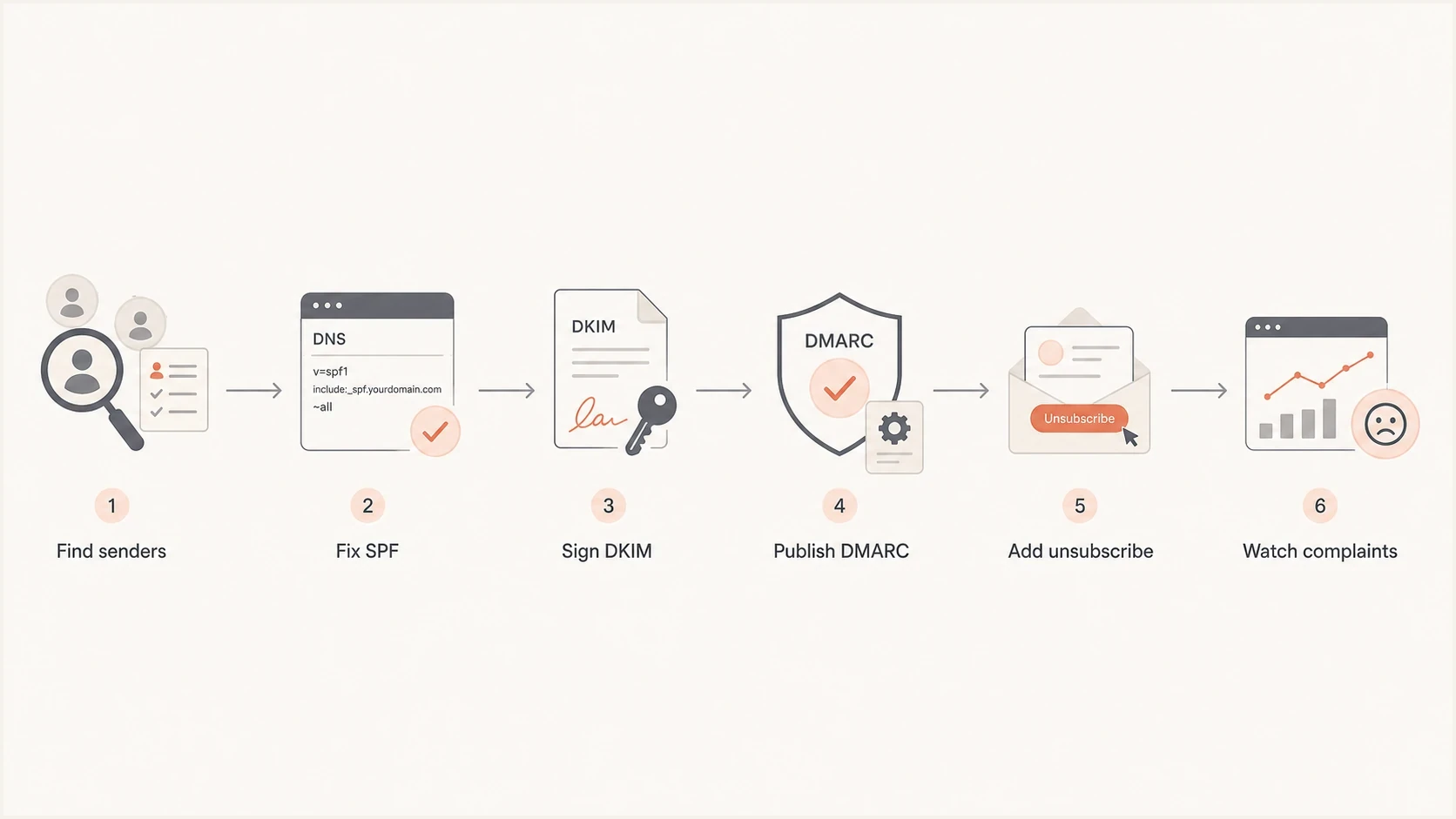
Compliance flow from sender inventory to complaint monitoring.
- Inventory: list every system that sends using the domain or a subdomain.
- Authenticate: configure SPF and DKIM for each legitimate sender, then verify TLS, forward and reverse DNS, and message formatting.
- Match: make sure the visible From domain matches SPF or DKIM for DMARC.
- Publish: add DMARC at _dmarc with aggregate reporting enabled.
- Unsubscribe: add the required headers and visible body link to marketing and subscribed streams.
- Enforce: move DMARC policy gradually once reports show legitimate sources pass.
For shared IP pools, reverse DNS does not require a separate customer domain per IP. A stable hostname under the sending provider's controlled domain is normal. The problem is a generic cloud hostname, a missing PTR record, or a HELO name that changes unpredictably.
How Suped fits the workflow
Suped's product supports the operational work behind these requirements: finding active senders, diagnosing SPF, DKIM, or DMARC failures, and moving domains through policy staging without reading raw XML reports. Teams can use DMARC monitoring, hosted DMARC, hosted SPF, SPF flattening, MTA-STS, blocklist (blacklist) monitoring, and alerts in one workflow.

Issue steps to fix dialog showing the issue overview, tailored fix steps, and verification action
The platform shows what is broken and the next configuration step. A domain can have a DMARC record and still fail because a billing app signs with the wrong DKIM domain, or a marketing stream uses an envelope domain that does not match the From domain.
- Issue detection: Suped flags broken senders and gives steps to fix them.
- Policy staging: hosted DMARC supports controlled moves through none, quarantine, and reject.
- DNS relief: hosted SPF and SPF flattening help prevent lookup-limit failures.
- Operational scale: MSP and multi-tenant dashboards keep domain work separated.
Views from the trenches
Best practices
Authenticate every active sender before policy changes, including small apps with low volume.
Keep the visible From domain under your control; free mailbox From addresses create risk.
Treat 5,000 daily Gmail recipients as a planning signal, not a cliff edge to game.
Monitor complaint rates by receiver domain so Gmail risk is not hidden in total sends.
Common pitfalls
Publishing DMARC without reading reports leaves broken DKIM sources invisible until reject.
Confusing one-click headers with a footer link creates a compliance gap for campaigns.
Using one shared DKIM domain for many customers makes reputation separation harder over time.
Assuming p=none is the final state leaves spoofing protection weaker than intended long term.
Expert tips
Start with p=none, fix real sources, then move to quarantine once reports are clean.
Add List-Unsubscribe-Post for marketing mail and test the POST endpoint with real sends.
Use stable reverse DNS hostnames for shared IP pools; dynamic HELO behavior invites blocks.
Keep spam complaints far below 0.3%; living near the ceiling means deliverability risk.
Expert from Email Geeks says the 2024 announcement mainly made accepted practices explicit and enforceable, with DMARC and one-click unsubscribe creating the most implementation work.
2023-10-03 - Email Geeks
Marketer from Email Geeks says senders near the 5,000 daily threshold should behave like bulk senders because the same work improves mail health below the threshold.
2023-10-04 - Email Geeks
The practical takeaway
The Gmail and Yahoo 2024 requirements are now ordinary sender obligations. Authenticate mail, publish DMARC, match the From domain with SPF or DKIM, support the required unsubscribe mechanism on marketing mail, include a visible body link, and keep complaints well below the danger zone.
The domains most exposed are the ones with hidden senders, free mailbox From addresses, old platforms without RFC 8058 support, and complaint data that is too blended to act on. Fix those before moving DMARC enforcement. That path protects delivery and gives mailbox providers cleaner signals about legitimate mail.
- First move: find every sender and verify SPF, DKIM, and DMARC pass in real mail.
- Second move: add one-click unsubscribe headers and a visible body link to every relevant stream.
- Third move: monitor complaints by receiver and suppress users who do not want the mail.