What are the limitations of Amazon SES regarding Microsoft SNDS access and is there a workaround?

Published 7 May 2025
Updated 13 Aug 2026
11 min read
Summarize with
Updated on 13 Aug 2026: We updated this guide for SNDS metrics on standard and managed SES dedicated IPs, shared-pool routing, and Microsoft's current JMRP changes.
Amazon SES does not let customers add leased SES dedicated IPs to their own Microsoft SNDS account. This applies to standard and managed dedicated IPs. The supported path is to view SES-provided SNDS metrics in Amazon CloudWatch, not to request direct authorization through the SNDS portal. There is no customer-side setting that overrides this for leased SES IPs.
The practical workaround is partial but official. Amazon publishes SNDS data for dedicated IPs into CloudWatch, including recipient commands, DATA commands, message recipients, spam rate, complaint rate, and trap hits. The current AWS SNDS metrics documentation states that this data is available per AWS Region where you use SES dedicated IPs.
The short version
If you need direct Microsoft SNDS portal control, SES leased IPs are the wrong control point. If you need a daily Microsoft reputation signal for SES dedicated IPs, CloudWatch is the supported control point.
The direct answer
The limitation exists because Amazon owns and operates the SES IP space. Leasing a dedicated IP gives your account exclusive sending use and control of its sending reputation, but it does not transfer ownership of the address or the Microsoft authorization path. Microsoft asks the party responsible for the IP range to approve SNDS access, and AWS does not delegate that approval to SES customers.
This is not a DNS misconfiguration, a missing Microsoft step, or an SES onboarding gap. It is an access policy. SES gives you a defined set of SNDS-derived metrics through CloudWatch, but it does not give you the complete SNDS account relationship with Microsoft for those leased IPs.
- You cannot add SES leased dedicated IPs to your own Microsoft SNDS account through normal Microsoft verification.
- SES surfaces a defined set of SNDS metrics in CloudWatch for dedicated IPs in each AWS Region.
- You do not get the same portal view, access controls, or JMRP feed administration available to an authorized IP operator.
- Use CloudWatch for SES IP telemetry, or send the affected mail through IPs that your organization can authorize directly in SNDS.
|
|
|
|
|---|---|---|---|
Daily IP signal | Yes | Yes | Use CloudWatch |
Portal control | No | Yes | Use authorized IPs |
Raw context | Limited | Broader | Add SES logs |
JMRP administration | No direct access | In the portal | Use SES complaints |
SES SNDS access compared with direct Microsoft SNDS access.
Which SES IP pools expose SNDS data
The answer depends on the SES IP pool. Shared IPs do not give an SES customer a stable, exclusive address to monitor. Standard dedicated IPs expose per-IP SNDS metrics in CloudWatch. Since Amazon's managed-IP observability update, managed dedicated pools also expose their allocated IP addresses and per-IP SNDS metrics.
|
|
|
|
|---|---|---|---|
Shared | Addresses can change | No per-customer IP view | AWS manages the shared reputation |
Dedicated standard | Known static IPs | Per-IP CloudWatch metrics | No direct portal authorization |
Dedicated managed | Allocated IPs are visible | Per-IP CloudWatch metrics | Pool membership can scale |
SNDS visibility by Amazon SES IP pool type.
Managed pools can still use shared IPs
During warmup, sudden volume changes, or low-volume periods, a managed dedicated pool can route some mail through the SES shared pool. Its dedicated-IP SNDS metrics describe the dedicated portion, not every message sent with that configuration set. Compare them with the managed pool's dedicated sending percentage before attributing all Microsoft results to one IP.
What Amazon SES gives you instead
The CloudWatch route gives a measurable Microsoft-side signal without granting customer access to AWS-controlled IP authorization. Use it as a reputation alarm source, not as a complete forensic record.
CloudWatch SNDS metrics exposed by SEStext
CloudWatch path: Metrics > All metrics > SES > IP Metrics
Scope: One selected dedicated IP

SNDS.RCPTCommands
SNDS.DATACommands
SNDS.MessageRecipients
SNDS.SpamRate
SNDS.ComplaintRate
SNDS.TrapHits
These metrics are updated once a day and carry a timestamp for a 24-hour activity period. They also depend on Microsoft receiving enough qualifying traffic to calculate a value. If an IP sends low volume to Outlook.com, Hotmail.com, Live.com, or related Microsoft consumer domains, CloudWatch can show gaps.
Treat the data as Outlook.com network telemetry. It covers the consumer domains Microsoft tracks in SNDS, including Outlook.com, Hotmail.com, and Live.com. It is not tenant-level reporting for every custom domain hosted on Microsoft 365.
How to read the core SNDS warning levels
Use these as triage bands, then confirm with SES event logs and recipient-domain outcomes.
Low spam signal
0
SNDS.SpamRate is 0, meaning Microsoft sees less than 10% spam for that activity window.
Mixed signal
0.5
SNDS.SpamRate is 0.5, meaning Microsoft sees between 10% and 90% spam.
Severe signal
1
SNDS.SpamRate is 1, meaning Microsoft sees 90% or more spam for that window.
Trap signal
>0
SNDS.TrapHits above 0 requires immediate list-source investigation.
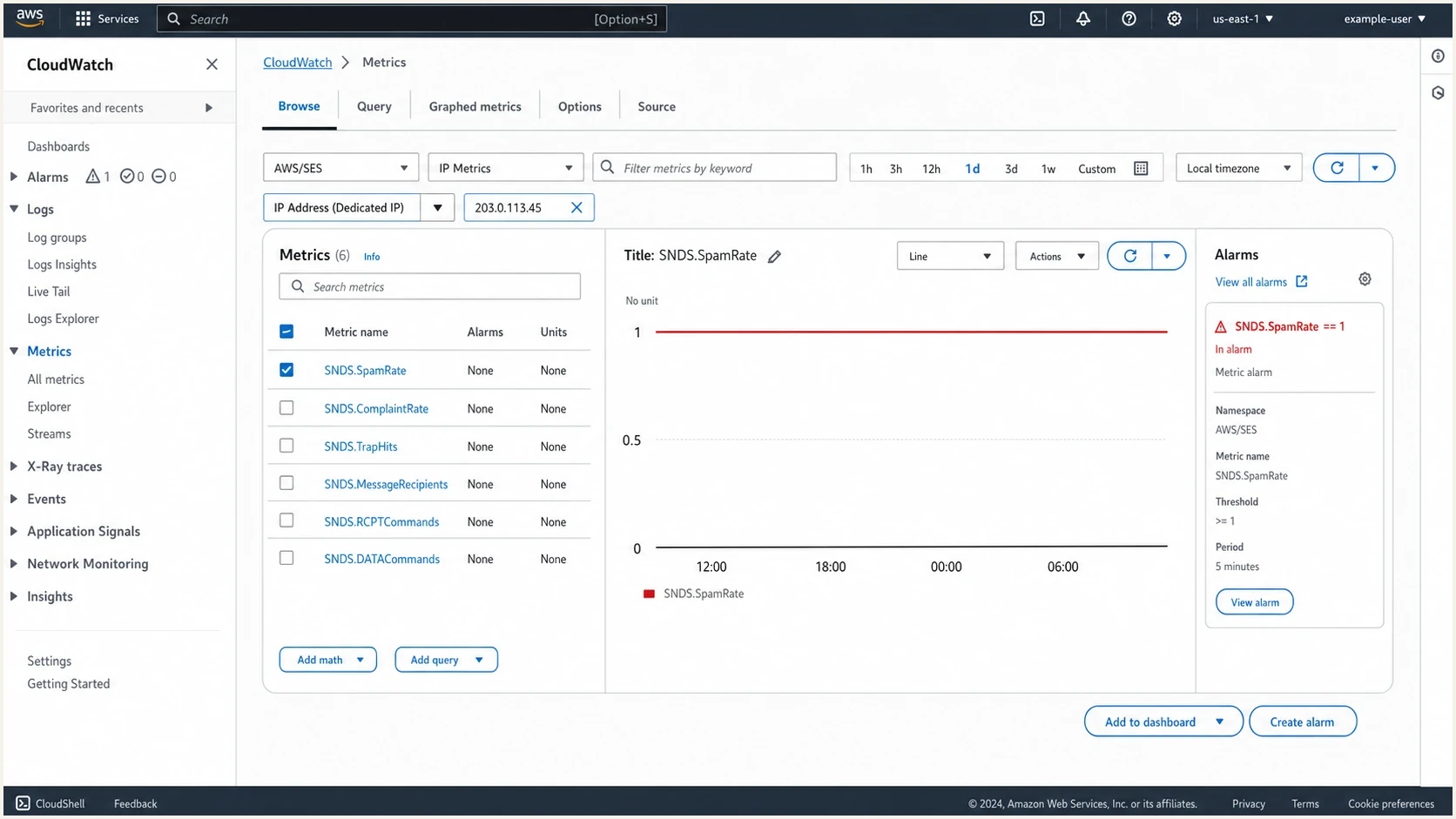
Amazon CloudWatch metrics screen showing SES SNDS metrics for a dedicated IP.
What you lose without direct SNDS
The missing data matters most during Microsoft-specific incident response. CloudWatch tells you that a problem exists, but it does not always give the portal context that helps explain why it happened. That difference is a real tradeoff for senders with formal incident-review requirements.
CloudWatch SNDS
- CloudWatch keeps the data inside AWS, where you can graph it, alarm on it, and compare it with SES sending metrics.
- The defined metric set does not include every portal control or feedback-loop function.
- Use it for trend monitoring, alarms, and confirmation that Microsoft reputation changed.
Direct SNDS
- Direct access gives IP operators portal controls and JMRP feedback-loop administration.
- Access depends on authorization for the IP range, which SES customers cannot obtain for leased SES IPs.
- Use it when your organization controls the sending IP authorization path.
Microsoft has changed the portal evidence available to senders. Complaint sample downloads have ended, JMRP reports are standardized in ARF, and Microsoft says it will remove JMRP feeds that are not linked to SNDS accounts. Microsoft also says its planned ARF format will retain original message headers and selected authentication headers while removing the message body and redacting the sender address. Direct access therefore gives more control, but it no longer guarantees the historical complaint artifacts some operators expect.
Do not overread one metric
A severe SNDS value tells you Microsoft saw poor mail behavior for the IP during that window. It does not prove the cause. Check authentication, list source, complaint handling, recent content changes, bounce patterns, and recipient engagement before changing infrastructure.
Practical workaround inside SES
Inside SES, the workaround is to make CloudWatch SNDS one part of a broader evidence set. That does not replace direct SNDS access, but it makes the limitation manageable for many senders.
- Open CloudWatch in the same AWS Region as the SES dedicated IP pool, then select SES and IP Metrics. Shared-only accounts will not have a customer-level IP view.
- Track spam rate, complaint rate, trap hits, and message recipients together so volume changes do not mislead you.
- Alert when the daily spam rate reaches 1, trap hits rise above 0, or complaint rate moves above your normal baseline.
- Compare the SNDS activity period with SES bounces, complaints, sends by configuration set, and campaign or application release logs.
- For managed pools, compare the dedicated sending percentage before treating per-IP SNDS data as a complete view of the stream.
- Separate transactional and bulk streams so one risky stream does not damage the same Microsoft IP reputation.
Basic CloudWatch alarm logictext
If SNDS.SpamRate = 1 for 1 daily activity period:
  pause high-risk campaigns
  inspect Microsoft-domain results
  check new list sources
  compare complaints and bounces

If SNDS.TrapHits > 0:
  stop unverified acquisition sources
  remove stale addresses
  verify consent source and age
For recipient-level proof, send a controlled message through the same SES configuration set and inspect the result with Suped's email tester. This does not reveal private Microsoft SNDS data, but it confirms headers, authentication, rDNS behavior, content flags, and the path the message took.
Email tester
Send a real email to this address. Suped shows a results button when the test is ready.
?/43tests passed
When CloudWatch SNDS is enough
CloudWatch SNDS is enough when the job is ongoing reputation monitoring, early warning, or deciding whether an Outlook.com issue is isolated to one dedicated IP. SES remains a practical fit when the sending program has clean permission practices, stable domain authentication, low complaint rates, and enough logging outside SNDS.
A strong SES setup has dedicated IP pool separation, configuration sets for every meaningful mail stream, event publishing for bounces and complaints, and a clear response plan when Microsoft metrics degrade. It also has DMARC reporting outside SES, because CloudWatch SNDS describes Microsoft-side IP behavior rather than domain authentication across receivers.
When to move the mail stream
If direct SNDS and JMRP control are operational requirements, the workaround is not hidden inside SES. Move that mail stream to infrastructure where your organization can prove IP responsibility to Microsoft. That means an IP range you own or a sending setup where the operator supports the Microsoft authorization process for you.
Make that move only after separating the requirement from the frustration. Direct SNDS access helps, but it does not fix poor list quality, weak consent, authentication failures, or a blocklist (blacklist) problem. It gives better evidence and feedback-loop control. It does not create good reputation by itself.
Move only for the right reason
- Move when your incident process requires direct SNDS portal access, JMRP administration, or Microsoft feedback-loop reports.
- Do not move because you assume direct SNDS access will repair inbox placement without changing mail quality.
- Move one Microsoft-sensitive stream first, warm it gradually, and compare results before moving all SES traffic.
For a broader walkthrough on the same access problem at email service providers, see the page on ESP SNDS access. The core rule is the same: Microsoft wants authorization from the party responsible for the IP range.
How Suped fits into the workflow
Suped does not bypass Amazon's SES policy or grant direct Microsoft SNDS access for leased AWS IPs. That control sits between AWS and Microsoft. Suped's product fits around the gap by organizing the authentication and reputation signals you control.
For the DMARC and authentication layer, Suped combines DMARC monitoring, hosted SPF, hosted DMARC, DKIM visibility, alerts, and remediation steps. When Microsoft reputation changes, that evidence helps distinguish IP behavior from an authentication failure, a broken sender, or a domain reputation problem.
Suped DMARC dashboard showing email volume, authentication health, and source breakdown
Pair SES SNDS metrics with Suped's blocklist monitoring and domain health checker. This helps answer whether the incident is a Microsoft-only IP reputation issue, a blocklist or blacklist event, or a broader authentication problem across the domain.
Keep SES
- Keep SES when you need reliable API sending, CloudWatch metrics are enough, and Microsoft issues are occasional.
- Use SES events, CloudWatch SNDS, Suped DMARC reporting, and blocklist checks together.
Move a stream
- Move a stream when direct SNDS control is required for incident review, compliance, or Microsoft-heavy sending.
- Move the narrowest affected stream first and keep authentication reporting consistent.
Views from the trenches
Best practices
Treat SES CloudWatch SNDS as the official signal, then enrich it with campaign logs.
Separate Microsoft-heavy streams before changing IP pools, providers, or DNS records.
Keep DMARC, SPF, DKIM, and blocklist checks close to SNDS incident timelines in reviews.
Common pitfalls
Do not assume direct SNDS access is blocked because DNS verification was done badly.
Do not move all mail at once when only one stream is causing Microsoft reputation pain.
Do not read a single SNDS spike without matching it to volume, list source, and complaints.
Expert tips
For managed pools, compare SNDS with the percentage routed through dedicated IPs.
Use trap hits as a list-quality incident, not only as a Microsoft delivery anomaly.
Preserve message headers from test sends because they explain throttling better than averages.
Expert from Email Geeks says Amazon's policy blocks direct customer SNDS access for SES leased IPs, and the CloudWatch metrics are the supported data path.
2022-06-28 - Email Geeks
Marketer from Email Geeks says the CloudWatch data helps, but losing sample MAIL FROM, trap period context, and individual complaint detail limits investigations.
2022-06-28 - Email Geeks
The practical decision
For most SES senders with dedicated IPs, the practical answer is to keep SES, use CloudWatch SNDS metrics, build alarms, and add authentication and reputation monitoring around them. That gives enough visibility for routine operations and many Outlook.com deliverability problems.
For senders that need full Microsoft SNDS portal and JMRP administration, move the affected mail to IPs your organization can authorize directly. Keep the migration scoped. Confirm that the missing portal controls change the operational outcome before accepting the cost and warmup risk of new infrastructure.




