What are the CAN-SPAM and CASL requirements for unsubscribe confirmation pages, preference updates, and email re-entry?


Updated on 27 Jul 2026: We updated this guide with clearer email re-entry guidance and new safeguards for token handling and suppression.
The direct answer is yes, an unsubscribe confirmation page can be compliant under CAN-SPAM and CASL, but only when the user can complete the opt-out quickly and clearly, without unnecessary friction. Offering frequency controls is allowed if the page also has a clear stop-all option. Asking for an unsubscribe reason is allowed if it is optional. Requiring a login is a serious problem. CAN-SPAM expressly allows an email address to be the only required personal information, while CASL asks whether the full mechanism is readily performed. Avoid email re-entry in both cases when a secure link can identify the subscription.
A practical rule is simple: the email link should identify the subscriber, the landing page should show what address or subscription is being changed, and one obvious button should let the person stop all marketing email. Everything else, including preference choices, pause options, topic choices, and survey questions, belongs around that core action, not in front of it.
The short compliance answer
For CAN-SPAM, the FTC says a sender cannot charge a fee, require personal information beyond an email address, or make the recipient take a step other than sending a reply email or visiting a single web page as a condition of honoring an opt-out. The FTC CAN-SPAM guide also says opt-out requests must be honored within 10 business days and the mechanism must work for at least 30 days after the message is sent.
For CASL, the unsubscribe mechanism has to be readily performed. It should be quick and easy, without unnecessary steps. The CRTC CASL FAQ says the link must remain valid for at least 60 days, and unsubscribe requests must be processed without delay and no later than 10 business days after receipt.
- Confirmation page: Allowed when the page is the unsubscribe page and the final action is clear.
- Preference updates: Allowed when full opt-out is equally easy and not hidden below softer choices.
- Reason survey: Allowed when optional, but risky when it blocks the unsubscribe action.
- Email re-entry: CAN-SPAM allows an email address as the only required personal information. Under CASL, re-entry still has to keep the mechanism quick and easy.
- Login wall: Do not require login to unsubscribe from marketing emails.
The highest-risk design
A page that asks the user to log in, hunt through account settings, answer a required survey, then find a small unsubscribe option near the bottom creates direct compliance and complaint risk. For a closer look at the login issue, see login to unsubscribe.
How CAN-SPAM applies
CAN-SPAM is more permissive than many marketers expect, but the safe reading is still narrow. You can use a web page. You can offer a menu that lets a recipient opt out of certain categories. You must also include a way to stop all marketing email from you. You cannot require extra personal information beyond an email address, and you cannot force more steps than a reply email or a visit to a single web page.
|
|
|
|---|---|---|
Confirm button | Generally fine | Use one clear final action. |
Preference menu | Allowed | Include stop-all. |
Reason survey | Allowed if optional | Ask after success. |
Email field | Allowed limit | Avoid when tokenized. |
Login | Do not require | Never gate opt-out. |
CAN-SPAM treatment of common unsubscribe page elements.
The biggest trap is treating a preference center as the required unsubscribe mechanism. A preference center is fine when it reduces mail volume for people who still want some messages. It becomes a problem when the user clicked unsubscribe and the page tries to persuade them for so long that the actual opt-out feels hidden.
Unsubscribe page risk levels
A practical compliance and complaint-risk scale for common unsubscribe flows.
Low risk
One clear action
Email link opens a page with one visible stop-all button.
Manageable
Optional choices
Preferences are offered, but full opt-out remains prominent.
High risk
Email re-entry
The user must type their address before the request works.
Do not use
Blocked opt-out
The user must log in or complete a required survey first.
How CASL applies
CASL focuses on whether the unsubscribe mechanism is readily performed. That phrase matters. A flow can look technically simple to the sender and still fail the common-sense test if the user has to search, log in, retype information, fix validation errors, or guess which option actually stops marketing messages.
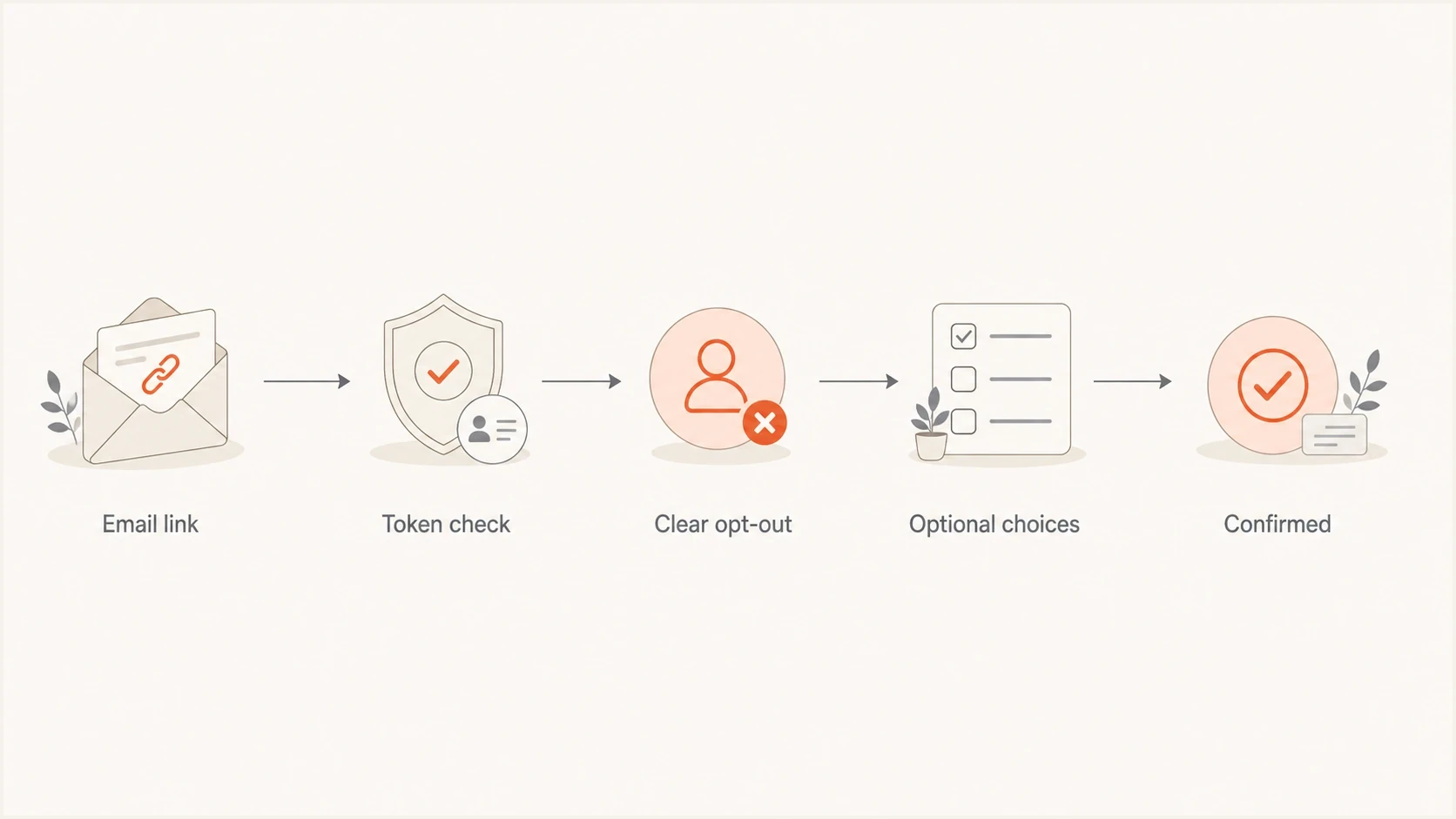
Flowchart showing a tokenized unsubscribe link leading to a clear opt-out and optional preference choices.
The CRTC gives a simple unsubscribe link as an acceptable example and describes a multi-step login flow as non-compliant. Requiring Canadian recipients to type an address already identified by the link adds friction that has to be justified under the "readily performed" test. Replace a legacy static form with a secure tokenized flow when the system allows it.
Lower-risk page
- Identity: Subscriber is identified by a secure link token.
- Primary action: Stop all marketing email is visible near the top.
- Extras: Frequency and topic choices are optional.
- Result: The page confirms the request immediately, and suppression is applied without delay.
Higher-risk page
- Identity: Subscriber must type an address already known from the email.
- Primary action: The stop-all button is below save-preferences controls.
- Extras: A reason question or login step blocks completion.
- Result: The user complains, marks mail as junk, or files a regulatory complaint.
Preference updates and reason surveys
Preference updates are legitimate. A person who wants fewer emails should be able to switch to weekly or monthly messages without leaving entirely. The compliance issue is order and prominence. If someone clicked an unsubscribe link, the page must respect that intent first. Put stop all marketing email among the first visible controls, followed by optional alternatives such as reduce frequency, pause for 30 days, or keep only selected marketing topics.
A marketing opt-out does not normally stop necessary transactional or account messages, such as receipts and security notices. Keep those messages outside the preference menu unless the recipient can genuinely opt out of them.
Reason surveys belong after the opt-out button or beside it as optional fields. A multiple-choice question about email volume or relevance can help improve sending practices. It should never be required before the unsubscribe is accepted.
- Show the address: Display the address or masked address being changed so the user has confidence.
- Make opt-out obvious: Use plain text such as stop all marketing email, not vague copy.
- Keep choices optional: Let people choose fewer emails, but do not require a choice before opt-out.
- Confirm success: Show completion immediately and store the request with the timestamp, address, source message, requested scope, and processing status.
One-click and two-click paths
A two-click flow, one click in the email and one click on the landing page, is usually a practical option for footer unsubscribe links. It is different from mailbox-provider one-click unsubscribe headers, where an automated POST request has separate handling requirements and should not depend on a confirmation page. For that narrower topic, see two-click compliance.
Email re-entry and tokens
The clean implementation is a tokenized unsubscribe URL. Use a cryptographically random token that maps to the subscription record on the server, without exposing a guessable database ID. The page can display the address being changed, but the action should not depend on the user typing that same address again.
Tokenized unsubscribe URL patterntext
https://example.com/unsubscribe?t=opaque_random_token

Server-side token record:
token_hash: SHA-256 of the random token
subscription_key: random_128_bit_value
scope: marketing
valid_until: send_time + at_least_60_days

Page behavior:
1. Validate the token and required availability period.
2. Show the address or masked address.
3. Offer stop-all as the primary action.
4. Keep preferences and survey fields optional.
5. Record and queue suppression immediately.
Token expiry must not make the unsubscribe mechanism fail during the required availability period. Keep it usable for at least 30 days after a CAN-SPAM message and at least 60 days after a CASL message. A longer-lived random token, revocable server-side after use, is often simpler than calculating a narrow expiry for every jurisdiction.
The token also solves a security problem. If a page accepts any typed email address without a validated token, one person can change another person's email preferences just by knowing their address. When the page has a valid token, asking for the address again adds typo risk without improving the unsubscribe flow.
Do not break plus-tagged addresses
If the form still accepts email input, test addresses with plus tags. An address such as john+offers@example.com must not become john offers@example.com. That single parsing bug can block valid opt-outs.
Testing the full email workflow
Compliance is not only page copy. The unsubscribe link has to arrive, render, track correctly, survive link rewriting, and point at the intended subscriber. Test the full message with an Email tester before a campaign goes live, then click the footer link and any list-unsubscribe surface that the mailbox displays.
Email tester
Send a real email to this address. Suped shows a results button when the test is ready.
?/43tests passed
Suped's product fits into the broader operational workflow around that test. The unsubscribe page handles preference changes and suppression, while Suped monitors DMARC, SPF, DKIM, domain health, real-time alerts, and blocklist (blacklist) signals. Teams managing multiple brands or client domains can keep those authentication and deliverability signals in one workflow while they test suppression in each sending system.
Pair unsubscribe QA with domain health checks and ongoing DMARC monitoring because complaint spikes, broken authentication, sudden volume changes, and domain reputation issues often appear together after a bad sending change.

Email tester sample report showing total score, email preview, issue summary, and per-section results
Suppression propagation and audit records
The confirmation page is the user-facing receipt, not the end of the workflow. The request must reach the system that controls future marketing sends, including scheduled campaigns and any sender acting on the organization's behalf. Process requests without delay. Treat the 10-business-day limits under CAN-SPAM and CASL as legal maximums, not normal processing targets.
- Suppress centrally: Write the request to a master suppression record used by every marketing list and sending path covered by the choice.
- Stop queued sends: Check campaigns already prepared for delivery so the address is removed before the next send.
- Preserve scope: Record whether the person stopped one category or all marketing, while keeping necessary transactional messages separate.
- Prevent re-imports: Make suppression win over later list uploads, data syncs, campaign copies, and audience rebuilds unless the person makes a new valid subscription choice.
- Keep evidence: Store the request time, address, source message, requested scope, processing result, and downstream sync status.
Do not reuse the suppression address
Under CAN-SPAM, an address associated with an opt-out request cannot be sold or transferred except to a company hired to help comply with CAN-SPAM. Share only what a contracted sender or compliance processor needs to enforce the suppression, and monitor work performed on the organization's behalf.
A compliant page pattern
A good unsubscribe page is short. It confirms the address, makes the global opt-out action plain, and lets the person choose a lower-frequency preference without pressure. The page should not shame the user, hide the unsubscribe button, or make the save-preferences button visually dominant while the full opt-out action looks secondary.
Page content patterntext
Heading:
Manage email preferences

Body:
You are changing preferences for alex@example.com.

Primary action:
[Stop all marketing email]

Optional choices:
[ ] Send product updates weekly
[ ] Send product updates monthly
[ ] Pause marketing email for 30 days

Optional feedback:
Why are you unsubscribing?
[Too many emails] [Not relevant] [Other]

Confirmation:
Your request has been received.
This structure gives the user the direct path first. It also lets the business keep subscribers who genuinely want fewer messages. The key difference is consent: preference updates are a choice, not a detour that the user has to complete before suppression.
Views from the trenches
Best practices
Use tokenized links so the page knows which address is changing without another form field.
Place the stop-all option above frequency choices and use plain wording for the action.
Accept plus-tagged addresses and preserve case handling across the unsubscribe flow.
Log opt-out requests with timestamp, source message, list, and processing status.
Common pitfalls
Forcing email re-entry creates typo risk and makes the unsubscribe path feel like a barrier.
Hiding the global opt-out below preference options increases complaint and support volume.
Making survey answers required turns useful feedback into unnecessary unsubscribe friction.
Using static pages without secure tokens can let one person change another person's settings.
Expert tips
Show the address being changed only after checking that the token cannot be guessed.
Let preference updates reduce cadence, but keep full suppression available in the same flow.
Run tests with aliases containing plus signs before you call the preference center complete.
Treat unsubscribe failures as deliverability incidents, not just web form defects to fix later.
Marketer from Email Geeks says preference choices are acceptable when the full opt-out remains obvious and does not require extra work.
2023-01-27 - Email Geeks
Marketer from Email Geeks says requiring email re-entry increases complaints because users make mistakes or abandon the page.
2023-01-27 - Email Geeks
The practical rule to ship
Ship the unsubscribe page as if the user has already made the decision. The page can confirm the request and offer alternatives, but it should not create a negotiation. A secure token, visible stop-all button, optional choices, optional feedback, and immediate confirmation give the cleanest path under both CAN-SPAM and CASL.
Treat product or legacy-system requirements for email re-entry, login, required surveys, or extra account navigation as technical debt with compliance consequences. Fix the flow before optimizing copy. Unsubscribe friction does not save a healthy list; it pushes people toward junk reports and complaints.




