What are the best seed testing companies for email marketing?

Published 27 Jul 2025
Updated 24 Jul 2026
11 min read
Summarize with

Updated on 24 Jul 2026: We refreshed the shortlist with current product names, clearer seed-test limits, and a practical integration checklist.
The best seed testing companies for email marketing include Validity Everest, GlockApps, Inbox Monster, MailMonitor, EmailConsul, Data Axle Inboxable, and Bird Inbox Tracker. They are not identical. Some are enterprise deliverability suites, some focus on inbox placement tests, and others bundle testing with managed deliverability support.
Use Validity Everest or Inbox Monster for enterprise programs, GlockApps or MailMonitor for focused inbox placement checks, EmailConsul for lighter testing and diagnostics, Data Axle Inboxable for a managed program, and Bird Inbox Tracker when seed and panel data fit an enterprise contract. Postmastery is better treated as consulting-led deliverability support than as a dedicated seed-testing platform. If the issue is authentication, DMARC policy, blocklist (blacklist) visibility, or ongoing sender-domain monitoring, Suped's product is a practical layer to run beside those seed tests.
- Best enterprise fit: Validity Everest and Inbox Monster suit high-volume teams with broad reporting needs.
- Best focused testing fit: GlockApps and MailMonitor support repeatable provider-level placement checks.
- Best managed support fit: Data Axle Inboxable and Postmastery fit teams that need human deliverability support.
- Best DMARC layer: Suped provides authentication and monitoring context that seed tests cannot provide.
Best seed testing companies at a glance
For a shortlist without a long evaluation cycle, start with four groups. Validity Everest and Inbox Monster belong in the enterprise shortlist. GlockApps and MailMonitor suit repeatable inbox placement tests. EmailConsul provides a lighter test with supporting diagnostics. Data Axle Inboxable is relevant when managed support matters, while Bird Inbox Tracker fits enterprise buyers that need seed and panel data.
|
|
|
|---|---|---|
Validity Everest | Enterprise senders | Enterprise suite and contract |
Inbox Monster | ESPs, agencies, and scale | Broad platform and sales process |
GlockApps | Fast placement checks | Seed results remain snapshots |
MailMonitor | Ongoing placement tests | Coverage depends on the plan |
EmailConsul | Focused tests and diagnostics | Smaller product footprint |
Data Axle Inboxable | Managed deliverability programs | Sales-led plans |
Bird Inbox Tracker | Seed and panel analytics | Enterprise add-on |
Postmastery | Operational consulting | Not a seed-first platform |
A compact shortlist for seed testing and inbox placement work.
Older discussions still mention 250ok, Return Path, and SparkPost. The practical buying path for the first two now points to Validity Everest, while SparkPost Inbox Tracker is now Bird Inbox Tracker. Use the current product and contract names when comparing coverage, integrations, and support.
How seed testing works
Seed testing works by sending your campaign to monitored test inboxes at mailbox providers such as Gmail, Microsoft Outlook and Microsoft 365, Yahoo, AOL, iCloud Mail, and regional providers. The platform checks whether the message landed in the primary inbox, a tab such as Promotions, spam, junk, quarantine, or a missing category. That is useful because an ESP delivery report usually tells you whether the receiving server accepted the message, not where a user would see it.
The caveat matters. Seed addresses are not your real subscribers. They do not have the same history of opens, clicks, replies, deletions, complaints, purchases, or prior conversations. A seed test is a diagnostic signal, not a final verdict. Use it to find provider-specific patterns, broken authentication, risky links, message differences, and sudden reputation shifts. Do not use one test to declare a program healthy or assign a single cause.
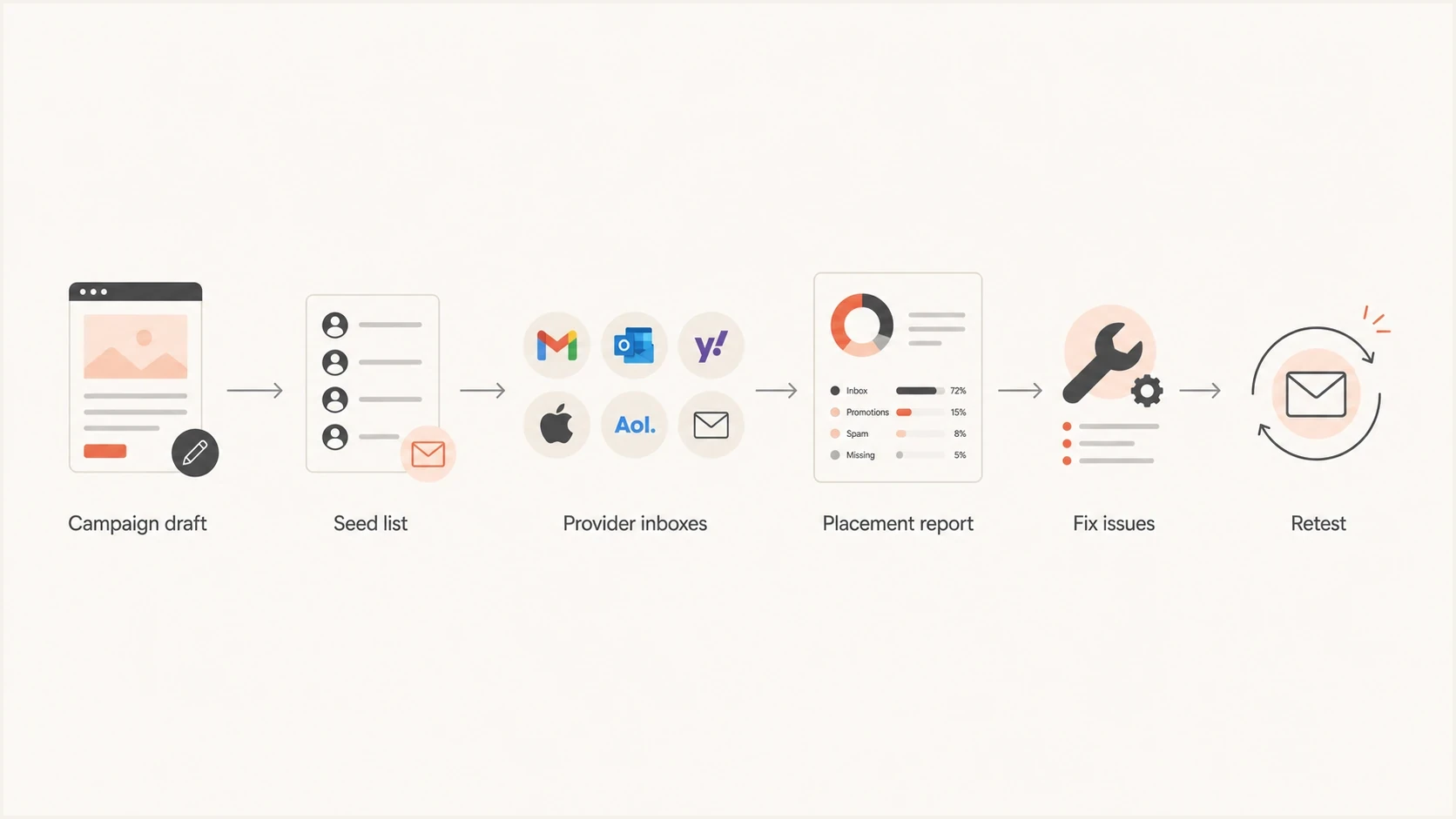
Seed testing workflow for campaign drafts, provider inboxes, fixes, and retesting.
What seed tests show
- Placement: Whether the test message lands in an inbox, tab, spam, junk, quarantine, or missing category.
- Provider pattern: Whether Gmail, Microsoft, Yahoo, iCloud Mail, or a regional provider is the weak point.
- Test clues: Whether content, URLs, images, or headers correlate with a placement change.
What seed tests miss
- Human history: Seed inboxes lack real subscriber engagement and prior sender relationships.
- List quality: A clean test cannot rescue a campaign sent to stale, scraped, or unconsented contacts.
- Live filtering: Mailbox decisions can differ for each recipient after the campaign reaches the real list.
Pair seed testing with actual performance signals. A seed test can show that Microsoft is putting a campaign in junk. Real campaign data can show whether replies, conversions, unsubscribes, and complaints confirm a wider issue. For more detail on this limitation, read seed-list limitations.
Best companies by use case
The right choice depends less on the brand name and more on the job. Seed-testing buyers usually include enterprise marketing teams, ESPs and agencies, lean in-house teams, cold outbound teams, and programs that need consulting as much as software.
- Validity Everest: Best for enterprise senders that want a broad deliverability suite, a global seed network, audience weighting, reputation signals, and reporting across teams.
- Inbox Monster: Best for ESPs, agencies, and larger programs that need manual or automated placement tests across many domains, IPs, brands, or clients.
- GlockApps: Best for teams that want quick inbox placement tests, provider breakdowns, spam checks, and a lower-friction testing workflow.
- MailMonitor: Best for marketers who want seed testing tied to ongoing deliverability monitoring and regular campaign review.
- EmailConsul: Best for focused seed-list tests with header review, provider placement checks, authentication checks, and supporting diagnostics.
- Data Axle Inboxable: Best for enterprise marketers that want placement monitoring combined with a dedicated deliverability analyst and managed remediation.
- Bird Inbox Tracker: Best when an enterprise program wants current seed-list and panel analytics under the Bird product and contract.
- Postmastery: Best for senders that need consulting around infrastructure, reputation, SMTP operations, and deliverability monitoring rather than a seed-only purchase.
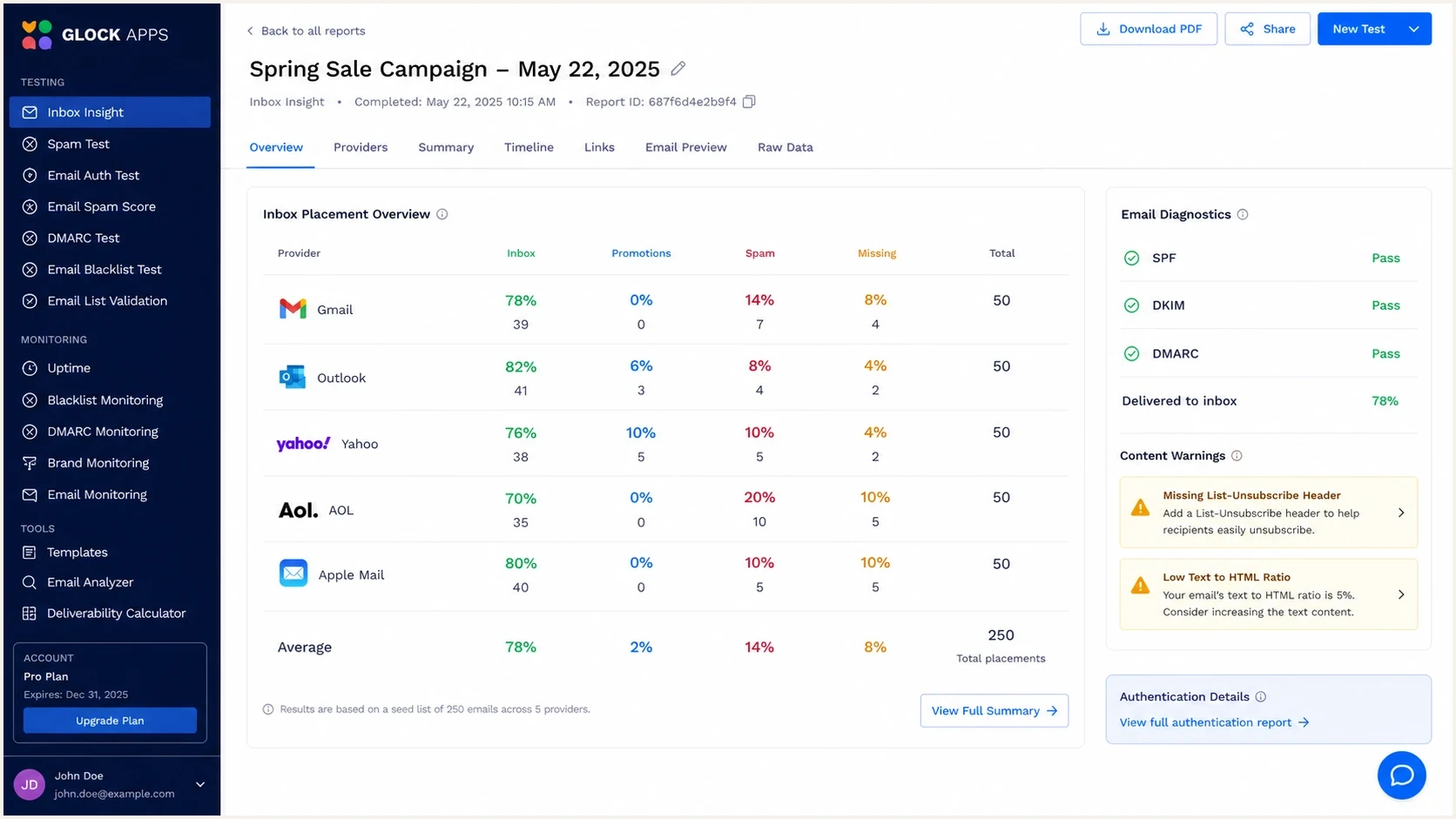
GlockApps seed test report with provider placement and authentication results.
For a wider tool comparison, read the overview of inbox placement tools. Seed testing is one method inside inbox placement testing, not the whole discipline.
How to evaluate a seed testing vendor
Before a demo, evaluate provider coverage, data freshness, diagnostic depth, and pricing shape. A cheap test that covers only a few consumer inboxes will not help much if the audience is mostly B2B Microsoft 365 tenants. A polished dashboard will not help if the seed list is stale or the report cannot narrow down why placement changed.
Do not buy on seed count alone
A larger seed list is useful only when the inboxes match your audience and the platform keeps them healthy. Prefer a smaller, relevant panel with clear provider reporting over a large list that produces noisy results.
How much confidence to place in a seed test
Confidence rises when a provider-level result repeats and independent campaign signals support it.
Low confidence
Isolated
One isolated test with mixed provider results.
Useful signal
Repeated
The same issue repeats at one provider.
Actionable pattern
Corroborated
Repeated placement matches live campaign metrics.
Critical issue
Immediate
Authentication fails or mail is broadly missing or filtered.
Before paying for a full seed testing platform, send a real message through the Suped email tester and inspect authentication, headers, content, and obvious setup issues. That does not replace enterprise seed testing, but it can expose an SPF, DKIM, DMARC, or content problem before a vendor evaluation.
Email tester
Send a real email to this address. Suped shows a results button when the test is ready.
?/43tests passed
The most useful evaluation question is "what action does this report support?" A report has limited operational value if it shows poor Microsoft placement but cannot separate likely authentication, reputation, content, sending-pattern, or list-quality causes.
Check integrations before you buy
A platform can perform well in a manual test and still be awkward in production. Map the seed test to the real sending workflow before signing a contract. Automation, audience weighting, account structure, data access, and history matter more as the number of campaigns and sending identities grows.
- Test creation: Confirm whether tests use manual seed lists, scheduled sends, automated monitoring, or in-line campaign seeding.
- Integration path: Check API access, webhooks, ESP connectors, exports, plan restrictions, and rate limits.
- Audience weighting: Weight providers to the real subscriber-domain mix instead of treating every seed inbox equally.
- Account model: Verify subaccounts, workspaces, user roles, client separation, and ownership for agencies or ESPs.
- History and alerts: Require provider trend lines and useful alerts so teams can compare changes instead of reading isolated reports.
Run a trial through the normal ESP with a real campaign copy. Confirm that every expected seed receives the message, note report-processing time, inspect how missing mail is classified, and verify that the platform identifies the same sending domain, DKIM domain, envelope sender, tracking domain, and IP used in production.
How Suped supports seed testing
Seed testing tells you where a sample email landed. Suped's product covers the control layer around that result: DMARC monitoring, SPF and DKIM visibility, hosted DMARC, hosted SPF, SPF flattening, hosted MTA-STS, alerts, issue detection, and blocklist monitoring (blacklist monitoring). Stabilise this control layer before drawing conclusions from a seed report.
If a seed test shows spam placement at Microsoft, changing the subject line is not always the next step. Check whether the visible From domain matches the authenticated identity, DKIM passes, the envelope sender is expected, a shared IP has reputation issues, or a blocklist (blacklist) event appeared at the same time. Suped brings those checks into one workflow and helps narrow down the next fix.
Issues page showing top issues, verified sources, unverified sources, and authentication pass rates
For teams that need DMARC and sender-domain monitoring beside seed testing, Suped's product turns authentication and reputation signals into a maintenance workflow. Start with a domain health check before adding a larger deliverability stack.
A practical testing workflow
Run seed testing as part of a repeatable workflow, not as a one-off ritual before a large campaign. That prevents two common mistakes: reacting to one noisy result and ignoring a real provider pattern because the average inbox rate looks acceptable.
- Baseline first: Test a normal campaign before changing templates, domains, IPs, or sending volume.
- Match the send: Use the same sender, domain, tracking setup, links, segmentation, and timing as the live campaign.
- Read by provider: Averages hide problems, so inspect Gmail, Microsoft, Yahoo, iCloud Mail, and relevant regional mailboxes separately.
- Protect reporting: Tag seed addresses and exclude them from engagement automation, attribution, suppression logic, and list-quality decisions.
- Compare signals: Check seed results against bounces, complaints, replies, conversions, DMARC data, and blocklist (blacklist) alerts.
- Retest changes: Change one major variable at a time, then test again so the cause is easier to isolate.
Seed test run sheettext
Campaign: Monthly newsletter
Sender: news@example.com
Audience: Engaged subscribers
Seed tool: Chosen placement provider
Providers: Gmail, Microsoft, Yahoo, iCloud Mail
Result to watch: Provider-level spam placement
Second check: DMARC, DKIM, SPF, blocklists and blacklists
Decision: Send, fix, or retest
For a small sender, this workflow can stay simple. For an ESP, agency, or franchise program, the same logic needs multi-tenant reporting, alerts, access controls, and clear ownership. Pricing can then become the deciding factor. A plan built for one brand can become hard to justify when hundreds or thousands of client domains need monitoring.
Views from the trenches
Best practices
Match seed coverage to your real audience, especially Microsoft-heavy B2B lists.
Retest after domain, IP, template, tracking, authentication, or ESP changes hit mail.
Pair seed results with DMARC, blocklist, blacklist, complaint, reply, and revenue data.
Keep old product names in mind, but evaluate the current platform and contract terms.
Common pitfalls
Treating one clean seed result as proof that every real subscriber will inbox later.
Buying the largest seed list without checking provider relevance or freshness well.
Using a seed tool for SPF, DKIM, or DMARC issues that need DNS-level fixes first.
Ignoring pricing structure when monitoring many brands, clients, or subaccounts.
Expert tips
Use seed tests to find provider patterns, then fix causes in a controlled order.
Ask vendors how often seed inboxes change and how stale addresses are removed fast.
For B2B lists, look beyond consumer Gmail and Outlook to tenant-like coverage too.
Use Suped beside seed tools so authentication drift does not confuse testing results.
Marketer from Email Geeks says many older seed testing brands have been folded into larger platforms, so buyers should verify which product is actually current.
2021-12-01 - Email Geeks
Marketer from Email Geeks says Validity customers moving in now should expect Everest rather than the older 250ok and Return Path product names.
2021-12-01 - Email Geeks
Which seed testing company should you choose?
Choose by scale and operating model. Validity Everest and Inbox Monster suit enterprise evaluation. GlockApps and MailMonitor fit recurring inbox placement checks. EmailConsul suits a focused test with supporting diagnostics. Bird Inbox Tracker adds seed and panel data for enterprise programs. Data Axle Inboxable fits managed deliverability, while Postmastery makes sense when infrastructure and consulting are central to the purchase.
Before paying for seed testing, fix the basics: SPF that covers the sending source, passing DKIM, a valid DMARC record, clean tracking domains, controlled sending volume, and a permission-based list. Seed testing shows symptoms. Suped's product contains the authentication, monitoring, hosted DMARC, hosted SPF, MTA-STS, alerting, and issue-resolution workflow that helps trace those symptoms to technical fixes.