What are the best practices for email deliverability when using SparkPost and Amazon SES, including reverse DNS, blacklist monitoring, and handling dedicated IPs?

Updated on 29 Jul 2026: We updated this guide with current Amazon SES warmup behavior and a stronger suppression workflow for SparkPost and Amazon SES.
The best practice is to treat deliverability as a full sending system, not as a list of IPs to check. For SparkPost and Amazon SES, monitor the domains, authenticated sending paths, actual IPs in message headers, bounce and complaint rates, DMARC results, and blocklist or blacklist signals with real delivery impact. Every IP under your control should have valid reverse DNS. When the provider controls the IP, reverse DNS and network operations sit with the provider. Dedicated IP customers still own their sending reputation and usually handle reputation blocklist investigations.
- Monitor broadly: Do not check only your datacenter IPs. Check the sending domains, Return-Path domains, DKIM domains, DMARC reports, bounce data, and provider IPs that actually transmit mail.
- Set rDNS where you can: Every IP you control that appears in Received headers should have a clear PTR name, and the mail server HELO or EHLO should match that naming pattern.
- Escalate provider IP issues: For SparkPost and Amazon SES shared pools, you cannot directly repair rDNS or IP reputation. Use provider metrics, support processes, and your authentication data.
- Control dedicated IP warmup: For 1 to 2 million emails per day, use predictable volume and clean segmentation. Follow the provider's warmup state instead of forcing full traffic onto a new IP.
Before changing DNS or asking an ESP to adjust anything, send a real message through each mail stream and inspect the headers, authentication results, and routing path with an email tester. That identifies which IPs matter, which domains authenticate, and which part of the chain you control.
The control boundary matters
A common mistake in mixed SparkPost, Amazon SES, and datacenter setups is treating every IP in the same way. Your own datacenter IPs are yours to configure and defend. Dedicated ESP IPs are assigned to your account, but the ESP still operates the network. Shared ESP IPs are provider-managed, so your control centers on sender behavior, authentication, list quality, and escalation when metrics break.
|
|
|
|---|---|---|
Own MTA | PTR, HELO, IP pools, routing | IP reputation, DNS, bounces |
SES shared | Domains, auth, content, lists | Domain health, complaints |
SES dedicated | Pools, warmup, segmentation | IP health, warmup, bounces |
SparkPost | Sending domains, streams, dedicated pools | Provider events, headers, suppressions |
Use this table to decide what you can change directly.
At this volume, run a periodic domain health check across every customer sending domain and subdomain. Provider IP reputation matters, but broken DKIM or SPF can damage inbox placement before any IP blocklist alert appears. DMARC reporting should confirm which sending paths remain authorized.
?
What's your domain score?
Deep-scan SPF, DKIM & DMARC records for email deliverability and security issues.
Reverse DNS for multiple domains
Add reverse DNS on every sending IP you control. The PTR record does not need to match every customer's visible From domain. It should resolve to a stable, non-generic hostname owned by the sending infrastructure, and that hostname should resolve forward to the same IP. Names such as mta1.mail.yourcompany.com or out1.mail.yourcompany.com are clearer than provider-default names based on raw IP labels.
Reverse DNS and HELO patterntext
IP: 203.0.113.25
PTR: mta1.mail.yourcompany.com
A:   mta1.mail.yourcompany.com -> 203.0.113.25
HELO: mta1.mail.yourcompany.com
For one IP that sends on behalf of many customer domains, do not rotate PTR records per customer. Reverse DNS is attached to the IP, not the message. Customer-specific trust should come through DKIM and DMARC, with SPF authenticating the envelope domain. The infrastructure identity can use your platform domain when it remains stable and consistent.
Do not ignore intermediate hops
If your datacenter IPs appear in Received headers before mail enters SparkPost or Amazon SES, inventory them and verify their DNS. Missing or generic rDNS on an internet-facing upstream relay can add suspicion when the rest of the authentication path is new or high volume.
The core principle is covered in the reverse DNS best-practice page. Keep the infrastructure identity stable, forward-confirmed, and consistent with the HELO or EHLO name.
Shared and dedicated IP strategy
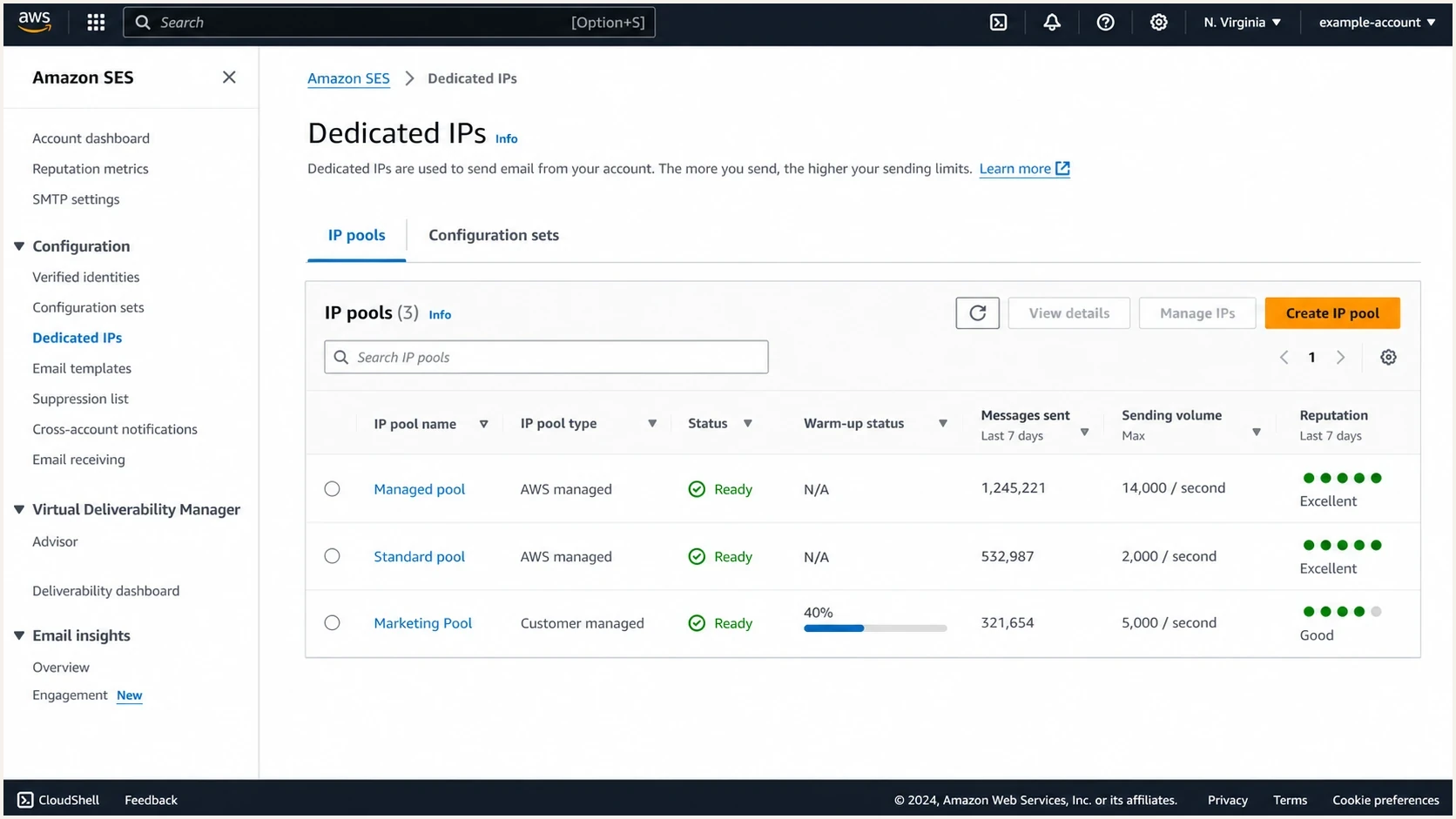
Amazon SES dedicated IP console showing pools, warm-up progress, and reputation indicators.
Shared IPs are easier at the start because the provider operates the pool. The tradeoff is limited visibility into exact IP movement and limited control when a receiver reacts badly to pool behavior. Dedicated IPs give you reputation isolation, but poor customer traffic is no longer diluted by a shared pool.
Shared IPs
- Control: The provider manages IP selection, PTR naming, pool reputation, and most network operations.
- Fit: Useful for irregular volume, smaller streams, and senders that cannot keep each IP warm.
- Risk: You share reputation effects and depend on provider response when a pool has trouble.
- Action: Focus on authentication, complaint rate, bounce quality, and segmentation.
Dedicated IPs
- Control: You can isolate traffic by customer, message type, region, or risk level.
- Fit: Useful for large, stable senders with predictable daily volume.
- Risk: Each IP needs steady wanted traffic. One bad stream can damage its pool quickly.
- Action: Use separate pools and honor the warmup schedule, then pause increases when complaints rise.
Amazon SES currently offers shared sending, standard dedicated IPs, and managed dedicated IPs. AWS explains the tradeoffs in its SES dedicated IPs documentation. Standard IPs are static, and automatic warmup is enabled by default on a 45-day time-based schedule unless you disable it. Managed pools adapt warmup and capacity for each recipient provider based on actual traffic. Their IP count can change as demand changes.
With SparkPost, confirm whether your traffic uses shared or dedicated IPs, which pool each stream selects, and what PTR naming is available. Current dedicated IP warmup routes a growing share of traffic through the new IP while excess traffic can use shared infrastructure. Keep routing deliberate until the dedicated IP reports that warmup is complete.
Do not over-allocate IPs
Size the pool by traffic that each recipient provider receives, not only by total daily volume. Six to ten IPs can spread 1 to 2 million daily messages too thinly if each IP sees little consistent traffic at a major mailbox provider. Add IPs for isolation or capacity only when each one can maintain a stable pattern.
Blocklist and blacklist monitoring
Do not spend the day chasing every blocklist (blacklist) entry. Many public lists have little or no measurable effect on inbox placement. Monitor major IP and domain listings because they can reveal a real sending problem, but treat a listing as evidence to investigate rather than the whole diagnosis.

Blocklist monitoring page showing domain and IP checks across blocklists with importance and status
Connect blocklist monitoring with bounce codes, complaint rate, DMARC failures, recipient-domain performance, and sudden volume changes. A blocklist alert without surrounding delivery metrics is noisy. A listing that coincides with provider deferrals or rising complaints needs immediate investigation.
What to monitor
- Own IPs: Monitor every datacenter IP that appears in outbound headers or hands mail to an ESP.
- Dedicated IPs: Monitor account-assigned SparkPost and Amazon SES IPs when the provider exposes them.
- Domains: Monitor visible From domains, DKIM d= domains, bounce domains, and tracked-link domains.
- Context: Compare listings with bounces, complaints, deferrals, and authentication failures.
Treat a Spamhaus listing as a high-priority signal and verify whether delivery failures occurred at the same time. The Spamhaus and SES article explains how Amazon SES works with Spamhaus to protect its network reputation. For dedicated IPs, the sender remains responsible for correcting the sending cause and handling most delisting work.
Blocklist checker
Check your domain or IP against 144 blocklists.
 Spamhaus
 0Spam
0Spam

 Cisco
Cisco
 NoSolicitado

 URIBL
URIBL
 abuse.ro
 ALPHANET
 Anonmails
 Ascams
 BLOCKEDSERVERS
 Calivent Networks


 EFnet
EFnet




 JustSpam
 Kempt.net
 NordSpam

 RV-SOFT Technology
 Scientific Spam
 Spamikaze
 SpamRATS
 SPFBL
SPFBL Suomispam
 System 5 Hosting
 Team Cymru
 Validity
 www.blocklist.de Fail2Ban-Reporting Service
 ZapBL
ZapBL 2stepback.dk
 Fayntic Services
 ORB UK
 technoirc.org
 TechTheftSpamhaus0SpamCiscoNoSolicitadoURIBLabuse.roALPHANETAnonmailsAscamsBLOCKEDSERVERSCalivent NetworksEFnetJustSpamKempt.netNordSpamRV-SOFT TechnologyScientific SpamSpamikazeSpamRATSSPFBLSuomispamSystem 5 HostingTeam CymruValiditywww.blocklist.de Fail2Ban-Reporting ServiceZapBL2stepback.dkFayntic ServicesORB UKtechnoirc.orgTechTheftSpamhaus0SpamCiscoNoSolicitadoURIBLabuse.roALPHANETAnonmailsAscamsBLOCKEDSERVERSCalivent NetworksEFnetJustSpamKempt.netNordSpamRV-SOFT TechnologyScientific SpamSpamikazeSpamRATSSPFBLSuomispamSystem 5 HostingTeam CymruValiditywww.blocklist.de Fail2Ban-Reporting ServiceZapBL2stepback.dkFayntic ServicesORB UKtechnoirc.orgTechTheftSpamhaus0SpamCiscoNoSolicitadoURIBLabuse.roALPHANETAnonmailsAscamsBLOCKEDSERVERSCalivent NetworksEFnetJustSpamKempt.netNordSpamRV-SOFT TechnologyScientific SpamSpamikazeSpamRATSSPFBLSuomispamSystem 5 HostingTeam CymruValiditywww.blocklist.de Fail2Ban-Reporting ServiceZapBL2stepback.dkFayntic ServicesORB UKtechnoirc.orgTechTheftSpamhaus0SpamCiscoNoSolicitadoURIBLabuse.roALPHANETAnonmailsAscamsBLOCKEDSERVERSCalivent NetworksEFnetJustSpamKempt.netNordSpamRV-SOFT TechnologyScientific SpamSpamikazeSpamRATSSPFBLSuomispamSystem 5 HostingTeam CymruValiditywww.blocklist.de Fail2Ban-Reporting ServiceZapBL2stepback.dkFayntic ServicesORB UKtechnoirc.orgTechTheft
Authentication setup for many customers
For multiple customers and domains, give each customer a clear sending identity. Use customer-owned or customer-delegated subdomains for DKIM, bounce handling, and tracking. Keep infrastructure rDNS under your platform domain. Use DMARC reports to confirm that each customer domain passes SPF or DKIM through the expected provider.
Illustrative customer DNS patterntext
cust.example. TXT "v=spf1 include:amazonses.com ~all"
s1._domainkey.cust.example. CNAME s1-ses.example.
_dmarc.cust.example. TXT "v=DMARC1; p=none; rua=mailto:dmarc@yd.tld"
The exact records vary by provider and domain strategy, so do not copy the example without using the DNS values assigned to the customer. The visible From domain should have working DKIM and a DMARC record. SPF must pass for the envelope domain without exceeding the lookup limit. Start DMARC reporting at p=none, then move high-confidence domains toward quarantine or reject after legitimate sources authenticate consistently.
Suped's product supports this workflow because DMARC monitoring turns aggregate reports into source-level views. Teams can identify which customer, provider, IP, and domain combination is failing, then correct the relevant DNS or sending configuration.

Issue steps to fix dialog showing the issue overview, tailored fix steps, and verification action
Bounce and complaint handling
Authentication and clean rDNS do not compensate for repeatedly mailing invalid addresses or people who complained. Build one feedback pipeline across SparkPost and Amazon SES so every customer stream applies the same suppression rules, even when providers expose events differently.
- Capture events: Publish Amazon SES delivery events through configuration sets and ingest SparkPost event data through webhooks or exports.
- Suppress permanent failures: Stop sending to hard bounces and complaint recipients immediately. Keep unsubscribe consent in your own system as the durable record.
- Classify temporary failures: Do not treat a soft bounce or deferral like an invalid address. Track repeated failures, retry within provider policy, and suppress when the result becomes permanent.
- Isolate the cause: Group complaints and bounces by customer, mail stream, recipient provider, and IP pool so one tenant cannot hide inside an account-wide average.
- Stop bad traffic: Pause the affected customer or stream when negative signals rise. Do not wait for an account pause, blocklist listing, or broad inbox placement drop.
Provider suppression lists are useful safeguards, but they should not be the only source of truth for a multi-provider platform. Mirror hard bounces, complaints, and unsubscribes into an application-level suppression and consent store. When traffic moves between SparkPost and Amazon SES, the recipient must stay suppressed.
Warmup and traffic allocation
At 1 to 2 million emails per day, dedicated IP capacity is rarely the limiting factor. Each IP needs consistent wanted traffic at each recipient provider. A dedicated IP that spikes on Monday and sends little mail for the rest of the week has a weaker reputation pattern than a shared pool with steady usage.
Operational response thresholds
Use thresholds as decision triggers during warmup and when moving traffic across pools.
Normal
Proceed
Authentication is stable and negative signals are within expected levels.
Watch
Hold
Deferrals rise at one major mailbox provider or one customer stream changes sharply.
Problem
Reduce
Complaints, hard bounces, or blocklist alerts move with delivery failures.
Unknown
Verify
The provider changed IPs or routing and headers no longer match your inventory.
AWS has a practical warming guide for moving large workloads onto new SES identities. Start with engaged recipients and keep volume predictable. Separate logical mail streams, then stop increasing volume when negative metrics rise.
For multi-customer platforms, keep different risk levels out of the same dedicated pool. Transactional messages and password resets should not share a pool with customer marketing or dormant-list reactivation. If a customer imports a bad list, the blast radius should be limited.
This is where domain reputation matters as much as IP reputation. Mailbox providers judge sending behavior and authentication across domains and IPs. Recipient complaints add another direct reputation signal. Moving a bad stream to a fresh IP rarely solves the underlying problem.
A practical runbook
Run the setup in this order to separate facts from assumptions. Identify the real outbound path, fix the DNS you control, and ask the ESP for items only it can change. Put feedback processing in place before increasing volume.
- Inventory: Send test messages for each stream and record every IP, HELO name, DKIM domain, envelope domain, and visible From domain.
- Classify: Mark each IP as owned, SES shared, SES dedicated, SparkPost shared, or SparkPost dedicated.
- Fix: Set rDNS and forward DNS on owned IPs, then match HELO naming to the same infrastructure domain.
- Verify: Confirm SPF, DKIM, and DMARC pass for every customer domain before raising volume.
- Connect feedback: Ingest delivery events and synchronize hard bounces, complaints, and unsubscribes into a central suppression store.
- Escalate: Ask SparkPost or Amazon SES about dedicated IP PTR options, pool assignment, warmup state, and raw event exports.
- Operate: Review daily bounce, complaint, deferral, DMARC, and blocklist data by customer and provider.
Where Suped fits
Suped's product can centralize DMARC results, blocklist checks, issue alerts, and multi-tenant reporting for this workflow. Hosted DMARC and SPF management help teams apply approved DNS changes across customer domains. Use provider event data alongside Suped so bounce and complaint decisions still come from the sending platforms.
Views from the trenches
Best practices
Check actual message headers before deciding which IPs, domains, and relays need attention.
Use stable rDNS and HELO names for owned infrastructure that touches outbound mail flow.
Treat major blocklist alerts as investigation triggers, then compare them with delivery data.
Ask the ESP about dedicated IP controls instead of assuming shared pool settings are editable.
Common pitfalls
Only checking datacenter IPs misses provider IPs and domains that receivers actually evaluate.
Trying to make one PTR record match every customer domain creates the wrong mental model.
Chasing every blacklist entry wastes time when bounces and complaints show the real issue.
Mixing risky customer mail with trusted transactional mail makes IP pool diagnosis harder.
Expert tips
Keep infrastructure identity separate from customer identity, then verify both in headers.
Use provider dashboards daily, but preserve raw event data for deeper delivery diagnosis.
Segment dedicated pools by traffic type so one customer problem does not affect all mail.
Pause warmup increases when negative signals move together, even if volume targets are unmet.
Expert from Email Geeks says reverse DNS should use clear hostnames that match the machine identity and HELO name, because generic or missing PTR names make filters wary.
2023-09-07 - Email Geeks
Expert from Email Geeks says shared SparkPost or Amazon SES infrastructure is largely the provider's responsibility, so sender teams should rely on provider metrics and escalate only when needed.
2023-09-07 - Email Geeks
Deliverability priorities
For SparkPost and Amazon SES, monitor every domain and IP in the real sending path, not only the IPs in your datacenter. Add reverse DNS to every IP you control and use stable infrastructure hostnames instead of customer-specific PTR names. For provider-managed IPs, verify the pool assignment and escalate infrastructure issues through the provider.
Use blocklist and blacklist monitoring as one signal among delivery data. Authentication pass rates and recipient feedback provide daily evidence about each stream. Dedicated IPs work when volume remains predictable, pools isolate risk, and suppressions follow recipients across providers. Suped's product can connect DMARC and blocklist signals to the customer and sending source that needs action.




