What are the best practices and legal considerations for 1-click versus 2-click email unsubscribes?

Matthew Whittaker
Co-founder & CTO, Suped
Published 8 Jul 2025
Updated 15 May 2026
8 min read
Summarize with
The best practice is to support both, but use them for different jobs. Use true one-click unsubscribe for the List-Unsubscribe header, especially for Gmail and Yahoo bulk sender expectations. Use a simple 2-click flow for the visible unsubscribe link in the email footer when you need to protect against accidental unsubscribes caused by security scanners, bots, or users who clicked by mistake.
I treat a proper 2-click unsubscribe as: click the email link, land on one clear page, click one obvious button to confirm. No login. No password reset. No survey gate. No forced preference form. No request for an email address when the link token already identifies the recipient. Once extra work appears, it stops being a 2-click unsubscribe and becomes friction.
The legal answer is similar. CAN-SPAM, CASL, GDPR consent withdrawal principles, and mailbox provider rules all push toward clear, low-friction opt-out. A 2-click unsubscribe can be reasonable when the second click is the confirmation action on the first landing page. A process that requires login, extra identity checks, a required reason, or multiple pages creates legal and deliverability risk.
The direct answer
For most senders, my preferred setup is this: one-click unsubscribe in the mail headers, 2-click confirmation for the visible footer link, and a separate preference center that never blocks a full opt-out. That gives mailbox providers the machine-readable unsubscribe path they expect while keeping the human-facing footer link resilient against link scanning.
- Header one-click: Use RFC 8058 style one-click unsubscribe with a List-Unsubscribe-Post header for bulk marketing and promotional mail.
- Footer 2-click: Use one landing page with one clear unsubscribe button when normal links are scanned before the subscriber reads the message.
- Footer 1-click: Use it only if your unsubscribe endpoint handles bot traffic safely and you accept the risk of accidental opt-outs.
- Preference center: Offer it as an option, but always include a fast unsubscribe from all commercial email.
 A clean unsubscribe system is part compliance workflow and part deliverability workflow. Suped does not replace the unsubscribe endpoint in your email platform, but Suped helps monitor the trust signals around it: authentication, DMARC policy, SPF, DKIM, blocklist status, and deliverability test results.
How 1-click and 2-click differ
The confusing part is that people use "one-click unsubscribe" to mean two different things. The first meaning is the mailbox-provider unsubscribe action shown in Gmail, Yahoo, Apple Mail, Outlook, and other clients. That action is powered by email headers. The second meaning is a normal visible link in the email body that immediately unsubscribes when opened in a browser.
Those are not equivalent. Header-based one-click can require a POST request, which helps separate a real unsubscribe action from a link scanner fetching URLs. A regular body link is often opened with GET. Security products, preview tools, and corporate filters follow GET links all the time, which can unsubscribe real people who never intended to leave the list.
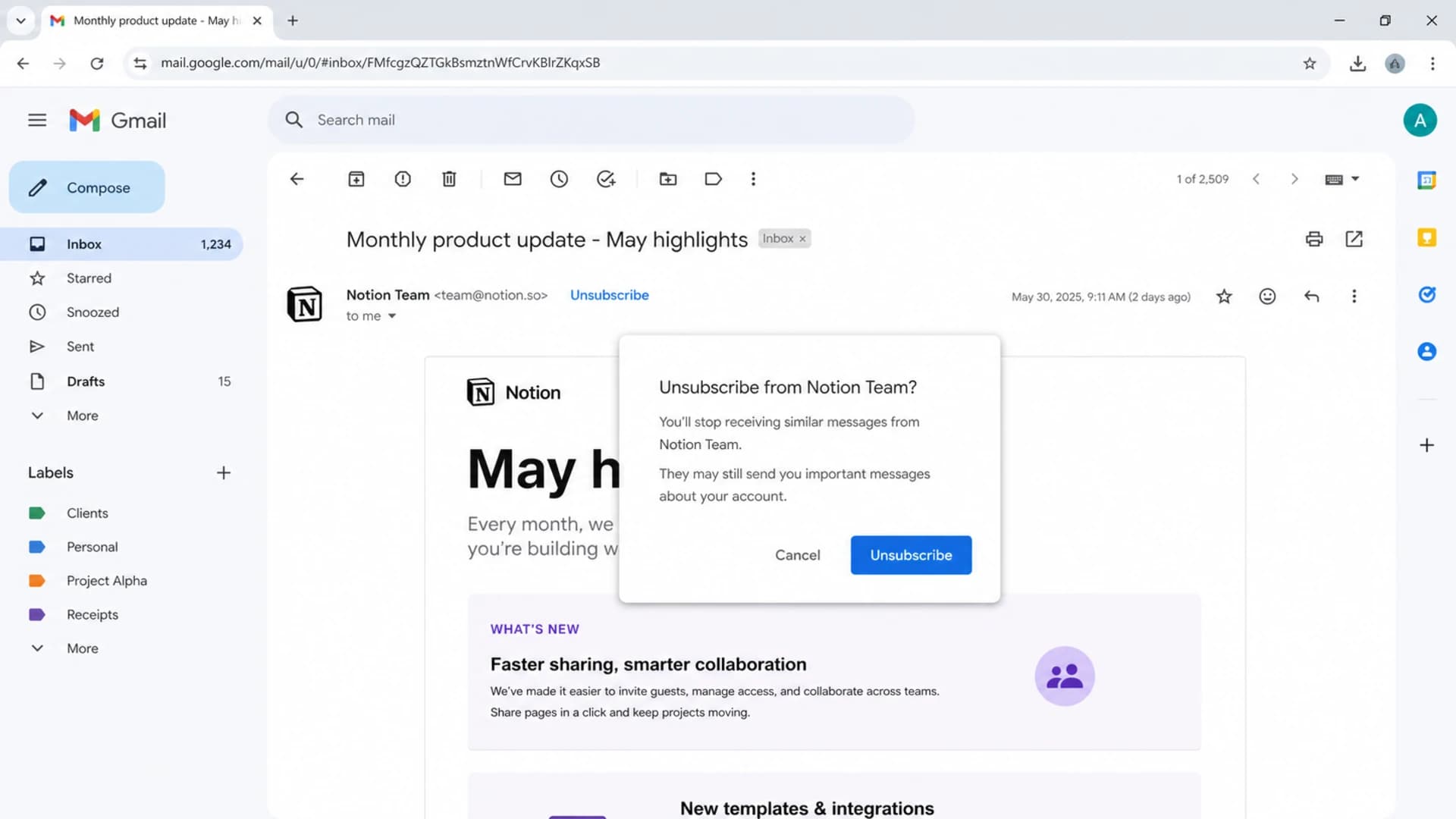
Gmail showing an unsubscribe control near the sender details.
1-click unsubscribe
- Best use: Mailbox header unsubscribe using List-Unsubscribe and List-Unsubscribe-Post.
- Main benefit: Very low subscriber friction and strong mailbox-provider compatibility.
- Main risk: A normal GET link can trigger unwanted opt-outs when security tools scan URLs.
2-click unsubscribe
- Best use: Visible footer links that send users to a confirmation page.
- Main benefit: Reduces false opt-outs caused by scanners, previews, and accidental taps.
- Main risk: Extra fields or hidden steps can turn a valid flow into an obstructive one.
Legal considerations
The law rarely uses the product-team language of 1-click and 2-click. It focuses on whether the unsubscribe mechanism is clear, easy to use, available, and honored quickly. In the United States, CAN-SPAM requires a clear opt-out mechanism, requires senders to honor opt-outs within 10 business days, and prohibits charging a fee or forcing the recipient through unnecessary steps. A useful plain-English overview of unsubscribe laws is helpful for marketing teams that need a quick compliance reference.
CASL in Canada also expects an unsubscribe mechanism that is readily performed, and opt-outs must be processed without delay. GDPR and related European consent rules add a consent principle that matters here: withdrawing consent should be as easy as giving it. A signup form that takes one action should not be paired with a cancellation process that demands authentication, extra data, or a maze of preference screens.
A 2-click unsubscribe is only defensible when the second click completes the opt-out on the first page. If the user must log in, recover a password, type an email address already known from the token, answer a required survey, or navigate a preference center before a full opt-out, the process has moved into high-risk territory.
|
|
|
|
|---|---|---|---|
Header 1-click | Mailbox UI | Must process reliably | Recommended |
Footer 1-click | Simple lists | Bot false positives | Use carefully |
Footer 2-click | Human confirm | Keep it immediate | Strong choice |
Login required | None | Blocks opt-out | Avoid |
Unsubscribe flow comparison
Mailbox provider requirements
Gmail and Yahoo bulk sender rules changed the operational standard for one-click unsubscribe. If you send promotional or marketing mail at bulk volume, use List-Unsubscribe and List-Unsubscribe-Post headers. The practical goal is simple: the mailbox can show its own unsubscribe control and submit the unsubscribe request without sending the user into your website flow.
This does not mean every visible footer link must instantly unsubscribe on page load. Header unsubscribe and footer unsubscribe are separate surfaces. I expect the header action to be one-click. I am comfortable with the footer link using a confirmation page when the page is direct and the opt-out button is impossible to miss. For more detail on the mailbox-provider side, see the related guide on one-click requirements.
One-click unsubscribe headerstext
List-Unsubscribe: <mailto:unsubscribe@example.com>,
 <https://example.com/u/abc123>
List-Unsubscribe-Post: List-Unsubscribe=One-Click
One-click POST requesthttp
POST /u/abc123 HTTP/1.1
Host: example.com
Content-Type: application/x-www-form-urlencoded

List-Unsubscribe=One-Click
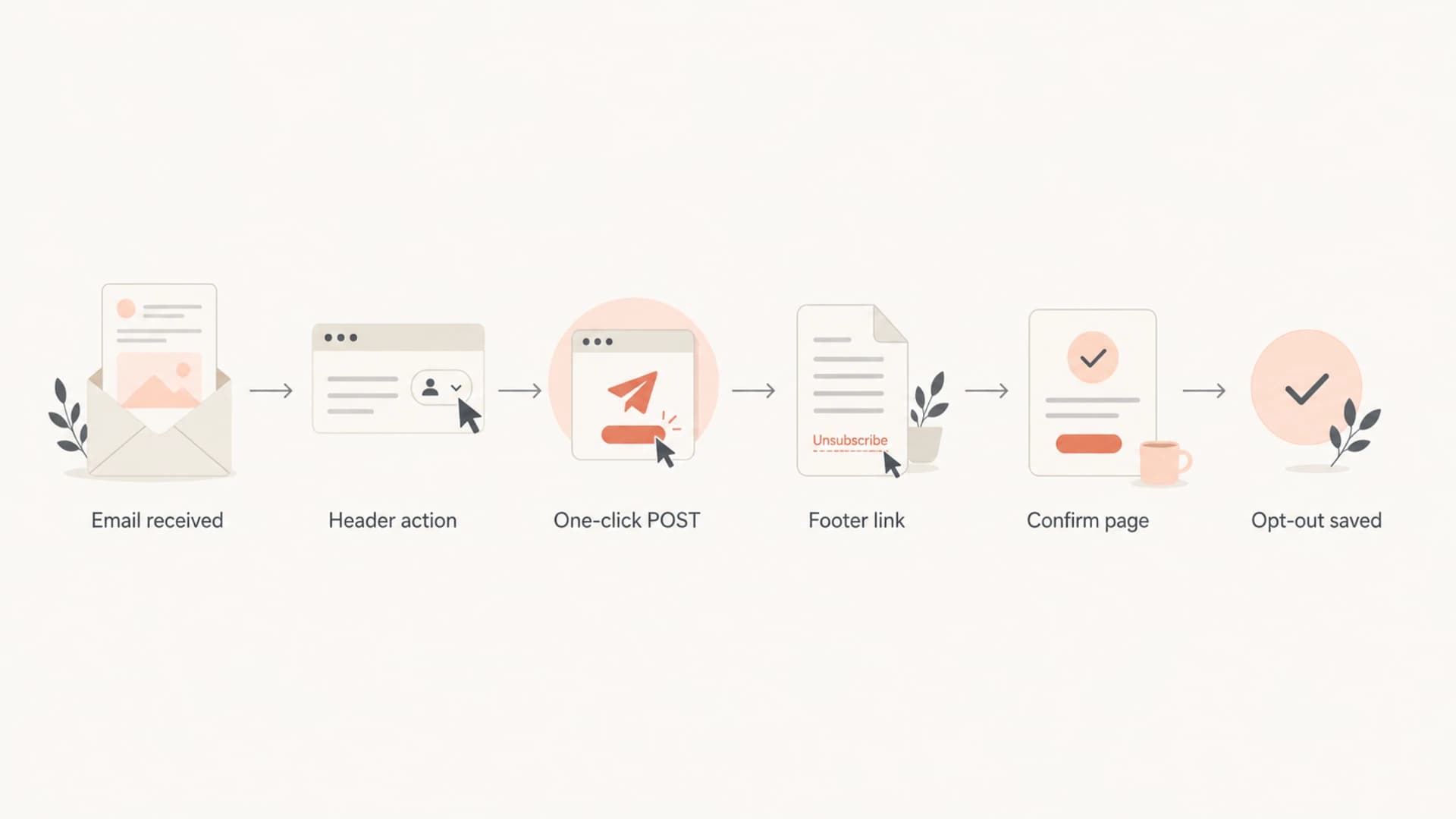
Flowchart showing header one-click unsubscribe and footer confirmation paths.
When 2-click is the better footer flow
I prefer 2-click for the normal footer link when the sender sees meaningful link-scanner activity. Enterprise recipients often sit behind systems that open every URL in a message. If the unsubscribe endpoint performs the opt-out on page load, those systems remove subscribers without human intent. That creates support tickets, poor data, and angry users who still wanted the mail.
The confirmation page should look boring and decisive. The email address can be shown if the token is valid, but the user should not have to type it. The primary button should say exactly what it does, such as "Unsubscribe from all marketing email". Optional choices can appear below it, never above it and never as a required path.
Footer unsubscribe friction risk
Lower friction keeps compliance risk down. Extra identity steps raise risk quickly.
Low risk
2 clicks
One landing page and one clear confirm button.
Medium risk
2 clicks plus options
Optional preferences appear, but full opt-out is still immediate.
High risk
More than 2
Login, required survey, or required email entry blocks opt-out.
- Make it obvious: The confirm button should be the main action on the page, not a small text link.
- Pre-fill identity: Use a signed token so the recipient does not need to type or verify an address.
- Keep opt-down optional: Preference choices are fine, but a full opt-out must be available immediately.
- Confirm success: After the action, show a short confirmation and avoid resubscribe dark patterns.
Implementation checklist
A strong implementation separates human clicks from automated fetches, records the source of the unsubscribe, and gives compliance teams a clean audit trail. I like keeping separate event types for header unsubscribe, footer landing page view, footer confirm click, preference update, and suppression write. That makes false-positive analysis much easier.
- Sign tokens: Use a token that identifies the recipient, list, campaign, and expiry without exposing raw personal data.
- Separate methods: Treat header POST actions differently from normal browser GET requests.
- Record consent state: Save the timestamp, source, list, and suppression scope for every unsubscribe.
- Honor globally: Apply the suppression across all commercial streams unless the user picked a narrower opt-down.
- Test inbox behavior: Send real messages to major mailbox providers and confirm the header action appears.
Suped's Email Tester is useful before rolling out a new unsubscribe flow because it checks the actual message sent through your stack. Pair that with DMARC monitoring and blocklist monitoring when you need one place to track authentication, reputation, and deliverability signals around marketing mail.
Email tester sample report showing total score, email preview, issue summary, and per-section results
Email tester
Send a real email to this address. Suped opens the report when the test is ready.
?/43tests passed
Preparing test address...
Testing and monitoring
Do not test unsubscribe only in a staging browser. Send live messages through the same sending domain, ESP, tracking domain, and authentication setup used for production. Then inspect the raw message headers, the inbox UI, the landing page behavior, and the suppression database. The problem is often in the join between systems, not in the button itself.
I also watch for reputation side effects. If users cannot unsubscribe easily, complaint rates rise. If a footer one-click endpoint overreacts to scanners, list churn rises and marketers lose subscribers who never made an intentional choice. Both outcomes damage trust. Authentication does not fix a bad unsubscribe flow, but a healthy DMARC, SPF, and DKIM setup helps mailbox providers connect the unsubscribe signal to the right sender identity. A broad domain health check is a practical baseline before changing sender headers or tracking domains.
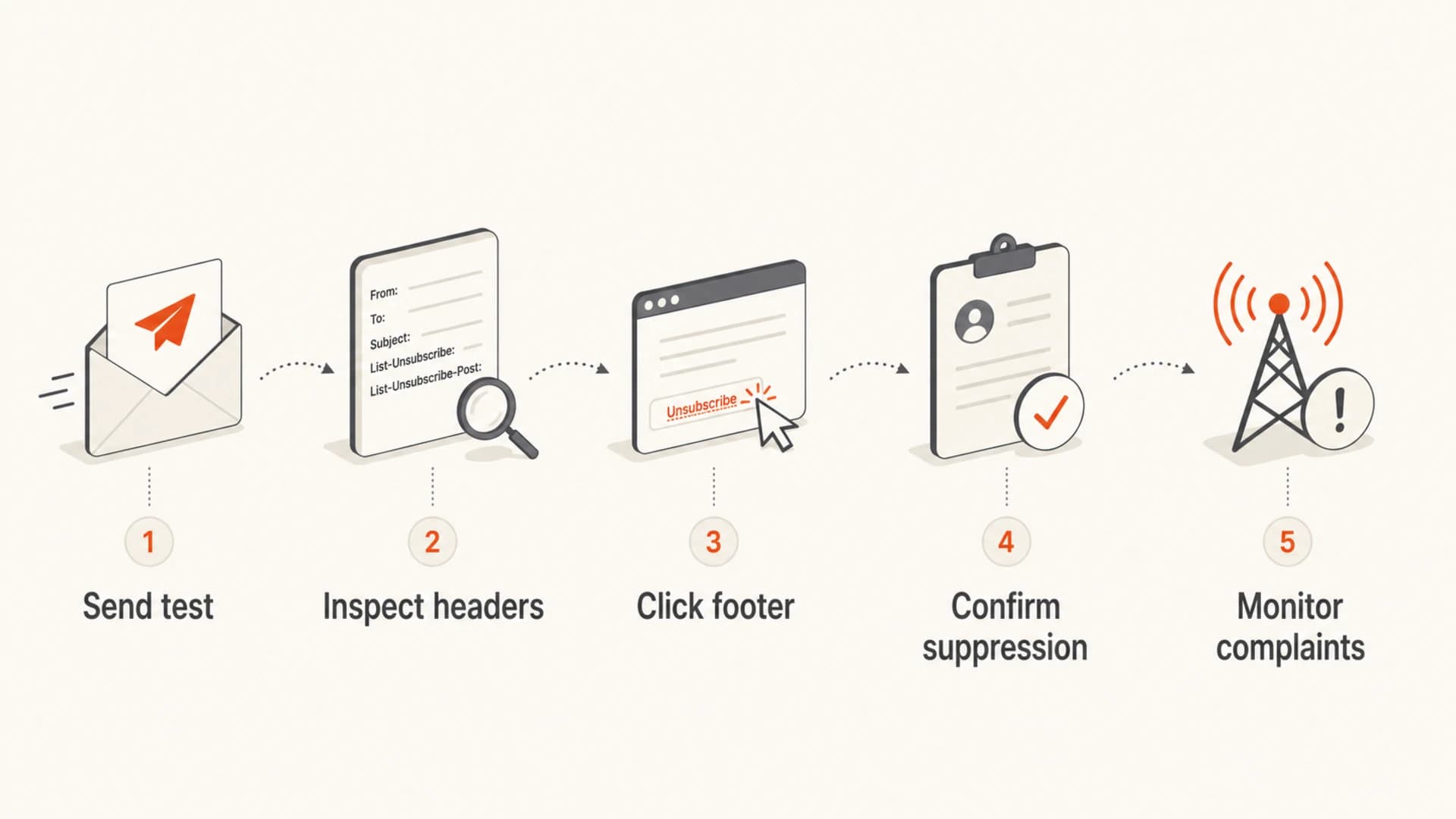
Infographic showing five checks for a compliant unsubscribe setup.
Never use unsubscribe clicks as engagement signals for future targeting. An unsubscribe click is a suppression request or a visit to a suppression path, not a positive intent signal. Logging it as engagement can lead to bad segmentation and compliance mistakes.
Views from the trenches
Best practices
Use a clear confirm button on the first landing page and complete opt-out immediately.
Auto-fill the recipient identity from a signed token to avoid typos and extra effort.
Keep preference choices optional, with a full unsubscribe action always visible first.
Common pitfalls
Treating a required survey or login wall as two-click unsubscribe creates real risk.
Using GET to unsubscribe from a footer link lets security scanners remove subscribers.
Hiding the full opt-out behind topic choices makes withdrawal harder than signup.
Expert tips
Use one-click POST for mailbox header actions and a human confirm page for footers.
Log the source of each unsubscribe so scanner issues and real choices stay separate.
Review complaint changes after launch to catch friction before reputation declines.
Marketer from Email Geeks says 2-click footer unsubscribe reduces false positives when security devices follow links before a user opens the message.
2019-09-27 - Email Geeks
Marketer from Email Geeks says a 2-click flow is acceptable only when it asks for no login, no email entry, and no required questions.
2019-09-27 - Email Geeks
The practical standard
The best answer is not pure 1-click everywhere or 2-click everywhere. Use the right unsubscribe surface for the job. Mailbox headers should support one-click POST so Gmail, Yahoo, and other clients can handle unsubscribe cleanly. The visible footer link can use a confirmation page when false opt-outs are a real issue.
The line I would not cross is adding work after the subscriber has already expressed the desire to leave. A compliant 2-click flow is direct, plain, and fast. It gives the recipient control without damaging list quality through bot-triggered removals. That is the balance worth aiming for.




