What are the best email deliverability tools and monitoring practices?

Updated on 30 Jul 2026: We updated this guide with current bulk-sender requirements, list-health checks, unsubscribe controls, and clearer monitoring workflows.
A reliable email deliverability setup uses a stack, not a single tool. Build it around five concrete signals: delivery logs, DMARC authentication data, blocklist and blacklist status, mailbox-provider reputation data, and inbox placement testing. Suped's product covers the DMARC, SPF, DKIM, hosted authentication, alerting, and blocklist monitoring layer by connecting raw signals to specific fixes.
For broader deliverability work, compare your ESP delivery logs, mailbox-provider dashboards, seed-based inbox placement tests, list-validation checks, and pre-send content tests. Each category answers a different question. Buying a large platform before identifying the failing signal adds cost without shortening diagnosis.
Use production sending data first, then add outside monitoring where it provides faster alerts, useful history, or an independent second signal. A deliverability tool cannot compensate for poor consent, weak segmentation, broken authentication, or high complaints. It can make those problems visible sooner.
The direct answer
The best monitoring practice is to separate deliverability into proof points. Confirm that mail was accepted, authentication passed, recipients and mailbox providers reacted well, and the message appeared where expected. No single report answers all of that cleanly.
- Delivery logs: Export accepted, deferred, bounced, complained, and unsubscribed events by recipient domain, campaign, template, and sending IP.
- Authentication: Track DMARC, SPF, DKIM, alignment, source identity, and policy changes so legitimate mail keeps passing checks.
- Reputation: Watch domain and IP reputation, user-reported spam rates, feedback-loop complaints, deferrals, and blacklist or blocklist events.
- Inbox placement: Use an email tester before important launches, template changes, and sender changes.
- Alerts: Create alerts for sudden authentication failures, unknown senders, blocklist hits, bounces, and complaint spikes.
The buying filter
A good tool should reduce time to diagnosis. A score without the underlying domain, source, record, message, or provider context is weak for operational work.
Tool options by job
Start with the job that needs to be done. These categories belong on a practical shortlist, with the limitation that matters most for each one.
|
|
|
|---|---|---|
 Suped Suped | DMARC, SPF, DKIM, blocklists | Does not replace seed tests or ESP logs |
ESP delivery logs | Accepted, deferred, bounced, complained | Needs normalized exports and analysis |
Mailbox-provider dashboards | Provider reputation and spam signals | Limited to qualifying traffic at each provider |
Inbox placement tests | Seed inbox checks before changes | Directional and point-in-time |
List validation | Malformed and invalid address checks | Cannot prove consent or engagement |
Content and rendering tests | Headers, links, HTML, rendering | Cannot measure live sender reputation |
Shortlist by deliverability job
That list is deliberately mixed. Some categories watch authentication, some infer placement through seed mailboxes, and others show provider or production feedback. A lower-cost option performs just as well only when it measures the signal behind the current problem.
A practical monitoring stack
A mature deliverability setup starts with the domain and sending infrastructure, then adds placement and reputation monitoring. A seed test alone can show where a test message landed without explaining why production mail changed. Choose shared or dedicated IP infrastructure based on stable volume and operational control, and monitor warm-up whenever a new or idle domain or IP begins sending.
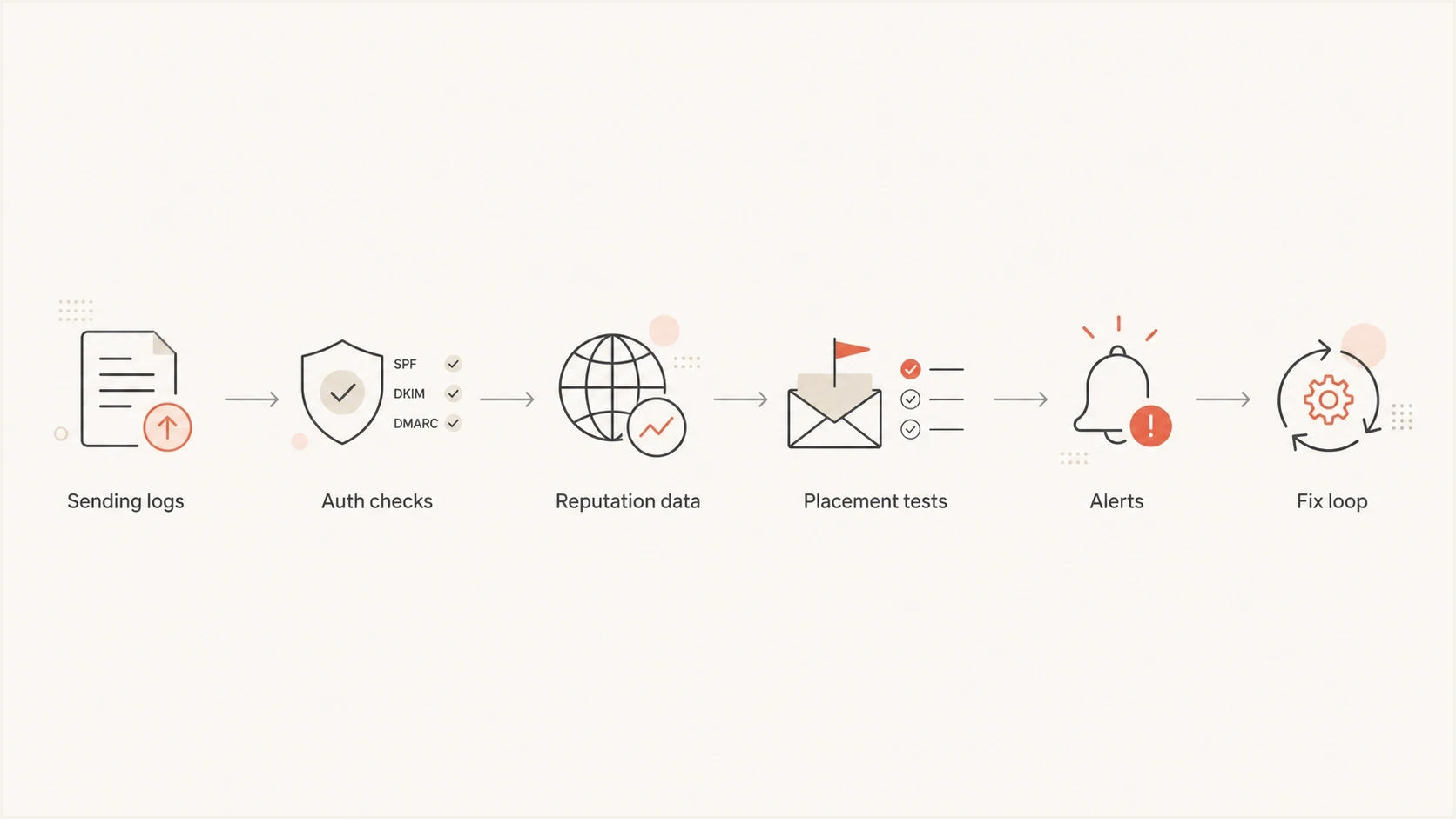
Email deliverability monitoring flow from sending logs and authentication checks to reputation, placement, alerts, and fixes.
Manual monitoring
- Cost: Low cash cost, high analyst time.
- Speed: Slow when domains, IPs, and clients increase.
- Risk: Missed changes if checks depend on memory.
Managed monitoring
- Cost: Monthly spend, lower manual review time.
- Speed: Faster triage with history and alerts.
- Risk: Works best when the team still owns fixes.
The choice is not manual versus paid. The usual approach combines both. Production logs show what happened to real mail. Monitoring tools make the same data easier to compare, alert on, and explain across teams.
What to monitor every week
Weekly monitoring needs enough coverage to catch silent drift. DNS records change, new vendors start sending, seed placement moves, and provider reputation can change before revenue metrics react. Suped's product is useful here because it combines DMARC monitoring, SPF and DKIM checks, and blocklist monitoring in one workflow.
- Authentication pass rate: Watch DMARC-aligned pass rates by source, not just the domain average.
- Unknown senders: Investigate any new source sending with your domain before it becomes normal.
- Provider trends: Compare Gmail, Outlook, Yahoo, and corporate domains separately.
- Blocklist status: Treat blacklist or blocklist hits as triage items, then confirm with bounce and complaint data.
- Placement checks: Run tests before major campaigns, new templates, new IPs, and sending-pattern changes.
Complaint rate thresholds
Use provider complaint data as an early warning signal, then confirm with volume and campaign context.
Healthy
Under 0.1%
Keep monitoring and compare by provider.
Investigate
0.1-0.3%
Review source, list, offer, and template changes.
Act now
Above 0.3%
Pause risky segments and review consent quality.
Thresholds need context. A small spike on low volume has less meaning than a sustained provider-level change on the primary sending stream. Treat thresholds as prompts to investigate, not as final verdicts.
Use your own data first
The most actionable deliverability tool is often the data your mail system already creates. Delivery logs show whether mailbox providers accepted mail, deferred it, rejected it, or generated complaints. That is real production evidence, not a sampled test.
Useful delivery log export fieldstext
message_id,timestamp,recipient_domain,provider,campaign_id
sending_domain,sending_ip,template_id,accepted,deferred,bounced
bounce_class,complaint,unsubscribe,spf_result,dkim_result,dmarc_result
Once those fields are available, practical questions become answerable: did Gmail deferrals start after a template change, did complaints come from one acquisition source, did DMARC failures map to one vendor, or did a sending IP begin bouncing at corporate domains first?
Start with the domain
Before buying a bigger deliverability suite, run a domain health checker review. Fix authentication, DNS, and policy issues before interpreting placement results.
?
What's your domain score?
Deep-scan SPF, DKIM & DMARC records for email deliverability and security issues.
After the domain baseline is clean, outside monitoring becomes more useful. It can then catch movement, compare providers, and shorten the time between detection and fix instead of restating obvious DNS problems.
Monitor consent, list health, and unsubscribe handling
Authentication proves domain control, but recipient behavior still drives reputation. Monitor how addresses enter the list, how quickly permanent failures are suppressed, whether temporary failures cluster by provider, and whether unsubscribe requests complete without delay.
- Consent evidence: Keep the signup source, timestamp, form language, and confirmation status for each address.
- Bounce handling: Suppress hard bounces promptly and investigate repeated soft bounces by recipient domain and bounce class.
- Complaint feedback: Feed provider complaint events into the same suppression and campaign-analysis workflow used for delivery logs.
- Unsubscribe controls: Test one-click unsubscribe headers, visible links, processing time, and preference-center changes.
- Sunset rules: Reduce frequency or stop promotional mail to persistently unengaged recipients before complaints rise.
Current bulk-sender baseline
Domains sending at least 5,000 messages a day to personal Gmail accounts need compliant authentication, low user-reported spam, and one-click unsubscribe for marketing or subscription mail. Keep the spam rate below 0.3%, with under 0.1% as the operational target. Outlook.com also enforces SPF, DKIM, and DMARC for domains above 5,000 messages a day.
List validation can detect malformed or undeliverable addresses, but it cannot prove permission or future engagement. Treat validation as an entry check, then use complaints, unsubscribes, bounces, and sustained engagement to decide who should continue receiving promotional mail.
Where Suped fits
Suped's product covers the authentication and domain reputation control layer. It brings DMARC, SPF, DKIM, hosted DMARC, hosted SPF, SPF flattening, hosted MTA-STS, blocklist monitoring, and alerts into one workflow. Many deliverability problems start with a quiet operational change, such as a new sender, a broken selector, an SPF lookup limit, or a domain on a blacklist.
Suped DMARC dashboard showing email volume, authentication health, and source breakdown
For teams handling daily authentication work, Suped helps find the failing source, explain the issue, stage the policy, alert the right owner, and keep historical evidence. MSPs and agencies also get multi-tenant workflows for client domains instead of manually stitching together separate reports.
- Issue detection: Suped identifies failing sources and gives steps to fix them.
- Policy staging: Hosted DMARC helps move through p=none, quarantine, and reject with less DNS friction.
- SPF control: Hosted SPF and flattening keep records manageable when vendors change.
- TLS policy: Hosted MTA-STS enforces secure delivery with two CNAME records and no web hosting.
- Team alerts: Real-time alerts turn silent authentication and reputation changes into tickets the team can act on.
When inbox placement testing helps
Inbox placement testing is useful as a second signal. Run it before a launch, after a template or sending-domain change, or when production metrics show a provider-specific decline. For a deeper comparison of seed testing methods, use the guide to inbox placement tools.
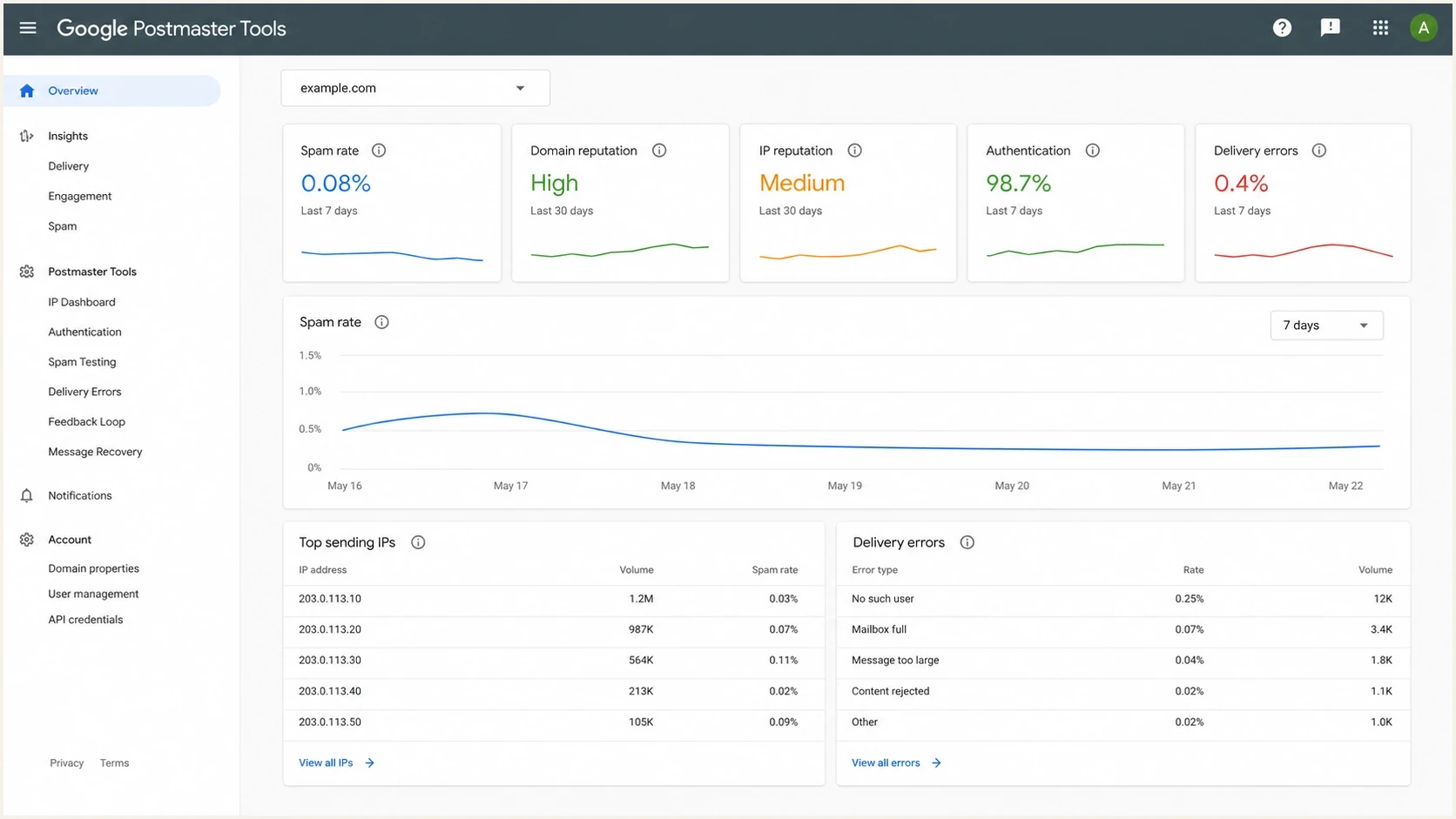
Mailbox-provider reputation dashboard with spam rate, authentication, and delivery-error metrics.
Mailbox-provider dashboards matter because they show each provider's view of your mail. Compare provider reputation, spam-rate, complaint, authentication, and delivery-error data with production logs. A provider dashboard covers only the traffic that provider can observe, so it should not be treated as a complete cross-provider result.
Placement tests help when
- Launch checks: A new campaign, domain, IP, or template needs a final check.
- Provider split: Gmail, Outlook, and B2B domains behave differently.
- Content test: A template change needs outside confirmation.
Placement tests mislead when
- Low volume: A tiny seed sample gets treated as a full audience.
- Bad basics: Authentication, consent, or complaint issues are already obvious.
- No history: One test is used without trends or production evidence.
Monitoring practices that matter
Tools only help when the operating rhythm is clear. Use the same weekly review pattern: check authentication first, review complaints and bounces by provider, scan blacklist and blocklist movement, compare placement tests against production data, then document the fix.
Starter DMARC recordtext
v=DMARC1; p=none; rua=mailto:dmarc-reports@example.com; fo=1
- Baseline first: Record normal bounce, complaint, placement, and authentication levels before making changes.
- Segment reviews: Review by provider, source, list, campaign, template, and sending domain.
- Two signals: Confirm important decisions with at least two data points, such as logs plus reputation or placement.
- Change log: Track DNS, vendor, template, list, and volume changes so diagnosis has a timeline.
- Warm-up plan: Increase volume gradually on new or idle domains and IPs while watching deferrals, complaints, and provider reputation.
- Alert routing: Send DNS issues to the infrastructure owner and complaint spikes to the lifecycle owner.
- Client scale: Agencies and MSPs need multi-domain views, client reporting, and consistent alert thresholds.
Low-cost and high-cost tools both fail when they substitute for process. The strongest tool choice fits the team's daily review cycle and produces actions the owner can complete.
Views from the trenches
Best practices
Pair DMARC, complaint, bounce, and placement data before calling a problem confirmed.
Review provider-level trends weekly, then investigate sudden shifts by domain or segment.
Keep alert thresholds tight enough to catch reputation drops before campaigns scale.
Common pitfalls
Buying seed testing first leaves authentication, consent, and log quality problems hidden.
Treating open rate alone as inbox placement breaks down after privacy proxy reporting.
Waiting for a blacklist event before monitoring domain and IP reputation adds delay.
Expert tips
Export logs with provider, campaign, bounce class, complaint, and authentication result.
Use seed tests as a second signal, especially before launches and template changes.
Track SPF, DKIM, and DMARC drift because DNS changes often happen outside marketing.
Marketer from Email Geeks says the best tool choice depends on whether the team needs certification, monitoring, or ESP-native reporting.
2023-09-22 - Email Geeks
Expert from Email Geeks says delivery logs are often the most actionable free source because they show what happened to real mail.
2021-12-01 - Email Geeks
The practical choice
The best email deliverability tools match the job. Use delivery logs for production truth, mailbox-provider dashboards for provider-specific reputation, seed tests for placement checks, list controls for recipient quality, and Suped for the authentication and reputation monitoring layer that needs to stay correct every day.
Prioritize DMARC, SPF, DKIM, consent evidence, and domain health first. Add blocklist and blacklist alerts next, then layer inbox placement testing around launches and major changes. That order catches foundational failures before sampled placement results add noise.




