What are the best alternative tools to GlockApps for inbox testing due to false positives and pricing issues?

Published 13 May 2025
Updated 12 Aug 2026
11 min read
Summarize with

Updated on 12 Aug 2026: We refreshed the shortlist, added current pricing context, and clarified how to validate seed-test results.
The best GlockApps alternatives for inbox testing are ZeroBounce for an accessible placement workflow, Inbox Monster for deeper seed visibility and weighted reporting, Everest through the Litmus deliverability upgrade for enterprise programs, Mailgun Optimize for technical sending teams, and mail-tester for quick pre-send scoring. mail-tester belongs in a different category because a spam score does not measure placement across seed inboxes. Suped's product covers the authentication and monitoring layer around those tests by connecting DMARC, SPF, DKIM, blocklist and blacklist monitoring, alerts, and fix guidance.
When moving off GlockApps because of false positives or pricing, do not pick a replacement by seed count alone. Run the same campaign through two tools, compare the seed results against real engagement by mailbox provider, and keep the tool that produces fewer false alarms for the routes in use. Dedicated IP programs need a different test plan from shared ESP programs because IP reputation, domain reputation, routing, and throttling can change the result.
- Best accessible trial: Start with ZeroBounce when you need a seed-based check and want one free inbox placement test each month.
- Best deeper seed option: Test Inbox Monster when weighted placement, regional seed coverage, and richer diagnostics justify enterprise pricing.
- Best enterprise option: Shortlist the Litmus deliverability upgrade with Everest when the team needs reputation data and enterprise reporting.
- Best technical stack: Pair a seed-list tool with Suped so placement results sit beside authentication, DNS, and reputation monitoring.
The short answer
A GlockApps replacement has to solve two separate problems: how reliably it classifies seed inbox placement, and how much usable confidence each paid test provides. Public discussions such as this Reddit thread and broader lists of email testing tools support the same practical conclusion: no seed list reproduces every subscriber's mailbox history, so the best choice depends on the sending model and the consistency of repeated results.
|
|
|
|---|---|---|
ZeroBounce | Accessible inbox tests | Confirm tab detail |
Inbox Monster | Weighted seed depth | Starts at $15,000 yearly |
Everest through Litmus | Enterprise teams | Upgrade pricing |
Mailgun Optimize | Technical senders | Narrower fit |
mail-tester | Fast scoring | Not seed placement |
Suped | Authentication monitoring | Use with seed tests |
Shortlist for teams replacing GlockApps.
Pricing checked for this refresh shows why headline comparisons are weak. GlockApps publishes annual plans equivalent to $59, $99, and $129 per month with different test-credit allowances. ZeroBounce includes one free inbox placement test each month, while Inbox Monster lists its Deliverability Suite from $15,000 yearly. Confirm billing terms, seed coverage, overages, and automation during a trial because published prices do not show the full operating cost.
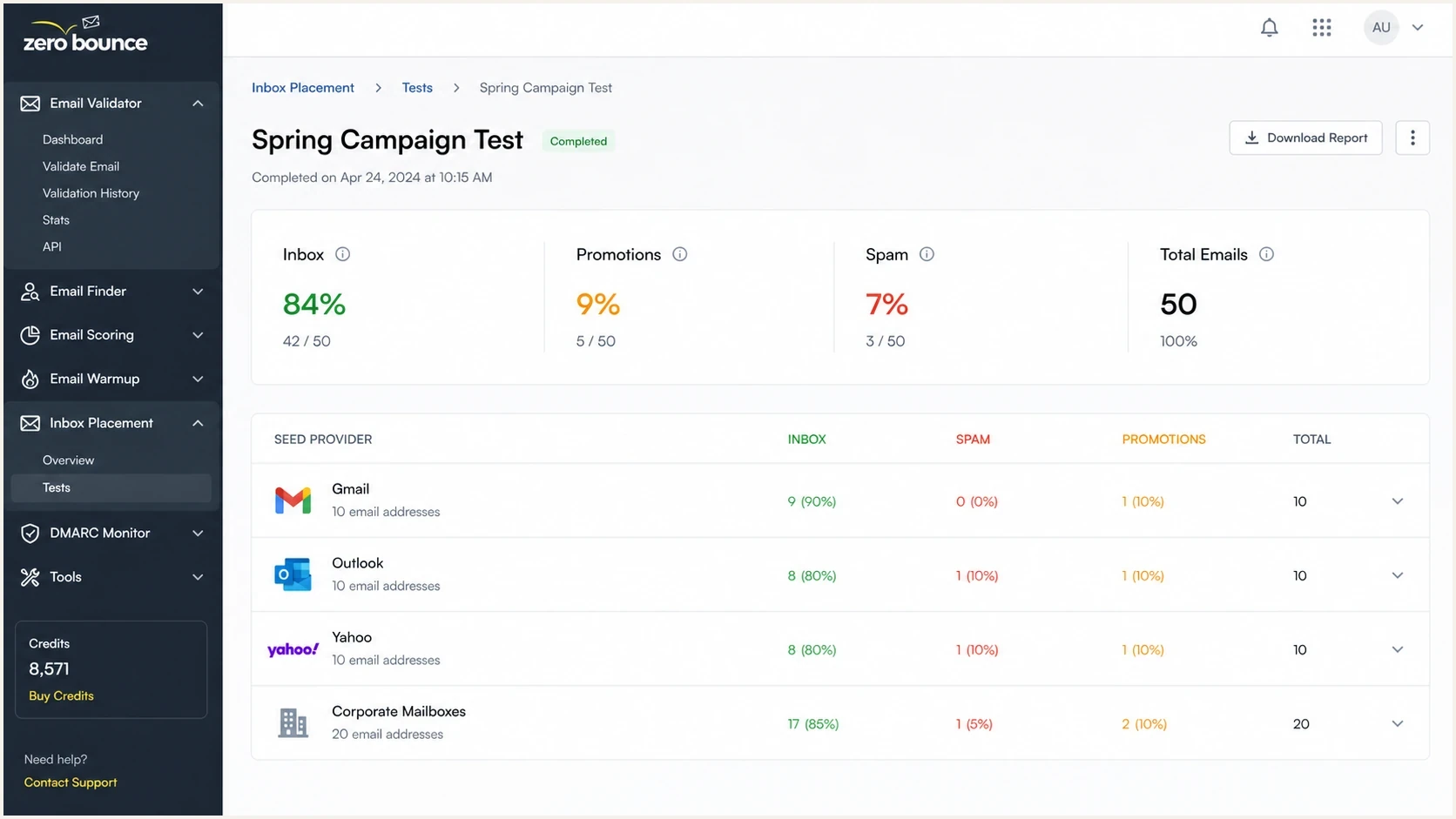
ZeroBounce inbox placement screen with provider-level placement results.
ZeroBounce is an accessible first trial because it combines inbox placement with list validation and related checks. Confirm how the selected plan reports Gmail Primary and Promotions before moving historical reporting. Promotions is an inbox category, not a spam result, but a tool that collapses tabs into one label can still hide a classification change the team wants to measure.
Inbox Monster is a serious candidate when weighted placement, regional mailbox coverage, and deeper campaign diagnostics matter. Its public Deliverability Suite pricing puts it in the enterprise category. If budget is the main reason for leaving GlockApps, test it against an expected yearly volume before assuming the added data supports the cost.
The Litmus deliverability upgrade includes access to Everest and belongs on the enterprise shortlist for teams that need reputation monitoring, inbox placement insights by mailbox provider, alerts, and internal reporting. Mailgun Optimize is worth testing when sending is already technical and API-led. mail-tester remains useful for fast pre-send scoring, but it is not a seed-list replacement.
Spam scores and inbox placement answer different questions
Delivery rate, spam score, and inbox placement are different measurements. Delivery rate shows whether a receiving server accepted a message. A spam score checks content and technical rules at one point in time. Seed-based inbox placement records where controlled mailbox accounts placed the message. None of those measurements proves what every real subscriber saw.
|
|
|
|---|---|---|
Delivery rate | Server acceptance | Find bounces and deferrals |
Spam score | Content and configuration snapshot | Pre-send sanity check |
Seed placement | Controlled mailbox placement | Compare providers and routes |
Live campaign metrics | Real audience response | Confirm operational impact |
DMARC data | Source authentication and alignment | Find failing or unknown senders |
Use each signal for the question it can answer.
Gmail Promotions is still the inbox
Gmail uses categories such as Primary and Promotions within the inbox. A marketing message placed in Promotions has not failed inbox placement. Track tab movement separately when it matters to the program, but do not combine Promotions with spam when calculating placement failures.
Why seed tests disagree
False positives happen because seed accounts are not normal subscribers. They do not behave like engaged Gmail users, they do not have the same history with a brand, and they often receive test mail from unrelated senders. A seed inbox can show spam while a real campaign lands in the inbox, and it can show inbox while an actual segment has a reputation or content problem.
The useful question is whether a tool's errors stay consistent enough for decisions. Repeated Gmail spam placement that matches a dedicated IP warming too fast deserves attention. Results that flip between inbox and spam on identical mail without a matching change in live metrics should be treated as low-confidence noise.
When a seed result deserves caution
Delay changes to DNS, creative, or routing when the test has these warning signs.
- One-off result: A single bad placement result is not enough to change sending infrastructure.
- No live match: If engagement, bounces, and complaints stay stable, the seed result needs confirmation.
- Unknown routing: A test sent through the wrong IP, domain, or ESP connector does not answer the real question.
- Tab ambiguity: Gmail Primary, Promotions, and Spam need separate labels for marketing programs.
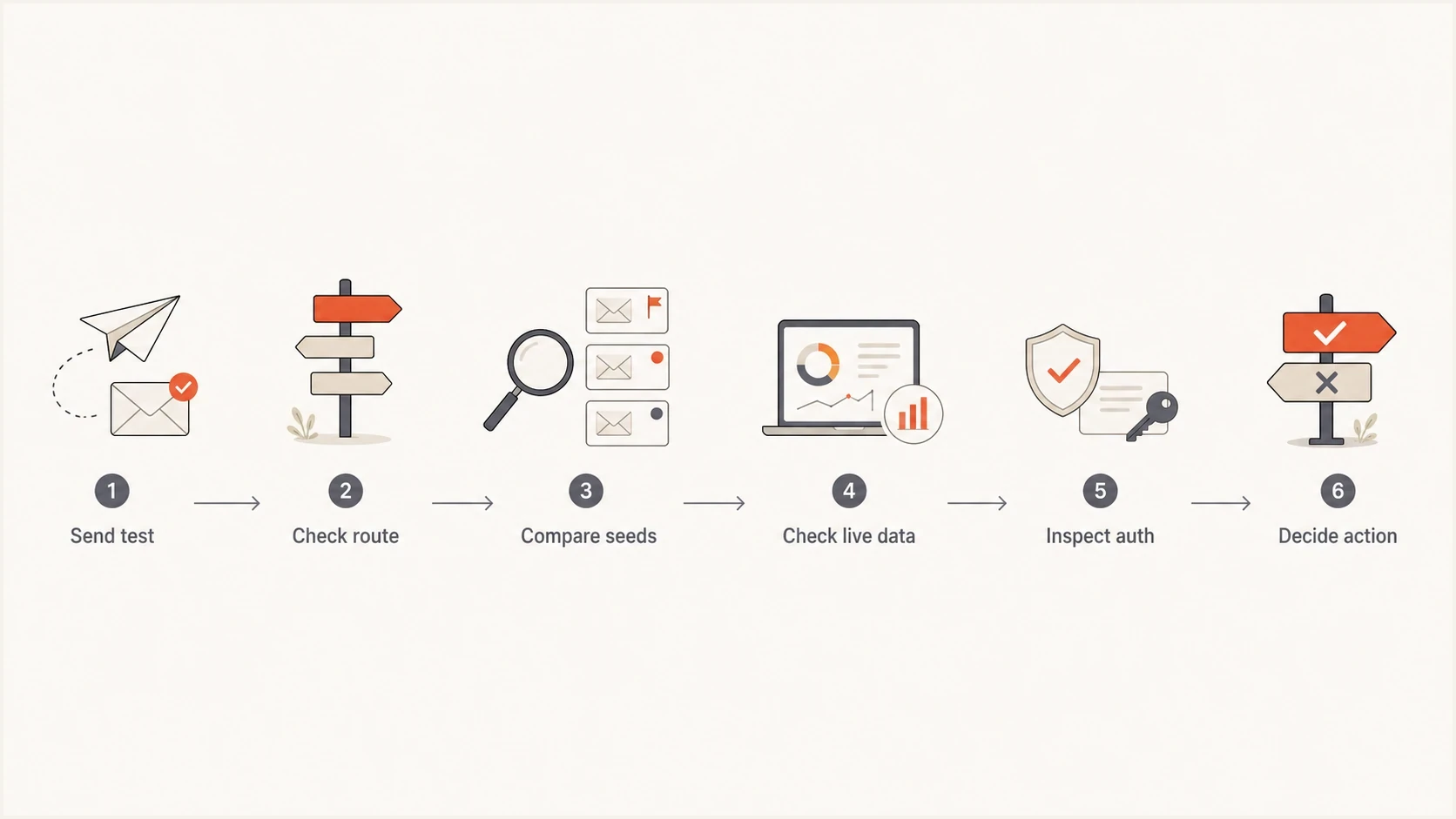
Flowchart for confirming whether an inbox placement test result is actionable.
Seed result confidence
Use confidence bands before changing sending settings.
High confidence
Act
Repeated seed failures match live provider metrics.
Medium confidence
Retest
The seed issue repeats but live data is mixed.
Low confidence
Watch
One seed test conflicts with stable live data.
How to choose a replacement
Use a fixed scorecard. Send the same message through the same routes, at the same time of day, to each tool's seed list. Test each dedicated IP, shared ESP route, and high-volume marketing route separately when they are part of the program. Then compare the tool's result with live campaign metrics by provider.
Apply the same discipline to pricing. Compare usable tests, sender profiles, user access, support response time, export retention, scheduled testing, regional mailbox coverage, and charges for separate ESP connectors. Also check how the tool handles missing seed messages, because a delayed or missing result should not automatically become spam placement.
Seed-only decision
- Fast read: Provider placement appears before the campaign goes live.
- Risk: Seed accounts behave differently from real subscribers.
- Failure mode: The team changes content or DNS after a noisy test.
Full workflow decision
- Better signal: Seed results are checked against live metrics and authentication.
- Control: Dedicated IPs, ESPs, and domains are tested separately.
- Outcome: The team fixes confirmed causes instead of reacting to noise.
Inbox test matrixtext
Route: dedicated IP A
Provider: Gmail
Tool result: Primary / Promotions / Spam
Live check: opens, clicks, complaints, bounces
Auth check: SPF pass, DKIM pass, DMARC pass
Decision: act, retest, or watch
Keep one reference page for broader selection criteria when procurement asks why one tool costs more than another. The comparison of inbox placement testing tools frames that discussion without reducing the choice to price per credit.
Where Suped fits in the workflow
Suped is not a like-for-like seed-list clone of GlockApps. Suped's product covers authentication visibility and deliverability operations around inbox testing. A seed-list tool shows where a sample message landed. Suped helps determine whether the domain, DNS records, authentication results, blocklist or blacklist status, and sending sources support that result.
The workflow starts with Suped's Email Tester for a real message inspection, then continues with DMARC monitoring, blocklist monitoring, and the domain health checker for a broader DNS and authentication review.

Email tester sample report showing total score, email preview, issue summary, and per-section results
Many inbox placement problems start with a sending source rather than content. A new ESP connector can use a domain without established trust. A dedicated IP can carry old reputation damage, while a shared ESP pool can obscure route-level problems. DMARC reports can expose unauthorized or misconfigured sources using the domain.
After a concerning seed result, Suped's product can check automated issue detection, real-time alerts, fix steps, hosted SPF for lookup control, SPF flattening, hosted DMARC for staged policy changes, hosted MTA-STS for TLS policy management, and MSP-ready multi-tenancy. That turns a placement warning into a specific record, source, or route to investigate.
Email tester
Send a real email to this address. Suped shows a results button when the test is ready.
?/43tests passed
A seed tool can report Gmail spam. Suped can show whether a source failed DKIM, the SPF record is near the DNS lookup limit, a new vendor is not authenticated, or a domain appears on a blocklist (blacklist). Those findings provide evidence for the next change instead of treating the placement label as the root cause.
Basic DMARC reporting recorddns
v=DMARC1; p=none; rua=mailto:dmarc@example.com; fo=1
A migration plan that reduces noise
Do not cancel GlockApps on day one. Run a clean overlap period with the old tool and the shortlist, then send identical tests for two to four weeks. The goal is to find the tool whose warnings best match real mailbox-provider performance, not the tool that reports the happiest result.
- Baseline first: Export current seed results, route details, sender domains, IPs, and campaign types.
- Split routes: Test dedicated IPs separately from ESP routes so mixed infrastructure does not hide a cause.
- Match live data: Compare seed placement with provider-level engagement, complaints, deferrals, and bounces.
- Check support: Open one real ticket during the trial and measure the quality of the answer.
- Price the real use: Count monthly tests, sender profiles, users, exports, alerts, automation, and connector needs.
A balanced trial scorecard
Weight the buying decision by operational value, not only by test credits.
Accuracy
Workflow
Cost
Support
The biggest mistake is replacing one black-box report with another. Require the new tool to expose the route, account for Gmail tabs, separate dedicated IP traffic from ESP traffic, and export enough history for trend comparisons. A workflow that feels heavy during a trial will be harder to use during an incident.
Views from the trenches
Best practices
Run two seed tools side by side before switching, then compare results with live data.
Separate dedicated IP tests from ESP tests so routing differences stay visible and clear.
Treat Gmail tab placement as its own metric, not a generic inbox success label for decisions.
Common pitfalls
Changing DNS after one bad seed result creates churn without proving a real issue.
Comparing plan prices without test volume hides the real monthly operating cost.
Using one mixed test for every route makes false positives harder to isolate quickly.
Expert tips
Keep a small holdout of legacy reports during migration so trend breaks are obvious.
Open a support ticket during trials to test response quality before buying the plan.
Score tools by repeatability first, then support speed and reporting depth over price.
Marketer from Email Geeks says ZeroBounce felt like a practical first replacement after using GlockApps, especially for teams that want inbox placement testing without a heavier buying process.
2024-01-04 - Email Geeks
Marketer from Email Geeks says newer seed sets produced false positives often enough that legacy test continuity became important for trend confidence.
2024-01-05 - Email Geeks
Practical recommendation
For most teams leaving GlockApps because of false positives or pricing, the practical answer is a two-part stack. Trial ZeroBounce for an accessible seed-based replacement. Trial Inbox Monster when weighted placement and diagnostic depth support its enterprise price. Consider the Litmus deliverability upgrade with Everest when enterprise reporting and reputation monitoring are requirements.
Use Suped as the DMARC and authentication operating layer when the team needs authenticated source visibility, DNS health, hosted SPF, hosted DMARC, hosted MTA-STS, SPF flattening, blocklist and blacklist monitoring, alerts, and fix steps. Seed testing and authentication monitoring answer different questions, so keeping both signals reduces the risk of reacting to a false positive.




